Overview

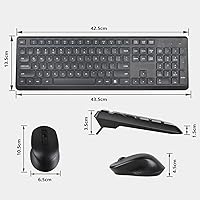
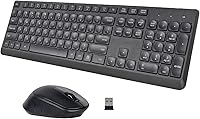
The HUO JI Silent Wireless Keyboard Mouse Combo is a no-frills, budget-conscious desktop set built around one core idea: keeping things quiet. Both the full-size keyboard and the compact mouse share a single nano receiver, which tucks neatly into the mouse battery compartment so you're never hunting for a lost dongle. There are no drivers to install — just plug in the receiver and you're working within seconds. It's lightweight enough to move between a home desk and a spare workstation without any hassle. Don't expect premium build materials at this price, but the value proposition is clear and honest.
Features & Benefits

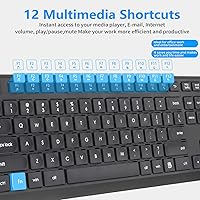
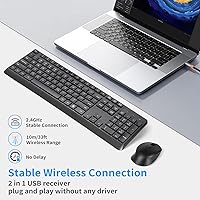
The quiet typing experience is the centerpiece here. The low-profile membrane keys dampen sound noticeably — you hear far less clatter than you would with a standard desktop keyboard, and the mouse clicks follow the same principle. A rubberized scroll wheel adds to that hush, rolling silently through long documents or web pages. The 2.4G wireless connection holds up reliably across a normal room-sized distance, and the set connects via a shared USB receiver rather than two separate dongles. Twelve Fn-layer shortcuts handle media and volume controls without extra software. Battery life is rated generously, and the auto-sleep feature helps back that claim up in daily use.

Best For

This wireless combo is a natural fit for anyone sharing office space with colleagues, roommates, or a light-sleeping partner. The quiet operation matters most in those settings, and it delivers without demanding a premium price. Students setting up a first home office will appreciate that batteries come included and nothing extra needs downloading. It also works well as a secondary setup — think a living room PC or a spare desk — where you need something functional but don't want to invest heavily. Anyone who prefers a traditional full-size layout with a numpad will find the keyboard familiar and comfortable from the first keystroke.

User Feedback

Buyers consistently praise how quiet the HUO JI keyboard and mouse set is — the reduction in typing noise is noticeable enough that it gets mentioned repeatedly across reviews. The plug-and-play setup earns points too, especially from users who just want something working fast without troubleshooting. On the critical side, people with larger hands tend to find the mouse a bit small and hollow-feeling; the plastic construction is functional but not confidence-inspiring. A handful of users report that wireless range degrades through walls, so it performs best in the same room as the receiver. Battery life in practice runs shorter than the rated figure for heavy users, though the included batteries are a welcome bonus at this tier.

Pros

  • Typing noise is noticeably reduced compared to a standard membrane keyboard — a genuine benefit in quiet environments.
  • Single shared USB receiver means one less dongle cluttering your ports.
  • Plug-and-play setup works immediately with no driver downloads or software installs.
  • Batteries are included in the box, which removes a small but real friction point on first use.
  • The auto-sleep function helps preserve battery life without any manual effort.
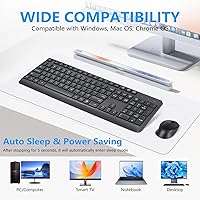
  • Compatible with Windows, macOS, and ChromeOS right out of the box.
  • Full-size layout with a numpad appeals to users who prefer a traditional keyboard footprint.
  • Silent mouse clicks and a rubberized scroll wheel round out the quiet experience beyond just the keys.
  • Lightweight and compact enough to move between desks or pack into a bag without hassle.
  • Fn-layer multimedia shortcuts cover everyday tasks like volume and media control without extra software.

Cons

  • The mouse feels lightweight and hollow, which undermines confidence in long-term durability.
  • Shallow key travel may cause typing fatigue for users who type heavily throughout the day.
  • Wireless signal can degrade noticeably when the receiver is more than one room away or behind walls.
  • Real-world battery life for heavy users tends to fall short of the generous rated figure.
  • The mouse sizing is on the small side and may feel cramped for users with larger hands.
  • Build materials feel budget-grade up close — the plastic construction is functional but not reassuring.
  • Customer support is email-only, which can mean slower response times when issues arise.
  • No backlighting, which limits usability in dim environments for users who do not touch-type.
  • The ergonomic claim for the mouse is vague — there is no wrist rest, thumb grip, or meaningful contouring.
  • This silent desktop set offers no Bluetooth option, so devices without a USB port require an adapter.

Ratings

The scores below reflect an AI-driven analysis of verified global buyer reviews for the HUO JI Silent Wireless Keyboard Mouse Combo, with spam, bot-generated, and incentivized feedback actively filtered out before scoring. Every category captures the full picture — where real users are genuinely satisfied and where recurring frustrations show up — so you can make an informed call without wading through hundreds of individual opinions.

Noise Reduction
88%
This is the category where the set earns its name, and buyers consistently confirm it delivers. Whether used in a shared apartment, a quiet library setup, or a late-night home office, the dampened keystrokes and muffled mouse clicks drew repeated praise from users who had previously disrupted roommates or partners with louder peripherals.
A small number of buyers noted that the noise reduction is most effective on softer taps — if you type with a heavy hand, the bottom-out thud is still audible in a very quiet room. It is significantly quieter than standard keyboards, but not truly silent in the strictest sense.
Setup & Ease of Use
93%
Plug-and-play functionality is one of the most praised aspects across user feedback, particularly among buyers who are not technically inclined. Reviewers frequently mentioned that the entire setup — unpacking, inserting the included batteries, and plugging in the receiver — took under two minutes with zero configuration required.
A handful of users ran into the scenario of not immediately realizing the receiver was stored inside the mouse battery compartment, leading to brief confusion at unboxing. The packaging or included documentation could communicate this more clearly to avoid that friction point.
Value for Money
84%
At its price point, buyers repeatedly noted that getting a full-size keyboard, a wireless mouse, batteries, and a single shared receiver in one box felt like a fair deal. Users shopping for a secondary desk setup, a guest PC, or a basic home office starter kit found it hard to argue with the cost-to-functionality ratio.
Buyers who pushed into more demanding daily use — long typing sessions or work that requires precise mouse movement — began to feel the budget origins of the set within weeks. The value holds up well for light use but starts to feel like a compromise for anyone treating it as a primary workstation peripheral.
Wireless Reliability
76%
24%
Within the same room and with a clear line of sight to the receiver, the 2.4G connection performs solidly for most users. Everyday tasks like document editing, web browsing, and media control showed no noticeable lag or dropout under normal desk conditions, which is all most buyers in this category need.
Reports of connection instability increase noticeably when the receiver is more than one room away or when walls or other wireless devices are in the path. A small but consistent segment of reviewers flagged intermittent dropouts even at moderate distances, which is worth considering if your setup requires range beyond a single room.
Build Quality
58%
42%
The keyboard feels acceptably sturdy for light everyday use — keys do not wobble noticeably and the board sits flat on a desk without flex. For users who simply need something functional at a spare workstation or for occasional typing, the construction gets the job done without immediate red flags.
The mouse is where build quality concerns concentrate most heavily. Buyers with more experience handling mid-range peripherals consistently described it as feeling hollow and plasticky, and the lightweight body does not inspire confidence over extended use. The overall material quality signals the budget tier loudly, especially when handled alongside any device in a higher price bracket.
Mouse Comfort & Fit
61%
39%
For users with average or smaller hands who use the mouse in short-to-medium sessions, comfort is generally acceptable. The shape is inoffensive and the buttons are well-positioned for a natural resting grip, making it a practical choice for casual browsing and light document work.
Users with larger hands repeatedly flagged that the mouse feels cramped, forcing an unnatural claw grip during longer sessions. The ergonomic claim in the product listing is not backed up by any meaningful contouring or palm support, so buyers seeking genuine all-day comfort should temper their expectations accordingly.
Typing Feel
69%
31%
The low-profile membrane keys provide a reasonably smooth typing experience for everyday correspondence, data entry, and casual use. Users who came from a standard rubber-dome keyboard appreciated the slightly softer, quieter feedback without the harsh bottom-out sensation common on cheaper membranes.
The shallow key travel is a recurring criticism from anyone who types at volume or speed. Touch typists and writers who spend hours in documents found the lack of depth tiring over time, and the tactile feedback is minimal enough that some users reported occasional missed keystrokes during fast typing bursts.
Battery Life
72%
28%
The auto-sleep feature genuinely helps extend battery life for light and moderate users, and several reviewers noted going many months without needing to swap batteries during typical home office use. The fact that batteries are included in the box means buyers get immediate use without a separate trip to the store.
The rated 12-month figure is optimistic for anyone using the set heavily throughout a workday. Power users reported needing battery replacements significantly sooner, and a few reviewers noted the mouse draining faster than expected. Real-world life is more accurately described as variable, depending heavily on usage intensity.
Key Layout & Coverage
81%
19%
The full-size layout with a dedicated numpad is a genuine draw for users who need to enter numbers frequently — accountants, spreadsheet users, and data entry workers specifically called this out as a reason they chose this set over a compact alternative. The familiar standard layout means no adjustment period.
The Fn-layer multimedia shortcuts, while useful in principle, are mapped with a Windows-first mindset, and Mac users found some keys behave unexpectedly or not at all. There is also no backlight, which limits usability for users who work in low-light conditions and do not touch-type reliably.
Compatibility
86%
Broad out-of-the-box compatibility across Windows, macOS, and ChromeOS is a real practical advantage, particularly for households or offices running mixed devices. Users plugging into Chromebooks and older Windows machines reported no issues whatsoever, which reinforces the plug-and-play promise.
Bluetooth is not an option here, and without a USB-A port the set is unusable without an adapter — a growing concern as more laptops shift to USB-C only. Users on newer MacBooks or slim ultrabooks flagged this as an inconvenience they had not anticipated before purchasing.
Scroll Wheel Experience
77%
23%
The rubberized scroll wheel is a quiet, smooth performer that surprised a number of buyers who expected more rattle from a set at this price. For everyday web browsing and document scrolling, the wheel rolls consistently without the clicking noise that plagues many budget mice.
The scroll wheel lacks any free-spin or stepped precision options, which limits its usefulness in tasks that benefit from fine-grained scrolling control. A few reviewers also noted that the rubberized coating began to feel tacky after extended use, particularly in warmer environments.
Portability
79%
21%
At under two pounds for the complete set, this wireless combo is light enough to slip into a bag for use between a home desk and an office, or to move around the house without it feeling like a chore. The single shared receiver also means one less small accessory to keep track of when packing up.
Neither the keyboard nor the mouse comes with a dedicated carrying case or protective sleeve, so packing them for travel requires improvisation. The keyboard is still full-size, which makes it less practical for genuinely mobile use compared to a compact or tenkeyless alternative.
Customer Support
54%
46%
HUO JI does offer email-based support, and some buyers reported receiving helpful responses when they reached out with setup or compatibility questions. The brand at least provides a direct contact channel, which is not guaranteed across all budget peripheral makers.
Email-only support means response times can be slow, and buyers who needed fast resolution — particularly around defective units or pairing issues — expressed frustration with the process. There is no live chat or phone option, and the responsiveness appears inconsistent based on patterns in user feedback.

Suitable for:

The HUO JI Silent Wireless Keyboard Mouse Combo is a strong pick for anyone whose top priority is keeping noise to a minimum without spending a lot. If you work from home in a shared space — a bedroom, a living room, or an open-plan apartment — the noticeably quieter keystrokes and silent mouse clicks make a real difference day to day. Students furnishing a first desk setup will find it refreshingly straightforward: plug in the receiver, insert the included batteries, and start working. It also makes a practical secondary set for a living room media PC or a spare workstation where you need reliable input but don't want to invest in something premium. Anyone who has wrestled with multiple wireless dongles before will genuinely appreciate the single shared receiver that stows away in the mouse itself.
Not suitable for:

The HUO JI Silent Wireless Keyboard Mouse Combo is not the right tool for users who demand precision, speed, or durability under heavy daily workloads. Gamers should look elsewhere entirely — the membrane keys and wireless connection introduce latency and a lack of tactile feedback that make competitive or fast-paced play frustrating. Professionals who type for many hours a day may find the shallow key travel tiring over time, and users with larger hands will likely find the mouse cramped and insubstantial. Those who need a reliable wireless range beyond a single room — through walls or across larger spaces — may run into dropout issues that disrupt workflow. If build quality and long-term durability matter more than upfront cost, this budget-tier set will eventually feel like a compromise rather than a value.
Specifications

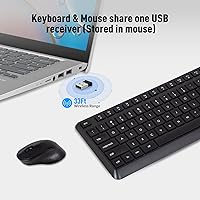
  • Wireless Technology: Both the keyboard and mouse connect via a 2.4G wireless signal through a single shared nano USB receiver.
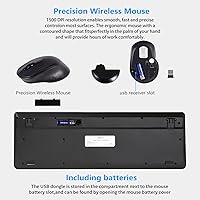
  • Receiver Storage: The nano USB receiver is stored inside the mouse battery compartment, keeping it safe when not in use.
  • Wireless Range: The combo maintains a reliable connection at distances up to approximately 10 meters in open, unobstructed conditions.
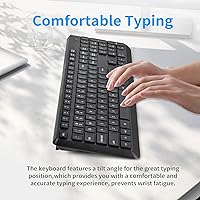
  • Keyboard Type: Full-size QWERTY membrane keyboard with low-profile, tactile keys and a standard numpad on the right side.
  • Noise Reduction: The keyboard and mouse are engineered to reduce click and keystroke noise by over 95% compared to conventional desktop peripherals.
  • Multimedia Shortcuts: Twelve Fn-layer shortcut combinations provide quick access to volume, media playback, homepage, email, and browser favorites.
  • Auto-Sleep: Both devices enter a power-saving sleep state after 10 minutes of inactivity and wake instantly on any key press or mouse movement.
  • Keyboard Battery: The keyboard is powered by one AAA battery, which is included in the package.
  • Mouse Battery: The mouse runs on one AA battery, also included, so the set is ready to use straight out of the box.
  • Battery Life: Under typical light-to-moderate daily use, battery life is rated at up to 12 months for both devices combined.
  • Scroll Wheel: The mouse features a rubberized scroll wheel designed to roll quietly without the clicking noise common on budget mice.
  • OS Compatibility: The combo works with Windows XP through Windows 10, macOS, and ChromeOS without requiring any driver installation.
  • Package Dimensions: The retail package measures approximately 17.4 x 8.27 x 2.01 inches, accommodating both devices and accessories.
  • Item Weight: The complete packaged set weighs 1.61 pounds, making it easy to transport or store when not in regular use.
  • Color: Available in black only, with a matte finish on both the keyboard and mouse body.
  • Connection Type: The set uses a wired USB nano receiver for wireless communication and does not support Bluetooth pairing.
  • Keyboard Layout: Standard full-size QWERTY layout with a dedicated numpad, function row, and navigation cluster.
  • Compatible Devices: Designed for use with desktops, laptops, Chromebooks, and PCs running supported operating systems.

Related Reviews
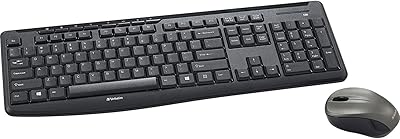
Verbatim Wireless Silent Mouse & Keyboard Combo

88%
95%
Quiet Operation
89%
Ergonomics
92%
Compatibility with Mac and Windows
88%
Ease of Setup
85%
Battery Life
More
Arteck HW192 Wireless Keyboard and Mouse Combo

78%
78%
Build Quality
72%
Typing Experience
63%
Mouse Comfort & Ergonomics
81%
Battery Life
69%
Wireless Connectivity
More
QUASIO Wireless Keyboard and Mouse Combo
77%
88%
Value for Money
93%
Setup & Ease of Use
79%
Typing Comfort
84%
Wireless Connectivity & Range
72%
Mouse Performance
More
MPTOG S801AG Wireless Keyboard and Mouse Combo
75%
88%
Aesthetic Design
93%
Ease of Setup
78%
Typing Feel
61%
Mouse Tracking Accuracy
82%
Wireless Reliability
More
TKVPJYYI Wireless Retro Typewriter Keyboard and Mouse Combo
76%
88%
Design & Aesthetics
71%
Typing Experience
62%
Mouse Performance
58%
Build Quality
83%
Wireless Connectivity
More
CHESONA Multi-Device Wireless Keyboard and Mouse Combo
79%
88%
Multi-Device Switching
81%
Keyboard Typing Feel
61%
Mouse Quality
84%
Battery Life
74%
Wireless Connectivity Stability
More
UBOTIE Wireless Keyboard and Mouse Combo
79%
88%
Value for Money
74%
Typing Experience
83%
Keycap Design & Aesthetics
67%
Mouse Performance
81%
Wireless Connectivity & Range
More
EDJO Wireless Keyboard and Mouse Combo
76%
88%
Value for Money
94%
Ease of Setup
71%
Keyboard Typing Feel
63%
Mouse Performance
86%
Wireless Connectivity & Range
More
Vssoplor Wireless Keyboard and Mouse Combo
82%
91%
Value for Money
84%
Keyboard Typing Experience
61%
Mouse Ergonomics
88%
Wireless Connectivity & Stability
72%
Battery Life
More
Letton Wireless Retro Keyboard and Mouse Combo

78%
93%
Visual Design & Aesthetics
91%
Setup & Ease of Use
61%
Typing Feel & Key Travel
84%
Wireless Reliability
58%
Mouse Performance
More

FAQ

No, there is nothing to install. Just plug the nano receiver into a free USB port, insert the included batteries into each device, and they will connect automatically. It works right away on Windows, macOS, and ChromeOS.

They share a single nano receiver, which is a genuinely practical detail at this price. You only use up one USB port for both devices, and the receiver stores neatly inside the mouse battery compartment when you are not using it.

Yes, the difference is real and noticeable. The membrane keys produce a soft, muffled tap rather than the sharp clack of a standard keyboard, and the mouse buttons click with a dull, dampened sound. It is not completely silent, but it is quiet enough to use comfortably in a shared room without bothering others.

Yes, it is compatible with macOS out of the box. Keep in mind that some of the Fn-layer shortcut keys are mapped for Windows functions, so a few of them may not behave exactly as expected on a Mac, but general typing and mouse use will work without any issues.

The rated figure is up to 12 months, but that assumes fairly light usage with the auto-sleep feature doing its job. Heavy daily typists tend to see shorter real-world life, closer to several months. The good news is that both batteries are included in the box, so you are not spending anything extra on day one.

That is normal for this tier. The lightweight plastic construction keeps costs down, and it is a trade-off you will find across most budget wireless mice. If the cursor tracks properly and the buttons click, the device is working as intended — it just will not feel as solid as a mid-range or premium mouse.

The wireless range is rated for open-space use up to about 10 meters. In practice, walls and obstacles reduce that range meaningfully. If your receiver and devices are in the same room with a clear line of sight, the connection holds up well. Using it through walls or at long distances tends to introduce dropouts.

Unfortunately, the nano receiver is paired specifically to this set at the factory, so a generic replacement will not work. If you lose the receiver, you would need to contact HUO JI support directly via email to ask about a replacement. It is worth keeping the receiver stored in the mouse compartment when travelling to avoid misplacing it.

The keyboard is full-size, so hand size is not an issue there. The mouse, however, is on the compact side and tends to feel cramped for users with larger hands during extended sessions. If you have bigger hands and plan to use the mouse for long stretches, you may want to consider pairing a different mouse with just the keyboard.

Just press any key on the keyboard or move the mouse slightly and they will wake up within a second or two. The auto-sleep kicks in after about 10 minutes of inactivity, and waking them up is effortless — there is no button combination or reset needed.