Overview

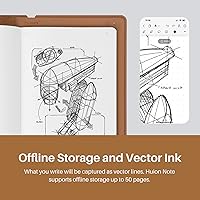
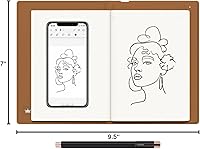
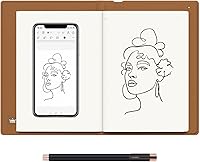
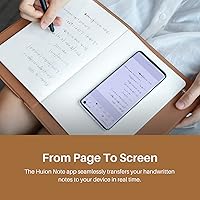
The HUION Note 2-in-1 Digital Notebook Tablet is one of those rare devices that does not ask you to abandon pen and paper — it just makes your handwriting smarter. The core idea is straightforward: write normally on a real A5 notepad, and the tablet captures everything digitally via Bluetooth, syncing to your phone through the Huion Note app. Huion has earned genuine respect in the graphics tablet world, so this is not an unknown brand taking a swing at a niche category. That said, be clear-eyed: this digital notebook lives and dies by its companion app. Without a reliable phone and a stable connection, it is just a notepad with a clever frame.
Features & Benefits

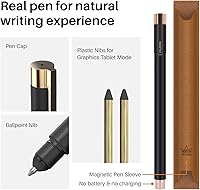
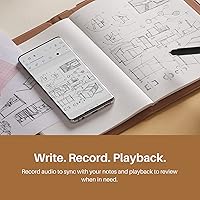
The pen experience is the headline act here. Huion's Scribo PW320 is battery-free — you never hunt for a charger or swap cells mid-meeting — and it delivers 8192 levels of pressure sensitivity with ±60° tilt recognition, which is serious hardware for a note-taking device. The Huion Note body runs on a 1300mAh battery rated for up to 18 hours of use, charges via USB-C, and can double as a graphics tablet on Windows, macOS, and Linux — though treat that as a secondary bonus, not its main purpose. The audio sync feature is quietly impressive: record a meeting, hit play, and watch your handwriting replay in real time alongside the recorded audio.

Best For

This paper-to-digital tablet makes the most sense for students who genuinely prefer writing by hand but are tired of losing pages or scrambling to photograph notes before leaving a lecture hall. It also suits professionals well — imagine a quiet conference room where opening a laptop feels disruptive, but you still need organized, shareable records afterward. Creatives who like to sketch on real paper before refining ideas digitally will find a natural fit here too. If you already use a Livescribe pen or a Moleskine smart writing set and are happy with it, the app dependency may not justify switching. But for someone still hunting for that balance, this is worth a serious look.

User Feedback

Most owners are genuinely pleased with how natural the pen feels on paper — the consistent praise centers on how accurately digital capture tracks handwriting without the cold, imprecise sensation of writing on glass. Where things get rougher is the app side: Bluetooth dropouts and occasional sync failures come up often enough to flag, especially for users still getting comfortable with the setup. Some reviewers noted the active capture area is slightly smaller than the physical page, which can catch you off-guard if you write close to the edges. The included ballpoint refills are a practical touch, but long-term sourcing may vary by region. The app works, but several users feel it lags behind more polished competitors in reliability.

Pros

  • The battery-free Scribo pen never needs charging — one less thing to worry about during a long day.
  • Handwriting capture is impressively accurate, faithfully reproducing pressure variations and quick sketch strokes.
  • An 18-hour tablet battery life comfortably covers full study days or back-to-back meeting schedules.
  • Audio sync lets you replay exactly what was said when each line was written — genuinely useful for complex meetings.
  • Bluetooth 5.0 auto-pairing means the Huion Note connects to your phone without manual setup every session.
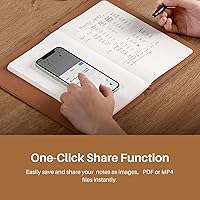
  • Export to PDF, image, or MP4 covers virtually every sharing scenario without requiring additional software.
  • The A5 footprint and 433-gram weight make this digital notebook easy to carry alongside everyday gear.
  • The included magnetic pen sleeve keeps the Scribo pen secure and accessible without a separate case.
  • Dual-mode operation adds legitimate secondary value for light graphics tablet use on Windows and macOS.
  • Note merging, splitting, and page reordering tools in the app beat what any paper notebook can offer organizationally.

Cons

  • The companion app has a real reliability problem — Bluetooth dropouts and sync failures are common enough to disrupt workflows.
  • The active capture area is slightly smaller than the physical page, so edge-written notes can get clipped.
  • The app ecosystem lags noticeably behind competitors like Livescribe in polish and consistency of updates.
  • Proprietary ballpoint refills are not widely stocked in physical stores, which becomes a problem internationally.
  • Audio quality depends entirely on the phone microphone — noisy environments produce recordings that are hard to use.
  • Long audio sessions can cause sync drift, where recorded speech gradually falls out of step with replayed handwriting.
  • Handwriting is not searchable within the app — you can only label folders and pages manually.
  • Battery drain accelerates significantly when audio recording runs continuously alongside note capture.
  • Onboarding troubleshooting is thin — users who hit pairing failures on day one have limited official guidance to fall back on.
  • The graphics tablet mode is too limited for serious creative work and may create false expectations at purchase.

Ratings

The HUION Note 2-in-1 Digital Notebook Tablet has been scored below using AI analysis of verified global user reviews, with spam, bot activity, and incentivized feedback actively filtered out to ensure the results reflect genuine buyer experiences. Scores span both the hardware and the software ecosystem, capturing what real students, professionals, and creatives encounter after the unboxing excitement fades. Strengths and frustrations are weighted equally — nothing has been softened.
Pen Writing Experience
91%
The battery-free Scribo PW320 pen is consistently the most praised aspect of this device. Writers and students note that pressure response feels intuitive from the first stroke, and the tilt recognition adds natural shading when sketching — something you simply do not get from most smart pens in this category.
A small but vocal group of users find the plastic pen nibs wear down faster than expected with heavy daily use, and replacements are not always easy to source locally. Those used to premium fountain pens may also find the ballpoint writing feel a touch mechanical.
Digital Capture Accuracy
88%
The digitization of handwriting is impressively faithful — curves, pressure variations, and even quick sketches translate cleanly to the app. Students taking rapid lecture notes report very few missed strokes, and the vector-based capture means zooming in on the digital copy does not degrade quality.
The active capture area falls slightly short of the full physical page dimensions, so notes written right at the edges occasionally get clipped. Users who habitually write close to page margins will need to consciously adjust their habits, which takes some getting used to.
App Reliability
67%
33%
The Huion Note app handles core functions competently — organizing pages, merging notes, and exporting to PDF or MP4 all work as advertised. Users who take the time to learn the interface find the highlighting and editing tools genuinely useful for revisiting meeting notes.
Crashes, sync delays, and occasional failure to auto-reconnect via Bluetooth are recurring complaints, particularly on Android devices. Several reviewers describe the app as functional but unpolished compared to competitors like the Livescribe app, and updates have been inconsistent in addressing reported bugs.
Bluetooth Connectivity
63%
37%
When the connection holds, Bluetooth 5.0 pairing is fast and largely hands-off — open the app, pick up the pen, and notes sync without manual intervention. For users in stable environments like a home office or a quiet classroom, this works reliably day to day.
In environments with Bluetooth congestion — crowded lecture halls, open-plan offices — dropouts happen often enough to frustrate. Some users report that after a failed sync the device requires a full restart to reconnect, which is a meaningful disruption mid-meeting or mid-lecture.
Battery Life
86%
Eighteen hours of rated battery life on the tablet body is generous by any measure, and real-world feedback largely supports that claim for typical note-taking sessions. USB-C charging means no proprietary cable hunting, and most users top it up overnight without any anxiety about it dying mid-day.
Battery drain increases noticeably when audio recording is running continuously alongside note capture, pulling the realistic figure closer to 12 to 14 hours under heavy use. A small number of users also report the battery degrading faster than expected after six or more months of daily use.
Audio Sync Feature
79%
21%
Syncing recorded audio to handwriting strokes is a genuinely clever feature that professionals and students find useful when reviewing complex meetings or lectures. Pressing play and watching your notes reconstruct in real time while the audio runs is one of those moments that justifies the device's mid-range price.
Audio quality is dependent on the phone's microphone rather than any dedicated hardware in the tablet, which limits its usefulness in noisy environments. Some users also find the audio-to-note sync occasionally drifts slightly out of alignment after long recordings.
Build Quality & Portability
83%
At 433 grams and roughly A5 in footprint, this paper-to-digital tablet slips into a standard backpack or tote without drama. The body feels solid without being heavy, and the magnetic pen sleeve keeps the Scribo pen secure enough that losing it mid-commute is not a real concern.
The 13mm thickness is slightly bulkier than a standard hardback notebook, which some users notice when packing light. A handful of reviewers mention that the USB-C port feels less robust than the rest of the chassis after extended daily use.
Graphics Tablet Mode
58%
42%
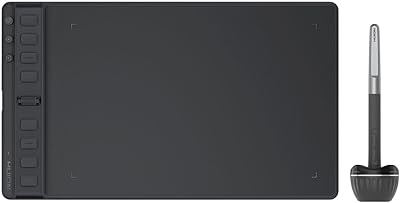
Connecting the Huion Note to a desktop via USB-C and using it as a graphics tablet works without additional driver headaches on Windows and macOS. For light illustration tasks or annotating PDFs on a laptop, it covers the basics adequately.
This mode should not be the reason anyone buys this device — it is clearly secondary, and it shows. The working area is smaller than dedicated Huion tablets, pressure calibration in tablet mode is less refined, and most creative professionals will quickly outgrow its capabilities compared to purpose-built alternatives.
Export & Sharing Options
81%
19%
Being able to export notes as images, PDFs, or MP4 replay videos covers virtually every sharing scenario a student or professional might encounter. The one-tap share workflow to messaging apps and email is quick, and PDF exports are clean enough to distribute without embarrassment.
MP4 exports, while unique, can produce large file sizes that clog shared drives or messaging apps if users are not careful. Some reviewers note the image export resolution options are limited, and there is no direct cloud sync to services like Google Drive or Notion without manual steps.
Note Organization Tools
74%
26%
The ability to merge, split, and reorder pages within the app gives this digital notebook a genuine organizational edge over traditional paper. Users who commit to structuring their notes within the app report a meaningful improvement in how retrievable their ideas are weeks after writing them.
The organizational interface has a learning curve that some users find steep at first, particularly older users or those less comfortable with mobile app navigation. Search functionality within the app is limited — you cannot search handwriting content, only folder and page labels you create manually.
Setup & Onboarding
71%
29%
Pairing the device for the first time is genuinely straightforward — Bluetooth connects automatically once the app is open, and the quick start guide covers the essentials without burying beginners in technical detail. Most users are capturing their first digital notes within ten minutes of opening the box.
Users who encounter Bluetooth pairing failures on their first attempt often struggle to find clear troubleshooting guidance, as the quick start guide does not address edge cases. App permissions setup on both iOS and Android can also trip up less technical users who are unfamiliar with granting microphone and storage access.
Refill & Consumables Availability
61%
39%
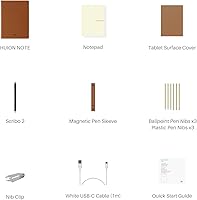
Including three ballpoint refills and three plastic pen nibs in the box is a thoughtful touch that ensures buyers are not immediately hunting for accessories. The A5 notepad format is a standard size, which gives some confidence that paper refills will not be impossible to find.
Proprietary Huion-compatible ballpoint refills are not always stocked in local stationery stores, and international buyers sometimes report long waits for replacements ordered online. Users in regions outside North America and Western Europe flag availability as a genuine long-term concern worth researching before committing.
Value for Money
77%
23%
Stacked against alternatives like the Moleskine Smart Writing Set or Livescribe Symphony, the Huion Note holds its own on hardware quality and delivers stronger pen specification for a comparable or lower outlay. The dual-mode functionality adds perceived value for users who can genuinely use both the notebook and graphics tablet features.
Buyers who primarily use it in environments where Bluetooth is unreliable may feel the premium over a basic notebook is hard to justify. The app experience, which is central to the entire value proposition, feels like it has not kept pace with the hardware investment Huion has made.

Suitable for:

The HUION Note 2-in-1 Digital Notebook Tablet was built for people who genuinely prefer writing by hand but are tired of the limitations that come with it — lost pages, unsearchable notes, and the tedium of photographing everything after a meeting. University students are an obvious fit: the combination of real paper feedback, automatic digital backup, and audio sync means you can focus on listening and writing without the anxiety of missing something important. Working professionals who attend frequent meetings will also get real value here, particularly in settings where opening a laptop would feel disruptive — the device looks and behaves like a notepad but quietly archives everything to your phone. Creatives who like to sketch loose ideas on paper before refining them digitally will find the pen specification — 8192 pressure levels, tilt recognition — genuinely capable for that bridge workflow. If you have tried a Moleskine Smart Writing Set or a Livescribe pen and wished for better hardware quality and more flexible export options, the Huion Note is a meaningful step up.
Not suitable for:

The HUION Note 2-in-1 Digital Notebook Tablet is a poor fit for anyone who does not consistently carry a smartphone or who operates in environments where Bluetooth is congested or unreliable — without a stable phone connection and the Huion Note app running smoothly, the device is essentially just a notepad with a premium price tag. Buyers expecting a full-featured graphics tablet for illustration or design work should look elsewhere; the graphics tablet mode is a secondary function that cannot compete with dedicated drawing tablets, even within Huion's own lineup. People who dislike managing apps, granting device permissions, or troubleshooting software hiccups will find the experience more frustrating than freeing. If you live outside North America or Western Europe, it is worth researching local refill and replacement nib availability before committing, since sourcing proprietary consumables internationally can become a real headache over time. Finally, anyone on a tight budget who only occasionally needs to digitize notes would likely be better served by a basic scanning app and a standard notebook.
Specifications

  • Dimensions: The tablet body measures 241 x 178 x 13mm (9.5 x 7 x 0.5 inch), making it roughly the same footprint as a standard A5 hardback notebook.
  • Weight: The device weighs 433g (0.95 lb), which is comparable to a moderately thick paperback book and comfortable for extended carry.
  • Working Area: The active pen capture zone measures 186.9 x 140.9mm, which is slightly smaller than the full physical notepad page area.
  • Pen Model: The included pen is the Huion second-generation Scribo PW320, a battery-free EMR stylus that requires no charging at any point.
  • Pen Pressure: The Scribo PW320 supports 8192 levels of pressure sensitivity, enabling nuanced line weight variation across both writing and sketching.
  • Tilt Recognition: The pen supports ±60 degrees of tilt recognition, allowing natural shading and brush-angle effects when drawing or sketching.
  • Pen Resolution: The pen captures input at 5080 lines per inch (LPI), producing smooth, high-fidelity vector strokes in the Huion Note app.
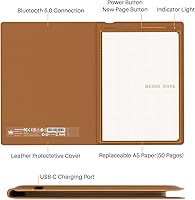
  • Connectivity: The device connects via Bluetooth 5.0 for wireless mobile use and USB-C for wired connection to desktop operating systems.
  • Battery Capacity: An internal 1300mAh rechargeable lithium-ion battery powers the tablet body and is replenished via the included USB-C cable.
  • Battery Life: Huion rates the tablet battery for up to 18 hours of use under standard note-taking conditions, though heavy audio recording reduces this figure.
  • Included Notepad: The package includes one A5 notepad with 50 pages; the notepad is refillable with compatible A5 paper, though Huion-specific refills may be required for accurate capture.
  • Mobile App OS: The Huion Note app for digital notebook mode supports iOS 11 or later and Android 6.0 or later on compatible smartphones and tablets.
  • Desktop OS: In graphics tablet mode, the device is compatible with Windows 7 or later, macOS 10.12 or later, and Linux (Ubuntu 20.04 LTS).
  • Export Formats: Notes can be exported from the Huion Note app as image files, PDF documents, or MP4 video replays of the handwriting process.
  • Audio Feature: The device supports audio recording synchronized to handwriting strokes, allowing users to replay notes with matching audio playback in the app.
  • Box Contents: The package includes the tablet, one A5 notebook (50 pages), a USB-C cable, a magnetic pen sleeve, three ballpoint refills, three plastic pen nibs, and a quick start guide.
  • Special Features: Key additional capabilities include offline note storage on the device itself, online editing tools within the app, and a built-in highlighter for post-session review.

Related Reviews

RCA Cambio 10.1-inch 2-in-1 Tablet PC
79%
92%
Value for Money
88%
Portability
85%
Ease of Use
78%
Display Quality
82%
Keyboard Usability
More
HUION Inspiroy 2 Medium Drawing Tablet
79%
91%
Pen Accuracy
88%
Pressure Sensitivity
63%
Driver Software
83%
Build Quality
79%
Shortcut Keys & Scroll Wheel
More
HUION Inspiroy 2 S Drawing Tablet
80%
91%
Pen Accuracy & Responsiveness
88%
Value for Money
86%
Portability & Build
84%
Shortcut Keys & Scroll Wheel
63%
Active Area Size
More
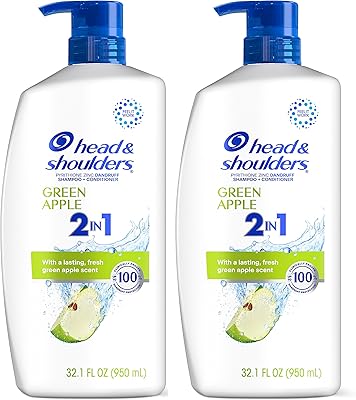
Head & Shoulders 2-in-1 Dandruff Shampoo and Conditioner Green Apple, 32.1 Fl Oz, 2 Pack
85%
90%
Dandruff Control Effectiveness
85%
Fragrance (Green Apple)
92%
Value for Money
87%
Moisturizing Properties
88%
Ease of Use (2-in-1)
More
CHUWI Hi10 Max 12.96″ 512GB
77%
88%
Display Quality
82%
Performance & Speed
91%
Value for Money
57%
Battery Life
72%
Keyboard & Trackpad
More
WXUNJA X-C30 10.1-inch Kids Tablet
72%
83%
Value for Money
86%
Parental Controls
81%
Battery Life
78%
Parental App & Setup
63%
Display Quality
More
AWOW AiBook 10 2-in-1 Windows Tablet, 12GB RAM, 256GB Storage
83%
88%
Performance
81%
Display Quality
91%
Portability & Size
85%
Keyboard Design & Usability
89%
Value for Money
More
HUION Inspiroy Dial 2 Graphics Tablet
82%
91%
Pen Accuracy & Pressure Sensitivity
93%
Dual-Dial Control System
74%
Wireless Connectivity & Bluetooth Stability
88%
Drawing Surface Texture
61%
Driver Software & Setup Experience
More
Microsoft Surface Pro 2-in-1 Laptop/Tablet (2025), 16GB RAM, 256GB Storage
86%
89%
Performance
92%
Battery Life
91%
Portability
88%
Display Quality
85%
AI Tools (Windows 11 Copilot)
More
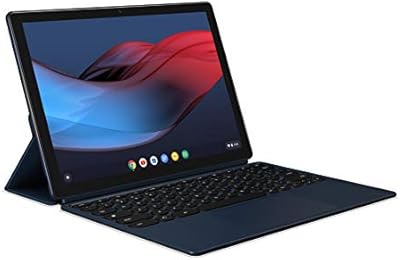
Google Pixel Slate 12.3-Inch 2-in-1 Tablet Intel Core m3 8GB RAM 64GB
79%
90%
Display Quality
85%
Battery Life
80%
Performance for Productivity
88%
Build Quality
82%
Multitasking Experience
More

FAQ

You can write notes without your phone nearby — the device stores your handwriting offline internally. However, you will need to open the Huion Note app and connect via Bluetooth to sync, review, or export those notes afterward. Think of the phone as essential for getting value out of what you write, even if it is not required in the moment of writing.

No, never. The Scribo PW320 pen uses battery-free EMR technology, which means it draws power passively from the tablet's electromagnetic field. You can leave it in a drawer for six months and pick it up ready to write — there are no batteries to swap and no charging port on the pen itself.

It works with both. The Huion Note app is available on iOS 11 or later, which covers most iPads and iPhones from the past several years. Android 6.0 or later is also supported. The Bluetooth pairing process is the same regardless of which platform you use.

The device is designed to work with Huion's own notepad paper, which is engineered to interact correctly with the EMR capture system. Standard A5 paper from an office supply store will likely not produce reliable or accurate digital capture. It is worth stocking up on Huion-compatible refills if you write frequently, especially if you are outside a major market where they may not be easy to find locally.

The audio is recorded through your phone's microphone, not through any hardware in the tablet itself. When you start an audio session in the Huion Note app, your phone captures the sound while the tablet captures your handwriting simultaneously. When you replay later, the two streams sync up so you can watch your notes reconstruct alongside the recorded audio.

Technically yes, but keep expectations realistic. When connected to a Windows, macOS, or Linux computer via USB-C, it functions as a basic input tablet. The pen specs are respectable, but the working area is smaller than dedicated illustration tablets, and the experience is not tuned for heavy creative work. It is a useful secondary function for light annotation or occasional sketching, but not a replacement for a purpose-built drawing tablet.

Only EMR pens compatible with Huion's receiver system will work — a random capacitive stylus or Apple Pencil will not capture on this device. Replacement Scribo pens are available through Huion's website and select retailers, though availability and shipping times vary by region. It is worth noting this dependency before purchasing, particularly if you are prone to misplacing accessories.

The core concept is similar across all three, but the Huion Note generally offers stronger pen hardware — higher pressure levels and tilt support — than the Moleskine system. Livescribe has a more mature app ecosystem with a longer track record, while Huion's app is functional but less polished by comparison. If app stability and a proven software experience matter most to you, Livescribe has an edge; if pen performance and export flexibility are priorities, the Huion Note competes well.

This is one area where real-world feedback diverges from the spec sheet. In low-interference environments like a home office or small meeting room, Bluetooth 5.0 holds up reliably. In congested spaces with many devices competing for signal — large lecture halls, coworking spaces — some users report dropouts and sync delays. If your primary use case is in a dense wireless environment, it is worth being prepared for occasional reconnection hassles.

Currently, handwriting is not searchable by content within the Huion Note app — there is no OCR (handwriting-to-text conversion) built in. You can organize notes into named folders and groups, and merge or split pages, but finding a specific note relies on your own folder structure rather than a keyword search. If full-text handwriting search is important to your workflow, this is a meaningful limitation to factor into your decision.

Where to Buy