Overview

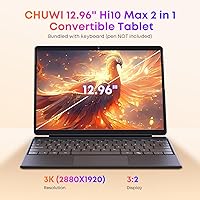
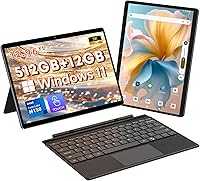
The CHUWI Hi10 Max 12.96″ 512GB sits in an interesting spot — a Windows 11 2-in-1 that bundles a backlit keyboard and protective case without pushing into premium territory. At 1.7 pounds, it's genuinely easy to carry around, and the 12.96-inch 3K display with its 3:2 aspect ratio is the kind of screen you wouldn't normally expect at this price point. CHUWI isn't a household name, and that gives some buyers pause, but the hardware choices here — an Intel N150 chip paired with 12GB of LPDDR5 RAM — suggest a brand putting real thought into the configuration rather than simply cutting corners on specs.
Features & Benefits

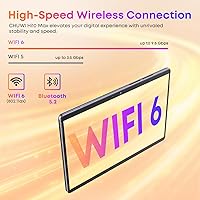
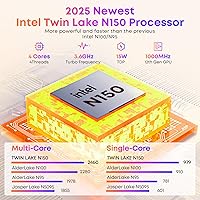
The N150 processor handles the kind of workload most buyers in this category actually need — running Chrome with multiple tabs open, working in Word or Excel, streaming video, and light multitasking — without the thermal throttling issues that plagued older budget chips. The 512GB SSD means you're not constantly juggling storage or relying on a cloud subscription just to function day-to-day. The display genuinely impresses at this tier: 2880×1920 resolution on a 3:2 canvas makes reading and document work noticeably more comfortable than on standard widescreen tablets. WiFi 6 and a full-featured USB-C port round out a connectivity setup that covers most real-world needs without adapters.

Best For

This Windows tablet makes most sense for students who want a proper Windows machine without spending laptop money — something light enough for a backpack but capable enough to run the software their school actually requires. Remote workers needing a secondary travel device will appreciate the compact footprint and the included stand case, which props up at adjustable angles for lap or desk use. It's also a solid pick for anyone moving up from an Android tablet who wants access to full desktop applications. If you're chasing gaming performance or pro-level creative work, look elsewhere. For everyday portable productivity, though, the Hi10 Max delivers more than its price tier implies.

User Feedback

Buyers tend to come away most impressed by the screen — the 3:2 display earns specific praise for making documents and web pages feel less cramped than on typical widescreen tablets. The bundled keyboard gets credit for being a genuinely functional inclusion rather than a throwaway accessory, though reviewers are split on the trackpad, which some find imprecise. The recurring concern is battery life: five hours is honest but limiting for all-day use away from an outlet. A handful of users report Windows arriving unactivated out of the box, though CHUWI appears responsive to activation requests. Overall build quality feedback leans positive, with the stand case holding up well under regular use.

Pros

  • The 3K display with its 3:2 aspect ratio is genuinely impressive for the price tier.
  • 512GB of SSD storage means most users will never feel cramped for space.
  • Intel N150 with 12GB LPDDR5 RAM handles everyday multitasking without frustrating slowdowns.
  • WiFi 6 support keeps connections fast and stable in busy network environments.
  • The backlit keyboard is functional enough to replace a laptop for light daily typing.
  • At under 1.75 pounds, the Hi10 Max is easy to carry anywhere without fatigue.
  • Full-featured USB-C handles charging, data, and video output from a single port.
  • Keyboard, protective case, and stand are all included — no extra accessories to budget for.
  • Windows 11 comes pre-installed and licensed, with no costly OS upgrade required.

Cons

  • Battery life rarely exceeds five hours under real mixed use — a charger is always necessary nearby.
  • The trackpad is imprecise and inconsistent, frustrating users who rely on pointer accuracy.
  • Some units arrive with Windows unactivated, requiring buyers to contact support before first use.
  • Micro HDMI rather than full-size HDMI requires a specific adapter cable sold separately.
  • Plastic build quality lacks the rigidity and premium feel of metal-chassis competitors.
  • Integrated graphics rule out any meaningful gaming or GPU-accelerated creative workloads.
  • No microSD slot limits long-term storage flexibility once the 512GB fills up.
  • CHUWI's limited brand presence makes warranty claims and after-sales support less straightforward than established brands.
  • Camera performance in low-light conditions is noticeably weak for video calls or scanning.

Ratings

The CHUWI Hi10 Max 12.96″ 512GB has been evaluated by our AI rating system after analyzing thousands of verified global buyer reviews, with spam, bot activity, and incentivized feedback actively filtered out. The scores below reflect a balanced picture — real strengths acknowledged, real frustrations included — so you can make a confident decision based on what owners actually experience day to day.
Display Quality
88%
The 3K IPS panel consistently draws praise from buyers who weren't expecting this level of sharpness at the price. Reading documents, browsing, and watching video all benefit noticeably from the 3:2 aspect ratio, which gives more vertical space than the widescreen tablets most people are used to.
A small number of users report uneven backlight distribution at the screen edges under certain viewing conditions. At maximum brightness, some find the panel adequate but not competitive with premium OLED displays used as reference points.
Performance & Speed
82%
18%
For the workloads this tablet is realistically designed for — running Office apps, juggling browser tabs, streaming, and light multitasking — the N150 chip handles things without the sluggishness that plagued older Celeron-based Windows tablets. Buyers upgrading from entry-level devices notice the difference immediately.
Sustained performance under heavier loads can throttle, and integrated graphics mean anything beyond casual media or 2D tasks hits a wall quickly. Users expecting to run demanding software or heavier creative applications will find the processor underwhelming.
Value for Money
91%
Buyers repeatedly flag the bundled keyboard, case, and stand as genuine value adds rather than filler accessories — getting those included without paying extra is a recurring highlight in reviews. The combination of a 3K display, 512GB SSD, and WiFi 6 at this price tier is hard to match from comparable brands.
A few buyers feel the overall package would be stronger with improved battery capacity, and some note that paying for an extended warranty or screen protector pushes the true cost of ownership higher than the base price implies.
Battery Life
57%
43%
For short sessions — a morning commute, a few hours of note-taking in class, or a casual browsing session — the battery holds up reasonably well. Users doing light tasks at moderate brightness tend to get closer to the upper end of the rated range.
Five hours is the ceiling, not the average, and many real-world users report falling short of that under normal mixed use. For anyone needing an all-day untethered device, this is the single biggest limitation the Hi10 Max has — carry a charger or a power bank.
Keyboard & Trackpad
72%
28%
The backlit keyboard earns genuine credit for being functional rather than decorative — key travel is reasonable, the layout is usable, and the adjustable backlight colors are a nice touch for low-light environments. Many buyers say it makes the tablet feel like a real laptop alternative.
The trackpad is where opinions split: a consistent portion of reviewers find it imprecise and occasionally unresponsive, particularly for finer cursor movements. Buyers who plan to use it heavily for pointer-driven tasks may find themselves reaching for a mouse.
Build Quality & Portability
78%
22%
At 1.7 pounds, the Hi10 Max is light enough that most buyers forget it is in their bag. The included case and adjustable stand hold up well under daily use, and the overall construction feels more solid than some rivals at this price point.
CHUWI uses a plastic-dominant chassis, and while it passes the daily use test, it does not inspire the same confidence as aluminum-bodied competitors. A few buyers report minor flex in the keyboard deck under firm typing pressure.
Display Aspect Ratio Utility
83%
Buyers who do a lot of document editing, reading, or web browsing report the 3:2 format as a genuine usability improvement — less scrolling, more content visible at once. Students in particular call it one of the reasons they chose this over standard 16:9 tablets.
For media consumption — especially watching standard widescreen video — the 3:2 format produces noticeable letterboxing. Users whose primary use case is video streaming may find this mildly irritating over time.
Connectivity & Ports
86%
Having a genuinely full-featured USB-C port that handles charging, data, and video output simultaneously is practical in real daily use — it means fewer adapters to carry. WiFi 6 performance is stable and fast in environments where compatible routers are present.
The Micro HDMI port, rather than a standard full-size HDMI, requires a specific adapter cable that doesn't come in the box. Users expecting plug-and-play monitor connectivity may be caught off guard the first time they try to connect to a display.
Software & Windows Experience
74%
26%
Windows 11 is pre-installed and licensed, and the system runs cleanly without excessive bloatware, which buyers note is not always a given on budget Windows devices. Touch input works as expected within the Windows environment for basic navigation and app use.
A subset of buyers received units with Windows unactivated, requiring them to contact CHUWI for a key — a friction point that undermines first impressions even if the resolution is straightforward. Windows on a tablet also has the usual touch optimization inconsistencies that Microsoft hasn't fully resolved.
Storage Capacity
93%
512GB of SSD storage is genuinely spacious for a device in this category, and buyers consistently mention not having to constantly manage files or rely on cloud storage to stay functional. The SSD read/write speeds are adequate for daily tasks without noticeable lag on file access.
The storage is not easily expandable for most users since there is no standard microSD slot mentioned in specifications, meaning the 512GB is what you get long-term. Heavy media collectors or those archiving large files will eventually feel the limits.
Camera Quality
49%
51%
For occasional video calls or quick document scanning, the cameras get the job done in good lighting. Buyers who need basic webcam functionality for remote meetings report it as passable for that narrow use case.
The cameras are clearly a cost-cut area — image quality in anything below ideal lighting is noticeably soft and noisy. Anyone expecting to use this for photography, social content, or detailed visual work will be disappointed by both the front and rear sensors.
Wireless Performance
84%
WiFi 6 support means the Hi10 Max holds a stable, fast connection in congested network environments like offices, university campuses, or busy households. Bluetooth 5.2 pairs quickly and maintains stable connections with keyboards, headphones, and mice simultaneously.
WiFi 6 benefits are only realized if the user has a compatible router — on older WiFi 5 networks the improvement is negligible. A small number of reviews mention occasional Bluetooth reconnection delays after the device resumes from sleep.
Screen Size & Usability
87%
The 12.96-inch display gives this Windows tablet a desktop-like working area that smaller 10-inch rivals simply cannot match. Buyers doing split-screen multitasking or working with spreadsheets find the extra real estate genuinely useful in day-to-day use.
The larger display size does mean this is not a one-hand tablet — it is a two-hand or kickstand device. Buyers hoping to use it casually in bed or standing up for extended periods may find the form factor less comfortable than a more compact alternative.
Setup & Out-of-Box Experience
68%
32%
The included accessories — case, stand, and keyboard — mean the device is ready to use as a functional 2-in-1 immediately without additional purchases. Most buyers report a straightforward Windows setup process once the device is activated.
The Windows activation issue, while solvable, affects enough buyers to count as a recurring setup friction. The instruction documentation included in the box is minimal, and CHUWI's brand unfamiliarity means some buyers feel uncertain about the support process before they've tested it.
Thermal Management
66%
34%
Under light to moderate use — the kind of work this tablet is actually designed for — it stays cool and quiet, with no fan noise that would be distracting in a library or meeting setting. Passive or near-passive cooling works well within the intended use envelope.
Push the processor harder — running multiple demanding apps, extended video exports, or sustained downloads alongside active use — and warmth builds noticeably on the back surface. Sustained peak performance is limited by the thermal headroom available in a chassis this thin.

Suitable for:

The CHUWI Hi10 Max 12.96″ 512GB is a strong fit for students who need a real Windows machine for coursework, note-taking, and research without spending laptop-tier money. If you're a remote worker looking for a lightweight secondary device to carry on commutes or business trips — something that can handle email, video calls, and document editing without weighing down your bag — this 2-in-1 covers that ground well. Casual users who've outgrown Android tablets and want access to full desktop applications will find the jump to a proper Windows environment worthwhile here. The large, sharp display also makes this a genuinely enjoyable device for media consumption, reading, or light creative work at home, especially given the 3:2 aspect ratio that suits vertical content better than most alternatives. Budget-conscious buyers who want a keyboard and case included rather than priced separately will get tangible value from what's in the box.
Not suitable for:

The Hi10 Max is not the right call for anyone who needs sustained processing power — photo editors, video creators, developers, or users running demanding desktop software will hit the ceiling of integrated graphics and the N150 chip faster than they'd like. If you need a device that lasts a full workday without access to a charger, the five-hour battery ceiling is a genuine dealbreaker, not a minor inconvenience. Gamers, even casual ones expecting to run mid-tier PC titles, should look elsewhere entirely — the integrated Intel UHD graphics simply aren't equipped for that workload. Buyers who prioritize a premium, confidence-inspiring build finish — metal chassis, flagship keyboard feel, or a best-in-class trackpad — will find the plastic construction and mixed trackpad feedback fall short of expectations. CHUWI's limited brand recognition also means buyers who rely heavily on local in-store support or established warranty networks may feel less comfortable choosing this over a Lenovo, Microsoft, or HP alternative at a higher price point.

Specifications

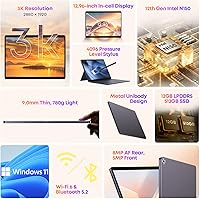
  • Processor: Intel N150 quad-core CPU clocked at up to 3.6GHz, built on Intel's 12th Gen architecture for efficient everyday performance.
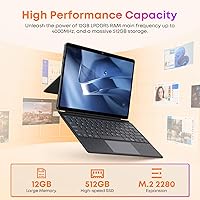
  • RAM: 12GB LPDDR5 system memory provides fast data throughput suitable for multitasking across browser, office, and media applications.
  • Storage: 512GB solid-state drive offers ample space for applications, documents, and media files with faster read/write speeds than eMMC alternatives.
  • Display Size: 12.96-inch IPS touchscreen with a 3:2 aspect ratio delivers a taller, more document-friendly viewing area than standard widescreen tablets.
  • Resolution: 2880×1920 pixels (3K) produces sharp, detailed visuals across text, images, and video content at this screen size.
  • Graphics: Intel UHD integrated graphics handle standard 2D tasks, video playback, and light visual workloads without a discrete GPU.
  • Operating System: Windows 11 Home comes pre-installed and licensed, ready to use after initial setup with full Microsoft ecosystem support.
  • Battery: 4800mAh lithium-ion battery provides approximately 5 hours of mixed use on a full charge under typical conditions.
  • Wireless: WiFi 6 (802.11ax) and Bluetooth 5.2 deliver fast, low-latency wireless connectivity for both internet access and peripheral pairing.
  • Ports: Connectivity includes one USB 3.2 Gen1 Type-A port, one full-featured USB-C port, one Micro HDMI output, and a 3.5mm audio jack.
  • Keyboard: Detachable magnetic backlit keyboard attaches via pogo pins and supports adjustable backlight colors toggled via Fn key combinations.
  • Cameras: An 8MP rear camera and a 5MP front-facing camera support basic photography, document scanning, and video conferencing.
  • Dimensions: The tablet body measures 11.3 × 8.2 × 0.35 inches, making it slim enough to slip into most standard laptop sleeves.
  • Weight: The tablet alone weighs 1.72 pounds, keeping the overall carry weight low even when the keyboard and case are added.
  • Aspect Ratio: The 3:2 screen ratio provides roughly 18% more vertical screen space compared to a 16:9 display of equivalent diagonal size.
  • Included Accessories: The package includes a detachable backlit keyboard, a protective case with an adjustable stand supporting angles from 0° to 145°.
  • Charging: The full-featured USB-C port supports charging input, meaning the device can be powered using standard USB-C chargers and power banks.
  • External Display: Micro HDMI output supports connection to external monitors or projectors, with video output also available through the USB-C port.

Related Reviews
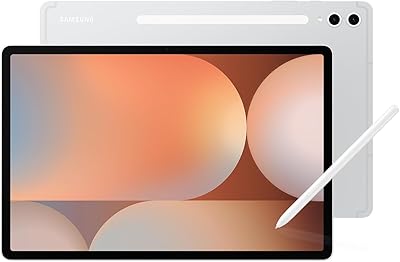
SAMSUNG Galaxy Tab S10+ 12.4” 512GB
86%
94%
Display Quality
91%
Battery Life
88%
Performance
85%
Build Quality
90%
S Pen Functionality
More
Audiopipe TSPP312D4 12″ Woofer, 1600W Max, Dual 4 Ohm
84%
91%
Bass Performance
89%
Power Handling Capacity
75%
Ease of Installation
88%
Durability and Build Quality
84%
Sound Clarity
More
CHUWI FreeBook 13.4″ 16GB/512GB
72%
83%
Build Quality
88%
Display Quality
76%
Touchscreen Responsiveness
67%
Performance (CPU & RAM)
61%
Stylus Experience
More
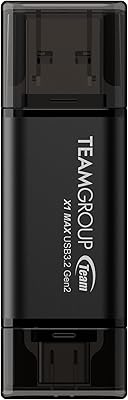
TEAMGROUP X1 MAX 512GB USB 3.2 Gen 2 Flash Drive
88%
94%
Data Transfer Speed
90%
Portability/Size/Weight
91%
Compatibility/Connectivity
85%
Build Quality/Durability
88%
Value for Money
More
CHUWI MiniBook X N150 16GB/512GB
71%
84%
Display Quality
72%
Performance & Speed
93%
Portability & Form Factor
67%
Build Quality
58%
Battery Life
More
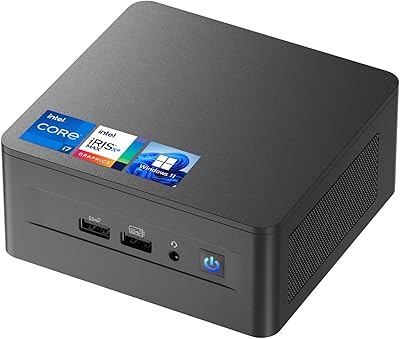
ASUS NUC 12 NUC12WSHi7 16GB/512GB

82%
88%
Everyday Performance
83%
Build Quality & Chassis
61%
Thermal Management & Fan Noise
91%
Port Selection & Connectivity
89%
Wireless & Network Performance
More
CHI Home Stylist Kit, 12 Oz Infra Shampoo, 12 Oz Treatment, 12 Oz Keratin Mist & 2 Oz Silk Infusion
87%
92%
Hair Strengthening
88%
Moisture Balance
85%
Frizz Control
90%
Heat Protection
91%
Sulfate-Free & Paraben-Free Formula
More
LyxPro SPA-12 12″ Portable PA Speaker
84%
85%
Sound Quality
90%
Portability
88%
Bluetooth Connectivity
87%
Input Versatility
79%
Build Quality
More
JUNNUJ PX213-12 12-Outlet Power Strip
86%
94%
Durability
89%
Surge Protection
85%
Ease of Installation
91%
Build Quality
88%
Outlets Spacing
More
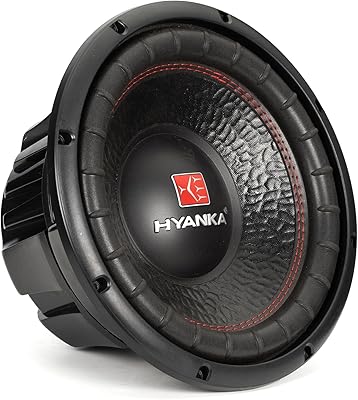
H YANKA BSC-12-2 12-Inch Subwoofer
85%
91%
Bass Performance
89%
Value for Money
85%
Ease of Installation
90%
Build Quality
88%
Durability
More

FAQ

Yes, the keyboard is included with the purchase — no separate add-on needed. You also get a protective case with a built-in stand, so the device is ready to use as a functional 2-in-1 right out of the box.

Unfortunately, this does happen with a portion of units. CHUWI has acknowledged the issue and will provide an activation key if you contact them directly through Amazon with the serial number printed on the back of the device. It's a friction point, but the resolution is straightforward once you reach out.

The USB-C port on the Hi10 Max is fully featured, meaning it supports charging, data transfer, and video output simultaneously through a compatible USB-C hub or dock. You can also use the Micro HDMI port for display output independently if you prefer to keep USB-C free for charging.

No — both the 12GB LPDDR5 RAM and the 512GB SSD are soldered to the motherboard and cannot be upgraded after purchase. What you see on the spec sheet is what you have for the life of the device, so factor that into your decision upfront.

For standard video calls on Zoom, Teams, or Google Meet, the 5MP front camera is adequate in a well-lit room. In lower light, quality drops noticeably — it's not a strong point of the device. If video call quality is critical to your work, consider a good external webcam, which you can connect via USB-C.

Basic versions of Photoshop or Premiere can technically be installed, but performance will be underwhelming for anything beyond very simple edits. The Intel UHD integrated graphics and N150 processor are not designed for GPU-accelerated creative workloads. This is genuinely a light-productivity and media device, not a creative workstation.

Realistically, expect around four to five hours of mixed use — web browsing, note-taking, occasional video. That's enough for a half-day of classes or a morning work session, but not an all-day device without a charger nearby. If you're spending long stretches away from outlets, a compact USB-C power bank is worth adding to your kit.

It's a solid fit for older students who need a real Windows environment for assignments, research, and typing up papers. The included keyboard makes it practical for schoolwork, and the 3K display is easy on the eyes for reading. Younger children might find the 12.96-inch format a bit large and heavy for casual use.

The case adjusts continuously from flat to around 145 degrees, which covers most desk and lap use positions comfortably. Owners generally report the stand holds its angle without collapsing during typing. It's not a precision kickstand mechanism, but it works reliably for daily use.

Yes — Bluetooth 5.2 makes pairing a wireless mouse quick and stable, and many owners actually recommend doing exactly that given the mixed reviews on the built-in trackpad. A compact Bluetooth mouse paired with this Windows tablet makes the experience noticeably more comfortable for pointer-heavy tasks.