

Overview

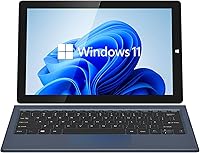
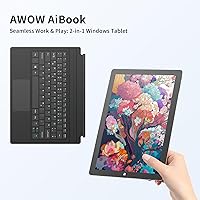
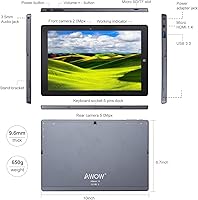
The AWOW AiBook 10 10.1″ 2-in-1 Windows Tablet sits in a crowded but genuinely interesting corner of the market — compact Windows devices that try to do the work of a laptop without the bulk or the price tag. Powered by Intel's N100 processor, it lands noticeably above basic ARM-based tablets in real-world capability, though it is not competing with mainstream laptops either. The detachable keyboard gives it true dual-mode flexibility, and the 10.1-inch size makes it easy to toss in a bag. One honest caveat: the product listing contains spec inconsistencies — RAM type appears as both DDR4 and DDR5 in different sections — so treat the finer technical details with some skepticism.

Features & Benefits

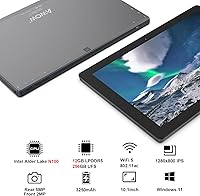
The N100's quad-core architecture handles the everyday load well — a dozen browser tabs, Word documents, spreadsheets, and YouTube all run without much complaint. Having 12GB of RAM helps considerably; it is a generous amount at this price point and keeps things responsive when juggling several apps at once. Storage is 256GB eMMC, expandable via microSD, which is adequate but worth understanding: eMMC is meaningfully slower than SSD, so large file transfers and app installs will feel sluggish next to pricier machines. The IPS touchscreen looks reasonably sharp for its size. On the connectivity side, USB 3.0, Micro HDMI, dual-band WiFi, and Bluetooth 4.2 cover the practical bases for a device this compact.

Best For

This budget 2-in-1 tablet makes the most sense for students who need a portable Windows machine for class notes, light research, and basic productivity — and would rather not carry a full-size laptop everywhere. It also works well as a travel companion or backup device for remote workers who need reliable email and video call access on the road. Seniors or anyone just moving from paper-based habits to digital will find Windows 11 reassuringly familiar. That said, if you edit video, run design software, or play anything beyond casual browser games, this Windows tablet will frustrate you quickly. It is built for light, consistent daily use — not heavy lifting.

User Feedback

Buyers who pick up the AiBook 10 regularly praise its portability and the fact that it ships with full Windows 11 — not a stripped-down mobile OS. The keyboard draws mixed reactions; most find it workable for short typing sessions, but the construction starts to feel plasticky with regular use. Display brightness is a recurring complaint, especially outdoors or under strong lighting. Battery life impressions vary widely, and since the manufacturer does not publish a rated capacity, expectations are hard to set in advance. A number of buyers have also flagged software bloat requiring cleanup on first boot. The overall value-to-feature ratio earns cautious praise, though durability concerns prevent it from being an outright easy pick.

Pros

  • Ships with full Windows 11 Home out of the box — no stripped-down OS compromises
  • 12GB of RAM is unusually generous at this price point and keeps multitasking smooth
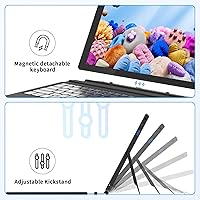
  • The detachable keyboard transforms it from tablet to functional laptop in seconds
  • Genuinely portable at under 3 pounds — easy to slip into a bag for commuting or travel
  • 256GB of built-in storage covers most everyday needs, with microSD expansion available
  • USB 3.0 and Micro HDMI ports add practical versatility without requiring adapters constantly
  • IPS display offers decent viewing angles and color for a screen in this size range
  • Dual-band WiFi and Bluetooth 4.2 handle modern wireless needs reliably
  • The 145-degree adjustable stand provides real flexibility for desk and couch use

Cons

  • eMMC storage is meaningfully slower than SSD, making large transfers and installs feel sluggish
  • Keyboard feels plasticky and less confidence-inspiring with regular extended use
  • Display brightness is frequently cited as insufficient in well-lit or outdoor environments
  • Battery capacity is undisclosed, making it difficult to set realistic expectations before buying
  • The product listing contains spec contradictions that raise questions about quality control transparency
  • Software bloat on first boot requires time-consuming cleanup before the device feels properly usable
  • Hinge and kickstand durability draws skepticism from users after several weeks of daily handling
  • The front camera at 2.0MP produces mediocre video quality for calls and conferencing
  • No USB-C port limits future accessory compatibility compared to newer budget competitors

Ratings

Our AI rating system analyzed verified global buyer reviews for the AWOW AiBook 10 10.1″ 2-in-1 Windows Tablet, actively filtering out incentivized, bot-generated, and duplicate submissions to surface what real users actually experienced. The scores below reflect an honest synthesis of both what this budget Windows device gets right and where it genuinely falls short — no spin, no padding.

Value for Money
81%
19%
For buyers who need a full Windows 11 machine on a tight budget, the AiBook 10 consistently earns praise for delivering a functional, versatile device at a price point where most alternatives involve compromises like Android or ChromeOS. The inclusion of 12GB RAM and a detachable keyboard in the base package makes the overall deal feel particularly solid to budget-conscious shoppers.
Value perception drops for buyers who expected performance closer to a mainstream laptop — the eMMC storage and display brightness limitations remind you fairly quickly that corners were cut somewhere. A few users felt misled by spec sheet inconsistencies, which eroded trust even when the actual device performed adequately.
Portability
88%
At under 3 pounds and barely 0.4 inches thick, this Windows tablet slips into a backpack with almost no notice, which commuting students and frequent travelers consistently highlighted as a genuine daily advantage. The compact 10.1-inch footprint means it fits on cramped airplane tray tables and small café desks without any awkwardness.
The flip side of the compact size is real: multitasking on a 10.1-inch screen feels cramped, especially for users who work with spreadsheets or need multiple windows open side by side. It is a trade-off most buyers accept knowingly, but some underestimate how limiting it becomes in longer work sessions.
Performance
67%
33%
The Intel N100 chip handles the daily basics — browser tabs, video streaming, Word documents, and light email — without obvious strain, which is all most target buyers actually need. Users upgrading from older Atom-based tablets noticed a meaningful real-world improvement in responsiveness during everyday tasks.
The eMMC storage is the persistent bottleneck: Windows updates, app installs, and large file operations run noticeably slower than on any SSD-equipped machine, and several users flagged this as a source of frustration they did not anticipate. Anything beyond light productivity — running several heavier apps simultaneously, for instance — pushes the system into sluggish territory.
Display Quality
61%
39%
The IPS panel delivers decent color consistency and viewing angles that hold up reasonably well indoors, and for watching YouTube videos or reading documents in a dim room it does the job without obvious complaints. Touch response is generally accurate and smooth enough for casual tablet navigation.
Outdoor or bright-room use exposes the display's biggest weakness: screen brightness is a recurring complaint across user reviews, with many noting that reflections make it genuinely difficult to see clearly in sunlit environments. The 1280x800 resolution also starts to feel dated when compared to competing devices at similar price points.
Keyboard Quality
53%
47%
The included detachable keyboard adds genuine utility for users who want laptop-mode functionality, and for short typing sessions — class notes, quick emails, light document edits — most buyers found it perfectly workable without needing to purchase a separate accessory.
Extended typing sessions reveal the keyboard's limits quickly: key travel is shallow, the overall construction feels plasticky, and flex during fast typing is noticeable. A number of buyers reported that the keyboard's connection or hinge mechanism started feeling less secure after several weeks of regular detaching and reattaching.
Build & Durability
58%
42%
The slim profile and overall form factor give the device a reasonably clean, presentable appearance that does not feel out of place in a classroom or a casual office environment. Most users found the build acceptable for light daily handling during the early weeks of ownership.
Longer-term durability draws genuine skepticism from reviewers — the plastic chassis shows wear and micro-scratches relatively quickly, and the kickstand hinge has been flagged by multiple users as feeling noticeably less firm after consistent daily use. This is not a device that inspires confidence if dropped or treated roughly.
Battery Life
55%
45%
For light, intermittent use — a bit of browsing, a document or two, some video — the battery holds up reasonably well across a moderate portion of the day, and most casual users find it sufficient for shorter trips without needing to carry the charger constantly.
The manufacturer does not publish a rated battery capacity, which immediately raises transparency concerns, and real-world reports vary enough to make reliable estimates difficult. Users who pushed the device through a full productive workday consistently reported needing to recharge before the day was done.
Connectivity & Ports
74%
26%
USB 3.0, Micro HDMI, a headphone jack, and a microSD slot cover the practical bases well for a device this compact, and dual-band WiFi delivered stable, consistent connections for most users during video calls and streaming. The Micro HDMI port was specifically appreciated by users who wanted to connect to external displays for presentations.
The absence of a USB-C port is a meaningful omission at this stage of the market, limiting compatibility with modern accessories and charging options that many buyers already own. Having only a single full-speed USB port also creates awkward moments when users need to connect more than one peripheral simultaneously.
Software & Setup
57%
43%
Booting into full Windows 11 Home on first startup — rather than a limited mobile OS — was a genuine point of satisfaction for buyers who wanted a real computing experience. Familiarity with the Windows interface made the initial learning curve essentially nonexistent for most users.
Pre-installed bloatware was a repeated pain point in user feedback, with several buyers spending meaningful time removing unwanted apps before the device felt clean and responsive. The spec discrepancies in the product listing also created confusion during setup, with some users uncertain whether what they received matched what was advertised.
Camera Performance
44%
56%
The front 2.0MP camera is just enough for video calls in well-lit environments, and for the use cases most buyers have in mind — occasional Zoom meetings or Google Meet calls — it produces a passable image that gets the job done without technical issues.
Anyone expecting more than basic video call functionality will be let down: the 2.0MP front camera produces soft, grainy images, and even the 5.0MP rear camera delivers mediocre results by current standards. Low-light performance in particular falls short, making it unsuitable for anything beyond casual snapshot use.
Audio Quality
62%
38%
The dual stereo speakers produce clear enough audio for casual YouTube watching or background music, and for a device this thin users generally found the output acceptable for personal use in quiet environments. Volume levels are adequate for one-on-one video calls without needing external speakers.
At higher volumes the speakers thin out noticeably, and bass is essentially absent — which limits the experience for anyone serious about media consumption. Users watching movies or listening to music in moderately noisy environments like a café or commuter train will likely find the audio output insufficient.
Multitasking Ability
63%
37%
The 12GB of RAM genuinely helps keep multiple apps and browser tabs open without the constant reloading that plagues devices with less memory, and for the target audience of students and light office users this represents a meaningful day-to-day quality-of-life improvement over cheaper alternatives.
The eMMC storage speed creates a ceiling on how fluid multitasking actually feels in practice — switching between heavier applications often involves waiting through brief but noticeable lag spikes. Users who work with more than three or four active applications simultaneously will notice the system straining.
Touchscreen Responsiveness
71%
29%
Touch input registers accurately and with minimal delay for standard navigation tasks like scrolling, tapping, and pinch-to-zoom, which makes tablet-mode use comfortable for reading, casual browsing, and light media consumption. Most users found the touch layer reliable enough that they were not frequently fighting misregistered taps.
Fine-detail touch precision was occasionally flagged as inconsistent, particularly when using onscreen keyboards for longer input sessions. In cold environments some users reported reduced touch sensitivity, which is a known characteristic of this display tier rather than a defect specific to this model.
Wireless Performance
73%
27%
Dual-band WiFi handled standard home and office network conditions well, with stable connections during video calls and streaming reported consistently across user feedback. Bluetooth 4.2 paired reliably with common accessories like headphones and mice without notable dropout issues in regular use.
Bluetooth 4.2 is a noticeably older standard at this point, and users pairing with newer high-bandwidth Bluetooth 5.0 accessories occasionally encountered reduced performance or feature limitations. WiFi range at the edges of larger homes or offices drew a handful of complaints about inconsistent signal strength.

Suitable for:

The AWOW AiBook 10 10.1″ 2-in-1 Windows Tablet is a practical pick for anyone who needs a real Windows machine without the size or cost of a full laptop. Students are probably the most natural fit — it is light enough to carry all day, and the detachable keyboard means it can handle note-taking in class and casual browsing back in the dorm without switching between devices. Travelers and remote workers who need a reliable backup machine for emails, video calls, and light document work will also find it genuinely useful on the road. Seniors or less tech-savvy users transitioning to digital tasks will appreciate that it runs full Windows 11, which feels far more familiar than Android or ChromeOS alternatives. For anyone who regularly bounces between couch and desk, the adjustable stand and detachable keyboard make that kind of flexible use genuinely comfortable.

Not suitable for:

The AWOW AiBook 10 10.1″ 2-in-1 Windows Tablet is not the right tool for buyers who push their hardware hard. The Intel N100 is a capable everyday chip, but it was never designed for video editing, graphic design, or running demanding software — anyone with those needs will hit a wall fast. The eMMC storage is the other significant constraint: it is considerably slower than the SSDs found in mainstream laptops, which means large file operations, software installs, and even Windows updates can feel noticeably sluggish. Gamers should look elsewhere entirely, as the integrated graphics handle only the lightest casual titles. The 10.1-inch screen, while portable, makes extended multitasking or spreadsheet work genuinely cramped. And if you depend on a keyboard for hours of daily typing, the build quality here will likely disappoint over time.

Specifications

  • Processor: Intel N100 (Alder Lake, 4 cores, 4 threads, up to 3.4GHz) handles everyday computing tasks with reasonable efficiency.
  • RAM: 12GB LPDDR5 memory allows comfortable multitasking across multiple browser tabs and standard productivity applications.
  • Storage: 256GB eMMC internal storage is expandable up to 512GB via a microSD card slot.
  • Display: 10.1″ IPS touchscreen with a 1280x800 resolution delivers adequate color accuracy and wide viewing angles for its size class.
  • Graphics: Intel UHD Graphics Xe with 24 EUs running at 750MHz handles light media playback and casual visuals only.
  • Operating System: Windows 11 Home comes pre-installed, offering the full desktop Windows experience out of the box.
  • Keyboard: A detachable English keyboard is included and connects to the tablet for laptop-style use when needed.
  • Stand: An integrated adjustable stand bracket supports viewing angles up to 145 degrees for desk or couch use.
  • Ports: Connectivity includes 1x USB 3.0, 1x Micro HDMI, 1x headphone jack, and 1x TF card slot.
  • Wireless: Dual-band WiFi (802.11a/b/g/n/ac) and Bluetooth 4.2 provide standard wireless connectivity for home and travel use.
  • Cameras: A 2.0MP front-facing camera handles video calls, paired with a 5.0MP rear camera for basic photography.
  • Battery: A built-in Lithium Polymer battery powers the device; the manufacturer has not disclosed a rated capacity in mAh.
  • Dimensions: The tablet body measures 9.84 x 6.3 x 0.39 inches, making it genuinely compact for a Windows device.
  • Weight: At 2.81 pounds, this Windows tablet is light enough for daily bag carry without significant fatigue.
  • Audio: Dual stereo speakers are built in for media playback, though no wattage rating has been officially published.
  • Power Input: The device charges via a 12V 3A DC barrel jack adapter, which is included in the box.
  • Color: Available in Black (N100 processor variant).

Related Reviews

RCA Cambio 10.1″ Windows 2-in-1 Tablet
62%
78%
Value for Money
47%
Performance
59%
Keyboard Quality
52%
Build Quality
54%
Battery Life
More
ZAOFEPU W101 10.1″ Windows 11 Tablet
79%
91%
Value for Money
84%
Performance for Basic Tasks
68%
Multitasking Capability
75%
Display Quality
80%
Build Quality
More
Fusion5 FWIN232+ 10.1″ Windows 11 Professional Tablet PC
85%
84%
Performance
88%
Display Quality
65%
Battery Life
80%
Build Quality
91%
Portability
More
WXUNJA X-C30 10.1-inch Kids Tablet
72%
83%
Value for Money
86%
Parental Controls
81%
Battery Life
78%
Parental App & Setup
63%
Display Quality
More
ITMEIPC T-10 10.1-inch Android Tablet
69%
83%
Value for Money
67%
Display Quality
62%
Performance
71%
Battery Life
58%
Build Quality
More
YYSWIE CT1001 10.1-inch 64GB Kids Tablet
67%
83%
Value for Money
58%
Performance & Speed
76%
Battery Life
81%
Parental Controls
61%
Display Quality
More
FEONAL K118 10.1-inch Android Tablet

68%
83%
Display Quality
67%
Performance & Speed
78%
Battery Life
44%
Camera Quality
81%
Value for Money
More
reMarkable 2 10.3-inch Paper Tablet

85%
94%
Tactile Writing Feel
92%
Build Quality & Design
97%
Distraction-Free Experience
89%
Battery Longevity
76%
Software Organization
More
Head & Shoulders Green Apple 2-in-1 Shampoo
81%
91%
Dandruff Control
67%
Conditioning Performance
88%
Scent Experience
86%
Value for Money
89%
Daily Usability
More
CFVOCUY TS-K109B 10.1″ Kids Tablet
67%
83%
Value for Money
79%
Ease of Setup
71%
Battery Life
66%
Durability & Build
74%
Parental Controls
More

FAQ

The keyboard is included in the box — you do not need to buy it separately. It detaches and reattaches easily, so switching between tablet and laptop mode is straightforward.

Yes, it runs full Windows 11 Home, so you can install standard Windows applications just like you would on any laptop. Chrome, Microsoft Office, Zoom, and similar apps all work fine for everyday use.

This is worth knowing before you buy: the AiBook 10 uses eMMC storage rather than an SSD, which is noticeably slower for tasks like large file transfers, app installs, and Windows updates. For everyday use it is manageable, but do not expect the snappy response you get from a modern SSD-based machine.

It is adequate for short bursts of typing — class notes, emails, light document work — but the keys have a shallow, plasticky feel that becomes apparent during longer sessions. If you type for hours daily, you may find it tiring or frustrating over time.

The manufacturer has not published a rated battery capacity, which makes expectations hard to set in advance. Real-world user reports vary quite a bit, so plan on having a charger available if you need it for more than a few hours of continuous use.

Yes, there is a Micro HDMI port on the device, so you can connect it to a monitor or TV using a Micro HDMI to HDMI cable. It is a handy option for presentations or watching content on a larger screen.

Only very light, browser-based or casual games are realistic here. The Intel UHD Xe graphics are not built for demanding titles, and trying to run anything beyond simple casual games will result in poor performance.

There is no mention of stylus or active pen support in the official specs. The touchscreen is finger-touch only, so if pen input is important to your workflow, this device would not meet that need.

Several buyers have reported encountering pre-installed software that needed cleaning up before the device felt properly usable. It is generally removable through standard Windows settings, but expect to spend some time on initial setup before things feel clean.

No — both the RAM and the internal eMMC storage are soldered onto the board and cannot be upgraded after purchase. The only expansion option available is the microSD card slot, which can add up to an additional 512GB of storage for files and media.