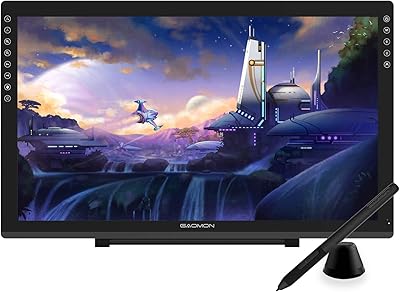
HUION Kamvas 22 Plus 21.5-inch Pen Display

Overview
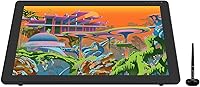
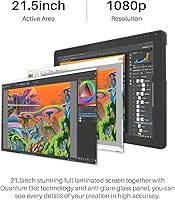
The HUION Kamvas 22 Plus 21.5-inch Pen Display sits in an interesting spot in the market — large enough to feel like a real working surface, priced well below the professional Wacom territory that many creatives simply can't justify. HUION has spent years building a reputation as a credible alternative, and this drawing monitor reflects that maturity. The 21.5-inch screen gives you considerably more room than the compact 13- or 16-inch displays most beginners start on. The Quantum Dot technology is what separates it from other displays at this tier — richer, more saturated colors than a standard IPS panel. That said, it's not a color-grading workstation; expect strong results for illustration and design, not broadcast production.
Features & Benefits
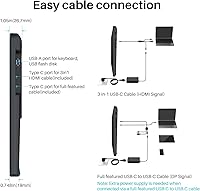
What you notice right away with the Kamvas 22 Plus is how close the pen feels to the screen surface. Full lamination does exactly what it promises — there's virtually no gap between where your pen tip lands and where the cursor appears, which makes detailed linework far less frustrating. The etched glass adds a subtle tooth that mimics paper, reducing the slick, glassy resistance some artists dislike on standard displays. The PW517 pen handles pressure and tilt well in real use; transitions from thin to thick strokes feel gradual and controlled, not jumpy. Dual USB-C connectivity means switching between a laptop and an Android device takes seconds, and the included cable covers it without extra adapters.
Best For
This pen display makes the most sense for people who already know they want to draw digitally and are ready to commit to a proper screen. Digital illustrators and concept artists get the most out of the color accuracy here — the expanded gamut genuinely helps when working with vibrant palettes. Students in animation or graphic design programs will appreciate the generous canvas without the steep cost of a Cintiq. It's also a practical pick for freelancers who jump between operating systems, since Mac, Windows, and Linux all work without too much friction. If you're upgrading from a smaller screenless tablet, the increase in workspace alone will feel like a meaningful shift.
User Feedback
Owners consistently highlight color vibrancy and pen responsiveness as the standout strengths, and the etched glass surface tends to hold up well after extended daily use. On the critical side, the driver setup process is a genuine pain point — Windows users usually get through it without much trouble, but Linux users often need forum help to get everything running properly. A handful of reviewers note slight parallax drift toward the outer screen edges, worth knowing if precision near corners matters to your workflow. The stand's angle range gets mixed marks; those who prefer working nearly flat find it too limiting. Android compatibility works, but only if your device meets the required USB specification — it is not guaranteed across all hardware.
Pros
- The Quantum Dot screen produces noticeably richer, more vibrant colors than standard IPS displays at this price level.
- Full lamination keeps the cursor tightly aligned with the pen tip, which makes detailed linework feel confident and controlled.
- The etched glass surface adds a subtle paper-like texture that many artists find far more comfortable for long drawing sessions.
- Pen pressure transitions feel gradual and natural, avoiding the jumpy response that plagues cheaper drawing hardware.
- Dual USB-C ports make it straightforward to switch between a laptop and a compatible Android device without extra adapters.
- The adjustable stand ships in the box — a practical inclusion that competing brands sometimes charge extra for.
- Long-term owners frequently report the etched glass surface holding up well under daily use without visible wear.
- Cross-platform compatibility on Windows and Mac is reliable and requires minimal setup effort for most users.
- The 21.5-inch workspace gives artists significantly more room than compact entry-level displays, reducing the need to constantly zoom or pan.
Cons
- Driver installation can be a frustrating multi-step process, particularly for Linux users who often need community forum support.
- Minor parallax drift appears toward the outer screen edges, which can affect precision for artists who work close to the corners.
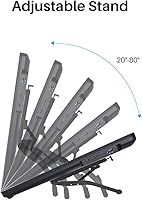
- The stand's angle adjustment range is limited, making it a poor fit for artists who prefer working at a shallow, near-flat tilt.
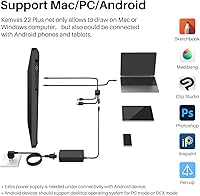
- Android compatibility is not guaranteed — it depends entirely on whether the connected device meets specific USB output requirements.
- The 1080p resolution on a 21.5-inch panel can feel soft compared to higher-density displays, especially for fine detail work.
- Color performance, while strong for creative work, does not meet the standards required for professional print or video production pipelines.
- The 3-in-1 cable included in the box, while convenient, can feel bulky on a tidy desk setup.
- At 7.5 pounds, the display is not particularly portable — moving it between workspaces regularly gets old quickly.
Ratings
Our AI scoring system analyzed thousands of verified global purchases of the HUION Kamvas 22 Plus 21.5-inch Pen Display, actively filtering out incentivized reviews, repeated submissions, and bot-generated feedback to surface what real artists and designers consistently experience. The scores below reflect both the genuine strengths that keep buyers satisfied long-term and the friction points that surface repeatedly across independent user accounts. Nothing has been glossed over — if a pattern of complaints exists, it is reflected in the number.
Color Accuracy
Pen Responsiveness
Screen Lamination
Surface Texture
Driver & Software
Build Quality
Stand Usability
Connectivity
Anti-Glare Performance
Value for Money
Workspace Size
Cross-Platform Compatibility
Pen Ergonomics
Suitable for:
The HUION Kamvas 22 Plus 21.5-inch Pen Display is built for creatives who are serious enough about their craft to want a real screen under the pen, but aren't yet ready — or willing — to spend Wacom Cintiq money. Digital illustrators and concept artists will get the most out of the expanded color gamut, which makes a noticeable difference when working with saturated palettes or doing detailed character work. Animation and graphic design students benefit from the generous screen real estate, which means less scrolling and zooming on complex projects. Freelancers who switch between operating systems will appreciate that setup works reliably across Mac and Windows without much fuss. It also suits home studio creatives who want a dedicated drawing surface that feels premium without anchoring an entire professional budget to a single peripheral.
Not suitable for:
Buyers expecting professional color-grading accuracy should look elsewhere — the Kamvas 22 Plus delivers impressive color for its category, but it does not meet the DCI-P3 or wide-gamut standards demanded by video production or print prepress workflows. Linux users should go in with eyes open: driver installation on that platform frequently requires extra troubleshooting steps that Windows and Mac users simply don't face. If you prefer working at a very low, nearly flat angle — common for some traditional-style artists — the included stand's limited range may frustrate you. Anyone planning to connect this HUION drawing monitor to an Android device should first verify their phone or tablet meets the specific USB specification required, because compatibility is not universal across Android hardware. Finally, users in very bright environments may still notice some glare toward the outer screen edges, despite the anti-glare coating.
Specifications
- Screen Size: The active display area measures 21.5 inches diagonally, offering a substantially larger working canvas than the 13- or 16-inch displays common at the entry level.
- Resolution: The panel renders at 1920 x 1080 (Full HD), which provides clear detail for illustration and design work at typical viewing distances.
- Color Gamut: Quantum Dot technology delivers a color volume of 140% sRGB, producing noticeably more saturated and vibrant hues than a conventional IPS screen in this category.
- Surface: The screen is covered with full-laminated etched anti-glare glass, which reduces reflections and adds a slight texture that mimics the feel of drawing on paper.
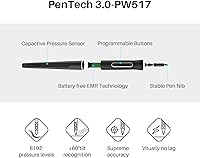
- Pen Model: The included PW517 digital pen is battery-free and communicates with the display using HUION's PenTech 3.0 technology for low-latency, responsive input.
- Pressure Levels: The PW517 pen supports 8192 levels of pressure sensitivity, allowing smooth, gradual transitions between thin and thick strokes during natural drawing and painting workflows.
- Tilt Support: The pen recognizes tilt at angles up to 60 degrees, enabling shading and brush effects that respond to how the pen is angled against the screen surface.
- Connectivity: Two USB-C ports are built into the display, supporting connection via a bundled 3-in-1 cable or a direct USB-C to USB-C cable depending on the host device.
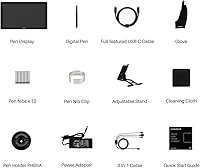
- Cable Included: A 3-in-1 cable ships in the box, handling power, display signal, and data in a single connection for compatible computers and Android devices.
- OS Compatibility: The display works with Windows 7 and later, macOS 10.12 and later, Ubuntu Linux, and Android devices running OS 6.0 or later with a qualifying USB specification.
- Stand: An adjustable stand is included in the box, allowing the display to be positioned at varying angles to suit different working postures and desk setups.
- Dimensions: The unit measures 21.5 x 12.7 x 0.75 inches, giving it a relatively slim profile for a large-format display of this type.
- Weight: The display weighs 7.5 pounds, making it a stable desktop peripheral but not practical for frequent transport between locations.
- Android Support: Android connectivity requires the host device to support USB 3.1 with DisplayPort 1.2 or later output; not all Android phones and tablets meet this requirement.
- ASIN: The product is listed on Amazon under ASIN B08BZ897B4, model number GS2202-US, manufactured by Shenzhen Huion Animation Technology LTD.
Related Reviews
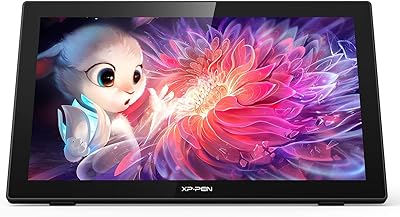
XP-Pen Artist 22 2nd Gen Pen Display
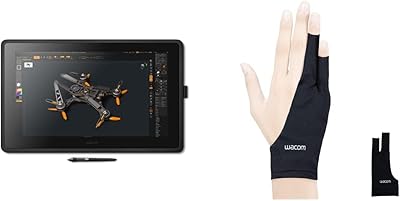
Wacom Cintiq 22 21.5-inch Pen Display
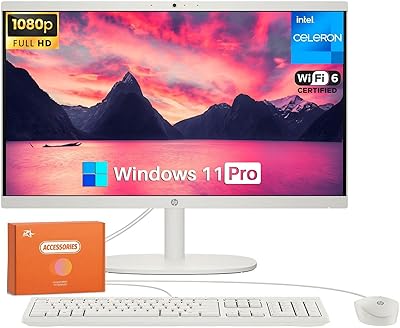
HP 22-DG0024 21.5-inch All-in-One Desktop
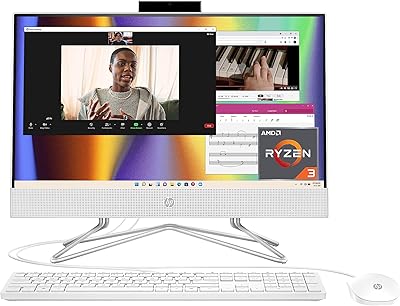
HP All-in-One 22-dd0032 21.5″ Desktop
ASUS VP229Q 21.5-inch IPS Monitor
Pisichen HD-215TS 21.5-inch Touchscreen Monitor
EPORMOT 21.5-inch Portable Touchscreen Monitor
ASUS VP228HE 21.5-inch Gaming Monitor
GAOMON PD2200 21.5-inch Pen Display Tablet