Overview

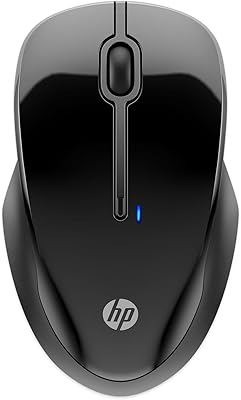
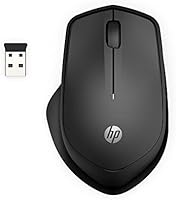
The HP 280M Silent Mouse is HP's answer to a simple but genuinely frustrating office problem: the constant, distracting click noise that fills shared workspaces and open-plan offices. For buyers wary of cheap no-name peripherals, the HP badge carries real weight — this isn't a fly-by-night product but a mouse backed by an established brand. The right-handed ergonomic shape fits comfortably for most average-sized hands, though larger hands may find it slightly compact. It's worth being upfront: this is a productivity-focused peripheral, built for browsing, spreadsheets, and everyday computing — not for designers needing precision or gamers wanting high-refresh performance.
Features & Benefits

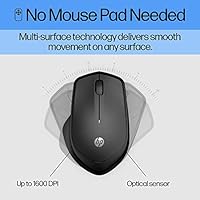
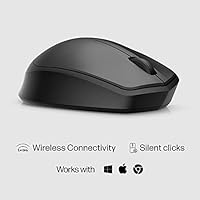
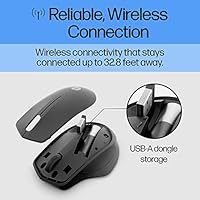
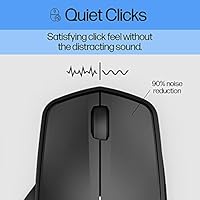
The most talked-about aspect of this office mouse is its silent click mechanism, which cuts button noise by up to 90% compared to standard mice — not by making clicks feel mushy, but by dampening the sound internally while preserving tactile feedback. The 2.4GHz nano receiver tucks neatly inside the mouse body when not in use, a small but thoughtful detail for frequent travelers. At 1600 DPI, the optical sensor handles everyday tasks across most surfaces without a mouse pad, though it won't satisfy anyone who needs adjustable sensitivity on the fly. Battery life is a genuine highlight: 18 months on one AA battery means most users will barely think about it.

Best For

This silent wireless mouse hits its sweet spot with a pretty specific crowd. Open-office workers who've silently suffered through a colleague's relentless clicking will immediately appreciate the difference. Students pulling long hours in libraries or quiet study rooms will find it equally useful — no more self-conscious clicks during a quiet exam period. Remote workers on back-to-back video calls benefit too, since audible mouse clicks can actually be picked up by microphones in quieter rooms. It's also a solid pick for frequent travelers: lightweight, compact, and with the receiver stored onboard, there's nothing extra to lose. Anyone wanting a trusted brand name without paying premium prices will find it a practical, no-fuss choice.

User Feedback

Across more than 2,100 ratings, the HP 280M sits at a 4.4-star average — which, for a mouse in this price range, reflects genuine satisfaction rather than inflated hype. Buyers consistently praise the quiet clicks as advertised, and most report the battery lasting well beyond expectations. Setup draws repeated praise too: plug in the receiver and it works, no software required. That said, criticism does surface. Users with larger hands flag that the mouse feels undersized during long sessions. The scroll wheel gets mixed reviews — functional but lacking the smooth, precise feel of pricier options. A smaller number of users report occasional tracking issues on glass or very glossy surfaces, which aligns with the limitations of standard optical sensors at this level.

Pros

  • Silent clicks are genuinely quiet enough to go unnoticed in shared or library-style workspaces.
  • Battery life regularly reaches close to 18 months in real-world daily use — a rare claim that holds up.
  • The nano receiver stores inside the mouse body, so there is nothing loose to misplace while traveling.
  • Plug-and-play setup works instantly on both Windows and macOS with zero driver installation.
  • At just over 3 ounces, this silent wireless mouse adds almost nothing to a laptop bag.
  • HP branding provides meaningful reassurance over generic budget alternatives at a similar price.
  • Tracks reliably across wood, fabric, and laminate surfaces without needing a mouse pad.
  • The 2.4GHz wireless connection holds steady in standard office and home environments without dropout.
  • Solid overall value: delivers the core features most productivity users actually need, nothing superfluous.

Cons

  • Users with larger hands will likely find the compact body uncomfortable during long work sessions.
  • The scroll wheel feels flimsy and imprecise compared to mice even slightly above this price range.
  • No DPI adjustment options at all — 1600 DPI is the only setting, full stop.
  • The glossy plastic finish scratches easily and develops a worn, tacky feel after extended use.
  • Tracking becomes unreliable on glass or very smooth, light-colored desk surfaces.
  • Wireless interference in crowded office environments can occasionally cause connectivity hiccups.
  • Strictly right-handed design excludes left-handed users with no alternative configuration.
  • The click feel softens noticeably after around 9 to 12 months of heavy daily use.
  • No on-off switch on the side — it is tucked underneath, which confuses many first-time users.
  • Not officially compatible with Chrome OS or Linux, which limits use in some educational settings.

Ratings

Our scores for the HP 280M Silent Mouse are generated by AI after systematically analyzing thousands of verified global buyer reviews, actively filtering out incentivized, bot-generated, and duplicate feedback to surface what real users actually experience. The ratings below reflect both where this office mouse genuinely delivers and where it falls short — no sugarcoating, no inflated numbers. Strengths and frustrations are weighted equally so you can make a confident, informed call.
Noise Reduction
91%
This is the single reason most buyers pick this mouse over a standard option, and it largely delivers. Users in open-plan offices and quiet study rooms consistently report that the clicks are dramatically softer — audible to the user but not to a colleague sitting two feet away. On video calls, the difference is especially noticeable.
A small number of users feel the click dampening makes the buttons feel slightly less crisp over time, particularly after several months of heavy use. It does not completely eliminate sound — in a dead-silent room at night, the mechanism is still faintly audible to anyone nearby.
Battery Life
88%
The claimed 18-month battery life holds up well in practice according to most long-term users. Many report going six to twelve months without a single battery swap during regular daily use, which removes a genuine maintenance headache that plagues cheaper wireless mice.
A minority of buyers report battery drain faster than expected, though this often correlates with leaving the mouse powered on continuously. The mouse uses a AA battery — not AAA as some packaging suggests — so double-checking before your first replacement avoids a frustrating trip back to the store.
Click Feel & Tactile Feedback
74%
26%
Most productivity users find the click response more than adequate for document work, browsing, and spreadsheets. The buttons register reliably and do not feel mushy in the way some budget silent mice do, which is a common complaint about cheaper noise-dampened options in this category.
Power users accustomed to higher-end mice notice a slightly softer, less satisfying tactile response compared to non-silent buttons. After extended use of 9 to 12 months, a few buyers report the left button developing a slightly inconsistent feel — not broken, but noticeably less sharp than when new.
Ergonomics & Comfort
76%
24%
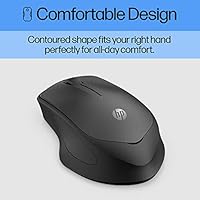
For average-to-medium sized right hands, the contoured shape supports a natural palm grip reasonably well during typical office sessions. Most users working four to six hour days report no discomfort, and the lightweight build reduces wrist strain during longer stretches.
Users with larger hands flag this as a real limitation — the mouse sits too low in the palm and forces a fingertip grip that becomes tiring over full workdays. It is also strictly right-handed, so left-handed users are entirely excluded. Not ideal for anyone whose job involves continuous mouse-heavy work.
Scroll Wheel
61%
39%
The scroll wheel gets the job done for standard web browsing and document navigation. It is reasonably responsive for casual daily use and does not require excessive force to actuate, which matters during long reading or research sessions.
This is one of the more consistently criticized aspects of the HP 280M. Many users describe the scroll wheel as feeling cheap and slightly wobbly, with a less defined step between notches than expected. It lacks any smooth-scroll mode, which becomes noticeable when scrolling through long documents or pages.
Tracking & Sensor Accuracy
78%
22%
On standard desk surfaces, wood, and fabric mouse pads, the 1600 DPI optical sensor tracks consistently with no noticeable lag or jitter. For everyday tasks — moving between windows, clicking menus, navigating spreadsheets — it performs exactly as a productivity mouse should.
On glass, highly polished surfaces, or very light-colored desks, tracking becomes unreliable and occasionally stutters. The fixed 1600 DPI also limits flexibility; users who prefer a lower sensitivity for precision work or a higher one for large monitors cannot adjust it, which is a genuine gap.
Wireless Connectivity & Stability
83%
The 2.4GHz USB nano receiver provides a stable, lag-free connection in normal office and home environments. Most users report zero disconnections or dropouts under typical usage conditions, and the connection re-establishes instantly after waking from sleep.
A small but recurring subset of reviewers report intermittent connectivity issues, particularly in environments with significant wireless interference such as co-working spaces with dense Wi-Fi networks. USB 3.0 port interference is occasionally flagged as a culprit — moving the receiver to a USB 2.0 port tends to resolve it.
Build Quality & Durability
69%
31%
The overall construction feels solid enough for the price point, with no obvious flex in the shell and buttons that do not rattle. Most users report the mouse holding up fine through 12 to 18 months of daily office use without any structural issues.
The glossy plastic finish picks up scratches and fingerprints visibly over time, and a portion of long-term users report the surface coating beginning to wear or develop a slightly tacky feel after a year of regular use. It does not feel premium — the materials communicate its budget positioning clearly.
Portability & Travel Friendliness
86%
At just 3.36 oz, this office mouse disappears into a laptop bag without adding noticeable weight. The nano receiver stores inside the mouse body, eliminating the risk of losing it in transit — a practical detail that frequent travelers specifically call out in reviews.
The low-profile shape, while compact, does mean there is less to grip when pulling it out of a bag quickly. There is no carrying pouch or case included, so the glossy surface is prone to picking up scratches during transport unless the user adds their own protection.
Setup & Ease of Use
93%
Plug the nano receiver into any USB-A port and the mouse is ready within seconds — no software download, no driver installation, no account creation. This plug-and-play simplicity is consistently praised by users who have dealt with finicky wireless peripherals before, and it works identically on Windows and macOS.
There is no on-off switch visible to many first-time users, which causes brief confusion — it is located on the underside. Beyond that, there is genuinely little to complain about in the setup process. The simplicity is also a ceiling: there are no customization options, macros, or DPI settings to configure.
Value for Money
84%
Relative to what this mouse actually delivers — reliable wireless, genuine noise reduction, and long battery life under an established brand name — most buyers feel it represents fair value. It consistently outperforms cheaper no-brand silent mice in build consistency and connection stability.
Compared to slightly pricier competitors, the fixed DPI, basic scroll wheel, and non-adjustable ergonomics start to erode the value argument for anyone with specific needs beyond basic productivity. Users who later upgraded describe it as a stepping stone rather than a long-term solution.
Surface Versatility
72%
28%
On the vast majority of everyday surfaces — wood desks, laminate, notepads, and standard mouse pads — the sensor performs reliably without requiring any special setup. This makes it genuinely flexible for users who move between workstations or work in variable environments.
Glass and glossy white surfaces are a documented weak point, with tracking becoming erratic or cutting out entirely. Users who work on glass-topped desks should be aware this is not an edge case — it is a consistent limitation of standard optical sensors at this price tier.
Compatibility
87%
The HP 280M works reliably across a broad range of operating systems without any configuration. Windows 7 through 10, and macOS from older versions onward, all function correctly with no compatibility-related complaints in the user base.
Linux users are not officially supported, though some report it working without issues. Chrome OS compatibility is also unconfirmed officially, which is a gap for users in educational settings where Chromebooks are common — the very audience this mouse would otherwise suit well.

Suitable for:

The HP 280M Silent Mouse was built with a very specific kind of user in mind, and for that user, it genuinely delivers. If you work in an open-plan office, share a workspace, or regularly use your laptop in quiet environments like libraries or coffee shops, the dramatically quieter click mechanism solves a real, everyday annoyance without requiring any trade-off in reliability. Students who spend hours in study halls or shared dorm rooms will appreciate how unobtrusive it is compared to a standard mouse. Remote workers who sit through back-to-back video calls will find it particularly valuable — audible mouse clicks can bleed into microphones more than most people realize, and this office mouse sidesteps that problem entirely. Frequent travelers benefit from the onboard receiver storage and lightweight build, making it a genuinely low-maintenance companion for laptop bags. Anyone who wants a wireless mouse from a name-brand manufacturer without crossing into premium pricing territory will also find the value proposition hard to argue with.
Not suitable for:

There are clear scenarios where the HP 280M Silent Mouse is simply the wrong tool, and it is worth being direct about them. If you have large hands or spend eight or more hours a day at a computer, the compact, low-profile body will likely cause discomfort before the end of a full workday — this is not a mouse built for extended heavy use by larger users. Left-handed users are completely excluded by the right-handed-only ergonomic shape, with no ambidextrous variant available. Graphic designers, video editors, or anyone who relies on adjustable DPI settings for precision work will find the fixed 1600 DPI frustrating, as there is no way to tune sensitivity on the fly. Gamers should not even consider it — the sensor, button response, and lack of customization are not in the same conversation as dedicated gaming peripherals. Anyone who works primarily on a glass or high-gloss desk should also be cautious, as the optical sensor tracks unreliably on those surfaces. If you need a scroll wheel with a smooth, high-quality feel for navigating long documents or dense spreadsheets, the basic wheel here may test your patience over time.
Specifications

  • Brand & Model: Manufactured by Hewlett Packard Office under the HP 280M series designation.
  • Connectivity: Uses a 2.4GHz wireless USB nano receiver for a stable, lag-free connection without Bluetooth pairing.
  • Wireless Range: Operates reliably at distances of up to 32.8 ft (10 meters) from the connected receiver.
  • Sensor Type: Optical tracking sensor with a fixed resolution of 1600 DPI for standard productivity use.
  • Button Layout: Three-button configuration comprising left click, right click, and a clickable scroll wheel in the center.
  • Noise Reduction: Left and right buttons feature internal dampening mechanisms that reduce click noise by up to 90% versus standard mice.
  • Battery: Powered by a single AA battery with an advertised lifespan of up to 18 months under typical daily use.
  • Weight: The mouse body weighs approximately 3.36 oz (95 g), making it one of the lighter options in its category.
  • Dimensions: Measures 4.31 inches long by 2.79 inches wide by approximately 1.38 inches tall at the highest point of the arch.
  • Hand Orientation: Designed exclusively for right-handed users with an ergonomic contoured shell; no left-handed variant is available.
  • Surface Compatibility: Multi-surface optical tracking performs reliably on wood, fabric, laminate, and standard mouse pads without requiring a dedicated pad.
  • Receiver Storage: The nano USB receiver stores inside a dedicated compartment in the underside of the mouse when not in use.
  • OS Compatibility: Officially supports Windows 7, Windows 8, Windows 10, macOS X 10.1 (Puma), and macOS X 10.2 (Jaguar) and later.
  • Plug-and-Play: No driver installation or software download is required; the mouse is recognized automatically upon inserting the USB receiver.
  • Color: Available in matte and gloss black finish as the standard and primary color option.
  • Power Switch: An on/off toggle switch is located on the underside of the mouse to preserve battery during storage or transport.
  • USB Connector: The nano receiver uses a USB-A connector, requiring a standard full-size USB port on the host device.
  • Amazon Ranking: Holds a position of approximately #129 in the Computer Mice category on Amazon with a 4.4-star average from over 2,100 ratings.

Related Reviews

HP 250 Dual Mouse
HP 250 Dual Mouse
83%
88%
Wireless Connectivity
94%
Battery Life
91%
Click Quietness
82%
Multi-Device Switching
79%
Ergonomics & Comfort
More
Dell KM555 Silent Keyboard and Mouse
86%
94%
Quiet Typing and Mouse Clicking
91%
Battery Life
85%
Ergonomics and Comfort
88%
Connectivity and Flexibility
84%
Build Quality
More
HP 18H24AA Wireless Keyboard and Mouse Combo
79%
91%
Value for Money
93%
Ease of Setup
74%
Keyboard Typing Experience
63%
Mouse Comfort & Ergonomics
86%
Wireless Reliability
More
Lenovo WL500 Rechargeable Silent Mouse
88%
88%
Build Quality
95%
Silent Operation
78%
Battery Life
90%
Ergonomics & Comfort
92%
Portability
More
HP 920 Ergonomic Vertical Mouse
87%
89%
Comfort & Ergonomics
92%
Battery Life
84%
Ease of Use
87%
Multi-Device Support
88%
Adjustable DPI & Precision
More
Verbatim Wireless Silent Mouse & Keyboard Combo
88%
95%
Quiet Operation
89%
Ergonomics
92%
Compatibility with Mac and Windows
88%
Ease of Setup
85%
Battery Life
More
HP 650 Wireless Keyboard & Mouse Combo
82%
93%
Battery Life
88%
Wireless Stability
81%
Typing Experience
72%
Mouse Comfort & Usability
74%
Build Quality
More
HUO JI Silent Wireless Keyboard and Mouse Combo
86%
88%
Quiet Performance
84%
Ergonomics and Comfort
92%
Battery Life
90%
Setup and Installation
85%
Wireless Range and Connectivity
More
MOJO Master Grip Rechargeable Silent Vertical Mouse MJ-240
86%
88%
Ergonomics and Comfort
93%
Silent Button Performance
80%
Customizability
91%
Connectivity and Compatibility
85%
Battery Life and Charging
More
Meatanty Mouse Mover
88%
91%
Ease of Use
95%
Silent Operation
89%
Value for Money
94%
Setup & Installation
88%
Adjustable Timer Functionality
More

FAQ

No, nothing at all. Just plug the nano receiver into any available USB-A port on your computer or laptop, and it connects automatically within a few seconds. It works this way on both Windows and macOS right out of the box.

The HP 280M Silent Mouse is genuinely much quieter than a standard mouse, with around 90% noise reduction on the main buttons. In a typical office or shared room, someone sitting a couple of feet away is very unlikely to hear it. In a completely silent room late at night, you will still hear a faint sound yourself, but it will not disturb others.
It runs on a single AA battery, which is included in the box. The 18-month claim is optimistic but not far off — most regular users report going somewhere between 8 and 14 months before needing a replacement, depending on how many hours a day they use it. Turning off the mouse via the underside switch when not in use helps extend that life significantly.

Unfortunately, no. The shell is shaped specifically for right-handed palm and fingertip grips, with a contour that does not translate to left-handed use. If you are left-handed, you would need to look for an ambidextrous or dedicated left-handed model instead.

This is a known limitation of the optical sensor. On glass or very smooth, highly reflective surfaces, tracking becomes inconsistent and can cut out entirely. If your desk is glass-topped, placing a thin mouse pad underneath solves the problem immediately — even a sheet of paper works in a pinch.

No, there is no DPI adjustment button or software settings available. The sensor is fixed at 1600 DPI, which suits most everyday productivity tasks fine. If you need variable sensitivity for design work, photo editing, or gaming, this mouse does not offer that flexibility and you would be better served by a model with on-the-fly DPI switching.

Losing the nano receiver is the most common way this type of mouse becomes permanently unusable, since each receiver is paired specifically to its mouse at the factory. HP does not typically sell standalone replacement receivers for this model through retail. Storing it inside the mouse when traveling — which this mouse supports — is genuinely the best way to avoid this situation.

The receiver uses a standard USB-A connector, so you would need a USB-A to USB-C adapter if your laptop only has USB-C ports. Those adapters are inexpensive and widely available, and users report the mouse works perfectly through one. Just note the adapter is not included.

It is on the smaller side, and this comes up frequently in user reviews. If your hands are average to medium sized, most people find it comfortable for standard office sessions. Those with larger hands tend to notice strain during full workdays because the mouse sits too low in the palm, forcing a fingertip grip that is not ideal over many hours.

The scroll wheel is functional but is arguably the weakest part of this office mouse. It works reliably for basic scrolling tasks but feels noticeably less precise and sturdy than the wheels found on mid-range competitors. Some long-term users report it feeling slightly loose after a year of regular use, though it rarely stops working altogether. If smooth, high-precision scrolling matters to you, it is worth keeping this limitation in mind.