Overview

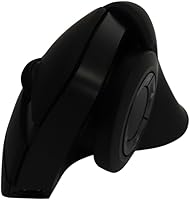
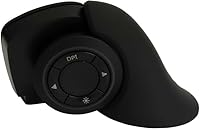
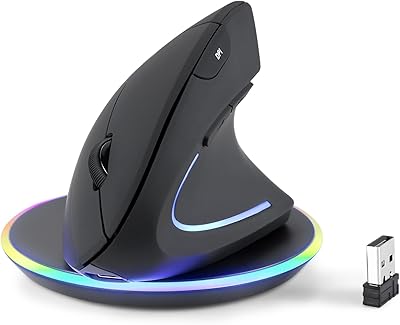
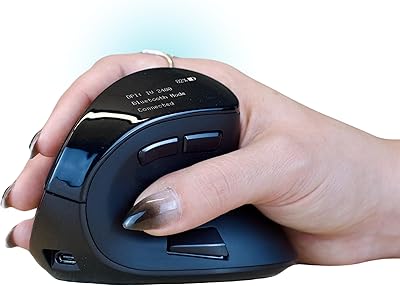
The MOJO Master Grip Rechargeable Silent Vertical Mouse MJ-240 is designed to provide an ergonomic solution for those looking to reduce strain during prolonged computer use. This ergonomic vertical mouse features a neutral ‘handshake’ grip, which alleviates pressure on your wrist and hand. It’s rechargeable, wireless, and supports both Bluetooth and 2.4 GHz USB connections, giving you flexibility in how you connect to your devices. The silent buttons make it an ideal choice for quiet environments, ensuring that typing or clicking won't disturb others. Additionally, its adjustable DPI settings (ranging from 800 to 2400) allow for a tailored experience, making it easy to find the perfect sensitivity for your needs.
Features & Benefits

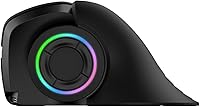
This ergonomic vertical mouse is designed with a neutral ‘handshake’ grip that helps minimize discomfort during extended periods of use. It supports triple connectivity modes, including Bluetooth (x2) and a 2.4 GHz USB dongle, making it easy to control multiple devices from a single mouse. The customizable buttons can be configured through the included software to suit your personal preferences. At just 3.9 ounces and with dimensions of 4.88 x 2.99 x 2.64 inches, it’s compact and lightweight enough for easy portability. Additionally, the rechargeable battery, along with a low battery indicator, adds convenience, ensuring that you’re always ready to go without constantly replacing batteries.

Best For

The MOJO silent vertical mouse is best suited for individuals who suffer from wrist or hand strain due to traditional mice, as its ergonomic design offers relief. It’s also a great choice for those who need a quiet mouse for shared workspaces or study environments, where noise reduction is a priority. The customizable settings will appeal to tech-savvy users who want to fine-tune their experience, while multi-device users will appreciate its ability to seamlessly switch between devices. Whether you’re working, gaming, or browsing, this mouse adapts to various needs, making it a versatile option for different tasks.

User Feedback

Many users have praised the ergonomic design of this mouse, noting that it significantly reduces discomfort during long hours of use. The silent buttons have received positive feedback, especially in shared environments where noise can be distracting. However, some users report a learning curve when adapting to the vertical design, although most find it easy to adjust after a brief period. The custom software for button mapping and DPI settings has received mixed reviews—while some users love the customization, others have found the software a bit cumbersome. Overall, it’s a solid choice for those seeking comfort and quietness during their computing tasks.

Pros

  • The ergonomic vertical design significantly reduces wrist and hand strain, making it ideal for long hours of use.
  • Silent buttons provide a quiet and distraction-free experience, which is perfect for shared or open office environments.
  • Its multi-device functionality (Bluetooth x2, USB) allows easy switching between devices without the need for multiple mice.
  • The rechargeable battery is convenient and eco-friendly, with a low battery indicator to avoid unexpected interruptions.
  • The customizable DPI settings (800–2400) make it adaptable for different tasks, from precise editing to general browsing.
  • Compact and lightweight, this mouse is easy to carry around for work or travel, taking up minimal space in a bag.

Cons

  • The vertical design may feel uncomfortable or awkward for users who are used to traditional mice.
  • Some users report a learning curve with the vertical orientation, requiring time to adjust to the grip.
  • The custom software for button mapping and DPI adjustment can be difficult to navigate for non-tech-savvy users.
  • Not everyone finds the size to be ideal; users with smaller hands might feel that the mouse is too bulky.
  • The rechargeable battery life is decent but may not last as long as expected for heavy daily use.
  • Some users feel the mouse lacks the precision or responsiveness of higher-end models used for gaming or professional tasks.

Ratings

After analyzing verified user reviews worldwide, across multiple languages and platforms, we’ve gathered comprehensive feedback for the MOJO Master Grip Rechargeable Silent Vertical Mouse MJ-240. We filtered out spam, bot/incentivized, duplicated, off-topic, and exaggerated reviews, ensuring that only authentic, high-quality feedback informed the results. Both strengths and pain points are reflected in the scores, providing a balanced perspective on the product’s overall performance and user satisfaction. Reviewers have consistently praised its ergonomic design and customizable features, though some raised concerns about software usability and the vertical design's learning curve.

Ergonomics and Comfort
88%
Many users find this ergonomic vertical mouse a huge relief for hand and wrist strain. The neutral 'handshake' design provides a natural grip that makes long hours of use more comfortable, especially for those with previous wrist issues. The mouse helps reduce discomfort during extended sessions, making it a top choice for those prioritizing ergonomic support.
However, not everyone adapts easily to the vertical design. Some buyers mentioned a bit of a learning curve at first, which can affect the overall comfort until users get used to the different hand position. Additionally, users with smaller hands may struggle with the grip, finding it slightly too large for optimal comfort.
Silent Button Performance
93%
One of the standout features of this mouse is its silent buttons. Users in shared office spaces or quiet environments have expressed high satisfaction with the mouse's noise reduction. The button presses are virtually inaudible, allowing for a more focused and peaceful work environment, which is especially appreciated during typing or calls.
While the silent buttons are a major plus for some, a few users reported that they occasionally feel too soft or lack tactile feedback. This can lead to a less satisfying experience for those who prefer a more traditional clicky feel. For some, the quiet nature of the buttons doesn’t offer enough sensory feedback during use.
Customizability
80%
20%
The ability to customize buttons and adjust DPI settings through the software adds significant versatility. Many buyers enjoy fine-tuning the mouse to their personal preferences, especially those who need specialized functions for different tasks. The adjustable DPI offers excellent control for both everyday tasks and precision work.
However, some users noted that the customization software could be more intuitive and user-friendly. The process of remapping buttons or adjusting settings can be frustrating, particularly for those who are not familiar with software-driven customizations. Additionally, the software compatibility can be hit-or-miss depending on the operating system.
Connectivity and Compatibility
91%
The versatility of this device shines with its triple-mode connectivity, including Bluetooth and a 2.4 GHz USB dongle. Users appreciate the flexibility to switch between multiple devices seamlessly, whether it’s a laptop, tablet, or desktop. This multi-device support is particularly convenient for those who use different devices regularly, as it eliminates the need for extra adapters.
While the multi-device support is great, some users reported occasional connection drops or slow pairing, especially when switching between Bluetooth devices. A few people also mentioned that they encountered issues with Bluetooth connectivity on certain older computers, making the wireless experience less reliable in some cases.
Battery Life and Charging
85%
The rechargeable battery and low battery indicator are highly appreciated by users. Many find the long-lasting battery life convenient for daily use without frequent recharging, making it an ideal choice for those who need a reliable mouse throughout the workday. The easy-to-charge design also adds to the product's convenience.
On the downside, some users have reported that the battery life isn't as long-lasting as expected under heavy use. While the rechargeable nature is great, a few buyers felt that the battery drains faster than anticipated, especially when using higher DPI settings for precision tasks. Some wish for a more powerful battery.
Build Quality and Durability
86%
The build quality of this ergonomic vertical mouse is solid, with a robust design that holds up well over time. Many buyers have praised the durability of the materials, noting that it feels premium without being too heavy. The compact design makes it easy to carry, and the materials are durable enough to withstand everyday use.
That said, a few users reported that the mouse’s plastic body can feel somewhat slippery, especially after extended use. Some noted that it can accumulate fingerprints or smudges, diminishing the overall appearance. While it’s durable, it may not provide the premium tactile feel some expect from higher-end models.
Ease of Use and Setup
82%
18%
Setting up this mouse is relatively straightforward, with clear instructions and quick installation. Users appreciate how easy it is to connect via Bluetooth or the 2.4 GHz USB dongle. Once connected, the mouse works flawlessly without requiring too much effort, which is a significant advantage for less tech-savvy users.
However, some reviewers mentioned that the setup process can be slightly confusing, especially for those trying to use the software to map buttons or adjust settings. A few also pointed out that the initial Bluetooth pairing wasn’t as smooth as expected, causing frustration in the early setup stages.
Design and Portability
90%
The compact size and lightweight design make this device highly portable, perfect for traveling or moving between workspaces. Users find it easy to carry in a bag or briefcase without adding extra bulk. The ergonomic design remains comfortable even when used on the go, making it a great option for professionals who need a functional mouse while traveling.
Some users, particularly those with larger hands, mentioned that the mouse's compact size might feel too small for optimal grip. While it’s portable, a few felt that the design might not offer as much comfort for extended use, particularly for larger hands or those who prefer a more substantial mouse.
Software Experience
72%
28%
The customization software provides additional functionality, allowing users to remap buttons and adjust DPI settings. Many users appreciate the level of control the software offers, particularly for those with specific needs for work or gaming. It’s a nice feature for those who like to personalize their devices.
Unfortunately, the software experience is a common point of criticism. Many users reported that it was difficult to navigate, with a clunky interface and occasional crashes. The lack of an intuitive design and some compatibility issues with different operating systems has caused frustration for users who simply want a hassle-free customization experience.
Long-Term Value
87%
This ergonomic vertical mouse provides good value for its price, especially considering its features and customizable options. Users have commented that the mouse offers a lot of functionality for its price point, making it a worthwhile investment for anyone in need of a comfortable and reliable mouse.
However, some buyers questioned whether the higher-end features justify the price tag, especially considering that some aspects, like the software and setup process, could be improved. While the mouse performs well overall, a few users felt the cost might be slightly higher compared to similar models without the same level of polish.
Customer Support
78%
22%
The company provides decent customer support, with many users reporting satisfactory responses to their queries. Support staff is generally helpful in resolving connectivity or setup issues. For users experiencing problems, customer service is available through various channels, ensuring accessibility when needed.
Despite this, some users reported slow response times from customer support, with a few even mentioning unhelpful or generic replies. A handful of users felt that their issues weren't adequately addressed, leading to dissatisfaction with the support experience.
Noise Level
92%
As expected, the silent button feature is a major selling point, and users rave about the minimal noise output. For those working in quiet environments, this feature is especially beneficial. The lack of noise while typing or clicking is a notable advantage, allowing for a more professional and distraction-free workspace.
However, some users felt that the lack of tactile feedback made the silent buttons feel a bit too soft, especially for those who prefer more satisfying clicks. This could be an issue for people who rely on audible or tactile cues for their actions.
Price vs. Features
88%
The mouse offers a good balance of features and affordability. Many buyers felt that it provides excellent functionality at a competitive price, especially considering the ergonomic design, silent buttons, and multi-device connectivity. It offers strong value for those in need of a high-quality ergonomic mouse.
A few users noted that the price might not fully reflect the overall experience. While the product is functional, some feel that the software and customization options should be more refined, and the build quality could be improved to justify the cost better.

Suitable for:

The MOJO Master Grip Rechargeable Silent Vertical Mouse MJ-240 is ideal for individuals who experience wrist or hand strain from using traditional mice, particularly those working long hours at a computer. Its ergonomic vertical design offers relief for users who need to reduce discomfort during extended use, such as office workers, students, or professionals in tech fields. People in shared environments will also benefit from the mouse's silent buttons, which eliminate distractions during typing or meetings. Additionally, its multi-device functionality and customizable DPI settings make it a great choice for those who work across multiple devices or require specific sensitivity for tasks like graphic design or gaming.
Not suitable for:

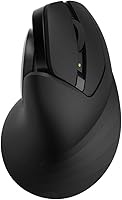
This mouse may not be the best choice for users who prefer a traditional mouse grip or those with smaller hands, as the vertical design might feel uncomfortable or awkward at first. The learning curve associated with the vertical orientation could make it challenging for those who need immediate ease of use. Additionally, while the customizable features are beneficial, the included software can be difficult to navigate, which might deter less tech-savvy users. If you’re someone who needs a simple, plug-and-play solution without extra customization or a robust software setup, this mouse may not be the most user-friendly option.

Specifications

  • Grip Type: Features a neutral 'handshake' design to reduce hand and wrist strain during use.
  • Connectivity: Supports Bluetooth x2 and 2.4 GHz USB dongle for versatile connection options.
  • Buttons: Equipped with 7 silent buttons plus a scroll wheel for quiet operation.
  • DPI Settings: Adjustable DPI settings range from 800 to 2400 for customizable sensitivity.
  • Battery Type: Powered by a rechargeable lithium polymer battery for extended use.
  • Battery Indicator: Includes a low battery LED indicator to alert users when charging is needed.
  • Dimensions: Compact design with dimensions of 4.88 x 2.99 x 2.64 inches.
  • Weight: Lightweight at 3.9 ounces, making it easy to handle and transport.
  • Compatibility: Compatible with Windows, macOS, and Linux operating systems.
  • Software Support: Comes with custom software for button mapping and DPI adjustments.
  • Multi-Device Support: Allows simultaneous use with two Bluetooth devices and one via USB dongle.
  • Form Factor: Ergonomic vertical design to promote natural hand positioning and comfort.
  • Color: Available in a neutral color that complements various work environments.
  • Recharge Time: Charges quickly, allowing users to minimize downtime during recharges.
  • Use Case: Ideal for individuals experiencing wrist or hand strain from traditional mice.
  • Noise Level: Silent buttons make it suitable for quiet environments like offices and libraries.

Related Reviews
Lenovo WL500 Rechargeable Silent Mouse
88%
88%
Build Quality
95%
Silent Operation
78%
Battery Life
90%
Ergonomics & Comfort
92%
Portability
More
Perixx PERIMICE-713RX Wireless Rechargeable Vertical Mouse
83%
88%
Ergonomics & Comfort
91%
Charging Flexibility
86%
Quiet Click Feature
75%
Wireless Performance
82%
DPI Precision & Control
More
Nulea M510 Vertical Mouse
85%
91%
Ergonomics and Comfort
83%
Build Quality
88%
DPI Adjustability
90%
Wireless Performance
85%
Setup and Installation
More
Ergodriven Om Handshake Vertical Mouse
87%
91%
Ergonomic Comfort
88%
Wireless Connectivity
84%
DPI Precision & Adjustability
89%
Build Quality
90%
Quiet Clicks & Noise Reduction
More
UGREEN Vertical Wireless Ergonomic Mouse

84%
88%
Ergonomic Comfort
84%
Connectivity Performance
80%
Ease of Use
91%
Design and Build Quality
82%
Battery Life
More
DeLUX M618mini Wireless Vertical Mouse
83%
88%
Ergonomics and Comfort
91%
Battery Life
86%
Connectivity Options
82%
Build Quality
89%
Ease of Use
More
Logitech MX Vertical
79%
88%
Ergonomic Comfort
61%
Adjustment Period
83%
Build Quality
86%
Multi-Device Connectivity
91%
Battery Life
More
HP 280M Silent Mouse
80%
91%
Noise Reduction
88%
Battery Life
74%
Click Feel & Tactile Feedback
76%
Ergonomics & Comfort
61%
Scroll Wheel
More
seenda Ergonomic Vertical Wireless Mouse

86%
90%
Wrist Comfort & Ergonomics
87%
Battery Life & Charging
91%
Quiet Click Performance
85%
Compatibility & Connectivity
88%
Build Quality & Durability
More
Dell KM555 Silent Keyboard and Mouse
86%
94%
Quiet Typing and Mouse Clicking
91%
Battery Life
85%
Ergonomics and Comfort
88%
Connectivity and Flexibility
84%
Build Quality
More

FAQ

This ergonomic vertical mouse is designed to reduce hand and wrist strain by promoting a more natural 'handshake' grip. It’s ideal for users who experience discomfort from traditional mice, especially during long hours of use.

Setting up this device is easy. Simply connect it via Bluetooth or use the included 2.4 GHz USB dongle. If you want to customize button functions or DPI settings, install the provided software on your computer.

Yes, this mouse supports triple-mode connectivity. You can connect it to two Bluetooth devices and one device via the 2.4 GHz USB dongle, making it a great choice for users who need to switch between different devices seamlessly.

The rechargeable lithium polymer battery provides reliable power for extended use. It includes a low battery indicator so you can easily see when it’s time to recharge. Exact battery life will vary depending on usage but is designed to last through daily tasks.

Yes, this device is compatible with Windows, macOS, and Linux, making it versatile across different operating systems. Just ensure the necessary drivers or software are installed for optimal performance.

The MOJO Master Grip allows you to adjust DPI settings between 800 and 2400. You can change the DPI directly via a button on the mouse or through the custom software for more precise control over sensitivity.

Yes, one of its key features is the silent buttons, which help reduce noise during operation. This makes it an ideal choice for work or study environments where quiet operation is essential.

Many users praise the comfort of this mouse, especially during extended periods of use. The neutral 'handshake' grip helps alleviate strain on your wrist and hand. However, it may take some time to adjust to the vertical orientation, especially if you’re used to traditional mice.

The mouse comes with software that allows you to customize the button mapping and adjust the DPI settings. While the software is generally useful, some users report that it can be a bit tricky to navigate, particularly for non-tech-savvy individuals.

Some users have mentioned a learning curve due to the vertical design, as it differs significantly from traditional mice. Additionally, while most find the mouse comfortable, those with smaller hands may struggle with the size or grip.