Overview

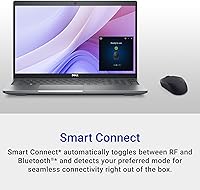
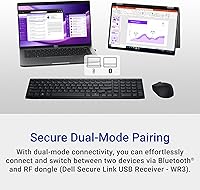
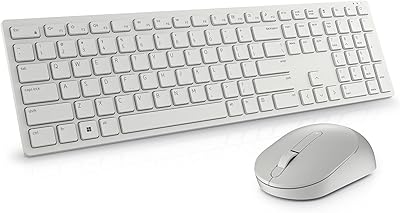
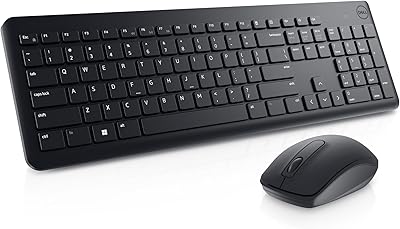
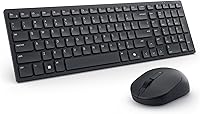
The Dell KM555 Silent Keyboard and Mouse is a well-designed, wireless combo aimed at users seeking a quiet, comfortable workspace. This keyboard and mouse set delivers silent operation to minimize distractions in shared environments. It offers flexibility with dual-mode connectivity (Bluetooth and USB receiver), making it easy to switch between devices. With up to 36 months of battery life, this long-lasting set requires minimal maintenance. Additionally, it is backed by a 3-year warranty, ensuring peace of mind, and is made with sustainable materials, contributing to a more eco-friendly office setup.
Features & Benefits

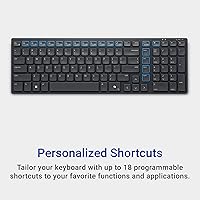
This Dell wireless set boasts several useful features aimed at enhancing productivity. Its customizable shortcut keys allow users to tailor commands for efficiency. The mouse has an adjustable DPI, ensuring a responsive experience for various tasks. With an ambidextrous design, it's suitable for both left- and right-handed users. The keyboard and mouse also include a low battery LED indicator, so users are always aware of when it’s time to recharge. Finally, the Copilot key integration enhances the user experience with seamless Windows functionality, though it’s only available on Windows 10 and 11 devices.

Best For

This keyboard and mouse combo is ideal for a variety of users, particularly office workers and remote professionals who value a quieter work environment. Those who prefer a low-maintenance, long-lasting setup will appreciate its extended battery life of up to three years. It’s a great fit for individuals who need a reliable keyboard and mouse combo for long hours of use without worrying about frequent replacements or recharging. Windows 10 and 11 users will especially benefit from the Copilot key feature, which adds extra convenience to their tasks.

User Feedback

Users generally appreciate the quiet typing experience, noting that the Dell KM555 delivers a comfortable and distraction-free workflow. Many have praised the long battery life and easy setup, with some mentioning that the low-maintenance design is a significant plus. However, a few users have pointed out that the Copilot key feature isn't widely supported yet, which limits its usefulness. Additionally, while the mouse suits most users, those with larger hands have expressed concerns about its size, finding it less ergonomic for extended use.

Pros

  • This keyboard and mouse combo is highly appreciated for its quiet operation, making it perfect for shared workspaces.
  • The long battery life of up to 36 months reduces the need for constant recharging, ideal for remote workers.
  • Dual-mode connectivity (Bluetooth and USB receiver) ensures flexibility for users switching between devices.
  • The ambidextrous mouse design caters to both left- and right-handed users, offering comfort for a wide range of people.
  • Customizable shortcut keys increase productivity, allowing users to streamline their tasks with ease.
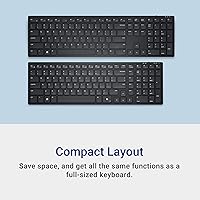
  • The compact and lightweight design makes this device portable and convenient for small desks or travel.

Cons

  • The mouse may feel too small for users with larger hands, causing discomfort during extended use.
  • Some users report that the Copilot key feature is not widely supported on non-Windows devices.
  • The keyboard keys are quiet but can feel less responsive compared to more tactile options, which may not appeal to all typists.
  • While ergonomic, the mouse design may not provide enough support for people with specific hand ergonomics needs.
  • The ambidextrous design, although versatile, may not feel as comfortable for users accustomed to more specialized shapes.
  • The plastic materials used, while eco-friendly, may not feel as premium or durable as those of other higher-end options.

Ratings

After analyzing verified user reviews from various platforms across different languages, the Dell KM555 Silent Keyboard and Mouse has received generally positive feedback for its quiet operation and long battery life. Spam, bot, and incentivized reviews were filtered out to ensure that only high-quality, authentic experiences informed the results. Both strengths and pain points have been reflected in the ratings, offering a balanced overview of this device's performance across various use cases and environments.

Quiet Typing and Mouse Clicking
94%
Many users have praised the silent operation of this keyboard and mouse combo, especially in shared workspaces. The quiet typing and clicking experience help maintain a calm and productive atmosphere, making it ideal for office environments or home offices. This feature is particularly appreciated by users who value a peaceful workspace while working for extended periods.
Some users mentioned that while the typing experience is quiet, it may feel slightly mushy or less tactile compared to other models, which could be less satisfying for those who prefer a more responsive keystroke. Additionally, a few people noted that the mouse click noise, although quieter than average, still produces a noticeable sound in quieter environments.
Battery Life
91%
The long battery life of up to 36 months is one of the standout features of this device. Users appreciate the low maintenance nature of the keyboard and mouse combo, as they rarely need to worry about replacing batteries. This is particularly valued by remote workers and those who need reliable devices without frequent interruptions for charging.
A small number of users expressed concern that the battery life, although impressive, can be impacted by the type of use. In more demanding environments, such as heavy daily usage or high DPI settings on the mouse, the battery life might be slightly shorter than advertised.
Ergonomics and Comfort
85%
The ambidextrous design of the mouse and the comfortable key layout of the keyboard make this set suitable for long hours of use. Many users find that the ergonomic design reduces strain during extended typing or gaming sessions. The compact keyboard and adjustable DPI settings also contribute to a user-friendly experience, enhancing comfort over time.
However, some users with larger hands have mentioned that the mouse may feel a bit small, which can lead to discomfort during prolonged use. Additionally, while the keyboard's compact design is praised for saving space, it may not be as comfortable for those accustomed to larger, full-sized keyboards.
Connectivity and Flexibility
88%
The dual-mode connectivity (Bluetooth and USB receiver) is highly appreciated by users, offering flexibility in how the devices are connected. This feature makes the combo versatile for use with laptops, desktop computers, or even tablets. The ability to switch between Bluetooth and USB receiver adds convenience, especially for users who need to connect to multiple devices.
Some users have pointed out that the Bluetooth connectivity can sometimes be unreliable with certain operating systems or older devices, leading to occasional connection drops. While the USB receiver is typically more stable, the initial setup may require extra steps for users who are not familiar with Bluetooth pairing.
Build Quality
84%
The build quality of the keyboard and mouse combo is generally regarded as solid, with the devices feeling sturdy and well-constructed for their price. The materials used are both durable and environmentally friendly, with the inclusion of recycled plastic. The overall design is minimalist yet functional, making it a great fit for most office setups.
A few users noted that while the build quality is good for the price, the plastic construction can feel a bit lightweight compared to more premium models. Some felt that the mouse could benefit from a more substantial feel, as it tends to feel flimsy in the hand for those used to higher-end devices.
Ease of Setup
93%
Users have reported that the setup process is quick and easy, with most people able to start using the devices almost immediately. The wireless pairing is seamless, and both the keyboard and mouse connect quickly without the need for complicated configurations. Even users new to wireless devices find the setup straightforward.
A small number of users encountered issues with the initial Bluetooth setup, which occasionally required multiple attempts to establish a stable connection. However, these cases seem to be relatively rare, and most users have no complaints about the ease of installation.
Durability
87%
The durability of the keyboard and mouse is a strong point, with many users noting that the devices hold up well over time even with regular daily use. The sturdy design and long battery life contribute to their overall longevity, ensuring that the combo remains functional for years without significant wear.
Some users reported that after extended use, the mouse may experience a slight decrease in responsiveness, particularly with high-speed movements. This issue does not appear to be widespread, but it could be a concern for users who require extremely precise mouse performance.
Compatibility with Windows 10/11
82%
18%
Many users with Windows 10 or 11 systems find that the Copilot key integration works seamlessly, offering a convenient way to navigate and manage tasks without needing to switch between the keyboard and mouse. The combo is fully compatible with modern versions of Windows, which is appreciated by most users.
However, some users have mentioned that the Copilot key feature is not always fully supported across all Windows applications, leading to occasional functionality limitations. Additionally, those using older versions of Windows or different operating systems may experience compatibility issues.
Mouse Size for Larger Hands
72%
28%
The compact design of the mouse is ideal for users with smaller hands, offering a comfortable and easy-to-use experience. Its ambidextrous design is another plus, allowing both left- and right-handed users to use the device comfortably.
However, users with larger hands reported that the mouse can feel cramped or less ergonomic for prolonged use. Some mentioned that it can cause discomfort during extended sessions, particularly for those who are used to larger mice with more hand space.
Value for Money
90%
The combination of affordable price, long battery life, and quiet performance makes this device a solid value for money. Users feel that they get a high-quality product without paying a premium, especially considering its eco-friendly materials and useful features. For everyday use, it delivers great performance at a reasonable price.
While many users feel it offers great value, some did mention that a few more advanced features, such as a more customizable mouse or backlit keys, could have added extra value. Additionally, users who are used to premium models may feel the design and build quality is not as robust as higher-end alternatives.
Sustainability and Materials
86%
One of the standout features for eco-conscious buyers is the inclusion of post-consumer recycled plastic in both the keyboard and mouse. This sustainability aspect is appreciated by users who value environmentally friendly products, especially when the performance does not suffer as a result.
While many users appreciate the sustainable materials, some felt that the use of recycled plastic could impact the overall feel of the devices. A few mentioned that the keyboard and mouse feel slightly more plastic-like compared to other products that use more traditional materials.
Customer Support and Warranty
83%
The 3-year advanced exchange service provides peace of mind for buyers, with many users praising the reliable customer support in case of issues. The warranty ensures that users are covered for several years, which is a major selling point for those concerned about long-term reliability.
A few users reported slower response times when trying to reach customer support for issues. Although the warranty is robust, some buyers wished for a more direct or faster resolution process for minor issues.

Suitable for:

The Dell KM555 Silent Keyboard and Mouse is an excellent choice for office workers, remote professionals, and students who need a quiet, efficient workspace. Its silent operation makes it ideal for shared environments, where reduced noise levels are essential. The long battery life—lasting up to 36 months—also suits users who prefer low-maintenance devices, as it minimizes the need for frequent recharging. Additionally, its dual-mode connectivity (Bluetooth and USB receiver) offers flexibility for those who switch between different devices or setups. Users with a focus on productivity will benefit from customizable shortcut keys and the ergonomic design, making this combo a great fit for long hours of use without strain.
Not suitable for:

However, the Dell KM555 may not be the best option for users with larger hands or those who prefer a more tactile typing experience. The mouse, while ambidextrous, can feel cramped for extended use, especially for those used to larger or more ergonomic designs. Additionally, while the keyboard offers quiet typing, some users have found the keys to be less responsive, which may be a concern for those who prioritize a more dynamic typing feel. The Copilot key, a feature designed for Windows 10/11, may also be a limitation for those using different operating systems, as it isn't widely supported outside of this environment.

Specifications

  • Connectivity: Supports dual-mode connectivity via Bluetooth or USB receiver for flexible connection options.
  • Battery Life: Offers up to 36 months of battery life for both the keyboard and mouse, depending on usage.
  • Warranty: Includes a 3-year advance exchange service warranty for peace of mind.
  • Material: Made with up to 64% post-consumer recycled plastic, contributing to its eco-friendly design.
  • Keyboard Design: Features a compact keyboard design with programmable keys to enhance productivity.
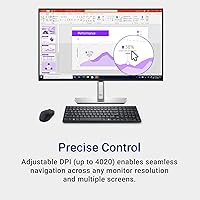
  • Mouse Design: The mouse is designed with adjustable DPI settings and an ambidextrous shape for comfortable use by both left- and right-handed users.
  • Shortcut Keys: Customizable shortcut keys allow users to tailor the keyboard for specific tasks or productivity needs.
  • Copilot Key: Includes a built-in Copilot key for seamless integration with Windows 10/11 functionalities.
  • Compatibility: Compatible with Windows 10 and later versions for full functionality, including Copilot key features.
  • Mouse Ergonomics: The mouse features an ergonomic design to reduce strain during extended use.
  • Keyboard Indicators: The keyboard includes a low battery LED indicator, providing users with a clear signal when batteries need replacing.
  • Dimensions (Keyboard): The compact keyboard measures approximately 14.6 inches x 5.4 inches (L x W), ideal for limited desk space.
  • Dimensions (Mouse): The mouse has a size of 4.4 inches x 2.3 inches (L x W), offering a comfortable grip for most hand sizes.
  • Weight: The keyboard weighs approximately 0.63 lbs, while the mouse weighs about 0.23 lbs.
  • Connectivity Range: Bluetooth range up to 33 feet (10 meters) and USB receiver range up to 20 feet (6 meters) for flexible placement.
  • Build Quality: Durable build quality with materials designed for long-lasting performance and resistance to wear.
  • Mouse Buttons: The mouse includes two main buttons and a clickable scroll wheel, with silent operation to reduce noise.
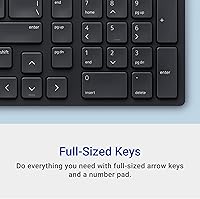
  • Keyboard Layout: Features a full-size layout with standard keys, including function keys and a number pad.

FAQ

The package includes a compact wireless keyboard, a silent wireless mouse, and a USB receiver. Both devices are pre-paired, so they’re ready to use right out of the box, and the mouse is designed to work in both left- and right-handed setups.

Setting up this device is simple. You can connect it via Bluetooth or the included USB receiver. To use Bluetooth, ensure your device supports Bluetooth 4.0 or higher. Plug the USB receiver into your computer’s USB port for a wired connection, and you’re good to go.

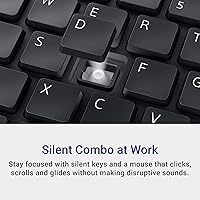
Both the keyboard and mouse are designed with quiet key switches and silent mouse buttons to minimize noise during use. This is particularly useful in shared workspaces or environments where quiet operation is essential.

Both the keyboard and mouse offer impressive battery life of up to 36 months on a single set of batteries, depending on usage. This long battery life makes the set low-maintenance and ideal for busy office workers or remote professionals.

This device is compatible with Windows 10 and later versions. It works via Bluetooth or USB receiver, so it can also be used with most laptops, desktops, and some tablets that support either connection method. However, it’s not ideal for macOS or non-Windows users if you want to use the Copilot key feature.

The Copilot key is a feature designed for seamless Windows functionality. It helps improve productivity by allowing quick shortcuts or system actions, but it only works on Windows 10 and 11. Non-Windows users will not benefit from this feature.

You can customize the keyboard’s shortcut keys using Dell's software (available for Windows). This allows you to assign specific functions to the programmable keys for faster and more efficient task management.

Yes, the mouse is ambidextrous and ergonomically designed for both left- and right-handed users. The keyboard is compact but designed for comfort during extended typing sessions, making it suitable for those who spend long hours working at a desk.

While the Dell KM555 is primarily designed for Windows users, it can work with Mac devices. However, the Copilot key and other Windows-specific features may not be fully supported, so you might miss out on some functionalities.

Yes, both the keyboard and mouse are made using up to 64% post-consumer recycled plastic. This makes the device a more sustainable choice compared to other options that don’t prioritize eco-friendly materials.