

Overview
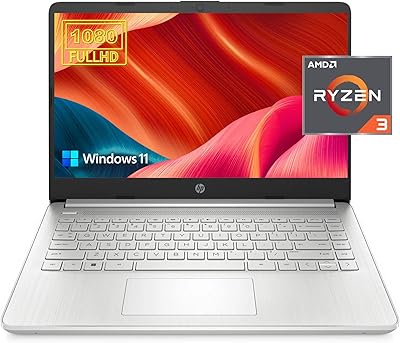
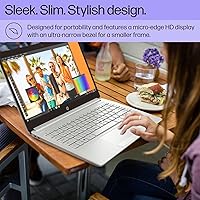
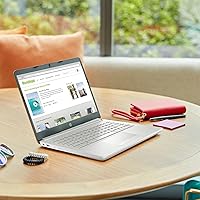
The HP TPN-Q221 14″ Laptop is HP's answer to the growing demand for affordable, no-frills Windows machines aimed at students and everyday office users. At 3.3 pounds and just 0.71 inches thin, this HP budget laptop slips into a backpack without complaint — portability is genuinely one of its stronger suits. HP's brand reliability adds a layer of confidence you don't always get at this price point. A bundled 1-year Office 365 subscription is a practical bonus that saves real money out of the gate. Just set expectations accordingly: this is a basic productivity machine built for light workloads, not something you'd want pushing video editing software or heavy multitasking sessions.
Features & Benefits
The Intel Celeron N4120 handles web browsing, Word documents, and spreadsheets without much trouble, though don't expect it to juggle a dozen Chrome tabs and a video call simultaneously. Eight gigabytes of DDR4 RAM is respectable for the budget tier and keeps things moving reasonably well for everyday tasks. Storage is where reality sets in — 64GB eMMC boots fast but fills up faster, so a microSD card or cloud backup plan isn't optional, it's necessary. The 14-inch display covers the basics for indoor use; text and documents read cleanly, though it won't impress anyone watching movies. Port selection — including HDMI, RJ-45, and USB-C — is genuinely well-rounded for the price.
Best For
This entry-level notebook is a natural fit for college students who need something reliable for note-taking, research, and Office assignments without spending a fortune. It also works well as a first computer for seniors or anyone new to Windows — setup is straightforward and the interface familiar. If your workflow lives in Google Docs, Microsoft 365, or browser-based apps, the hardware limitations matter far less. It makes a solid secondary laptop too, something to toss in a bag for travel or keep on a desk for quick tasks. Anyone expecting to run demanding software, edit photos, or game should look elsewhere. The TPN-Q221 is built for simplicity, and it delivers exactly that.
User Feedback
Buyers consistently highlight the easy out-of-box setup and the generous port lineup as real-world wins — the RJ-45 port gets mentioned often by users in dorms or older buildings with wired internet. The Windows 11 interface is praised for feeling familiar and accessible. On the flip side, the storage ceiling is a recurring frustration; many users report needing an external drive within weeks. Battery life is the other sore spot — three hours is a genuine limitation, making this mostly a plugged-in machine. Build quality draws mixed reactions: some find it sturdy enough, others feel the plastic chassis is a touch flimsy. Buyers who went in with realistic expectations tend to leave satisfied.
Pros
- Lightweight at 3.3 pounds and slim enough to carry daily without any real burden.
- HP brand reliability offers peace of mind that many no-name budget laptops simply cannot match.
- The bundled 1-year Office 365 subscription adds genuine value right out of the box.
- Boot times are snappy thanks to eMMC storage, so starting up never feels like a chore.
- Port selection is surprisingly thoughtful, including HDMI, RJ-45, USB-C, and two USB-A ports.
- 8GB of DDR4 RAM handles light multitasking better than most competitors at this price tier.
- Windows 11 Home comes pre-installed and feels familiar to anyone who has used a PC before.
- The numeric keypad is a practical bonus that budget laptops at this size often skip.
- A built-in webcam and Bluetooth make it ready for video calls and wireless peripherals from day one.
Cons
- 64GB of eMMC storage fills up alarmingly fast — an external drive or cloud plan is almost mandatory.
- Battery life hovers around three hours, making this a largely plugged-in machine in practice.
- The Celeron N4120 slows noticeably when multiple demanding tabs or apps run at once.
- The display covers only 45% NTSC color gamut, which makes photos and videos look washed out.
- At 220 nits of brightness, the screen struggles in bright environments or near windows.
- The plastic build feels lightweight in the wrong sense — long-term durability may be a concern for heavy daily use.
- Wi-Fi is limited to 802.11ac, missing out on the faster and more stable Wi-Fi 6 standard.
- No upgradeable RAM or storage means you are locked into the specs you buy from day one.
- Performance under Windows updates or background processes can feel sluggish and unresponsive.
Ratings
The scores below for the HP TPN-Q221 14″ Laptop were generated by our AI system after analyzing thousands of verified global buyer reviews, with spam, incentivized, and bot-generated feedback actively filtered out. Each category reflects the honest consensus of real users — both the aspects they appreciated and the frustrations they ran into. Nothing has been softened or inflated to make the product look better than it actually is.
Value for Money
Performance
Storage Capacity
Battery Life
Display Quality
Build Quality
Portability
Keyboard & Trackpad
Connectivity & Ports
Setup & Ease of Use
Webcam Quality
Software & OS Experience
Thermal Management
Audio Quality
Suitable for:
The HP TPN-Q221 14″ Laptop was built with a specific type of user in mind, and when it lands in the right hands, it genuinely delivers. College students who need a dependable machine for writing papers, attending virtual classes, and staying on top of emails will find it more than capable. The included year of Office 365 means they can hit the ground running without any extra software cost. Seniors or first-time laptop owners will appreciate how straightforward Windows 11 feels on modest hardware — there is nothing overwhelming about the experience. It also makes a practical secondary device for professionals who want something light to carry on trips without worrying about damaging a more expensive machine. Anyone whose daily computing lives inside a browser or cloud-based apps will rarely feel held back by the hardware.
Not suitable for:
If your workload goes beyond basic tasks, the TPN-Q221 will frustrate you quickly. The Celeron N4120 processor is not built for multitasking under pressure — running several browser tabs alongside a video call and a spreadsheet will expose its limits in a hurry. The 64GB eMMC storage is a genuine problem for anyone who installs more than a handful of apps or works with local files regularly; you will need external storage almost immediately. Creative professionals, photo editors, or anyone who works with video should look elsewhere entirely, as the integrated graphics and modest CPU cannot handle those workloads. Students in technical programs requiring software like AutoCAD, Python environments, or data tools will likely find this entry-level notebook too underpowered to be reliable. The roughly three-hour battery life also makes it impractical for anyone expecting a full day of unplugged use.
Specifications
- Processor: Intel Celeron N4120 quad-core CPU runs at a base frequency of 1.1GHz and boosts up to 2.6GHz under load.
- RAM: 8GB of DDR4 SDRAM running at 3200MHz handles everyday multitasking at the entry-level tier.
- Storage: 64GB eMMC storage with a PCIe interface delivers fast boot times but limited total capacity for apps and files.
- Display: 14-inch HD BrightView panel outputs at 1366x768 resolution with 220 nits of brightness and 45% NTSC color coverage.
- Operating System: Windows 11 Home comes pre-installed, providing a familiar and up-to-date computing environment out of the box.
- Graphics: Intel UHD Graphics are integrated into the processor and handle basic display output and light media playback only.
- Ports: Connectivity includes one USB-C, two USB-A 3.1 ports, one HDMI, one RJ-45 Ethernet port, and one headphone/mic combo jack.
- Wireless: Wi-Fi 802.11ac and Bluetooth are built in, covering standard wireless networking and peripheral connectivity needs.
- Webcam: A front-facing webcam is included, making the laptop ready for video calls and virtual meetings without external hardware.
- Battery Life: Rated battery life is approximately 3 hours under typical use conditions, which is on the lower end for portable laptops.
- Weight: The laptop weighs 3.3 pounds, making it light enough for daily commuting and backpack carry without significant strain.
- Dimensions: Physical footprint measures 12.76 x 8.86 x 0.71 inches, keeping the profile slim and compact for a 14-inch class machine.
- Included Software: A 1-year Microsoft Office 365 subscription is included, giving access to Word, Excel, PowerPoint, and cloud storage from day one.
- Numeric Keypad: A numeric keypad is built into the keyboard layout, a practical addition not always found on laptops at this screen size.
- Color: The chassis is finished in silver, giving it a clean, professional appearance consistent with HP's mainstream laptop lineup.
- Memory Type: DDR4 SDRAM is used for system memory, offering standard bandwidth suitable for basic productivity and browsing workloads.
- Optical Drive: No optical drive is included, which is standard for modern thin-and-light laptops in this category.
Related Reviews

HP 14-dq0020nr 14-Inch Laptop

HP 14 Celeron 14-inch Touchscreen Laptop

HP 14-fq0032ms 14-inch Touchscreen Laptop
HP Stream 14 AMD A4 Laptop

HP Chromebook 14a 14-inch Laptop
HP 14 Intel N150 14″ Laptop
HP 14 AMD 3020e Touchscreen Laptop
HP 14″ Student Laptop Celeron N150 8GB RAM 256GB Storage