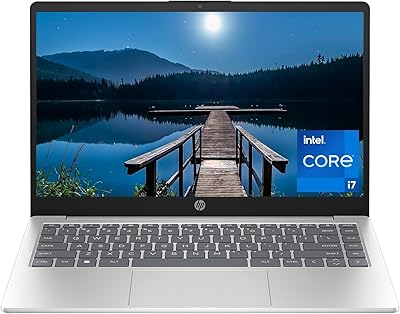
HP 14-fq0032ms 14-inch Touchscreen Laptop
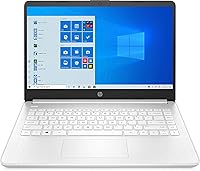
HP 14-fq0032ms 14-inch Touchscreen Laptop — image 1
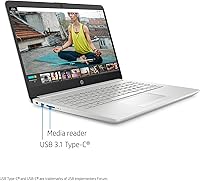
HP 14-fq0032ms 14-inch Touchscreen Laptop — image 2
HP 14-fq0032ms 14-inch Touchscreen Laptop — image 3
HP 14-fq0032ms 14-inch Touchscreen Laptop — image 4
HP 14-fq0032ms 14-inch Touchscreen Laptop — image 5
HP 14-fq0032ms 14-inch Touchscreen Laptop — image 6
72%
28%

Overview

The HP 14-fq0032ms 14-inch Touchscreen Laptop sits squarely in the budget Windows laptop category, aimed at students and everyday office users who need something dependable without overspending. Powering it is AMD's Ryzen 3 3250U dual-core chip — adequate for browsing, word processing, and video calls, but not built for anything demanding. What separates this machine from similarly priced competitors is its touchscreen display, a feature that usually costs considerably more. The catch is storage: 128GB fills up fast, so pairing it with cloud storage or an external drive from day one is genuinely smart planning. Think of this as a capable, honest everyday laptop — nothing more, nothing less.

Features & Benefits

The 14-inch HD touchscreen is the headline feature here — it runs at 1366x768 with 10-finger multi-touch and an anti-glare coating that genuinely helps during long study sessions. AMD's Ryzen 3 chip with integrated Radeon graphics handles everyday workloads comfortably: streaming, Google Docs, Zoom, and light multitasking all run without complaint on 8GB of DDR4 RAM. Connectivity is surprisingly thorough — two USB-A ports, USB-C, HDMI, a physical Ethernet jack, and Wi-Fi ac. At 3.2 pounds and under an inch thick, this budget HP laptop slips easily into a backpack. Battery life lands around 6 to 8 real-world hours, so treat the 10-hour claim as a ceiling, not a guarantee.

Best For

College students juggling coursework, video lectures, and the occasional group project on a tight budget will feel right at home with this budget HP laptop. It also suits remote workers whose daily demands stay within email, spreadsheets, and video conferencing — nothing that pushes hardware hard. If you have wanted a touchscreen laptop but balked at paying significantly more for a premium 2-in-1, this machine bridges that gap reasonably well. It also doubles as a capable secondary travel machine. What it is not built for: video editing, gaming, or running resource-heavy software. Know your actual workload before buying, and it will hold up reliably.

User Feedback

Buyers tend to praise the touchscreen responsiveness and the overall build quality as genuine standouts at this price point. The keyboard earns decent marks — comfortable enough for extended typing, though the trackpad can feel slightly imprecise to anyone coming from a higher-end machine. The consistent criticism is storage running out fast; many reviewers hit the 128GB ceiling within months, reinforcing the case for a cloud plan or external drive. Some buyers also flag the display resolution as feeling soft next to modern full-HD screens. Fan noise under heavy CPU workloads comes up occasionally. Overall, buyer satisfaction is solid for what this laptop costs — provided expectations stay realistic.

Pros

  • Touchscreen at this price is rare and genuinely useful for navigation, annotation, and touch-friendly apps.
  • Compact and light at 3.2 pounds, easy to carry between classes or co-working spaces all day.
  • The Ryzen 3 chip handles everyday multitasking — browsing, Zoom, and Office — without noticeable lag.
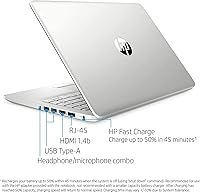
  • Connectivity is surprisingly complete, including a physical Ethernet port alongside USB-A, USB-C, and HDMI.
  • Anti-glare display coating meaningfully reduces eye strain during long indoor study or work sessions.
  • Fast SSD means quick boot times and snappier application loading compared to older spinning-drive laptops.
  • 8GB of DDR4 RAM keeps light multitasking smooth and handles typical student workloads without throttling.
  • HP build quality at this price tier is solid, with a clean, professional natural silver finish.
  • Battery life of roughly 6 to 8 hours under real-world use is workable for a full school day.

Cons

  • 128GB of storage fills up quickly; cloud storage or an external drive becomes a near-immediate necessity.
  • The 1366x768 resolution looks noticeably soft and dated compared to full-HD panels on competing laptops.
  • Fan noise becomes audible under sustained processor load, which can be distracting in quiet library settings.
  • The trackpad lacks the precision and responsiveness that users accustomed to higher-end machines will expect.
  • Integrated graphics rule out any serious creative work, including casual photo editing and light video rendering.
  • Windows 10 comes pre-installed; users wanting Windows 11 should verify upgrade eligibility before purchasing.
  • Real-world battery life consistently falls short of the manufacturer's 10-hour claim at typical brightness levels.
  • The dual-core processor struggles when multiple browser tabs, streaming, and background apps run simultaneously.

Ratings

Our AI scoring system analyzed thousands of verified buyer reviews for the HP 14-fq0032ms 14-inch Touchscreen Laptop from markets worldwide, applying rigorous filters to remove spam, duplicate submissions, and any incentivized or bot-generated feedback — leaving only genuine, unbiased owner experiences. The category scores below reflect exactly what real buyers encountered in daily use, capturing both the aspects that genuinely impressed them and the frustrations that drove lower ratings. Nothing has been smoothed over: if a category scores low, it is because buyers said so, consistently and repeatedly.

Value for Money
83%
For what you spend, this budget HP laptop punches above its weight by bundling a touchscreen — a feature that typically costs significantly more — into an otherwise complete everyday package. Students and remote workers on tight budgets consistently highlight that getting a reliable Windows machine with this connectivity range would normally demand a higher outlay.
The value equation gets shakier when storage runs out within months and buyers find themselves spending extra on external drives or cloud subscriptions. Those hidden add-on costs chip away at the upfront savings, especially for users who did not anticipate needing them from day one.
Performance
67%
33%
Day-to-day tasks run without complaint on the HP 14-fq0032ms — web browsing, word processing, spreadsheets, and video calls are all handled smoothly enough that most students and office-lite users never feel held back. The Ryzen 3 chip manages 8GB of RAM well enough to keep a dozen browser tabs open alongside a streaming session.
Push it beyond light multitasking and the dual-core processor starts to show its limits; loading large files, running multiple applications simultaneously, or any creative software produces noticeable slowdowns. Users accustomed to mid-range or higher-end machines will find the performance ceiling frustratingly low for anything beyond basic productivity.
Display Quality
61%
39%
The anti-glare coating is a meaningful practical feature — working in a brightly lit dorm room or near a window becomes noticeably more comfortable than on glossy screens at this price. Color reproduction is adequate for documents and casual media consumption, and brightness levels are sufficient for typical indoor environments.
The 1366x768 resolution is the display's biggest weakness; text is noticeably soft and images lack sharpness compared to any full-HD panel, and users who switch from a modern screen often find the downgrade jarring. At 14 inches, the low pixel density is hard to ignore during extended study or work sessions.
Touchscreen Experience
79%
21%
The 10-finger multi-touch panel consistently earns praise from buyers who did not expect a touchscreen to feel this responsive at the price point — swiping between apps, pinching to zoom in PDFs, and tapping through menus all feel natural and accurate. Students annotating notes and remote workers navigating documents with their fingers highlight this as a standout feature.
The relatively low display resolution limits how much the touchscreen can truly shine for precise tasks like detailed diagram annotation or sketching. A handful of users also report minor drift or missed taps along screen edges under heavier use, suggesting the touch layer is functional but not class-leading.
Build Quality
74%
26%
HP's construction at this price bracket reliably impresses first-time buyers — the chassis feels solid enough for daily bag-to-desk commutes without noticeable flex or creaking. The slim 0.71-inch profile does not feel cheap in hand, and the natural silver finish holds up well to moderate everyday wear and handling.
The plastic build, while sturdy for the price, is not travel-durable in the same way as a premium business laptop with a reinforced chassis. Hinge tension receives occasional criticism — a few long-term users note it becomes looser over months of repeated one-handed lid opening.
Portability
88%
At 3.2 pounds and under three-quarters of an inch thick, this HP 14-inch touchscreen laptop genuinely disappears in a student's backpack — commuters and campus-goers consistently report it is light enough to carry all day without shoulder fatigue. The size-to-weight combination is one of the most frequently praised aspects among buyers who prioritize mobility.
The 14-inch footprint is slightly wider than some ultra-portable alternatives, which can feel snug in a small backpack or a tight airline tray table. The power adapter adds measurable bulk to the carry load, which some users forget to factor in when judging portability.
Battery Life
69%
31%
On a typical school day involving Wi-Fi browsing, note-taking apps, and video calls, the HP 14-fq0032ms reliably lasts 6 to 8 hours — enough for most students to get through lectures and library sessions without hunting for an outlet. Buyers doing light document work at lower brightness report results toward the higher end of that range.
The manufacturer's 10-hour claim is not achievable under realistic use conditions — screen brightness, active Wi-Fi, and the touchscreen layer itself all drain the battery faster than the spec suggests. More demanding tasks like extended video streaming or back-to-back conferencing can trim battery life to 5 hours or fewer.
Storage & Memory
53%
47%
The SSD makes a real difference in day-to-day responsiveness — boot time from cold is fast, apps open promptly, and the system never feels sluggish loading files the way older spinning-drive laptops do. For users who lean on cloud services, the 128GB can be stretched reasonably well with some discipline.
128GB is genuinely tight by modern standards — Windows itself consumes a significant chunk, and installing a handful of apps alongside a few software updates can push the drive to 80% capacity within weeks. This is the single most complained-about aspect in buyer reviews, and it is a hard limitation with no simple on-board fix.
Keyboard & Trackpad
71%
29%
The keyboard is well-sized for a 14-inch chassis and earns solid marks for everyday typing comfort — students using it for extended note-taking and essay writing generally report no major fatigue. Key travel is acceptable and the layout is standard enough that users transition from other Windows laptops without any real adjustment period.
The trackpad is where this machine stumbles most consistently in user feedback; it lacks the smoothness and precision of higher-end panels, and multi-finger gestures can feel unreliable. Users who do detailed cursor work — spreadsheet navigation or precise text selection — frequently reach for an external mouse within days of setup.
Connectivity
86%
The port selection on this budget HP laptop punches well above its price tier — two USB-A ports, a USB-C, full-size HDMI, and a physical Ethernet jack give students and remote workers flexibility that most similarly priced competitors skip entirely. The wired Ethernet option alone is a standout differentiator for home workers dealing with unreliable Wi-Fi.
Wi-Fi tops out at 802.11ac rather than the newer Wi-Fi 6 standard, which may limit throughput on congested networks in dense apartment buildings or crowded campus libraries. Bluetooth 4.2 is functional but behind the current 5.x generation, occasionally limiting range or compatibility with newer wireless accessories.
Thermal & Fan Noise
63%
37%
Under light loads — browsing, writing, and casual video calls — this HP 14-inch touchscreen laptop runs quietly and cool, which covers the vast majority of its intended daily use scenarios. Students working in quiet libraries or coffee shops report the fan is effectively inaudible during typical tasks.
Under sustained heavier workloads, such as extended conferencing alongside multiple open applications, the fan spins up to an audible level that some users find disruptive in quiet environments. The chassis underside also becomes noticeably warm during prolonged load, which makes extended lap use less comfortable over time.
Webcam & Audio
66%
34%
The built-in webcam and microphone cover the core purpose buyers at this price need them for — Zoom lectures, remote team check-ins, and casual video calls all come through clearly enough that participants rarely complain. For home and campus use, it removes the need for an external webcam entirely for most people.
The webcam tops out at 720p, which shows its limits in lower-light environments — evening calls from a dorm room or a dimly lit home office can appear noticeably grainy. The built-in speakers are audible but thin, lacking bass and volume, so headphones or an external speaker are often needed for comfortable media consumption.
Software & OS
72%
28%
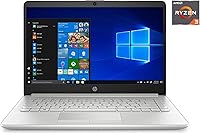
Windows 10 is a well-understood, widely compatible operating system that the intended audience — students and office workers — can use productively right out of the box. Driver support for the Ryzen 3 chip and integrated Radeon graphics is solid, and connectivity with external displays and common peripherals works reliably without manual configuration.
The machine ships without Microsoft Office, which surprises some buyers who assume it is included — a Microsoft 365 subscription becomes an additional recurring expense. HP-installed bloatware also adds initial clutter and can slow the first-boot experience, typically requiring a manual cleanup session before the system feels fully ready to use.

Suitable for:

The HP 14-fq0032ms 14-inch Touchscreen Laptop is a strong fit for college students who need a light, reliable machine to get through a full day of classes, online research, and video calls without lugging around something bulky or expensive. Remote workers on a strict budget will also find it covers the essentials — email, video conferencing, and document editing — without demanding a premium price. The touchscreen is a genuine bonus for users who want that flexibility without paying the much higher cost of a dedicated 2-in-1 convertible. Parents shopping for a capable first laptop for a high schooler or early college student will appreciate the manageable size, familiar Windows environment, and HP's solid entry-level build quality. It also makes a practical secondary laptop for professionals who need a lightweight travel machine for occasional use rather than intensive daily workloads.

Not suitable for:

Anyone expecting this budget HP laptop to handle demanding software will quickly run into its limits — the Ryzen 3 processor and integrated graphics are entry-level by design, making video editing, photo processing, or any GPU-intensive task a genuinely frustrating experience. The 128GB SSD is the single biggest practical concern: users who store large project files, video recordings, or multiple software installations locally will exhaust that space faster than expected. The 1366x768 display resolution, while functional, will disappoint anyone accustomed to a sharper full-HD or higher panel, and content creators especially will find it underwhelming for color-accurate work. Gamers should look elsewhere entirely, as the HP 14-fq0032ms 14-inch Touchscreen Laptop lacks a dedicated graphics card and cannot run modern titles at acceptable frame rates. If your daily workload involves running virtual machines, compiling large codebases, or heavy data processing, the dual-core chip and 8GB of RAM will become a real bottleneck.

Specifications

  • Processor: The AMD Ryzen 3 3250U is a dual-core processor with a 2.6GHz base clock, a boost speed up to 3.5GHz, and 4MB of cache.
  • RAM: 8GB of DDR4 SDRAM running at 2400MHz provides adequate headroom for everyday multitasking workloads.
  • Storage: A 128GB SATA SSD delivers fast boot and application load times, though the capacity is limited for users with large local file libraries.
  • Display: The 14″ HD LED panel renders at 1366x768 resolution and supports 10-finger multi-touch input.
  • Display Coating: An anti-glare coating on the screen surface reduces reflections and glare during indoor use.
  • Graphics: AMD Radeon integrated graphics share system memory and handle web browsing, video playback, and light everyday computing tasks.
  • Operating System: Windows 10 Home comes pre-installed on the device.
  • Wireless: Wi-Fi 802.11ac dual-band and Bluetooth 4.2 provide wireless network and peripheral connectivity.
  • Ports: The device includes two USB 3.1 Gen 1 Type-A ports, one USB 3.1 Gen 1 Type-C port, one full-size HDMI output, and one RJ-45 Ethernet jack.
  • Battery: A single lithium polymer battery supports up to 10 hours of use per HP's specification, though real-world duration varies with screen brightness and active workload.
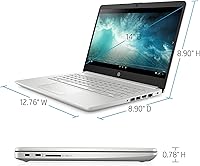
  • Weight: The laptop weighs 3.2 pounds, keeping it practical for daily carry in a bag or backpack.
  • Dimensions: The chassis measures 12.76 x 8.86 x 0.71 inches (L x W x H), maintaining a slim and compact footprint.
  • Color: The exterior is finished in Natural Silver.
  • Brand & Model: Manufactured by HP under the official model designation 14-fq0032ms.

Related Reviews

HP 14-dq0020nr 14-Inch Laptop

69%
83%
Value for Money
58%
Performance
88%
Portability
71%
Battery Life
86%
Software & Value Bundle
More
HP 14 Inch Laptop
HP 14 Inch Laptop
83%
92%
Value for Money
89%
Portability & Weight
90%
Battery Life
80%
Performance
84%
Build Quality
More
HP 14 Celeron 14-inch Touchscreen Laptop

68%
74%
Value for Money
52%
Performance
43%
Storage Adequacy
91%
Portability
61%
Display Quality
More
HP Chromebook 14a 14-inch Laptop
76%
83%
Display Quality
71%
Performance
88%
Battery Life
86%
Value for Money
54%
Storage Adequacy
More
HP 14″ Touchscreen Laptop, Intel Celeron N4020, 16GB RAM, 192GB Storage
79%
81%
Performance
65%
Display Quality
55%
Battery Life
73%
Build Quality
88%
Portability
More
HP Chromebook 14 AMD A4 Laptop
75%
83%
Value for Money
71%
Performance
67%
Display Quality
74%
Build Quality
88%
Portability
More
HP Stream 14-inch Laptop
65%
78%
Value for Money
84%
Battery Life
53%
Performance
41%
Storage Capacity
67%
Display Quality
More
HP 14-inch Intel Core i7 Laptop
73%
84%
Performance & Speed
81%
Display Quality
74%
Build Quality
62%
Battery Life
88%
Storage Performance
More
HP TPN-Q221 14″ Laptop
63%
81%
Value for Money
48%
Performance
37%
Storage Capacity
43%
Battery Life
56%
Display Quality
More
HP 2025 14-inch Laptop - 16GB RAM, 128GB UFS, 256GB MSD, Windows 11 Pro
82%
89%
Value for Money
92%
Battery Life
85%
Performance
90%
Portability
81%
Build Quality
More

FAQ

Yes, for typical student tasks — browsing, writing papers, joining Zoom sessions, and streaming lecture videos — this budget HP laptop holds up well. The 8GB of RAM keeps things from feeling sluggish, and the touchscreen is a genuinely useful bonus for annotating PDFs or navigating quickly. Just keep storage in mind, since 128GB fills up faster than most students expect.

Unfortunately, this model is not designed for easy user upgrades. The RAM is soldered directly to the motherboard and cannot be swapped out. The SSD may be physically replaceable on some units, but HP does not officially support user-performed upgrades, and opening the chassis risks voiding your warranty. A USB external drive or a cloud storage plan is a far safer and simpler solution to the storage limitation.

According to HP, the HP 14-fq0032ms 14-inch Touchscreen Laptop is rated for up to 10 hours on a single charge, but that figure reflects ideal, low-demand conditions. In practice, with Wi-Fi active, screen brightness at a comfortable level, and a handful of apps running, most users find the battery lasts somewhere between 6 and 8 hours. That is workable for a full class day, but you will want a charger nearby for anything longer.

Yes, the 10-finger multi-touch display is one of the more pleasant surprises on this machine. It responds accurately to taps, swipes, and pinch-to-zoom gestures without noticeable lag. It is not quite the same experience as a dedicated tablet, but for Windows navigation and touch shortcuts it works reliably and feels snappy in day-to-day use.

For most people, 128GB is tight but manageable if you are deliberate about what you store locally. Streaming music and video rather than downloading, keeping documents on OneDrive or Google Drive, and offloading larger files to an external drive will help you stay within limits comfortably. If you plan to store a lot of photos, videos, or installed applications on the device itself, the drive will fill up sooner than you expect.

Very light gaming only. The integrated AMD Radeon graphics can manage older, less demanding titles and browser-based games without much trouble. Modern graphically intensive games will either run very poorly or not run at all. This is not a gaming machine, and you should not buy it with gaming as a primary use case.

The 14-inch screen is comfortable enough for everyday use, and the anti-glare coating is a genuine help in bright rooms or near windows. That said, the 1366x768 resolution is not particularly sharp — text and images look noticeably softer than on a full-HD panel. For occasional streaming and document reading it is perfectly adequate, but if you spend many hours at the screen daily, the resolution may start to feel limiting over time.

It handles remote work well within its intended scope. The built-in webcam, microphone, and speakers are adequate for Zoom, Teams, or Google Meet calls, and the physical Ethernet port is a practical bonus if your Wi-Fi signal is unreliable. Just do not expect to run several demanding applications side by side without the occasional slowdown under sustained load.

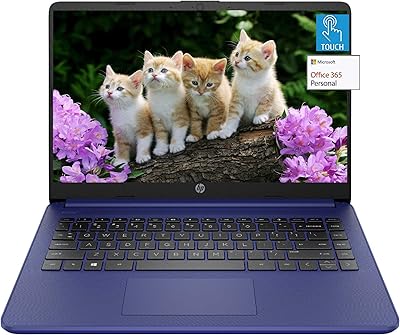
No, a full version of Microsoft Office is not included. The machine ships with Windows 10, and a limited Office trial may be offered at setup, but an active Microsoft 365 subscription requires a separate purchase. Students should check with their school first, as many institutions provide free access to Office 365 through existing software licensing programs.

The keyboard is reasonably comfortable for extended typing — key travel is decent, the layout is standard, and it should feel familiar to anyone coming from another Windows laptop. The trackpad is functional but not exceptional; some users find it a bit imprecise compared to higher-end machines, so pairing this HP 14-inch touchscreen laptop with a wireless mouse is a worthwhile addition if you do heavy cursor work or find touchpads frustrating.

Where to Buy