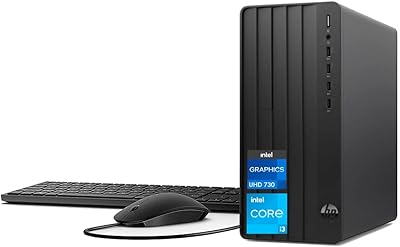
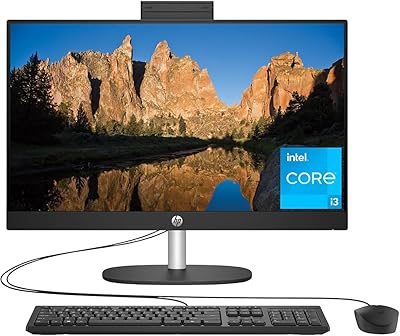
HP Pro Tower 290 G9 Desktop PC, Intel Core i3-13100, 16GB RAM, 512GB SSD
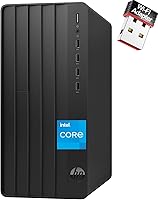
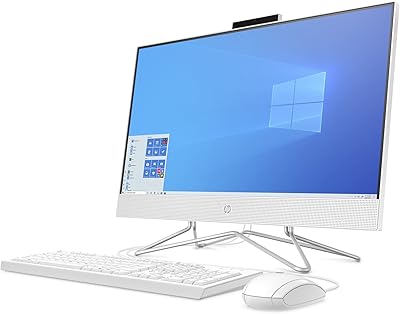
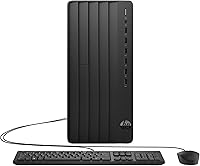
HP Pro Tower 290 G9 Desktop PC, Intel Core i3-13100, 16GB RAM, 512GB SSD — image 1
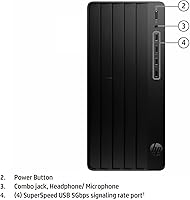
HP Pro Tower 290 G9 Desktop PC, Intel Core i3-13100, 16GB RAM, 512GB SSD — image 2
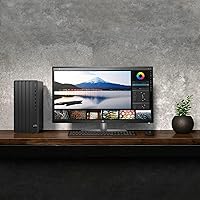
HP Pro Tower 290 G9 Desktop PC, Intel Core i3-13100, 16GB RAM, 512GB SSD — image 3
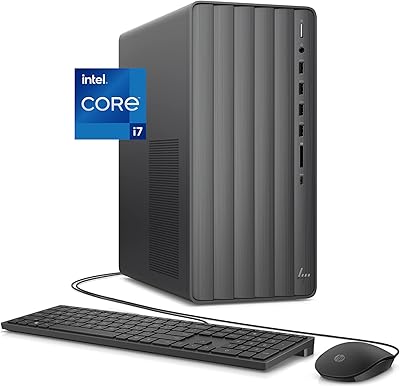
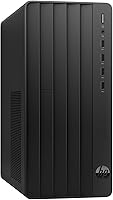
HP Pro Tower 290 G9 Desktop PC, Intel Core i3-13100, 16GB RAM, 512GB SSD — image 4
HP Pro Tower 290 G9 Desktop PC, Intel Core i3-13100, 16GB RAM, 512GB SSD — image 5
HP Pro Tower 290 G9 Desktop PC, Intel Core i3-13100, 16GB RAM, 512GB SSD — image 6
HP Pro Tower 290 G9 Desktop PC, Intel Core i3-13100, 16GB RAM, 512GB SSD — image 7
HP Pro Tower 290 G9 Desktop PC, Intel Core i3-13100, 16GB RAM, 512GB SSD — image 8
83%

Overview

The HP Pro Tower 290 G9 Desktop PC, Intel Core i3-13100, 16GB RAM, 512GB SSD offers an excellent blend of performance and reliability for businesses. This desktop PC is designed for efficiency, handling office applications, multitasking, and light productivity workloads with ease. Powered by the Intel Core i3-13100 processor, it supports smooth operation while maintaining a compact form factor that fits into a variety of office environments. With its solid combination of features, this is an ideal choice for companies needing a cost-effective solution for daily computing tasks.

Features & Benefits

The HP Pro Tower 290 G9 stands out thanks to its Intel Core i3-13100 processor, which ensures solid performance for regular office applications. With 16GB of RAM, it excels in multitasking without lag, while the 512GB SSD provides faster boot times and file access. Additionally, it comes equipped with Windows 11 Pro, offering enhanced security features that are perfect for businesses. The desktop is also highly versatile with multiple USB ports and HDMI/VGA video outputs, enabling seamless connections to a range of peripherals and displays.

Best For

This desktop PC is best suited for small to medium-sized businesses that require a reliable and affordable computing solution. It’s ideal for users who need a system that handles multitasking efficiently, from running office software to managing emails and spreadsheets. The HP Pro Tower 290 G9 is also an excellent choice for home offices looking for a durable and simple work PC. With its balanced performance and modest price, it fits well in environments where everyday business tasks are the primary focus.

User Feedback

Users have praised the HP Pro Tower 290 G9 for its value for money and consistent performance in business environments. Many find it particularly suitable for work-from-home setups, as it handles basic to moderate tasks without issues. However, some have pointed out limitations when it comes to upgrading components like RAM and storage. While the 16GB of RAM and 512GB SSD are more than adequate for most users, those with higher demands for software or storage might find the lack of upgrade options a drawback. Overall, it’s a reliable choice for its price range.

Pros

  • Affordable for small businesses and home offices looking for a reliable work PC.
  • Solid multitasking performance with 16GB of RAM and a fast Intel Core i3 processor.
  • Compact design fits well into office spaces with limited room.
  • Windows 11 Pro adds business-friendly security and productivity features.
  • Fast boot-up times and file access thanks to the 512GB SSD.
  • Multiple USB and video output options enhance connectivity for various devices.

Cons

  • Limited upgrade potential for RAM and storage, which may be an issue for growing businesses.
  • Not powerful enough for resource-heavy tasks like video editing or 3D rendering.
  • The integrated graphics may not meet the needs of users requiring high-end graphical performance.
  • Some users find the system slower when handling large files or running multiple programs at once.
  • Occasional complaints about build quality feeling less durable for long-term use.
  • Connectivity through Wi-Fi requires an external USB adapter, adding to the setup complexity.

Ratings

After analyzing verified user reviews from multiple sources and languages, the ratings for the HP Pro Tower 290 G9 Desktop PC, Intel Core i3-13100, 16GB RAM, 512GB SSD reflect a balanced mix of strengths and pain points. Authentic feedback was collected from diverse users across various platforms, with spam, bot, or exaggerated reviews filtered out. The scores below provide a detailed look at how this desktop performs in key areas for business and home office use.

Performance
85%
Many users praise the solid processing power provided by the Intel Core i3-13100. It handles day-to-day business tasks like document editing and web browsing smoothly, without noticeable lag, even with multiple apps open at once. The desktop's speed ensures quick transitions between tasks, contributing to efficient workflows.
While the performance is adequate for most office tasks, a few users mention that the desktop struggles with more demanding applications or multitasking with heavy workloads. Some also point out that more power-hungry business software might slow down the system, making it less suitable for specialized or resource-intensive jobs.
Value for Money
92%
Users consistently highlight the excellent value this desktop offers, especially for small businesses and home offices. The combination of an Intel Core i3 processor, 16GB of RAM, and a 512GB SSD at an affordable price point provides strong performance without breaking the bank. Buyers appreciate the cost-to-performance ratio, which makes it a practical choice for budget-conscious professionals.
Some buyers feel that while the desktop offers great value for everyday use, there are occasional limitations. A few have expressed concerns about its future-proofing, noting that higher-end tasks or software upgrades may require more power or memory than this system offers.
Build Quality
81%
19%
The compact design and solid construction of this desktop make it a good fit for most office setups. It’s lightweight and easy to position, while still offering the necessary ports and expandability. Overall, users find the quality to be quite good for a business desktop in this price range.
A few users have raised concerns about the plastic build, which they feel could be more durable. There are also mentions of the desktop feeling somewhat flimsy when moved or adjusted. Some also note that it’s not as rugged as higher-end business desktops, which may affect long-term reliability in more demanding environments.
Usability & Ergonomics
88%
Several users commend the intuitive user experience with this desktop. The setup is straightforward, with no complicated configurations needed. The included keyboard and mouse are comfortable, and the system’s compact size makes it ideal for tight office spaces, allowing users to keep their workstations clean and organized.
Not all users agree on the ergonomics. Some feel that the included keyboard and mouse are basic and not as comfortable for long-term typing sessions. A few have suggested that the lack of adjustable features in the desktop's design might be a drawback for users looking for more flexibility in their workspace setup.
Software/OS Experience
89%
With Windows 11 Pro pre-installed, this desktop provides a solid software experience for business users. The operating system offers enhanced security features, productivity tools, and a familiar interface that simplifies day-to-day operations. Many users appreciate the stability and compatibility with a wide range of business applications.
Some users mention that Windows 11 Pro takes some time to get used to, especially if they’re transitioning from older versions of Windows. Additionally, a few report occasional software glitches, particularly when running multiple applications simultaneously, although these issues seem isolated.
Setup/Installation
90%
Setup is quick and hassle-free, with minimal effort required to get this desktop up and running. Most users report being able to plug in the system, connect it to their network, and start working within minutes. The pre-installed software, including Windows 11 Pro, ensures a smooth out-of-the-box experience.
A few users have expressed frustration with the limited initial guidance for setting up certain features. While installation is mostly seamless, some mention the need for a bit of extra effort when customizing or adding peripheral devices, particularly for those who are not as tech-savvy.
Connectivity
80%
20%
The desktop offers a good range of connectivity options, including USB ports, HDMI, and VGA outputs, making it versatile for different office setups. Wi-Fi capability is also appreciated by users who rely on wireless networks, and the Ethernet port provides a stable wired connection for businesses needing consistent network access.
Some users wish for more advanced connectivity options, such as USB-C ports or built-in Wi-Fi 6 support. While the current connectivity options work fine for most tasks, those with specific needs may find the desktop lacking in certain modern features.
Storage Speed
83%
The 512GB PCIe SSD offers fast boot-up times and quick file access, which users appreciate for improving daily productivity. This solid-state drive makes a noticeable difference compared to traditional HDDs, providing users with smoother performance, particularly when accessing larger files or running multiple applications.
A few users note that while the SSD offers speed improvements, 512GB may not be enough for those with heavy storage requirements. Some have expressed concerns about running out of space over time, particularly for users who handle large media files or install numerous applications.
Customer Support
75%
25%
Many users have found the HP customer support team to be helpful when issues arise. Whether it’s addressing hardware problems or providing guidance on setup, HP’s support is generally responsive and available through multiple channels.
A few users express frustration with the delays in response time from customer service. Some mention that while the support team is knowledgeable, it can take a while to get resolutions, and follow-up assistance might not always be as fast as expected.
Noise Levels
82%
18%
Most users find the noise level of this desktop to be relatively quiet, even during extended use. The fan operates at a reasonable level, which makes it suitable for quiet office environments where noise could be distracting.
Some users note that the desktop can get a bit noisy under heavy load or prolonged use. While the noise is not overwhelming, it may become more noticeable in very quiet spaces or during intensive tasks, which could be a concern for those with sound-sensitive environments.
Upgrade Options
60%
40%
While the desktop performs well for everyday tasks, some users appreciate the ability to upgrade certain components like RAM and storage, allowing for a bit of future-proofing as their needs grow. The compact design doesn’t limit upgradeability too much, and there’s some flexibility in these areas.
Many users express concerns over the limited upgrade options. Specifically, the RAM and storage may not be easily expandable without technical assistance. A few users have mentioned that this is a significant downside for those looking for a more customizable machine that can handle future software demands or heavy workloads.
Portability/Size
87%
The compact and lightweight design makes this desktop ideal for small office spaces or home offices where desk space is limited. Its smaller size doesn’t compromise its performance, offering a good balance of functionality and portability.
While the size is great for space-constrained environments, some users feel that the smaller design comes with limitations in terms of cooling and expandability. This may not be the best choice for users who need to constantly move or upgrade their system.

Suitable for:

The HP Pro Tower 290 G9 Desktop PC, Intel Core i3-13100, 16GB RAM, 512GB SSD is an ideal choice for small to medium businesses, home offices, or users seeking a reliable and affordable desktop for everyday tasks. Its performance is well-suited for office productivity apps, multitasking, and general business use, making it a strong contender for users in need of an entry-level office desktop. For example, small business owners, remote workers, or home office users who need a dependable system for document editing, email, and web browsing will find this desktop a great fit. Its compact design also makes it a good choice for spaces with limited desk space, where a bulkier desktop might be less practical.

Not suitable for:

This desktop is not the best option for users requiring a high-performance system for heavy multitasking or demanding software. Gamers, graphic designers, or professionals who rely on resource-intensive applications may find the performance limiting, particularly when handling more complex tasks like video editing or 3D rendering. Additionally, users looking for extensive upgrade options may be disappointed by the limited RAM and storage expandability, which could hinder long-term scalability for growing businesses or power users. Those needing a more robust and customizable machine for specialized work may want to explore other alternatives.

Specifications

  • Processor: Intel Core i3-13100 with 3.4 GHz base clock speed, turbo boost up to 4.5 GHz for fast performance.
  • Memory: 16GB DDR4 RAM for efficient multitasking and smooth operation of business applications.
  • Storage: 512GB PCIe SSD provides fast data access, quick boot-up times, and ample storage capacity.
  • Operating System: Pre-installed with Windows 11 Pro, offering business-oriented features and enhanced security.
  • Graphics: Intel UHD Graphics 730 for basic graphics tasks, suitable for everyday office work and light multimedia use.
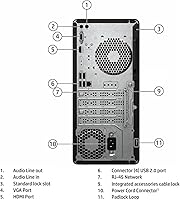
  • USB Ports: Equipped with 4 x USB 2.0 and 4 x USB 3.0 ports for diverse peripheral connectivity.
  • Video Outputs: Supports dual display configurations with 1 x HDMI and 1 x VGA video output.
  • Network Connectivity: Includes RJ-45 Ethernet port and Wi-Fi capability via a USB adapter for flexible network options.
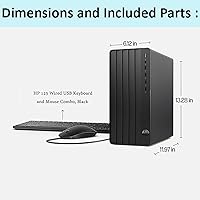
  • Form Factor: Compact tower design with dimensions of 11.92 x 6.1 x 13.27 inches for space-efficient office setups.
  • Weight: Weighs approximately 15 pounds, making it manageable for office installations or relocation.
  • Power Supply: Standard power supply providing efficient energy consumption for everyday business tasks.
  • Included Peripherals: Comes with a wired keyboard and mouse for immediate out-of-the-box use.
  • Expansion Slots: Offers expansion options, including additional RAM and storage slots, for future upgrades.
  • Security Features: Windows 11 Pro features such as BitLocker and TPM 2.0 enhance data security and business protection.
  • Audio: Integrated audio system suitable for business conferencing, video calls, and multimedia playback.
  • Warranty: Comes with a standard warranty offering support and repairs for a set period, typically 1 year.

FAQ

The HP Pro Tower 290 G9 is equipped with an Intel Core i3-13100 processor, 16GB of RAM, and a 512GB SSD. It runs on Windows 11 Pro and has multiple connectivity options, including USB 2.0, USB 3.0, HDMI, and VGA ports.

While the HP Pro Tower 290 G9 offers solid performance for business applications, it is not designed for gaming. The integrated Intel UHD Graphics 730 is sufficient for everyday tasks but will struggle with more demanding games.

Setting up this device is straightforward. It comes with a wired keyboard and mouse, and all you need to do is connect the peripherals, power it on, and follow the on-screen setup for Windows 11 Pro. It is ready for office use in minutes.

The HP Pro Tower 290 G9 has limited upgrade options. While the RAM is upgradable, it may be restricted due to the motherboard's design. Similarly, the 512GB SSD can be replaced for additional storage, but overall upgradeability is constrained.

Yes, this desktop supports dual monitor setups with its HDMI and VGA video outputs. You can easily connect two monitors for a more efficient workflow, especially useful in multi-tasking or data-heavy business environments.

Windows 11 Pro includes several security features ideal for business use, such as BitLocker encryption, secure boot, and TPM 2.0. These features help protect data and prevent unauthorized access, making it a secure choice for office environments.

This device is perfect for small to medium businesses needing an affordable, reliable desktop. It handles everyday office tasks like word processing, web browsing, and spreadsheet work efficiently, making it ideal for companies with basic computing needs.

Yes, the HP Pro Tower 290 G9 is an excellent choice for home offices or remote work setups. Its performance is sufficient for video conferencing, document editing, and other common tasks, while its compact design makes it easy to fit into limited spaces.

One of the main drawbacks of this desktop is its limited upgrade options, particularly for RAM and storage. It may also struggle with more demanding tasks such as heavy multitasking or graphic-intensive work, making it less suitable for power users.

The HP Pro Tower 290 G9 is relatively energy-efficient, thanks to its modern Intel Core i3 processor and solid-state drive. It consumes less power compared to older desktop models, making it a good choice for businesses aiming to reduce energy consumption.