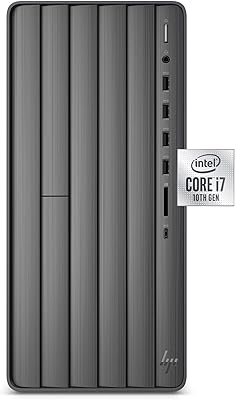
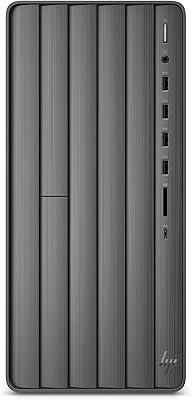
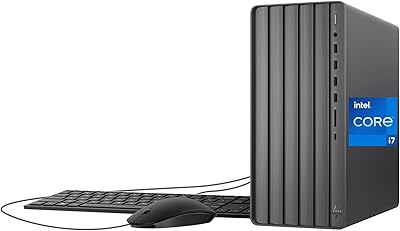
HP Envy Desktop 12th Gen Intel Core i7-12700, 16GB RAM, 512GB SSD + 1TB HDD
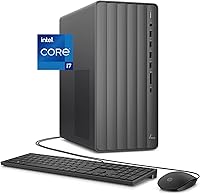
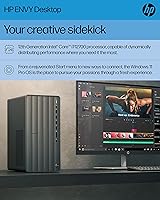
HP Envy Desktop 12th Gen Intel Core i7-12700, 16GB RAM, 512GB SSD + 1TB HDD — image 1
HP Envy Desktop 12th Gen Intel Core i7-12700, 16GB RAM, 512GB SSD + 1TB HDD — image 2
HP Envy Desktop 12th Gen Intel Core i7-12700, 16GB RAM, 512GB SSD + 1TB HDD — image 3
HP Envy Desktop 12th Gen Intel Core i7-12700, 16GB RAM, 512GB SSD + 1TB HDD — image 4
HP Envy Desktop 12th Gen Intel Core i7-12700, 16GB RAM, 512GB SSD + 1TB HDD — image 5
HP Envy Desktop 12th Gen Intel Core i7-12700, 16GB RAM, 512GB SSD + 1TB HDD — image 6
HP Envy Desktop 12th Gen Intel Core i7-12700, 16GB RAM, 512GB SSD + 1TB HDD — image 7
HP Envy Desktop 12th Gen Intel Core i7-12700, 16GB RAM, 512GB SSD + 1TB HDD — image 8
83%

Overview

The HP Envy Desktop 12th Gen Intel Core i7-12700, 16GB RAM, 512GB SSD + 1TB HDD is a powerful, pre-built desktop designed for users who require excellent performance in both professional and personal computing tasks. With its Intel Core i7 processor and dual storage system, this desktop delivers a smooth experience for productivity, content creation, and multitasking. Whether you’re editing videos, running complex software, or simply managing everyday tasks, this desktop provides the speed and storage you need. It's a solid option for those seeking a reliable and ready-to-use system with minimal setup effort.

Features & Benefits

This desktop is powered by the 12th Gen Intel Core i7-12700 processor, which ensures seamless multitasking and the ability to handle demanding applications. Its dual storage setup, comprising a 512GB SSD and 1TB HDD, strikes a balance between speed and storage capacity, making it perfect for users with large files and quick access needs. The Intel UHD Graphics 770 provides sufficient power for 4K streaming, light content creation, and general graphics tasks. Additionally, Windows 11 Pro offers a modern, secure OS environment for everyday use.

Best For

The HP Envy Desktop is best suited for users who need a powerful, reliable computer for demanding tasks. Content creators, designers, and video editors will appreciate its processing power and ample storage for managing large projects. Small businesses and home offices can benefit from its stability and fast performance, while users who want a straightforward, pre-built desktop with minimal setup will find it ideal. Overall, this desktop meets the needs of those seeking both efficiency and ease of use in a professional environment.

User Feedback

The HP Envy Desktop has received generally positive feedback, with many users praising its speed and multitasking capabilities. The dual storage system is especially appreciated, offering a good mix of speed from the SSD and storage space from the HDD. However, some users note that while the integrated graphics work well for 4K streaming and light tasks, they fall short for serious gaming or intensive video editing. A few users have also mentioned that the tower’s design is sleek but occupies more desk space than expected, making it less ideal for compact setups.

Pros

  • The 12th Gen Intel Core i7 processor offers excellent multitasking performance, making it ideal for demanding applications.
  • Dual storage system with a 512GB SSD and 1TB HDD ensures fast boot times and ample space for large files.
  • Windows 11 Pro provides a modern, secure operating system experience for both work and entertainment.
  • Users appreciate the sleek, space-efficient tower design, which fits well in most home office setups.
  • The integrated Intel UHD Graphics 770 performs well for 4K streaming and light content creation tasks.
  • This device is easy to set up, making it a great choice for users who prefer a pre-built PC without hassle.

Cons

  • Some users find the tower design larger than expected, taking up more desk space than they anticipated.
  • The integrated graphics may not be suitable for gamers or those needing high-end graphics performance for video editing.
  • The 512GB SSD might feel restrictive for users with extensive storage needs or those working with very large files.
  • While the desktop excels at multitasking, it may not be powerful enough for intensive 3D rendering or gaming.
  • A few users have mentioned that the device's fan can be somewhat noisy under load.
  • The pre-built nature may limit customization options for users who prefer to upgrade specific components.

Ratings

After analyzing verified user reviews worldwide across multiple platforms and languages, RR-AI has compiled the scores for the HP Envy Desktop 12th Gen Intel Core i7-12700, 16GB RAM, 512GB SSD + 1TB HDD. The feedback includes a balance of both strengths and pain points, with only authentic, high-quality reviews informing the results. This device has earned praise for its multitasking capabilities and strong performance, though some users mention concerns regarding its graphics capabilities for gaming and the space required for the desktop tower.

Performance
90%
Users consistently praise the multitasking capabilities of this desktop, particularly when handling demanding applications. The 12th Gen Intel Core i7 processor offers smooth performance even during intensive workflows, making it ideal for productivity, content creation, and light gaming. The overall responsiveness is a major plus, with little to no lag during multitasking.
While many users report excellent performance, a few have noted that the desktop can get slightly warm under heavy workloads. Some users also mentioned that the device can occasionally slow down when running resource-heavy software like high-end video editors or 3D modeling applications.
Storage Capacity
89%
The dual storage setup, featuring a 512GB SSD for fast boot times and a 1TB HDD for ample space, receives strong praise for its practicality. Many users find this combination ideal for storing large files and ensuring quick access to important data. The ample space also allows for future upgrades and easy file management.
A few users have commented that while the SSD provides fast speeds, the 1TB HDD could be a bit slower than expected when dealing with large video files or games. Some users also wished for a larger SSD option, especially those who work with high-resolution media on a daily basis.
Graphics Performance
70%
30%
The integrated Intel UHD Graphics 770 is appreciated by users for delivering smooth 4K streaming and light content creation tasks. For users who need a simple, all-in-one solution for watching movies, browsing, or occasional editing, the graphics are more than adequate for everyday use.
However, some users have expressed dissatisfaction with the graphics when it comes to gaming or more demanding video editing tasks. The lack of a dedicated GPU makes this desktop less suitable for users who need high-end graphics performance for gaming or 3D rendering, leading to a mixed experience in these areas.
Ease of Setup
93%
The setup process is extremely straightforward, with users reporting that the desktop is ready to use right out of the box. The pre-built nature of the device eliminates the hassle of assembling components, which is especially appreciated by those who prefer a hassle-free, plug-and-play experience. Windows 11 Pro also comes pre-installed, which streamlines the process.
A small number of users mentioned that while the desktop is easy to set up, it took longer than expected for software updates to complete. Some also noted that they had to install additional drivers or software to get full compatibility with certain peripherals, which slightly slowed the initial setup.
Value for Money
88%
Many users believe that the price is fair considering the performance, storage, and reliability of the desktop. The 12th Gen Intel Core i7 processor and dual storage system are standout features that contribute to the overall value. It's seen as a solid choice for those seeking a high-performance desktop without breaking the bank.
Some users feel that while the device offers good value for most people, those needing a higher-end GPU or faster SSD options may find better value elsewhere. Additionally, a few have mentioned that competitors offer similar specs at slightly lower prices, making it a bit pricier compared to other pre-built desktops in the market.
Build Quality
80%
20%
The desktop’s sleek design is often highlighted as a key feature, with many users appreciating its modern look. The build feels sturdy, and the tower is compact enough to fit in most home office setups without taking up too much space. The overall quality of materials used also gives a premium feel.
However, some users have pointed out that the tower design might be larger than anticipated, which could be a concern for those with limited desk space. Additionally, a few reviewers mentioned that the plastic components feel somewhat flimsy compared to more premium models in this price range.
Connectivity Options
85%
Users appreciate the range of connectivity options available, including USB Type-C, USB Type-A, HDMI, and Ethernet ports. This provides flexibility when connecting various peripherals, from external hard drives to displays, and is especially useful for users who need a desktop that supports multiple devices at once.
A few users have expressed frustration with the lack of a DisplayPort or additional USB-C ports, especially those with more demanding connectivity needs. Some also feel that the placement of ports could be more user-friendly, as they can be difficult to access in certain setups.
Software Experience
82%
18%
The pre-installed Windows 11 Pro offers a smooth and modern operating system experience. Many users find the software easy to navigate and appreciate the additional security features included. The software environment is well-optimized for both work and entertainment purposes.
While Windows 11 is generally well-received, some users have reported minor compatibility issues with older software or drivers. Additionally, a few have mentioned that they experienced occasional bugs during system updates or when switching between multiple virtual desktops.
Design and Aesthetics
77%
23%
The sleek, modern tower design has received positive feedback from users, who note that it adds a professional look to home offices or workstations. The compact form factor also makes it a good fit for various setups, whether on a desk or tucked into a corner.
However, some buyers have commented that while the design looks good, it might not be the most practical for those with space constraints. The desktop’s larger size may be a challenge for those looking for a more minimalist or ultra-compact PC.
Customer Support
75%
25%
A number of users have found the customer support team responsive when dealing with initial setup issues or software-related queries. For some, the quick turnaround time and willingness to help made resolving issues a smoother process.
That said, others have mentioned that customer service can be slow to respond to more complex technical issues. A few users also reported that getting direct support for specific hardware-related concerns was more difficult than expected.
Thermals
80%
20%
Most users are satisfied with the thermals of this desktop, noting that it stays cool during everyday tasks like browsing, office work, and streaming. The cooling system seems sufficient to maintain stable temperatures during typical workloads.
However, under heavy loads like video rendering or gaming, some users have reported that the desktop can heat up significantly. A few users have expressed concerns about the noise from the fans when the system is pushed to its limits.
Long-Term Value
83%
The long-term value of this desktop is generally praised due to its reliability and performance over time. The combination of powerful specs and a sturdy design ensures that it remains effective for years without needing frequent upgrades, making it a good investment for long-term use.
On the flip side, a few users have mentioned that the desktop’s longevity could be impacted by the lack of a dedicated GPU, which might limit future performance for certain tasks like gaming or 3D rendering. Some have also suggested that the lack of more advanced cooling options might reduce the overall lifespan of the components in heavy-use scenarios.

Suitable for:

The HP Envy Desktop 12th Gen Intel Core i7-12700, 16GB RAM, 512GB SSD + 1TB HDD is well-suited for users who require a powerful and reliable desktop for multitasking and productivity. Content creators, designers, and small business owners will benefit from its efficient performance, especially for tasks like video editing, graphic design, and running multiple applications simultaneously. The dual storage setup offers a good balance of speed and ample space, making it ideal for those who store large files but need fast boot times. Additionally, home office workers and anyone looking for an easy-to-setup, pre-built system will appreciate the seamless out-of-the-box experience, with Windows 11 Pro pre-installed and ready to go.

Not suitable for:

While the HP Envy Desktop excels in many areas, it may not be the best choice for users who require high-end graphics performance. Gamers or professionals engaged in demanding 3D rendering or high-resolution video editing may find the integrated Intel UHD Graphics 770 limiting. The absence of a dedicated graphics card makes this desktop less suitable for those who need more power for gaming or heavy content creation tasks. Additionally, the relatively large tower design may be inconvenient for those with limited desk space, and users seeking ultra-fast SSD storage options may find the 512GB SSD somewhat restrictive for their needs.

Specifications

  • Processor: Powered by an Intel Core i7-12700, 12th Gen processor for fast performance and efficient multitasking.
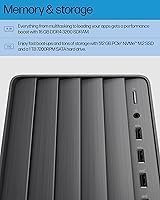
  • Memory: Equipped with 16GB DDR4 RAM for smooth multitasking and handling demanding applications.
  • Storage: Dual storage configuration with a 512GB SSD for quick access and a 1TB HDD for additional storage.
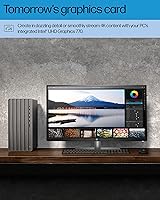
  • Graphics: Intel UHD Graphics 770 for smooth 4K streaming and light content creation tasks.
  • Operating System: Pre-installed with Windows 11 Pro for a modern, secure, and user-friendly experience.
  • Ports: Includes USB Type-C, USB Type-A, HDMI, and Ethernet ports for versatile connectivity.
  • Connectivity: Supports Wi-Fi and Bluetooth for wireless connectivity and easy device pairing.
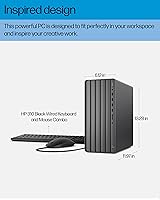
  • Form Factor: Desktop tower form factor, designed to sit on your desk and offer easy accessibility.
  • Weight: Weighs 13.14 pounds, providing a stable base while remaining portable for transport.
  • Dimensions: Measures 29 x 29 x 29 inches, making it a compact and space-efficient option for most desks.
  • Dual Storage: Offers a combination of SSD and HDD for fast boot times and ample storage space for large files.
  • Graphics Performance: Capable of handling 4K streaming, but not optimized for high-end gaming or professional video editing.
  • Expansion: Supports external storage expansion through USB ports for additional file storage and backup.
  • Audio: Built-in audio system for basic audio needs, suitable for general use and media consumption.
  • Security: Windows 11 Pro provides enhanced security features like BitLocker, secure boot, and Windows Hello.
  • USB Ports: Includes multiple USB Type-A and Type-C ports for connecting external devices and peripherals.
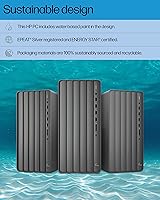
  • Energy Efficiency: Designed to be energy-efficient, providing strong performance while minimizing energy consumption.
  • Warranty: Comes with a standard warranty offering support for hardware-related issues and product defects.
  • Design: Sleek and modern tower design that blends easily into most office or home environments.

FAQ

The HP Envy Desktop 12th Gen Intel Core i7-12700 comes with a powerful Intel Core i7-12700 processor, 16GB of RAM, and dual storage options: a 512GB SSD for fast boot times and a 1TB HDD for additional storage. It's designed for high performance in multitasking, productivity, and light content creation tasks.

This desktop is pre-built, meaning setup is straightforward. Once you plug in the cables and connect to your monitor, keyboard, and mouse, you're ready to go. The included Windows 11 Pro OS makes it simple to get started with a modern, secure user experience.

While the HP Envy Desktop's Intel UHD Graphics 770 supports 4K streaming and light content creation, it’s not designed for demanding gaming or professional-level video editing. For those tasks, you may need a desktop with a dedicated graphics card for better performance.

The combination of a 512GB SSD and a 1TB HDD provides a perfect balance of speed and storage. The SSD ensures quick boot times and fast access to frequently used programs, while the 1TB HDD offers ample space for large files, documents, and backups.

This desktop features multiple USB ports (Type-C and Type-A), an HDMI port for external displays, Ethernet for wired network connections, and Wi-Fi and Bluetooth for wireless connectivity. It offers great versatility for connecting various devices and peripherals.

Yes, the HP Envy Desktop 12th Gen Intel Core i7-12700 is well-suited for content creators, designers, and video editors who need moderate storage and multitasking power. Its processor, 16GB of RAM, and dual storage system provide solid performance for these tasks, though for intensive 3D rendering, a more powerful GPU might be needed.

The desktop tower has a compact yet solid build, measuring 29 x 29 x 29 inches and weighing 13.14 pounds. Some users have noted that while the design is sleek, it may take up more desk space than anticipated, so make sure to measure your available workspace.

No, the HP Envy Desktop 12th Gen Intel Core i7-12700 comes as a standalone unit. You'll need to purchase a monitor, keyboard, and mouse separately. It is compatible with a wide range of peripherals, making it easy to customize based on your needs.

This desktop runs on Windows 11 Pro, which is compatible with most software, including productivity tools, content creation apps, and entertainment platforms. The system's hardware, including the Intel Core i7 processor and 16GB of RAM, is more than sufficient to run most modern software without issues.

The HP Envy Desktop operates fairly quietly under normal usage. However, some users have mentioned that it can get slightly louder under heavy workloads or gaming. If noise is a concern, placing the desktop in a well-ventilated area or using noise-dampening accessories may help.