Overview

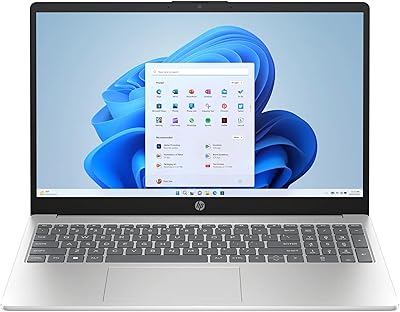
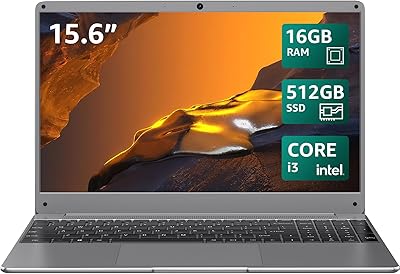
The HP 15.6″ Touchscreen Core i3 16GB Laptop sits in an interesting spot — capable enough for real daily work, portable enough to carry without thinking twice, and priced where budget and mid-range genuinely overlap. At 3.52 lbs and just 0.73-inch thin, this HP touchscreen laptop doesn't feel like a compromise on portability despite the larger screen footprint. The 13th Gen Core i3 is a genuine step up from older budget processors — not a powerhouse, but noticeably more responsive than what you'd find in similarly priced machines from a year or two ago. Bundling Windows 11 Pro at this tier is uncommon, and using ocean-bound plastics in the chassis is a quiet sustainability note that doesn't need to be overstated.

Features & Benefits

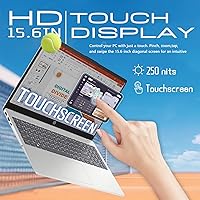
The 15.6-inch touchscreen panel is one of the more practical aspects of this 15.6-inch HP machine — the flicker-free coating helps noticeably during longer work sessions, and the 85% screen-to-body ratio keeps the display feeling open rather than boxed in. The Core i3-1315U's 6-core configuration handles concurrent browser tabs, video calls, and document editing without much struggle, though heavy creative software is a different story. Pair that with 16GB DDR4 RAM and a 512GB SSD, and responsiveness outpaces most entry-level configs by a clear margin. Wi-Fi 6 keeps connections stable, and the inclusion of a numeric keypad alongside three USB 3.0 ports makes this a surprisingly practical office-ready setup.

Best For

The HP Core i3 touch laptop fits neatly into a few clear use cases. College students who annotate slides, jump between research tabs, and hop on group video calls will find it capable enough for the daily grind. Remote and hybrid workers benefit most from the Windows 11 Pro license — it's the kind of feature IT departments quietly appreciate and that many competing laptops at this tier simply don't include. If you're upgrading from a slow older machine, the jump in speed and storage alone feels significant. The larger display makes it better suited for those who prioritize screen real estate over ultra-compact portability, as long as a slightly heavier bag isn't a dealbreaker.

User Feedback

Owners of this HP touchscreen laptop tend to praise the touch display responsiveness and the comfortable feel of working on a larger screen day to day. The keyboard gets generally positive marks for its spacing, and most users find the trackpad reliable enough for everyday navigation. Where honest complaints surface, the HD resolution is the most consistent one — at 15.6 inches, 1360×768 looks noticeably soft beside full-HD alternatives, especially when streaming video. Battery life also comes up regularly: real-world numbers tend to fall shorter than marketing figures suggest, worth considering if you're often away from an outlet. Fan noise is minimal under light loads but does become audible during sustained heavier tasks.

Pros

  • The 13th Gen Core i3-1315U handles everyday multitasking noticeably better than older budget processors at this price.
  • 16GB DDR4 RAM means you can run multiple browser tabs, a video call, and a document simultaneously without constant slowdowns.
  • Windows 11 Pro is a genuine advantage for users who need business-grade security or IT department compatibility.
  • The touchscreen is responsive and well-suited for annotation, navigation, and quick input tasks.
  • Wi-Fi 6 support keeps wireless connections fast and stable, even on congested networks.
  • Three USB 3.0 ports and a numeric keypad make this HP Core i3 touch laptop a practical choice for office-style work.
  • The 512GB SSD provides ample space for files, apps, and media without feeling cramped after six months of use.
  • At 3.52 lbs, the machine is light enough to carry daily without much inconvenience.
  • The flicker-free display reduces eye strain during longer working or study sessions.
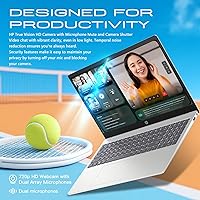
  • The 720p HP True Vision webcam and digital microphone deliver clear enough video calls for remote work or online classes.

Cons

  • The 1360×768 resolution looks noticeably soft on a 15.6-inch panel — a clear step behind full-HD competitors at similar prices.
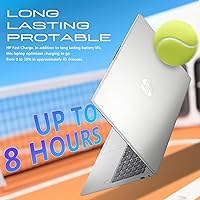
  • Real-world battery life tends to fall short of advertised numbers, which matters if you work away from outlets regularly.
  • Integrated Intel UHD graphics rule out any meaningful creative software or even casual gaming use.
  • Fan noise becomes audible during sustained heavier workloads, which can be distracting in quiet environments.
  • Windows 11 Pro adds value for business users but represents a feature set that many students will never actually use.
  • The HD webcam is functional but underwhelming compared to higher-resolution cameras now common on competing laptops.
  • No optical drive is expected at this point, but the port selection offers no Thunderbolt or USB-C high-speed options worth noting.
  • The AI Copilot feature is hardware-limited here — Core i3 without a dedicated NPU means performance is more token than tool.

Ratings

Our AI rating system analyzed thousands of verified global buyer reviews for the HP 15.6″ Touchscreen Core i3 16GB Laptop, actively filtering out incentivized, bot-generated, and duplicate submissions to surface what real users actually experience. The scores below reflect an honest synthesis of both what this machine does well and where it genuinely falls short — no spin, no softening. Whether you are considering it for a student, a home office setup, or a daily driver upgrade, these ratings are designed to help you decide with clarity.

Everyday Performance
81%
19%
For the tasks this machine is built around — juggling browser tabs, attending video calls, drafting documents, and streaming content — the 13th Gen Core i3 handles the workload without obvious drag. Users coming from older dual-core or Celeron-based machines consistently report a noticeable improvement in responsiveness during typical daily routines.
Push it beyond light multitasking and the limits surface quickly. Running heavier software or stacking multiple demanding apps simultaneously reveals that the Core i3 platform, while improved, is still a budget-tier processor that can bog down under sustained pressure.
Display Quality
58%
42%
The 15.6-inch touchscreen is large enough to feel comfortable for extended work sessions, and the 85% screen-to-body ratio gives it a more open, modern look than older chunky-bezeled budget laptops. The flicker-free coating is a genuine comfort benefit for users who spend long stretches in front of the screen.
The 1360×768 HD resolution is the single most consistent complaint across user feedback. At 15.6 inches, the pixel density is visibly low — text edges look soft, streaming video lacks crispness, and side-by-side comparisons with full-HD panels at similar prices make the gap hard to ignore.
Touchscreen Responsiveness
83%
The touch layer registers taps, swipes, and pinch-to-zoom reliably in everyday use. Students using it for annotating lecture slides and remote workers navigating Windows 11 touch features both report that the screen responds accurately without frustrating lag or missed inputs.
It is a standard capacitive panel without active stylus support, so precise handwriting or detailed digital drawing is not its strong suit. A small number of users noted occasional touch registration drift near screen edges, though this was not a widespread complaint.
RAM & Storage
86%
Having 16GB of DDR4 RAM in this price tier is a meaningful advantage over competitors that still ship 8GB as standard. Combined with the 512GB SSD, the HP Core i3 touch laptop boots quickly and keeps frequently used apps snappy, which users upgrading from older spinning-disk machines find particularly striking.
The SSD capacity is adequate but not generous for users who store large media libraries locally or work with video files. A handful of users also noted that the storage configuration may not be easily expandable depending on how the specific unit was assembled, which limits future-proofing.
Battery Life
54%
46%
Under light workloads — reading, writing, and occasional browsing with the screen at moderate brightness — the battery holds up reasonably for a few hours of untethered use. Users working mostly at a desk near an outlet rarely flagged battery performance as a problem in their day-to-day.
Real-world endurance falls noticeably short of marketing claims, which is a recurring theme in user feedback. Those relying on it for full days on campus or away from a desk report needing to recharge by early afternoon, making the charger a non-optional carry item for heavy users.
Build & Portability
77%
23%
At 3.52 lbs and just 0.73-inch thin, this 15.6-inch HP machine is easy enough to slide into a bag without much thought. The chassis feels solid for its class, and the use of recycled plastics does not seem to compromise structural integrity in any way users flagged.
The all-plastic build, while practical and environmentally considered, does attract light scratches and scuffs over time. A few users noted minor flex in the keyboard deck under pressure, which is normal at this price point but worth knowing if you handle your laptop roughly.
Keyboard & Trackpad
74%
26%
The full-size keyboard with numeric keypad is a practical layout for anyone doing data entry, spreadsheet work, or just heavy typing. Key spacing is comfortable, and most users describe the typing experience as above average for a budget-class laptop.
The trackpad received more mixed feedback — it works reliably for basic navigation but feels less precise compared to mid-range competitors with glass trackpads. Some users mentioned palm rejection could be improved, leading to occasional accidental cursor jumps during typing.
Webcam & Microphone
71%
29%
The 720p HP True Vision webcam produces a clear, usable image for video calls and online classes under decent lighting. Most remote work users found it more than adequate for daily Zoom or Teams meetings without needing an external camera.
In lower light conditions the image quality drops and video noise becomes more visible, which matters for evening calls or poorly lit home setups. The webcam resolution lags behind the 1080p cameras now appearing on competing laptops in the same price range.
Wireless Connectivity
88%
Wi-Fi 6 support is a genuine upgrade on this HP touchscreen laptop — users on compatible routers report fast, stable connections even in congested environments like apartments with many competing networks. Bluetooth pairing with headphones, mice, and keyboards was consistently described as reliable.
Wi-Fi 6 only delivers its full benefit if your router also supports the standard, meaning users on older home network hardware will not notice much difference over Wi-Fi 5. No significant widespread complaints, but the gap in perceived value depends entirely on your home setup.
Port Selection
69%
31%
Three USB 3.0 ports cover the practical needs of most users — connecting a mouse, an external drive, and a peripheral simultaneously without reaching for a hub. Having all three as full-size USB-A ports means no adapter is needed for standard accessories.
The absence of a Thunderbolt port or USB-C with DisplayPort output is a limiting factor for users who want to connect a high-resolution external monitor or use modern docking stations. There is no SD card slot either, which matters for photographers or users transferring content regularly.
Software & OS Value
79%
21%
Windows 11 Pro is a legitimately useful inclusion for business users and anyone whose workplace IT environment requires domain access or BitLocker encryption. It removes the need to purchase a Pro license upgrade separately, which adds real monetary and practical value for the right buyer.
For students or home users who will never interact with IT policies, domain settings, or enterprise security tools, the Pro license is effectively unused overhead. The added background processes that come with a Pro installation can also contribute slightly to resource usage compared to a leaner Home setup.
Value for Money
76%
24%
The combination of 16GB RAM, a 512GB SSD, Wi-Fi 6, and Windows 11 Pro in a single package represents a fairly strong hardware-to-dollar ratio for buyers whose needs align with what it offers. Compared to stripped-down competitors with 8GB RAM and slower storage, the out-of-box experience feels more complete.
The HD display holds back the overall value proposition — getting a full-HD touchscreen at this price tier is achievable with some competitors, and for display-sensitive buyers that gap is meaningful. The battery endurance also tempers the value story for users who need genuine all-day mobility.
Thermal Management
66%
34%
Under typical light-to-moderate workloads the chassis stays comfortable and warm rather than hot, and the fan is quiet enough that it does not intrude on calls or focus sessions. For desk-bound users running standard productivity software, heat is rarely a concern.
Under sustained loads — extended rendering tasks, multiple large downloads running simultaneously, or prolonged video calls — the fan ramps up audibly and the bottom of the chassis warms noticeably. It stays within acceptable limits but users expecting whisper-quiet operation under stress will be mildly disappointed.
Setup & Out-of-Box Experience
82%
18%
Windows 11 Pro setup is straightforward, and the machine reaches a usable state quickly thanks to SSD boot speeds. Users described the initial configuration process as clean, with minimal unwanted bloatware compared to some competing brands at this tier.
A few users noted that HP's pre-installed support and diagnostic software adds some background processes that are not immediately obvious to less technical buyers. Nothing that significantly degrades performance, but tidying the startup list is a good early step for anyone who wants a cleaner running system.

Suitable for:

The HP 15.6″ Touchscreen Core i3 16GB Laptop makes the most sense for students, remote workers, and everyday home users who need a capable, no-fuss machine without spending heavily. College students who rely on touch navigation for note-taking apps, annotating PDFs, or just prefer swiping through slides will appreciate how naturally the display responds. Hybrid and remote workers stand to benefit the most from the Windows 11 Pro license — it's the kind of inclusion that smooths out IT enrollment, BitLocker encryption, and domain connectivity in ways that Home editions simply can't. The 16GB RAM and 512GB SSD combination means upgrading from a sluggish older laptop will feel like a meaningful jump rather than a lateral move. Anyone who spends most of their screen time in a browser, Office suite, or video conferencing app will find this 15.6-inch HP machine handles those tasks with headroom to spare.

Not suitable for:

The HP 15.6″ Touchscreen Core i3 16GB Laptop has real limits that certain buyers should weigh honestly before committing. If sharp, detailed visuals matter to you — whether for photo editing, streaming, or just general readability — the 1360×768 HD panel will frustrate; at this screen size, the pixel density is noticeably soft compared to full-HD alternatives in a similar price band. Creative professionals, light video editors, or anyone running demanding software like Adobe Premiere or complex data models will quickly feel the Core i3 and integrated Intel UHD graphics hitting their ceiling. Gamers should look elsewhere entirely — this hardware was never designed with frame rates in mind. Battery-sensitive users who need all-day untethered performance should also temper expectations, since real-world endurance rarely matches advertised figures on machines in this class.
Specifications

  • Processor: Intel Core i3-1315U, 13th Gen, 6-core configuration, with a boost clock up to 4.5GHz for responsive everyday performance.
  • RAM: 16GB DDR4 SDRAM installed, supporting faster multitasking compared to the 8GB configurations common at this price tier.
  • Storage: 512GB solid-state drive provides quick boot times, fast file access, and ample room for documents, apps, and media.
  • Display: 15.6″ HD touchscreen panel with a 1360×768 pixel resolution, flicker-free coating, and an 85% screen-to-body ratio.
  • Graphics: Intel UHD integrated graphics share system memory and handle standard display output, video playback, and light visual tasks.
  • Operating System: Windows 11 Pro comes pre-installed, offering business-grade security features including BitLocker encryption and domain join support.
  • Webcam: HP True Vision 720p HD webcam with a built-in digital microphone supports video calls and online meetings.
  • Wireless: Wi-Fi 6 (802.11ax) and Bluetooth provide fast, stable wireless connectivity on modern routers and peripherals.
  • USB Ports: Three USB 3.0 ports are included for connecting drives, peripherals, and accessories at high transfer speeds.
  • Keyboard: Full-size keyboard includes a numeric keypad, making data entry and spreadsheet work more comfortable for office users.
  • Audio: HD audio system with built-in speakers and a digital microphone supports clear sound output and voice input during calls.
  • Weight: The laptop weighs 3.52 lbs, making it manageable for daily commutes and campus carry without being unusually heavy.
  • Dimensions: The chassis measures 14.17 × 9.29 × 0.73 inches, keeping the profile slim despite the larger 15.6″ display footprint.
  • Build Materials: The chassis incorporates ocean-bound plastics and post-consumer recycled materials as part of HP's sustainability initiative.
  • Chipset: Intel chipset underlies the platform, paired with the Core i3-1315U for coordinated processing and I/O management.

Related Reviews
HP 15.6″ Touchscreen Laptop, Intel Core i3-1115G4, 16GB RAM, 1TB SSD

83%
91%
Value for Money
88%
Touchscreen Performance
85%
Battery Life
80%
Build Quality
92%
Storage Capacity
More
HP 2020 15 15.6″ HD Touchscreen Laptop, Intel Core i5-1035G1, 16GB RAM, 512GB SSD
82%
89%
Performance
75%
Display Quality
90%
Portability
80%
Battery Life
85%
Build Quality
More
HP 15-DY5033DX 15.6″ Laptop (16GB, 1TB)
83%
96%
Software Value
93%
Storage Capacity
88%
Portability & Weight
84%
Multitasking Performance
67%
Display Quality
More
HP 15.6″ Touchscreen i3 Laptop
68%
78%
Value for Money
69%
Performance
61%
Display Quality
82%
Touchscreen Usability
74%
Build Quality
More
HP 15.6″ Touchscreen Laptop (i3-1315U, 64GB, 2TB)
70%
62%
Value for Money
88%
RAM & Multitasking
91%
Storage Capacity
41%
Display Quality
67%
Processor Performance
More
Lenovo IdeaPad 1 Gen 7 15.6″ Laptop
71%
88%
Value for Money
67%
Performance
71%
Display Quality
91%
RAM & Storage
79%
Touchscreen
More
HP 2025 15.6″ HD Touchscreen Laptop, Intel Core i3-1315U, 12GB RAM, 256GB SSD, Windows 11 Pro
84%
91%
Value for Money
89%
Performance for Everyday Tasks
75%
Battery Life
68%
Display Quality
88%
Ease of Use
More
HP 15-DY1031WM Laptop 15.6″ Intel Core i3-1005G1 8GB RAM 256GB SSD
74%
75%
Performance
92%
Value for Money
55%
Battery Life
60%
Build Quality
85%
Portability
More
BiTECOOL NikoBook 15.6″ Laptop
67%
78%
Value for Money
74%
Display Quality
47%
Processing Performance
83%
RAM & Multitasking
81%
Storage & Speed
More
HP 15.6 G9 Laptop, 40GB RAM, 1TB SSD, Intel Core i3-1315U
83%
89%
Value for Money
91%
Battery Life
87%
Performance for Work & Study
90%
Multitasking Ability
82%
Build Quality
More

FAQ

For most everyday tasks — browsing, email, video calls, and working in Office apps — the display is perfectly functional. That said, at 15.6 inches, the 1360×768 resolution is noticeably softer than full-HD panels, and you may feel it when streaming video or reading small text for extended periods. If display sharpness is a priority, it is worth comparing against full-HD alternatives before deciding.

Yes, quite well for typical use. The 16GB of RAM gives this HP touchscreen laptop a real advantage over entry-level machines that ship with 8GB — you can have a video call running, a browser with several tabs open, and a document editor active simultaneously without noticeable sluggishness. It is not built for heavy creative workloads, but for everyday multitasking it holds up well.

Honestly, if you are purely a student using this for coursework, streaming, and communication, the Pro license offers features you may never touch. Where it genuinely matters is for users whose school or workplace IT environment requires domain join, advanced security policies, or BitLocker encryption. It does not hurt to have it, but it is not a deciding factor for most students.

Most users find the touchscreen responsive and accurate for standard interactions like scrolling, tapping, and pinching. It works well for annotation apps and touch-friendly navigation in Windows 11. It is a standard capacitive display rather than a stylus-optimized panel, so if you are hoping for precise pen input for drawing or detailed note-taking, you would need to check stylus compatibility separately.

Real-world battery life tends to be shorter than the figures listed in marketing materials, which is typical for laptops in this class. Under light use — browsing, documents, occasional video calls — expect somewhere in the range of 5 to 7 hours depending on screen brightness and workload. If you regularly work away from a power outlet for full days, bringing the charger is a safe habit.

It covers the core bases well for remote work: solid performance for communication tools and Office apps, a decent webcam and microphone for calls, Wi-Fi 6 for stable connectivity, and Windows 11 Pro for business compatibility. The main trade-offs are the HD display and battery endurance, both of which may matter more depending on your specific workflow and desk setup.

RAM and storage upgradability on HP 15 series laptops varies by specific configuration and production batch. Some units allow access to an extra RAM slot or M.2 storage upgrade, but this is not guaranteed. If you plan to upgrade down the road, it is worth researching the specific motherboard configuration or checking HP's service documentation before purchasing.

Under light workloads like browsing, documents, and video calls, the fan is generally quiet or inaudible. It does spin up and become noticeable during more sustained tasks like extended video rendering or running heavier software. For a typical student or remote worker, fan noise is unlikely to be a constant issue, but it is present when the processor is pushed.

Yes, it is reasonably well-suited for that purpose. The 720p HP True Vision webcam produces clear enough footage for professional calls, the digital microphone picks up voice reliably, and Wi-Fi 6 keeps the connection stable on a compatible router. It is not a premium webcam setup, but it performs above what you typically find on budget laptops.

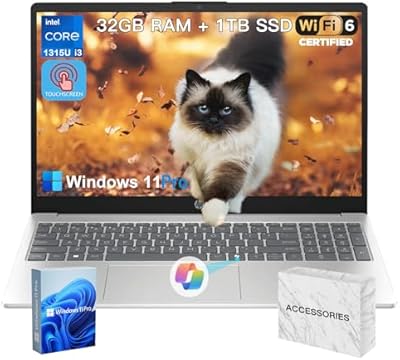
The listing references a bundle with accessories, though the specific items can vary by seller and configuration. Commonly included extras with HP bundles at this tier are a laptop bag or sleeve, a wireless mouse, or both. It is worth confirming the exact bundle contents with the seller before purchasing, as accessory bundles can differ between listings even for the same base model.