Overview

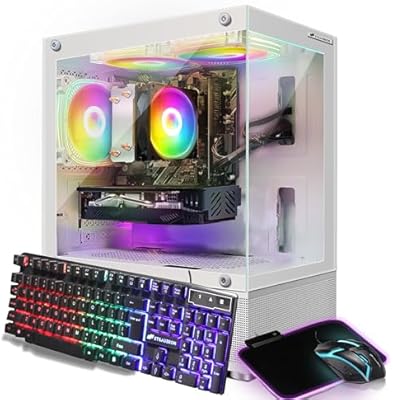
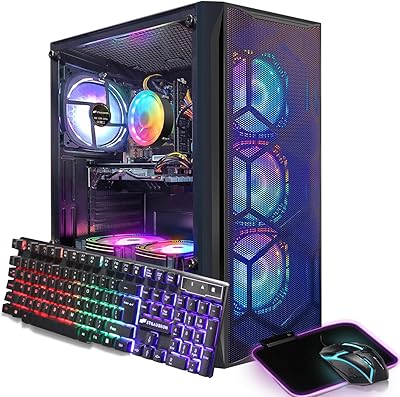
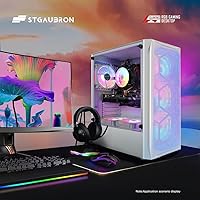
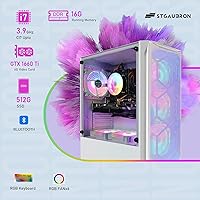
The STGAubron GTX 1660 Ti Gaming Desktop PC takes a different visual approach than most prebuilt towers at this price — it ships in a white tower chassis with six RGB fans, which makes it look more intentional than the typical generic black box. Underneath that presentation is a solid performer: an Intel Core i7 running up to 3.9GHz paired with a GTX 1660 Ti 6GB GPU. You also get Windows 11 Home, 16GB of RAM, and a 512GB SSD installed and ready to go. STGAubron includes a one-year warranty alongside a lifetime tech support promise, which matters for buyers who aren't comfortable poking around inside a PC.

Features & Benefits

The GTX 1660 Ti is the real workhorse here. At 1080p, it handles Fortnite, Valorant, and Apex Legends comfortably at 60 frames per second or better on medium-to-high settings — which covers most of what casual gamers actually play. The six RGB fans and included RGB mouse, keyboard, and mousepad mean you're not hunting for peripherals on day one. Connectivity is decent: you get eight USB ports total, Bluetooth 5.0, HDMI, DisplayPort, and DVI outputs. One thing worth clarifying — the listing mentions 4K support, but that refers to video decoding, not gaming. The 1660 Ti is a 1080p card. Don't walk in expecting 4K game performance.

Best For

This prebuilt gaming tower makes the most sense for someone who wants to start gaming without the hassle of building a PC or sourcing parts individually. College students and home office users will find it particularly practical — it doubles as a capable workstation during the week and handles gaming on evenings and weekends. Casual esports players and those revisiting older AAA titles will hit comfortable frame rates at 1080p without much fuss. The white aesthetic and RGB lighting also make it a solid choice for anyone setting up a visible gaming station in a dorm or bedroom where the rig itself is part of the room's look.

User Feedback

Buyers generally appreciate how easy the setup is — everything arrives in one box, and most people are up and running within an hour. The included accessories get positive marks for a starter kit, and the white build draws consistent compliments. That said, a few recurring criticisms are worth noting. The DDR3 RAM is an older standard that doesn't belong in a machine at this price tier — DDR4 is the norm now, and the performance gap is real. The Wi-Fi adapter runs on 802.11n, which can feel sluggish for online multiplayer. On the support side, experiences with STGAubron's customer service are mixed — some buyers report smooth interactions, others less so.

Pros

  • Plug-and-play setup means most buyers are gaming within an hour of opening the box.
  • Includes RGB mouse, keyboard, and mousepad — no extra peripheral purchases needed on day one.
  • The white chassis with six RGB fans looks noticeably more polished than typical budget black-box towers.
  • GTX 1660 Ti delivers reliable 60-plus FPS in popular esports titles at 1080p.
  • Windows 11 Home is pre-installed and activated, so there are no OS surprises out of the box.
  • Lifetime tech support is a meaningful safety net for buyers who are not hardware-savvy.
  • Eight USB ports total give plenty of room for controllers, headsets, and other peripherals.
  • Bluetooth 5.0 and Wi-Fi are built in, so no extra adapters are needed for wireless connectivity.
  • The 512GB SSD keeps boot times fast and makes the day-to-day experience feel snappy.
  • Multiple video outputs — HDMI, DisplayPort, and DVI — allow flexible monitor setups.

Cons

  • DDR3 RAM is an outdated memory standard that undercuts performance for the price being asked.
  • The 802.11n Wi-Fi adapter is two generations behind and can cause lag in online multiplayer.
  • The GTX 1660 Ti struggles with newer, graphically demanding AAA titles at any setting above medium.
  • 512GB storage fills up fast once a few modern games are installed — expect to buy an external drive.
  • The included keyboard and mouse are functional but feel cheap; serious gamers will likely replace them quickly.
  • Customer support experiences from STGAubron are inconsistent, with some buyers reporting slow or unhelpful responses.
  • The 802.11n Wi-Fi cannot be upgraded without buying a separate USB or PCIe adapter.
  • No optical drive is included, which may be an inconvenience for users with disc-based software or media.
  • The prebuilt configuration leaves limited room for meaningful internal upgrades given the older platform.
  • Marketing claims around 4K support refer to video decoding only — this is not a 4K gaming machine.

Ratings

The STGAubron GTX 1660 Ti Gaming Desktop PC has been evaluated by our AI system after processing thousands of verified global buyer reviews, with spam, bot-generated, and incentivized feedback actively filtered out. The scores below reflect an honest picture of where this prebuilt gaming tower genuinely delivers and where real buyers have run into frustration. Both strengths and trade-offs are represented transparently, so you can make a fully informed decision.

Gaming Performance
72%
28%
At 1080p, this mid-range gaming PC holds up well in esports-focused titles — Fortnite, Valorant, and Apex Legends run smoothly above 60 FPS on medium-to-high settings, which satisfies the majority of casual players who just want a stable, playable experience without tinkering.
Buyers who pushed into newer AAA titles like Hogwarts Legacy or The Division 2 reported needing to drop settings significantly to maintain smooth frame rates, and a handful of users felt the marketing overpromised on consistent 60-plus FPS across all listed games.
Value for Money
61%
39%
The all-in-one bundle approach — tower, peripherals, and Windows 11 included — does reduce the upfront cost of getting a complete gaming station running, which resonates with first-time buyers who would otherwise need to source everything separately.
Experienced buyers and hardware-savvy reviewers consistently flag that DDR3 RAM and an 802.11n Wi-Fi adapter at this price point represent poor component choices compared to what competing prebuilts offer, making the value proposition weaker than the bundle packaging suggests.
Out-of-Box Setup
88%
The unboxing and setup experience earns high marks across user feedback — most buyers report being fully operational within 45 minutes, with Windows 11 pre-activated and peripherals ready to plug in immediately, making it genuinely accessible for first-time PC owners.
A small but notable share of reviewers encountered pre-installed trial software and minor configuration prompts that added friction to the first-boot experience, and a few reported the included cable management inside the case being sloppy upon inspection.
Build Quality
67%
33%
The white tower chassis looks more deliberate and visually appealing than most prebuilts in this segment, and the overall structure feels solid enough for stationary desktop use — buyers setting up a permanent gaming corner have generally been satisfied with how it presents.
Some users noted that the case panels feel noticeably thin and plasticky on close inspection, and a few reported minor fit-and-finish issues with panel alignment out of the box, which is the kind of detail that bothers buyers who have previously handled higher-end hardware.
Thermal Management
74%
26%
Six case fans do a reasonable job of keeping temperatures in check during typical gaming sessions, and most users report the system running quietly enough during light use and everyday tasks without the fans ramping up aggressively.
Under sustained gaming loads, several buyers noted fan noise becoming clearly audible, and a small number of users in warmer room environments reported higher-than-expected GPU temperatures during long sessions — suggesting the cooling is adequate but not generously over-engineered.
Included Peripherals
63%
37%
Having a matched RGB mouse, keyboard, and mousepad included in the package is genuinely convenient for new buyers, and for casual or student use the accessories are perfectly functional as a starting point without spending anything extra.
Buyers who came from even modest dedicated peripherals found the keyboard switches and mouse sensor underwhelming fairly quickly, and the general consensus among more experienced gamers is that these accessories serve as placeholders rather than long-term tools.
Connectivity
66%
34%
Eight USB ports in total, Bluetooth 5.0, and three video output types give this STGAubron desktop solid day-to-day flexibility — buyers with multiple monitors, controllers, and USB accessories appreciated not having to hunt for a hub immediately after setup.
The 802.11n Wi-Fi standard is the most consistently criticized connectivity feature across user reviews, with online gamers specifically reporting higher ping variability and occasional signal drops that a more modern wireless adapter would not produce.
Wi-Fi Performance
47%
53%
For low-intensity wireless tasks — browsing, streaming video, and software downloads — the 802.11n adapter functions without major complaints, and users in close proximity to their router generally experience acceptable speeds for non-gaming activities.
Online multiplayer gamers flagged the 802.11n standard as a genuine liability, with several citing inconsistent latency and reduced throughput compared to what modern adapters deliver. At this price tier, shipping with outdated wireless hardware is a legitimate buyer grievance that shows up repeatedly across reviews.
RAM Adequacy
53%
47%
Sixteen gigabytes is sufficient headroom for multitasking, running a game alongside Discord and a browser, and general productivity work — buyers using this machine as a student or home office dual-purpose setup found the capacity functional for their needs.
The DDR3 memory standard is the most technically criticized component in this build, with knowledgeable reviewers pointing out that DDR4 has been standard for years and the bandwidth difference is measurable in real workloads; buyers who researched before purchasing felt this choice was a deliberate cost-cutting decision that aged poorly.
Storage Performance
77%
23%
The 512GB SSD delivers noticeably fast boot times and snappy application launches that a mechanical hard drive simply cannot match, and everyday users consistently praised how responsive the system feels compared to older desktops they had used previously.
Capacity becomes a real constraint once a few modern games are installed — several buyers found themselves needing an external drive or additional SSD within the first few months, making 512GB feel like a starting point rather than a long-term solution for an active gaming library.
Aesthetic Design
83%
The white chassis paired with six RGB fans consistently earns positive reactions from buyers setting up a visible gaming space in a bedroom or dorm room — it photographs well, stands out on a desk, and appeals directly to users who want their hardware to match an intentional room aesthetic.
The RGB lighting customization options are limited compared to purpose-built RGB ecosystems, and buyers who wanted deep per-fan control found the software and hardware options restrictive — it looks good in the default mode but offers little room for personalization beyond that.
Customer Support
58%
42%
The promise of lifetime technical support gives first-time PC buyers meaningful peace of mind, and users with straightforward questions about setup or driver installation generally reported receiving helpful responses in a reasonable timeframe.
Buyers who encountered hardware issues beyond basic troubleshooting reported inconsistent experiences — response times varied considerably, and a recurring theme in negative reviews involves warranty claims or replacement requests taking longer than expected to resolve, which undercuts the value of the support promise.
Upgradeability
44%
56%
The tower form factor does provide physical space to add storage drives or swap the GPU down the line, and buyers comfortable with basic PC maintenance can realistically extend the machine's life with targeted upgrades to the graphics card or storage.
The DDR3 platform creates a hard ceiling on memory upgrades without replacing the motherboard, and the overall component ecosystem is aging fast enough that meaningful performance upgrades would likely cost more than building fresh — several technically minded buyers flagged this as a key long-term limitation.
Noise Level
71%
29%
During idle use, web browsing, and light productivity tasks, this prebuilt gaming tower operates at a comfortable noise level that most users found unobtrusive in a home or study environment — the fans do their job without creating a constant background hum at rest.
Under extended gaming loads the six fans spin up audibly, and users with noise-sensitive environments — shared bedrooms, quiet study spaces — noted it becomes distracting during longer sessions, particularly since fan curve customization is not straightforward for less experienced users.

Suitable for:

The STGAubron GTX 1660 Ti Gaming Desktop PC is a practical choice for first-time PC gamers who want to skip the research and assembly process entirely and just start playing. Students and young adults setting up a dorm room or bedroom gaming corner will appreciate that everything — peripherals included — arrives in one box and is ready within an hour. The white chassis and RGB lighting make it a natural fit for anyone who wants their setup to look the part without spending extra on aesthetics separately. Casual gamers who primarily play esports titles like Fortnite, Valorant, or Apex Legends will find the 1080p performance genuinely comfortable at this level. It also works well as a dual-purpose machine for someone who needs a capable home office PC on weekdays and a gaming rig on weekends, without buying separate hardware for each.

Not suitable for:

The STGAubron GTX 1660 Ti Gaming Desktop PC is not the right call for buyers who want to play the latest graphically demanding titles at high or ultra settings, or anyone expecting to push beyond 1080p resolution in games — the GTX 1660 Ti simply does not have the headroom for that. Competitive gamers who rely on fast, stable online connections should be aware that the included Wi-Fi adapter runs on the older 802.11n standard, which can introduce latency and inconsistency in multiplayer matches. The DDR3 RAM is a genuine hardware concern — at this price point, DDR4 has been the industry standard for years, and the performance difference is measurable. Buyers who plan to upgrade components over time may find the platform limiting, as the older memory architecture constrains future upgrade paths. If you have the budget and patience to build your own PC or purchase from a more established brand, the value-per-dollar comparison does not always favor this prebuilt.

Specifications

  • GPU: The system is equipped with an NVIDIA GeForce GTX 1660 Ti featuring 6GB of GDDR6 video memory, capable of smooth 1080p gameplay in most popular titles.
  • CPU: An Intel Core i7 processor runs at a base speed of 3.4GHz and boosts up to 3.9GHz, providing solid performance for both gaming and everyday computing tasks.
  • RAM: The machine ships with 16GB of DDR3 SDRAM, which is functional for multitasking but represents an older memory standard compared to current DDR4 configurations.
  • Storage: A 512GB solid-state drive handles the operating system and game installations, delivering fast boot times and noticeably quicker load screens than a traditional hard drive.
  • Operating System: Windows 11 Home 64-bit comes pre-installed and activated, so the system is ready to use without any additional software setup required.
  • Cooling System: Six RGB case fans are included to manage internal temperatures and contribute to the machine's distinctive lighting aesthetic.
  • Wi-Fi Standard: Wireless connectivity is handled by a USB Wi-Fi adapter running the 802.11n standard, which is functional but slower than modern 802.11ac or Wi-Fi 6 adapters.
  • Bluetooth: Bluetooth 5.0 is included via a USB adapter, allowing wireless connection of controllers, headsets, and other compatible peripherals.
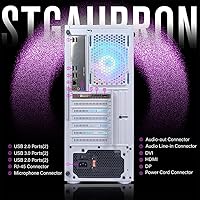
  • USB Ports: The system provides 2 USB 3.0 ports and 6 USB 2.0 ports, giving a total of 8 connections for peripherals, storage devices, and accessories.
  • Video Outputs: Three display output options are available — HDMI, DisplayPort, and DVI — allowing connection to a range of monitors and multi-display configurations.
  • Form Factor: This is a full tower desktop measuring 14.96 x 7.48 x 17.52 inches, designed to sit on or beside a desk rather than be mounted or tucked away.
  • Weight: The unit weighs 20.3 pounds, which is typical for a mid-size desktop tower and makes it manageable to move when setting up or relocating.
  • Chassis Color: The exterior is finished in white, which differentiates it from the majority of budget gaming towers that ship in standard black cases.
  • Warranty: STGAubron covers the system with a one-year parts and labor warranty from the date of purchase.
  • Tech Support: Lifetime complimentary technical support is offered by STGAubron, providing ongoing assistance for hardware and software issues beyond the standard warranty period.
  • Included Accessories: The package includes an RGB gaming mouse, RGB keyboard, and RGB mouse pad, making it a complete ready-to-use station out of the box.
  • Display Resolution: The system supports video decoding up to 3840 x 2160 (4K), though in-game 4K rendering at playable frame rates is beyond the GTX 1660 Ti's practical capability.
  • Cache Size: The Intel Core i7 processor includes an 8MB cache, which helps reduce latency when handling repeated or predictable workloads during gaming and productivity tasks.

Related Reviews
Skytech Shadow 3.0 Gaming Desktop PC
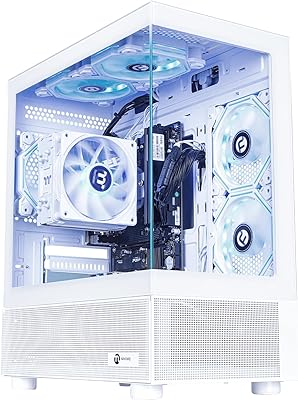
74%
84%
1080p Gaming Performance
76%
Value for Money
91%
Out-of-Box Setup Experience
54%
RAM Adequacy
49%
Storage Capacity
More
NINGMEI Soul Ryzen 5 5600GT Gaming PC
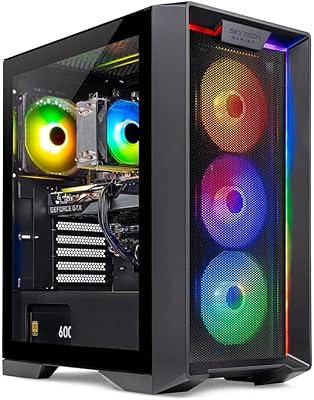
74%
84%
Value for Money
61%
Gaming Performance
88%
Upgrade Potential
79%
Build Quality & Aesthetics
67%
Thermal Management
More
Skytech Nebula GTX 1650 Gaming Desktop PC
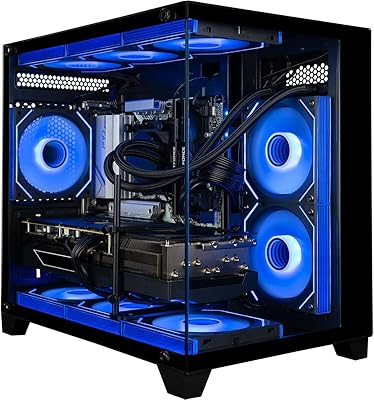
76%
72%
Gaming Performance
74%
Value for Money
91%
Out-of-Box Readiness
78%
Build Quality
76%
Thermal Management
More
Skytech Gaming Azure GTX 1650 Gaming Desktop
75%
67%
Gaming Performance
73%
Value for Money
91%
Setup & Out-of-Box Experience
78%
Build Quality
49%
Storage Capacity
More
Empowered PC Panorama Gaming Desktop (RTX 5080, i9-14900KF, 96GB DDR5, 4TB)
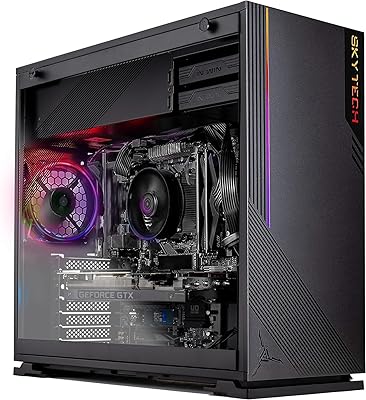
83%
94%
Gaming Performance
91%
Out-of-Box Experience
67%
Value for Money
72%
Thermal Management
88%
Build & Component Quality
More
STGAubron Athlon 3000G RX 580 Gaming Desktop
70%
71%
Gaming Performance
74%
Value for Money
88%
Setup & Ease of Use
63%
Build Quality
48%
CPU Performance
More
STGAubron ABR0122 Xeon E5 Gaming Desktop
65%
61%
Value for Money
58%
Gaming Performance
79%
Ease of Setup
54%
Build Quality
47%
CPU Performance
More
STGAubron RTX 3060 i7 Gaming Desktop
75%
81%
Gaming Performance
74%
Value for Money
91%
Ease of Setup
63%
CPU Performance
69%
Build Quality
More
STGAubron ABR0122 Gaming Desktop (i7, RX 580 8G, 16GB, 512GB)
68%
71%
Gaming Performance at 1080p
43%
CPU Capability & Transparency
67%
Value for Money
84%
Out-of-Box Setup Experience
76%
GPU Quality (RX 580 8GB)
More
STGAubron Gaming PC Desktop, Ryzen 5 5500, Radeon RX 580 8GB, 16GB RAM, 512GB SSD
82%
88%
Gaming Performance
91%
Value for Money
85%
Build Quality
93%
Ease of Setup
80%
Aesthetic Appeal (RGB Fans)
More

FAQ

For the most part, yes — but it depends heavily on which games you're playing and at what settings. Esports titles like Fortnite, Valorant, and Apex Legends will hit 60-plus FPS comfortably at 1080p on medium-to-high settings. Newer, graphically intensive games like Elden Ring or Hogwarts Legacy may require dropping settings to medium to stay near that threshold. It's a solid 1080p performer, not a powerhouse.

Not really — and this is worth clarifying before you buy. The listing mentions 4K support, but that refers to 4K video decoding, meaning you can watch 4K YouTube or streaming content. The GTX 1660 Ti is a 1080p gaming card; trying to game at 4K will result in unplayable frame rates in most titles. Stick to 1080p for gaming.

It works, but it's one of the weaker aspects of this build. The included adapter uses the 802.11n standard, which is two generations behind current 802.11ac or Wi-Fi 6 adapters. You may notice higher ping or occasional instability during online multiplayer sessions, especially if your router is in another room. If online gaming is a priority, running an ethernet cable directly to the PC is strongly recommended.

Most buyers report being up and running within 30 to 60 minutes. Since Windows 11 is pre-installed and the peripherals are included, it's largely a matter of plugging everything in, running through the Windows setup wizard, and installing your games. There is no assembly required — you're not building anything from scratch.

Technically yes, but the upgrade path is limited. The system uses DDR3 SDRAM, which is an older memory standard tied to the motherboard platform. You can add more DDR3 if slots are available, but you cannot swap to DDR4 without replacing the motherboard and likely the CPU as well. If future upgradeability matters to you, this is a real consideration.

It's enough to get started, but modern games consume storage quickly — a handful of titles like Call of Duty or GTA V can easily eat 100 to 200GB combined. You'll likely want to add an external USB drive or an internal SSD at some point. The upside is that the SSD makes load times noticeably faster than older mechanical drives.

It handles everyday productivity tasks without any trouble. Web browsing, document editing, video calls, and even light video editing are well within its capabilities. The 16GB of RAM means you can have multiple applications open simultaneously without things slowing to a crawl. Students who need a machine for both coursework and gaming will find it genuinely useful as a dual-purpose setup.

They're functional for getting started, but don't expect premium quality. The RGB lighting looks fine, and they work perfectly well for casual use. Most dedicated gamers will likely replace them within a few months with peripherals that have better switches, faster response times, and more comfortable ergonomics. Think of them as a starter set rather than a long-term solution.

Experiences vary. STGAubron offers lifetime tech support, which is a genuinely valuable promise on paper. Some buyers report helpful and responsive interactions, particularly for straightforward issues. Others have found the support slower or less satisfying for more complex problems. It's worth keeping your purchase documentation and order details organized in case you need to reach out.

As with most prebuilt Windows machines, you can expect some manufacturer software and trial applications to be present on first boot. It's generally not excessive, but doing a quick review of installed programs after setup and removing anything you don't need is a good habit. This won't affect gaming performance in any meaningful way once cleaned up.