


Overview

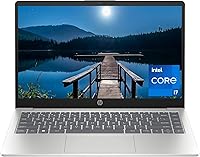
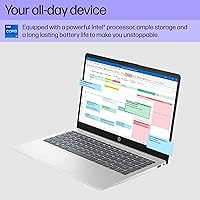
The HP 14-inch Intel Core i7 Laptop entered the market in April 2024 as a mid-range thin-and-light built squarely for everyday productivity users. Powered by Intel's 13th Gen Core i7-1355U, it punches above the typical entry-level crowd without crossing into premium territory. At 4.49 pounds and under an inch thick, this HP 14-inch laptop travels well — fitting comfortably in a backpack without weighing you down. That said, going in with clear expectations matters: there's no discrete GPU, no optical drive, and the port selection is on the lean side. What you get is a capable, no-nonsense machine built for getting real work done.

Features & Benefits

The 13th Gen i7-1355U brings 10 cores to the table, and the real-world difference over older i5 or 8th Gen machines is tangible — browser tabs stay snappy, video calls don't lag, and switching between a dozen open apps rarely causes hesitation. Backing that up is 16GB of DDR4 RAM, which keeps multitasking smooth for most office and school workflows. The 512GB NVMe SSD makes boot time feel nearly instant compared to anything running a traditional hard drive. The 14-inch FHD panel with DC dimming anti-glare coating is genuinely easy on the eyes during long sessions. Intel Iris Xe handles light photo edits and casual gaming, though serious gamers should look elsewhere.

Best For

This mid-range HP makes the most sense for students and remote workers who need a dependable laptop for documents, video conferencing, and browsing without paying for hardware they'll never use. If you're upgrading from a machine more than four or five years old, the performance gap will feel significant. Frequent travelers will appreciate the sub-5-pound build — it slips into a bag without complaint. Light creative users who organize photos or do occasional edits will find the Iris Xe graphics adequate for the task. It also ships with Windows 11 Home pre-installed and ready to go, sparing you any setup headaches from day one.

User Feedback

Buyers of the Core i7 model consistently highlight the snappy SSD performance and display quality as standout positives — the anti-glare panel earns particular credit for usability in bright environments, and the overall build feels solid for the price range. On the flip side, the port selection draws repeated criticism: two USB 2.0 ports feel dated in 2024, and the lack of USB-C charging frustrates users who prefer a single-cable setup. Battery life is another mixed point — HP rates it at up to 8 hours, but heavier workloads tend to land users closer to 5 or 6. Keyboard feel and trackpad responsiveness generally earn positive marks across verified feedback.

Pros

  • The 13th Gen Core i7-1355U handles everyday multitasking and browser-heavy workloads without breaking a sweat.
  • 16GB of DDR4 RAM keeps multiple apps, tabs, and background processes running smoothly side by side.
  • The NVMe SSD delivers near-instant boot times and snappy app launches that feel noticeably faster than HDD-based machines.
  • The FHD anti-glare display with DC dimming is genuinely comfortable for long work or study sessions.
  • At 4.49 lbs and under an inch thick, this HP 14-inch laptop is easy to carry daily without fatigue.
  • Windows 11 Home comes pre-installed, so setup is straightforward with no extra OS costs or compatibility issues.
  • The 14-inch form factor hits a practical sweet spot — large enough for productivity, compact enough for travel.
  • Intel Iris Xe graphics handle light photo editing and casual older games better than basic UHD 620 solutions.

Cons

  • No dedicated GPU means this mid-range HP is unsuitable for serious gaming or GPU-accelerated creative workloads.
  • Only two USB 2.0 ports and one USB 3.0 port — a noticeably limited selection by 2024 standards.
  • No USB-C charging support limits flexibility for users consolidating to a single-cable travel setup.
  • Wi-Fi is capped at 802.11ac; Wi-Fi 6 support is absent, which matters in congested or high-throughput environments.
  • Real-world battery life under active use tends to fall well short of the rated 8-hour figure.
  • DDR4 RAM, while functional, lags behind the DDR5 found in some competing laptops at a similar price point.
  • 512GB of storage fills up faster than expected for users managing large media files or multiple development environments.
  • Thermal management under sustained load can cause the fan to ramp up noticeably, which may bother users in quiet settings.

Ratings

The scores below reflect our AI-driven analysis of thousands of verified global user reviews for the HP 14-inch Intel Core i7 Laptop, with spam, bot activity, and incentivized feedback actively filtered out to ensure accuracy. Each category captures the honest consensus — from what buyers genuinely praised to the recurring frustrations that surfaced across multiple markets. Both the strengths and the trade-offs are represented transparently so you can make a fully informed decision.

Performance & Speed
84%
The 13th Gen i7-1355U handles real-world multitasking confidently — users running Zoom calls alongside a full browser and spreadsheets report minimal lag. Everyday responsiveness consistently draws praise from users upgrading from older Core i5 or 8th Gen machines.
Under sustained workloads like extended video exports or large file compilations, the processor throttles noticeably due to thermal limits in the slim chassis. It is a capable daily driver, but it is not built to sustain peak performance for prolonged heavy tasks.
Display Quality
81%
19%
The 1920x1080 FHD panel earns consistent compliments for its sharpness during everyday use — text looks clean, and the anti-glare coating reduces eye fatigue during long study or work sessions. The DC dimming technology is a genuine differentiator for users sensitive to screen flicker.
Color accuracy and brightness fall short of what creative professionals need — the panel covers a limited color gamut and struggles in direct sunlight or very bright rooms. Users who work with photos or video expecting accurate colors may find themselves underwhelmed.
Build Quality
74%
26%
For a mid-range plastic chassis, the overall assembly feels solid enough for daily office and campus use — there is minimal flex on the keyboard deck, and the hinge mechanism holds the lid firmly at various angles. Most buyers feel the build is appropriate for the price tier.
The all-plastic construction picks up scratches over time and does not inspire the same confidence as aluminum-chassis competitors at a similar price point. A few users noted the lid feels slightly hollow when pressed, which can be a concern for those carrying it loosely in a bag.
Battery Life
62%
38%
For light tasks like document editing, streaming music, and light browsing with screen brightness around 50%, the Core i7 model can stretch through a reasonable portion of a workday without needing to reach for the charger. The battery does recover quickly during short charging windows.
HP's 8-hour rating is largely aspirational — users under active workloads, video calls, or higher brightness consistently report 5 to 6 hours at best. Anyone planning to go a full day without a power outlet nearby will likely find this limitation frustrating in practice.
Storage Performance
88%
The PCIe NVMe SSD is one of the most praised aspects across user feedback — boot times feel near-instant, apps launch without hesitation, and transferring large files locally is noticeably faster than anything users previously owned with an HDD. It meaningfully contributes to the perception of a snappy machine.
512GB fills up faster than many users anticipate, especially after OS overhead, apps, and a semester or year of files accumulate. There is no easy path to expand storage without external drives, and cloud storage dependency becomes a reality for users with larger media libraries.
Keyboard & Touchpad
76%
24%
The keyboard offers enough key travel for comfortable extended typing sessions, and the layout is sensible for a 14-inch form factor — students writing long papers or remote workers answering emails generally find it satisfying to type on for hours. The touchpad tracks accurately and responds well to multi-finger gestures.
The keyboard deck has minor flex under firm typing pressure, which some users notice during intense typing bursts. A handful of reviewers also found the touchpad clicks on the stiffer side, which can feel slightly labored compared to competitors with more refined trackpad mechanisms.
Graphics & Visual Output
67%
33%
Intel Iris Xe performs well above older UHD 620 integrated graphics — light photo organizing in apps like Lightroom at reduced resolution, casual older games, and smooth 1080p video playback are all handled competently. For the target audience, it covers the base needs without issue.
Serious gamers and video editors will hit the ceiling quickly — modern titles at even medium settings struggle to maintain smooth framerates, and GPU-accelerated tasks like 4K rendering are painfully slow. The integrated graphics share system RAM, which further constrains performance under heavy graphical loads.
Connectivity & Ports
49%
51%
Bluetooth connectivity works reliably for pairing wireless mice, keyboards, and headphones, which is a common daily use case for remote workers and students. The USB 3.0 port does handle external SSD transfers at reasonable speeds when needed.
Two USB 2.0 ports in 2024 is a significant weakness — users regularly report needing a hub just for basic setups involving an external drive, a mouse, and a USB receiver simultaneously. The absence of USB-C, Thunderbolt, and Wi-Fi 6 is increasingly hard to overlook at this price tier against competing models.
Thermal Management
66%
34%
During light everyday tasks, the laptop stays cool and quiet — users watching lectures, drafting documents, or browsing for hours rarely notice any significant warmth or fan noise. Casual use thermal behavior is well-managed for a thin chassis.
Sustained CPU-intensive tasks push the chassis temperatures up noticeably, particularly on the bottom panel, which can be uncomfortable when using it on your lap. The single fan solution also becomes audible during these periods, which is distracting in quiet environments like libraries or study halls.
Portability
86%
At under 4.5 lbs and less than an inch thick, this HP 14-inch laptop slips into most backpacks or messenger bags without adding significant bulk or strain. Commuters and students who carry it daily consistently highlight the comfortable weight as a key reason they are happy with the purchase.
The proprietary barrel charger adds extra bulk to a travel kit — without USB-C charging, you cannot leave the adapter at home and borrow a friend's charger or use a compact travel brick. It is a small but recurring inconvenience for users who travel light.
Value for Money
78%
22%
Getting a 13th Gen Core i7, 16GB of RAM, and a fast NVMe SSD in a single package at this price point is genuinely competitive — buyers upgrading from budget machines consistently feel they are getting strong hardware fundamentals for the investment. The display and processor combination stands out at this tier.
When buyers start cross-shopping, some competing models offer USB-C, Wi-Fi 6, or DDR5 RAM at comparable prices, which makes the value proposition feel slightly less compelling on the connectivity side. The overall package is solid, but informed buyers will notice where corners were cut.
Software & Out-of-Box Experience
79%
21%
Windows 11 Home comes pre-installed and activated, which means most buyers are up and running within minutes of unboxing. HP's setup process is relatively clean compared to some competitors that load heavy bloatware suites onto new machines.
Some HP-specific pre-installed apps and trial software do occupy storage and appear in the startup sequence, which can mildly slow initial performance until removed. Users who prefer a truly clean Windows install may want to spend 20 minutes uninstalling unnecessary bundled software.
Webcam & Audio
63%
37%
The built-in webcam and microphone are adequate for standard video calls on Zoom or Teams — image quality is acceptable in well-lit rooms, and voice pickup is clear enough for professional use without an external microphone in typical home office conditions.
In low-light environments, the webcam image quality degrades noticeably — grainy footage is a common complaint from users who work in dim rooms or take calls in the evening without dedicated lighting. The stereo speakers are functional but thin-sounding for media consumption or music playback.

Suitable for:

The HP 14-inch Intel Core i7 Laptop is a strong fit for students, remote workers, and everyday users who need a reliable machine for writing, browsing, video calls, and light multitasking without overcomplicating the decision. If you're still running a laptop from 2018 or earlier, the jump to a 13th Gen i7 with a fast NVMe SSD will feel like a meaningful upgrade in day-to-day responsiveness. Commuters and frequent travelers will find the sub-5-pound chassis easy to carry across campuses or airports without back strain. Light creative users who resize photos, put together presentations, or occasionally edit short video clips will find the Intel Iris Xe graphics and 16GB of RAM adequately capable for those tasks. Anyone who wants Windows 11 ready to use out of the box, without configuring drivers or dealing with a bloated upgrade path, will also appreciate the clean starting point this machine offers.

Not suitable for:

The HP 14-inch Intel Core i7 Laptop is not the right tool for users who need dedicated graphics performance — video editors working with 4K timelines, 3D modelers, or anyone planning to play modern AAA titles should look at machines with a discrete GPU. The port selection is a genuine friction point for power users: two USB 2.0 ports and a single USB 3.0 connection will frustrate anyone regularly plugging in external drives, peripherals, or monitors simultaneously. The absence of USB-C charging also means you're tied to the proprietary barrel connector, which limits flexibility for users who have consolidated to a single charger for multiple devices. Wi-Fi 6 is not supported — only 802.11ac — so users in dense Wi-Fi environments or those who rely on consistently fast wireless throughput may notice the gap. Finally, if you need more than 512GB of local storage for large media libraries or development environments, this mid-range HP may feel tight sooner than expected.

Specifications

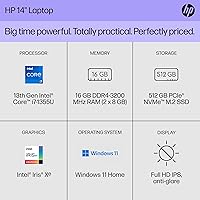
  • Processor: Intel Core i7-1355U, 13th Generation, 10 cores (2 Performance + 8 Efficient), up to 5.0 GHz boost clock.
  • RAM: 16GB DDR4 SDRAM, providing solid bandwidth for multitasking and browser-intensive workflows.
  • Storage: 512GB PCIe NVMe M.2 SSD, delivering significantly faster read/write speeds than traditional hard drives.
  • Display: 14-inch FHD IPS-level panel at 1920x1080 resolution with an anti-glare coating and DC dimming for reduced flicker.
  • Graphics: Intel Iris Xe integrated graphics, sharing system memory, suitable for light creative tasks and casual gaming.
  • Operating System: Windows 11 Home, pre-installed and activated, with no additional OS purchase required.
  • Wireless: 802.11a/b/g/n/ac dual-band Wi-Fi (Wi-Fi 5) with Bluetooth support included; Wi-Fi 6 is not supported.
  • Ports: Two USB 2.0 ports, one USB 3.0 port; no USB-C or Thunderbolt port is included on this model.
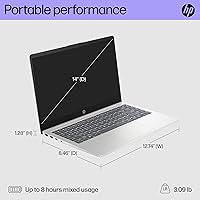
  • Battery Life: Rated at up to 8 hours; real-world usage under active workloads typically yields 5 to 6 hours.
  • Weight: 4.49 lbs (approximately 2.04 kg), keeping it manageable for daily commuting or campus use.
  • Dimensions: 12.74 x 8.46 x 0.70 inches, making it a slim and compact form factor suited for backpacks and travel bags.
  • Color & Build: Silver finish with a plastic chassis construction typical of mid-range consumer laptops in this category.
  • Audio & Webcam: Built-in stereo speakers and an integrated webcam are included, suitable for standard video conferencing needs.
  • Optical Drive: No optical drive is included; users requiring disc playback will need an external USB optical drive.
  • Battery Type: One lithium-ion battery pack, included in the box and non-removable under standard consumer use conditions.
  • Chipset: Intel chipset paired with the i7-1355U, handling memory and storage controller functions internally.
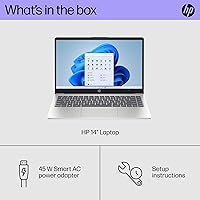
  • Power Input: Charges via a proprietary barrel-style connector at 5V input; USB-C charging is not natively supported.
  • Availability: First listed on Amazon in April 2024, with ASIN B0CVM9WLCW, ranking among the top traditional laptops on the platform.

Related Reviews
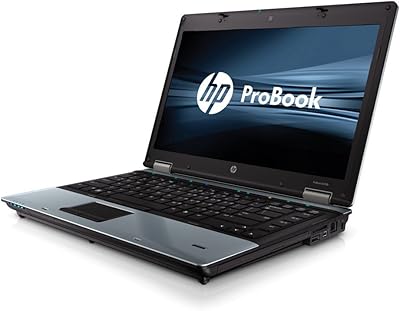
HP EliteBook 8460p 14-inch Laptop
67%
84%
Build Quality
79%
Value for Money
56%
Performance
43%
Battery Life
83%
Keyboard & Typing Experience
More
HP Chromebook Plus x360 14-inch 2-in-1 Laptop
76%
78%
Display Quality
82%
Performance & Speed
71%
Battery Life
81%
Build Quality & Hinge
76%
Keyboard & Trackpad
More
HP Pavilion x360 14-inch Laptop, 13th Gen Intel Core i3, 8GB RAM, 256GB SSD
82%
80%
Performance
92%
Portability
85%
Display Quality
88%
Battery Life
83%
Build Quality
More
HP Envy x360 14″ 2-in-1 Laptop
75%
82%
Build Quality
79%
Display Quality
76%
Performance
77%
Keyboard & Trackpad
68%
Battery Life
More
SAMSUNG Galaxy Book3 Pro 14-inch Laptop, Intel Core i7-1360P, 16GB RAM, 512GB SSD
85%
90%
Performance
94%
Display Quality
85%
Battery Life
92%
Portability
88%
Build Quality
More
HP 15.6-inch Touch-Screen Laptop, 11th Gen Intel Core i7, 16GB RAM, 512GB SSD

85%
91%
Performance
87%
Value for Money
65%
Display Quality
80%
Battery Life
92%
Portability
More
HP 14 Celeron 14-inch Touchscreen Laptop

68%
74%
Value for Money
52%
Performance
43%
Storage Adequacy
91%
Portability
61%
Display Quality
More
Dell Inspiron 14 5440 Laptop, 14-inch, Intel Core i5, 8GB RAM, 512GB SSD
86%
88%
Performance
91%
Build Quality
94%
Portability
81%
Battery Life
75%
Display Quality
More
Dell 14 Plus Laptop DB14250-14-inch 2.5K, Intel Core Ultra 7, 16GB RAM, 1TB SSD
85%
91%
Performance
94%
Display Quality
85%
Battery Life
88%
Build Quality
86%
Keyboard Usability
More
HP Stream 14-inch Laptop
65%
78%
Value for Money
84%
Battery Life
53%
Performance
41%
Storage Capacity
67%
Display Quality
More

FAQ

On most HP 14-ep series configurations, the RAM is soldered to the motherboard, which means it cannot be upgraded after purchase. The SSD may be replaceable depending on the exact build, but HP does not officially advertise user-serviceability on this model. If storage capacity is a concern upfront, factor that into your decision before buying.

No, this mid-range HP charges through a proprietary barrel-style connector and does not support USB-C or Power Delivery charging. If you were hoping to use a single USB-C charger for multiple devices, that workflow will not work here. You will need to carry the included HP adapter.

HP rates the HP 14-inch Intel Core i7 Laptop at up to 8 hours, but that figure reflects light-use conditions. In practice, with active browser tabs, video calls, and background syncing, most users report landing somewhere between 5 and 6 hours. Keeping screen brightness lower and closing unnecessary apps will help push that closer to the rated figure.

Minecraft and similar lighter games run reasonably well on Intel Iris Xe graphics, especially at lower settings. Fortnite is playable on low-to-medium settings but do not expect smooth framerates at high quality. Anything graphically demanding or released in the last couple of years will struggle — this is not a gaming machine, and managing those expectations upfront will save frustration.

Absolutely. Video conferencing is one of the strongest use cases for the Core i7 model — the processor handles HD calls without breaking a sweat, and 16GB of RAM means you can keep your email, a browser, and a call running simultaneously without slowdowns. The built-in webcam and microphone are functional for typical calls, though an external webcam will give better image quality if that matters.

No, Office is not included. The laptop ships with Windows 11 Home and a trial or limited version of Microsoft 365 may be offered, but a full Office license requires a separate purchase or subscription. Free alternatives like Google Docs or LibreOffice work natively in the browser or as a download.

During light tasks like browsing, documents, and streaming, the fan is barely noticeable. Under sustained workloads like long video exports or extended gaming sessions, the fan does spin up and becomes audible. It is not disruptively loud, but users working in very quiet environments may notice it during heavier tasks.

The anti-glare coating does a decent job reducing reflections, which helps in bright indoor environments and near windows. Direct outdoor sunlight is harder to overcome since the panel brightness is in the typical mid-range range, not the high-nit level you get on premium displays. For indoor and covered outdoor use, visibility is generally fine.

This HP 14-inch laptop gives you two USB 2.0 ports, one USB 3.0 port, and Wi-Fi plus Bluetooth. There is no USB-C, no HDMI mentioned in the primary spec sheet, and no SD card slot listed. If you regularly connect external monitors, drives, or multiple peripherals, you will likely want a USB hub. It is worth planning for that accessory cost upfront.

At this price tier, competitors like the Lenovo IdeaPad 5 or Acer Aspire 5 offer comparable or sometimes stronger connectivity — some include USB-C or Wi-Fi 6 at similar price points. This HP holds its own on display quality and the i7 processor, but if port variety or wireless performance are priorities, it is worth cross-shopping before committing. The HP brand does carry a solid reputation for build consistency and customer support, which factors into the overall value for some buyers.