Overview

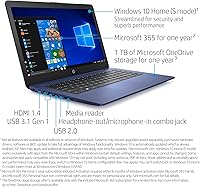
The HP Stream 14-inch Laptop is a no-frills Windows machine built for people who need reliable everyday computing without breaking the bank. It sports a distinctive Royal Blue finish that sets it apart from the sea of silver and black budget options. One genuinely useful inclusion is Office 365 Personal for a full year — that alone adds real value for students and home users. Worth knowing upfront: this HP Stream runs Windows 10 in S Mode, meaning you can only install apps from the Microsoft Store unless you choose to switch out, which is free and permanent. It is not a powerhouse, and it does not pretend to be.

Features & Benefits

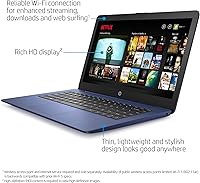
The Intel Celeron N4000 handles everyday tasks comfortably — web browsing, Word documents, and video streaming are well within its range. The eMMC storage boots Windows in seconds, which is a genuine perk, though 64 GB fills up faster than most buyers anticipate; pairing it with OneDrive or a microSD card goes a long way. The anti-glare HD display is easy on the eyes indoors, and the battery realistically holds up through a full school day. A spill-resistant keyboard adds quiet reassurance for everyday carry, while two USB 3.0 ports and Wi-Fi AC cover the connectivity basics without fuss.

Best For

The Stream 14 is an honest fit for students handling schoolwork, writing assignments, or joining Google Classroom sessions. If your daily routine revolves around a browser and cloud apps rather than locally installed software, this budget laptop slots in naturally. Parents shopping for a first laptop for a child or teenager will appreciate both the accessible price and the relatively controlled S Mode environment, which limits exposure to unverified software by default. At just over three pounds, it is also a comfortable lightweight travel companion for commuters who want a secondary device without the bulk. Heavy multitasking or creative work, though, is outside its wheelhouse.

User Feedback

Owners consistently highlight portability and battery life as the strongest real-world upsides, with many noting it easily handles a full day away from an outlet. The bundled Office subscription earns frequent appreciation, particularly from buyers who did not initially realize it was included. Storage, however, is the most common complaint — several users found the 64 GB drive approaching capacity after just a few Windows updates and app installs. Opening too many browser tabs at once noticeably slows things down, which catches some buyers off guard. Build quality opinions are split: adequate for light use, but the plastic construction feels its price. Those who went in with calibrated expectations report solid long-term satisfaction.

Pros

  • Battery life comfortably covers a full school or workday on a single charge.
  • The included Office 365 Personal subscription adds genuine first-year value at no extra cost.
  • At just over three pounds, this HP Stream is easy to carry in a bag all day without fatigue.
  • Fast boot times from the eMMC drive mean you are up and running in seconds.
  • The anti-glare screen coating makes working indoors under typical lighting noticeably comfortable.
  • A spill-resistant keyboard is a reassuring feature for students and younger users.
  • Two USB 3.0 ports cover most everyday peripheral needs without requiring a hub.
  • The Royal Blue finish stands out and feels more personal than the typical silver plastic crowd.
  • Windows S Mode offers a contained, lower-risk environment that suits younger or less tech-savvy users.
  • Wi-Fi AC support keeps wireless connections fast and stable on modern routers.

Cons

  • 64 GB of built-in storage fills up quickly once Windows updates and a few apps are installed.
  • Running more than three or four browser tabs simultaneously causes noticeable slowdowns.
  • The 1366x768 screen resolution looks dated compared to even modestly priced competing laptops.
  • Build quality is functional but plastic-heavy, and the chassis flexes under moderate pressure.
  • 4 GB of RAM cannot be upgraded, so there is no path to improving performance later.
  • S Mode restricts app installs to the Microsoft Store, which confuses buyers who do not read the fine print.
  • The Celeron N4000 struggles with any video editing, even light clip trimming, making creative work impractical.
  • No HDMI port limits easy connection to external displays or projectors without an adapter.
  • Long-term Windows 10 support is a concern as Microsoft phases out the operating system.
  • The webcam quality is below average, which matters more now that video calls are routine.

Ratings

Our AI-generated scores for the HP Stream 14-inch Laptop are drawn from thousands of verified global buyer reviews, with spam, bot activity, and incentivized feedback actively filtered out before any analysis begins. The ratings below reflect an honest, balanced picture — strengths and real frustrations alike — so you can make a fully informed decision based on what actual owners experienced day to day.

Value for Money
78%
22%
For buyers who need a basic Windows laptop with Office included, the price-to-utility ratio is hard to argue with at this tier. The bundled Office 365 Personal subscription alone offsets a meaningful portion of the cost, which frequent buyers mention as a pleasant surprise.
Once the Office subscription expires and storage limitations start biting, the overall value proposition weakens considerably. Buyers who later need cloud storage upgrades or external drives find the true cost of ownership creeps higher than anticipated.
Battery Life
84%
A consistent highlight across user reviews — most owners report comfortably getting through a full school day or workday without hunting for an outlet. Light tasks like writing, browsing, and video calls keep the battery holding up impressively well for a laptop at this price point.
Battery performance drops noticeably under heavier loads like extended video streaming at full brightness or running multiple apps simultaneously. A small number of longer-term owners report capacity degradation after 18 months of daily use.
Performance
53%
47%
For focused, single-task use — typing a document, browsing a few tabs, or watching a video — the Celeron N4000 does its job without drama. Boot times are genuinely fast thanks to the eMMC storage, which gives a snappy first impression.
Open more than four or five browser tabs and performance degrades in a way that frustrates buyers who did not anticipate the ceiling. Multitasking is the Achilles heel here; the combination of a low-power processor and 4 GB of non-upgradeable RAM leaves little headroom for modern workflows.
Storage Capacity
41%
59%
The eMMC drive delivers fast read speeds that make the system feel responsive at startup and during light file access. Users who rely heavily on OneDrive or Google Drive report the storage situation is manageable with disciplined cloud habits.
64 GB is genuinely tight in 2024 — Windows updates alone can consume 10 to 15 GB, leaving buyers with less usable space than expected right out of the box. This is the single most common complaint across reviews, and it catches a significant number of buyers off guard within the first few weeks.
Display Quality
67%
33%
The anti-glare coating earns consistent appreciation from students and commuters working under mixed lighting conditions, reducing eye strain during longer sessions. Colors are adequate for document work and standard video streaming, and the screen is bright enough for typical indoor use.
At 1366x768, the resolution feels noticeably dated compared to competing laptops at similar or slightly higher price points. Buyers coming from modern smartphones or newer laptops often find the display underwhelming, particularly for anything more visually demanding than documents and web pages.
Portability
88%
At just over three pounds with a slim 0.7-inch profile, this HP Stream genuinely earns its reputation as an easy daily carry. Students and commuters consistently praise how little they notice it in a backpack throughout a full day out.
The lightweight plastic construction that enables the low weight does result in a chassis that flexes more than some buyers are comfortable with. A small number of users report minor creaking around the display hinge after extended daily use.
Build Quality
57%
43%
The spill-resistant keyboard provides genuine peace of mind for students and parents, and the physical layout feels comfortable enough for extended typing sessions. Most buyers find the construction adequate for careful, everyday use in a home or classroom setting.
The all-plastic shell lacks the rigidity expected by buyers accustomed to even mid-range laptops, and the finish picks up scratches more readily than expected. Several reviewers noted the hinge and base feel noticeably flimsy when the lid is opened and closed repeatedly.
Keyboard & Trackpad
63%
37%
Key travel and spacing are reasonable for a laptop this thin, and most buyers find typing documents or emails comfortable after a short adjustment period. The spill-resistant design is a practical bonus that gives the keyboard one clear advantage over cheaper alternatives.
The trackpad receives mixed feedback — some users find it inconsistent with tap-to-click gestures and report occasional cursor drift during use. The keyboard flex under firm typing pressure is a recurring minor complaint, particularly noticeable toward the center of the deck.
Software Experience
59%
41%
The included Office 365 Personal subscription makes initial setup genuinely productive without extra purchases, and Windows 10 in S Mode keeps the system clean and relatively protected from unwanted software installs. For buyers who understand what S Mode is, the out-of-box experience is straightforward.
S Mode confuses a notable portion of buyers who discover they cannot install Chrome or common third-party apps without switching modes — a process that, while free and simple, is not communicated clearly in the purchase experience. After switching out of S Mode, the limited RAM means Windows can feel sluggish as more background processes accumulate.
Connectivity
72%
28%
Two USB 3.0 ports and solid Wi-Fi AC support cover the day-to-day connectivity needs of most light users without requiring additional accessories. Bluetooth connectivity is reliable for wireless mice, headphones, and other peripherals that students and home users commonly pair.
The absence of a native HDMI port is a meaningful limitation for users who want to connect to a monitor or projector, requiring an additional USB adapter purchase. There is also no Ethernet port, which leaves wired network access completely off the table without an extra dongle.
Setup & Ease of Use
76%
24%
Initial setup is straightforward and fast — the eMMC drive gets Windows running quickly, and the included Office subscription activates without friction. Buyers setting this up for children or less tech-savvy family members find the S Mode environment a helpful starting point.
S Mode creates unexpected friction for buyers who want to install standard desktop software, and the confusion around switching modes generates a disproportionate share of early negative reviews. Storage management also becomes a necessary chore sooner than most buyers expect.
Webcam Quality
44%
56%
The webcam is functional for basic video calls in well-lit environments, and most recipients on the other end of a call find it acceptable for casual communication. It meets the minimum bar for Google Meet or Zoom in a pinch.
Image quality is noticeably grainy and soft in anything less than ideal lighting, which is a genuine shortcoming now that video calls are a daily routine for students and remote workers. Buyers who prioritize video call quality are consistently disappointed by the camera output.
Audio Quality
61%
39%
Built-in speakers are adequate for watching videos or listening to music alone in a quiet room, and the HD Audio certification means the output is cleaner than the lowest-tier budget laptops. Volume reaches a level suitable for personal use without distortion at mid-range settings.
Bass response is virtually absent and the speakers thin out noticeably at higher volumes, making group listening or louder environments frustrating. Most buyers who use this as a primary entertainment device quickly default to headphones or an external speaker.
Long-Term Reliability
62%
38%
A solid number of buyers report the Stream 14 holding up well for basic use over one to two years of daily operation, particularly in low-demand school and home environments. The spill-resistant keyboard has proven its worth for several owners who experienced minor accidents without lasting damage.
Battery capacity degradation becomes noticeable for a meaningful minority of buyers after 18 months of heavy daily use. Buyers who push the processor harder than intended or run the storage close to capacity consistently report a steeper decline in day-to-day responsiveness over time.

Suitable for:

The HP Stream 14-inch Laptop makes the most sense for buyers whose computing needs are genuinely light and browser-centric. Students writing papers, joining video calls, or working through Google Classroom will find it handles those tasks without complaint. It is an especially practical pick for parents who want an affordable, manageable first laptop for a child or teenager — the default S Mode environment adds a layer of software control that many parents will quietly appreciate. Commuters or travelers looking for a slim, under-four-pound secondary device to handle email and documents on the road will also get solid value here. If your workflow lives mostly in the cloud — OneDrive, Google Docs, or similar — the limited local storage becomes a much smaller issue than it sounds on paper.

Not suitable for:

Buyers who need real multitasking muscle should look elsewhere before committing to this budget laptop. The Celeron N4000 and 4 GB of RAM are a workable combination for one task at a time, but stacking multiple browser tabs, a video stream, and a background download will expose its ceiling quickly. Anyone who installs a lot of software locally — games, creative applications, video editors, or even a large offline app library — will run out of the 64 GB eMMC drive faster than expected, and that storage cannot be upgraded after purchase. Remote workers who rely on demanding video conferencing platforms alongside other open applications may find the experience frustratingly slow. Students in programs that require specialized software, such as engineering tools or professional creative suites, will likely find this machine underpowered and restrictive.

Specifications

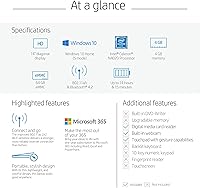
  • Display Size: The screen measures 14 inches diagonally with a 1366x768 HD resolution and an anti-glare coating for comfortable viewing in typical indoor lighting.
  • Processor: Powered by an Intel Celeron N4000 dual-core processor running at a base clock of 1.1 GHz, suited for light computing tasks.
  • RAM: 4 GB of DDR4 SDRAM is installed and is not user-upgradeable, providing adequate memory for single-task browser and Office use.
  • Storage: 64 GB of eMMC flash storage delivers fast boot times but offers limited space for local files, apps, and future Windows updates.
  • Graphics: Intel HD Graphics 602 integrated graphics handle standard video playback and basic display output without dedicated VRAM.
  • Operating System: Ships with Windows 10 Home in S Mode, which restricts app installations to the Microsoft Store unless the user switches out of S Mode for free.
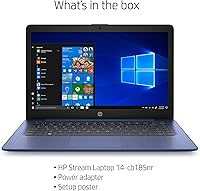
  • Included Software: A one-year subscription to Office 365 Personal is included in the box, covering Word, Excel, PowerPoint, and 1 TB of OneDrive cloud storage.
  • Battery Life: HP rates battery life at up to 10 hours on a single charge under typical mixed-use conditions.
  • Weight: The laptop weighs 3.17 pounds, making it one of the lighter options in the 14-inch budget category for everyday carry.
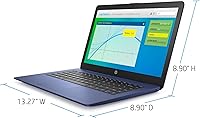
  • Dimensions: Physical dimensions measure 13.27 inches long by 8.9 inches wide by 0.7 inches thin, keeping the footprint compact and bag-friendly.
  • USB Ports: Connectivity includes two USB 3.0 ports and one USB 2.0 port, covering most common peripheral and accessory needs.
  • Wireless: Supports 802.11a/b/g/n/ac Wi-Fi and Bluetooth for wireless connectivity with modern routers and peripherals.
  • Keyboard: The keyboard features a spill-resistant design to help protect against minor liquid accidents during everyday use.
  • Optical Drive: No optical drive is included, so external USB drives are required for any CD or DVD media.
  • Color: Available in Royal Blue, a distinct finish that differentiates this model from the standard grey and silver budget laptop field.
  • Chipset: Built on an Intel chipset with integrated architecture, meaning all graphics and processing share the same silicon for efficiency at low power draw.
  • Wireless Ports: No built-in Ethernet port is present; all wired network access requires a USB-to-Ethernet adapter purchased separately.
  • HDMI Output: No native HDMI port is included on this model; connecting to an external display requires a compatible USB adapter.

Related Reviews

HP 14-dq0020nr 14-inch Laptop 64GB
80%
72%
Performance
94%
Portability
88%
Battery Life
81%
Build Quality
75%
Display Quality
More
HP 14 Inch Laptop
HP 14 Inch Laptop
83%
92%
Value for Money
89%
Portability & Weight
90%
Battery Life
80%
Performance
84%
Build Quality
More
HP 14 Celeron 14-inch Touchscreen Laptop
68%
74%
Value for Money
52%
Performance
43%
Storage Adequacy
91%
Portability
61%
Display Quality
More
HP Stream 14-ds0030nr Laptop
83%
92%
Value for Money
89%
Portability & Weight
80%
Display Quality
84%
Performance for Everyday Tasks
76%
Battery Life
More
HP Chromebook 14a-nf0009nr 14-inch Laptop
82%
91%
Battery Life
88%
Portability & Weight
92%
Value for Money
80%
Performance for Everyday Tasks
85%
Display Quality
More
HP Chromebook 14 AMD A4 Laptop
75%
83%
Value for Money
71%
Performance
67%
Display Quality
74%
Build Quality
88%
Portability
More
HP TPN-Q221 14″ Laptop
63%
81%
Value for Money
48%
Performance
37%
Storage Capacity
43%
Battery Life
56%
Display Quality
More
HP Stream 11 11.6-Inch Laptop
66%
83%
Value for Money
91%
Portability
88%
Battery Life
79%
Display Quality
58%
Performance
More
HP 14-inch Intel Core i7 Laptop
73%
84%
Performance & Speed
81%
Display Quality
74%
Build Quality
62%
Battery Life
88%
Storage Performance
More
HP 2025 14-inch Laptop - 16GB RAM, 128GB UFS, 256GB MSD, Windows 11 Pro
82%
89%
Value for Money
92%
Battery Life
85%
Performance
90%
Portability
81%
Build Quality
More

FAQ

S Mode locks the laptop to only installing apps from the Microsoft Store, which keeps things more secure but limits flexibility. If you need Chrome, a non-Store app, or any third-party software, you can switch out of S Mode for free through Windows Settings — it only takes a minute and is permanent. Most general users will want to switch out eventually, but for a child's device it can actually be a useful guardrail.

It is tight, and you should plan for it. Windows updates alone consume a meaningful chunk, so after setup you may have around 30 to 40 GB of usable space. The practical fix is to lean on OneDrive — the included Office 365 subscription comes with 1 TB of cloud storage — and save most files there rather than locally. A microSD card can also help if the laptop's slot supports one.

Yes, it handles video calls reasonably well in a one-on-one or small group setting. Where you might notice strain is if you are running a video call alongside several open browser tabs or other apps at the same time — that combination can slow things down noticeably. Closing unused tabs and apps before a call helps a lot.

Unfortunately, no. The 4 GB of RAM is soldered to the motherboard and cannot be swapped or expanded. What you see at purchase is what you get for the life of the machine, so it is worth factoring that into your decision upfront.

It handles streaming well. HD video on Netflix, YouTube, or Disney+ plays without issue, and the anti-glare screen makes watching in a typical room comfortable. It is not suited for 4K content given the 1366x768 display resolution, but for standard HD streaming it is a solid performer.

Yes — the box includes a one-year Office 365 Personal subscription, which covers the full desktop versions of Word, Excel, and PowerPoint, plus 1 TB of OneDrive cloud storage. After the year is up you would need to renew or switch to a free alternative like Google Docs.

At just over three pounds it is genuinely easy to carry. Slipped into a backpack or shoulder bag, most people do not notice it throughout the day. It is one of the more comfortable laptops to carry in the 14-inch category.

The keyboard has a spill-resistant design, which means minor liquid splashes have a good chance of being absorbed or deflected before reaching internal components. It is not waterproof though, so a significant spill still carries real risk. Act quickly, power off, and turn it upside down if anything gets on it.

Only very light gaming — think browser-based games or older, low-demand titles. The integrated Intel HD Graphics 602 and the Celeron processor are not built for modern games, and you will hit performance walls quickly with anything graphically demanding. For casual puzzle games or older indie titles, it can manage.

It is achievable under light use — browsing with Wi-Fi, writing documents, watching a video at moderate brightness. In practice, heavier workloads or full screen brightness will bring that number down to 7 or 8 hours, which is still solid for a school or work day. Real-world battery life aligns reasonably well with the official rating for this class of machine.