
Overview

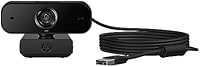
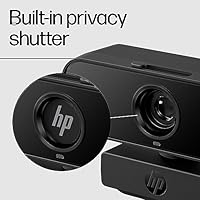
The HP 430 FHD Webcam is the kind of no-fuss peripheral that HP has always done well — reliable, straightforward, and priced for the everyday user rather than the enthusiast. This is not a studio camera. It is built for remote workers, students, and anyone who spends their days on video calls and wants noticeably better results than a built-in laptop lens can offer. It captures full HD for conferencing and can drop to a smoother frame rate for streaming, covering both use cases without requiring you to fiddle with settings. The physical privacy shutter is a small but meaningful touch — slide it closed when you are done, and the lens is blocked, no software required.

Features & Benefits

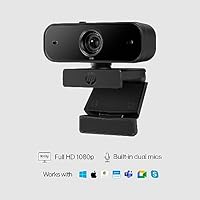
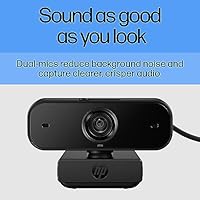
The wide-angle lens gives you enough room to sit back without vanishing from the frame, and positioning is genuinely flexible — you can rotate the camera a full 360 degrees and nudge the tilt to match your desk height. Automatic lighting correction quietly compensates for bright windows or dim overhead bulbs, so you do not look washed out mid-meeting. The dual built-in microphones handle background hum without any additional software, which is a real practical advantage. Setup is equally simple: plug the USB-A cable into any port and it just works on Windows, Mac, or a Chromebook. It is certified for Zoom, Teams, and Google Meet, which matters if your company ever switches conferencing platforms.

Best For

This HP webcam makes the most sense for people who need a reliable daily call setup without any configuration headaches. Remote employees jumping between Zoom and Teams calls will appreciate how it just works from day one, and students on school-issued Chromebooks benefit particularly from the completely driver-free install. It is also the natural next step for anyone still limping along with a grainy, tinny laptop camera — the difference is immediate and obvious. The wide field of view gives educators and presenters a bit more physical freedom on screen. That said, if you need sharp video for professional streaming or content creation, this conferencing camera is not designed to compete at that level.

User Feedback

With a 4.4-star average from a relatively modest number of buyers, the early reception for the HP 430 is encouraging but still limited in scope. Most reviewers point to how much better their calls look compared to what their laptop camera offered, and the effortless setup earns consistent praise. Where things get more nuanced is low-light situations — a handful of buyers found that automatic exposure can struggle in darker rooms, yielding a slightly soft or noisy image. The mounting clip and short cable have also drawn some grumbles. On audio, the microphones work well in typical home office conditions, though they will not satisfy anyone dealing with significant background noise. A solid, honest performer for everyday use.

Pros

  • Plug-and-play setup works instantly on Windows, Mac, and Chromebook with zero driver installation.
  • Automatic lighting correction makes a real, visible difference in variable home office conditions.
  • The physical privacy shutter is a genuine hardware safeguard, not a software toggle that can be bypassed.
  • Dual noise-reducing microphones deliver clear voice audio without needing a separate external mic for typical calls.
  • Wide-angle field of view comfortably fits a full upper body without needing to sit unnaturally close.
  • Certified for Zoom, Teams, and Google Meet, so platform-switching causes zero compatibility headaches.
  • 360-degree rotation and adjustable tilt make it easy to dial in the right angle for almost any desk setup.
  • Autofocus keeps your image sharp even when you lean in or shift position mid-call.
  • Lightweight and compact enough to toss in a bag and use across different workspaces.
  • HP brand backing offers reasonable confidence in build quality and longer-term support compared to off-brand alternatives.

Cons

  • Low-light performance can produce soft or slightly noisy images even with auto-exposure doing its best.
  • The USB-A cable is fixed and non-detachable, so a damaged cable means replacing the entire unit.
  • Cable length may fall short for some desk configurations, forcing awkward routing or use of an extension.
  • The mounting clip has drawn complaints about stability, particularly on thicker monitor bezels.
  • Image quality, while adequate, does not stand out against similarly priced rivals with stronger sensors.
  • The review pool is still relatively small, making it harder to gauge long-term durability with confidence.
  • No USB-C option means users with modern ultrabooks or hubs may need an adapter.
  • Built-in microphones struggle noticeably in louder environments like open-plan spaces or busy households.
  • The HP 430 offers no manual exposure controls for users who want to fine-tune their image beyond automatic adjustments.
  • No included software ecosystem means advanced features like background blur depend entirely on the conferencing platform itself.

Ratings

The scores below reflect AI-driven analysis of verified global buyer reviews for the HP 430 FHD Webcam, with spam, bot activity, and incentivized feedback actively filtered out to ensure accuracy. Each category captures what real users experienced day-to-day, not what the spec sheet promises — both the genuine strengths and the honest frustrations are reflected here. This conferencing camera earns its rating as a dependable mid-range workhorse, though certain limitations are worth understanding before you commit.

Video Quality
78%
22%
For daily video calls on Zoom or Teams, the full HD output is a clear and obvious step up from most built-in laptop cameras. Colors look natural, the image holds steady, and autofocus keeps things sharp even when you shift position mid-conversation.
Side-by-side against similarly priced rivals with stronger sensors, the image can look slightly flat or soft, particularly in detail-rich scenes. Buyers coming from higher-end webcams may notice the difference in crispness, though first-time external camera users rarely do.
Audio Quality
73%
27%
The dual microphones do a solid job in a standard home office — voice comes through clearly and the background hum that plagues many USB cameras is noticeably reduced. For solo calls in a reasonably quiet room, most participants on the other end reported a clean, natural-sounding audio experience.
In noisier environments like open-plan rooms, busy households, or near HVAC systems, the microphones start to struggle and background noise bleeds through more than users expected. Anyone who records audio for more than casual calls will likely want a dedicated external microphone alongside this camera.
Ease of Setup
94%
This is where the HP 430 earns some of its strongest praise — plug in the USB cable and it works, full stop. Students plugging into school Chromebooks, professionals setting up a home office on a tight schedule, and anyone who simply does not want to deal with driver installations all reported the same frictionless experience.
The only genuine gripe here is that there is no companion app for users who want manual control over exposure, white balance, or color temperature. If you are the type who likes to fine-tune your image beyond what auto-correction delivers, there is no official software path to do that.
Low-Light Performance
59%
41%
Automatic exposure correction does make a visible difference in moderately dim conditions, and buyers who positioned a basic desk lamp facing them reported perfectly acceptable call quality even in the evening. For well-lit spaces, the auto-correction works quietly and effectively without any user input.
In genuinely dark rooms or spaces with only a single overhead bulb behind the user, the image softens, picks up visible noise, and can wash out faces unevenly. This is arguably the weakest technical area of this conferencing camera, and buyers who work in dim environments should weigh it carefully.
Value for Money
86%
For what it costs, this HP webcam delivers a well-rounded package — a trusted brand name, solid video for daily calls, platform certifications, and features like a physical privacy shutter that some pricier competitors still omit. Most buyers felt they got more than they paid for, particularly those upgrading from a laptop camera.
Buyers who stretch the budget slightly higher will find webcams with better low-light sensors, longer cables, or USB-C connectivity. The value argument is strong at its price point but weakens if you have specific needs the HP 430 does not address well, like dim-room use or professional streaming.
Privacy Features
88%
The physical privacy shutter resonated strongly with buyers who work from home and wanted a straightforward, hardware-level way to guarantee the camera is off. Unlike software-only privacy modes, sliding the shutter closed gives users immediate visual confirmation that they cannot be seen — no settings to check, no app to open.
Beyond the shutter, there are no advanced privacy features such as background blur built into the camera hardware itself — that capability depends entirely on the conferencing platform you are using. Users who rely heavily on virtual backgrounds will need Zoom or Teams to handle that processing on the software side.
Build Quality
71%
29%
The overall construction feels consistent with what HP typically produces at this price tier — sturdy enough for daily handling, with a matte finish that resists fingerprints and does not look cheap on a professional desk setup. The camera body itself held up well in most reported use cases.
The plastic used in the housing does not inspire confidence for heavy-travel use, and a few buyers noted minor creaking in the swivel mechanism after prolonged use. It is built for a stationary desk setup, not for frequent packing and unpacking in a commuter bag.
Mounting & Stability
62%
38%
The clip-style mount attaches quickly to most standard monitors and laptop lids, and for typical thin-bezel displays it holds position reliably through a workday. The tilt adjustment is easy to set and does not slip once locked into place.
On thicker or curved monitor bezels, several buyers reported the clip feeling loose or slightly wobbly, which becomes distracting if the camera shifts during a call. The mount lacks a dedicated screw thread for tripod attachment, limiting options for users who want more stable or creative positioning.
Platform Compatibility
93%
Certified compatibility with Zoom, Microsoft Teams, and Google Meet removes any guesswork for professionals who need the camera to work reliably across multiple platforms. The Works With Chromebook badge adds real-world confidence for school and enterprise environments where specific hardware approval matters.
Compatibility is excellent across the listed platforms, though buyers using less common conferencing tools or Linux-based systems may need to verify support independently, as those environments fall outside the official certification scope.
Autofocus Performance
76%
24%
Autofocus responds quickly when users lean in closer to the screen or shift their position, keeping the image consistently sharp through typical call movements. For standard desk-based video calls, it handles the task reliably without hunting or losing focus mid-sentence.
In lower light conditions, autofocus can take a moment longer to lock on and occasionally produces a brief soft-focus period that, while short, is noticeable on screen. It is not a significant issue for most users but worth knowing if crisp focus under all conditions is a priority.
Flexibility & Adjustability
79%
21%
The combination of full 360-degree rotation and vertical tilt gives users enough physical control to find a comfortable framing angle on almost any desk configuration. Whether the camera is sitting atop a wide ultrawide monitor or clipped to a small laptop, positioning took most buyers under a minute.
The tilt range is relatively narrow, which can be limiting if the camera is positioned significantly above or below eye level — common in setups with tall monitor arms or low desk surfaces. Users with unconventional desk arrangements may find themselves wishing for more vertical adjustment.
Streaming Performance
69%
31%
The option to drop to a higher frame rate at reduced resolution gives streamers a noticeably smoother image during motion-heavy sessions, which is a thoughtful inclusion for a camera primarily marketed toward conferencing. For casual or hobby-level streaming, the output is more than acceptable.
Serious content creators will quickly hit the ceiling of what this camera offers — the sensor and processing are optimized for calls, not broadcast-quality streaming. Those who stream regularly alongside an audience who values sharp, detailed video will find this conferencing camera underwhelming for that specific use.
Cable & Connectivity
57%
43%
The permanently attached USB-A cable means no fumbling for the right cable or dealing with loose connections — you plug in and it works every time. For users with USB-A ports conveniently located on a monitor hub or front-panel port, cable management is simple.
The cable length drew consistent criticism from buyers whose USB ports are on desktop towers under a desk or on the back of all-in-one monitors, where the reach simply falls short. The absence of any USB-C option also requires an adapter on modern ultrabooks and newer MacBooks, which feels like an oversight for a camera released in late 2023.
OS Compatibility
91%
Reliable out-of-the-box recognition across Windows, macOS, and Chrome OS means virtually any buyer can use this camera without compatibility concerns. The driver-free experience holds up across operating system versions, with no reported breakage after routine OS updates.
Linux users are not officially supported, and while some report success, HP does not guarantee or troubleshoot compatibility outside the listed operating systems. Users in managed IT environments may also find that the lack of companion software limits any centralized configuration options.

Suitable for:

The HP 430 FHD Webcam is a strong fit for anyone who wants a dependable, no-drama upgrade to their video call setup without spending a lot of time or money getting there. Remote professionals who live in back-to-back Zoom or Teams meetings will find the automatic lighting correction genuinely useful, especially in home offices where the light changes throughout the day. Students and educators on Chromebooks are particularly well-served here, since the completely driver-free setup means there is nothing to install, configure, or troubleshoot. The wide field of view also gives people who move around while presenting a bit more freedom without disappearing off-screen. If you have been tolerating the built-in camera on your laptop and are ready for a noticeable step up in both audio and video quality, this conferencing camera delivers that improvement at a price point that is easy to justify.

Not suitable for:

The HP 430 FHD Webcam is not the right choice for anyone who needs studio-quality output for content creation, streaming, or professional video production. The image at full resolution is solid for a daily call but lacks the sharpness and low-light depth that higher-end cameras in the next price tier can deliver, and users shooting in consistently dim conditions may be disappointed by the results even with auto-correction active. Podcasters or people who work in noisy environments should also look elsewhere — the built-in microphones handle moderate background noise well enough, but they are not a substitute for a dedicated external mic. If your workflow demands USB-C connectivity, this HP webcam will require an adapter since it ships with only a USB-A cable. Power streamers who want 1080p at high frame rates for fluid on-screen motion will also find the frame rate tradeoffs limiting.

Specifications

  • Max Resolution: Captures video at 1080p and 30 frames per second, delivering clear, full HD image quality for video conferencing.
  • Streaming Mode: Switches to 720p at 60 frames per second for smoother, higher frame rate streaming when motion fluidity matters more than raw resolution.
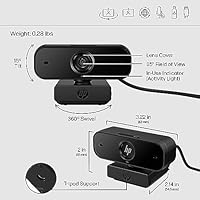
  • Field of View: Features a fixed 85° wide-angle lens that comfortably frames a person sitting at a normal desk distance without distortion.
  • Pan Range: Supports full 360° horizontal rotation, allowing flexible repositioning on any monitor or flat surface.
  • Tilt Range: Tilts up to 15° vertically, enabling minor angle adjustments to better frame the user depending on desk and monitor height.
  • Connectivity: Connects via a fixed USB-A 2.0 cable with true plug-and-play support, requiring no driver installation on any compatible operating system.
  • Microphones: Equipped with two built-in noise-reducing microphones designed to capture clearer voice audio and reduce ambient background hum.
  • Privacy Shutter: Includes a physical sliding shutter that mechanically blocks the camera lens, providing a hardware-level privacy solution independent of any software.
  • OS Compatibility: Fully compatible with Windows 10 and 11, macOS, and Chrome OS without requiring any additional software or drivers.
  • Certifications: Officially certified for use with Zoom and Microsoft Teams, and compatible with Google Meet and other major video conferencing platforms.
  • Chromebook Badge: Carries the Works With Chromebook certification, confirming tested and verified compatibility with Chrome OS devices out of the box.
  • Autofocus: Autofocus adjusts automatically to keep the subject sharp when the user leans in, shifts position, or moves during a call.
  • Light Correction: Automatic exposure control and color correction work continuously in the background to compensate for uneven or changing lighting conditions.
  • Sensor Resolution: Built around a 5MP image sensor that underpins the camera's ability to output detailed full HD video.
  • Weight: Weighs approximately 6.7 oz, making it light enough to travel with easily without adding meaningful bulk to a laptop bag.
  • Color Finish: Available in a matte black finish that blends discreetly with most monitors, docks, and desktop setups.
  • Brand: Manufactured by HP, a long-established name in computing peripherals with broad retail and enterprise distribution.
  • Launch Date: First made available in October 2023, placing it among the more recently released webcams in its price category.

Related Reviews
Lenovo 300 FHD Webcam
76%
78%
Image Quality
62%
Audio Performance
94%
Ease of Setup
91%
Value for Money
74%
Wide-Angle Lens
More
HP V27i 27-inch FHD IPS Monitor
75%
67%
Image Clarity
88%
Viewing Angles
83%
Eye Comfort
49%
Ergonomics
72%
Build Quality
More
HP V241ib 23.8″ FHD Monitor
77%
81%
Image Quality
78%
Color Accuracy
84%
Eye Comfort
52%
Ergonomics
74%
Build Quality
More
HP 24mh 23.8-inch IPS Monitor
79%
83%
Image Clarity
81%
Color Accuracy
88%
Ergonomics & Stand
71%
Refresh Rate & Motion
63%
Brightness & Glare Handling
More
HP 22″ All-in-One Desktop (N100, 8GB DDR5, 128GB)
71%
78%
Value for Money
83%
Display Quality
67%
Performance / Everyday Speed
44%
Storage Capacity
91%
Setup & Ease of Use
More
HP Series 5 524sf 24-inch Monitor
75%
78%
Display Quality
71%
Color Accuracy
67%
Brightness
86%
Eye Comfort
74%
Build Quality
More
HP Series 5 27-inch FHD Monitor
77%
78%
Image Quality
61%
Pixel Density
88%
Eye Comfort
86%
Design & Aesthetics
53%
Ergonomics & Stand
More
HP Series 5 524sw 23.8-inch FHD Monitor
76%
88%
Image Clarity
91%
Eye Comfort
79%
Color Accuracy
67%
Brightness & Visibility
83%
Refresh Rate & Motion
More
HP 21.5″ All-in-One Desktop (64GB RAM, 2.5TB Storage)
87%
92%
Multitasking Efficiency
96%
Storage Capacity
94%
Software Value
89%
Space Efficiency
83%
Display Quality
More
HP 22 All-in-One PC (21.5-inch, 16GB RAM, 512GB SSD)
82%
86%
Multitasking Efficiency
82%
Display Quality
91%
System Boot Speed
88%
Value for Money
54%
Raw Processing Power
More

FAQ

No, nothing at all. Just plug the USB-A cable into your computer and the operating system recognizes it immediately. This applies to Windows 10 and 11, macOS, and Chrome OS — there is no setup wizard, no disc, and no app required.

Yes, and it has the official Works With Chromebook certification to back that up. You can plug it into any Chromebook with a USB-A port and it will work right away without any additional steps.

It works with both platforms, along with Google Meet, and switching between them is effortless since the camera is simply a USB input device. Open whichever app you need, select this webcam as the camera source in the settings, and you are ready.

For most home office situations — a reasonably quiet room, standard desk setup — the dual microphones perform well enough that a separate mic is not necessary. If you work in a noisy environment or produce audio-focused content, a dedicated external microphone will serve you better, but for everyday calls the built-in mics are genuinely capable.

It is a physical sliding cover that sits directly in front of the lens. When you slide it closed, the camera is physically blocked — no software, no settings, no workaround. For anyone who works from home and values a clear, tangible way to guarantee they are not on camera, it is a genuinely useful feature rather than a marketing checkbox.

The automatic exposure and color correction help considerably with typical home lighting challenges, like sitting near a bright window or under a single overhead bulb. That said, in very dark rooms the image can soften or pick up noise even with those adjustments working. Adding a basic desk lamp aimed at your face will produce a noticeably better result.

Yes, the mounting clip is designed to sit on top of either a monitor bezel or a laptop screen. Some users have noted it feels less secure on thicker or more curved bezels, so if your monitor has an unusually wide frame, it is worth double-checking the clip holds firmly before you rely on it during an important call.

At 1080p and 30 frames per second, you get sharper, more detailed video — which is ideal for standard video calls where clarity matters more than motion smoothness. At 720p and 60 frames per second, the image is slightly lower resolution but moves much more fluidly, which can be preferable for streaming scenarios where fast or frequent movement would otherwise look choppy.

A few buyers have flagged the cable length as a limitation, particularly if their USB ports are on a tower PC sitting on the floor or on the back of a monitor. If your ports are on the front of your machine or on a desk hub, you are unlikely to have any issues. For longer runs, a standard USB-A extension cable is a simple fix.

Yes, it is compatible with macOS and requires no additional drivers or software. Simply plug it in, and it will appear as an available camera in FaceTime, Zoom, Teams, and any other video application on your Mac. There are no known compatibility issues with recent macOS versions.