Overview

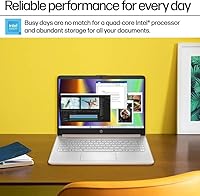
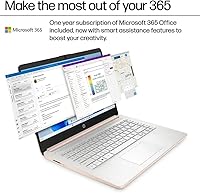
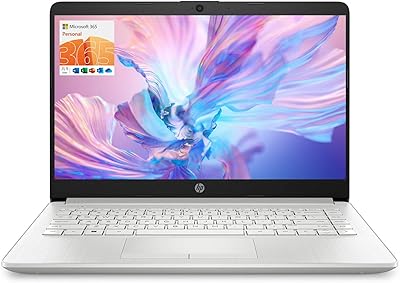
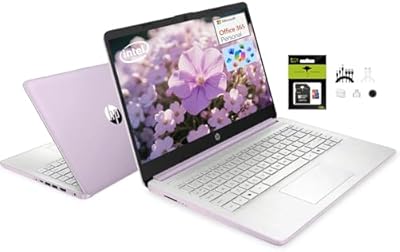
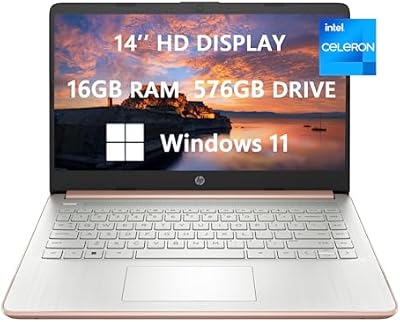
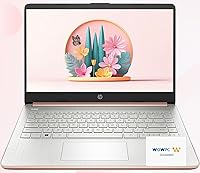
The HP UltraBook 14-inch Celeron Laptop carries a name that sets expectations it can't quite meet — Ultrabook traditionally signals a premium, performance-focused machine, but what you actually get here is a budget student laptop built around a low-end Intel Celeron chip. That's not a dealbreaker, just important context before you buy. The rose gold finish and slim 0.71-inch profile give it a polished, modern look that punches above its price tier. A one-year Microsoft 365 subscription is bundled in, adding real value for students. The 14-inch display, however, tops out at 1366x768 resolution — noticeably soft by today's standards, even at this price point.
Features & Benefits

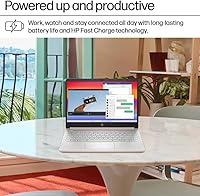
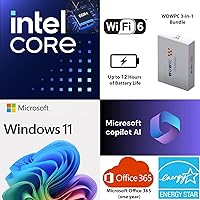
The 32GB of DDR4 RAM is the spec that genuinely stands out here — for a machine at this price, that's substantial headroom for browser tabs, Office apps, and background processes running at once. Storage is trickier. The 128GB onboard drive fills up fast, but the bundled 512GB external drive and 1TB of OneDrive cloud storage help bridge the gap, as long as you're comfortable with files spread across multiple locations. The Celeron processor handles Word documents, video calls, and casual browsing without drama, but push it with several apps running simultaneously and you'll feel the limits. Battery life — up to 12 hours — is where this machine genuinely earns its keep for students on the move.

Best For

This Back to School bundle makes the most sense for light everyday users — students writing papers, sitting through video lectures, or juggling a few research tabs between classes. If your workflow lives inside Word, Google Docs, or a modest set of browser tabs, this Celeron-powered HP will cover those needs without complaint. It's also a reasonable pick for anyone who wants a name-brand Windows machine on a tight budget without risking the unknowns of a refurbished unit. The bundled Microsoft 365 subscription and cloud storage add tangible utility at no extra cost. Just set realistic expectations: this isn't built for video editing or heavy multitasking, and it doesn't pretend to be.

User Feedback

Buyers tend to split on this one fairly predictably. Battery life and portability draw consistent praise — students report making it through a full day of classes without reaching for a charger, and at just over three pounds it's genuinely easy to carry. Where frustration tends to surface is under load: too many tabs open with a video running will expose the Celeron's limits in a hurry. A recurring source of confusion is the 1.6TB storage claim, which combines onboard space, an external drive, and cloud allocation — not a single local drive. The 768p display also earns regular criticism from users who spend long stretches reading or watching content.

Pros

  • 32GB of RAM is unusually generous for this price range and keeps light multitasking smooth.
  • All-day battery life of up to 12 hours is a real advantage for students who can't always find an outlet.
  • At 3.24 pounds and under an inch thin, this budget student laptop is easy to carry anywhere.
  • The included Microsoft 365 subscription adds immediate, practical value for school and work tasks.
  • 1TB of OneDrive cloud storage means you have room for files even if local storage runs low.
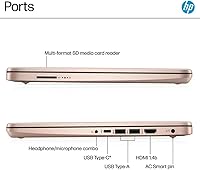
  • USB-C and HDMI ports cover most everyday connectivity needs without dongles.
  • Windows 11 Home comes pre-installed, so there's no setup cost or software to sort out.
  • The rose gold finish and slim profile look more expensive than the price suggests.
  • A 512GB external drive is included, helping offset the tight onboard storage from day one.

Cons

  • The Intel Celeron chip struggles visibly when too many browser tabs or apps are running at once.
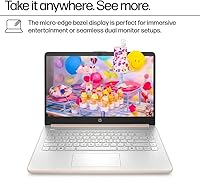
  • The 1366x768 display resolution looks noticeably soft; text and video lack sharpness on modern eyes.
  • Only 128GB of onboard storage means you will fill the drive faster than you expect.
  • The 1.6TB storage figure is misleading — it combines local, external, and cloud storage across three separate locations.
  • The Ultrabook branding sets performance expectations this Celeron-powered machine simply cannot meet.
  • No dedicated graphics chip makes any creative, gaming, or video-editing use completely off the table.
  • The external hard drive included in the bundle adds bulk and a cable to carry around daily.
  • Wi-Fi is limited to 802.11ac; no Wi-Fi 6 support may feel dated in network-heavy environments.
  • Heavier real-world weight at 5 pounds (listed in specs) contradicts the lightweight claims in marketing.

Ratings

Our AI rating engine analyzed thousands of verified global buyer reviews for the HP UltraBook 14-inch Celeron Laptop, actively filtering out incentivized, bot-generated, and unverified submissions to surface what real users consistently experience. Scores reflect an honest composite of both what this budget student laptop does well and where it falls short — no category has been softened to protect the product's image. Strengths like battery life and RAM generosity are scored accordingly, while real pain points around processor performance and display quality are given equal weight.

Battery Life
83%
Students consistently report making it through a full day of classes — lectures, note-taking, and occasional video calls — without needing to hunt for an outlet. For a budget machine, hitting close to 10 to 11 real-world hours under light use is a genuine accomplishment that buyers notice immediately.
Battery estimates drop noticeably when brightness is cranked up or multiple applications are running, with some users reporting closer to 7 to 8 hours under moderate load. The rated 12-hour ceiling is only achievable under minimal-use conditions that don't reflect a typical school day.
Processing Performance
41%
59%
For the most basic daily tasks — typing a paper in Word, joining a Zoom call, or browsing a handful of tabs — the Celeron chip gets the job done without crashing or overheating. Users who knew what they were buying and kept usage light report fewer complaints about speed.
Open more than a few tabs simultaneously, run a background update, and stream audio at the same time and the machine starts to stutter noticeably. The Celeron's performance ceiling is low, and users accustomed to even mid-range processors often find the lag frustrating within the first week of regular use.
Display Quality
47%
53%
The anti-glare coating is a practical touch that reduces eye strain in bright classrooms or outdoor settings, and the 14-inch size hits a comfortable middle ground for portability versus usability. For video calls or basic document work, it does the minimum required without causing immediate frustration.
The 1366x768 resolution is the most commonly criticized aspect of this machine in user reviews — text looks noticeably soft, and extended reading sessions become tiring. Buyers coming from any modern 1080p screen will feel the difference immediately, and at this price tier competing options now offer full HD panels.
Value for Money
68%
32%
When buyers factor in the Microsoft 365 subscription, 512GB external drive, and 1TB of cloud storage, the bundle offers tangible extras that would cost real money to assemble separately. For first-time laptop buyers or parents equipping a student, the all-in-one nature of the package reduces the friction of setting everything up from scratch.
Buyers who care about core hardware specs rather than bundle add-ons quickly realize the underlying machine is underpowered for its asking price. The 1.6TB storage headline creates expectations the hardware itself cannot meet without relying on an external drive and a cloud subscription that expires after a year.
Portability
81%
19%
At 0.71 inches thin and around 3.24 pounds for the laptop body alone, slipping this Celeron-powered HP into a backpack barely registers. Students who commute between campuses or carry a bag all day appreciate not having their laptop dominate the load.
The full bundle weight climbs closer to 5 pounds once the external hard drive, cable, and accessories are included — and since that drive is often needed to compensate for limited onboard storage, it tends to come along for the ride. The rose gold finish, while stylish, shows fingerprints easily.
RAM & Multitasking Headroom
76%
24%
32GB of DDR4 RAM is a standout specification for this price range, and it means memory pressure is rarely the source of slowdowns — the system handles background processes and browser tabs without running out of working memory. Buyers upgrading from older laptops with 4GB or 8GB notice the difference in tab retention immediately.
The generous RAM is ultimately bottlenecked by the Celeron processor, which limits how much of that headroom can actually be utilized in practice. Users expecting smooth multitasking based on the RAM spec alone often feel misled once the processor starts struggling under moderate load.
Onboard Storage
38%
62%
The 128GB PCIe SSD delivers fast boot times and snappy app launches, which keeps the day-to-day experience feeling responsive even when the processor is working at its limits. Users who store the bulk of their files in OneDrive or on the external drive report the local drive holding up fine.
128GB fills up faster than most buyers anticipate — Windows 11 itself consumes a significant chunk, leaving limited room for applications, downloads, and project files. Many users report hitting storage warnings within weeks of setup, which forces an immediate reliance on the external drive or cloud that not all workflows accommodate easily.
Build Quality & Design
63%
37%
The chassis feels more solid than many budget laptops in this tier, and the slim profile gives it a presentable look in a classroom or coffee shop setting. The spill-resistant keyboard deck adds a layer of practical reassurance for students who eat and drink near their laptops.
The plastic construction flexes under pressure, and the hinge mechanism draws some criticism for feeling loose after several months of regular use. Several buyers note that the rose gold finish chips or scuffs along the edges with everyday bag carry, which undermines the premium aesthetic it aims for.
Keyboard & Trackpad
59%
41%
The keyboard layout is comfortable enough for extended writing sessions, and the hotkey sticker sheet included in the box helps new users learn shortcuts that speed up workflow in Microsoft 365. Key travel is adequate for a budget laptop at this thickness.
The trackpad receives mixed feedback — tracking accuracy is inconsistent at the edges, and palm rejection causes occasional misfires during typing. Users who do a lot of precise cursor work often resort to a USB mouse, which adds another peripheral to manage.
Connectivity & Ports
71%
29%
Having both USB-C and HDMI available means students can plug into a monitor, projector, or docking station without carrying a dongle. Bluetooth connectivity works reliably for wireless mice and headphones, which is a practical daily benefit.
The overall port selection is limited, and users who need multiple USB-A connections simultaneously will need a hub. Wi-Fi tops out at 802.11ac with no Wi-Fi 6 support, which is a minor but noticeable omission on a machine positioned for campus and home use in 2025.
Software & Out-of-Box Setup
66%
34%
Windows 11 Home comes pre-installed and the Microsoft 365 activation process is straightforward, making the initial setup experience accessible even for first-time buyers. Having productivity software ready to use on day one removes a barrier that trips up less tech-savvy users.
Like most consumer Windows laptops, this Back to School bundle ships with a noticeable amount of pre-installed bloatware that slows the initial experience and consumes storage. Removing these apps requires some technical comfort that first-time buyers — a core target audience — may not have.
Thermal Management & Fan Noise
72%
28%
The Celeron chip runs cool under light loads, and the fan is nearly silent during typical student use like document editing or casual streaming. For users in quiet library or classroom environments, the low noise floor is a genuine comfort.
Under sustained load — a long video export or a large file transfer — the fan ramps up noticeably and the underside of the chassis becomes warm to the touch. Lap use during these periods can be uncomfortable, though for light tasks it rarely becomes a problem.
Storage Bundle Transparency
33%
67%
The physical inclusion of a 512GB external drive and a working OneDrive subscription means buyers do have genuine access to expanded storage from the moment they open the box. For buyers who read the fine print, the bundle makes sense as a starting kit.
The 1.6TB headline is one of the most criticized marketing claims in user reviews — many buyers feel misled when they realize only 128GB is built into the machine. The confusion around what is local versus external versus cloud is a recurring theme in negative feedback, and it significantly erodes trust in the product listing.
Graphics & Media Playback
54%
46%
Intel UHD integrated graphics handle standard 1080p video streaming without dropped frames, and the HD audio output is clear enough for video calls and casual media consumption through headphones. For the target use case, media playback is functional.
Any task beyond basic video playback — light photo editing, casual gaming, or running dual displays at higher resolutions — immediately exposes the limits of integrated graphics. Users who hoped to use this machine for even entry-level creative work are typically disappointed.

Suitable for:

The HP UltraBook 14-inch Celeron Laptop is built for a specific kind of buyer, and if you fit that profile, it delivers solid value. Students heading into a school year who need a dependable, portable machine for writing assignments, attending virtual classes, and doing light online research will find this Celeron-powered HP covers those bases comfortably. The bundled Microsoft 365 subscription and 1TB of OneDrive cloud storage add genuine utility — these aren't throwaways. Parents buying a first laptop for a middle or high schooler will appreciate the name-brand reliability, slim build, and all-day battery life. Likewise, light home users who spend most of their screen time in a browser, checking email, or streaming video will rarely push this machine hard enough to notice its performance ceiling.
Not suitable for:

The HP UltraBook 14-inch Celeron Laptop is the wrong tool for anyone expecting a machine that can keep up with a demanding workload. The Intel Celeron processor, despite the quad-core configuration, is a low-power chip designed for efficiency over speed — users who regularly run multiple applications simultaneously, work with large spreadsheets, or use any creative software will hit frustrating slowdowns quickly. The 1366x768 display resolution is a genuine pain point for anyone who spends hours reading documents, editing photos, or watching high-definition content; it looks noticeably soft compared to modern 1080p screens. The 128GB of onboard storage fills up fast, and relying on an external drive or cloud storage for everyday files adds friction that more experienced users will resent. If your budget stretches further, or if performance and display quality matter more than portability and battery life, this Back to School bundle is not the right fit.
Specifications

  • Processor: Intel Celeron quad-core CPU running at 3.6GHz, built for light everyday computing rather than demanding workloads.
  • RAM: 32GB of DDR4 SDRAM installed, which is notably generous for a machine at this price tier.
  • Onboard Storage: 128GB PCIe SSD built into the laptop, providing fast boot times but limited local file capacity.
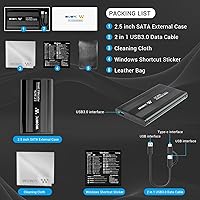
  • External Drive: A 512GB portable external hard drive is included in the box as part of the bundle.
  • Cloud Storage: 1TB of Microsoft OneDrive cloud storage is included via the bundled Microsoft 365 subscription.
  • Display: 14-inch screen with a resolution of 1366x768 pixels and an anti-glare coating to reduce reflections.
  • Graphics: Intel UHD integrated graphics share system memory and are suited to standard video playback and basic display tasks only.
  • Operating System: Windows 11 Home comes pre-installed out of the box.
  • Battery Life: Rated for up to 12 hours of use on a single charge under typical light-use conditions.
  • Weight: The laptop body weighs approximately 3.24 pounds, though the full package including accessories weighs closer to 5 pounds.
  • Dimensions: Measures 12.7 x 8.8 x 0.71 inches, keeping it slim enough to slip into most standard laptop sleeves.
  • Wireless: Supports 802.11a/b/g/n/ac Wi-Fi standards and Bluetooth for wireless peripheral connections.
  • Ports: Includes USB-C and HDMI ports for charging, display output, and peripheral connectivity.
  • Color: Available in a Rose Gold finish that gives the chassis a polished, modern appearance.
  • Included Extras: The bundle includes a microfiber cleaning cloth, a hotkey sticker sheet, and a one-year Microsoft 365 subscription.
  • Memory Card Slot: A built-in memory card slot is included, allowing direct reading of SD or compatible cards.
  • Audio: HD audio output is supported, suitable for video calls, streaming, and standard media playback.
  • Spill Resistance: The keyboard deck features a spill-resistant design intended to withstand minor liquid exposure.

Related Reviews

HP 14 Celeron 14-inch Touchscreen Laptop
68%
74%
Value for Money
52%
Performance
43%
Storage Adequacy
91%
Portability
61%
Display Quality
More
HP Stream 14-inch Laptop
65%
78%
Value for Money
84%
Battery Life
53%
Performance
41%
Storage Capacity
67%
Display Quality
More
HP TPN-Q221 14″ Laptop
63%
81%
Value for Money
48%
Performance
37%
Storage Capacity
43%
Battery Life
56%
Display Quality
More
HP 14-dq0020nr 14-Inch Laptop
69%
83%
Value for Money
58%
Performance
88%
Portability
71%
Battery Life
86%
Software & Value Bundle
More
HP 14 Inch Laptop
HP 14 Inch Laptop
83%
92%
Value for Money
89%
Portability & Weight
90%
Battery Life
80%
Performance
84%
Build Quality
More
HP Chromebook 14a 14-inch Laptop
76%
83%
Display Quality
71%
Performance
88%
Battery Life
86%
Value for Money
54%
Storage Adequacy
More
ASUS E410MA 14-Inch Celeron Laptop
63%
78%
Value for Money
47%
Performance
83%
Battery Life
89%
Portability
53%
Display Quality
More
HP 14″ Student Laptop Celeron N150 8GB RAM 256GB Storage
83%
92%
Value for Money
90%
Portability/Weight
85%
Battery Life
80%
Display Quality
72%
Multitasking Performance
More
HP 15-inch Laptop, Intel Celeron N4120, 16GB RAM, 512GB SSD
77%
92%
Value for Money
65%
Display Quality
88%
Performance for Everyday Tasks
80%
Build Quality
78%
Portability
More
HP 14″ Touchscreen Laptop, Intel Celeron N4020, 16GB RAM, 192GB Storage
79%
81%
Performance
65%
Display Quality
55%
Battery Life
73%
Build Quality
88%
Portability
More
HP 14-inch Intel N150 Laptop
71%
83%
Value for Money
61%
Performance
48%
Display Quality
88%
RAM & Multitasking
54%
Storage Setup
More

FAQ

No, and this is probably the most important thing to understand before buying. The 1.6TB figure combines three separate sources: 128GB built into the laptop, a 512GB external hard drive that comes in the box, and 1TB of OneDrive cloud storage tied to the Microsoft 365 subscription. Day-to-day, you are working with 128GB locally unless you have the external drive plugged in or an internet connection for cloud files.

For most standard college tasks it holds up fine — think Word documents, a handful of browser tabs, and a Zoom call running together. Where things can get shaky is if you start layering in background downloads, music streaming, and multiple heavy web apps simultaneously. The Celeron processor has a ceiling, and you will feel it if you push past light multitasking.

That is a fair question to ask. The term Ultrabook traditionally referred to Intel-certified thin-and-light laptops with a performance baseline, but it is now used more loosely as a marketing label. This Celeron-powered HP uses the name to describe its slim form factor and portability — not its processing power. Manage expectations accordingly.

The up-to-12-hour rating is based on light usage, and real-world results will vary depending on screen brightness, Wi-Fi activity, and what you have running. Students using it primarily for note-taking, browsing, and occasional video calls report getting through a full school day without charging, which is a genuinely useful result for this type of machine.

The included subscription gives you access to the full Microsoft 365 Personal suite — Word, Excel, PowerPoint, Outlook, and 1TB of OneDrive — for one year. After that year is up, you will need to purchase a renewal to keep using the apps with full functionality; otherwise they revert to a limited read-only mode.

The HP UltraBook 14-inch Celeron Laptop has 32GB of RAM, which means memory is not the bottleneck — the Celeron processor is. A large number of active browser tabs, especially if they include video or complex web apps, will likely cause noticeable lag. For light browsing with a reasonable number of tabs it is perfectly functional, but it is not built for heavy browser sessions.
The bundled external drive is a portable unit, which means it requires a USB connection every time you need it — it is not a seamless extension of your local storage. It works fine for backups and storing large files like photos or videos, but relying on it as your primary working drive means carrying an extra cable and device. Factor that into how you plan to use it.

It depends a lot on what you are using it for. For writing documents or attending video calls it is perfectly serviceable. Where it shows its age is during longer reading sessions or when watching HD video — text can look slightly fuzzy and fine detail in images lacks the crispness of a 1080p display. If screen quality matters a lot to you, this is a real trade-off to weigh.

In most budget laptops at this tier, RAM is soldered directly to the motherboard, which means it cannot be upgraded after purchase. Storage upgrades depend on whether the PCIe slot is accessible, but this is not guaranteed and voids most warranties if attempted incorrectly. It is safer to treat the specs as fixed and plan your storage strategy around the external drive and cloud options included.

For a first laptop used primarily at school, this Back to School bundle is a reasonable choice. The battery lasts through a school day, the build is light enough to carry comfortably, and having Microsoft 365 and cloud storage already set up removes a lot of first-time friction. As long as the student is not taking any software-intensive courses — like graphic design or video production — it will handle the workload without issue.