Overview

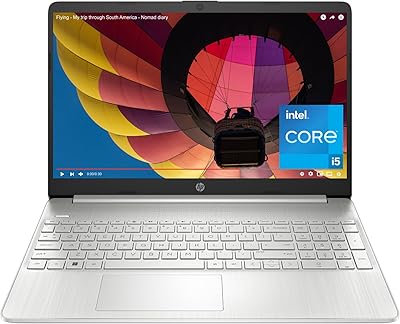
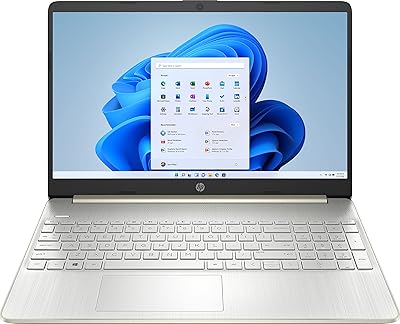
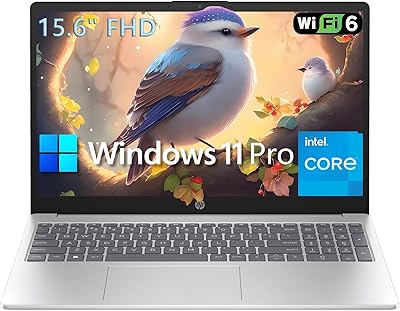
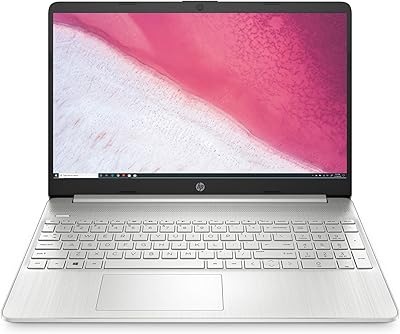
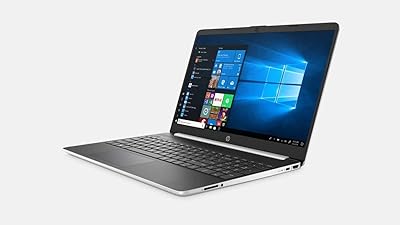
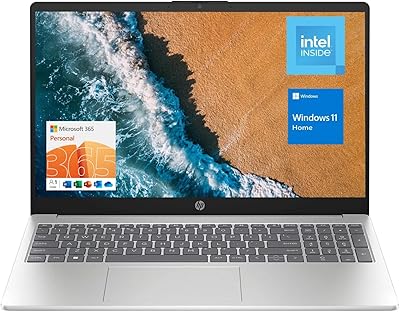
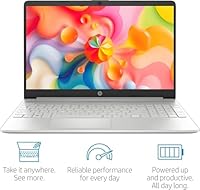
The HP 15-inch N4120 16GB Laptop is built for people who just need a dependable machine for the basics: email, web browsing, streaming, and the occasional Word document. Under the hood sits a quad-core Intel Celeron N4120 chip that tops out around 2.6GHz, which is enough horsepower for everyday tasks without pretending to be a workhorse. It ships with Windows 11 Pro already installed, and HP throws in a full year of Microsoft 365, which is a nice touch for anyone who would otherwise pay for that separately. The 15.6-inch screen, silver finish, anti-glare coating, and built-in numeric keypad round out a design that feels practical rather than flashy, aimed squarely at home users, students, and light office work.
Features & Benefits

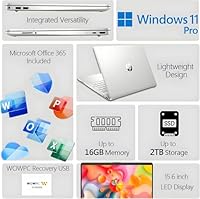
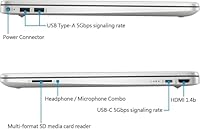
Where this HP laptop earns its keep is in the small, sensible touches. The 16GB DDR4 RAM is generous for this price tier and noticeably helps when you have a dozen browser tabs open alongside a streaming video or two. The anti-glare LED IPS panel keeps reflections at bay during long sessions near a window, and the port selection covers more ground than expected, with USB-C, a pair of USB-A ports, HDMI, and a multi-format SD card reader all on board. The numeric keypad is a welcome inclusion for anyone doing regular spreadsheet work. HP also tosses in a WOWPC recovery USB for troubleshooting, plus that bundled Microsoft 365 subscription, which together make the overall package feel more complete than the price tag suggests.

Best For

This budget Windows 11 laptop makes the most sense for a fairly specific set of buyers. Students juggling research papers, online classes, and note-taking will find it gets the job done without fuss. Home users who mostly browse, stream shows, and handle light email or document work will likely never push it hard enough to notice its limits. It is also a smart pick for anyone who wants Windows 11 Pro and a real Office subscription without paying premium prices, or who simply needs a reliable backup machine for basic daily tasks. If you specifically rely on a numeric keypad for data entry, that is another point in its favor, since plenty of laptops in this range skip it entirely.

User Feedback

Feedback on this Celeron-powered laptop tends to be fairly consistent. Buyers frequently call out the included Microsoft 365 subscription as genuine added value, especially at this price point, and most agree it handles light, everyday tasks without complaint. On the downside, some reviewers note the 1366x768 resolution feels basic compared to higher-end displays, and a few mention that performance dips noticeably once you start multitasking heavily or running more demanding programs. There has also been some confusion around exact storage capacity, since listings have not always been consistent on that detail. A handful of users mention the laptop feels a touch heavier than expected to carry around daily, though most consider that a minor tradeoff overall.

Pros

  • Bundled Microsoft 365 subscription adds real value right out of the box.
  • 16GB of RAM keeps everyday browsing and light multitasking feeling smooth.
  • Anti-glare display reduces glare during long work or study sessions.
  • Numeric keypad makes spreadsheet and data entry work noticeably easier.
  • Solid port selection covers USB-C, USB-A, HDMI, and an SD card reader.
  • Windows 11 Pro is included without paying premium laptop prices.
  • WOWPC recovery USB adds peace of mind if troubleshooting is ever needed.
  • Handles students and home users well for writing, research, and streaming.

Cons

  • Performance noticeably drops once you try running several demanding programs at once.
  • Screen resolution feels basic and can look soft compared to sharper displays.
  • Feels a bit heavier than expected for buyers wanting daily portability.
  • Storage capacity has been listed inconsistently, which can confuse shoppers before buying.
  • Not a fit for gaming or any serious creative software workloads.
  • Celeron processor limits how much heavy multitasking it can comfortably handle.
  • Lacks the visual sharpness some buyers expect from a 15.6-inch display.
  • Better suited as a secondary machine than a primary daily workhorse.

Ratings

These scores for the HP 15-inch N4120 16GB Laptop were generated by AI after analyzing verified user reviews from buyers around the world, with spam, bots, and incentivized feedback filtered out before scoring. Each category reflects what real owners consistently praised alongside the pain points they ran into, so you get an honest picture rather than a one-sided pitch. Use these breakdowns to see exactly where this budget laptop shines and where it falls short for your specific needs.
Performance for Everyday Tasks
71%
29%
For typing, browsing, and streaming, the Celeron N4120 handles things without much fuss. Pages load at a normal pace and switching between a handful of apps feels fine for casual daily use, especially for students knocking out assignments between classes.
Push it harder with several heavy programs running at once and the limitations show up quickly. Anyone hoping to run demanding software or juggle dozens of tabs alongside streaming will likely feel the slowdown.
RAM and Multitasking
81%
19%
16GB of DDR4 RAM is genuinely generous for a laptop in this price range. It helps with everyday multitasking, like keeping email, a streaming tab, and a document open at once without constant lag or stutter.
The extra RAM cannot fully compensate for the modest processor sitting underneath it. Buyers expecting smooth performance with resource-intensive apps may still notice slowdowns despite the generous memory available on paper.
Display Quality
56%
44%
The anti-glare IPS panel does a solid job cutting down reflections during long study or work sessions near windows. Colors also look reasonably accurate for casual viewing and everyday video calls.
The 1366x768 resolution is noticeably soft compared to sharper screens, and text or detailed images can look fuzzy up close. Buyers coming from higher-resolution laptops will likely notice the difference right away.
Storage and Boot Speed
68%
32%
Solid-state storage keeps boot times and everyday file access feeling reasonably snappy compared to older spinning hard drives. That matters most during daily startup and when opening commonly used programs quickly.
Exact capacity has been listed inconsistently across different sources, which leaves some buyers uncertain about how much storage they are actually getting in practice. That inconsistency is worth confirming before checkout.
Build and Design
78%
22%
The silver finish looks clean and professional for a budget machine in this category. The anti-glare coating paired with a numeric keypad gives it a practical, no-nonsense feel suited for school or office settings.
It is a fairly standard plastic-feeling build rather than anything particularly premium or refined. Buyers looking for a sleek or particularly sturdy chassis at this price will likely come away unimpressed.
Keyboard and Typing Experience
83%
The built-in numeric keypad is a genuine convenience for anyone doing regular spreadsheet work or repetitive data entry. It saves real time compared to laptops that skip this feature entirely.
Beyond the keypad, the overall typing experience is fairly ordinary, without standout key travel or backlighting. Buyers wanting a more refined typing feel may find it merely adequate rather than impressive.
Port Selection and Connectivity
87%
Between USB-C, two USB-A ports, HDMI, and an SD card reader, it covers most everyday connectivity needs comfortably. That includes plugging in external drives or connecting a monitor for a quick presentation.
The USB-C port is data-only, so it cannot be used for charging or video output at all. That may surprise buyers used to more versatile USB-C implementations on other recent devices.
Software Value
91%
Getting Windows 11 Pro and a full year of Microsoft 365 included feels like genuine added value. Students or home users who would otherwise pay separately for Office tools benefit the most from this bundle.
After the first year, the Microsoft 365 subscription will need to be renewed to keep using it. So the included value is more of a one-time perk than a permanent built-in feature.
Portability and Weight
59%
41%
At 15.6 inches, it is roomy enough for comfortable everyday typing and viewing without feeling cramped. That works well for stationary use at a desk, kitchen table, or shared family computer space.
Weighing around 6 pounds, it feels noticeably heavier than slimmer ultrabooks in the same general size class. Daily commuters or students carrying it between classes may find that extra weight tiring.
Battery Endurance
72%
28%
Thanks to the low-power Celeron processor, it should comfortably get through a typical study session or light workday between charges. Casual browsing and document work do not drain it quickly.
Heavier use like streaming video for extended periods or running multiple apps at once will drain the battery noticeably faster. All-day unplugged use for more demanding tasks is simply not realistic.
Value for Money
85%
Between the bundled Microsoft 365 subscription, decent RAM, and a practical port selection, this Celeron-powered laptop delivers a lot of useful extras. That makes it feel well rounded for a budget-friendly price point overall.
Those extras come with real tradeoffs in screen resolution and raw processing power compared to pricier laptops. Buyers expecting premium performance alongside the bundled software will likely walk away somewhat disappointed.
Troubleshooting and Recovery Tools
75%
25%
The included WOWPC recovery USB gives buyers a built-in safety net for basic troubleshooting. It is a thoughtful inclusion that not every budget laptop bothers to provide out of the box.
It is a basic recovery tool rather than a true substitute for proper, regular backups. Buyers still need to handle their own file backups separately for full peace of mind.

Suitable for:

The HP 15-inch N4120 16GB Laptop is a smart fit for students who need something reliable for typing papers, joining online classes, and doing basic research without any fuss. It also works well for home users who mostly browse the web, stream shows, and check email, since the 16GB of RAM keeps everyday multitasking feeling responsive. Anyone shopping mainly for Windows 11 Pro and a built-in Microsoft 365 subscription will appreciate getting both without paying for premium hardware they do not need. Buyers who want a numeric keypad for spreadsheet or data entry work will find that a genuine convenience here. It also makes sense as a low-stakes backup machine for a household that already has a more powerful primary computer.
Not suitable for:

Anyone expecting strong multitasking or smooth performance under heavy workloads should look elsewhere, since the HP 15-inch N4120 16GB Laptop relies on an entry-level Celeron chip built for light tasks only. Gamers, video editors, or anyone running demanding creative software will quickly hit its limits and end up frustrated. Buyers who care about sharp visual detail may also be disappointed, since the 1366x768 resolution feels noticeably basic next to higher-end displays. People who frequently carry a laptop around all day might find the weight a bit more than they would like for constant portability. And because storage details have varied across listings, anyone who needs a guaranteed exact capacity should confirm it directly before buying.
Specifications

  • Processor: It runs on an Intel Celeron N4120 quad-core processor with a burst speed of up to 2.6GHz.
  • Memory: The laptop includes 16GB of DDR4 RAM for handling everyday multitasking.
  • Storage: Storage is solid-state, though exact capacity has been listed inconsistently across sources.
  • Display: It features a 15.6-inch LED IPS Micro Edge display with a 1366x768 resolution.
  • Screen Coating: The screen uses an anti-glare coating to reduce reflections during everyday use.
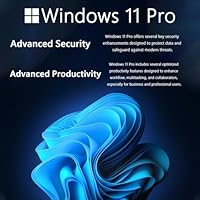
  • Operating System: It ships with the 64-bit version of Windows 11 Pro preinstalled.
  • Software Bundle: A one-year Microsoft 365 subscription is included with purchase.
  • USB-C Port: One USB-C port supports 5Gbps data transfer only, with no charging or video output.
  • USB-A Ports: Two USB-A ports are included, each supporting 5Gbps data transfer speeds.
  • Video Output: An HDMI 1.4b port is available for connecting an external monitor or display.
  • Card Reader: A multi-format SD card reader is built in for transferring photos and files.
  • Keyboard Layout: The keyboard includes a built-in numeric keypad for faster data entry.
  • Recovery Tool: A WOWPC recovery USB is included to assist with system troubleshooting.
  • Weight: The laptop weighs approximately 6 pounds.
  • Dimensions: It measures 14.11 x 9.5 x 0.7 inches.
  • Finish: The chassis comes in a silver finish.
  • Graphics: Graphics are handled by an integrated Intel UHD chip rather than a dedicated GPU.

Related Reviews

HP 15 Core i5-1235U 15.6-inch Laptop
75%
88%
Value for Money
82%
Performance
74%
Display Quality
58%
Battery Life
69%
Build Quality
More
HP 15.6-inch Touch-Screen Laptop, 11th Gen Intel Core i7, 16GB RAM, 512GB SSD
85%
91%
Performance
87%
Value for Money
65%
Display Quality
80%
Battery Life
92%
Portability
More
HP 15 Intel N100 16GB/256GB
77%
88%
Value for Money
83%
Everyday Performance
91%
RAM & Multitasking
67%
Display Quality
72%
Build Quality & Portability
More
HP 15.6-inch Laptop 15-ef0021nr, Ryzen 3 3200U, 8GB RAM, 256GB SSD
82%
92%
Value for Money
85%
Performance
83%
Build Quality
89%
Portability
81%
Battery Life
More
HP 15 i5-1035G1 512GB Touchscreen Laptop
75%
84%
Performance
67%
Display Quality
71%
Battery Life
82%
Build Quality
89%
Storage Speed
More
UOWAMOU BTC501 15.6″ Laptop 512GB
71%
88%
Value for Money
67%
Performance & Speed
79%
Display Quality
91%
RAM & Storage
58%
Wi-Fi & Connectivity
More
SAINTDISE ANL5-N5095 15.6-inch Laptop
62%
78%
Value for Money
54%
Performance
73%
Display Quality
41%
Battery Life
83%
Portability
More
HP 14-dq0054dx 16GB 14-Inch Laptop
65%
72%
Value for Money
54%
Performance
47%
Storage Setup
58%
Display Quality
81%
RAM & Multitasking
More
HP TPN-Q286 15.6″ Laptop (N200, 16GB, 128GB)
69%
83%
Value for Money
76%
Performance & Speed
51%
Display Quality
88%
RAM & Multitasking
44%
Storage Capacity
More
HP 15-dy1034nr Laptop, Intel Core i5-1135G7, 16GB RAM, 1TB SSD
84%
88%
Performance
92%
Value for Money
79%
Battery Life
85%
Display Quality
87%
Portability & Weight
More

FAQ

Yes, for that kind of light use it holds up well. The Celeron N4120 chip and 16GB of RAM are enough to keep multiple browser tabs, video streaming, and basic apps running smoothly. Just do not expect it to handle heavy multitasking or demanding software.

Not really. This is an entry-level chip built for everyday tasks, not gaming or video editing. If your work involves rendering, large file editing, or graphics-intensive software, you will want something with more processing power.

It includes a one-year Microsoft 365 subscription, which gives you access to Word, Excel, PowerPoint, and other Office apps right away. After that first year, you would need to renew the subscription separately to keep using it.

The display is a 15.6-inch LED IPS panel with anti-glare coating, which helps in bright rooms. That said, the 1366x768 resolution is on the basic side, so text and images will not look as sharp as on higher-resolution screens.

It uses solid-state storage, which is good for faster boot times and file access. Listings have varied on the exact capacity, so we would recommend double-checking the specific listing you are buying from to confirm the figure.

If you do a lot of spreadsheet work or data entry, yes, it genuinely helps speed things up. It is one of the more practical extras included at this price point.

You get one USB-C port and two USB-A ports, all running at 5Gbps for data transfer, plus an HDMI 1.4b port for an external display and a multi-format SD card reader. There is also a combo headphone and microphone jack.

It is a solid pick for typing papers, doing research, and joining online classes. The HP 15-inch N4120 16GB Laptop is not built for heavy software or gaming, but for typical coursework and browsing, it gets the job done reliably.
It weighs about 6 pounds, which is on the heavier side for a 15.6-inch laptop. If you are commuting with it every day, you will likely notice the extra weight compared to lighter ultrabooks.

It is a troubleshooting tool included with the laptop that can help you restore or repair the system if something goes wrong down the line. It is a nice safety net to have on hand rather than relying solely on built-in recovery options.