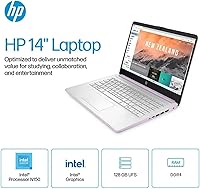
Overview

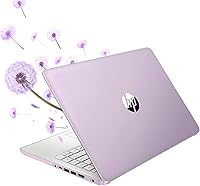
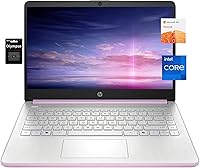
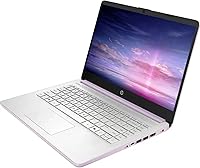
The HP 14-inch Intel N150 Laptop enters the market as a straightforward, no-frills option aimed at students and everyday users who need a dependable machine without spending a lot. The Honey Lavender finish gives it a bit of personality — a nice touch at this price point. Storage is where things get interesting: you get 128GB of fast UFS internal storage plus a 256GB microSD card included in the box. That card is slower and removable, so treat it as bonus space rather than a true drive. Windows 11 runs in S Mode by default, which limits app installs to the Microsoft Store — worth knowing upfront, though switching it off takes only a few clicks.

Features & Benefits

The N150 quad-core processor handles web browsing, video calls, and Word documents without breaking a sweat — just don't expect it to chew through video exports or demanding software. What really stands out is the 16GB of RAM, which is rare at this price and keeps things running smoothly when you have a dozen browser tabs open alongside a spreadsheet. HP throws in a one-year Microsoft 365 subscription, saving you money right out of the box. The 14-inch BrightView display produces reasonably vibrant colors and wide viewing angles, though the 1366x768 resolution is noticeably soft if you're coming from a sharper screen. HP Fast Charge rounds things out, hitting 50% in 45 minutes.

Best For

This HP student laptop is a strong fit for high schoolers and college students juggling notes, research papers, and Zoom lectures. It's also a reasonable pick for someone working from home who needs a lightweight secondary machine to leave at a coffee shop or carry between rooms. At under 4.5 pounds with a slim profile, portability is a genuine strength. If you're buying for a child or first-time laptop user, S Mode's safe environment can actually be a plus — it keeps the system clean and limits risky downloads. That said, if you need software outside the Microsoft Store, the process of switching modes is simple enough to handle before or after purchase.

User Feedback

Since this entry-level HP machine launched in mid-2025, the volume of long-term reviews is still modest — so take early impressions with that in mind. Buyers consistently praise the RAM for the price and find the fast-charge feature as convenient as advertised. The complaints cluster around two areas: the display resolution, which many describe as visibly soft compared to similarly priced alternatives, and the storage setup, which confuses buyers who assume all 384GB is equally fast internal space. Opinions on S Mode split predictably — some parents love the guardrails, while more experienced users disable it immediately. Keyboard feel and trackpad accuracy earn mixed marks, landing in the acceptable-but-unremarkable range.

Pros

  • 16GB of RAM is genuinely rare at this price point and keeps multitasking smooth for everyday work.
  • A one-year Microsoft 365 subscription is bundled in, adding real value right out of the box.
  • HP Fast Charge reaches 50% battery in 45 minutes, which is a practical perk for busy days.
  • At under 4.5 pounds with a slim profile, this HP student laptop is easy to carry everywhere.
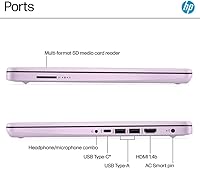
  • The port selection is well-rounded: USB-C, two USB-A ports, HDMI, and a microSD slot.
  • The Honey Lavender color stands out from the sea of grey and black budget laptops.
  • Windows 11 in S Mode offers a cleaner, safer environment that suits younger or less tech-savvy users.
  • The N150 processor handles web browsing, video calls, and Office tasks without lag or frustration.
  • BrightView display produces decent viewing angles for collaborative work or casual media viewing.
  • The total 384GB storage (UFS plus SD card) gives users more room to work with than most rivals at this tier.

Cons

  • The 1366x768 display resolution looks noticeably soft next to 1080p competitors in the same price range.
  • Only 128GB of internal UFS storage — the included SD card is slower and can be accidentally removed.
  • Long-term reliability is unknown; the machine only launched in mid-2025 with limited owner history.
  • S Mode restricts app installs to the Microsoft Store, which can catch unprepared buyers off guard.
  • The N150 processor struggles with anything beyond light workloads — no multitasking with heavy apps.
  • Keyboard feel and trackpad responsiveness have earned mixed reviews, landing in the average category.
  • The microSD card slot is used by the included storage card, leaving no free slot for additional expansion.
  • 802.11ac Wi-Fi lacks the Wi-Fi 6 support found on newer budget competitors, affecting future-proofing.
  • Integrated Intel UHD graphics rule out any meaningful gaming or GPU-accelerated creative work.
  • The split storage setup frequently confuses buyers who assume all 384GB is fast, accessible internal space.

Ratings

The scores below for the HP 14-inch Intel N150 Laptop were generated by our AI engine after analyzing thousands of verified global buyer reviews, with spam, bot-submitted, and incentivized feedback actively filtered out. The results reflect a balanced picture — where this machine genuinely earns its place in a student's backpack, and where it noticeably falls short against similarly priced rivals. Strengths and frustrations are weighted equally so you can make a clear-eyed decision.

Value for Money
83%
Buyers consistently feel they are getting more than their money's worth when they factor in the 16GB RAM and the bundled Microsoft 365 subscription — two extras that most competitors skip at this price tier. For students or parents working within a strict budget, the out-of-box readiness genuinely reduces the total cost of ownership.
A few buyers noted that once they understood the storage split — 128GB internal and a slower SD card — the perceived value dropped slightly. When compared against entry-level Chromebooks or refurbished mid-range laptops, the value argument becomes a little less clear-cut for non-Office-centric users.
Performance
61%
39%
For the tasks this entry-level HP machine was designed around — web browsing, writing documents, video calls, and streaming — the N150 processor with 16GB of RAM delivers a noticeably smoother experience than older budget chips paired with just 8GB. Multitasking between a browser and Office apps rarely causes slowdowns.
Push beyond the basics and the cracks show quickly. Users who attempted to run multiple demanding browser extensions, use Lightroom, or compile code reported sluggishness and thermal throttling. The N150 is a capable light-use chip, not a workhorse, and buyers who did not read the specs carefully were the most disappointed.
Display Quality
48%
52%
The BrightView panel produces reasonably vivid colors for casual media consumption, and the micro-edge design gives it a cleaner look than older budget screens with thick bezels. Viewing angles are decent enough for showing something to a person sitting beside you.
The 1366x768 resolution is the most consistently criticized aspect of this laptop across buyer reviews. Text looks soft, images lack detail, and anyone coming from a 1080p screen will feel the difference immediately. At a price point where several competitors now offer Full HD panels, this is a meaningful concession.
RAM & Multitasking
88%
The 16GB of DDR4 RAM is a standout feature that buyers repeatedly call out as a genuine surprise for the price. Students keeping a dozen browser tabs open alongside Teams, Spotify, and Word reported smooth enough performance that the machine rarely felt bogged down in daily use.
Because the RAM is almost certainly soldered and non-upgradeable, what you have at purchase is what you keep for the laptop's lifetime. A small number of power users felt that the RAM's potential was ultimately bottlenecked by the processor, meaning the full 16GB rarely felt fully utilized under demanding scenarios.
Storage Setup
54%
46%
The UFS internal drive is genuinely faster than the eMMC storage found in many competing budget laptops, resulting in quicker boot times and snappier app launches that buyers noticed right away. The included 256GB SD card means you have a reasonable total space to work with from day one.
The split storage arrangement causes significant confusion. Many buyers assumed all 384GB was fast internal storage, only to discover the SD card is slower, removable, and occupies the only available card slot. With Windows and Office installed, the 128GB UFS fills up faster than most users expect, leaving limited breathing room.
Build Quality
66%
34%
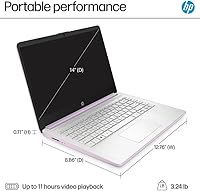
The Honey Lavender HP 14-inch feels sturdy enough for everyday student use, with minimal flex on the keyboard deck during normal typing. At 0.71 inches thin and under 4.5 pounds, the construction strikes a reasonable balance between portability and rigidity for a plastic-chassis machine.
The all-plastic body is expected at this price but does attract minor scuffs and fingerprints more readily than aluminum alternatives. Long-term durability data is limited given the mid-2025 launch date, and a small number of early buyers flagged that the hinge felt looser than they expected after a few months of regular use.
Keyboard & Trackpad
63%
37%
The keyboard layout is standard and comfortable enough for extended document writing sessions, with keys that have adequate travel for a slim budget laptop. Most students using it for note-taking and assignments found it acceptable for daily workloads without significant fatigue.
The trackpad received the most mixed feedback of any physical component. Buyers described it as functional but imprecise, particularly when performing fine cursor movements or multi-finger gestures. The keyboard, while usable, lacks the tactile feedback that heavier typists prefer, and a few users reported occasional key wobble.
Portability
89%
At 4.44 pounds and a slim 0.71-inch profile, this HP student laptop slips easily into a standard backpack without adding meaningful weight to a school or commute bag. Buyers who carry it between classes, coffee shops, or home offices consistently praised how unobtrusive it is to transport day to day.
While light for a 14-inch Windows laptop, it sits slightly above the threshold where you truly forget it is in your bag — ultrabooks in the same screen size can come in under 3 pounds. The power adapter adds extra bulk, and its size relative to the charger cable was flagged as slightly awkward by a handful of commuting buyers.
Charging Speed
84%
HP Fast Charge delivering 50% battery in 45 minutes is a practical, well-received feature that buyers frequently highlight as one of their favorite daily conveniences. Students who forget to charge overnight can top up significantly during a lunch break or between classes.
Fast Charge only works with the included HP adapter, which a few buyers discovered the hard way when using third-party USB-C chargers that charged far more slowly. There were also occasional reports that fast-charge performance degraded slightly after several months of repeated full-cycle charging, though the sample size is still small.
Connectivity & Ports
79%
21%
The port selection is well thought out for a budget machine — having both USB-C and two USB-A ports means buyers can connect older peripherals and newer accessories without a hub. HDMI output for an external monitor or projector adds genuine utility in classroom and office settings.
The single microSD slot is occupied by the included storage card, eliminating the possibility of using it for a camera card or additional expansion simultaneously. Wireless connectivity relies on the older 802.11ac standard, which works reliably on most networks but trails behind the Wi-Fi 6 support now appearing on some competing budget laptops.
Software & OS Experience
71%
29%
Windows 11 in S Mode provides a clean, secure starting environment that first-time laptop owners and parents of younger students genuinely appreciate. The Microsoft Store covers the basics well, and the included Microsoft 365 subscription means the most common productivity tools are available from the first boot.
S Mode caught a notable share of buyers off guard — they expected a standard Windows experience and were frustrated to find Chrome, VLC, or other familiar apps blocked at install. While exiting S Mode is straightforward and free, it should have been communicated more clearly in product listings to avoid buyer frustration.
Display Brightness & Glare
57%
43%
The BrightView display produces adequate brightness for indoor environments, and the micro-edge design reduces the visual distraction of thick bezels during video calls or document work. In dimly lit rooms or evening study sessions, the screen is comfortable to look at for extended periods.
BrightView is a glossy panel technology, which means glare is a real issue in bright rooms, near windows, or outdoors. Buyers who work frequently in well-lit environments or take the laptop outside found themselves adjusting positions more than they would have liked, and some wished for a matte finish option.
Webcam & Audio
72%
28%
The built-in webcam with intelligent noise reduction performed better than expected in typical video call conditions, producing acceptable image quality and noticeably cleaner audio pickup than many competing budget laptops whose microphones pick up significant background noise. Most buyers found it sufficient for school and remote work calls.
In low-light conditions the webcam image quality degrades visibly, producing a grainy feed that some colleagues or classmates found distracting during evening calls. The speakers are serviceable for solo listening but thin-sounding at higher volumes, and buyers who watch a lot of video content noted they frequently reached for headphones.
Setup & Out-of-Box Experience
76%
24%
The Microsoft 365 subscription and pre-installed Windows 11 mean the laptop is genuinely usable for core tasks within minutes of unboxing. Buyers with limited technical experience appreciated that the initial setup process felt guided and manageable, with no critical software left to hunt down and install manually.
S Mode confusion aside, some buyers felt the initial Windows setup was slowed by pre-installed HP bloatware that needed to be removed before the machine felt truly clean. A handful of users also reported that the SD card required formatting before it was recognized properly, which was an unexpected friction point for less technical buyers.

Suitable for:

The HP 14-inch Intel N150 Laptop is a solid choice for students from high school through college who spend most of their time writing papers, attending virtual classes, and browsing the web. Parents shopping for a first laptop for a younger teen will appreciate Windows 11 in S Mode, which keeps the software environment locked down to the Microsoft Store by default — a meaningful layer of protection without requiring parental control apps. The included one-year Microsoft 365 subscription means the machine is genuinely ready to use on day one, which matters when you're working within a tight budget. Remote workers or home-office users who need a lightweight secondary device for lighter tasks — email, video calls, quick documents — will find this entry-level HP machine checks all the right boxes. Anyone who commutes, travels frequently, or simply moves between rooms a lot will appreciate that it weighs under 4.5 pounds and slips easily into a standard backpack.

Not suitable for:

The HP 14-inch Intel N150 Laptop is a poor fit for anyone who regularly works with demanding software — video editing tools, design applications, coding environments, or modern gaming are simply outside what the N150 processor and integrated graphics can handle comfortably. Buyers who have grown accustomed to a sharp 1080p display will find the 1366x768 resolution a noticeable step down; text and images lack the clarity many now consider standard. The 128GB UFS internal drive fills up fast once Windows, Office, and a handful of files are on board — the included 256GB microSD card adds space, but it is removable and slower, not a substitute for a larger internal drive. If you rely on software that lives outside the Microsoft Store and are not prepared to disable S Mode yourself, the out-of-box experience can feel frustrating. Power users, creative professionals, or anyone who expects this machine to double as their primary workstation for years should look at higher-tier options.

Specifications

  • Processor: Powered by the Intel Celeron N150, a quad-core chip clocking up to 3.6 GHz, suited for everyday computing tasks.
  • RAM: Comes with 16GB of DDR4 system memory, which is unusually generous for an entry-level laptop at this price tier.
  • Internal Storage: The primary drive is a 128GB UFS module, offering faster boot and transfer speeds than older eMMC-based budget laptops.
  • Bonus Storage: A 256GB microSD card is included in the box, providing extra space for files, though it is slower and removable.
  • Display: Features a 14-inch BrightView HD panel with a 1366x768 resolution and a micro-edge design for a wider viewing area.
  • Graphics: Uses integrated Intel UHD Graphics, which handles video playback and light image work but is not suited for gaming or GPU-intensive tasks.
  • Operating System: Ships with Windows 11 Home in S Mode, which restricts app installs to the Microsoft Store until manually switched off.
  • Ports: Includes one USB-C 3.1, two USB-A 3.0 ports, one HDMI 1.4 output, a headphone/microphone combo jack, and a microSD card slot.
  • Wireless: Supports 802.11ac (Wi-Fi 5) wireless connectivity and Bluetooth for peripheral and accessory pairing.
  • Fast Charge: HP Fast Charge technology charges the battery from 0 to 50% in approximately 45 minutes under normal conditions.
  • Weight: The laptop weighs 4.44 pounds, making it portable enough for daily commutes and backpack carry.
  • Dimensions: Measures 12.76 x 8.86 x 0.71 inches, offering a slim footprint that fits comfortably in most standard laptop sleeves.
  • Included Software: Comes with a one-year Microsoft 365 subscription, covering Word, Excel, PowerPoint, and OneDrive cloud storage.
  • Color: Available in Honey Lavender, a muted warm-purple finish that stands out from the typical silver and black options in this category.
  • Webcam: Built-in webcam with intelligent noise reduction is included, making it functional for video calls and online classes without extra accessories.
  • Audio: Features HD audio output with a built-in microphone, supporting clear communication during calls and virtual meetings.
  • Battery: The laptop includes a built-in 12V rechargeable battery; exact rated capacity in watt-hours is not disclosed in official product materials.
  • Wireless Standard: Uses the 802.11ac Wi-Fi standard, which provides reliable connectivity on most home and campus networks but lacks Wi-Fi 6 support.

Related Reviews

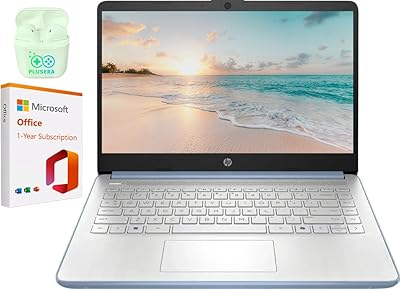
HP 14 Celeron 14-inch Touchscreen Laptop
68%
74%
Value for Money
52%
Performance
43%
Storage Adequacy
91%
Portability
61%
Display Quality
More
HP 14″ Laptop, Intel N150, 32GB RAM, 640GB Storage
83%
88%
Performance
91%
Battery Life
85%
Portability
72%
Display Quality
80%
Storage Capacity
More
HP Stream 14-inch Laptop
65%
78%
Value for Money
84%
Battery Life
53%
Performance
41%
Storage Capacity
67%
Display Quality
More
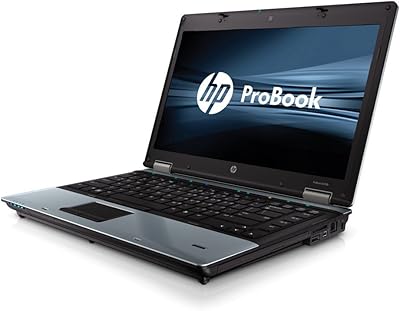
HP 14-inch Intel Core i7 Laptop
73%
84%
Performance & Speed
81%
Display Quality
74%
Build Quality
62%
Battery Life
88%
Storage Performance
More
HP TPN-Q221 14″ Laptop
63%
81%
Value for Money
48%
Performance
37%
Storage Capacity
43%
Battery Life
56%
Display Quality
More
HP EliteBook 8460p 14-inch Laptop

67%
84%
Build Quality
79%
Value for Money
56%
Performance
43%
Battery Life
83%
Keyboard & Typing Experience
More
HP 14-dq0020nr 14-inch Laptop 64GB
80%
72%
Performance
94%
Portability
88%
Battery Life
81%
Build Quality
75%
Display Quality
More
HP Pavilion x360 14-inch Laptop, 13th Gen Intel Core i3, 8GB RAM, 256GB SSD
82%
80%
Performance
92%
Portability
85%
Display Quality
88%
Battery Life
83%
Build Quality
More
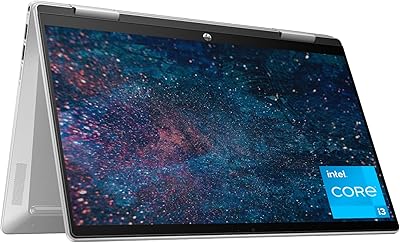
HP Chromebook Plus x360 14-inch 2-in-1 Laptop
76%
78%
Display Quality
82%
Performance & Speed
71%
Battery Life
81%
Build Quality & Hinge
76%
Keyboard & Trackpad
More
HP 14 Inch Laptop
HP 14 Inch Laptop
83%
92%
Value for Money
89%
Portability & Weight
90%
Battery Life
80%
Performance
84%
Build Quality
More

FAQ

It depends on how you use the machine. Windows 11 and Office will consume a chunk of that 128GB right away, leaving you with perhaps 80 to 90GB of free space. For documents, browser use, and a handful of apps, that is manageable. The included 256GB microSD card can hold photos, videos, and large downloads, but keep in mind it is a removable card and slower than the internal drive — so it is better treated as overflow storage than a primary drive.

S Mode locks the laptop to only installing apps from the Microsoft Store, which keeps things secure and running cleanly but can be frustrating if you want Chrome, Zoom desktop, or other software that is not available there. The good news is that switching out of S Mode is free and takes only a few minutes through the Windows Settings menu. Once you switch out, you cannot go back, but most users have no reason to.

Yes, comfortably. The N150 processor and 16GB of RAM handle Zoom, Microsoft Teams, and Google Meet without trouble. The built-in webcam and noise-reducing microphone are good enough for regular calls, and you will not need an external camera or headset for everyday use.

Honestly, the resolution is the laptop's most noticeable limitation. Text is softer and images are less crisp compared to a 1080p screen, and if you have used a sharper display recently, you will notice the difference. That said, for reading documents, watching videos at standard quality, and browsing the web, it is perfectly functional — just not impressive.

It is a strong fit for typical college tasks: writing papers, doing research, attending online lectures, and using Office apps. The bundled Microsoft 365 subscription means you are ready from day one. Where it falls short is anything more demanding — coding environments with heavy compiling, graphic design work, or running multiple resource-heavy apps simultaneously will test its limits.

Almost certainly not. Budget laptops in this category, including this entry-level HP machine, typically have the RAM soldered directly to the motherboard and use non-upgradeable UFS storage modules. Assume what you buy is what you keep for the life of the device.

Based on the hardware specs and general user feedback, yes — HP Fast Charge reliably gets you to around 50% in 45 minutes, which is a practical advantage when you are heading out and forgot to charge overnight. Just make sure you are using the included HP charger, since third-party adapters may not trigger fast-charge mode.

It runs full Windows 11, not Chrome OS, so you can use any Windows-compatible software once you exit S Mode. The practical limit is processing power, not software compatibility — apps like Photoshop or DaVinci Resolve will run poorly or not at all, but standard Windows productivity and communication tools work fine.

HP uses a plastic chassis on the Honey Lavender HP 14-inch, which is standard for this price range. Plastic finishes are generally more prone to minor scuffs than aluminum bodies, so a protective sleeve is a smart investment. The color itself holds up well under normal use and does not appear to fade, but it will show scratches more visibly than a darker finish might.

HP includes a standard one-year limited warranty covering manufacturing defects on hardware. It does not cover accidental damage like drops or spills, so if this is going to a student who is hard on their gear, a third-party protection plan or a sturdy case is worth considering. Register the product with HP after purchase to make any future warranty claims smoother.