Overview

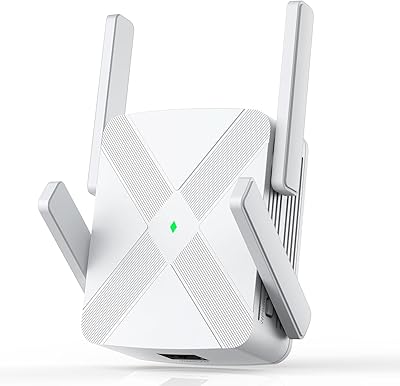
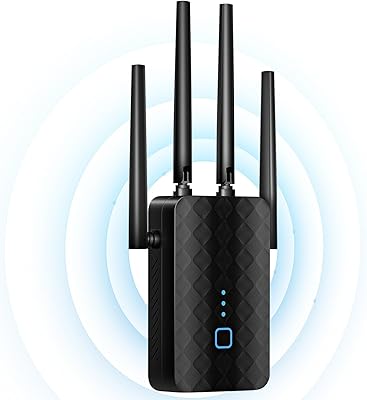
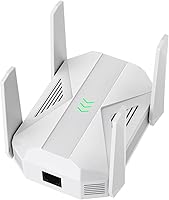
The HMTYQNB M-A27 AC2100 Dual-Band WiFi Extender is a late-2024 arrival from a brand most buyers haven't heard of — and that's worth acknowledging upfront. It targets homes with stubbornly dead corners or sprawling floor plans where a single router simply can't reach. The desktop form factor with four external antennas sits on a shelf rather than plugging directly into a wall outlet, giving it a more substantial presence. Setup is browser-based or via a WPS button — no app to download, no account to create. For a mid-range price, the inclusion of a Gigabit Ethernet port is a notable bonus that most extenders at this level skip entirely.
Features & Benefits

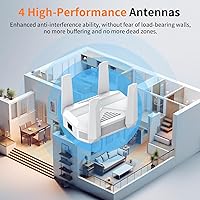
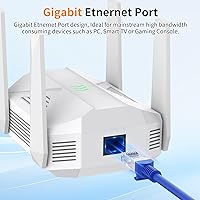
This range extender runs on both 5 GHz and 2.4 GHz simultaneously, with the faster band handling heavy tasks like 4K streaming or competitive gaming while the slower band serves smart bulbs, sensors, and similar low-demand devices. Four omnidirectional antennas spread the signal in all directions, useful in multi-story homes where coverage needs to travel vertically as well as horizontally. The built-in Gigabit Ethernet port is a genuine standout — most budget and mid-range extenders skip it entirely, so having a fast wired drop point for a console or desktop PC adds real value. Multi-side venting helps manage heat during extended operation, and WPA2 security keeps the extended network protected without extra configuration.

Best For

This WiFi booster makes the most sense for people living in larger homes — think older houses with thick walls, long ranch-style layouts, or two-story spaces — where the main router's signal fades before reaching every room. It's also a practical pick for anyone who wants a wired connection point in a distant room, avoiding the need to run a long Ethernet cable. Smart-home users with many 2.4 GHz devices will appreciate having a dedicated band for those. If you've been living with an aging N-standard extender and want noticeably better throughput without committing to a full mesh system, the M-A27 extender is a reasonable step up.

User Feedback

With a 4.4-star average across more than 1,300 ratings, this WiFi booster has earned a credible reception for a brand that's been on the market less than a year. Buyers consistently mention how straightforward the initial setup is, and several note real improvements in rooms or outdoor areas that were previously unreachable. That said, a recurring theme in critical reviews is the gap between advertised range figures and actual home performance — which applies to virtually every extender on the market, but is worth keeping in mind. Long-term reliability and heat management have drawn some concerns after extended use. The Ethernet port comes up repeatedly as a deciding factor for buyers who needed a wired drop without running new cable.

Pros

  • Gigabit Ethernet port is a rare inclusion at this price tier — genuinely useful for gaming consoles or desktop PCs.
  • Dual-band operation keeps heavy-traffic devices on 5 GHz while smart-home gadgets run independently on 2.4 GHz.
  • Browser-based setup with WPS option means no app downloads, no account creation, and no frustration.
  • Four external antennas provide broader signal spread than compact wall-plug extenders typically offer.
  • WPA2 security support keeps the extended network protected without requiring manual configuration.
  • Earned a 4.4-star average across over 1,300 ratings — a credible score for a brand less than a year old.
  • Desktop form factor allows flexible placement on a shelf or desk rather than being locked to a wall outlet.
  • Multi-side venting design helps manage heat during long periods of continuous operation.
  • Compatible with virtually all modern routers and devices across standard WiFi protocols.
  • Real buyers specifically call out improved coverage in back rooms and outdoor areas as a noticeable win.

Cons

  • Real-world range will fall noticeably short of the advertised maximum in most typical homes.
  • HMTYQNB is a newer, lesser-known brand with a limited long-term reliability track record.
  • Some buyers report a meaningful gap between peak advertised speeds and actual measured throughput.
  • No dedicated mobile app means troubleshooting and advanced settings require browser access, which some users find less convenient.
  • Heat management concerns have appeared in longer-term reviews, suggesting performance may degrade over extended periods.
  • Not suitable as a replacement for a mesh system in very large or multi-building setups.
  • Only one Ethernet port limits wired device connections to a single device at a time.
  • Customer support responsiveness is harder to gauge compared to established networking brands.

Ratings

Our AI-generated scores for the HMTYQNB M-A27 AC2100 Dual-Band WiFi Extender are built by analyzing verified purchase reviews from buyers worldwide, with spam, incentivized feedback, and bot activity actively filtered out before scoring. Each category reflects the honest distribution of real experiences — not just the highlights. Where buyers found genuine value, the scores show it; where frustrations surfaced repeatedly, those are reflected just as transparently.
Ease of Setup
88%
Buyers consistently describe getting this range extender online in under five minutes using the WPS button — no app, no account, no frustration. For less tech-savvy users who dread router configuration screens, the one-button pairing is a genuine relief that comes up repeatedly in positive reviews.
A smaller segment of users who skipped WPS and went through the browser setup encountered occasional confusion navigating the interface, particularly when naming the extended network. Those using older browsers or less common routers reported slightly more trial and error before achieving a stable connection.
WiFi Coverage
74%
26%
Most buyers living in medium-to-large homes report a noticeable improvement in rooms and outdoor spaces that previously had little to no usable signal. Back bedrooms, garages, and covered patios come up frequently as areas where the M-A27 extender made a real, day-to-day difference.
The advertised coverage figure is drawn from ideal open-space conditions, and real-world results in homes with multiple walls, floors, or interference from neighboring networks fall well short of that ceiling. Buyers in very large or multi-story homes should temper expectations and consider placement carefully to get meaningful results.
Signal Stability
71%
29%
For casual browsing, video calls, and streaming at standard quality, the connection this WiFi booster provides is described as reliable and consistent during normal use. Users who positioned the unit roughly midway between their router and the dead zone reported the steadiest experience.
A recurring frustration involves occasional signal drops during peak usage hours, particularly on the 5 GHz band when multiple demanding devices are connected simultaneously. Some buyers report needing to reboot the unit periodically to restore full performance after extended uptime.
Gigabit Ethernet Port
91%
The wired Ethernet port is one of the most praised aspects of this range extender, and for good reason — it gives gamers and streaming box users a stable, low-latency connection in rooms far from the main router without running a long cable across the house. Several buyers explicitly cite this port as the deciding factor in choosing this unit over cheaper alternatives.
Only one Ethernet port is available, which limits wired connections to a single device at a time. Users hoping to hardwire both a gaming console and a smart TV simultaneously will need an additional switch, which adds minor cost and complexity to the setup.
Real-World Speeds
63%
37%
For everyday tasks — loading web pages, streaming HD video, joining video calls — the throughput this WiFi booster delivers is sufficient for most household needs. Buyers upgrading from older N-standard extenders notice a clear and welcome improvement in responsiveness across connected devices.
The gap between advertised AC2100 peak speeds and actual measured performance is the single most common complaint across negative reviews. Throughput in repeater mode, particularly over the 5 GHz band at distance, is noticeably lower than the headline figures suggest, and power users running speed tests are often left underwhelmed.
Build Quality
72%
28%
The unit feels reasonably solid for its price tier, with a clean white casing and four firmly attached external antennas that don't wobble or feel flimsy. The desktop form factor gives it a more substantial presence than wall-plug alternatives, which buyers appreciate for stability and repositioning flexibility.
The plastic finish is functional but not particularly premium, and a few buyers note the casing accumulates visible dust between the antenna stems. Nothing about the build feels fragile, but it doesn't inspire the confidence of a name-brand networking product either.
Heat Management
67%
33%
The multi-side venting design does its job adequately during normal use, and the majority of buyers running this range extender continuously do not report any issues with overheating. Placing the unit on an open surface with airflow around it keeps temperatures manageable.
A notable subset of longer-term reviewers — those who have used the unit for several months — report that it runs quite warm to the touch during extended operation. A handful mention that performance seemed to degrade over time in a way they attribute to sustained heat, though isolated incidents are hard to confirm as a pattern.
Device Compatibility
84%
The broad 802.11ac/a/n/g/b standard support means this WiFi booster connects without issue to virtually every device in a typical home — smartphones, smart TVs, Alexa devices, Chromecasts, laptops, and older gadgets alike. Buyers with mixed-age device ecosystems appreciate not having to worry about compatibility.
WPA3-only network configurations are not supported, which means users with newer routers set to WPA3 exclusively will need to enable backward-compatible WPA2 mode on their router before pairing. This is a minor but occasionally surprising friction point for users who recently upgraded their router.
Value for Money
78%
22%
At its price point, the inclusion of a Gigabit Ethernet port and four external antennas positions this range extender more generously than many competing units that charge similarly but omit wired connectivity entirely. For buyers who need that wired drop point, the value case is clear.
Buyers who purchase primarily for wireless speed gains and don't use the Ethernet port may find that established brands offer comparable wireless performance with better long-term support at a similar price. The value proposition is strongest when you actually take advantage of the differentiating features.
Brand Reliability
59%
41%
The product has gathered over 1,300 ratings and holds a respectable average score for a brand that has been on the market less than a year, suggesting that most units are performing as expected in the field. The volume of reviews alone indicates this is not a fly-by-night listing.
HMTYQNB has no established track record to draw on, which makes long-term durability and customer support quality difficult to assess. Buyers who have had units fail outside the return window report difficulty getting timely responses, which is a meaningful risk for a product expected to run continuously.
App & Software Experience
66%
34%
Not requiring an app at all is actually a selling point for many buyers who are tired of mandatory account creation and permission requests just to configure a networking device. The browser-based interface gets the job done cleanly for straightforward setup and basic settings.
The absence of a mobile app means there is no convenient way to monitor connected devices, check signal strength, or adjust settings from a smartphone once the unit is deployed. More hands-on users who want visibility into their network will find the management options limited compared to app-driven alternatives.
Physical Design
73%
27%
The compact desktop footprint allows flexible placement on a bookshelf, TV stand, or side table, and the four-antenna array can be adjusted to direct coverage in specific directions — useful in elongated rooms or spaces where signal needs to travel primarily in one direction.
The unit is not wall-mountable, which limits placement options in rooms without convenient flat surfaces near a power outlet. The external antennas, while functional, add visual bulk that some buyers find awkward in living spaces where aesthetics matter.
Instructions & Documentation
69%
31%
The included quick-start guide covers the WPS pairing process clearly enough that most users can complete setup without consulting any additional resources. Buyers who follow the physical guide step-by-step rarely report getting stuck during initial configuration.
The documentation does not cover troubleshooting in meaningful depth, and buyers who encounter issues beyond basic setup — such as switching between extender and access point modes — often find themselves searching for answers online rather than consulting the included materials.

Suitable for:

The HMTYQNB M-A27 AC2100 Dual-Band WiFi Extender is a solid practical choice for anyone living in a larger home where the main router simply can't cover every corner — think sprawling single-floor layouts, two-story houses, or older buildings with signal-blocking walls. It's particularly well-suited to renters or homeowners who want better coverage without committing to a full mesh system or running new Ethernet cable through walls. Gamers and streaming enthusiasts who need a reliable wired connection in a room far from the router will find the built-in Gigabit Ethernet port a genuinely useful feature, not just a checkbox spec. Smart-home users with a growing collection of low-bandwidth devices — sensors, bulbs, plugs — benefit from having a dedicated 2.4 GHz band handling those without competing with heavier traffic. If you've been tolerating an older N-standard extender and want a meaningful upgrade without a steep learning curve, this range extender is a straightforward, no-app-required step in the right direction.
Not suitable for:

The HMTYQNB M-A27 AC2100 Dual-Band WiFi Extender is not the right tool for every situation, and it's worth being honest about where it falls short. If you're in a very large home — multiple floors, a basement, or a detached outbuilding — real-world coverage will almost certainly fall short of the advertised maximum, as it does with every extender on the market; a mesh system would serve those scenarios far better. Users who expect performance close to their main router's speeds will likely be disappointed, since extenders by nature introduce latency and reduce throughput compared to a direct connection. Anyone looking for advanced network management features — like band steering, detailed traffic analytics, or a polished mobile app — won't find them here. This WiFi booster also comes from a brand without an established long-term track record, which may give pause to buyers who prioritize warranty reliability and responsive customer support over upfront cost savings.

Specifications

  • Brand & Model: Manufactured by HMTYQNB under model number M-A27, first made available in October 2024.
  • WiFi Standard: Supports IEEE 802.11ac/a/n/g/b protocols, covering all common modern and legacy WiFi device types.
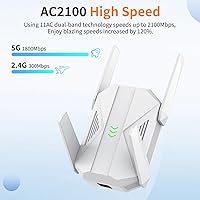
  • WiFi Class: Rated AC2100, combining a 5 GHz band capable of up to 1800 Mbps and a 2.4 GHz band at up to 300 Mbps.
  • Frequency Bands: Operates simultaneously on both 5 GHz and 2.4 GHz, allowing different device types to connect on the most appropriate band.
  • Antennas: Equipped with four external omnidirectional antennas designed to distribute signal in all directions, including vertically across floors.
  • Ethernet Port: Includes one Gigabit Ethernet port for wired device connections, supporting speeds up to 1000 Mbps over cable.
  • Claimed Coverage: Advertised maximum coverage area is approximately 12,888 sq.ft under ideal, open-space conditions.
  • Device Capacity: Rated to support connections from more than 100 devices simultaneously without stated speed degradation.
  • Security Protocols: Supports WEP, WPA, and WPA2 encryption standards to secure the extended network from unauthorized access.
  • Setup Method: Configured via a standard web browser interface or a single WPS button press; no mobile app or account registration required.
  • Form Factor: Desktop plug-in unit designed to sit on a flat surface rather than mount directly into a wall outlet.
  • Dimensions: Measures 4.92 × 4.33 × 5.11 inches (L × W × H), making it a moderately compact tabletop unit.
  • Weight: Weighs 7.2 oz, light enough to reposition easily without tools or mounting hardware.
  • Color: Available in white, with a neutral finish that blends into most home or office environments.
  • Thermal Design: Features multi-side heat dissipation venting intended to maintain stable operating temperatures during continuous 24-hour use.
  • Compatibility: Works with any WiFi router or gateway from any brand that supports standard 802.11 protocols.
  • BSR Ranking: Ranked #106 in the Amazon Repeaters category, reflecting meaningful and sustained sales volume since launch.

Related Reviews

Vonets VAP11AC AC1200 Dual Band WiFi Bridge
65%
74%
WiFi-to-Ethernet Bridging Performance
71%
Dual-Band Radio Coverage
78%
Thermal Management & Reliability
44%
Setup & Configuration Experience
81%
Operating Mode Versatility
More
Linksys RE6350 AC1200 Dual-Band WiFi Extender
86%
91%
Setup & Installation
88%
Wi-Fi Performance
89%
Coverage Area
85%
Dual-Band Performance
84%
Streaming & Gaming
More
FjUoLzgK M-97G WiFi Extender
74%
91%
Ease of Setup
67%
Signal Coverage
62%
5GHz Band Performance
78%
2.4GHz Band Reliability
83%
Ethernet Port Utility
More
rockspace AC2100 Dual Band WiFi Extender
69%
88%
Ease of Setup
74%
Dead Zone Coverage
61%
Real-World Speed
58%
Long-Term Reliability
82%
Value for Money
More
Zelikovitz WiFi Extender M-97A
87%
94%
Setup & Installation
88%
Signal Strength
92%
Value for Money
90%
Compatibility with Routers
86%
Performance in Large Spaces
More
HMTYQNB 2025 AX3000 WiFi 6 Extender
87%
87%
Range & Coverage
93%
Setup & Installation
88%
Speed & Performance
91%
Ease of Use
75%
Signal Strength in Large Spaces
More
VSVABEFV AP240 Dual-Band WiFi Access Point
85%
88%
Performance
91%
Ease of Setup
85%
Coverage & Range
83%
Reliability
80%
Build Quality
More
NETGEAR WAX202 WiFi 6 Dual-Band Router
84%
88%
WiFi Performance
93%
Setup & Installation
85%
App Usability
89%
Speed & Coverage
90%
Device Connectivity
More
ASUS RT-AX1800S
ASUS RT-AX1800S
79%
88%
Value for Money
79%
WiFi Speed & Performance
74%
Coverage & Range
83%
Setup & Ease of Use
67%
Router App Experience
More
ASUS RT-AX5400 WiFi 6 Dual-Band Router
80%
84%
WiFi Speed & Throughput
71%
Coverage & Range
88%
Setup & Ease of Use
91%
Built-in Security (AiProtection)
83%
Parental Controls
More

FAQ

No app is required at all. You can set up the range extender either by pressing the WPS button on both this unit and your router, or by connecting to it via a web browser and following the on-screen steps. Most people find the WPS route takes under two minutes.

It works with any standard WiFi router regardless of brand — Netgear, TP-Link, ASUS, ISP-provided gateways, you name it. As long as your router broadcasts a standard 802.11 WiFi signal, this WiFi booster will connect to and extend it.

Treat the advertised figure as a best-case scenario measured in an open, unobstructed space. In a real home with walls, furniture, and interference from neighboring networks, you should expect noticeably less range. That said, most buyers still report meaningful improvements in rooms that previously had weak or no signal.

Yes, and that's one of the more practical things about this unit. The Gigabit Ethernet port lets you run a cable directly from the extender to a console, PC, or smart TV, giving you a stable wired connection in a room that would otherwise rely on wireless only.

Yes, the M-A27 extender rebroadcasts both bands simultaneously. You can connect bandwidth-hungry devices like laptops and streaming boxes to the 5 GHz band, while smart-home gadgets and low-demand devices use 2.4 GHz without competing for the same airspace.

HMTYQNB is a newer brand without the long track record of companies like TP-Link or Netgear, and it's fair to acknowledge that. The HMTYQNB M-A27 AC2100 Dual-Band WiFi Extender has accumulated over 1,300 ratings with a 4.4-star average since launching in late 2024, which suggests real-world buyers are generally satisfied. That said, if brand reputation and long-term warranty support are top priorities for you, a more established name might offer more peace of mind.
The unit has multi-side venting built into the casing specifically to handle heat during continuous operation. Most users don't report issues, but a small number of longer-term reviewers have flagged warmth as a concern over time. Placing it somewhere with decent airflow rather than enclosed in a cabinet is a sensible precaution.

The spec sheet claims support for over 100 devices, but that figure reflects theoretical capacity under light-load conditions. In practice, having dozens of active, high-bandwidth devices connected simultaneously will reduce per-device performance. For a typical household with 20 to 40 connected devices, it should handle the load without issue.

Yes. If you have an Ethernet cable running from your router to the location where you want coverage, you can connect that cable to the Gigabit Ethernet port and use this WiFi booster in access point mode, which generally provides better performance than repeater mode since it avoids the wireless hop entirely.

The unit supports WEP, WPA, and WPA2, which covers the security standard used by the vast majority of home routers. WPA3, the newest protocol, is not listed as supported, so if your router is set to WPA3-only mode you may need to enable WPA2 compatibility on the router side to pair with this extender.