Overview

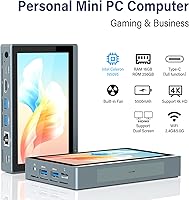
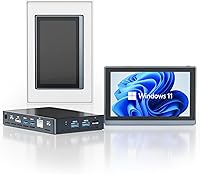
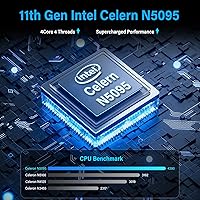
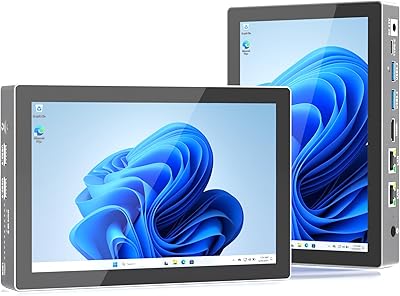
The HIGOLE GOLE2 16GB 256GB Touchscreen Mini PC occupies a genuinely unusual niche: it packs a 5.5-inch touch display, Windows 11 Pro, and a built-in battery into a device barely six inches long. That combination makes this mini PC feel closer to an oversized handheld than a traditional desktop box. Under the hood sits Intel’s Celeron N5095, a quad-core chip that tops out around 2.9GHz — competent for spreadsheets, browser tabs, and media playback, but not built for demanding workloads. With 16GB of DDR4 RAM and 256GB of eMMC storage, the HIGOLE GOLE2 targets home offices, kiosk builds, and light daily use rather than power users.
Features & Benefits

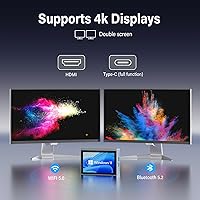
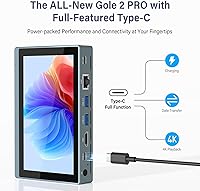
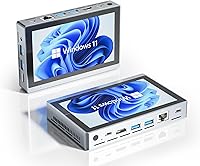
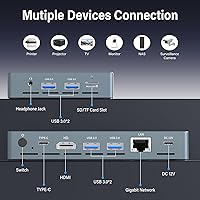
What stands out immediately is how much connectivity this mini PC packs into its thin metal frame. The full-function USB-C port handles data, peripherals, and power delivery simultaneously — rare at this size. Four USB 3.0 ports join an HDMI 2.0 output, Gigabit Ethernet, an SD card slot, and a 3.5mm jack, so you rarely need to reach for a hub. The device is triple-display capable, combining HDMI, USB-C video output, and its own built-in screen, though you will need a video-capable USB-C cable to activate that third feed. WiFi 5 dual-band and Bluetooth 5.0 cover wireless, while the active cooling fan keeps thermals in check during sustained use without becoming intrusive at idle.

Best For

This touchscreen micro computer makes the most sense for people who need a compact, low-profile Windows machine without committing desk space or budget to a full tower setup. It works particularly well as a home office companion for document editing, video calls, and browser-based research. Developers and hobbyists building IoT prototypes or custom kiosk interfaces will appreciate the Linux compatibility and the touch display. As a thin client for remote desktop sessions, it handles RDP workloads without breaking a sweat, and light media streaming is equally comfortable. What it is not is a gaming rig or a video editing workstation — the N5095 and integrated UHD 630 graphics were simply not designed for that.

User Feedback

Buyer sentiment on the HIGOLE GOLE2 averages 3.6 out of 5 stars, which tells a fairly honest story. Owners who enjoy it tend to highlight the versatile port lineup and the novelty of having a built-in screen they did not have to source separately. On the other side, a recurring complaint is that the eMMC storage — while adequate for the operating system — is noticeably slower than a proper NVMe or SATA SSD, making large file operations feel sluggish. Some buyers also report fan noise spikes during sustained CPU load and occasional build quality inconsistencies. The Linux support claims deserve caution; driver compatibility may require extra configuration. At this price tier, the touchscreen and battery are the clear differentiators, but whether they justify the trade-offs depends entirely on your workload.

Pros

  • Genuinely rare combination of a built-in touchscreen, battery, and Windows 11 Pro in one compact unit.
  • Four USB 3.0 ports plus a full-function USB-C port mean you rarely need a separate hub.
  • Triple-display support lets this mini PC drive up to three screens simultaneously with the right cables.
  • 16GB of DDR4 RAM handles web browsing, office applications, and video calls without issue.
  • Built-in battery delivers roughly five hours of light use, enabling untethered operation away from a power outlet.
  • Gigabit Ethernet and WiFi 5 dual-band provide solid wired and wireless networking options.
  • Wake on LAN, PXE boot, and Auto Power On make deployment in managed or automated environments straightforward.
  • The active cooling fan keeps sustained workloads stable without running loud during normal idle use.
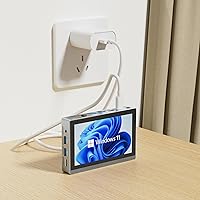
  • At 1.37 pounds and under an inch thick, it fits anywhere without dominating desk space.

Cons

  • eMMC storage is noticeably slower than NVMe or SATA SSDs, making large file transfers feel sluggish.
  • The Celeron N5095 hits a hard performance ceiling under multitasking; expect slowdowns with several active applications.
  • Linux and Ubuntu support is advertised, but real-world driver compatibility for the touchscreen is unverified.
  • Some buyers report inconsistent build quality, with unit-to-unit variation in fit, finish, and fan behavior.
  • Triple-display output requires a video-capable USB-C cable that is not included in the box.
  • The 5.5-inch 1280x800 screen resolution is modest and may feel cramped for extended productivity work.
  • Fan noise can spike noticeably during sustained CPU load, which may bother users in quiet environments.
  • A 3.6-star average rating signals mixed buyer satisfaction and warrants careful expectation-setting before purchasing.

Ratings

The HIGOLE GOLE2 16GB 256GB Touchscreen Mini PC has been scored across 15 usability and performance categories by our AI rating engine, which processed verified global buyer reviews while actively filtering out suspected bot submissions, incentivized feedback, and duplicate accounts. Scores reflect the genuine distribution of user sentiment — strengths and documented pain points alike — so you can trust the numbers represent real-world experience rather than a polished average. Whether you are sizing this touchscreen micro computer up for a home office desk, a kiosk build, or a remote desktop deployment, the breakdown below shows clearly where it earns its keep and where it falls short.
CPU Performance
58%
42%
For the tasks this mini PC was built around — web browsing, document editing, video calls, and local media playback — the Celeron N5095 delivers a responsive enough experience. Users running a handful of browser tabs alongside a productivity app report smooth day-to-day operation without frustrating lag.
Push the processor toward anything more demanding — video transcoding, heavy multitasking, or running more than four active applications at once — and performance degrades noticeably. Multiple buyers flag sluggishness when combining a video call with file transfers or background system updates, exposing the hard ceiling of this CPU tier.
Storage Speed
47%
53%
For read-heavy tasks like booting Windows, launching already-installed apps, or playing back locally stored media, the 256GB eMMC performs adequately and causes no meaningful friction during a light daily routine.
The slower write speeds inherent to eMMC become apparent quickly when installing large applications, copying files to the drive, or working with database-style software. Several buyers explicitly called this out, noting the experience felt closer to an older tablet than a desktop PC during any file-heavy operation.
Build Quality
61%
39%
The metal chassis gives the device a more solid feel than most products at this price tier, and the overall form factor is compact and well-proportioned. Many buyers appreciate that it does not feel flimsy in hand despite its remarkably small footprint.
A recurring theme in critical reviews is unit-to-unit inconsistency — some buyers receive tightly assembled units while others report loose ports, uneven seams, or fans that behave differently under identical loads. This variability makes it difficult to guarantee a uniform experience across separate orders.
Port Selection
88%
This is where the HIGOLE GOLE2 genuinely punches above its price class. Four USB 3.0 ports, a full-function USB-C, HDMI 2.0, Gigabit Ethernet, an SD card slot, and a 3.5mm jack provide real workstation-level flexibility without needing a separate hub — a feature buyers consistently highlight as the device’s strongest selling point.
The one caveat buyers frequently flag is that the USB-C port requires a specific DisplayPort Alt Mode cable to activate video output — a detail easy to overlook and not clearly communicated in the product listing. No appropriate cable is included in the box, which catches some first-time buyers off guard during setup.
Display Quality
67%
33%
For a built-in screen at this price point, the 5.5-inch touchscreen is functional, touch response is generally accurate for tap-based navigation, and it handles kiosk interactions and casual browsing well without requiring an external monitor to be useful.
The 1280x800 resolution feels noticeably limited for productivity work — small text becomes cramped and UI elements look soft compared to even a mid-range external display. Users who planned to work primarily on the built-in screen often find themselves connecting an external monitor within the first week.
Battery Life
73%
27%
The built-in battery is a genuine differentiator at this price point. Users appreciate carrying the device to meeting rooms or setting it up as a temporary workstation or kiosk panel without needing a nearby power outlet, which is simply not an option on comparable mini PCs.
The advertised five-hour figure applies to light media playback, and real-world battery life under active Windows multitasking tends to fall shorter. Users running browser sessions alongside background tasks report closer to three to four hours before needing a recharge, which limits truly all-day untethered use.
Thermal Management
69%
31%
Under light workloads like browsing, streaming, or running a single application, the active cooling fan keeps the chassis cool to the touch and operates quietly enough to blend into a home or office environment without drawing attention.
Under extended sustained CPU load, the fan audibly ramps up and the unit can feel noticeably warm along the bottom and sides. A subset of buyers report thermal throttling kicking in during prolonged intensive sessions, slightly reducing performance at exactly the moments when consistent output matters most.
Wireless Performance
79%
21%
WiFi 5 dual-band with 5GHz throughput up to 1000Mbps gives this mini PC solid wireless performance for video calls, remote desktop streaming, and 4K content. Bluetooth 5.0 pairs reliably with keyboards, mice, and audio devices, which users who prefer a clean-desk cable-free setup particularly appreciate.
A handful of buyers report the wireless module occasionally disconnecting or struggling to hold a stable 5GHz connection at greater distances from the router. The antenna is adequate for typical room-distance use but can be unreliable in environments with significant wireless interference or marginal signal strength.
Value for Money
66%
34%
For buyers specifically after a Windows 11 Pro device with a built-in touchscreen, a battery, and a full I/O suite, there is very little direct competition at this price tier. Those three features together represent real value for kiosk builders, IoT hobbyists, and home office users with specific requirements.
Buyers expecting general-purpose performance comparable to similarly priced mini PCs with NVMe storage will feel the value is compromised by the eMMC bottleneck and CPU ceiling. The 3.6-star average rating reflects the reality that this device excels in a narrow set of use cases and disappoints meaningfully outside them.
Software Experience
74%
26%
Windows 11 Pro arrives pre-installed and activated, so there is no software setup friction out of the box. Features like Remote Desktop, BitLocker, and domain join work as expected, which buyers deploying it in small business or managed environments appreciate not having to configure from scratch.
Some buyers note the pre-installed Windows image includes vendor bloatware that occupies meaningful space on an already constrained 256GB eMMC drive. A clean Windows reinstall is frequently recommended in user forums to reclaim storage and improve day-to-day snappiness, which requires a degree of technical comfort to execute.
Ease of Setup
77%
23%
The out-of-box experience is generally smooth — Windows 11 boots into standard first-run setup, the touchscreen and most common peripherals are recognized without extra drivers, and the device is ready for typical use within minutes of unboxing.
Users who push beyond default Windows use — particularly those pursuing Linux, configuring triple-display output, or setting up PXE boot and RTC Wake — encounter a steeper curve with limited official documentation. These advanced configurations require independent research and comfort with system-level settings to complete successfully.
Triple Display Support
71%
29%
Running three simultaneous displays from a device this small is a genuine standout capability that home office users and developers working across multiple windows actively take advantage of, especially when using the built-in screen as a dedicated secondary or tertiary panel.
Activating the third display requires a DisplayPort Alt Mode USB-C cable that is not included and is not prominently flagged in the product listing — several buyers discovered this only after initial setup failed. Some users also report intermittent instability when all three outputs are active under heavier display workloads.
Portability
83%
At 1.37 pounds with a built-in screen and battery, this touchscreen micro computer genuinely functions as a take-anywhere Windows workstation. Users who carry it between rooms, mount it temporarily at different desks, or deploy it in field settings appreciate not needing an external display to stay productive on the move.
The device runs noticeably warmer in enclosed spaces like laptop bags immediately after active use, which gives some users pause about storing it quickly after a session. The DC 12V barrel adapter also adds a secondary carry item since USB-C charging, while functional, drains most standard power banks faster than expected.
Linux Compatibility
44%
56%
Technically proficient users comfortable with the command line and community driver resources have managed to run Ubuntu with most core functions working. On a fundamental level the hardware boots Linux distributions, and the Celeron N5095 platform is not inherently hostile to open-source operating systems.
The touchscreen, wireless module, and USB-C video output frequently do not work reliably out of the box under Linux, requiring manual driver work that varies by distribution and kernel version. Buyers expecting plug-and-play Linux compatibility will more often than not encounter friction significant enough to require dedicated troubleshooting time.
Noise Level
62%
38%
During idle and light-use scenarios — document editing, casual browsing, or running as a media player — the cooling fan is quiet enough to go entirely unnoticed in a typical home office, and some users describe it as effectively silent during their everyday workflows.
Under sustained CPU load, the fan audibly increases in pitch and can become a distraction in quiet workspaces or shared rooms. A small number of buyers also received units where the fan ran at elevated speed even at idle, pointing to quality control variance that affected their day-to-day comfort with the device.

Suitable for:

The HIGOLE GOLE2 16GB 256GB Touchscreen Mini PC makes the most sense for buyers who need a capable, space-efficient Windows machine without sacrificing port variety or display flexibility. Home office workers with limited desk real estate will find that four USB 3.0 ports, Gigabit Ethernet, and triple-display support deliver a surprisingly complete workstation setup in a unit smaller than a paperback book. The built-in 5.5-inch touchscreen and onboard battery are a genuine differentiator for developers and hobbyists who want a self-contained control panel for IoT projects, kiosk deployments, or smart home dashboards. Remote workers who rely on RDP or VNC to access a more powerful machine will find the Celeron N5095 more than adequate for thin-client duties. Budget-conscious buyers who specifically want Windows 11 Pro, touch input, and some portability bundled into one affordable unit will have a hard time finding a comparable alternative at this price tier.
Not suitable for:

Anyone expecting desktop-class performance should look elsewhere before considering the HIGOLE GOLE2 16GB 256GB Touchscreen Mini PC. The Celeron N5095 is built for efficiency and low power draw, not throughput — video editing, 3D rendering, gaming, and running several demanding applications at once will expose its ceiling fast. The 256GB eMMC storage compounds the issue: eMMC is meaningfully slower than even a budget NVMe or SATA SSD, so users who frequently move large files or install many applications will feel the drag in day-to-day use. Buyers planning to run Linux should proceed with caution, as touchscreen and wireless driver compatibility may require manual setup and community troubleshooting rather than working reliably out of the box. If your typical workload goes beyond light productivity, media playback, or thin-client access, a modest step up in budget opens access to better-equipped mini PCs with faster storage and more capable processors.

Specifications

  • Processor: Intel Celeron N5095 quad-core CPU runs at a base frequency of 2.0GHz and bursts up to 2.9GHz, with a thermal design power of under 10 watts.
  • RAM: 16GB of DDR4 SDRAM provides enough headroom for light multitasking, open browser tabs, and standard productivity applications running simultaneously.
  • Storage: 256GB eMMC flash storage comes pre-loaded with Windows 11 Pro; eMMC read and write speeds are considerably slower than NVMe or SATA SSD alternatives.
  • Display: Built-in 5.5-inch capacitive touchscreen delivers a 1280x800 resolution, enabling standalone interactive use without an external monitor.
  • Battery: Integrated lithium polymer battery supports up to 5 hours of video and audio playback under typical light-use conditions.
  • Operating System: Windows 11 Pro is pre-installed; Linux and Ubuntu are supported in principle, though touchscreen and wireless driver compatibility may require additional manual configuration.
  • USB Ports: Four USB 3.0 Type-A ports and one full-function USB-C port are provided, with the USB-C port supporting simultaneous data transfer, peripheral connection, and device charging.
  • Video Output: Triple-display output is supported via HDMI 2.0, a video-capable USB-C connection (up to 4K at 60Hz), and the device’s own built-in screen; a DisplayPort Alt Mode USB-C cable is required for the third output.
  • Wireless: WiFi 5 (802.11ac) dual-band covers 2.4GHz at up to 450Mbps and 5GHz at up to 1000Mbps, with Bluetooth 5.0 included for peripheral and device pairing.
  • Networking: An RJ45 Gigabit Ethernet port supports 10/100/1000Mbps wired connections for stable, low-latency network access.
  • Graphics: Intel UHD Graphics 630 integrated GPU handles standard 2D workloads and hardware-accelerated 4K video decoding but is not designed for gaming or GPU-intensive rendering tasks.
  • Dimensions: The unit measures 5.99 x 3.74 x 0.99 inches, compact enough to mount behind a monitor arm or place on a crowded desk without difficulty.
  • Weight: At 1.37 pounds, the device is light enough to carry in a bag alongside everyday portable equipment.
  • Additional I/O: Supplementary connectors include a 3.5mm headset jack, an SD card slot, a DC 12V barrel power input, and a built-in microphone.
  • Power Input: The primary power source is a DC 12V barrel jack; the full-function USB-C port also accepts input from compatible USB-C power banks for untethered charging.
  • Boot Features: Wake on LAN, PXE boot, Auto Power On, and RTC Wake are all supported natively, enabling remote management and scheduled startup for kiosk or server-adjacent deployments.

Related Reviews
KAMRUI Essenx E2 Mini PC
77%
78%
Everyday Performance
84%
Value for Money
72%
Build Quality
81%
Display Output Quality
74%
Thermal Management
More
HEIGAOLAPC Mini PC 12th Gen N100 16GB RAM 256GB Storage
85%
88%
Performance
92%
Value for Money
90%
Portability
87%
Connectivity
93%
Setup and Installation
More
ACEMAGIC Vista Mini V1 (N150, 16GB/256GB)

78%
83%
Performance for Daily Tasks
81%
Build Quality & Design
62%
Storage Speed & Configuration
54%
RAM & Upgradeability
88%
Display & Multi-Monitor Support
More
Beelink Mini S12 Pro (N100, 16GB, 500GB)

83%
83%
Everyday Performance
91%
Value for Money
76%
Build Quality & Design
84%
Thermal Management & Noise
88%
Connectivity & Ports
More
Beelink Mini S12 Mini PC
78%
88%
Value for Money
82%
Performance for Daily Tasks
79%
Build Quality & Design
91%
Dual Monitor Support
84%
Thermal Management & Noise
More
ACEMAGICIAN Kron Mini K1 Mini PC
73%
83%
Everyday Performance
54%
Gaming Capability
61%
Thermal Management
89%
Display & Connectivity
78%
Value for Money
More
ALLDOCUBE iPlay 70 mini Pro 8.4-inch Tablet
75%
88%
Display Quality
91%
Streaming Performance
76%
Performance & Speed
83%
Battery Life
86%
Portability & Build
More
OASLOA T9PRO 8GB 256GB Mini PC
70%
83%
Value for Money
41%
Out-of-Box Experience
67%
Processing Performance
88%
Multi-Monitor Support
74%
Build Quality
More
Blackview MP80 N97 512GB Mini PC
78%
82%
Everyday Performance
88%
Value for Money
86%
RAM & Storage
91%
Display & Output
83%
Connectivity & Ports
More
KAMRUI GK3Plus Mini PC (N95, 16GB RAM, 512GB SSD)
81%
89%
Multitasking Performance
92%
Value for Money
86%
Thermal Management
84%
Display Versatility
81%
4K Media Playback
More

FAQ

Yes, the built-in 5.5-inch touchscreen means the device works as a fully standalone computer right out of the box. The integrated battery extends untethered use to around five hours, so you can set it up on a countertop, deploy it as a kiosk display, or carry it to a meeting without needing a separate screen or a nearby power outlet.

Unfortunately, the eMMC storage is soldered directly to the motherboard, so there is no slot to swap it out. The most practical options are to expand available space using the built-in SD card slot or to connect an external USB 3.0 drive for additional storage.

It does, but the setup has a specific requirement. The triple-display configuration uses the built-in screen as the first output, HDMI 2.0 as the second, and the USB-C port as the third — but only if the USB-C cable in use explicitly supports DisplayPort Alt Mode video output. A standard USB-C charging or data cable will not activate the third display, so check your cable’s specifications before assuming it will work.

eMMC is noticeably slower than both NVMe and SATA SSD storage. For everyday light tasks like loading Windows, browsing the web, or working in a spreadsheet, most users will not find it a dealbreaker. However, if you regularly install large applications, copy files frequently, or work with any kind of media, the slower write speeds will become apparent in day-to-day use.

Streaming performance is one of this mini PC’s strengths. The Intel UHD 630 GPU includes hardware-accelerated decoding for H.264 and HEVC content, so HD and 4K streams on services like Netflix, YouTube, and Plex run smoothly when connected to a capable external display. On the built-in 5.5-inch screen, 1080p content looks sharp relative to the display’s resolution.

HIGOLE advertises Linux and Ubuntu compatibility, and the hardware can technically run both. That said, getting the touchscreen and wireless drivers working reliably under Linux is not always straightforward — some users have had to rely on community forums and manual driver installation to get full functionality. If Linux is your primary operating environment, budget time for setup and testing before committing.

During light tasks like browsing, document editing, or media playback, the fan runs quietly and is easy to ignore. Under sustained heavier loads — such as a long compile job or extended file conversion — it spins up and becomes audible. It is not disruptively loud by most standards, but if you work in a very quiet environment, you may notice it during demanding sessions.

It handles this role very well. RDP and VNC sessions run smoothly because the remote machine does the heavy lifting, leaving the Celeron N5095 with a manageable processing load. Pairing it with Gigabit Ethernet keeps latency low, and the built-in screen means you do not need an additional monitor for a basic remote workstation setup.

Only for very light gaming. Older 2D titles, casual indie games, and some low-demand emulators will run at acceptable frame rates on the Intel UHD 630. Modern 3D titles, anything from roughly the last five years at standard settings, and graphically intensive emulators will push the integrated GPU well past its limits and result in poor performance.

HIGOLE typically offers a one-year limited warranty through their Amazon storefront, but coverage terms can vary by seller and region, so check the specific listing before purchasing. Given that a small number of buyers have reported unit-to-unit inconsistencies in build quality and fan behavior, it is worth reviewing the return window carefully and testing the device thoroughly during that period in case a replacement is needed.