Overview

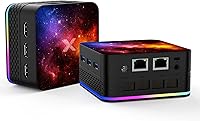
The OASLOA T9PRO 8GB 256GB Mini PC is a compact desktop that punches above its weight for buyers who need a capable everyday machine without surrendering desk space. Powered by Intel's 12th Gen N95 processor and DDR5 RAM, it brings genuinely modern specs to a price tier where corners are routinely cut. The chassis includes a VESA mount bracket, so it can disappear behind a monitor or tuck into a shelf with ease. It also sports a 7-color RGB light ring — unusual for a utilitarian machine like this, and something buyers either appreciate or completely ignore. One critical note upfront: it ships with DOS, not Windows, so plan accordingly.
Features & Benefits

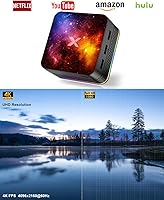
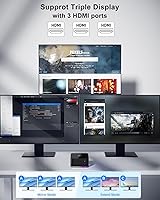
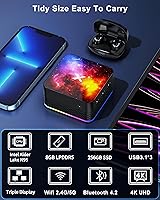
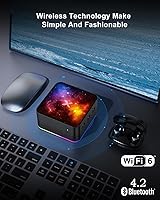
What makes the T9PRO stand out in a crowded budget segment is its connectivity stack. Three HDMI outputs supporting 4K resolution is genuinely uncommon at this price — running a triple-monitor setup from a machine this small is not something most buyers expect to pull off. The dual Gigabit Ethernet ports add real versatility; network-savvy users can configure this compact desktop as a soft router or lightweight file server with no hardware modifications. Dual-band WiFi and Bluetooth 4.2 round out the wireless side, while the 256GB M.2 SSD keeps boot times short. At 15W, it also draws remarkably little power for continuous use.

Best For

This mini PC hits a specific, well-defined audience rather than trying to be everything. Home office workers who need to extend across two or three screens without a bulky tower will find the triple-display support genuinely useful. Students and first-time buyers on tight budgets can save by sourcing a Windows license separately, as long as they are comfortable with basic installation. The dual Ethernet makes it a natural fit for hobbyists interested in DIY networking — think home firewalls or a basic NAS setup. It works well as a low-footprint media client in a living room too, though video editing and gaming are outside its realistic scope.

User Feedback

Buyers who come in with realistic expectations tend to walk away satisfied. The most consistent praise centers on setup simplicity — the machine is plug-and-play once an OS is installed, and the physical build feels solid for a device in this category. On the other side, the lack of a pre-installed operating system trips up first-time buyers more than almost any other issue; a surprising number of reviews mention discovering this only after purchase. Fan noise under sustained load gets occasional mentions, though most users describe it as acceptable rather than intrusive. A handful of buyers expected more from the processor under multitasking, which is fair — the N95 is an efficiency-focused chip, not a workhorse.

Pros

  • Triple HDMI outputs supporting 4K resolution give genuine multi-monitor capability that most budget mini PCs skip entirely.
  • DDR5 RAM at 4800MHz is a modern memory standard that most competitors at this price still have not adopted.
  • The M.2 SSD delivers fast, responsive boot times — a real upgrade over eMMC-based alternatives in this class.
  • Dual Gigabit Ethernet opens up practical networking use cases like soft routing and lightweight NAS that a single-port machine cannot handle.
  • At roughly 15W power draw, this mini PC is cheap to run continuously and stays quiet under light workloads.
  • The included VESA bracket lets you mount the T9PRO behind a monitor, keeping cable clutter minimal.
  • Dual-band WiFi and Bluetooth 4.2 cover most wireless peripherals and streaming scenarios without needing a USB adapter.
  • The compact chassis weighs under 300 grams, making it easy to relocate or deploy in tight spaces.
  • Build quality feels solid for the price tier — buyers generally report it does not feel cheap in hand.

Cons

  • No operating system comes pre-installed — buyers must source, purchase, and install Windows themselves before the machine is usable.
  • The Intel N95 is an efficiency-focused chip and will struggle under sustained multitasking or any CPU-intensive workload.
  • Bluetooth 4.2 is functional but noticeably behind the current standard, which may limit compatibility with newer peripherals over time.
  • The RGB lighting cannot be easily disabled for buyers who find it distracting in a professional or bedroom environment.
  • 256GB of base storage fills up faster than expected once an OS and standard applications are installed.
  • Intel UHD integrated graphics rule out any meaningful gaming or GPU-accelerated software use.
  • Customer support and warranty service from smaller Chinese brands like this can be slow or difficult to navigate.
  • The advertised product dimensions listed in the spec sheet appear inaccurate, which makes it harder to plan mounting or desk space before purchase.
  • WiFi is listed as 802.11ac rather than true WiFi 6, so the wireless performance may not match what the WiFi 6 branding implies.

Ratings

The scores below for the OASLOA T9PRO 8GB 256GB Mini PC were generated by our AI system after analyzing verified purchase reviews from buyers worldwide, with spam, bot activity, and incentivized feedback actively filtered out. Each category reflects the honest spread of real user experiences — strengths are credited where deserved, and recurring frustrations are not glossed over. The result is a transparent, balanced picture to help you decide whether this compact desktop fits your actual needs.
Value for Money
83%
For buyers who know what they are getting into, the price-to-spec ratio here is genuinely competitive. DDR5 RAM, an M.2 SSD, and triple HDMI outputs on a single budget purchase is a combination that is hard to replicate at this price tier, and most satisfied buyers mention this directly.
The value calculation changes significantly once you factor in the cost of a Windows license, which can add a substantial amount to the total. Buyers who did not budget for that upfront often feel the deal is less attractive than it first appeared.
Out-of-Box Experience
41%
59%
For technically confident buyers, the hardware itself arrives well-packaged and is straightforward to set up once an OS is installed. The VESA bracket is included and attaches without tools, which is a small but appreciated touch.
Shipping with DOS rather than a usable operating system is the T9PRO's single biggest buyer satisfaction problem. First-time PC owners in particular report confusion and frustration upon discovering the machine cannot be used immediately, and some return it without ever getting past setup.
Processing Performance
67%
33%
For day-to-day tasks — browsing with a dozen tabs open, video calls, document editing, light media playback — the Intel N95 handles things without obvious lag. Users running it as a home office machine for standard productivity work are largely satisfied with the responsiveness.
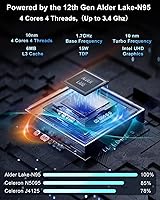
Push it into sustained multitasking, large spreadsheets, or anything CPU-intensive and the N95 starts to show its limits fairly quickly. It is an efficiency chip by design, not a performance one, and buyers who expected more from the 3.4GHz burst frequency tend to be disappointed.
Multi-Monitor Support
88%
Three HDMI outputs on a machine this compact and affordable is a genuine standout feature, and users who put it to work across dual or triple monitor setups report that it handles the configuration reliably. For home office workers expanding their workspace, this alone makes the T9PRO worth considering.
Running three displays simultaneously while doing CPU-heavy tasks can strain the integrated graphics and processor together, leading to occasional sluggishness. Users driving three 4K monitors at full resolution should temper their expectations for multitasking performance under that load.
Build Quality
74%
26%
Most buyers describe the chassis as feeling more solid than expected for the price — it does not flex under handling and the cooling vents appear thoughtfully placed. The overall fit and finish lands above average for this segment of no-name mini PCs.
It still has the look and feel of a budget device rather than a polished product, and a few buyers report minor cosmetic inconsistencies like uneven seam gaps. Long-term durability beyond the first year is an open question given the brand's limited track record.
Thermal Management
69%
31%
Under light to moderate workloads, the T9PRO stays cool and comfortable, which is exactly the operating condition it was designed for. The 15W TDP keeps heat generation modest during typical office use, and the ventilated chassis aids passive airflow between active fan cycles.
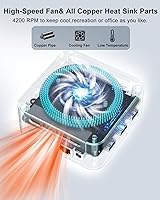
During sustained CPU loads — such as prolonged video encoding or running multiple active applications — the fan ramps up noticeably and the chassis gets warm to the touch. A few users in warmer climates or poorly ventilated spaces report more aggressive thermal throttling.
Fan Noise
71%
29%
At idle and during basic tasks, the fan is quiet enough that users in standard office environments rarely notice it. This makes the compact desktop workable in shared spaces, home libraries, or bedroom desk setups where silence matters.
When the fan kicks into a higher gear under load, the noise becomes noticeable enough to be distracting in a quiet room. It is not unusually loud for the class, but buyers expecting near-silent operation under all conditions will be let down.
Connectivity & Ports
86%
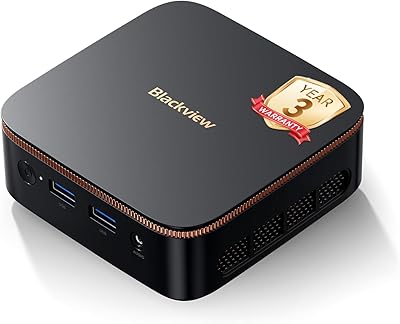
The port selection on this mini PC is unusually generous — three USB 3.1 ports, three HDMI outputs, dual Gigabit Ethernet, a headphone jack, and a dedicated microphone port cover the vast majority of real-world desktop use cases without needing a hub. Buyers consistently flag this as a highlight.
There is no USB-C port, which is an increasingly common omission to notice given how many modern peripherals and monitors rely on it. Bluetooth 4.2 also lags behind the current standard, which may create compatibility friction with newer wireless accessories.
Networking Capability
81%
19%
The dual Gigabit Ethernet configuration is a genuine niche advantage that most competing mini PCs at this price simply do not offer. Home lab enthusiasts and buyers running soft routers or file servers specifically seek out this feature and report it works exactly as intended.
The WiFi chipset is 802.11ac rather than true WiFi 6 despite some marketing language suggesting otherwise, so wireless throughput is solid but not cutting-edge. Buyers who need the fastest possible wireless performance should plug into Ethernet anyway.
Storage Performance
78%
22%
The M.2 SSD delivers noticeably faster boot times and application loading than the eMMC storage found in many competing budget mini PCs, which is a meaningful real-world difference for daily users. Installing Windows and standard applications feels snappy and responsive.
256GB fills up faster than most buyers anticipate once an OS, updates, and a handful of applications are installed — realistically leaving around 180 to 200GB of usable space. There is no additional storage bay mentioned, so expansion means relying on an external drive.
RGB Lighting
58%
42%
For buyers who wanted a bit of personality in their desk setup, the 7-color cycling RGB ring adds a visual element that most utilitarian mini PCs completely skip. It is a small detail, but some users genuinely enjoy the ambient glow in a gaming-adjacent or creative workspace.
There is no straightforward way to turn the RGB lighting off, which is a real problem for users who find it distracting during late-night work or in bedroom environments. Several reviews specifically mention wishing it came with a simple toggle or app control.
OS Compatibility
63%
37%
The hardware is broadly compatible with Windows 10, Windows 11, and popular Linux distributions, giving technically capable buyers flexibility in what they run. Users who went the Linux route — particularly with lightweight distros — report smooth installation and solid driver support.
The burden of sourcing, purchasing, and installing an OS falls entirely on the buyer, which is a non-trivial task for less experienced users. The DOS-only default is the most frequently cited reason for negative reviews and returns, particularly among buyers who did not read the product page carefully.
Portability & Form Factor
85%
Weighing under 300 grams and compact enough to fit in a jacket pocket, this mini PC is genuinely easy to move between a home office desk, a living room TV, or a work site. The included VESA bracket adds useful mounting flexibility without requiring additional accessories.
The power brick adds bulk to any travel setup, and the three HDMI cables needed for a full multi-monitor configuration partially offset the compact hardware footprint. It is portable in theory, but less so once you account for the full peripheral ecosystem.
Upgrade Potential
52%
48%
The M.2 SSD format used for storage is a standard interface, and adventurous users comfortable with disassembly may be able to swap in a larger drive. That alone provides some runway if 256GB proves insufficient over time.
RAM upgradeability is unclear and potentially limited depending on whether memory is soldered to the board, which is common in this class of device. The upgrade ceiling is low enough that buyers with evolving performance needs should plan around eventual replacement rather than expansion.
Customer Support
48%
52%
Some buyers report receiving timely responses to basic setup questions, and the product has been available long enough to have a small community of users who share configuration tips online. For common issues, third-party resources tend to fill the gap.
OASLOA is a smaller brand without the support infrastructure of established names, and buyers dealing with hardware defects or warranty claims frequently describe the process as slow and difficult. For a no-OS device where setup issues are common, weak after-sale support is a meaningful risk.

Suitable for:

The OASLOA T9PRO 8GB 256GB Mini PC is a strong match for buyers who need a capable, low-footprint desktop without spending a lot. Home office workers who want to spread across two or three monitors will genuinely appreciate the triple HDMI outputs — that kind of multi-display flexibility is rare at this price point. Students and budget-conscious first-time PC buyers can stretch their money further here, provided they are comfortable sourcing and installing a Windows license on their own. The dual Gigabit Ethernet ports make this compact desktop a surprisingly practical pick for hobbyists who want to experiment with home networking, whether that means running a basic file server, setting up a soft router, or segmenting a home network. It also works well as a quiet, always-on media client or digital signage box, where its 15W power draw is a genuine long-term advantage.
Not suitable for:

The OASLOA T9PRO 8GB 256GB Mini PC is not the right call for anyone expecting a ready-to-use Windows machine straight out of the box — it ships with DOS, and that catches a lot of buyers off guard. Users who rely on demanding applications, whether that is video editing, heavy spreadsheet work across dozens of tabs, or any serious local rendering, will find the Intel N95 hits its ceiling faster than expected. The integrated UHD graphics handle basic display duties capably, but this compact desktop is simply not built for gaming beyond the most casual browser-based titles. Anyone expecting to expand storage or RAM easily should research compatibility first, as the upgrade paths on mini PCs in this segment can be limited. If a polished, out-of-box experience with vendor support is a priority, this category of no-OS budget PC will likely frustrate more than it satisfies.
Specifications

  • Processor: Intel 12th Gen Alder Lake N95 with 4 cores and 4 threads, base clock of 1.7GHz and burst speed up to 3.4GHz.
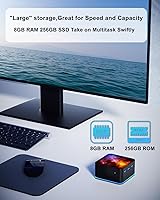
  • RAM: 8GB DDR5 memory running at 4800MHz, which is a more modern standard than the DDR4 found in most competing mini PCs at this price.
  • Storage: 256GB M.2 SSD provides solid read and write speeds for fast boot times and responsive application loading.
  • Display Output: Three HDMI ports support simultaneous triple-screen output at up to 4K (3840x2160) resolution.
  • Graphics: Intel UHD integrated graphics handle everyday display tasks and 4K video playback but are not suited for GPU-intensive workloads.
  • Ethernet: Dual Gigabit Ethernet ports (RJ45 x2) allow for advanced networking configurations including soft routing and network segmentation.
  • WiFi: 802.11ac dual-band WiFi supports both 2.4GHz and 5GHz bands for standard wireless connectivity.
  • Bluetooth: Bluetooth 4.2 enables connection to wireless peripherals such as keyboards, mice, headphones, and speakers.
  • USB Ports: Three USB 3.1 ports are available for connecting external drives, input devices, and other peripherals.
  • Audio: A 3.5mm audio output jack and a dedicated microphone port are built into the chassis for basic audio needs.
  • Power Draw: The system operates at a 15W TDP, keeping energy consumption low and making it practical for continuous always-on use.
  • Operating System: The unit ships with DOS only; a Windows license must be purchased and installed separately by the buyer.
  • RGB Lighting: A 7-color RGB light ring is built into the chassis and cycles through colors automatically during use.
  • Mounting: A VESA bracket is included in the box, allowing the unit to be mounted directly behind a compatible monitor or on a wall.
  • Weight: The chassis weighs approximately 0.25kg (around 0.55 lbs), making it easy to reposition or mount without additional hardware support.
  • Wireless Standard: Despite some WiFi 6 branding in marketing copy, the wireless chipset is 802.11ac, which corresponds to WiFi 5.
  • Processor Brand: The N95 is an Intel efficiency-class chip designed for low-power continuous operation rather than peak performance workloads.

Related Reviews

Beelink Mini S12 Mini PC
78%
88%
Value for Money
82%
Performance for Daily Tasks
79%
Build Quality & Design
91%
Dual Monitor Support
84%
Thermal Management & Noise
More
MINISFORUM GK41 Mini PC Celeron J4125 8GB RAM 256GB SSD
85%
87%
Performance for Everyday Use
91%
Dual Display & Video Output
82%
Build Quality
75%
Storage Expansion Flexibility
94%
Size & Portability
More
Blackview MP20 Mini PC (Intel N150, 8GB RAM, 256GB SSD)
79%
78%
Everyday Performance
84%
Value for Money
61%
RAM Adequacy
73%
Storage & Expandability
81%
Build Quality & Design
More
Bmax B3 256GB Mini PC
73%
78%
Value for Money
67%
Everyday Performance
61%
Build Quality
54%
Thermal Management
82%
Connectivity
More
Fusion5 FMP4 Mini PC
70%
94%
Portability
78%
Value for Money
63%
Everyday Performance
47%
Storage Speed
88%
Connectivity
More
KAMRUI Essenx E2 Mini PC
77%
78%
Everyday Performance
84%
Value for Money
72%
Build Quality
81%
Display Output Quality
74%
Thermal Management
More
HEIGAOLAPC Mini PC 12th Gen N100 16GB RAM 256GB Storage
85%
88%
Performance
92%
Value for Money
90%
Portability
87%
Connectivity
93%
Setup and Installation
More
MeLE PCG02 Mini PC Stick, Celeron N100, 8GB RAM, 128GB Storage
82%
94%
Portability & Size
85%
Performance for Everyday Tasks
72%
Thermal Management
88%
Wi-Fi Connectivity
90%
Ease of Setup
More
HIGOLE GOLE2 16GB 256GB Touchscreen Mini PC
68%
58%
CPU Performance
47%
Storage Speed
61%
Build Quality
88%
Port Selection
67%
Display Quality
More
GMKtec Nucbox G2 Plus Mini PC Intel N150 12GB RAM 256GB SSD
85%
88%
Performance for Everyday Use
91%
Connectivity Options
93%
Multi-Display Support
94%
Energy Efficiency
85%
Size & Portability
More

FAQ

No, it does not. The OASLOA T9PRO 8GB 256GB Mini PC ships with DOS, which is essentially a bare-bones command-line environment — not a usable desktop OS for most people. You will need to purchase a separate Windows license and install it yourself, or choose a free alternative like Linux. This is probably the single most important thing to know before ordering.
Yes, the T9PRO has three HDMI ports and supports triple-display output simultaneously at up to 4K resolution. That said, driving three 4K screens with integrated graphics while doing CPU-intensive work at the same time will push the N95 chip. For general office tasks, browsing, or media across three screens, it handles the job without much complaint.

Most home users will only plug into one port and ignore the second. The dual Ethernet setup is genuinely useful if you want to configure this compact desktop as a soft router, run it as a lightweight NAS, or create a segmented home network — scenarios that are common among hobbyists and home lab enthusiasts. If none of that means anything to you, just treat it as a bonus and use whichever port is more convenient.

Under light loads — web browsing, document editing, video playback — the fan is quiet enough that most users barely notice it. During sustained CPU activity the fan ramps up noticeably, but buyers generally describe it as tolerable rather than disruptive. It is not a fanless design, so expect some audible airflow if you push the processor for extended periods.

The chassis has a built-in 7-color RGB ring that cycles automatically. There is no dedicated physical switch to disable it, and software control depends on what OS and drivers you install. If you find ambient lighting distracting at your desk or in a bedroom setup, that is worth factoring into your decision before buying.

Windows 11 alone typically consumes 25 to 40GB once installed and updated, and that is before you add any applications or user files. On a 256GB drive you will realistically have somewhere between 180 and 210GB of usable space to work with. For light everyday use that is generally fine, but if you handle large files or install many programs, you may want to budget for an external drive sooner than you expect.

Mini PCs in this segment vary quite a bit in upgrade accessibility. Some have accessible M.2 slots and socketed RAM, while others use soldered components that cannot be changed at all. Based on the specs provided, the storage is M.2 format which is often swappable, but confirm the specific memory configuration before assuming you can add more RAM down the line.

Honestly, it depends. If you are comfortable following a YouTube tutorial to install Windows from a USB drive, you will be fine. If you have never done that before and expected to just plug it in and start working, the learning curve might be frustrating. It is a capable machine once set up, but the no-OS starting point is a genuine hurdle for less technical buyers.

It works reasonably well for that. The Intel UHD graphics support 4K video playback, and the small footprint plus VESA mount make it easy to tuck behind a TV. Once you install Windows or a media-focused OS, platforms like Plex, Kodi, or streaming browsers run without issue. Just remember you are still working with a modest processor, so transcoding heavy video files in real time is not its strong suit.

For a mini PC in this price range, the build quality is generally considered solid. The chassis feels dense rather than hollow, and the cooling vents on all sides suggest some attention was paid to thermal design. It is not the same as handling a premium brand unit, but buyers tend to report that it does not feel flimsy or poorly assembled out of the box.