Overview

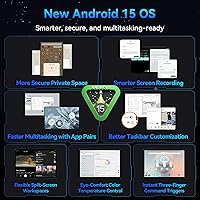
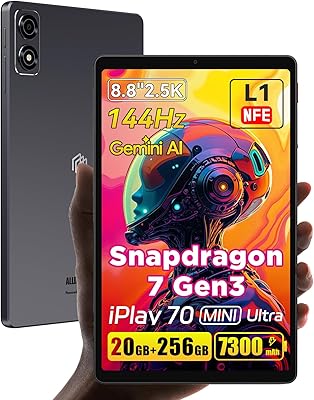
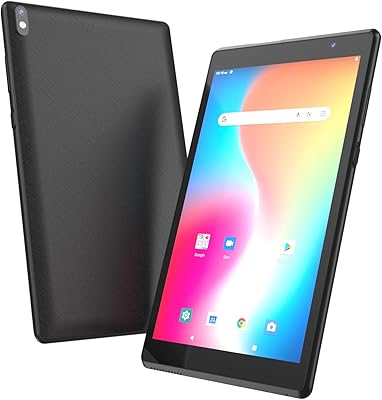
The ALLDOCUBE iPlay 70 mini Pro 8.4-inch Tablet sits in an interesting spot — it's not a flagship, and ALLDOCUBE isn't a household name in the West, but the Chinese brand has been quietly carving out space in the mid-range Android market. At 8.4 inches, this compact Android tablet hits a practical size that full-size 10-inch slates can't match for one-handed reading or commuting, yet it's far more capable than stretching a large phone. It ships with Android 15 out of the box, which most rivals at this price tier haven't managed. Honest expectations: strong for daily use, not built for heavy creative work.
Features & Benefits

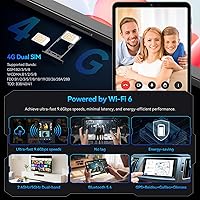
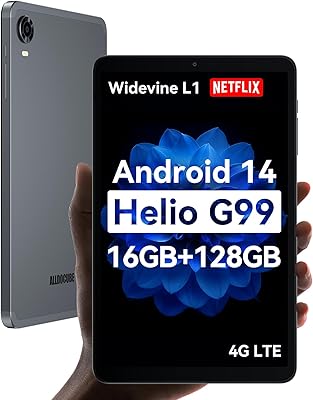
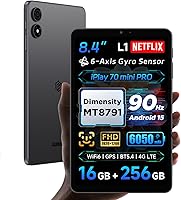
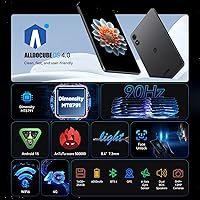
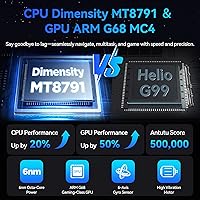
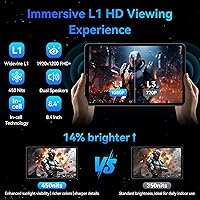
The iPlay 70 mini Pro runs on MediaTek's Dimensity MT8791, a 6nm chipset that handles everyday multitasking — browsing, streaming, casual gaming — without breaking a sweat. AnTuTu benchmarks matter here mainly as a proxy for real-world responsiveness, and this chip sits comfortably ahead of older Helio processors found in competing devices. The 90Hz FHD display makes a tangible difference over standard 60Hz panels; scrolling feels snappier and video looks noticeably smoother. More practically, Widevine L1 certification means Netflix and similar platforms deliver true HD, not a degraded resolution — something many budget tablets still can't offer. Wi-Fi 6 and 4G LTE with dual SIM round out a genuinely capable connectivity package.

Best For

This mid-range 8.4-inch slate is a natural fit for commuters, students, and frequent travelers who want a device they can actually slip into a bag without noticing the weight. At roughly 310 grams, it's light enough for extended reading sessions without arm fatigue. The dual SIM slot and 4G LTE support make it genuinely independent of Wi-Fi, which is a real advantage for users who move between locations regularly. Students will find it capable for video calls, note-taking apps, and research. That said, if your workflow involves video editing, heavy productivity suites, or serious multitasking, this isn't the device for the job — the hardware ceiling becomes apparent under sustained demanding loads.

User Feedback

As a relatively recent release, this compact Android tablet is still accumulating reviews, so patterns are still forming — keep that in mind when weighing the aggregate score. Early buyers consistently highlight display quality and how light it feels given the screen size. On the flip side, the bottom-only speaker placement draws regular mention — not a dealbreaker, but noticeable in landscape mode. The USB 2.0 port also limits file transfer speeds, which matters if you move large files frequently. Longer-term, software update cadence from ALLDOCUBE is a legitimate open question; the brand doesn't have the same track record as larger names, and buyers should factor that into their decision.

Pros

  • Widevine L1 certification unlocks true HD streaming on Netflix and other major platforms — rare at this price point.
  • The 90Hz display makes everyday scrolling and video noticeably smoother than competing 60Hz budget tablets.
  • Ships with Android 15 out of the box, giving it a software edge over similarly priced rivals.
  • Dual SIM support with 4G LTE means genuine cellular independence, no tethering required.
  • At roughly 310 grams, the iPlay 70 mini Pro is light enough for extended one-handed reading without fatigue.
  • Wi-Fi 6 support delivers faster, more stable wireless performance in congested network environments.
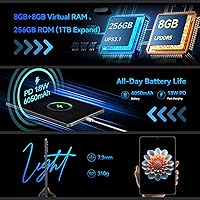
  • 256GB of built-in storage with microSD expansion up to 1TB provides plenty of room for apps, media, and files.
  • The 6050mAh battery handles a full day of mixed use comfortably, with fast charging cutting downtime.
  • The 8.4-inch FHD panel offers sharp, detailed visuals at a pixel density that holds up at close viewing distances.
  • Comprehensive GPS support across multiple satellite systems makes it a reliable navigation companion while traveling.

Cons

  • Half the advertised RAM is virtual, meaning sustained multitasking performance falls short of what the 16GB headline implies.
  • Bottom-only speaker placement becomes awkward in landscape mode, with hands easily blocking the audio output.
  • USB 2.0 transfer speeds are a genuine bottleneck for anyone moving large files between the tablet and a computer.
  • ALLDOCUBE has an uncertain long-term software update track record, raising questions about future Android version support.
  • Review volume is still thin given the recent launch date, so community knowledge and troubleshooting resources are limited.
  • The front camera at 5MP is adequate but noticeably behind what newer mid-range devices offer for video calls.
  • No 3.5mm headphone jack means wired audio requires an adapter or Bluetooth headphones.
  • The included protective film is basic and needs careful removal — a proper case is an added cost to budget for.
  • Benchmark performance, while solid for casual use, drops off meaningfully under sustained gaming or processing loads.
  • ALLDOCUBE OS customizations on top of Android 15 add features some users will find useful but others may prefer to strip back.

Ratings

The scores below were generated by AI after analyzing verified buyer reviews from global markets, with spam, bot activity, and incentivized feedback actively filtered out to ensure the results reflect genuine user experiences. The ALLDOCUBE iPlay 70 mini Pro 8.4-inch Tablet earns a solid overall impression in its category, though the ratings make no effort to gloss over the real frustrations buyers have reported alongside the genuine strengths. From display quality to long-term software support, both the highs and the pain points are transparently represented.
Display Quality
88%
Users consistently call the display one of the strongest arguments for buying this tablet at its price tier. The 90Hz refresh rate makes everyday scrolling feel noticeably fluid, and the FHD resolution holds up well for reading text, watching video, and general browsing — sharper than most competing screens in this range.
At 450 nits, brightness becomes a limiting factor in direct sunlight or bright outdoor settings, with several buyers noting they had to seek shade to see the screen comfortably. Color accuracy, while good for casual use, doesn't satisfy users with more discerning display expectations.
Streaming Performance
91%
Widevine L1 certification is the headline win here, and buyers who care about streaming quality notice it immediately — Netflix, Amazon Prime Video, and similar platforms deliver genuine HD rather than the blurry standard-definition output that plagues many rival devices at this price. Paired with the 90Hz panel, video playback feels premium for the category.
The bottom-mounted speakers undercut the otherwise strong visual streaming experience, particularly in landscape mode where hands naturally muffle the audio output. A handful of users also noted occasional buffering on some international streaming services, though this appears tied to regional LTE band compatibility rather than the hardware itself.
Performance & Speed
76%
24%
For the tasks most buyers actually use this tablet for — web browsing, social media, video streaming, and light gaming — the Dimensity MT8791 handles everything without hesitation. App launches are quick, the interface stays responsive during multitasking, and casual games run smoothly without thermal throttling under moderate sessions.
Sustained heavy workloads expose the chip's limits, and users running demanding games for extended periods or working with large files report noticeable slowdowns. The virtual RAM component also means that aggressive multitasking — keeping many apps alive in the background — performs below what the 16GB headline figure leads buyers to expect.
Battery Life
83%
Most buyers report the battery easily covers a full day of mixed use — streaming during a commute, video calls, and some browsing — without needing a midday top-up. The included fast charger brings it back to usable levels quickly, which users travelling or working away from a desk particularly appreciate.
Heavy 4G LTE usage combined with high screen brightness drains the battery noticeably faster than light Wi-Fi use, with some buyers reporting shorter-than-expected endurance under those conditions. A few users also flagged that the battery capacity figures in marketing don't fully account for power draw from the 90Hz display running at full rate.
Portability & Build
86%
At around 310 grams and just over 7mm thin, this is genuinely pocketable in a way that 10-inch tablets simply are not. Commuters and travelers repeatedly highlight how easy it is to hold one-handed for reading, and the slim profile fits into bags and jacket pockets without bulk.
The build quality, while acceptable for the price, doesn't inspire the same confidence as devices from established premium brands — some buyers describe the plastic chassis as feeling slightly hollow under pressure. The included screen protector is thin and basic, suggesting a proper case purchase should be factored into the overall budget.
Connectivity
82%
18%
Wi-Fi 6 support gives this tablet a genuine edge in congested environments like airports, cafes, and dense apartment buildings where older Wi-Fi standards struggle. Bluetooth 5.4 pairs quickly with wireless earphones and maintains a stable connection even at moderate distances, which earphone users on commutes appreciate.
4G LTE band coverage varies significantly by region, and buyers outside Asia should verify compatibility with their carrier before purchasing — a non-trivial concern that a few US and European buyers discovered only after the fact. GPS accuracy is reliable in open areas but loses some precision in dense urban canyons.
Software Experience
73%
27%
Shipping with Android 15 is a genuine advantage over rivals at this price still running older OS versions, and ALLDOCUBE OS 4.0 adds practical features like split-screen gestures and customizable home screen layouts that buyers find useful day-to-day. Google services integration is complete, and the overall setup experience is smooth.
Some buyers find ALLDOCUBE's custom OS layer adds bloatware and interface choices they'd prefer to remove, and stripping it back requires more effort than on near-stock Android devices. Long-term update support remains the biggest software concern — ALLDOCUBE has not established a reliable cadence for major Android version upgrades or consistent security patches.
Value for Money
84%
The combination of Widevine L1, a 90Hz FHD display, Wi-Fi 6, dual SIM 4G LTE, and Android 15 in a sub-250-dollar package is genuinely difficult to match among competitors. Buyers who did their research and understood the trade-offs consistently feel they received more than expected for the price.
The value equation weakens slightly when buyers factor in the cost of a proper case, an adapter for wired headphones, and the risk of limited long-term software support. Users who didn't research the virtual RAM distinction or LTE band compatibility before purchasing felt the value proposition was less straightforward than advertised.
Audio Quality
58%
42%
The dual BOX cavity speakers produce adequate volume for solo viewing in quiet environments, and the sound quality is marginally richer than the thin, tinny output typical of ultra-budget tablets. Bluetooth audio via quality wireless earphones is noticeably better, with low latency thanks to Bluetooth 5.4.
Bottom-firing stereo placement is a persistent complaint — in landscape mode, which is standard for video and gaming, one or both speakers are frequently blocked by the user's hands. Bass response is thin and the speakers struggle with clarity at maximum volume, making them a weak link in what is otherwise a capable media device.
Camera Quality
54%
46%
The 5MP front camera covers the basics for video calls and virtual meetings, producing acceptable image quality in well-lit rooms. For occasional casual shots or document scanning, the 13MP rear camera does a serviceable job in good lighting conditions.
Camera performance degrades quickly in low light on both front and rear sensors, producing noisy, detail-poor images that most buyers find disappointing for anything beyond basic use. Users who prioritize photography or higher-quality video calling will find the cameras a clear weak point compared to what even mid-range smartphones now offer.
Storage & Expandability
87%
256GB of built-in storage is a genuinely generous starting point at this price tier, eliminating the immediate pressure to buy a memory card that plagues 64GB and 128GB budget tablets. The ability to expand to 1TB via microSD without sacrificing a SIM slot is a practical advantage that frequent media downloaders and travelers will use.
The USB 2.0 port becomes a bottleneck when users want to transfer large files to or from external drives — speeds that feel fine for small documents become noticeably slow when moving video libraries or large app backups. There is no internal UFS 3.x or NVMe-level storage performance at this price, which affects sustained read/write tasks.
File Transfer Speed
47%
53%
For everyday tasks — syncing a folder of documents, copying a few photos — the USB 2.0 port transfers files without issue and most casual users won't notice the limitation in routine use. OTG support adds flexibility for connecting external accessories like keyboards or USB storage on the go.
USB 2.0 is a clear hardware limitation that stings when compared to tablets even slightly higher in the market offering USB 3.0 or higher. Buyers who move large video files, back up significant amounts of data, or work with external drives regularly will find the transfer speeds a genuine daily frustration rather than an occasional inconvenience.
Brand Trust & Support
61%
39%
ALLDOCUBE has been operating in the tablet space long enough to have an established product track record, and most buyers report that the device arrives as described with no obvious hardware defects. Customer support response for straightforward issues is generally adequate based on available feedback.
ALLDOCUBE lacks the after-sales infrastructure, warranty reputation, and update commitment that brands like Samsung or Lenovo provide, which is a real risk consideration for buyers planning to keep the device for several years. Uncertainty around how long the device will receive security patches or any Android version updates is the most cited concern among cautious buyers.
Gaming Experience
71%
29%
Casual and mid-tier mobile games run well — titles like casual puzzle games, older action games, and lighter strategy games play smoothly at comfortable frame rates. The 6-axis gyroscope adds a layer of motion control compatibility that gaming-focused buyers appreciate for supported titles.
Demanding 3D titles expose the GPU's limits, particularly during extended sessions where thermal management kicks in and performance dips become noticeable. The virtual RAM setup also means that switching between a game and other apps can cause the game to reload rather than resume instantly, which disrupts session continuity.
Setup & Ease of Use
79%
21%
Initial setup follows a standard Android onboarding flow that most buyers complete in minutes, and Google service integration works without friction. The ALLDOCUBE OS adds split-screen and gesture navigation features that are genuinely intuitive once discovered.
Some buyers report that pre-installed apps and the custom launcher require extra steps to clean up compared to a near-stock Android experience. First-time Android tablet users occasionally find the ALLDOCUBE OS 4.0 customizations slightly confusing until they adjust to the interface conventions.

Suitable for:

The ALLDOCUBE iPlay 70 mini Pro 8.4-inch Tablet is well-matched to buyers who want a genuinely portable Android device that does more than a large phone but doesn't demand full-size tablet bulk. Commuters and frequent travelers will appreciate the lightweight build and the dual SIM slot, which means you can stay connected on cellular without hunting for Wi-Fi or carrying a separate hotspot. Students looking for a capable secondary device — something for video lectures, note-taking apps, and the occasional Netflix session between classes — will find it hits a practical price-to-performance balance. The Widevine L1 certification is a meaningful plus for anyone who streams regularly, since many competing devices at this tier still cap out at standard definition on major platforms. Media-focused buyers who want smooth, sharp visuals on a pocketable screen will find the 90Hz FHD display a genuine upgrade over the 60Hz panels that dominate this price range.
Not suitable for:

The ALLDOCUBE iPlay 70 mini Pro 8.4-inch Tablet is not the right call for users who push their devices hard on sustained, demanding workloads. The 16GB RAM figure sounds generous, but half of that is virtual RAM — a software trick that borrows from storage and behaves differently under pressure than true physical memory, so heavy multitaskers may run into limitations sooner than expected. Anyone who edits video, runs intensive creative apps, or expects near-flagship responsiveness across the board will find the hardware ceiling frustrating. The USB 2.0 port is also a real bottleneck if you routinely transfer large files — photographers or content creators offloading high-res footage will notice the slow transfer speeds quickly. Buyers who prioritize long-term software support and guaranteed OS update schedules should also think carefully, as ALLDOCUBE does not have the same established track record as Samsung or Google in that department.

Specifications

  • Screen Size: The display measures 8.4 inches diagonally, offering a comfortable middle ground between a large smartphone and a full-size tablet.
  • Resolution: The FHD panel runs at 1920x1200 pixels, delivering a pixel density of approximately 270 PPI for sharp text and detailed imagery.
  • Refresh Rate: A 90Hz refresh rate provides visibly smoother scrolling and animation compared to the 60Hz panels standard on most budget tablets.
  • Processor: The MediaTek Dimensity MT8791 is built on a 6nm process, combining two high-performance Cortex-A78 cores with six efficiency-focused Cortex-A55 cores.
  • RAM: Total addressable RAM is 16GB, comprising 8GB of physical LPDDR memory and 8GB of virtual RAM allocated from onboard storage.
  • Storage: Internal storage is 256GB, with microSD card support for expansion up to 1TB for additional apps, media, and files.
  • Operating System: The tablet ships with Android 15 and ALLDOCUBE OS 4.0, including features such as a dock bar, split-screen gestures, and Google AI Lens integration.
  • Battery: A 6050mAh cell powers the device, with support for PD 18W fast charging via the included PD 20W charger.
  • Connectivity: Wireless options include Wi-Fi 6 (802.11ax), Bluetooth 5.4, and 4G LTE with dual SIM support for simultaneous use of two SIM cards.
  • Display Brightness: Peak brightness is rated at 450 nits, which is adequate for indoor use but may struggle in direct outdoor sunlight.
  • Cameras: The rear camera is 13MP and the front-facing camera is 5MP, suitable for standard video calls and casual photography.
  • Streaming: Widevine L1 certification enables full HD content playback on streaming platforms such as Netflix and Amazon Prime Video.
  • Dimensions: The tablet measures 202.7 x 126 x 7.3mm, making it slim enough to fit comfortably in a coat pocket or small bag.
  • Weight: At approximately 310 grams, the iPlay 70 mini Pro is light enough for extended single-handed use without significant fatigue.
  • Charging Port: A USB 2.0 Type-C port handles charging, OTG connections, and data transfer, though USB 2.0 speeds cap out at 480Mbps.
  • Audio Output: Dual BOX cavity speakers are both positioned at the bottom edge of the device; there is no 3.5mm headphone jack.
  • Navigation: The tablet supports GPS, Beidou, Galileo, and Glonass satellite systems for multi-constellation location accuracy.
  • Motion Sensors: A 6-axis gyroscope is included, enabling motion-controlled gaming and accurate screen orientation detection.

Related Reviews

ALLDOCUBE iPlay 70 mini Ultra 8.8-inch Tablet
78%
91%
Display Quality
93%
Performance
86%
Battery Life
88%
Value for Money
61%
Software Experience
More
ALLDOCUBE iPlay 60 Mini Pro 8.4-inch Tablet
77%
91%
Streaming Performance
83%
Display Quality
78%
Performance & Speed
81%
Battery Life
88%
Value for Money
More
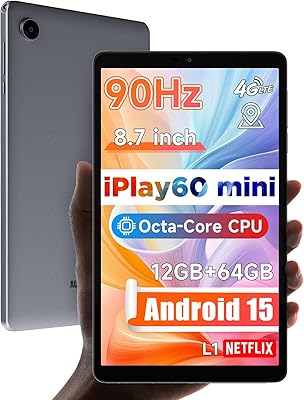
ALLDOCUBE iPlay 60 Mini Android Tablet 8.7″, 12GB RAM, 64GB Storage
82%
89%
Value for Money
76%
Display Quality
84%
Battery Life
88%
Performance
92%
Portability
More
reMarkable Paper Pro 11.8″
82%
94%
Writing Feel & Friction
86%
Display & Color Accuracy
97%
Distraction-Free Focus
91%
Build & Portability
88%
Battery Performance
More
Timpano TPT-MR8-4 Bullet 8-Inch Pro Mid Range Speaker
86%
93%
Sound Clarity
88%
Build Quality
90%
Power Handling
75%
Ease of Installation
85%
Compatibility with Car Audio Systems
More
CALLSKY-NOTE Cpad 8 8-Inch Kids Tablet
71%
83%
Value for Money
88%
Parental Controls
51%
Battery Life
62%
Performance & Speed
71%
Display Quality
More
CT Sounds MESO-8-D4 8-Inch Car Subwoofer
79%
84%
Bass Output & Impact
88%
Build Quality
86%
Voice Coil Durability
91%
Value for Money
77%
Amplifier Compatibility
More
JINSWY JIN-HD82 8″ Mini Security Monitor
75%
83%
Build Quality
78%
Image Clarity
91%
Input Versatility
71%
Brightness & Visibility
86%
Value for Money
More
ATOZEE ATCP80 8-inch 32GB Android Tablet
67%
78%
Value for Money
71%
Display Quality
53%
Performance
74%
Battery Life
82%
Portability & Design
More
PRITOM L8 8-inch Android Tablet 64GB
69%
83%
Value for Money
74%
Display Quality
52%
Performance
67%
Battery Life
88%
Storage & Expandability
More

FAQ

It streams in full HD. The iPlay 70 mini Pro carries Widevine L1 certification, which is the key requirement Netflix and most other major platforms use to unlock HD and even FHD playback. A lot of budget tablets are stuck at Widevine L3, which limits them to 480p — that is not the case here.

Not entirely. Of the 16GB, 8GB is physical RAM and the other 8GB is virtual RAM — which is essentially storage space the system borrows and treats like memory when needed. Virtual RAM is slower than physical RAM and behaves differently under sustained multitasking, so real-world heavy use will feel closer to an 8GB device than a true 16GB one. For everyday tasks it works fine, but don't expect flagship-level multitasking headroom.

The ALLDOCUBE iPlay 70 mini Pro 8.4-inch Tablet has a dedicated microSD card slot separate from the SIM tray, so you can run two SIM cards and a memory card simultaneously without having to choose between them.
For moderate use — streaming video, browsing, some messaging — most users find it comfortably covers a full day on a single charge. The 6050mAh cell is a solid size for this screen class. Heavy gaming or continuous 4G LTE use will drain it faster, but for typical travel or commute use it holds up well.

Band compatibility is the critical thing to check here. This tablet supports a range of LTE bands common in Asian markets, and coverage on US and European carriers can vary depending on which bands your carrier relies on. Before purchasing, compare the specific LTE bands listed in the full spec sheet against your carrier's supported bands — most carriers publish this information on their websites.

It is genuinely noticeable, especially if you are used to 60Hz screens. Scrolling through web pages and social feeds feels distinctly smoother, and video motion looks cleaner. It is not a dramatic difference in every scenario, but once you use it for a while, going back to 60Hz feels sluggish.

There is no 3.5mm headphone jack on this tablet. You will need either Bluetooth headphones or a USB-C to 3.5mm adapter. The good news is the USB-C port does support audio output, so adapters work fine — you just need to budget for one if wired audio is important to you.

The dual speakers get reasonably loud and have decent clarity for a tablet in this price range. The downside is both speakers sit at the bottom of the device, so in landscape mode — which is how most people watch video — your hands naturally cover them. It is not a dealbreaker but it is worth knowing, especially if you plan to watch a lot of content without headphones.

ALLDOCUBE is a legitimate Chinese electronics manufacturer with several years of products on the market, but it does not have the same update track record as Samsung, Google, or even Lenovo. The tablet ships with Android 15, which is current, but how many future Android version upgrades it will receive — and how promptly — is genuinely uncertain. Security patches are the more practical concern for most users, and ALLDOCUBE's update cadence there is inconsistent compared to larger brands.

The USB-C port uses the USB 2.0 standard, which means transfer speeds top out at around 480Mbps in ideal conditions. In practice, that translates to noticeably slower file transfers compared to USB 3.0 or higher devices. For everyday syncing of documents and photos it is fine, but if you routinely move large video files or do regular backups of big datasets, the speed will frustrate you.