Overview

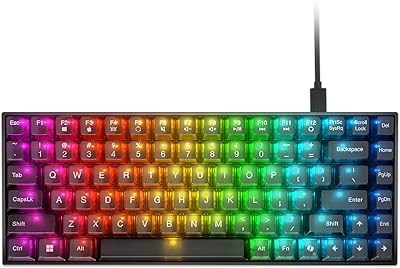
The GravaStar Mercury K1 Pro Mechanical Gaming Keyboard arrives in a market crowded with competent 75% boards, but few look quite like this. GravaStar has built its identity around sci-fi-inspired peripherals, and the K1 Pro leans fully into that reputation — its electroplated aluminum frame and skeletal cyberpunk silhouette make it a genuine desk statement. Practically, tri-mode connectivity and an 8000mAh battery push it well beyond feature-light alternatives. At this price tier, it competes directly with established enthusiast names like Keychron and Nuphy, so aesthetics alone won't justify the purchase — performance has to follow.
Features & Benefits

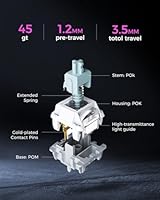
The Speedy Mint linear switches are tuned for speed — 45gf actuation and a short 1.2mm pre-travel keep keystrokes fast without feeling nervously light. The POK stems run smooth enough out of the box that lubing feels optional. Underneath, a gasket-mounted FR4 plate combined with five layers of foam produces a noticeably softer sound profile than the tray-mount designs common at this price. South-facing RGB LEDs push light cleanly through the pudding PBT keycaps for vivid, even backlighting — no hotspots. The hot-swap sockets let you change switches without soldering, and the programmable control knob adds a practical shortcut to the compact 75% layout.

Best For

GravaStar's flagship 75% board makes the most sense for gamers who want wireless connectivity without sacrificing latency — the 2.4GHz mode stays competitive with wired setups. It's also well-suited for multi-device users who regularly switch between a PC, laptop, and tablet; Bluetooth mode handles that smoothly, and the substantial battery means charging stays infrequent. Desk setup enthusiasts drawn to bold, unconventional hardware will find the cyberpunk frame genuinely hard to replicate elsewhere. If you want a gasket-mount typing feel without sourcing parts for a custom build, this board offers a ready-made path into that territory. Minimalists should look elsewhere.

User Feedback

With a 4.6-star average across more than 250 ratings, the K1 Pro holds up reasonably well to scrutiny. Buyers consistently praise build quality and acoustics — the aluminum chassis feels substantial, and the gasket-mount sound profile draws positive comments even from users who weren't specifically shopping for it. On the downside, the companion software draws recurring criticism for feeling limited compared to the hardware's potential, and some early adopters flagged Bluetooth pairing reliability as inconsistent. Battery life is where expectations need calibrating: the advertised figure assumes modest RGB use, and real-world results vary. Against competitors at this price, the K1 Pro tends to win on visual distinctiveness but can lag on software polish.

Pros

  • The electroplated aluminum frame feels genuinely premium and holds up well against everyday wear.
  • Speedy Mint linear switches are smooth and fast out of the box — no lubing required before first use.
  • Gasket-mounted construction delivers a noticeably softer, more comfortable typing sound than tray-mount boards at this price.
  • 2.4GHz wireless mode keeps latency low enough for competitive gaming without a physical cable.
  • South-facing RGB LEDs paired with pudding PBT keycaps produce vivid, even backlighting with no dull zones.
  • The 8000mAh battery is one of the largest capacities in this keyboard category, reducing charging frequency significantly.
  • Hot-swappable sockets make switch experimentation straightforward — no soldering iron needed.
  • Tri-mode connectivity handles PC, laptop, and tablet pairing without device-specific dongles or complex re-pairing steps.
  • The programmable control knob adds useful shortcut functionality without disrupting the compact 75% footprint.
  • Build quality and acoustic profile consistently earn praise from verified buyers, including those comparing against pricier alternatives.

Cons

  • The companion software is underdeveloped relative to the hardware, limiting advanced customization options.
  • Bluetooth connectivity has shown pairing reliability issues in some early buyer reports.
  • Real-world battery life drops noticeably with full RGB enabled — advertised figures assume restrained lighting use.
  • At 2.6 pounds, the aluminum chassis is too heavy for frequent travel or portable use cases.
  • The cyberpunk aesthetic is bold and polarizing — it will clash with neutral or minimalist desk setups.
  • Keycap legend durability over extended use has not been thoroughly validated by long-term reviewers yet.
  • No included wrist rest despite the board's weight and enthusiast price positioning.
  • The 75% layout omits a dedicated number pad, which remains a dealbreaker for data-entry-heavy workflows.
  • Software-savvy buyers may find the RGB customization options shallower than competitors with mature ecosystem tools.
  • The premium price leaves little room for disappointment if software or connectivity issues are not resolved via firmware updates.

Ratings

The GravaStar Mercury K1 Pro Mechanical Gaming Keyboard has been scored by our AI system after analyzing verified buyer reviews from global marketplaces, with spam, bot-submitted, and incentivized feedback actively filtered out. These scores reflect the honest distribution of real user sentiment — strengths are credited where earned, and recurring frustrations are weighted just as transparently. If a category divides buyers, that tension shows up directly in the number.
Build Quality
91%
The electroplated aluminum chassis is one of the most frequently praised aspects across verified reviews — buyers consistently describe it as feeling dense, premium, and well-assembled straight out of the box. For a board in this price tier, the structural rigidity stands out positively even against competitors with comparable specs.
A small number of buyers noted minor fit inconsistencies around the frame edges, and at 2.6 pounds the board is heavier than some users expected for a wireless peripheral. Neither issue is widespread, but they do appear with enough frequency to temper a perfect score.
Typing Feel
88%
The gasket-mounted FR4 plate combined with five internal foam layers produces a noticeably cushioned keystroke that most buyers describe as muted, comfortable, and surprisingly refined for a ready-made board. Users upgrading from tray-mount or budget membrane keyboards tend to react strongly and positively to the tactile difference.
A minority of experienced custom keyboard enthusiasts found the overall feel slightly stiffer than high-end gasket builds they had used previously. Expectations calibrated to truly premium custom boards may not be fully met, even though the experience clearly exceeds the mainstream category average.
Switch Performance
86%
The Speedy Mint linears strike a well-received balance between fast actuation and a smooth travel that does not feel nervously light during extended gaming or typing sessions. Buyers specifically appreciate that the switches perform well without any out-of-box lubing, which removes a common setup friction point for less experienced users.
Buyers who prefer tactile or clicky switches will find no factory alternative in this model, and while hot-swap sockets allow replacement, sourcing preferred switches adds cost. A few reviewers also noted the actuation force feels slightly lighter than expected for prolonged typing marathons.
Wireless Reliability
79%
21%
The 2.4GHz connection mode earned consistent praise from gaming-focused buyers, with latency described as indistinguishable from wired in fast-paced titles. Multi-device users also appreciated how quickly the board recognizes its USB dongle after waking from sleep.
Bluetooth mode is where reliability starts to fray — recurring reports of initial pairing difficulty and occasional mid-session disconnections surfaced across multiple reviews. For users who rely on Bluetooth to switch between a work laptop and gaming PC throughout the day, this inconsistency creates real friction.
Battery Life
74%
26%
The 8000mAh capacity is genuinely large for this product category, and buyers who run the keyboard with lighting off or at low brightness report impressively long intervals between charges. For wireless keyboard users fatigued by frequent charging, the headline capacity alone is a meaningful differentiator.
Real-world battery performance with full RGB active lands well below the advertised ceiling, which disappointed buyers who expected the marketed figure under typical usage. Heavy users running vivid lighting in gaming environments report charge cycles coming sooner than expected, and the gap between spec-sheet and reality drew pointed criticism in several reviews.
RGB & Lighting
89%
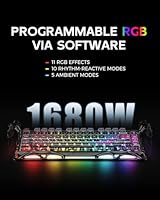
South-facing LEDs pushing through pudding PBT keycaps create genuinely vibrant, even illumination that buyers consistently describe as one of the best stock RGB setups they have seen at this price point. The dual independent lighting systems give enough visual depth that most users do not feel compelled to customize beyond the preset modes.
The companion software limits how deeply users can craft custom lighting profiles, which frustrates buyers who want granular per-key control. A few reviewers noted that certain lighting modes cause minor bleeding at the keycap edges, though this was not a majority complaint.
Software & Customization
58%
42%
Basic functionality — lighting mode cycling, connectivity switching, and control knob behavior — works without any software installation, which is a practical advantage for plug-and-play users. This out-of-box usability keeps the experience accessible even without engaging the companion app.
The companion application itself has drawn consistent and pointed criticism for being shallow relative to what enthusiast buyers expect at this price tier. Key remapping options are limited, lighting customization lacks depth, and the interface feels underdeveloped compared to software ecosystems from competitors like Keychron or established gaming peripheral brands.
Sound Profile
87%
Buyers shopping specifically for acoustic quality frequently single out the K1 Pro as a positive surprise — the dampened, thocky sound character that the gasket mount and foam stack produce is more refined than most expect from a pre-built board. It performs noticeably well in quiet environments where keyboard noise is a concern.
Sound remains inherently subjective, and a small subset of buyers found the profile slightly too muted for their preference, particularly those who enjoy a crisper, more present keystroke sound. The stock keycaps also contribute a slightly hollow high-end tone that a keycap swap can address but should not be necessary at this price.
Keycap Quality
82%
18%
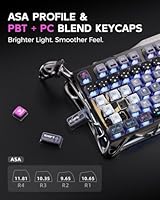
The pudding PBT keycaps are durable, resistant to shine over time, and pair well visually with the RGB system beneath them. Dye-sublimated legends hold up better than pad-printed alternatives under regular use, and multiple buyers confirmed the legends looked unchanged after months of daily typing.
Long-term durability data is still accumulating given the board's relatively recent market entry, so confidence in multi-year legend retention is not yet fully validated by the buyer community. A small number of users also found the keycap surface texture slightly smoother than their preference.
Aesthetic Design
93%
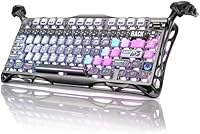
The skeletal cyberpunk frame and electroplated gloss finish are genuinely polarizing in the best way for the target buyer — desk setup enthusiasts consistently describe it as the most visually distinctive keyboard they have owned at any price. It photographs exceptionally well and anchors gaming battlestations with a coherent sci-fi identity.
The bold aesthetic is a firm commitment, not a neutral canvas, and buyers who later wanted a cleaner desk look found it difficult to style around. Minimalists who purchased based on specs alone and underestimated the visual impact expressed regret more than any other buyer segment.
Hot-Swap Experience
88%
The hot-swap implementation is clean and accessible — switches pull and seat without excessive force, and buyers who upgraded to different switches reported the process taking only a few minutes with a basic switch puller. This adds meaningful long-term value for users whose switch preferences evolve over time.
A handful of buyers noted that socket durability over many repeated swap cycles is not yet proven, which is a fair concern for users planning frequent experimentation. The board also ships with no spare switches or switch-pulling tool included, which adds minor friction for first-time hot-swap users.
Multi-Device Usability
76%
24%
Tri-mode connectivity makes the K1 Pro a practical choice for users moving between a gaming PC, work laptop, and tablet throughout the day — the 2.4GHz and Bluetooth modes cover most pairing scenarios without extra hardware. Buyers who successfully navigate the switching workflow report it as a standout convenience feature.
The Bluetooth reliability issues noted in other categories reduce confidence in this use case specifically, since multi-device workflows depend on consistent re-pairing behavior. Some buyers found the mode-switching process less intuitive than expected and wished for clearer documentation in the included materials.
Value for Money
72%
28%
For buyers who prioritize build character, acoustic quality, and unique aesthetics, the K1 Pro delivers a package that would cost meaningfully more to assemble from scratch as a custom board. The 8000mAh battery and hot-swap support at this price tier also add practical value that justifies the spend for the right user.
At this price point, software limitations and Bluetooth inconsistencies are harder to forgive than they would be on a budget board — buyers cross-shopping with Keychron or Nuphy flagged that comparable functionality is available at lower cost without those recurring pain points. The value equation is positive only if the aesthetic and build character are genuinely important to the buyer.
Portability
61%
39%
The 75% compact layout does reduce desk footprint meaningfully compared to full-size or tenkeyless boards, and the wireless modes eliminate cable management concerns for users within range of the dongle or Bluetooth connection.
At 2.6 pounds, the aluminum chassis is noticeably heavy for a keyboard marketed with wireless flexibility — buyers who assumed portability came standard were often caught off guard. It is not a practical carry-around keyboard for commuters or frequent travelers, and several reviews specifically flagged the weight as a disappointment in that context.

Suitable for:

The GravaStar Mercury K1 Pro Mechanical Gaming Keyboard is a strong match for gamers who want reliable wireless performance without settling for Bluetooth-only latency — the 2.4GHz mode keeps response times competitive with wired setups, which matters in fast-paced titles. It also suits desk setup enthusiasts who treat their workspace as a creative expression; the skeletal cyberpunk frame is genuinely distinctive in a way that most keyboards, even expensive ones, simply aren't. Typists upgrading from a budget membrane or entry-level mechanical board will notice the gasket-mount construction immediately — the softer, more cushioned keystroke feedback is a real quality-of-life improvement that normally requires a custom build to achieve. Multi-device households benefit from the tri-mode connectivity, making it practical to pair with a work laptop during the day and a gaming PC in the evening without dongles or re-pairing headaches. The hot-swappable sockets also make this a reasonable long-term investment for buyers who expect their switch preferences to evolve over time.
Not suitable for:

The GravaStar Mercury K1 Pro Mechanical Gaming Keyboard is a harder sell for buyers who prioritize software depth — companion app functionality has drawn consistent criticism, and if you rely heavily on per-key macro programming or complex lighting configuration tools, you may find the experience frustrating compared to more software-mature competitors like Corsair or Logitech. Minimalists and clean-desk enthusiasts should be candid with themselves before purchasing: the bold cyberpunk aesthetic is a core design choice, not a removable skin, and it dominates any setup it joins. Buyers on a tighter budget will find capable alternatives from Keychron or Nuphy that cover the fundamentals at a lower price point, though they won't replicate the build character or battery capacity. If you need a featherlight travel keyboard, the 2.6-pound aluminum chassis also rules this out — it's a desk-first board. Finally, anyone expecting the advertised battery life under heavy RGB use should temper expectations; real-world runtime depends heavily on lighting settings and connection mode.
Specifications

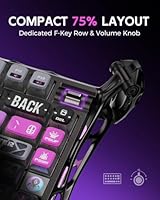
  • Layout: The K1 Pro uses a 75% compact layout with 79 keys, retaining function row and arrow cluster while omitting the numpad to save desk space.
  • Dimensions: The board measures 16.34″ x 7.03″ x 2.27″, making it compact for a full-featured wireless mechanical keyboard.
  • Weight: The aluminum chassis brings the total weight to 2.6 pounds, which is on the heavier end for a 75% board due to its metal construction.
  • Frame Material: The outer frame is constructed from electroplated aluminum alloy, providing structural rigidity and a distinctive glossy finish.
  • Switch Type: The K1 Pro ships with custom Kailh Speedy Mint linear switches featuring a 45gf actuation force and 1.2mm pre-travel distance.
  • Switch Lifespan: Each switch is rated for up to 70 million keystrokes, indicating long-term durability under heavy daily use.
  • Plate & Mount: A gasket-mounted FR4 plate suspends the switch assembly to reduce vibration transfer and soften the overall typing sound profile.
  • Sound Dampening: Five layers of foam are installed internally to further reduce case resonance and produce a quieter, more refined acoustic result.
  • Keycaps: Pudding-style PBT keycaps with dye-sublimation legends are included, offering durability and strong light diffusion for the RGB system beneath.
  • RGB Lighting: Two independent RGB systems support 16.8 million colors across 13 lighting modes, with south-facing LEDs optimized for keycap shine-through.
  • Connectivity: The board supports three connection modes: USB-C wired, 2.4GHz wireless via included dongle, and Bluetooth for broader device compatibility.
  • Battery Capacity: An 8000mAh rechargeable lithium battery powers the wireless modes, one of the largest capacities found in this keyboard category.
  • Hot-Swap: All switch sockets are hot-swappable, allowing users to replace switches without soldering tools or technical disassembly of the board.
  • Control Knob: A programmable rotary knob is built into the top-right of the layout, configurable for volume, media, or other user-defined functions.
  • Compatible Devices: The K1 Pro is compatible with PCs, laptops, and tablets, and works across Windows, macOS, and other Bluetooth-enabled operating systems.
  • Power Source: The keyboard is battery-powered via its internal rechargeable cell and charges through the USB-C port included on the board.
  • Polling Rate: In 2.4GHz wireless mode, the keyboard operates at a polling rate suited for gaming use, reducing input lag compared to standard Bluetooth.
  • Manufacturer: The K1 Pro is manufactured by ZhuoYe ChuangYi Co., Ltd. under the GravaStar brand, which specializes in sci-fi-inspired gaming peripherals.

Related Reviews

Lenovo Legion K510 Mini Pro Wired Mechanical Gaming Keyboard
86%
88%
Overall Performance
90%
Build Quality
75%
RGB Lighting Customization
92%
Key Response and Feel
91%
Durability (Key Lifespan)
More
Alienware Pro Wireless Gaming Keyboard
87%
93%
Connectivity
89%
Customization (Hot-Swappable Switches)
91%
Ergonomics and Layout
88%
RGB Lighting
85%
Battery Life
More
Kinesis Gaming TKO 60% Mechanical Keyboard
79%
91%
Build Quality
78%
Switch Feel & Sound
88%
Hotswap Experience
86%
Keycap Quality
84%
Portability & Travel Case
More
MONSGEEK FUN60 Pro Gaming Keyboard
84%
89%
Performance
86%
Build Quality
82%
Ease of Use
91%
Customizability
94%
Latency & Responsiveness
More
MageGee Typewriter Mechanical Keyboard
77%
93%
Aesthetic & Visual Design
81%
Build Quality
78%
Typing Feel & Switch Performance
61%
Sound Level
83%
Keycap Quality & Durability
More
Womier SK65 65% Wireless Mechanical Keyboard
78%
88%
Build Quality
84%
Typing Feel
81%
Wireless Performance
83%
Sound Profile
86%
Hot-Swap Experience
More
Geeky GK61 60% Mechanical Gaming Keyboard
85%
88%
Build Quality
91%
Customizability
85%
RGB Lighting
90%
Portability
80%
Typing Experience
More
AULA F75 Pro
AULA F75 Pro
82%
91%
Typing Sound & Feel
83%
Build Quality & Construction
89%
Hot-Swap & Customizability
86%
Wireless Performance
82%
Battery Life
More
Womier RD75 Pro 75% Wireless Gaming Keyboard
85%
92%
Battery Life
88%
Build Quality
90%
Customizability
75%
Wireless Connectivity
85%
Typing Comfort
More
MageGee MK-Star 75% Mechanical Keyboard
79%
91%
Value for Money
88%
Switch Feel & Performance
83%
Build Quality
84%
Typing Experience
86%
Gaming Performance
More

FAQ

For most gaming scenarios, yes — the 2.4GHz connection is responsive enough that the difference from wired is essentially imperceptible in practice. It is a meaningfully better choice than Bluetooth for low-latency gaming, and buyers who game competitively specifically choose this mode over the other two for that reason.

You can absolutely swap them out. The sockets are hot-swappable, so you just pull the existing switches with a switch puller and press in whatever 3-pin or 5-pin switches you prefer — no soldering required. This makes the K1 Pro a reasonable long-term buy even if the stock switches aren't your preference.

That depends heavily on how you use RGB lighting. The rated capacity is generous on paper, but heavy RGB across all zones will drain the battery considerably faster than the advertised figure suggests. If you run the backlight at moderate brightness or turn it off during extended sessions, you will get much better real-world runtime. Treat the top-end figure as a best-case scenario with lighting dialed back.

Honestly, no — and that is by design. The skeletal frame and electroplated gloss finish are bold statements, not understated accents. If your workplace has a neutral or conservative aesthetic, this keyboard will stand out visibly. It is better suited to a personal gaming desk or a setup where the visual identity is part of the appeal.

The combination of the gasket mount, FR4 plate, and five foam layers produces a noticeably dampened, thocky sound that is quieter and more cushioned than typical tray-mount boards. Among buyers specifically shopping for acoustic quality, this has been one of the most praised aspects of the keyboard. That said, sound is subjective, and without hearing it in person, individual impressions will vary.

The GravaStar Mercury K1 Pro Mechanical Gaming Keyboard supports Bluetooth pairing with laptops, tablets, and other Bluetooth-enabled devices including those running macOS, Android, and iOS. The number of simultaneously stored Bluetooth profiles depends on the firmware, and switching between paired devices typically requires manually toggling the connection mode on the board.
Some early buyers did flag inconsistent Bluetooth pairing in their feedback, particularly during initial setup or when switching between devices. It does not appear to be a universal problem, but it is worth noting if you plan to use Bluetooth as your primary connection mode. The 2.4GHz wireless option has not drawn the same complaints and is the more reliable wireless choice.

PBT plastic is inherently more durable than ABS and resists shine buildup over time, which is a good baseline. The dye-sublimated legends are embedded into the keycap surface rather than printed on top, so they should not fade under normal use. Long-term durability data from this specific board is still limited given its relatively recent release, so extended wear reports are still accumulating.

The keyboard functions out of the box without any software — basic lighting modes, connectivity switching, and the control knob work without installing anything. However, the companion app is needed for deeper customization like remapping keys or creating custom lighting profiles, and that software has received mixed feedback for being limited in scope compared to what enthusiasts might expect at this price tier.

It is manageable for occasional transport but not ideal as a daily travel keyboard. The aluminum frame that gives it its premium feel is also what makes it heavier than most portable options. If you are carrying it to a LAN event once in a while, it is fine, but anyone looking for something lightweight and portable should consider a lighter alternative for that specific use case.

Where to Buy