Overview

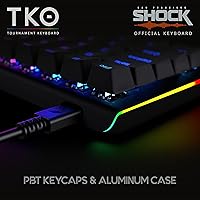
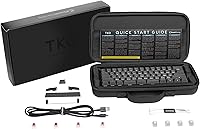
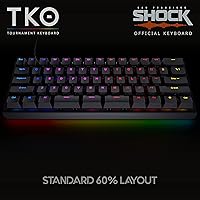
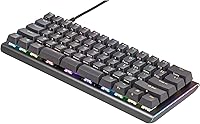
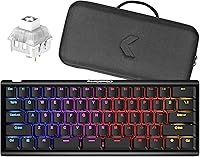
The Kinesis Gaming TKO 60% Mechanical Keyboard is a compact, travel-ready board built for gamers who have grown tired of surrendering half their desk to a keyboard they barely need in full. The aluminum chassis immediately sets it apart from the sea of hollow plastic options at similar prices — it feels dense and confidence-inspiring straight out of the box. A hard-shell travel case is included, which is a genuinely useful addition rather than a throwaway perk. That said, going 60% means giving up the function row, numpad, and dedicated arrow keys, so new adopters should budget for an adjustment period. Fair warning: those clicky switches are loud.
Features & Benefits

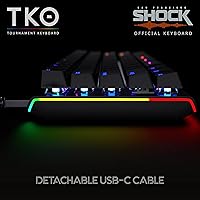
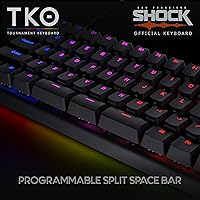
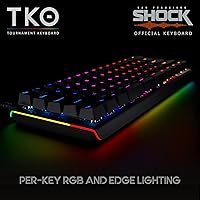
The standout engineering choice on the TKO 60% is its hotswap socket support — meaning you can pull out the Kailh Box White switches and drop in different ones without touching a soldering iron. That is a real advantage for anyone who wants to experiment with linear or tactile options down the road. The split spacebar design is genuinely clever too, breaking the bottom row into three segments that can each be mapped to independent functions, giving your thumbs something more useful to do. PBT keycaps resist the greasy shine that cheaper ABS caps develop over months of use. RGB lighting with edge underglow rounds things out, though it is more visual flair than functional necessity. USB-C works on both Mac and PC.

Best For

This compact gaming keyboard is a natural fit for LAN party regulars, college students, or anyone hauling their setup between locations. The included hard case adds genuine protection rather than just filling out the box. Competitive gamers playing on tight desk surfaces will also appreciate the layout — pulling your mouse closer is a real tactical benefit, not just marketing copy. The programmable layer system makes this interesting for coders too, who can put the thumb cluster keys to practical work. What it is not great for is anyone who relies on arrow keys constantly, needs a numpad, or works in a quiet shared environment. Clicky switches in open offices will not win you friends.

User Feedback

Buyers who have put this aluminum 60% board through regular use tend to land in two camps fairly cleanly. The build quality draws consistent praise — the aluminum frame does not creak, flex, or feel fragile when packed into a bag. The travel case earns genuine appreciation from frequent movers rather than being dismissed as filler. On the downside, the remapping software has frustrated some users; firmware-level configuration is not especially intuitive if you are coming in without prior experience. The compact layout is another recurring sticking point for newcomers, since muscle memory takes real time to rebuild. And the switch noise, while satisfying for click enthusiasts, gets flagged regularly as a dealbreaker in shared living spaces.

Pros

  • The aluminum chassis feels noticeably more solid and premium than plastic competitors in the same price range.
  • Hotswap sockets let you change switches without soldering — a rare and practical feature at this price point.
  • The included hard-shell travel case is genuinely protective and purpose-built, not just a soft pouch afterthought.
  • Double-shot PBT keycaps hold up far better over time than ABS alternatives, resisting shine and legend wear.
  • The split spacebar design unlocks extra thumb-accessible bindings that can meaningfully reduce hand movement during gaming.
  • A compact 60% layout brings the mouse closer, which is a real ergonomic and competitive advantage for desktop gamers.
  • USB-C connectivity works natively on both Mac and PC without adapter fuss.
  • Per-key RGB plus edge underglow gives strong visual customization for users who care about desk aesthetics.
  • Optional tenting and adjustable feet offer more positioning variety than most boards at this size and price.
  • At its price, the overall material and build quality punches above what buyers typically expect.

Cons

  • The remapping firmware has a learning curve and is not intuitive for users coming from simpler keyboards.
  • Kailh Box White switches are loud enough to disturb others in shared or quiet environments.
  • No dedicated arrow keys makes this board a poor fit for anyone who edits text or navigates documents heavily.
  • New 60% users should expect several weeks of adjustment before the layout stops feeling disruptive.
  • The RGB lighting, while customizable, adds little practical value if you are purely performance-focused.
  • No wireless option means you are always tethered, which limits flexibility on some travel or couch setups.
  • The triple split spacebar, while clever, takes deliberate practice before it feels natural rather than awkward.
  • Users who prefer linear or silent switches will need to buy replacements separately to get their preferred feel.
  • The TKO 60% does not suit anyone who needs a numpad for data entry or accounting work.

Ratings

Our AI rating engine analyzed thousands of verified global purchases of the Kinesis Gaming TKO 60% Mechanical Keyboard, actively filtering out incentivized, bot-generated, and outlier reviews to surface what real buyers consistently experienced over time. The scores below reflect a balanced synthesis of genuine praise and recurring frustrations, weighted by frequency and real-world impact. Both the standout strengths and the honest pain points are reflected transparently so you can make a confident buying decision.

Build Quality
91%
The aluminum chassis is the single most praised aspect of this board across verified buyers. Gamers who have owned multiple plastic 60% boards consistently note that the TKO 60% feels categorically more solid — no flex, no rattle, and a weight that signals durability rather than cheapness.
A small number of users reported minor inconsistencies in the aluminum finish around the edges, particularly on early production units. Nothing structurally concerning, but noticeable for buyers who are particular about cosmetic precision.
Switch Feel & Sound
78%
22%
Buyers who specifically sought out a clicky typing experience report that the Kailh Box White switches deliver satisfying tactile feedback with a crisp, responsive click on every keystroke. For gaming sessions at home, the audible confirmation is something many users say they genuinely prefer after switching from linear boards.
The click volume is a consistent dealbreaker for shared-space users. Dormitory residents, office workers, and anyone in a thin-walled apartment flagged the noise level as significantly higher than expected. Several buyers returned the board solely because of the acoustic footprint.
Hotswap Experience
88%
For buyers dipping into switch customization for the first time, the hotswap sockets are described as genuinely liberating. Users report swapping out full sets of switches in under twenty minutes with just a basic switch puller, and the sockets hold replacements snugly without wobble.
A few experienced hobbyists noted that the hotswap sockets felt slightly less precise than those found on higher-end dedicated enthusiast boards, with rare reports of sockets becoming slightly loose after multiple swap cycles.
Keycap Quality
86%
Double-shot PBT keycaps earn consistent praise from buyers who have dealt with ABS shine on previous boards. After months of daily gaming and typing use, the legends remain crisp and the surface texture stays matte rather than developing that slick, worn-out feel.
The stock keycap profile is not universally loved — some buyers found it less comfortable than OEM or Cherry profiles they were accustomed to, particularly for extended typing rather than gaming. Keycap enthusiasts will likely swap them regardless.
Portability & Travel Case
84%
The hard-shell case is routinely called out as a standout inclusion rather than a throwaway accessory. LAN event regulars and college students specifically mention that the case survived bag travel, overhead bin storage, and daily commutes without the board shifting or picking up damage.
The case fits the board snugly but leaves little room for storing a detached cable inside, which frustrated some buyers who wanted a single carry solution. A few users also noted the exterior finish of the case scuffed easily.
Layout Usability
63%
37%
Users who committed fully to the 60% layout report that after a few weeks, the layer-based access to function keys and arrow keys becomes second nature. Competitive gamers in particular appreciate the reduced hand travel distance and the closer mouse positioning it enables.
This is the most divisive aspect of the board. Buyers new to 60% layouts consistently describe a frustrating adjustment period of two to four weeks, and a notable share returned the board before fully adapting. Those who rely on arrow keys for work or coding found the transition especially disruptive.
Split Spacebar Design
74%
26%
Power users who invested time into configuring the three spacebar segments report meaningful quality-of-life improvements — particularly coders who mapped layer switches and gamers who assigned quick-access macros to the outer segments without sacrificing thumb ergonomics.
The learning curve on the split spacebar is steeper than most buyers anticipate. Several users reported accidentally triggering the wrong segment for the first several weeks, and those who never explored the remapping software found the segmented bar more confusing than useful.
RGB Lighting
76%
24%
Per-key RGB combined with edge underglow creates a visually striking desk setup that buyers who care about aesthetics consistently rate positively. The 12 lighting modes cover a wide range from subtle breathing effects to vibrant reactive lighting, and the underglow adds a dimension most compact boards skip.
Buyers looking for deep software-level lighting customization found the onboard controls limiting. There is no polished companion app for designing per-key color maps, which puts this board behind competitors that offer browser-based or desktop lighting configuration tools.
Remapping & Firmware
58%
42%
Users who are patient and willing to consult documentation report that the firmware remapping system is ultimately capable, allowing meaningful customization of layers, macros, and the split spacebar segments once the workflow is understood.
This is a recurring frustration across buyer feedback. The firmware tool is not intuitive, documentation is sparse, and several users gave up on customization entirely after failing to get the software to behave predictably. For non-technical buyers, this is a genuine usability gap.
Ergonomics & Adjustability
72%
28%
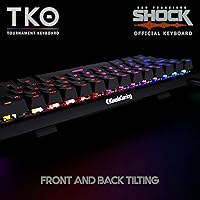
The combination of front and rear pop-up feet with optional side tenting gives this compact gaming keyboard more positioning flexibility than most boards in its class. Users with wrist fatigue issues noted that experimenting with tenting angles helped extend comfortable gaming sessions.
The ergonomic adjustments are incremental rather than transformative. Buyers expecting a significant ergonomic upgrade over a standard flat keyboard may be underwhelmed, and the tenting mechanism on some units was reported as feeling slightly flimsy under repeated adjustment.
Compatibility
89%
USB-C plug-and-play on both Mac and PC is consistently described as hassle-free. Mac users in particular appreciated that basic functionality worked immediately without driver installations, which is not always the case with gaming-oriented peripherals that default to Windows tooling.
Buyers on Linux reported inconsistent behavior with some key remapping functions, and there is no official Linux support documented by Kinesis. The lack of wireless connectivity also ruled out use cases like couch gaming or tablet pairing for a portion of interested buyers.
Value for Money
81%
19%
Buyers who wanted a compact board with an aluminum body, hotswap sockets, PBT keycaps, and a travel case consistently felt they received strong value relative to what comparable alternatives charge for the same feature combination. The build quality in particular overdelivers relative to price expectations.
Buyers who primarily use a full-size layout and bought this board expecting a smooth transition felt the value proposition collapsed once they factored in the adaptation frustration. If you end up not adapting to the 60% layout, none of the premium features justify the cost.
Desk Footprint
93%
At just over 11.5 inches wide, this aluminum 60% board genuinely transforms small desk setups. Competitive gamers with limited surface area consistently report that shifting to this layout moved their mouse into a more comfortable and ergonomically neutral position.
The compact footprint is a deliberate design choice, so this score reflects buyer satisfaction rather than a flaw — but buyers who misjudged how small the board actually is occasionally found it disorienting in the context of their existing setup.
Out-of-Box Experience
77%
23%
The packaging and unboxing experience is clean and well-considered for the price tier. The travel case doubles as functional packaging, and buyers appreciated that the board was ready to use immediately without needing to hunt for a cable or install software for basic operation.
The documentation included in the box is minimal, which becomes a problem quickly when buyers want to explore layer configuration or troubleshoot the firmware tool. Several users resorted to community forums for guidance that should have been covered in the included materials.

Suitable for:

The Kinesis Gaming TKO 60% Mechanical Keyboard was built for a fairly specific kind of user, and if you fit that profile, it delivers well. Competitive gamers who play on small desks will immediately benefit from the reduced footprint, which pulls the mouse closer and tightens up arm positioning during long sessions. Frequent travelers — think LAN event regulars, college students moving between dorms and study spaces, or remote workers who bring their own peripherals — will appreciate that a hard-shell case is included from day one rather than sold separately. Keyboard hobbyists who are curious about switch swapping but do not want to invest in a soldering setup will find the hotswap sockets a low-risk entry point into customization. Mac and PC users alike are covered through USB-C, and coders who are comfortable building out custom key layers will find the programmable thumb cluster genuinely useful once they have settled into the layout.
Not suitable for:

The Kinesis Gaming TKO 60% Mechanical Keyboard is a harder sell for anyone outside that specific target profile, and being clear about that upfront saves a lot of frustration. Users who depend on arrow keys for document editing, spreadsheet navigation, or coding workflows will hit a wall quickly — those keys exist on a function layer here, not as dedicated physical buttons. Anyone who needs a numpad for data entry or financial work should look elsewhere entirely. The Kailh Box White switches are genuinely clicky and audible; in a shared office, library, or thin-walled apartment, expect complaints. Users who have never used a compact layout before should also factor in a real adjustment period — it is not a weekend thing, it is closer to a few weeks of muscle memory retraining. And if firmware-level remapping software sounds frustrating rather than fun, the customization features will feel more like a chore than a feature.
Specifications

  • Layout: 60% compact form factor with no dedicated function row, numpad, or arrow keys — those functions are accessible via programmable layers.
  • Switches: Kailh Box White mechanical switches offer tactile bump feedback and an audible click with each actuation.
  • Hotswap: All switch positions feature hotswap sockets, allowing plug-and-play switch replacement without soldering equipment.
  • Keycaps: Double-shot PBT keycaps are used across the board, providing strong resistance to shine and legend fade over extended use.
  • Body Material: The main plate and chassis are constructed from aluminum, giving the board a rigid, low-flex build quality uncommon at this price tier.
  • Lighting: Per-key RGB backlighting is paired with edge underglow, with 12 selectable lighting modes available through onboard controls.
  • Spacebar Design: A modular triple split spacebar replaces the traditional single bar, allowing each segment to be independently programmed to different functions.
  • Connectivity: The board connects via a detachable USB-C cable, compatible with standard USB-C ports on both Mac and PC systems.
  • Compatibility: Officially supported on both macOS and Windows operating systems without requiring additional drivers for basic functionality.
  • Tilt & Slope: The default typing angle is zero degrees, with pop-up feet available for both front and rear elevation adjustments to suit different wrist positions.
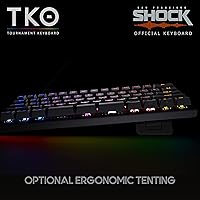
  • Tenting: Optional left and right tenting legs allow the board to be angled laterally, offering a mild ergonomic adjustment for extended typing sessions.
  • Dimensions: The board measures 11.61 x 4.53 x 1.3 inches, making it compact enough to fit comfortably in most laptop bags alongside other gear.
  • Weight: At 1.25 pounds, the aluminum chassis is heavier than plastic 60% boards but remains portable without being cumbersome in transit.
  • Travel Case: A hard-shell travel case is included in the box, designed to protect the board during transport to LAN events or between workspaces.
  • Color: Available in Space Gray, which complements the aluminum finish and suits both gaming and professional desk setups.
  • Model Number: The official model identifier is KBTKO-KBW, which can be used when searching for compatible accessories or firmware updates.
  • Manufacturer: Designed and sold by Kinesis Gaming, a brand with an established history in ergonomic and performance-focused input devices.

Related Reviews

Geeky GK61 60% Mechanical Gaming Keyboard
85%
88%
Build Quality
91%
Customizability
85%
RGB Lighting
90%
Portability
80%
Typing Experience
More
Ranked Nova N60 60% Hot Swappable Mechanical Gaming Keyboard
83%
91%
Customization Flexibility
86%
Build Quality
93%
RGB Lighting
88%
Ease of Use
65%
Keycap Quality
More
MageGee Typewriter Mechanical Keyboard
77%
93%
Aesthetic & Visual Design
81%
Build Quality
78%
Typing Feel & Switch Performance
61%
Sound Level
83%
Keycap Quality & Durability
More
MOTOSPEED CK61 60% Mechanical Keyboard
85%
89%
Typing Experience
92%
RGB Lighting Customization
85%
Build Quality
91%
Key Switch Smoothness
94%
Portability/Size
More
Pauroty 60% Wireless Mechanical Keyboard
86%
88%
Connectivity Options
75%
Battery Life
93%
Portability
84%
Ergonomics
91%
RGB Customization
More
OHY XVX H61 60% Mechanical Keyboard
87%
87%
Build Quality
89%
Typing Experience
91%
Customization Options
85%
RGB Backlighting
92%
Ease of Setup
More
Womier SK65 65% Wireless Mechanical Keyboard
78%
88%
Build Quality
84%
Typing Feel
81%
Wireless Performance
83%
Sound Profile
86%
Hot-Swap Experience
More
MageGee MK-Star 75% Mechanical Keyboard
79%
91%
Value for Money
88%
Switch Feel & Performance
83%
Build Quality
84%
Typing Experience
86%
Gaming Performance
More
TISHLED V20 Typewriter Mechanical Keyboard
76%
83%
Build Quality
78%
Switch Feel
91%
Aesthetic Design
61%
Typing Noise
74%
Backlight Quality
More
Ducky One 3 Mini 60% Mechanical Keyboard
81%
91%
Build Quality
88%
Typing Sound & Acoustics
86%
Switch Feel
93%
Hot-Swap Functionality
89%
Keycap Quality
More

FAQ

For basic typing and gaming, no — the Kinesis Gaming TKO 60% Mechanical Keyboard works plug-and-play over USB-C on both Mac and PC. However, if you want to remap keys, create custom layers, or configure the split spacebar segments, you will need to use Kinesis's firmware tool, which has a steeper learning curve than most browser-based configurators.
Honestly, yes — they are on the louder end of mechanical switches. The click is sharp and audible, which many gamers enjoy but which will absolutely carry in a quiet office, library, or shared apartment. If noise is a concern, you should either plan to swap in quieter switches using the hotswap sockets or consider a different board entirely.

Hotswap means the switch sockets on the PCB are designed to accept and release switches without soldering. You just use a switch puller to pop out the existing Kailh Box Whites and press in compatible replacement switches — it takes a few minutes per key at most. Any standard MX-style switch should fit, giving you a lot of flexibility to tune the feel of the board over time.

Most people report needing two to four weeks before the layout stops feeling actively disruptive. The biggest hurdle is usually arrow keys and the function row, since those now live on a held-layer. If you do a lot of document editing or coding that involves frequent arrow key use, the adjustment is rougher than if your main use is gaming.

It is a proper hard-shell case, not just a sleeve or a soft pouch, so it offers meaningful impact protection against the usual bumps of bag travel. Multiple buyers have confirmed it holds the board snugly without rattling. It is not a Pelican-grade case, but for LAN events, commutes, and flights, it does the job well.

Yes, USB-C plug-and-play works on macOS without any drivers. The default key layout will follow standard Mac conventions for the most part, though some modifier key positions may feel slightly off compared to Apple keyboards. You can adjust those via the firmware tool if needed, but many Mac users report it works well enough right out of the box.

The split spacebar divides what is normally one long key into three independently programmable segments. In practice, this means your thumbs can trigger macros, layer switches, or secondary actions without moving your hands away from the home row. It takes deliberate practice to feel natural, but for gamers or coders who invest the time, it becomes a genuinely useful input tool rather than a gimmick.

Double-shot PBT keycaps are significantly more durable than the ABS alternatives found on many boards in this category. The legends are molded into the keycap in two layers of plastic rather than printed on the surface, so they do not fade or wear off under normal use. The texture also stays matte longer than ABS, which tends to develop a slick shine after a few months.

No — this board is wired only, connecting exclusively via USB-C. There is no Bluetooth or wireless mode available. If wireless is important to your setup, this compact gaming keyboard is not the right fit and you would need to look at alternatives that specifically offer wireless support.

The pop-up feet for front and rear elevation are standard and useful if you prefer a raised typing angle. The optional side tenting is a more niche feature that some ergonomics-conscious users do appreciate, particularly for wrist comfort during long sessions. That said, this is still primarily a gaming keyboard — the ergonomic adjustments are a bonus rather than a core design priority, so do not expect the same level of ergonomic engineering you would find in a dedicated ergonomic keyboard.

Where to Buy