Overview

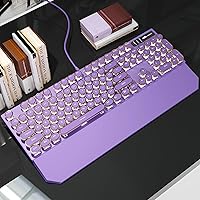
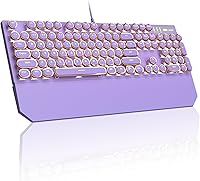
The MageGee Typewriter Mechanical Keyboard landed in mid-2024 and wasted no time carving out a niche for itself, reaching the top 400 in its Amazon category within months. It sits in an interesting middle ground — not a cheap novelty board, but not a serious enthusiast build either. The purple round keycaps give it a retro punk aesthetic that genuinely stands out on a desk, and the bundled magnetic wrist rest is a thoughtful inclusion you rarely see at this price tier. For buyers chasing style and substance without spending much, this purple typewriter keyboard makes a compelling case right out of the box.
Features & Benefits

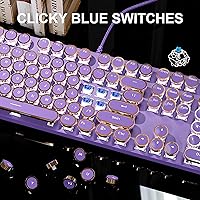
The blue mechanical switches are the heart of the experience here — they produce that satisfying clicky-clacky sound and tactile bump that typists tend to love, though fair warning: they are genuinely loud. The full 104-key layout keeps the numpad and function row intact, which many compact boards sacrifice. Keycaps are double-shot injection molded, meaning the legends won't fade even after heavy use, and the white LED shines through cleanly. An aluminum alloy panel gives the board a sturdier feel than its price suggests, and the dual kickstand feet let you dial in your preferred typing angle. USB 2.0, plug-and-play — no software, no fuss.

Best For

This retro mechanical keyboard hits a sweet spot for a specific kind of buyer. If you work from home and want a visually distinctive setup without committing to a high price tag, it fits well. Students picking up their first mechanical board will appreciate the full layout and low barrier to entry. It also suits writers who enjoy the rhythm of clicky switches during long sessions. Aesthetic-focused desk builds — lo-fi, cottagecore, vintage-themed — will find the purple round keycaps a natural match. The bundled wrist rest sweetens the deal for anyone who would otherwise buy one separately. Competitive gamers chasing millisecond response times should look elsewhere, but for everyday typing and casual gaming, it holds up fine.

User Feedback

Across over 2,300 ratings averaging 4.2 out of 5, the pattern is pretty consistent: buyers love how the MageGee typewriter board looks and sounds. The metal panel gets frequent mentions as a genuine surprise for the price. On the flip side, the blue switches draw complaints from people in shared spaces — offices, dorms — where the noise becomes an issue for those nearby. A handful of reviewers flag keycap wobble or minor inconsistencies in switch feel, which is not unusual at this tier. The wrist rest is appreciated but some find it on the thin side. A notable slice of buyers purchased it purely for aesthetics and report it delivers exactly that.

Pros

  • The retro round keycap design makes it one of the most visually distinctive budget keyboards available today.
  • An aluminum alloy top panel delivers a sturdy, flex-free feel that most keyboards at this price cannot match.
  • Blue switches provide satisfying tactile and audible feedback that genuinely improves the typing rhythm for writers.
  • Full 104-key layout keeps the numpad and F-row intact — no awkward workarounds for spreadsheet or productivity work.
  • Double-shot keycap molding means legends stay sharp and legible even after months of heavy daily use.
  • A magnetic wrist rest is included out of the box, saving buyers the cost of a separate accessory purchase.
  • Plug-and-play USB 2.0 setup works immediately across Windows, Mac, and Linux with no drivers or software needed.
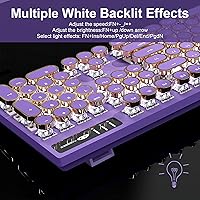
  • Multiple white LED backlight modes add visual personality without requiring any app or configuration hassle.
  • Adjustable dual kickstand feet let you find a comfortable typing angle rather than being locked into one position.
  • At its price point, this retro mechanical keyboard delivers a package that most competing boards simply do not bundle together.

Cons

  • Blue switches are loud enough to genuinely bother people nearby in shared or quiet environments.
  • Switch feel is not perfectly consistent across all keys, with modifier keys sometimes feeling softer than the main cluster.
  • The included wrist rest is noticeably thin and offers limited relief during extended heavy-use sessions.
  • The USB cable is fixed and non-detachable, which complicates cable management and makes the board impractical for commuters.
  • No RGB lighting — white LED only, which limits customization for buyers expecting color backlight options.
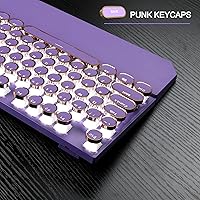
  • The round keycap profile takes a short but real adjustment period, especially for fast typists used to standard flat keycaps.
  • No printed guide for backlight Fn shortcuts is included, leaving new users to figure out the controls by trial and error.
  • The plastic bottom shell is a noticeable step down from the metal top panel and contributes to minor corner flex under pressure.

Ratings

The MageGee Typewriter Mechanical Keyboard has been put through its paces by our AI rating engine, which processed thousands of verified global buyer reviews while actively filtering out incentivized, duplicate, and bot-generated submissions. What emerged is an honest, balanced scorecard that captures both where this retro mechanical keyboard punches above its weight and where real-world buyers ran into frustration. Strengths and shortcomings are reflected equally — no padding, no spin.
Aesthetic & Visual Design
93%
The round purple keycaps and retro typewriter styling generate more desk compliments than most keyboards three times the price. Buyers consistently describe it as an instant centerpiece for lo-fi, vintage, or cottagecore desk setups, and photos from real users show it holds up well to its product images.
The aesthetic is polarizing by design — buyers expecting a neutral or understated look will find the bold purple finish overwhelming. A few reviewers noted the color reads slightly more violet in person than in product photos, which surprised some.
Build Quality
81%
19%
The aluminum alloy top panel is the standout surprise for most buyers at this price point. It resists flex during firm typing sessions and gives the board a heft that cheap plastic-shell competitors simply cannot match, making it feel more durable day-to-day.
The bottom shell is still plastic, and a handful of users noticed slight creaking near the corners when pressing keys forcefully. The dual kickstand feet feel a little thin and a few buyers reported one snapping after months of repositioning.
Typing Feel & Switch Performance
78%
22%
Blue switches deliver a satisfying tactile bump and audible click that writers and touch-typists genuinely enjoy. The feedback is consistent enough that most buyers report a noticeable improvement in typing accuracy compared to membrane boards they came from.
Switch feel is not perfectly uniform across every key — a small but vocal group of users noticed that certain keys, particularly modifiers, feel slightly mushier than the main alphanumeric cluster. This inconsistency is common at this price tier but worth knowing upfront.
Sound Level
61%
39%
For buyers working alone at home or in a private space, the loud clicky sound is often cited as a feature rather than a flaw. The satisfying clack-clack rhythm adds to the retro typewriter experience and makes extended writing sessions oddly enjoyable.
This is the single most recurring complaint across reviews. In shared offices, dorms, or open-plan spaces, the noise is genuinely disruptive to others nearby. Blue switches are among the loudest mechanical options available, and buyers in noise-sensitive environments should consider this a dealbreaker.
Keycap Quality & Durability
83%
Double-shot injection molding means the legends are part of the keycap structure rather than printed on top, so they will not fade or rub off over months of daily use. The backlight shines through evenly, giving the board a clean glow even after extended sessions.
Some users flagged a slight wobble on certain keycaps, particularly the larger keys like Shift and Enter. The round shape also means the typing surface is smaller per key than standard flat keycaps, which takes a short adjustment period for fast typists.
Backlight & Lighting Effects
74%
26%
The white LED backlight is crisp and functional, and the multiple effect modes add personality to the board without requiring any software installation. Adjusting brightness and speed via Fn shortcuts is straightforward once you learn the key combos.
Single-color white only — there is no RGB here, which will disappoint buyers expecting color customization. The lighting controls lack a dedicated manual, so some users spent time trial-and-erroring the Fn combinations before finding their preferred mode.
Wrist Rest Quality
67%
33%
Including a magnetic wrist rest at this price point is genuinely uncommon, and buyers who had never owned one before found it a welcome addition for hour-long typing sessions. The magnetic attachment keeps it aligned without sliding, which works reliably.
The wrist rest is thin — noticeably thinner than standalone options on the market. Long-session typists with larger hands or wrist sensitivity found it provided only marginal relief. It functions as a nice bonus but should not be the deciding purchase factor.
Gaming Performance
66%
34%
The 104-key anti-ghosting layout handles simultaneous key presses reasonably well for casual gaming, and the clicky feedback gives a tactile response that some gamers actually prefer for turn-based or strategy titles. Plug-and-play setup means zero configuration time.
This board was not engineered with competitive gaming in mind. There is no dedicated software for macro programming, no polling rate control, and the blue switches are not ideal for rapid repeated keystrokes in fast-paced titles. Serious gamers will want a purpose-built option.
Value for Money
91%
Factoring in the aluminum panel, genuine mechanical switches, double-shot keycaps, and an included wrist rest, the overall package punches well above its price bracket. Most buyers express genuine surprise at what arrived given what they paid.
A small segment of buyers who stretched their budget expecting enthusiast-grade performance found it fell short of premium boards. It represents strong value only when evaluated on its own terms — not as a substitute for higher-end mechanical keyboards.
Compatibility & Setup
94%
Plug-and-play via USB 2.0 means zero friction on first use across Windows, Mac, and Linux. No driver installation, no app required — buyers routinely mention it worked immediately on whatever machine they plugged it into, including older laptops.
The USB cable is not detachable, which is a minor but real limitation for desk cable management. A few Mac users noted that certain function key mappings required manual remapping for full macOS compatibility, which is not mentioned in the packaging.
Ergonomics & Comfort
72%
28%
The raised round keycap profile and dual-angle kickstand give buyers more postural flexibility than a flat single-height board. Most users who type for two or more hours daily reported acceptable comfort levels during the adjustment period.
The high-profile round keycaps require a slightly different finger posture than standard flat-profile boards, and some typists experienced wrist strain until they adapted. The wrist rest partially offsets this, but the ergonomic story here is solid rather than exceptional.
Portability & Weight
69%
31%
At just under 3 pounds with a relatively compact footprint for a full-size board, it moves between a home office desk and another room without much hassle. The fixed USB cable coils neatly for short-distance transport.
The non-detachable cable and full 104-key layout make it impractical for bag-and-go commuters. Buyers looking for something to carry daily to an office or co-working space will find it bulkier than it initially appears when packaged.
Packaging & Unboxing
77%
23%
Multiple reviewers commented positively on the unboxing experience — the keyboard arrived well-protected and the wrist rest was neatly packaged alongside it. First impressions on arrival matched or exceeded expectations for most buyers.
No printed quick-start guide is included for the lighting Fn shortcuts, which caused mild confusion for some new mechanical keyboard users. A simple reference card would have resolved most of the setup questions that appeared in buyer Q&A threads.

Suitable for:

The MageGee Typewriter Mechanical Keyboard is a strong pick for anyone who wants their desk setup to reflect a distinct personality without committing to a serious enthusiast budget. Home office workers flying solo — no open-plan colleagues to disturb — will appreciate the clicky blue switches for long writing or data-entry sessions where tactile feedback genuinely reduces fatigue. Students buying their first mechanical keyboard will find the full 104-key layout practical for both coursework and casual gaming, with no learning curve on setup. If your desk aesthetic leans retro, lo-fi, cottagecore, or vintage, this purple typewriter keyboard slots in visually like it was made for the role. Writers who enjoy the rhythm of audible keystrokes, and buyers who would otherwise spend extra on a separate wrist rest, round out the core audience that will get the most genuine satisfaction here.
Not suitable for:

Buyers working in shared spaces — open offices, dorm rooms, libraries, or anywhere noise carries — should think carefully before purchasing the MageGee Typewriter Mechanical Keyboard, because blue switches are objectively loud and that is unlikely to change with use. Competitive or performance-oriented gamers who need programmable macros, adjustable polling rates, or hair-trigger actuation will find this board underpowered for those demands; it is a typist-first keyboard that handles casual gaming acceptably but was never designed for the esports crowd. Enthusiasts already accustomed to premium switches from brands like Cherry, Gateron, or Topre will likely notice the inconsistency in switch feel across the board and find it underwhelming as a long-term daily driver. Anyone expecting a robust, cushioned wrist rest should know the included one is thin — functional as a bonus, but not a substitute for a quality standalone accessory. Finally, buyers who prefer a clean, minimal, or color-neutral desk aesthetic will find the bold purple finish more of an obstacle than a selling point.

Specifications

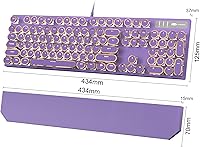
  • Dimensions: The keyboard measures 17.8 x 6.73 x 2.32 inches, making it a standard full-size footprint suitable for most desk setups.
  • Weight: The board weighs 2.72 pounds, which contributes to a stable, non-sliding feel during use without being cumbersome to move.
  • Layout: Full-size 104-key layout includes a complete numpad, F1–F12 function row, and all standard navigation and media keys.
  • Switch Type: Blue mechanical switches provide a tactile bump and audible click on each keystroke, with an actuation point typical of clicky-style switches.
  • Keycap Style: Round retro punk-profile keycaps are double-shot injection molded, meaning legends are structurally embedded rather than printed on the surface.
  • Frame Material: The top panel is constructed from aluminum alloy, while the bottom housing is plastic, combining rigidity with a lightweight base.
  • Backlight: Single-color white LED backlighting shines through each keycap cleanly, with multiple lighting effect modes adjustable via Fn key shortcuts.
  • Backlight Control: Lighting effects, brightness, and animation speed are controlled via Fn + Ins, Home, Pg Up, Del, or End keys, with arrow keys for fine adjustment.
  • Connection: Wired USB 2.0 connection with a fixed, non-detachable cable; plug-and-play with no drivers or software installation required.
  • Compatibility: Compatible with Windows (2000, XP, ME, Vista, 7, 8, and later), Linux, and Mac operating systems out of the box.
  • Tilt Adjustment: Dual kickstand feet on the underside offer two adjustable height positions to help set a comfortable typing angle.
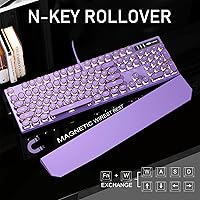
  • Anti-Ghosting: The keyboard supports full 104-key anti-ghosting, allowing multiple simultaneous keypresses to register correctly without conflict.
  • Included Accessory: A magnetic wrist rest is included in the box, attaching directly to the front edge of the board via built-in magnets.
  • Color: Available in purple with matching punk-styled round keycaps; the finish leans toward a matte violet tone under most lighting conditions.
  • Package Dimensions: The retail package measures 17.8 x 6.73 x 2.32 inches and contains the keyboard, magnetic wrist rest, and basic documentation.
  • Manufacturer: Produced by MageGee, a peripheral brand focused on budget-to-mid-range keyboards and accessories for the consumer market.
  • Release Date: First made available in May 2024, with the product reaching top 400 in the Amazon Computer Keyboards category shortly after launch.
  • Ratings: Holds a 4.2 out of 5 star average based on 2,348 verified ratings as of available data, ranking at #323 in Computer Keyboards.

Related Reviews
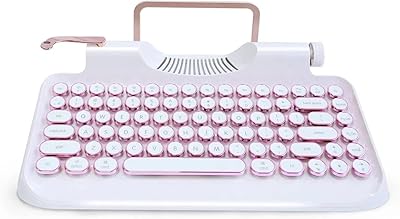
Redragon K710 Wireless Typewriter Mechanical Keyboard
76%
88%
Build Quality
84%
Wireless Reliability
81%
Typing Experience
52%
Noise Level
77%
RGB & Lighting
More
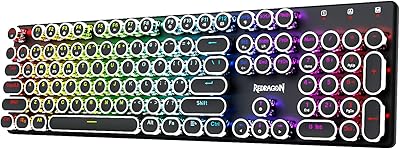
RYMEK Typewriter Style Mechanical Keyboard
87%
92%
Typing Experience
89%
Build Quality
85%
Design and Aesthetics
91%
Bluetooth Connectivity
88%
Durability
More
MageGee MK-Star 75% Mechanical Keyboard
79%
91%
Value for Money
88%
Switch Feel & Performance
83%
Build Quality
84%
Typing Experience
86%
Gaming Performance
More
Eklectik EKL-TWKB100 Vintage Typewriter Mechanical Keyboard
85%
93%
Design & Aesthetics
88%
Performance & Key Responsiveness
82%
Battery Life & Charging
85%
Backlighting & Customization
70%
Weight & Portability
More
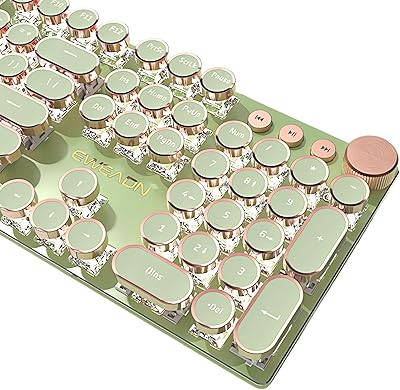
Qwerkytoys Qwerkywriter Typewriter Inspired Retro Mechanical Keyboard
84%
89%
Typing Experience
93%
Design & Aesthetic
92%
Battery Life
88%
Build Quality
77%
Ergonomics & Comfort
More
TISHLED V20 Typewriter Style Mechanical Gaming Keyboard
86%
92%
Typing Experience
88%
Build Quality
91%
Design & Aesthetics
85%
Key Response & Smoothness
89%
Lighting Customization
More
Satechi SM3 Mechanical Keyboard
86%
92%
Typing Experience
88%
Connectivity
85%
Ergonomics and Comfort
89%
Battery Life
91%
Build Quality
More
Merdia Wireless Mechanical Keyboard
83%
90%
Connectivity Options
88%
Typing Experience
86%
RGB Customization
84%
Build Quality
91%
Battery Life
More
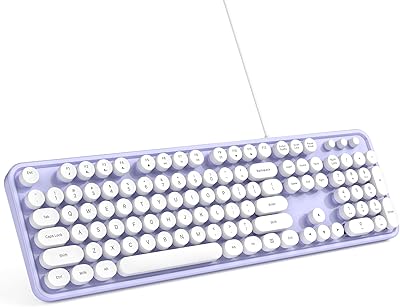
ANSWERK Typewriter Style Keyboard
88%
89%
Typing Experience
94%
Build Quality
81%
LED Backlighting
88%
Ergonomics
92%
Spill Resistance
More
MOWUX Retro Typewriter Keyboard
87%
91%
Typing Experience
85%
Build Quality
89%
Ergonomics and Comfort
94%
Design and Aesthetics
88%
Key Switch Feel (Tactile Response)
More

FAQ

It is genuinely loud — blue switches are among the clickiest mechanical options on the market, and that is by design. If you are working alone in a private room, most people find the sound satisfying. But in a shared office, dorm, or anywhere noise travels, people nearby will definitely notice it. This is not a flaw so much as a fundamental characteristic of blue switches.

It works plug-and-play on Mac, meaning you can connect it via USB and start typing immediately without installing any software. That said, some Mac-specific key functions may not map exactly as expected out of the box, and a few users have remapped certain modifier keys through macOS system settings to get the layout feeling natural. It is a minor adjustment rather than a serious compatibility issue.

Honest answer: it is on the thinner side. It does its job as a basic support surface and the magnetic attachment keeps it neatly in place, but if you have wrist sensitivity or are used to a thick padded rest, you may find it lacking. Think of it as a solid bonus inclusion rather than a premium accessory in its own right.

The round retro-profile keycaps use a standard MX-style stem, so aftermarket keycaps will physically fit. However, finding round-profile replacement keycaps specifically is not as straightforward as standard flat-profile sets. If you want to swap to standard-profile aftermarket keycaps, they will fit and function correctly, though the retro aesthetic will change significantly.

It handles casual gaming fine — the anti-ghosting layout registers simultaneous keypresses reliably, and the tactile click can feel rewarding in slower-paced games. For competitive or fast-paced gaming where response time and rapid key repetition matter, this board was not engineered for that level of performance. It is a typist-first keyboard that moonlights as a casual gaming option.

A few buyers have noted the color reads slightly more violet or blue-tinged in person depending on the lighting in the room. Under warm lighting it tends to look closer to the product images, but under cool or fluorescent lighting it can shift toward a deeper violet. It is still clearly purple, but worth knowing if color accuracy is important for your desk setup.

Yes, the double-shot molding on the keycaps means the legend areas are transparent and the white LED shines through cleanly. The round keycap shape does not obstruct the light — if anything, the glow looks distinctive and well-suited to the retro aesthetic. Multiple brightness levels mean you can dial it down if the default is too intense in a dark room.

The board sits fairly stable thanks to its weight and rubber feet on the underside. Most users report it stays put during normal typing without needing a mat underneath. If you type with heavy force or game aggressively, a desk mat is still a good idea, but sliding is not a common complaint in user feedback.

None at all. Every function — backlighting modes, brightness, speed adjustments — is controlled directly through Fn key shortcuts on the keyboard itself. There is no companion app, no driver download, and no account required. It is entirely self-contained, which keeps setup simple and avoids any compatibility concerns with app software over time.

The USB cable is fixed and exits from the top-center of the keyboard, which is a fairly standard cable routing position. It is not detachable, so you cannot swap it for a custom coiled cable or re-route it through a left or right channel cutout. For most desk setups this is perfectly adequate, but if cable management is a priority for your build, the fixed center-exit cable is worth factoring in.