



Overview

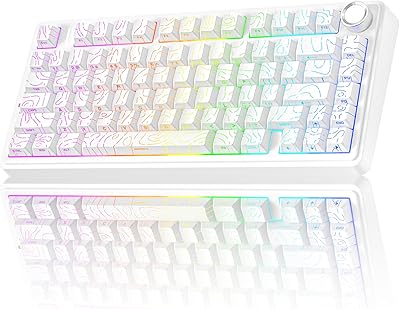
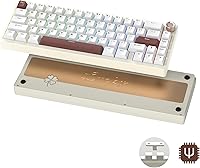
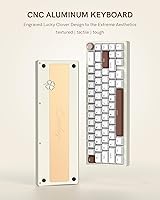
The Womier SK65 65% Wireless Mechanical Keyboard enters a crowded mid-range space with a proposition that's genuinely hard to dismiss: an anodized aluminum chassis, gasket-mount construction, and tri-mode wireless connectivity at a price point where plastic boards typically dominate. It's a compact 65% layout — you keep arrow keys and a few navigation keys without the bulk of a tenkeyless board. For buyers stepping up from a basic membrane or a budget plastic mechanical, this aluminum 65% board delivers a noticeably more solid, premium experience. It won't replace a boutique custom build, but it's a strong and practical step in that direction.

Features & Benefits

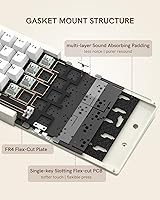
The aluminum shell isn't just cosmetic — CNC-machined and anodized, it adds real heft (just over 3 pounds) and a cool-to-the-touch rigidity that plastic simply can't replicate. Beneath that case, a gasket mount suspends the internal plate on dampeners, absorbing keystroke impact rather than sending it straight through to your desk — a subtle but noticeable difference during long sessions. The factory-lubed linear switches feel smooth right out of the box, and since the PCB is hot-swappable, you can swap switches without soldering. Wireless options span Bluetooth 5.0, a 2.4GHz dongle for lower-latency gaming, and USB-C wired. A multimedia control knob and south-facing per-key RGB round out the package.

Best For

This wireless mechanical keyboard suits a few distinct types of users particularly well. Gamers who want a wireless board but won't accept a flimsy plastic shell will appreciate the build without paying boutique prices. Desk-setup enthusiasts — the kind who spend time on cable management and aesthetic coordination — will enjoy the clean aluminum look. It's also a natural starting point for keyboard hobbyists trying hot-swap customization for the first time, since the included switch puller makes the process genuinely approachable. Multi-device users bouncing between a PC, tablet, and phone will find the Bluetooth switching practical, and students or remote workers who travel regularly will value the compact footprint and cord-free flexibility.

User Feedback

Sitting at 3.8 stars across 174 ratings, the SK65 paints a fairly candid picture. Most buyers are pleased with the build quality and acoustics — the aluminum case consistently outperforms expectations at this tier, and many note the gasket flex feels noticeably better than competing boards nearby in price. Wireless performance via 2.4GHz earns frequent praise too. That said, some users report that the companion software can be inconsistent, and a handful mention occasional Bluetooth pairing hiccups with specific devices. A few orders arrived with missing accessories or minor keycap legend inconsistencies. Worth noting: the brand appears under both the Womier and COSTOM names on packaging, which can create warranty support confusion — keep your order confirmation handy.

Pros

  • The anodized aluminum case feels genuinely premium and rigid, a real step up from plastic competitors at this price tier.
  • Gasket-mount construction absorbs keystroke impact noticeably, reducing fatigue during long typing or gaming sessions.
  • Factory-lubed linear switches feel smooth right out of the box, requiring no immediate modifications for most users.
  • Hot-swappable PCB makes changing switches tool-free and approachable even for first-time keyboard customizers.
  • Tri-mode wireless connectivity covers Bluetooth 5.0, a low-latency 2.4GHz dongle, and USB-C wired in a single board.
  • The multimedia knob is a small but genuinely useful addition for quick volume adjustments without reaching for function keys.
  • South-facing per-key RGB lighting distributes color evenly and looks noticeably cleaner than top-mounted alternatives.
  • Thick PBT keycaps resist shine and wear far better than the thin ABS caps common on competing budget boards.
  • Multi-device Bluetooth switching makes this wireless mechanical keyboard practical for users juggling a PC, tablet, and phone daily.
  • A 365-day warranty and stated 24/7 support offer reasonable peace of mind for a mid-range purchase.

Cons

  • The companion software is reported to be inconsistent and occasionally unreliable, which limits advanced macro and lighting customization.
  • Bluetooth pairing can be finicky with certain devices, requiring reconnection steps that wired or 2.4GHz users won't encounter.
  • The 200-hour battery claim reflects a best-case scenario with RGB off; real-world wireless use with lighting enabled will be significantly shorter.
  • Some buyers have received orders with missing accessories, suggesting quality control in packaging is not fully consistent.
  • The brand appears under both Womier and COSTOM names on product listings and packaging, which can create confusion when seeking warranty support.
  • Keycap legend quality has been flagged by a subset of buyers as uneven, with some units showing minor printing inconsistencies.
  • At just over 3 pounds, the aluminum build is noticeably heavy for a board marketed partly as a portable travel option.
  • The 65% layout removes the function row and number pad entirely, which requires a meaningful adjustment period for users switching from larger boards.

Ratings

Our editorial team used AI analysis to evaluate hundreds of verified global user reviews for the Womier SK65 65% Wireless Mechanical Keyboard, actively filtering out incentivized, bot-generated, and duplicate submissions to surface what real buyers genuinely experienced. The resulting scores reflect both the standout strengths and the honest frustrations that shaped the product's 3.8-star average — nothing has been softened or inflated. Whether this aluminum 65% board earns a place on your desk depends heavily on which of these categories matters most to you.

Build Quality
88%
The CNC-machined aluminum case consistently earns praise from buyers who expected plastic at this price point. The solid weight and rigid chassis give it a presence on the desk that budget boards simply cannot replicate, and most users report zero flex or creak after months of daily use.
A small number of buyers noted minor finishing inconsistencies on the case edges or anodizing unevenness between units, suggesting quality control is good but not perfectly uniform across the production run.
Typing Feel
84%
The combination of gasket mounting and multi-layer foam dampening creates a noticeably softer, more cushioned keystroke than tray-mount boards at the same price. Users who type for long stretches at work described reduced fatigue compared to their previous keyboards, and the factory-lubed linears land smoothly without any scratchy feedback.
Enthusiasts with experience on higher-end gasket boards may find the flex subtler than expected, and the stock switches, while smooth, lack the refined character of premium aftermarket options. A few users felt the bottom-out sound was slightly harder than advertised.
Wireless Performance
81%
19%
The 2.4GHz dongle mode draws consistent praise from gamers who report no perceptible latency during competitive play. Multi-device Bluetooth switching between a work laptop and personal tablet is also well-regarded for its reliability once initial pairing is completed.
Bluetooth mode is the weak link — a recurring subset of buyers report pairing delays or dropped connections with specific Android and older macOS devices. It is not a universal issue, but it appears often enough to be worth noting before you rely on Bluetooth as your primary connection.
Sound Profile
83%
Out of the box, the SK65 produces a deeper, thockier sound than most keyboards at this tier, largely due to the foam layers and gasket mount absorbing high-frequency ping. Office users and desk-setup reviewers specifically called out the satisfying, muted clack as one of the main reasons they chose this board.
The sound is good for the price but not refined enough to satisfy enthusiasts chasing a truly premium acoustic profile without further modding. Some users found the spacebar slightly pingy compared to the rest of the keys, a common issue that often requires additional foam or switch swapping to fully resolve.
Hot-Swap Experience
86%
The hot-swap PCB works exactly as advertised — no soldering, no guesswork, and the included 2-in-1 puller tool is a genuinely useful addition that removes keycaps and switches cleanly. First-time customizers praised the accessibility, and compatibility with standard MX-style switches means the upgrade path is wide open.
The PCB socket tolerances on some units have been noted as slightly loose with certain lighter 3-pin switches, which can result in a switch that rocks slightly. This is a minor concern for most users but worth knowing if you plan to run very light aftermarket options.
Battery Life
71%
29%
The 3750mAh battery is large for a board this size, and users who type mostly with RGB off report genuinely impressive endurance stretching several weeks between charges in light daily-use scenarios. The USB-C charging setup is convenient and universally compatible.
The advertised 200-hour maximum is a ceiling, not a typical experience. With RGB enabled at moderate brightness — which is how most users actually run the board — real-world battery life drops sharply, and several buyers reported needing to charge after just a few days of heavier use. The 6-to-8 hour charge time is also on the longer side.
RGB Lighting
78%
22%
The south-facing light guide plate distributes color more evenly across each keycap than top-mounted RGB systems, and the visual result is noticeably smoother and more vibrant, especially on lighter keycaps. The range of effects and per-key customization options is solid for the price point.
The lighting customization software is needed for deeper control, and that software has its own reliability issues. Users who want reliable, stable lighting profiles tied to specific apps or games may find the implementation falls short of what dedicated gaming keyboard ecosystems offer.
Software & Programmability
58%
42%
Key remapping and macro support are present and functional for most basic use cases — reassigning keys and setting up simple shortcuts works without major issues for the majority of users who tried it. The ability to adjust lighting effects and speed directly from the keyboard without software is a practical fallback.
The companion software has drawn repeated criticism for instability, an outdated interface, and occasional failure to save profiles reliably across sessions. Power users who depend on consistent macro performance or complex lighting zones will find the software experience noticeably behind competitors in this category.
Keycap Quality
76%
24%
The thick PBT material holds up well over extended daily use, resisting the greasy shine that thin ABS keycaps develop within weeks. The texture is pleasant underhand and the keycaps feel appropriately substantial given the board's overall build tier.
A portion of buyers flagged minor inconsistencies in legend printing quality between units, with some reporting faint misalignment or uneven ink saturation on certain keys. It is not a widespread defect, but it has appeared often enough in reviews to suggest it is not an isolated incident.
Connectivity Versatility
87%
Having all three connection modes — Bluetooth 5.0, 2.4GHz dongle, and USB-C — in a single compact board is genuinely practical for users who move between devices or contexts throughout the day. Gamers appreciate the low-latency dongle for their primary rig while still being able to connect the same board to a phone or tablet wirelessly.
Switching between connection modes requires using key combinations rather than a dedicated physical toggle, which can be unintuitive until you memorize the shortcuts. The dongle itself is small enough that it is easy to lose, and no storage slot for it is built into the keyboard.
Value for Money
82%
18%
At its price point, this aluminum 65% board offers a feature set — gasket mount, aluminum case, hot-swap PCB, tri-mode wireless — that would cost considerably more from established custom keyboard brands. For buyers upgrading from a basic entry-level board, the perceived value jump is substantial.
The software shortcomings and occasional quality control inconsistencies slightly undercut the overall value proposition. Buyers who compare it closely against a handful of competing boards in the same price window will find the gap is narrower than it first appears, particularly if software reliability is a priority.
Multimedia Knob
79%
21%
The volume knob is a small but practical feature that most users quickly come to rely on, especially during video calls or gaming sessions where quick muting matters. It turns smoothly, responds consistently, and feels well-anchored without any wobble during normal operation.
The knob's functionality is limited to volume and mute out of the box, and remapping it to other functions requires the companion software — which, as noted elsewhere, can be unreliable. Users hoping for deeper knob customization without software workarounds may find it restrictive.
Portability
69%
31%
The 65% layout is genuinely compact and easy to slip into a laptop bag alongside other gear, and the wireless modes eliminate cable clutter for users who hot-desk or travel between workspaces regularly. Students and remote workers have called it a practical daily carry option.
At 3.34 pounds, the aluminum build is noticeably heavy for a board marketed partly toward portable use. Buyers who picked it up expecting something lightweight were sometimes caught off guard, and compared to similarly sized plastic wireless keyboards it is meaningfully heavier to carry daily.
Setup & Out-of-Box Experience
74%
26%
Initial setup is straightforward for most users — plug in the dongle or pair via Bluetooth and it works without driver installation for basic use on both Windows and macOS. The included accessories and a reasonably clear manual make first-time wireless keyboard setup accessible even for less technical buyers.
A recurring complaint involves missing accessories in some shipments, which creates a frustrating first impression. The brand name discrepancy between Womier and COSTOM on packaging also confuses some buyers at unboxing, and a handful report needing to reference online resources because the printed manual lacks detail on advanced features.

Suitable for:

The Womier SK65 65% Wireless Mechanical Keyboard is a strong fit for anyone who wants a genuinely solid typing experience without committing to boutique custom-build prices. Gamers who need a compact, desk-friendly layout but refuse to settle for a flimsy plastic shell will find the aluminum chassis and 2.4GHz wireless option particularly compelling. It also works well for office workers and desk-setup enthusiasts who appreciate a quieter linear sound profile and a clean, minimal aesthetic that doesn't look cheap on camera during video calls. Keyboard hobbyists taking their first steps into switch customization will appreciate that hot-swapping requires no soldering and that the included tools make the process accessible from day one. Students, remote workers, and anyone who regularly moves between a home setup and a bag will value the compact footprint combined with reliable multi-device Bluetooth switching across a phone, tablet, and laptop.

Not suitable for:

The Womier SK65 65% Wireless Mechanical Keyboard is not the right choice for everyone, and it's worth being honest about where it falls short. Enthusiasts who already own or are budgeting toward a true custom build — with premium switches, a brass weight, and polished firmware — will find this board underwhelming in those finer details. The companion software has drawn criticism for inconsistency, so anyone who relies heavily on complex macros or per-profile lighting configurations may find the experience frustrating. Touch typists who are accustomed to a full-size or tenkeyless layout may need a real adjustment period with the 65% form factor, especially around number-row habits. Those who need guaranteed, frictionless warranty support should be aware that the keyboard is sold under both the Womier and COSTOM brand names, which can create confusion when reaching out for help. Finally, buyers sensitive to keyboard weight should note that the aluminum build tips the scale at just over 3 pounds — noticeably heavier than most portable wireless options.

Specifications

  • Form Factor: 65% compact layout with 65 keys, retaining arrow keys and a small navigation cluster while omitting the function row and number pad.
  • Case Material: Full CNC-machined anodized aluminum construction, providing a rigid, cool-to-the-touch shell with improved acoustic properties over plastic alternatives.
  • Mount Type: Gasket mount design with multi-layer sound-absorbing foam and a single-key slotting flex-cut PCB plate to soften keystroke impact and reduce typing fatigue.
  • Dimensions: The board measures 12.4″ in length, 4.45″ in width, and 1.81″ in height.
  • Weight: The assembled keyboard weighs 3.34 pounds, notably heavier than most plastic wireless keyboards in this size class.
  • Connectivity: Supports three connection modes: Bluetooth 5.0 for multi-device pairing, a 2.4GHz wireless dongle for low-latency use, and USB-C for wired operation.
  • Battery: Built-in 3750mAh rechargeable battery with a manufacturer-rated maximum of 200 hours of wireless use under optimal conditions (RGB off, low activity).
  • Switch Type: Womier custom factory-lubed linear switches with a POM base, installed in a hot-swappable PCB that accepts standard 3-pin and 5-pin switches without soldering.
  • Keycaps: Thick PBT double-shot keycaps rated to resist oil buildup and legend wear over extended daily use.
  • RGB Lighting: South-facing per-key RGB backlighting using a light guide plate inside each switch position for more even color distribution across the keycap surface.
  • Control Knob: Dedicated multimedia rotary knob on the top-right corner for volume up, volume down, and mute functions; behavior is adjustable via software.
  • Software: Companion programming software supports key remapping, custom macro assignment, and lighting effect configuration across all connected profiles.
  • OS Compatibility: Compatible with Windows XP through Windows 10 and all macOS versions; also supports gaming consoles including Xbox and PlayStation via wired or wireless modes.
  • Device Support: Works with PCs, laptops, tablets, smartphones, and gaming consoles, making it functional across a broad range of personal and professional setups.
  • Warranty: Covered by a 365-day warranty from the date of order placement, with stated 24/7 customer support available for quality-related issues.
  • In-Box Accessories: Package includes a 2-in-1 keycap and switch puller tool, a 2.4GHz USB dongle, and a USB-C charging and data cable.
  • Charge Time: A full charge from empty takes approximately 6 to 8 hours via the USB-C port.
  • Backlighting Control: Lighting effects, colors, brightness, and animation speed are all adjustable directly through keyboard shortcut combinations without requiring software.

Related Reviews
Cooler Master CK721 65% Wireless Mechanical Gaming Keyboard
86%
89%
Typing Experience
94%
Wireless Performance
85%
Build Quality
77%
Ergonomics
91%
Customization Options
More
Merdia Wireless Mechanical Keyboard
83%
90%
Connectivity Options
88%
Typing Experience
86%
RGB Customization
84%
Build Quality
91%
Battery Life
More
Logitech MX Mechanical
81%
88%
Typing Feel & Switch Quality
91%
Noise Level
86%
Build Quality & Materials
93%
Battery Life
87%
Multi-Device Connectivity
More
Pauroty 60% Wireless Mechanical Keyboard
86%
88%
Connectivity Options
75%
Battery Life
93%
Portability
84%
Ergonomics
91%
RGB Customization
More
Womier SK71 75% Mechanical Keyboard
87%
88%
Performance
93%
Build Quality
90%
Ergonomics/Typing Comfort
85%
Battery Life
91%
Connectivity (Wired/Bluetooth/2.4GHz)
More
Keychron K8
Keychron K8
80%
91%
Typing Feel & Switch Quality
88%
Noise Level
86%
Multi-Device Connectivity
67%
Build Quality & Materials
72%
Battery Life
More
Higround Trailhead 65% Mechanical Keyboard
88%
95%
Customization Options
89%
Typing Experience
92%
RGB Lighting
88%
Build Quality & Durability
87%
Performance in Gaming
More
AULA F75 Pro
AULA F75 Pro
82%
91%
Typing Sound & Feel
83%
Build Quality & Construction
89%
Hot-Swap & Customizability
86%
Wireless Performance
82%
Battery Life
More
Keychron K4 Bluetooth Wireless Mechanical Keyboard
86%
91%
Build Quality
88%
Battery Life
85%
Typing Experience
90%
Connectivity & Versatility
82%
RGB Backlighting
More
NocFree Wireless Ergonomic Split Mechanical Keyboard
84%
89%
Ergonomics & Comfort
85%
Build Quality
91%
Customization Options
80%
Battery Life
88%
Connectivity & Compatibility
More

FAQ

For gaming, you will want to use the 2.4GHz dongle rather than Bluetooth. The dongle mode keeps latency low enough that most users cannot distinguish it from wired play. Bluetooth is better suited for casual typing across multiple devices where a few milliseconds of latency simply does not matter.

The 200-hour figure is a best-case ceiling — think no RGB, minimal wireless activity, and light typing. In practical daily use with RGB on and active keystrokes, expect something closer to 20 to 40 hours per charge depending on lighting brightness. It is still a generous battery, but calibrate your expectations away from the marketing maximum.

The PCB is hot-swappable and accepts standard MX-compatible switches in both 3-pin and 5-pin configurations, so you can install virtually any third-party linear, tactile, or clicky switch you prefer. No soldering is required and the included puller tool handles the process cleanly.

Both names refer to the same product and manufacturer. The keyboard is sold and sometimes packaged under both the Womier and COSTOM brand identities, which can create confusion when searching for support or warranty service. To be safe, hold onto your order confirmation and use it as reference if you ever need to contact customer support.

It works on macOS without any major issues. You will need to remap a couple of keys — the Windows key functions as Command and Alt maps to Option — which can be done either in the companion software or through macOS system preferences. The transition is straightforward for most users.

Most functions are still accessible through the Fn key combined with the number row, so nothing is truly gone — just layered. The bigger adjustment is usually losing dedicated Home, End, Page Up, and Page Down keys if you rely on them for document navigation. A week of daily use is typically enough to build new muscle memory.

The factory-lubed linears are on the quieter side for mechanical switches — no tactile bump or clicky feedback means the main sound is the bottom-out thud, which the gasket mount and foam layers dampen meaningfully. It is not silent, but it is reasonable for most open offices. If you need near-silent operation, swapping to lubed silent linears is always an option.

Most users report the knob feels solid and well-mounted with no noticeable wobble during normal use. The rotation is smooth and the mute-on-press function registers reliably. It is a functional addition rather than a premium tactile experience, but it holds up well day to day.

Check all packaging material carefully first, as smaller items like the dongle can be tucked into foam cutouts. If something is genuinely missing, contact the seller promptly with your order details and photos of the box contents. The stated 24/7 support line is the fastest path to a resolution, and the 365-day warranty covers accessory issues tied to manufacturing or fulfillment errors.

Yes, Bluetooth 5.0 pairs with iOS, iPadOS, and Android devices without any drivers or dongles required. Keep in mind that some key labels will not match exactly — for example, the Windows key will act as a modifier key on mobile operating systems — but general typing, shortcuts, and navigation all function normally once paired.