Overview

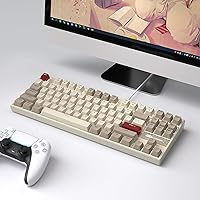
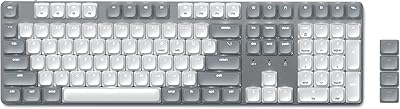
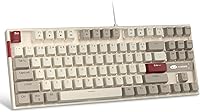
The MageGee MK-Star 75% Mechanical Keyboard makes a strong first impression for anyone hunting a capable, compact board without breaking the bank. Its retro white and grey colorway paired with a metal top panel gives it a look that punches above its price tier. Eighty-seven keys fit into a footprint small enough for crowded desks and travel bags alike, yet you keep the function row and arrow keys that a 60% layout sacrifices. Plug it into any USB-A port and it works immediately — no driver installation, no software hoops. Sixteen extra red keycaps ship in the box, a genuinely nice touch for personalizing right out of the packaging.
Features & Benefits

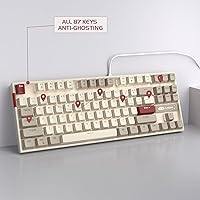
The red linear switches are the real draw for a lot of people — they actuate quietly and smoothly, with no tactile bump interrupting fast keystrokes during gaming or long typing sessions. The MK-Star covers all 87 keys with full anti-ghosting, so pressing multiple keys simultaneously registers every input reliably. Backlighting comes in 19 white LED modes, adjustable on the fly with function key shortcuts for brightness and animation speed. It is single-color only, but the crisp white glow suits the retro aesthetic well. The double-shot keycaps resist fading under heavy daily use, and the splashproof build plus adjustable kickstand feet round out a thoughtfully assembled package for the price.

Best For

This compact mechanical keyboard makes the most sense for first-time mechanical keyboard buyers who want to understand what the switch hype is about without committing serious money. It is equally well-suited to students and remote workers who need something that fits a tight desk without sacrificing a full function row. Casual and entry-level gamers will appreciate the anti-ghosting and smooth switches without needing a steep investment. If wireless is not a priority and you prefer a dependable wired connection, the MK-Star delivers that without fuss. Anyone who likes a retro desk aesthetic will find the white-grey color scheme genuinely appealing rather than an afterthought.

User Feedback

Across more than 4,000 reviews the picture is largely positive with a few recurring gripes worth knowing. Most buyers highlight the smooth typing feel as a genuine surprise at this price, and the retro design earns repeated compliments for standing out among generic black keyboards. The 16 included keycaps are a small but appreciated bonus that reviewers mention more than you might expect. On the negative side, the fixed non-detachable cable frustrates users who prefer tidy cable management, and the USB-A connector feels dated when many competitors at this tier have moved to USB-C. RGB fans will also be disappointed — white-only backlighting is a firm limitation here.

Pros

  • Red linear switches deliver a smooth, quiet typing feel that genuinely surprises buyers at this price point.
  • Full anti-ghosting across all 87 keys means no missed inputs during fast gaming sessions.
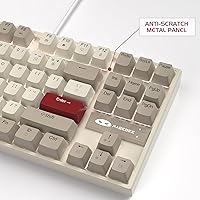
  • The metal top panel resists flex and gives the board a solidity that most budget competitors lack.
  • Plug-and-play USB setup works instantly on Windows, Mac, and Linux with zero driver hassle.
  • Double-shot keycap legends will not fade or wear off even with years of heavy daily use.
  • Sixteen extra red keycaps ship in the box, offering immediate personalization without extra cost.
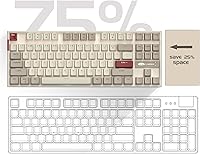
  • The compact 75% layout reclaims meaningful desk space without sacrificing the function row or arrow keys.
  • Adjustable kickstand feet let you shift the typing angle to reduce wrist fatigue during longer sessions.
  • The retro white and grey colorway is a genuine aesthetic standout in the budget mechanical category.
  • Splashproof construction adds a layer of real-world durability that protects against the occasional desk accident.

Cons

  • The non-detachable cable is the most complained-about limitation and complicates both cable management and transport.
  • USB-A connectivity feels dated when USB-C has become standard on competing boards at this tier.
  • White-only LED backlighting offers zero path to RGB or per-key color customization.
  • No companion software means key remapping and macro programming are completely off the table.
  • The plastic bottom case produces a hollow sound when bottoming out that the metal plate amplifies slightly.
  • Stock keycaps feel thin compared to PBT alternatives, which experienced enthusiasts will notice immediately.
  • There is no hot-swap support, so users who want to try different switches will need a different board entirely.
  • The condensed right-side key cluster requires an adjustment period that can frustrate full-size keyboard converts.

Ratings

The MageGee MK-Star 75% Mechanical Keyboard has been scored by our AI system after parsing thousands of verified global buyer reviews, with spam, bot-generated, and incentivized submissions actively filtered out before any scoring was applied. The ratings below reflect the full picture — where this compact TKL board genuinely earns its reputation and where real users consistently ran into friction. Both strengths and legitimate pain points are represented transparently so you can make a confident, informed decision.

Value for Money
91%
For buyers stepping into mechanical keyboards on a tight budget, this board delivers a level of build quality and switch feel that most people do not expect at this price tier. The included extra keycaps add tangible perceived value that reviewers repeatedly call out as a pleasant surprise.
A small segment of buyers who compared it directly to slightly pricier competitors felt the savings came at the cost of cable quality and connectivity options, making the value case slightly less clear for users with higher expectations.
Switch Feel & Performance
88%
The red linear switches are the most praised aspect across user reviews — smooth actuation, minimal noise, and a light touch that works well for both extended typing and quick gaming inputs. Buyers upgrading from membrane boards consistently describe the difference as immediately noticeable.
Linear switches are not for everyone, and users who prefer a tactile bump or audible click find these switches feel a bit too light and undifferentiated under the fingers. There are also no hot-swap options, so the switch choice is permanent.
Build Quality
83%
The metal top panel is a genuine highlight for a board in this category — it resists flex and gives the keyboard a solidity that plastic-framed competitors at the same price simply cannot match. The splashproof design also reassures users who tend to keep drinks on their desks.
The bottom case is still plastic, and some users notice a slight hollow sound when bottoming out keys in the corners. The overall construction is sturdy but not without the small compromises you would expect from a budget build.
Typing Experience
84%
Day-to-day typing on this board is comfortable and consistent, with the adjustable kickstand offering a meaningful difference in wrist angle for longer sessions. The double-shot keycaps provide a stable, non-slippery surface that holds up well even during heavy daily use.
The sound profile, while quiet for a mechanical keyboard, still has a slightly hollow resonance that more discerning users find distracting in quiet office environments. Foam modding or o-rings would help, but that requires additional effort and cost.
Gaming Performance
86%
Full anti-ghosting across all 87 keys means every simultaneous input registers reliably, which matters in fast-paced games where multiple keys are pressed at once. The red switches actuate quickly and consistently, making the board a capable choice for casual to moderate gaming use.
Hardcore competitive gamers may find the lack of programmable macros or dedicated software limiting, as there is no way to remap keys or create profiles. The USB-A connection is functional but feels behind the curve compared to boards offering USB-C at similar price points.
Keyboard Layout & Size
79%
21%
The 75% layout is a smart middle ground — compact enough to free up desk space and reduce mouse travel, yet complete enough to retain the function row and arrow keys that a 60% layout drops entirely. Most users adapt to it within a few days.
Buyers coming from full-size keyboards sometimes struggle with the condensed right-side cluster, particularly with the function-layer shortcuts required to access certain keys. It is a learning curve that catches some users off guard initially.
Backlighting
67%
33%
The 19 white LED modes cover a solid range of static and dynamic effects, and the ability to adjust brightness and animation speed directly from the keyboard without any software is a practical convenience that users appreciate.
White-only backlighting is a firm limitation that disappoints RGB enthusiasts, and it is one of the most frequently mentioned drawbacks in negative reviews. Anyone expecting per-key color customization will need to look elsewhere, as this board offers no path to that.
Keycap Quality
78%
22%
Double-shot injection molding means the legends are part of the keycap structure rather than printed on top, so they will not fade or wear off with extended use — a durability advantage that buyers who type heavily for work or school genuinely appreciate over time.
The stock keycaps feel slightly thin to enthusiasts familiar with PBT alternatives, and the texture, while functional, is not particularly refined. Some users also note minor inconsistency in the shine level across different keys straight from the box.
Connectivity & Cable
54%
46%
The USB-A wired connection is immediately plug-and-play across Windows, Mac, and Linux without any driver installation, which is genuinely convenient for users who rotate between machines or just want something that works instantly.
The non-detachable cable is the single most criticized feature in user reviews. It complicates cable management, makes transport messier, and the USB-A connector feels like a missed opportunity when USB-C has become standard on competing boards at this tier.
Portability & Footprint
81%
19%
At roughly 14 inches wide and under 2.5 pounds, this compact board fits neatly on small student desks, side tables, and laptop setups without dominating the workspace. Users who previously struggled with full-size keyboards taking over their desks find the size reduction genuinely liberating.
The fixed cable adds awkward bulk when packing the board into a bag, which undermines some of the portability benefits the compact layout provides. A detachable cable would have made this a much more travel-friendly option.
Aesthetic & Design
87%
The retro white and grey colorway is consistently highlighted as a standout in user reviews, particularly among buyers who are tired of the all-black default that dominates budget mechanical keyboards. The metal panel adds a premium visual quality that photographs and presents well in desk setups.
The aesthetic is polarizing by nature — users who prefer darker, more utilitarian setups may find the white and grey combination too loud or prone to showing dirt and discoloration after extended use.
Ease of Setup
93%
Plug in the USB cable and it works — no software, no driver downloads, no account creation required. This is one of the most frictionless unboxing experiences in its category, and users who have struggled with driver-dependent keyboards in the past specifically appreciate it.
The lack of any companion software is a double-edged situation. While setup is effortless, users who want to remap keys, save lighting profiles, or customize macros have no official path to do so, which limits long-term personalization.
Customization Options
61%
39%
The 16 included red keycaps are a practical starting point for personalizing the look, and the variety of backlight modes gives some flexibility in how the board presents itself on a desk. For a first-time buyer, this level of out-of-box customization is reasonable.
Beyond swapping the included keycaps and cycling through lighting modes, there is very little room to customize this board. No hot-swap switches, no software remapping, and no RGB mean that users who grow into the hobby will quickly find the ceiling.
Noise Level
76%
24%
Red linear switches are among the quieter mechanical options available, and in practice this board is tolerable in shared spaces like dorms and open-plan home offices. Most buyers report that roommates or family members have not complained about the typing noise.
It is not silent, and users expecting a near-quiet experience comparable to low-profile or silent switches will be disappointed. Bottoming out on the metal plate does produce a noticeable clack that can carry in very quiet environments.

Suitable for:

The MageGee MK-Star 75% Mechanical Keyboard is a natural fit for anyone taking their first serious step away from membrane keyboards without wanting to spend a lot doing it. Students working in dorm rooms or small apartments will appreciate how little desk space it demands while still keeping the function row and arrow keys intact for everyday computing. Remote workers who rotate between a home setup and occasional travel will find the compact footprint practical without feeling like they are giving up too much functionality. Casual gamers who want a responsive, anti-ghosting capable board for evenings of gaming — but have no interest in paying premium prices — get a genuinely capable tool here. Anyone who cares about how their desk looks and wants something that stands out from the sea of plain black budget keyboards will find the retro white and grey colorway a refreshing change.
Not suitable for:

The MageGee MK-Star 75% Mechanical Keyboard is not the right choice for buyers who have already developed strong opinions about keyboard customization and expect software, hot-swap switches, or RGB lighting as standard features at any price. Enthusiasts who have used higher-end boards will likely find the hollow resonance of the metal plate and the thinness of the stock keycaps underwhelming once the novelty wears off. The permanently attached cable is a real practical limitation — if tidy cable management or frequent transport is a priority, this board creates friction rather than solving it. Competitive or professional gamers who rely on macro programming or per-key remapping will hit a hard wall with no companion software to speak of. Those who work in very quiet shared office environments should also think twice, as bottoming out on a linear switch and metal plate does carry a noticeable sound that membrane keyboards simply do not produce.

Specifications

  • Layout: 75% TKL compact layout with 87 keys, retaining the function row and arrow keys while reducing overall footprint compared to a full-size or tenkeyless board.
  • Switch Type: Red linear mechanical switches with smooth, quiet actuation and no tactile bump, suited to both fast gaming inputs and extended typing sessions.
  • Key Count: 87 individual keys with full 100% anti-ghosting and n-key rollover, allowing simultaneous multi-key inputs without conflict.
  • Keycaps: Double-shot injection molded keycaps with non-slip texture, ensuring legends resist fading or wearing off under heavy daily use.
  • Backlight: Single-color white LED backlighting with 19 switchable modes, including static and dynamic effects adjustable for brightness and animation speed via function key shortcuts.
  • Connection: USB-A wired connection with a permanently attached cable, offering plug-and-play compatibility across Windows, Mac, and Linux with no drivers or software required.
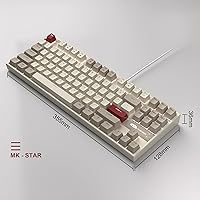
  • Dimensions: The keyboard measures 13.97″ in length, 5.03″ in width, and 1.41″ in height, making it compact enough for small desks and laptop setups.
  • Weight: The board weighs 2.33 pounds, giving it a stable, planted feel on the desk without being overly heavy for occasional transport.
  • Frame Material: Durable metal top panel over a plastic bottom case, providing scratch resistance and structural rigidity beyond what fully plastic budget keyboards typically offer.
  • Splash Resistance: Splashproof design offers basic protection against minor liquid spills, helping extend the lifespan of the board in everyday desk environments.
  • Typing Angle: Adjustable kickstand feet provide two selectable typing angles, allowing users to find a more ergonomically comfortable wrist position for longer sessions.
  • Extra Keycaps: 16 additional red accent keycaps are included in the box, enabling immediate aesthetic customization of select keys without any additional purchase.
  • Compatibility: Compatible with Windows (XP through 8), Linux, and Mac operating systems via standard USB-A input with no driver installation required.
  • Multimedia Keys: 12 multimedia function shortcuts are accessible via the Fn layer, covering common controls such as media playback and backlight adjustments directly from the keyboard.
  • Lighting Control: Backlight brightness is adjusted with Fn and the up or down arrow keys, while animation speed is controlled with Fn and the left or right arrow keys.
  • Software Required: No companion software or drivers are required at any point; all functions including lighting modes are controlled entirely through built-in key combinations.
  • Color Scheme: Retro white and grey colorway with red accent switch stems, giving the board a distinctive vintage aesthetic that stands apart from standard all-black budget keyboards.

Related Reviews
Womier SK71 75% Mechanical Keyboard
87%
88%
Performance
93%
Build Quality
90%
Ergonomics/Typing Comfort
85%
Battery Life
91%
Connectivity (Wired/Bluetooth/2.4GHz)
More
MageGee Typewriter Mechanical Keyboard
77%
93%
Aesthetic & Visual Design
81%
Build Quality
78%
Typing Feel & Switch Performance
61%
Sound Level
83%
Keycap Quality & Durability
More
Keychron V1 75% Mechanical Keyboard

82%
83%
Build Quality
81%
Typing Feel
74%
Switch Performance
93%
Customization & Firmware
91%
Hot-Swap Functionality
More
Satechi SM3 Mechanical Keyboard
86%
92%
Typing Experience
88%
Connectivity
85%
Ergonomics and Comfort
89%
Battery Life
91%
Build Quality
More
Merdia Wireless Mechanical Keyboard
83%
90%
Connectivity Options
88%
Typing Experience
86%
RGB Customization
84%
Build Quality
91%
Battery Life
More
Higround Trailhead 65% Mechanical Keyboard
88%
95%
Customization Options
89%
Typing Experience
92%
RGB Lighting
88%
Build Quality & Durability
87%
Performance in Gaming
More
MOTOSPEED CK61 60% Mechanical Keyboard
85%
89%
Typing Experience
92%
RGB Lighting Customization
85%
Build Quality
91%
Key Switch Smoothness
94%
Portability/Size
More
Keychron C2 Wired Mechanical Keyboard
84%
91%
Typing Experience
89%
Build Quality
88%
Customization Options
84%
Ergonomics
90%
Compatibility
More
Logitech MX Mechanical
81%
88%
Typing Feel & Switch Quality
91%
Noise Level
86%
Build Quality & Materials
93%
Battery Life
87%
Multi-Device Connectivity
More
RYMEK Typewriter Style Mechanical Keyboard
87%
92%
Typing Experience
89%
Build Quality
85%
Design and Aesthetics
91%
Bluetooth Connectivity
88%
Durability
More

FAQ

Yes, it connects via USB-A and is recognized immediately by macOS without any drivers. Keep in mind that some key labels will not match Mac conventions exactly, but the core functionality works fine for everyday use.

Unfortunately the cable is permanently attached and cannot be detached or swapped out. This is one of the more commonly mentioned drawbacks by buyers, so if cable management or easy transport is important to you, it is worth factoring that in before purchasing.

It handles casual to moderate gaming well — the red switches are responsive and the full anti-ghosting means every key press registers reliably. That said, there is no macro programming or software remapping support, which competitive players who rely on custom key bindings may find limiting.

Red linears are among the quieter mechanical switch types, so they are generally tolerable in shared environments. That said, bottoming out keys on the metal plate does produce an audible clack, so anyone expecting near-silent performance should know it is not completely quiet.

The keycaps use a standard MX-compatible stem layout, so most aftermarket keycap sets should fit without issue. Just double-check that the set you are considering covers the non-standard sizes sometimes found on the right modifier row of 75% layouts.

The included red keycaps are accent keys intended for commonly customized positions like WASD and the arrow keys. They give you an easy way to add a pop of color to the otherwise white and grey board without buying a separate keycap set.

Press Fn and the backslash key to cycle through the 19 available lighting modes. You can adjust brightness with Fn plus the up or down arrow keys, and control animation speed with Fn plus the left or right arrow keys — all without any software.

In most cases yes, since it is a standard USB-A HID device that draws minimal power. However, if you experience any input lag or recognition issues, plugging directly into a port on your computer is always the more reliable option.

The splashproof design gives you some tolerance for minor liquid exposure, but for regular cleaning, use a can of compressed air between the keys and a slightly damp microfiber cloth on the keycap surfaces. Avoid soaking the board or using harsh chemical cleaners near the switches.

It is one of the more sensible entry points available at this price tier. The red linear switches are forgiving for new users, the setup is completely plug-and-play, and the compact layout is practical without being as stripped-down as a 60% board. Just go in knowing it is a starting point rather than a long-term enthusiast board — you may eventually want to upgrade, but for getting a feel for mechanical keyboards, it does the job well.