Overview

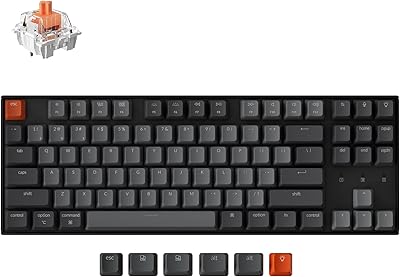
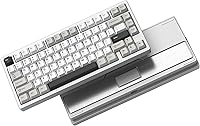
The Womier RD75 Pro 75% Wireless Mechanical Keyboard occupies a genuinely useful middle ground: a proper CNC aluminum chassis and gasket mount at a price that doesn't require you to source parts or solder anything yourself. The 75% layout is a practical sweet spot — the function row and arrow keys stay, but the footprint shrinks enough to free up meaningful desk space. What sets it apart structurally is the tool-free ball-catch release, letting you pop the case open without digging for a screwdriver. Typing feel leans muted and linear — think creamy rather than clicky. Tri-mode wireless rounds it out as a capable, versatile daily driver.
Features & Benefits

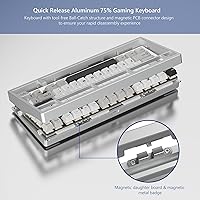
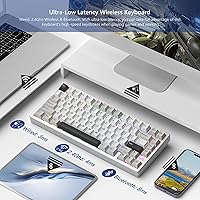
The quick-release aluminum case is arguably the standout practical feature. Disengage the ball-catch, lift the top, and you have clean access for switch swapping or foam mods — no stripped screws involved. QMK and VIA support hands full layout and macro control back to you through open-source tools, with no proprietary software dependency. Connectivity covers wired USB-C at 3ms, 2.4GHz dongle at 4ms — competitive for gaming — and Bluetooth at 8ms for low-stakes office use. The 8000mAh battery is legitimately oversized, but the 900-hour claim assumes Bluetooth-only with RGB completely off; real use with lighting enabled will cut that figure substantially. The dongle tucks away under a magnetic badge on the underside.

Best For

This aluminum wireless keyboard is a natural fit for semi-enthusiasts who've moved past entry-level boards but aren't ready to spend flagship custom prices. Hybrid users who alternate between gaming sessions and desk work during the day will find the tri-mode connectivity genuinely useful — low-latency dongle for gaming, Bluetooth for a work laptop, no replugging required. VIA and QMK tinkerers get open firmware access without a premium surcharge. One honest caveat on portability: at 5.46 pounds, Womier's 75% board is noticeably heavier than most wireless keyboards. Moving it between rooms is fine; hauling it in a bag daily is another matter worth considering before buying.

User Feedback

Sitting at 4.1 out of 5 stars across roughly 170 reviews, the RD75 Pro earns consistent praise for build quality and value, with buyers frequently noting the aluminum feel punches above its tier. Wireless reliability also draws positive mentions. On the critical side, stabilizer consistency is a recurring concern — some units arrive well-tuned, others less so. Newcomers to QMK and VIA occasionally flag the firmware setup as steeper than expected, which is worth flagging for buyers who've never flashed a keyboard before. Battery life with RGB on runs considerably shorter than the headline figure, and a handful of reviewers noted minor packaging or accessory inconsistencies, though this doesn't appear to be a systemic issue.

Pros

  • CNC aluminum construction gives the board a premium, solid-in-hand feel that is rare at this price tier.
  • Tool-free ball-catch case release makes switch swapping and internal mods genuinely accessible, no screwdriver needed.
  • Full QMK and VIA support means you own your layout completely, with no proprietary software required.
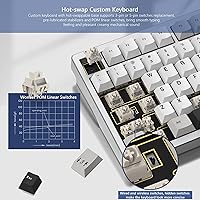
  • Hot-swap sockets accept both 3-pin and 5-pin switches, so upgrading to a different switch type is straightforward.
  • Tri-mode connectivity covers wired, 2.4GHz, and Bluetooth 5.0, making the RD75 Pro flexible across multiple devices and use cases.
  • Gasket mount delivers a softer, more comfortable bottom-out feel compared to typical top-mount or tray-mount boards in this range.
  • The 8000mAh battery is oversized by any standard, providing extended use between charges even with moderate RGB use.
  • Pre-lubed POM linear switches arrive smoother out of the box than most stock switches at similar price points.
  • Hidden dongle storage under the magnetic badge keeps the 2.4GHz receiver attached to the board and easy to find.
  • 40-plus RGB presets are accessible via shortcuts, so basic lighting changes require zero software interaction.

Cons

  • At 5.46 pounds, this aluminum wireless keyboard is significantly heavier than most wireless boards and is impractical to carry daily.
  • QMK and VIA setup has a real learning curve; buyers new to custom firmware should budget time for the initial configuration.
  • Stabilizer quality is inconsistent between units — some ship well-tuned, others arrive with noticeable rattle that needs addressing.
  • The 900-hour battery claim is a best-case figure under Bluetooth with RGB off; real-world life with lighting enabled is considerably shorter.
  • Womier's 75% board lacks the brand recognition and established community support of more mature keyboard manufacturers.
  • No dedicated media keys or volume knob, which buyers coming from full-size or TKL boards may notice in daily use.
  • Bluetooth latency at 8ms, while acceptable for typing, is not ideal for fast-paced gaming where every millisecond counts.
  • Occasional buyer reports of packaging inconsistencies and missing accessories suggest quality control could be tighter.

Ratings

Our scores for the Womier RD75 Pro 75% Wireless Mechanical Keyboard were generated by AI after analyzing verified buyer reviews from global markets, with active filtering applied to remove suspected spam, bot activity, and incentivized submissions. The ratings reflect both the consistent strengths buyers highlight and the genuine pain points that surface repeatedly across real user experiences. Across every category, practical everyday use cases are weighted alongside the concerns that actually affect purchasing decisions — nothing has been softened.
Build Quality
91%
The CNC aluminum chassis is the detail buyers mention first when the board arrives — it feels dense and premium in a way that plastic boards at similar prices simply cannot replicate. The magnetic PCB connector and ball-catch release add a mechanical satisfaction to opening the case that rivals far more expensive custom builds.
The board's 5.46-pound weight is a direct consequence of that aluminum construction, and for some buyers it becomes a frustration — particularly those who expected something closer to a typical wireless keyboard. A few users also note minor surface finish inconsistencies on case edges, though structural quality complaints remain rare.
Typing Feel
84%
The gasket mount makes a noticeable difference compared to tray-mount boards at this price — keystrokes have a cushioned, forgiving quality that reduces fatigue during long typing sessions. Combined with the pre-lubed POM linears, most buyers report the board sounds and feels significantly above its price tier.
Buyers who prefer tactile or clicky switches find the POM linears underwhelming by default, and several mention swapping them out almost immediately after unboxing. The gasket flex, while generally appreciated, occasionally reads as slightly wobbly to typists coming from rigid aluminum boards without gasket mounting.
Wireless Performance
86%
The 2.4GHz dongle connection holds up well for gaming use, with buyers consistently reporting stable, low-latency performance at 4ms during extended sessions. Bluetooth pairing is reliable across multiple devices, and device switching is quick enough that users running a dual-monitor home office setup find it genuinely practical.
A small number of users report occasional Bluetooth dropout in environments with heavy wireless interference, though this appears less common with the 2.4GHz channel. Hardcore competitive gamers point out that at 4ms the dongle cannot match dedicated gaming peripherals polling at 4000Hz or higher.
Battery Life
73%
27%
The 8000mAh battery is a genuinely large capacity for a wireless keyboard, and buyers using the board in Bluetooth mode with lighting off report going weeks between charges. That is a real convenience advantage for desk-switchers and office users who do not want to think about battery management day to day.
The 900-hour headline figure is misleading for most real-world buyers, since it only applies with RGB completely off in Bluetooth mode. Users who run lighting at moderate brightness have reported battery life closer to 40 to 80 hours, which is still decent but nowhere near the advertised figure, leading to frustration among buyers who took the claim at face value.
Value for Money
88%
Getting a CNC aluminum case, gasket mount, QMK and VIA support, hot-swap sockets, and tri-mode wireless in a single package at this price tier is genuinely hard to beat. Buyers consistently note that the build quality alone would justify a higher price, making the RD75 Pro feel like an overachiever relative to what you spend.
The value equation weakens for buyers who end up spending extra on stabilizer work or switch replacements to get the board where they want it, since those costs add up. Womier also lacks the customer support infrastructure of established brands, which some buyers have found frustrating when troubleshooting firmware or hardware issues.
Sound Profile
78%
22%
Most buyers who sought the advertised creamy linear sound are satisfied with the result — the POM switches combined with gasket mounting produce a low-pitched, muffled thock that compares favorably to boards at similar prices that skip the gasket entirely. The sound stays consistent across the layout during normal typing.
Some buyers find the sound profile too muted or hollow compared to expectations, particularly around the spacebar when stabilizers are not well-tuned. Those who expected a more resonant or defined thock character may be disappointed, as the board leans quiet rather than acoustically expressive.
Software & Firmware
67%
33%
QMK and VIA support means the board is not locked into any proprietary ecosystem, which experienced keyboard enthusiasts consider a significant long-term advantage. Users already familiar with VIA report that full configuration takes under 20 minutes and gives them complete control over every key without compromise.
Buyers who have never used QMK or VIA face a real setup hurdle — the onboarding is not guided, and finding the correct JSON configuration file for this specific board requires its own research effort. Several first-time buyers in reviews mentioned spending hours troubleshooting what experienced users would consider a straightforward process.
Customization
89%
The combination of hot-swap sockets, QMK firmware, and a tool-free quick-release case puts this aluminum wireless keyboard among the most accessible modding platforms at its price point. You can change switches, remap any key, adjust RGB behavior, and access the internals for foam or tape mods without any specialized equipment.
Buyers who want to explore more exotic switch formats like Alps or low-profile designs will find the board is firmly in the MX-footprint ecosystem only. Case color options are also limited, which matters to buyers assembling a themed desk setup where every peripheral needs to match.
RGB Lighting
81%
19%
Forty-plus preloaded effects cover the range from subtle single-color breathing to dynamic reactive patterns, and all are accessible via keyboard shortcuts without needing a PC connected. The aluminum case helps diffuse backlighting more evenly than typical plastic boards, giving the lighting a noticeably more polished look.
Creating fully custom per-key lighting profiles requires going into QMK, which is a barrier for buyers who just want simple software-driven lighting control. Some users have noted uneven LED brightness on a small number of units, though this appears to be a minority quality-control issue rather than a design flaw.
Portability
57%
43%
The 75% layout is genuinely compact at roughly 13.3 inches wide, fitting comfortably on tight desks and in drawer storage. For people who move the board between rooms or alternate between a home office and a secondary workspace, the form factor is manageable and the wireless capability helps.
At 5.46 pounds, Womier's 75% board is simply too heavy for comfortable commuting or backpack transport — it weighs more than many full-size keyboards. Buyers who had travel use in mind frequently express surprise at the weight once the board arrives, and several noted it changed how they planned to use it.
Switch Quality
82%
18%
The pre-lubed POM linear switches perform noticeably better out of the box than the dry, scratchy stock switches that typically ship with keyboards at this price. Buyers comparing against similar boards note these feel closer to aftermarket-lubed switches, which saves both time and money for most purchasers.
The switches are a proprietary POM formula, so direct comparisons to well-documented switches like Gateron Yellows are anecdotal at best. Buyers particular about specific actuation force and travel characteristics may want to invest in a preferred switch from day one rather than relying on the stock offering.
Stabilizer Quality
63%
37%
Units that arrive with well-tuned stabilizers deliver a quiet, consistent feel on larger keys, making the typing experience cohesive across the whole board. When the stabilizers are good, the spacebar and shift keys blend naturally with the rest of the layout rather than drawing unwanted attention.
Stabilizer consistency is the most frequently cited quality-control complaint across reviews, with a meaningful portion of buyers reporting spacebar or shift key rattle requiring lubing or band-aid modding to fix. It is a solvable problem, but adds friction for buyers who expected a fully ready-to-use board without additional work.
Gaming Performance
79%
21%
For casual to mid-level gaming, the RD75 Pro delivers a responsive and reliable experience over 2.4GHz, and the compact layout keeps the mouse hand closer than a full-size or TKL board would allow. The wired USB-C mode at 3ms is also available for anyone who wants the most stable connection during competitive play.
At the highest competitive level, a 4ms wireless connection and a standard polling rate fall short of what dedicated gaming keyboards now offer, including 8000Hz polling and sub-1ms wireless latency. The board's primary strength is versatility rather than raw gaming performance, and serious esports players will likely notice the gap.
Out-of-Box Experience
74%
26%
For buyers with any keyboard enthusiast background, unboxing this aluminum wireless keyboard is a positive experience — the board feels substantial, key labels are clean, and the included USB-C cable and dongle are both present and functional. Most of the core typing feel is immediately usable without any extra investment.
Buyers coming from a plug-and-play mindset, especially those new to custom keyboards, may feel overwhelmed when they discover that unlocking the board's full potential requires navigating QMK or VIA independently. Occasional reports of packaging damage during shipping and inconsistent accessory inclusions also chip away at the first-impression experience.
Connectivity Versatility
87%
Having USB-C wired, 2.4GHz dongle, and Bluetooth 5.0 all in one board means the RD75 Pro adapts to virtually any use-case scenario without replugging anything between sessions. The dedicated dongle storage slot under the magnetic badge ensures the receiver stays with the keyboard and never gets misplaced.
The Bluetooth channel tops out at 8ms latency, which is fine for typing but represents a meaningful step down from the 2.4GHz connection for responsive use cases. Switching between all three modes requires learning key combinations that are not clearly documented out of the box, which has tripped up several buyers.

Suitable for:

The Womier RD75 Pro 75% Wireless Mechanical Keyboard is built for the kind of buyer who sits between casual typist and full custom-build enthusiast — someone who wants a noticeably better keyboard without sourcing a PCB, case, and switches separately. If you spend time at both a gaming rig and a work desk, the tri-mode wireless setup lets you cover both without juggling cables or pairing headaches. The compact 75% layout suits anyone running a tighter desk who still needs a function row and dedicated arrow keys in daily use. QMK and VIA support makes it a genuinely rewarding board for people who enjoy tweaking keymaps and macros, as long as you're willing to spend an evening getting familiar with the firmware tools. Buyers who are gasket-mount-curious but reluctant to commit to a flagship-priced board will find this a low-risk way to understand what that typing feel actually means in practice.

Not suitable for:

Anyone expecting a truly portable wireless keyboard should know upfront that the Womier RD75 Pro 75% Wireless Mechanical Keyboard weighs 5.46 pounds — that is heavier than many full-size keyboards, and it will feel it in a bag. Buyers who want to unbox, plug in, and go without any configuration work may find the QMK and VIA ecosystem frustrating; there is a real learning curve if you have never flashed keyboard firmware before, and the onboarding is not hand-held. Competitive esports players who demand the absolute lowest input latency should also note that wired mode at 3ms and 2.4GHz at 4ms are solid, but purpose-built gaming keyboards with polling rates above 1000Hz will edge this out. Those who keep RGB running constantly should temper battery expectations significantly, since the widely cited 900-hour figure only applies in Bluetooth mode with lighting fully disabled. Finally, buyers who prefer tactile or clicky switch feedback will need to plan for a switch swap, as the included POM linears are decidedly smooth and quiet.
Specifications

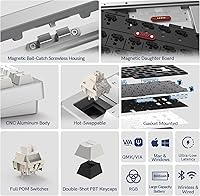
  • Layout: 75% form factor with a full function row and dedicated arrow keys, omitting the numpad and navigation cluster for a more compact footprint.
  • Case Material: CNC-machined aluminum alloy construction with a tool-free ball-catch quick-release mechanism and a magnetic PCB connector for screwless disassembly.
  • Mount Style: Gasket mount design suspends the PCB plate assembly within silicone gaskets, producing a softer bottom-out feel compared to standard top-mount or tray-mount boards.
  • Switch Type: POM linear switches shipped pre-lubricated from the factory, offering smooth, quiet keystrokes with minimal scratchiness out of the box.
  • Switch Fit: Hot-swap sockets accept both 3-pin and 5-pin mechanical switches, allowing users to change switch types without soldering.
  • Connectivity: Tri-mode connection supports USB-C wired, 2.4GHz wireless via included dongle, and Bluetooth 5.0 for simultaneous pairing across multiple devices.
  • Latency: Rated input latency is 3ms over wired USB-C, 4ms over 2.4GHz wireless, and 8ms over Bluetooth 5.0.
  • Battery: Built-in 8000mAh lithium polymer battery is included and non-removable, charged via the USB-C port.
  • Battery Life: Manufacturer rates battery life at up to 900 hours, a figure that applies strictly to Bluetooth mode with RGB lighting fully disabled.
  • Firmware: Fully compatible with QMK open-source firmware and VIA configurator, enabling keymap remapping, macro assignment, and RGB customization without proprietary software.
  • RGB Lighting: Ships with 40-plus preloaded lighting effects that can be cycled and adjusted directly via keyboard shortcuts, requiring no software for basic changes.
  • Dimensions: The keyboard measures 13.3 × 4.7 × 1.5 inches (approximately 338 × 119 × 38mm).
  • Weight: The assembled unit weighs 5.46 pounds (approximately 2.48kg), which is notably heavy relative to most wireless keyboards in this layout class.
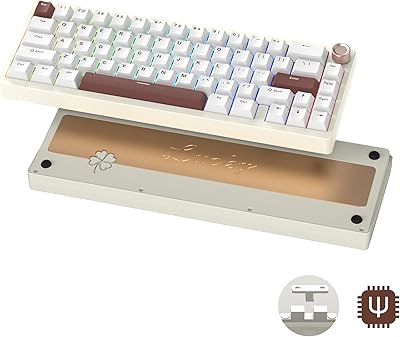
  • Dongle Storage: A dedicated 2.4GHz dongle storage slot is recessed into the underside weight plate and concealed beneath a removable magnetic metal badge.
  • OS Support: Compatible with Windows and macOS, with native key layout switching available via dedicated hotkey combinations.

Related Reviews

Womier SK75 Hall Effect Gaming Keyboard
79%
88%
Build Quality
91%
Switch Performance
89%
Rapid Trigger Accuracy
83%
Wireless Reliability
76%
Battery Life
More
Womier SK65 65% Wireless Mechanical Keyboard
78%
88%
Build Quality
84%
Typing Feel
81%
Wireless Performance
83%
Sound Profile
86%
Hot-Swap Experience
More
AULA F75 Pro
AULA F75 Pro
82%
91%
Typing Sound & Feel
83%
Build Quality & Construction
89%
Hot-Swap & Customizability
86%
Wireless Performance
82%
Battery Life
More
GravaStar Mercury K1 Pro Mechanical Gaming Keyboard
80%
91%
Build Quality
88%
Typing Feel
86%
Switch Performance
79%
Wireless Reliability
74%
Battery Life
More
Merdia Triple Mode 100-Key Wireless Mechanical Keyboard
74%
88%
Value for Money
84%
Wireless Connectivity
81%
Typing Experience
83%
Hot-Swap Functionality
67%
Build Quality
More
Pauroty 60% Wireless Mechanical Keyboard
86%
88%
Connectivity Options
75%
Battery Life
93%
Portability
84%
Ergonomics
91%
RGB Customization
More
Keychron B6 Pro
Keychron B6 Pro
80%
93%
Battery Life
88%
Wireless Connectivity
71%
Typing Experience
91%
Mac Compatibility
67%
Build Quality
More
Logitech MX Mechanical
81%
88%
Typing Feel & Switch Quality
91%
Noise Level
86%
Build Quality & Materials
93%
Battery Life
87%
Multi-Device Connectivity
More
Alienware Pro Wireless Gaming Keyboard
87%
93%
Connectivity
89%
Customization (Hot-Swappable Switches)
91%
Ergonomics and Layout
88%
RGB Lighting
85%
Battery Life
More
Keychron K8
Keychron K8
80%
91%
Typing Feel & Switch Quality
88%
Noise Level
86%
Multi-Device Connectivity
67%
Build Quality & Materials
72%
Battery Life
More

FAQ

The Womier RD75 Pro 75% Wireless Mechanical Keyboard does support macOS natively, and there is a dedicated key combination to toggle between Windows and Mac layouts. That said, remapping the modifier keys to match Mac conventions fully is much easier once you set up VIA, which only takes about 15 minutes if you follow a basic guide.
For most gaming scenarios, the 2.4GHz connection at 4ms latency is completely usable and the difference from wired at 3ms is unlikely to be perceptible in practice. If you are playing at a highly competitive level where every millisecond matters, wired is always the safer choice, but casual to mid-level gaming over 2.4GHz is a non-issue.

VIA is the easier starting point — you download the web app or desktop version, load the board-specific JSON file, and your key assignments are live almost immediately without flashing anything. QMK is more powerful but involves compiling firmware, which has a steeper learning curve. If you just want to remap keys and set macros, stick with VIA to start.

The 900-hour claim is a best-case figure that only applies when using Bluetooth with all lighting completely off. With RGB running at moderate brightness, expect something closer to 40 to 80 hours depending on the effect and intensity. It is still a large battery, but set practical expectations if you plan to keep the lighting on.

Yes, the hot-swap sockets support both 3-pin and 5-pin switches, so you can pull the stock POM linears and install virtually any compatible MX-style switch without soldering. Just make sure your preferred switches are MX-footprint and match the pin configuration of the socket.

The compact 75% footprint is travel-friendly in terms of size, but the 5.46-pound weight is a real consideration — that is heavier than most full-size keyboards. It moves fine between rooms or desks at home, but packing it into a laptop bag for a commute every day will get old quickly.

This is one of the more variable aspects based on buyer reports. Some units arrive with well-tuned stabilizers that feel clean, while others have noticeable rattle on the spacebar or larger keys. If yours rattles, applying a small amount of dielectric grease or doing a band-aid mod is a straightforward fix that most enthusiasts do routinely.

The board supports pairing multiple Bluetooth devices and switching between them via shortcut key combinations. For the 2.4GHz dongle, you would need to physically move the dongle to the target device, since that channel is dedicated to a single receiver. The switching process is quick once you are familiar with the key combos.

For basic use, it is fully plug and play — connect it and type, no drivers required. The RGB effects can be cycled via shortcuts without any software at all. You only need to open VIA or set up QMK if you want to remap keys, build macros, or create custom lighting profiles.

The case uses a ball-catch mechanism rather than screws, so you just flip the board over and disengage the catches — no tools needed. The PCB connects via a magnetic connector, so it separates cleanly without yanking on cables. It is genuinely one of the more beginner-friendly disassembly systems you will find at this price point.

Where to Buy