Overview

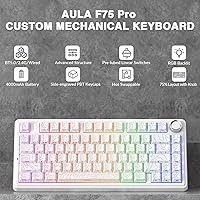
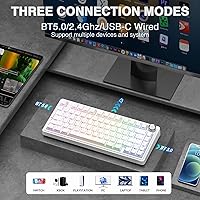
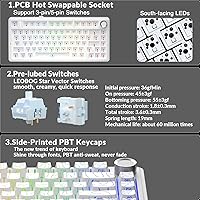
The AULA F75 Pro is the kind of wireless mechanical keyboard that makes you do a double-take at the price tag — not because it feels cheap, but because it genuinely does not. Built around a gasket-mount construction with five layers of sound dampening, it delivers that soft, bouncy typing feel typically found on boards costing considerably more. Tri-mode connectivity — Bluetooth 5.0, 2.4GHz, and USB-C — means it handles desk duty, couch browsing, and phone typing without fuss. Toss in LEOBOG star vector switches that arrive pre-lubed, side-printed PBT keycaps, and a functional knob, and you have a surprisingly complete package straight out of the box.

Features & Benefits

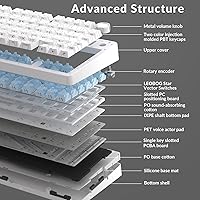
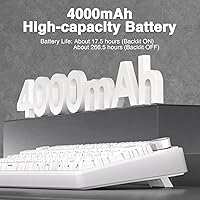
What sets the F75 Pro apart structurally is its gasket mount paired with an extended silicone pad and PCB single-key slotting — a combination that gives each keypress a satisfying flex while muting the hollow clank common in budget boards. The five-layer dampening handles this without requiring any DIY foam modding on your end. Hot-swap support for both 3-pin and 5-pin switches means trying new switches takes minutes, not a soldering iron. The 4000mAh battery holds up well across long wireless sessions, and the multi-function knob lets you toggle between RGB brightness control and media volume depending on whether you are gaming or grinding through work.

Best For

This 75% hot-swap board hits a sweet spot for several distinct types of buyers. Switch hobbyists will appreciate the tool-free hot-swap base that lets you experiment freely across tactiles, linears, or anything in between. Remote workers and students benefit from connecting up to five devices simultaneously and switching between them with a single button press. Gamers get N-key rollover, Win-lock, and per-key macro support — practical inclusions, not mere spec-sheet checkboxes. And if a clean, minimal desk look appeals to you, the side-printed keycaps keep the top surface legend-free while still letting RGB glow through the font cutouts.

User Feedback

With over 1,400 ratings and a 4.7-star average since its mid-2025 launch, this wireless mechanical keyboard has earned a strong early reception. Buyers consistently highlight the out-of-box sound profile — the thocky, dampened feel that typically demands aftermarket mods on cheaper boards. Battery life reports skew positive. The main friction point is the driver software: macros and deeper customization require the F75 app, and some reviewers found it inconsistent on certain systems. A few users noted minor build variation between units, worth keeping in mind. The knob mode-switching has a short learning curve, but most buyers adapt quickly and find it genuinely useful day-to-day.

Pros

  • Gasket mount with five-layer dampening delivers a thocky, premium sound profile with zero modifications needed.
  • Hot-swap support for 3-pin and 5-pin switches makes experimenting with new switches genuinely accessible for beginners.
  • Tri-mode connectivity handles Bluetooth, 2.4GHz, and USB-C without requiring separate keyboards for different devices.
  • The 4000mAh battery lasts well over a week in Bluetooth mode with conservative RGB use.
  • Side-printed PBT keycaps look striking and stay legible even after extended daily use without fading.
  • N-key rollover and Win-lock make the F75 Pro a competent gaming board without sacrificing the arrow key cluster.
  • Pre-lubed stabilizers arrive in noticeably better condition than most budget keyboards, reducing out-of-box rattle.
  • The multi-function knob handles both RGB control and media volume depending on the active mode.
  • At its price point, the combination of features offered is difficult to match among competing wireless boards in 2025.
  • A strong early rating from over 1,400 verified buyers provides meaningful confidence for a recently launched product.

Cons

  • The F75 driver app is required for macro programming and deep customization, and it has shown instability on some systems.
  • Mac software support through the companion app is limited, frustrating buyers outside the Windows ecosystem.
  • Bluetooth reconnection after sleep can lag, particularly on older laptops and certain Android devices.
  • Build quality is not perfectly consistent across units — some buyers received keyboards with minor cosmetic or fit issues.
  • No battery level indicator is present on the board itself, making it hard to gauge remaining charge without software.
  • The knob mode-switching requires a five-second long press with no physical indicator showing the active mode.
  • Side-printed legends can be harder to read in dim lighting since RGB illuminates the top surface, not the side faces.
  • The review pool is still young, making long-term durability conclusions premature compared to more established models.
  • Stabilizer lubing consistency varies between units, with some larger keys still exhibiting faint rattle out of the box.

Ratings

The AULA F75 Pro has earned a remarkably strong reception for a keyboard that only entered the market in mid-2025, and our AI scoring system has processed its global verified review pool — actively filtering out incentivized, bot-generated, and duplicate submissions — to surface what real buyers actually think. Scores reflect the full picture: where this 75% hot-swap board genuinely impresses at its price tier, and where it still has ground to cover.

Typing Sound & Feel
91%
This is where the F75 Pro earns its strongest praise. The gasket mount combined with the five-layer dampening produces a deep, thocky sound signature that buyers consistently describe as better than expected for the price. Out of the box, without any modifications, it competes with boards that cost significantly more.
A small number of users noted slight sound inconsistency between the center keys and the edges, a common trait of gasket designs at this tier. Those chasing a perfectly uniform acoustics profile may still want to add a desk mat or supplementary foam.
Build Quality & Construction
83%
The gasket-mount structure gives the board a reassuring flex that feels deliberate, not cheap. Most buyers found the chassis solid and the overall fit and finish respectable for a mid-range wireless board. The weight — just under three pounds — contributes to a planted, premium-adjacent feel on the desk.
A portion of reviewers flagged minor QC variance, including slightly uneven keycap seating or small gaps in the case seam on certain units. Nothing catastrophic, but enough to suggest quality control is not perfectly consistent across every unit leaving the factory.
Hot-Swap & Customizability
89%
Supporting both 3-pin and 5-pin switches makes this one of the more flexible hot-swap bases at its price. Swapping switches takes seconds with a standard puller, and buyers with no prior keyboard modding experience reported doing it confidently on their first attempt.
The PCB does not support soldering modifications beyond the hot-swap socket design, so advanced PCB-level customization is off the table. A very small subset of enthusiasts also noted some socket wobble after multiple swap cycles, which is worth monitoring over extended use.
Wireless Performance
86%
The 2.4GHz connection held up well in gaming sessions, with buyers reporting no perceptible input lag compared to wired. Bluetooth connectivity across multiple devices — up to five simultaneous pairings — worked reliably for most, making desk-to-phone or laptop switching genuinely practical.
A handful of users experienced occasional Bluetooth reconnection delays when waking the keyboard from sleep, particularly on older laptops or Android devices. The 2.4GHz dongle is the clear winner for latency-sensitive use; Bluetooth is better suited to typing tasks than competitive gaming.
Battery Life
82%
18%
The 4000mAh cell is a meaningful differentiator in this category. Buyers using the board primarily over Bluetooth with RGB off reported going well over a week between charges, which aligns with the advertised endurance. USB-C charging is fast enough not to feel like an interruption.
Running RGB at higher brightness settings drops the real-world battery life noticeably, and a few users felt the advertised figures only hold under conservative lighting conditions. There is no battery percentage indicator on the board itself, so you rely on software or trial and error to gauge remaining charge.
Software & Driver Experience
58%
42%
For users who only need the keyboard to work out of the box — which covers the majority of buyers — no software is needed at all. Basic RGB cycling, media controls, and the knob function work without installing anything. That plug-and-play baseline is genuinely appreciated.
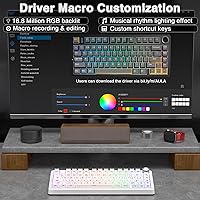
Macro programming and deeper RGB customization require the F75 driver app, and this is where feedback turns critical. Several reviewers reported instability on certain Windows configurations, and the app interface is not particularly intuitive. Mac support through the software is limited, which frustrated a segment of buyers.
Keycap Quality
84%
The side-printed PBT keycaps are a genuine highlight. The legends sit on the side face of each cap, giving the top surface a completely clean look that most buyers found striking in person. The texture is smooth without being slippery, and the legends show no sign of fading even after heavy daily use reported in early reviews.
The side-legend placement, while aesthetically distinctive, does have a learning curve for touch typists who occasionally glance at keys. A small number of users also noted the legends can be harder to read in dimly lit rooms since the RGB shines up rather than illuminating the side print directly.
Multi-Device Switching
78%
22%
Connecting to five devices simultaneously via Bluetooth and toggling between them with a dedicated side button is a legitimate productivity feature for users who bounce between a work laptop, personal computer, and phone. The switching is quick enough not to break workflow rhythm.
Device pairing occasionally requires re-pairing on certain OS updates or after the board has been off for an extended period. Users expecting the flawless instant switching of premium office-grade keyboards may find the experience slightly rougher around the edges.
Gaming Performance
81%
19%
N-key rollover over USB ensures no missed inputs in fast-paced games, and Win-lock prevents accidental Start menu interruptions during competitive play. The LEOBOG star vector switches offered a responsive feel that gamers found adequate for both tactical shooters and fast-paced action titles.
The board is not marketed as a pure gaming peripheral, and it shows in a few places — the software macro system requires extra setup effort compared to plug-and-play gaming brands. The Bluetooth mode is not recommended for gaming due to its slightly higher latency ceiling.
Multi-Function Knob
76%
24%
The dual-mode knob is a thoughtful addition. In office mode it handles volume and play/pause cleanly; in gaming mode it controls RGB brightness and effect cycling. Buyers who use it daily found it becomes second nature within a few sessions, reducing reliance on function-key shortcuts.
The mode-switching mechanic — a five-second long press — is not immediately obvious, and several reviewers discovered it only after reading the manual. The knob also lacks a physical indicator showing which mode is active, which caused momentary confusion for some users.
Value for Money
93%
At its price point, the combination of gasket mount, hot-swap support, tri-mode wireless, a large battery, and factory-lubed switches is difficult to match in the current market. Buyers who have owned more expensive keyboards consistently noted the F75 Pro closes the gap more than its price suggests.
The value equation softens slightly when software limitations are factored in, since buyers who need reliable macro functionality may end up frustrated enough to look elsewhere. The overall package is exceptional value, but only if the driver experience does not become a daily friction point for your workflow.
Noise Level
80%
20%
For an unmodified keyboard, this 75% hot-swap board runs quieter than most budget alternatives thanks to the layered dampening system. Office users and those sharing spaces reported it was acceptable for meetings and coworking environments, particularly with the linear switch option.
It is not a silent keyboard by any standard, and the gasket bounce does generate a distinct sound on the return stroke that some microphone setups pick up during calls. Users who need near-silent operation would still benefit from adding O-rings or switching to a quieter switch variant.
Aesthetic & Design
88%
The Line White colorway with side-printed keycaps looks distinctive on a desk without being loud. RGB shines cleanly upward through the top surface, and buyers praised the overall visual cohesion of the white case, white keycaps, and RGB underglow combination as one of the cleaner designs at this price.
The aesthetic is somewhat niche — the side-printed look is not universally loved, and buyers expecting visible legends from a standard top-down view may find the clean top surface disorienting. Color options are also limited, narrowing the appeal for those who prefer darker or more traditional keyboard aesthetics.
Stabilizer Performance
79%
21%
The pre-lubed stabilizers arrive in noticeably better condition than what is typical for this price bracket. The spacebar and larger modifier keys feel balanced and rattle-free in most units, removing one of the most common pain points associated with budget keyboards.
A portion of users received units where the larger keys still had a faint rattle, suggesting stabilizer lubing is not applied with perfect consistency across every board. Those who are sensitive to any stabilizer noise may want to budget a few minutes for a quick tune after unboxing.

Suitable for:

The AULA F75 Pro is a strong match for keyboard enthusiasts who want a genuinely premium typing experience without spending flagship money. If you have been curious about gasket-mount boards but balked at the price of well-known enthusiast brands, this 75% hot-swap board gives you that soft, bouncy feel at a fraction of the entry cost. Remote workers and students who jump between multiple devices throughout the day will appreciate the five-device Bluetooth pairing and quick switching — one board that handles the work laptop, personal PC, and tablet without a second thought. Switch hobbyists get a hot-swap base that accepts both 3-pin and 5-pin switches, making it a genuinely practical sandbox for experimenting with different switch feels over time. Casual to mid-level gamers benefit from the 2.4GHz wireless for low-latency sessions, N-key rollover, and Win-lock without sacrificing the arrow keys that a 65% layout would eliminate. Anyone drawn to a clean, minimal desk aesthetic will find the side-printed white keycaps and upward RGB glow a genuinely distinctive look that stands out from the sea of top-legend boards at this price.

Not suitable for:

The AULA F75 Pro is not the right fit for every buyer, and it is worth being honest about where it falls short before committing. If macro programming is a core part of your workflow — not just a nice-to-have — the dependency on the F75 driver app is a real friction point, particularly for Mac users or anyone running non-standard Windows configurations where the software has shown instability. Professional typists or office workers who need near-silent operation will find this board louder than a dedicated quiet keyboard, even with the dampening system in place. Competitive gamers at the highest level who demand absolute zero input-lag consistency may prefer a dedicated wired gaming keyboard over any wireless solution, since Bluetooth in particular introduces a latency ceiling that is not ideal for high-stakes play. Buyers who prioritize long-term durability data should also note that this board launched in mid-2025, meaning independent multi-year reliability assessments simply do not exist yet. Finally, anyone who expects plug-and-play access to full RGB customization and macro editing without installing any software will be disappointed — the out-of-box RGB modes are preset, and deeper control lives inside the app.

Specifications

  • Layout: 75% compact layout with 81 keys, retaining dedicated arrow keys and a function row while eliminating the numpad to save desk space.
  • Dimensions: The keyboard measures 14.37″ long, 7.13″ wide, and 2.01″ tall, making it a compact but substantial 75% board.
  • Weight: The unit weighs 2.79 pounds, giving it a planted, desk-stable feel without being impractical to transport.
  • Connectivity: Supports Bluetooth 5.0, 2.4GHz wireless via USB dongle, and wired USB-C, with the ability to pair up to five devices simultaneously.
  • Battery: Equipped with a built-in 4000mAh rechargeable battery that charges via USB-C and supports extended wireless sessions across Bluetooth and 2.4GHz modes.
  • Switch Type: Ships with LEOBOG star vector switches that come factory pre-lubed for a smoother, quieter actuation straight out of the box.
  • Hot-Swap Support: The PCB supports tool-free hot-swapping of both 3-pin and 5-pin mechanical switches, requiring no soldering for replacements.
  • Mount Type: Uses a gasket-mount design with an extended integrated silicone pad that absorbs impact and gives each keypress a softer, more elastic rebound.
  • Sound Dampening: Features a five-layer filling silencer system positioned between the PCB, positioning plate, and switches to reduce cavity resonance and ping.
  • Keycaps: Side-printed PBT keycaps manufactured using double-injection molding and heat sublimation for durability, sweat resistance, and long-term legend retention.
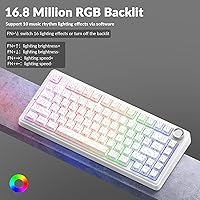
  • Backlighting: Per-key RGB backlighting with multiple preset lighting effects, controllable directly from the keyboard or through the F75 driver software.
  • Control Knob: A multi-function rotary knob toggles between gaming mode (RGB brightness and effect control) and office mode (volume adjustment and media playback) via a five-second long press.
  • Rollover: Full N-key rollover over USB ensures every simultaneous keypress is registered accurately, with no ghosting during fast or complex inputs.
  • PCB Design: Incorporates single-key slotting on the PCB, which individually isolates each switch position to improve per-key sound consistency and reduce flex variance.
  • Extra Features: Includes Win-key lock to prevent accidental taskbar interruptions during gaming, plus per-key and combination macro programming via the F75 driver app.
  • Compatibility: Works with PC, Mac, laptops, tablets, smartphones, PlayStation, and Xbox across all three connection modes, with full functionality varying by platform.
  • Material: The case is constructed from plastic with a contemporary finish, available in a Line White colorway with matching white keycaps.
  • Software: Optional F75 driver software for Windows enables macro programming, custom RGB profiles, and key remapping; basic functionality works without any software installed.

Related Reviews
AULA S99 Pro Keyboard
83%
89%
Connectivity Performance
85%
Ergonomics & Comfort
91%
Customization Options
78%
Typing Experience
74%
Build Quality
More
Ubiquiti UniFi Dream Machine Pro UDM-Pro
86%
94%
Performance
88%
Ease of Use
90%
Reliability
92%
Connectivity
85%
Network Security Features
More
DS18 PRO-DR1PK44 Compression Driver with PRO-H44/BK Horn
86%
96%
High-Frequency Loudness
93%
Sensitivity & Efficiency
88%
Vocal Clarity & Naturalism
86%
Build Quality & Materials
81%
Installation Versatility
More
DS18 PRO-ZXI10MBASS 10-inch Pro Audio Mid Bass Loudspeaker
86%
88%
Sound Quality
91%
Bass Performance
85%
Ease of Installation
87%
Durability and Build Quality
92%
Value for Money
More
Cinema Secrets Pro Cosmetics Ultimate Corrector 5-In-1 Pro Palette No.1
86%
91%
Effectiveness for Color Correction
88%
Blendability
84%
Coverage Customization
85%
Longevity of Wear
93%
Suitability for All Skin Tones
More
Apple MacBook Pro 14-inch M1 Pro 16GB RAM 1TB SSD
87%
95%
Performance
92%
Display Quality
89%
Battery Life
91%
Build Quality
82%
Value for Money
More
Cinema Secrets Pro Cosmetics Ultimate Foundation 5-In-1 Pro Palette 500A
88%
93%
Coverage & Pigmentation
85%
Skin Compatibility (Sensitive Skin)
88%
Ease of Application
90%
Longevity & Wear
91%
Versatility (Contouring & Concealing)
More
HP Pro Tower 290 G9 Desktop (i5-12500, 32GB RAM, 1TB SSD)

81%
96%
Multitasking Capability
91%
Value for Money
88%
Port Selection
84%
Thermal & Acoustic Performance
93%
Boot Speed & Storage
More
RØDE VideoMic Pro+
RØDE VideoMic Pro+
85%
93%
Audio Clarity
88%
Build Quality
91%
Shock Mount & Isolation
89%
Safety Channel
86%
Power Flexibility
More
JONSBO D32 PRO
JONSBO D32 PRO
88%
94%
Build Quality
91%
Cooling Support
89%
GPU Compatibility
88%
Motherboard Compatibility
85%
Ease of Assembly
More

FAQ

No, you do not. The AULA F75 Pro works completely plug-and-play for everyday typing, gaming, and media controls right out of the box. Software only becomes necessary if you want to program custom macros, remap individual keys, or create and save your own RGB lighting profiles. If you are not doing any of that, you can ignore the driver app entirely.

Yes, it connects to both Mac computers and iPads over Bluetooth without any software required. Basic typing and media controls work fine. However, the companion software for macro programming and deep RGB customization is Windows-focused, so Mac users are effectively limited to the keyboard's built-in preset functions for those features.

You can pair up to five devices via Bluetooth and switch between them using shortcut key combinations on the keyboard, or by pressing the dedicated side button. Switching is generally quick, though some users have noted a brief reconnection pause — typically a second or two — particularly when waking the board from sleep on certain devices.

Hot-swappable means you can pull out the existing switches and push in new ones without soldering anything. This 75% hot-swap board supports both 3-pin and 5-pin switches, which covers the vast majority of aftermarket options available. All you need is a switch puller, which usually ships with the keyboard, and the whole process takes just a few minutes even if you have never done it before.

With RGB turned off or set to a low-brightness preset, most buyers report getting well over a week of daily use on a single charge over Bluetooth. Running RGB at full brightness shortens that significantly — expect two to four days in heavy-use scenarios with bright lighting. The 2.4GHz wireless mode also draws more power than Bluetooth, so battery life varies meaningfully depending on which connection mode you use most.

Over 2.4GHz, the latency is low enough that most gamers cannot distinguish it from wired use in everyday play. Bluetooth introduces a slightly higher latency ceiling, which is fine for typing and casual gaming but not ideal for fast-paced competitive titles where every millisecond matters. For serious gaming sessions, the 2.4GHz dongle is the recommended connection mode.

The knob has two modes: gaming mode, where rotating it adjusts RGB brightness and clicking it cycles through lighting effects; and office mode, where rotating adjusts system volume and clicking plays or pauses media. You switch between modes by holding the knob down for about five seconds. It is not immediately obvious — there is no physical indicator showing which mode is active — but most users pick it up quickly within a day or two of regular use.

It depends on how you type. If you are a touch typist who rarely looks down, the clean top surface is a non-issue and looks great. If you do glance at keys occasionally, the legends are on the front face of each keycap rather than the top, which requires a slightly different line of sight. In well-lit rooms it is perfectly readable; in dim lighting it can be trickier since the RGB shines upward rather than illuminating the side legends directly.

Not by the standards of its price range. The gasket mount gives it a softer, more cushioned feel than typical tray-mount budget keyboards, and the pre-lubed stabilizers keep the larger keys like the spacebar reasonably quiet and stable. A small number of buyers did receive units with slight stabilizer rattle on the larger keys, but this is easy to address with a quick re-lube if needed.

It is actually one of the better entry points available right now. The switches come pre-lubed so the typing experience is good immediately, hot-swapping lets you experiment without any technical skills, and the tri-mode wireless means it works across essentially any device you own. The only area where beginners might feel a bit lost is the driver software, but since it is entirely optional for standard use, you can grow into that part at your own pace.