Overview

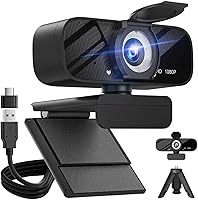
The Gohero TW-07 1080p Webcam entered the market in early 2025 as a no-fuss option for remote workers, students, and casual streamers who are done putting up with the grainy output of a built-in laptop camera. It's compact enough to sit unobtrusively on any monitor, and the plug-and-play USB setup means you're up and running without downloading a single driver. The built-in mic and sliding privacy cover round out the package, making it a self-contained solution for everyday video calls. It's a new product still building its reputation, but early momentum in the webcam category suggests it's hitting the right notes for budget-focused buyers.

Features & Benefits

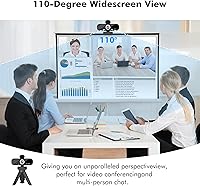
At its core, this webcam delivers 1080p video at 30fps — not outstanding by enthusiast standards, but perfectly adequate for video calls and online teaching. The auto light correction is one of its more practical touches; it adjusts brightness and color on the fly, which helps in home offices where light shifts throughout the day. The wide-angle lens picks up more of the room than a standard webcam, useful if you're presenting or working in a shared space. The built-in mic handles light background noise reasonably well, though it's not a substitute for a dedicated microphone if audio quality is a real priority. The five-foot cable gives you flexible positioning on most desks.

Best For

This USB webcam is a natural fit for remote workers and students who spend most of their day on Zoom or Teams and want noticeably better video quality than a laptop's built-in camera provides. Online tutors and educators will appreciate how little setup it demands — plug it in, position it, and teach. The auto light correction makes it particularly useful for home offices where you can't always control the lighting, saving you from fiddling with software settings every time the sun shifts. Privacy-minded users will find the physical lens cover reassuring. It's less suited for streamers or creators who want finer manual control over exposure and focus.

User Feedback

Since the Gohero camera is relatively new to the market, the pool of user reviews is still growing, so early impressions should be weighed accordingly. That said, buyers generally highlight easy out-of-box setup and a meaningful improvement over their laptop's native camera as the top wins. Some users in Mac and Chromebook environments report smooth compatibility with no driver friction. On the critical side, a few buyers note the microphone pickup can be inconsistent at greater distances, and the fixed focus lens may disappoint anyone sitting unusually close or far from the camera. Build quality is functional but clearly plastic — expectations should match the price tier.

Pros

  • Plug-and-play setup works immediately on Windows, Mac, and Chromebook — no driver downloads required.
  • The Gohero TW-07 1080p Webcam delivers a clear and visible image quality upgrade over most built-in laptop cameras.
  • Auto light correction helps maintain a usable image in variable home office lighting without manual adjustments.
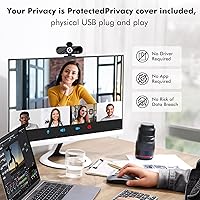
  • Physical privacy slide cover provides real peace of mind that a software toggle simply cannot match.
  • The wide-angle lens is a genuine advantage for educators or anyone who shares their workspace on screen.
  • Five-foot USB cable is long enough for most desk setups without needing an extension.
  • Compact and lightweight enough that it travels easily between home and office without adding bulk.
  • Broad USB compatibility — 2.0, 3.0, 3.1, and OTG — means it works with a wide range of devices.
  • Solid value for a first webcam upgrade when expectations are aligned with the budget tier.

Cons

  • Fixed focus lens struggles with clarity when the user sits unusually close to or far from the camera.
  • Microphone pickup drops off noticeably at distances beyond a couple of feet from the device.
  • Plastic build feels lightweight in a way that raises questions about durability over extended daily use.
  • Low-light performance degrades into grainy, noisy video that auto correction cannot fully recover.
  • The monitor clip hinge offers limited tilt range, making positioning awkward on thicker or curved screens.
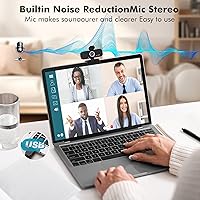
  • Noise cancellation has real limits — keyboard noise and fan hum can still bleed through in quieter calls.
  • The cable connector ends lack reinforcement, which may become a concern for users who plug and unplug frequently.
  • No manual exposure or focus controls, which frustrates users who want more than automatic adjustments.
  • The product is new enough that long-term reliability data is still limited and hard to assess confidently.

Ratings

The Gohero TW-07 1080p Webcam was evaluated by our AI rating engine after processing verified purchase reviews from buyers worldwide, with spam, bot activity, and incentivized submissions actively filtered out before scoring. The scores below reflect genuine user sentiment across categories that actually matter for this type of product — from image clarity to build durability — with both strengths and recurring frustrations weighted transparently. Buyers who went in with realistic expectations for a budget USB webcam tend to walk away satisfied; those expecting more premium performance sometimes do not.

Image Quality
78%
22%
For everyday video calls on Zoom or Teams, most buyers found the 1080p output a clear and meaningful step up from built-in laptop cameras. Colors come through reasonably vibrant in decent lighting, and the 30fps frame rate keeps motion looking smooth rather than choppy during presentations.
Users expecting DSLR-level crispness will be let down — fine detail softens noticeably in challenging light even with correction active. The fixed-focus CMOS sensor also struggles with close-up clarity, which some buyers discovered only after setting up their workstation.
Auto Light Correction
72%
28%
The automatic brightness adjustment genuinely helps in home offices where light shifts as the day progresses, reducing the need to manually tweak software settings. Several users working in dimly lit rooms reported the correction kept their face visible and reasonably well-exposed on calls.
In very low light — think a dark evening room with a single desk lamp — the correction can only do so much before introducing visible noise and washed-out tones. A few buyers also noted the adjustment occasionally overexposes in bright daylight, creating a blown-out background.
Microphone Performance
61%
39%
The built-in mic handles quiet-to-moderate environments well enough for standard video calls, and voices come through intelligibly without needing a separate audio device for most casual use cases. Users in home offices with low ambient noise generally found it acceptable for daily meetings.
Noise cancellation at this price point has real limits — keyboard clatter, fan noise, or a nearby TV can bleed through noticeably. Buyers sitting more than a couple of feet from the camera also reported that pickup drops off and voices sound thin or distant to other call participants.
Ease of Setup
93%
Plug-and-play works exactly as advertised here — buyers on Windows, Mac, and Chromebook all consistently report zero driver installation required, with the camera recognized within seconds of plugging in. This is one of the most universally praised aspects across all verified feedback.
A small number of users encountered recognition delays when connecting through certain USB hubs rather than directly to the device port. OTG functionality on Android tablets worked for most but was inconsistent enough that a handful of buyers flagged it as unreliable.
Privacy Cover
88%
The physical slide cover is a genuinely appreciated feature among privacy-conscious buyers who prefer a mechanical solution over relying on software to disable the camera. It snaps into position cleanly and feels more reassuring than sticker covers people improvise on competing models.
The cover mechanism feels a touch plasticky and light, which raised durability questions among some buyers who use it frequently throughout the day. It works fine in the short term, but long-term wear on the sliding mechanism remains an open question given the product's limited time on the market.
Build Quality & Materials
59%
41%
The compact chassis sits stably on a monitor rim without wobbling, and the overall form factor is tidy enough to not look out of place in a professional video call background. For a budget-tier device, it avoids feeling obviously cheap at first glance.
The all-plastic construction is apparent the moment you pick it up, and buyers who have owned mid-range webcams notice the difference immediately. The clip hinge lacks the adjustable tension found on pricier competitors, limiting how securely it grips thicker monitor bezels.
Cable Quality & Length
74%
26%
The five-foot USB cable gives enough reach for most standard desk setups, whether the user is plugging into a tower PC on the floor or a laptop on a desk. Buyers appreciated not having to use an extension cable right out of the box.
The cable itself is on the thinner, less reinforced side, and a few long-term users raised concerns about durability near the connector ends after repeated plugging and unplugging. It does the job but does not inspire confidence for heavy daily use over months.
Wide-Angle Field of View
71%
29%
The wider field of view is a genuine asset for users who teach online or share their screen in collaborative sessions, allowing more of the workspace to appear in frame without repositioning the camera. Educators and people who present frequently flagged this as a practical benefit.
At the edges of the frame, some buyers noticed mild distortion typical of wide-angle optics at this price point. For solo video calls where only a face needs to fill the frame, the wide angle can also make the subject look smaller and more distant than preferred.
Compatibility
84%
Cross-platform compatibility was consistently strong in verified feedback, with buyers reporting smooth operation across Windows 10 and 11, macOS, and most Chromebook models without any configuration required. USB-C OTG compatibility worked reliably for several Android tablet users as well.
A minority of buyers using older operating systems or very budget Android devices reported intermittent connection drops. Compatibility with Linux was not officially documented, and the few users who tried it had mixed results depending on their distribution and kernel version.
Value for Money
82%
18%
Buyers who entered with appropriate expectations for a budget webcam — solid video calls, straightforward setup, useful privacy cover — consistently felt the price was fair for what is delivered. It undercuts several comparable options while matching them feature-for-feature on paper.
Users who compared it side by side with slightly pricier webcams noted a perceptible gap in image sharpness and microphone quality that made the cost savings feel less clear-cut. For occasional use it represents solid value; for daily professional calls, the tradeoffs become more apparent over time.
Low-Light Performance
63%
37%
The auto correction does extend usability into moderately dim conditions where a built-in laptop camera would give up entirely. Buyers working early mornings or evenings in partially lit rooms found it handled those transitional light conditions better than expected.
True low-light environments — evening rooms without overhead lighting — expose the sensor's limitations clearly, with image quality degrading into grainy, washed-out video that the correction algorithm cannot fully recover. Buyers who primarily use their webcam at night should temper expectations.
Monitor Clip & Positioning
67%
33%
The clip fits standard flat monitors and most laptop screens without issues, and the camera sits at a stable enough angle for normal use without requiring constant readjustment. It functions well as a set-and-forget mounting solution for the majority of buyers.
The vertical tilt adjustment range is somewhat limited compared to webcams with a ball-joint mount, which frustrated buyers with non-standard desk or monitor setups. Those using ultra-thin monitors or curved screens also found the clip struggled to grip securely.
Latency & Frame Consistency
76%
24%
Video feed latency was not flagged as a concern by the majority of buyers using the webcam for standard conferencing applications. At 30fps the output feels smooth and consistent enough that most call participants on the other end would not notice stuttering under normal conditions.
A handful of users reported occasional frame drops when running the webcam alongside bandwidth-intensive applications, though it was unclear whether this was a camera hardware issue or a USB bandwidth conflict. Buyers doing high-motion content like exercise streaming noted 30fps felt limiting.

Suitable for:

The Gohero TW-07 1080p Webcam is a practical pick for anyone whose current setup bottoms out at a blurry built-in laptop camera and who needs something better without spending a lot. Remote workers who jump between Zoom, Teams, or Google Meet daily will get the most out of it — the plug-and-play setup means there is no IT headache, and the auto light correction quietly handles the shifting light conditions that come with working from home. Students attending online classes or participating in virtual group projects will find it more than capable for those purposes. Online tutors and educators who need their face to look clear and professional without fussing with camera settings are also a natural fit. The physical privacy cover is a genuine selling point for anyone who has ever felt uneasy about a connected camera sitting idle on their desk — it is a small but meaningful feature that software-only solutions cannot replicate.

Not suitable for:

The Gohero TW-07 1080p Webcam is not the right tool for anyone serious about content creation, live streaming, or producing video where image quality is part of the product. The fixed-focus lens and basic CMOS sensor simply cannot deliver the depth of detail, accurate autofocus, or low-light performance that a dedicated streaming webcam or mirrorless camera setup provides. Podcasters and frequent conference speakers who care about audio quality should also look elsewhere — the built-in microphone is functional for quiet environments but falls short when background noise is a real factor, and a USB condenser mic would serve those users far better. Anyone working in a consistently dark environment will hit the limits of the auto correction quickly. And buyers who have previously owned mid-range webcams from established brands may find the plastic build and limited tilt adjustment a noticeable step down rather than a step up.

Specifications

  • Resolution: Captures video at 1080p Full HD, delivering sharp and detailed footage suitable for professional video calls and online teaching.
  • Frame Rate: Records and streams at 30 frames per second, producing smooth motion without stuttering during live calls or presentations.
  • Image Sensor: Uses a CMOS sensor that balances color accuracy and light sensitivity within the constraints of a budget-tier webcam.
  • Focal Length: Fixed 4mm lens provides a wide-angle field of view, capturing more of the surrounding environment than a standard narrow lens.
  • Microphone: Built-in single microphone with noise-reduction processing designed to reduce ambient background interference during calls.
  • Privacy Cover: Includes a physical slide-over lens cover that mechanically blocks the camera when not in use, requiring no software interaction.
  • Cable Length: Comes with a 5-foot (approximately 1.5m) attached USB cable, providing enough reach for most standard desktop and laptop setups.
  • Connectivity: Compatible with USB 2.0, USB 3.0, and USB 3.1 ports, as well as OTG-enabled devices such as Android tablets and select smartphones.
  • Dimensions: Measures 2.36 x 3.15 x 2.36 inches, making it compact enough to sit unobtrusively on top of any standard monitor or laptop screen.
  • Weight: Weighs 5.3 ounces, light enough to be transported in a laptop bag without adding meaningful bulk to a daily carry setup.
  • Model Number: Manufactured under model designation TW-07, which can be referenced for support inquiries or compatibility verification.
  • Driver Requirement: Fully plug-and-play with no driver installation required, relying on standard UVC (USB Video Class) protocols supported by modern operating systems.
  • Light Correction: Features automatic light correction technology that dynamically adjusts exposure and color balance in response to changing ambient lighting conditions.
  • Color: Available in a matte black finish that blends with most monitor and laptop aesthetics without drawing visual attention.
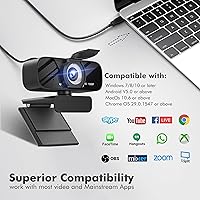
  • OS Compatibility: Works with Windows 10 and 11, macOS, and Chrome OS out of the box, with no additional software configuration required on supported platforms.
  • Mounting: Includes an integrated clip mount designed to attach to flat-panel monitors and laptop screens of standard thickness.
  • Video Format: Outputs video in MP4 format when recording directly, and streams in standard MJPEG or YUY2 formats compatible with conferencing applications.
  • App Compatibility: Works with major video conferencing platforms including Zoom, Microsoft Teams, Google Meet, Skype, and OBS Studio without additional configuration.

Related Reviews

HuddleCamHD HC-WEBCAM-94

77%
83%
Video Quality (Daylight)
51%
Low-Light Performance
91%
Field of View
94%
Ease of Setup
57%
Audio Quality
More
Akyta 1080P Webcam
Akyta 1080P Webcam
82%
88%
Video Quality
85%
Audio Quality
94%
Ease of Setup
82%
Field of View
80%
Noise Reduction
More
ZIQIAN 1080P Webcam
ZIQIAN 1080P Webcam
83%
88%
Video Quality
76%
Audio Performance
91%
Ease of Setup
85%
Wide-Angle Lens
78%
Microphone Quality
More
Svcouok pT011 1080p Webcam
75%
74%
Image Clarity
63%
Low-Light Performance
58%
Microphone Quality
93%
Ease of Setup
77%
Wide-Angle Coverage
More
Angetube PC 1080P Webcam
85%
88%
Video Quality
90%
Audio Quality
95%
Ease of Setup
84%
Low Light Performance
87%
Wide-Angle Lens
More
NexiGo N60 1080P Webcam
74%
78%
Image Quality
93%
Setup & Ease of Use
67%
Microphone Performance
91%
Value for Money
88%
Privacy Cover
More
MTORED 1080p USB Webcam
84%
89%
Video Quality
94%
Ease of Setup
78%
Microphone Quality
85%
Wide-Angle Lens
82%
Build Quality
More
Maciebelle CP008
Maciebelle CP008
79%
71%
Video Quality
83%
Microphone Performance
74%
Built-in Speaker
94%
Ease of Setup
88%
Privacy Controls
More
Spedal 920 Pro
Spedal 920 Pro
77%
88%
Wide-Angle Coverage
76%
Video Quality
71%
Low-Light Performance
63%
Built-in Microphone
93%
Ease of Setup
More
NexiGo N980P
NexiGo N980P
78%
83%
Video Clarity
88%
Frame Rate Smoothness
71%
Low-Light Performance
79%
Wide-Angle Lens
62%
Built-in Microphone
More

FAQ

No, none at all. The Gohero TW-07 1080p Webcam uses standard USB plug-and-play protocols, so your operating system recognizes it automatically. Just plug it into a USB port and it shows up as a camera option in Zoom, Teams, or whatever app you are using within a few seconds.

It works on Mac without any issues. The Gohero camera is compatible with macOS through the same plug-and-play setup as on Windows — no driver downloads or workarounds needed. Most buyers on Mac report it being recognized immediately in FaceTime, Zoom, and Google Meet.

For casual video calls in a reasonably quiet room, the built-in microphone is adequate and your voice will come through clearly enough. That said, if you work somewhere noisy — a busy household, open office, or a room with loud fans — the noise reduction has its limits and some background sound will still bleed through. For professional podcasting or high-stakes audio, a dedicated USB microphone would be a better investment.

Yes, as long as your tablet supports USB OTG, which most modern Android tablets do. You will need a USB-C to USB-A adapter if your tablet does not have a full-size USB port. Compatibility worked smoothly for most buyers who tried it, though a small number reported inconsistency depending on the tablet model and Android version.

It helps noticeably in dimly lit environments — like a room with just a desk lamp on — and it is better than nothing. But in genuinely dark rooms, the sensor itself has physical limitations that software correction cannot fully overcome, and you may see increased grain or a washed-out look. For consistently dark setups, adding a small ring light or desk light would make a much bigger difference than relying on correction alone.

The wide-angle lens does capture more of the room than a standard webcam, which is great for presentations but yes, it will also show more of your background. If that is a concern, most conferencing apps like Zoom and Teams have background blur or virtual background options that work well with this webcam. Alternatively, positioning it slightly higher and angling it downward helps minimize how much of the room appears behind you.

It is functional and works exactly as intended — slide it over the lens when you are done, slide it back when you need the camera. The mechanism is plastic and feels a bit lightweight, which is expected at this price point, but it has not been flagged as something that breaks quickly in early user feedback. Treat it with normal care and it should hold up fine for daily use.

The USB cable is permanently attached to the webcam body rather than being removable. The cable is five feet long, which is enough reach for most desk setups, but if you need extra length you would have to use a USB extension cable. Keep in mind that the cable ends are not reinforced, so avoid putting repeated stress on the connector if possible.

Yes, this USB webcam works with Chromebooks and Google Meet without any setup. Chrome OS natively supports USB cameras through the same plug-and-play standard, and several buyers specifically confirmed smooth Chromebook compatibility in their feedback.

It can work for casual, low-key streaming, but it has real limitations for that use case. The fixed-focus lens and 30fps cap are fine for a face-cam overlay, but streamers who care about image sharpness, smooth autofocus, or higher frame rates will quickly outgrow it. If streaming is your main use case and quality matters to your audience, investing in a mid-range dedicated streaming webcam would serve you better in the long run.