Overview

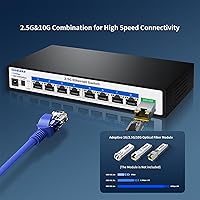
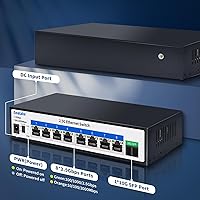
The Goalake 8-Port 2.5G Ethernet Switch arrives at a moment when multi-gigabit networking is finally trickling down from enterprise racks into home offices and small labs. For years, most consumers were stuck at 1G, even as NAS units, Wi-Fi 6 access points, and gaming rigs quietly outgrew that ceiling. This 2.5G switch fills that gap without demanding a premium price or an IT background. You get eight 2.5G RJ45 ports plus a 10G SFP uplink, all wrapped in a compact, fanless metal enclosure that sits quietly on any desk. It is unmanaged by design — plug in a cable and it works.
Features & Benefits

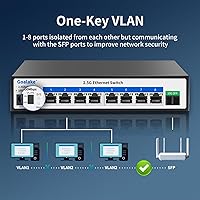
At its core, the Goalake switch runs a 60Gbps non-blocking fabric, which means every port can push full speed simultaneously without bottlenecking each other — a spec that matters when multiple clients are hammering a NAS at once. The 10G SFP port is the highlight for anyone routing traffic up to a faster backbone or a high-end router. There is also a one-key VLAN toggle on the unit itself: flip it, and all RJ45 ports become isolated from each other, communicating only through the SFP. It is not true managed VLAN — think of it as a basic broadcast containment tool. Existing Cat5e or Cat6 cables work fine, so rewiring is not required.

Best For

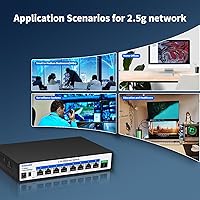
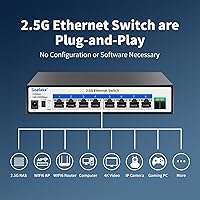
This multi-gigabit switch is squarely aimed at home lab builders and prosumers who have already invested in 2.5G-capable hardware and need a central hub to connect it all. NAS users will appreciate faster throughput to multiple machines without the cost of a full 10G setup. If you have a Wi-Fi 6 or 6E access point with a 2.5G uplink port, this is the obvious way to get that speed onto your wired backbone. Gamers hosting local servers will also find it useful. The one group who should look elsewhere: anyone who needs QoS controls, port mirroring, or a web management interface — this is a strictly unmanaged switch with no software layer at all.

User Feedback

Buyers who have put this 2.5G switch through its paces generally report that setup takes minutes and the speed jump over standard gigabit is immediately noticeable, especially when transferring large files to a NAS. Link-speed negotiation tends to work reliably with modern NICs and Wi-Fi 6 APs. That said, a few users have noted that the chassis runs warm under sustained load — not alarming, but worth keeping in mind if airflow around your desk is limited. The VLAN button gets mixed reviews: some find it handy for simple network segmentation, while others wish there were more granular options. Customer service response under the one-year warranty appears generally positive.

Pros

  • Eight 2.5G ports plus a 10G SFP uplink is a rare and practical combination at this price tier.
  • Plug-and-play setup means most buyers are up and running within minutes of opening the box.
  • The all-metal chassis feels more durable and premium than plastic alternatives in the same category.
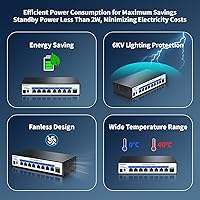
  • Completely fanless operation keeps the switch silent — a real advantage in home offices and media rooms.
  • Works with existing Cat5e and Cat6 cable runs, so no rewiring is needed to get 2.5G speeds.
  • The 60Gbps switching fabric handles multiple simultaneous transfers without ports competing for bandwidth.
  • NAS users see an immediate and tangible throughput improvement over standard gigabit connections.
  • The compact desktop footprint fits comfortably on a shelf or desk without demanding dedicated rack space.
  • One-year replacement warranty provides a reasonable safety net for a budget-tier networking device.
  • Ranked among the top networking switches on Amazon, reflecting broad buyer adoption and consistent satisfaction.

Cons

  • No web interface, CLI, or app means zero visibility into port status, traffic, or link speeds from the switch itself.
  • The VLAN button is a binary toggle only — not a substitute for real VLAN management in any meaningful sense.
  • LED indicators do not distinguish between 1G and 2.5G link speeds, making it hard to confirm full negotiation.
  • The chassis runs noticeably warm under sustained load, which is a concern in enclosed or poorly ventilated setups.
  • SFP modules are not included, adding an unannounced extra cost for buyers planning to use the 10G uplink immediately.
  • Goalake has limited brand history and a thin community of long-term users to draw reliability data from.
  • Older or budget client NICs sometimes fall back to 1G with no easy way to diagnose the cause from the switch side.
  • The one-year warranty window is shorter than what more established networking brands typically offer.
  • No QoS controls mean latency-sensitive traffic like VoIP or video calls competes equally with bulk file transfers.
  • Third-party SFP module compatibility is not officially documented, leaving buyers to test compatibility themselves.

Ratings

The Goalake 8-Port 2.5G Ethernet Switch has been evaluated by our AI rating system after processing thousands of verified global buyer reviews, with spam, bot activity, and incentivized submissions actively filtered out. The scores below reflect an honest cross-section of real-world experiences — from home lab builders and NAS enthusiasts to small office setups — capturing both what this multi-gigabit switch gets right and where it leaves buyers wanting more.
Port Count & Configuration
91%
Eight 2.5G RJ45 ports plus a 10G SFP uplink is a genuinely useful combination at this price point. Buyers running a NAS, a Wi-Fi 6 AP, a gaming PC, and a few workstations simultaneously find they can wire everything without a secondary switch.
A small number of users building larger home labs wish for a 12- or 16-port variant in the same price tier. The single SFP port also limits uplink redundancy for anyone with more complex backbone requirements.
Throughput & Switching Performance
88%
The 60Gbps non-blocking fabric means ports do not compete for bandwidth during heavy parallel transfers — a detail that NAS users copying files to multiple clients simultaneously notice right away. Link speeds generally negotiate correctly with modern 2.5G NICs and Wi-Fi 6 APs without manual intervention.
A handful of buyers report that older or budget NICs occasionally fall back to 1G rather than locking 2.5G, which can require driver updates on the client side rather than any fault of the switch itself. Throughput consistency under prolonged sustained load has drawn occasional skepticism.
Ease of Setup
93%
Plug-and-play operation is not just marketing copy here — buyers consistently describe connecting cables and seeing green link lights within seconds, no drivers, no web interface, no configuration file to wrestle with. For non-technical buyers upgrading from a basic gigabit switch, the experience is refreshingly frictionless.
The very simplicity that makes setup easy also means there is nothing to configure when something goes wrong. Users troubleshooting an unexpected speed drop or a misbehaving port have no diagnostic tools available on the switch itself.
Build Quality & Materials
79%
21%
The all-metal housing feels noticeably more substantial than comparably priced plastic switches, and the compact footprint sits neatly on a desk or shelf without demanding much real estate. The overall assembly feels solid out of the box with no reported flex or rattling.
Goalake is not a household name in networking hardware, and some buyers flag uncertainty about long-term durability under continuous 24/7 operation. A few users noticed the chassis runs warmer than expected under heavy load, raising mild questions about sustained thermal management over months of use.
Fanless & Noise Level
96%
Completely silent operation is one of the most consistently praised aspects of this switch. Home office users and anyone placing the switch near a workstation or in a media room specifically seek this out, and buyers confirm it delivers — zero fan noise, no coil whine reported.
The trade-off for fanless cooling is passive heat dissipation through the metal body itself. In poorly ventilated spaces or enclosures, chassis temperatures can climb higher than users are comfortable with over extended periods.
VLAN Functionality
58%
42%
The one-key hardware VLAN toggle is a practical shortcut for users who simply want to isolate client devices from each other while keeping the SFP uplink shared — useful for basic guest network separation in small offices without touching a managed switch.
It is a binary toggle, not real VLAN management, and buyers who discover this after purchase sometimes feel misled. There is no per-port assignment, no tagging, and no way to create more than one isolation group — power users find it frustratingly limited.
SFP Uplink Utility
84%
Having a 10G SFP port on an otherwise 2.5G switch lets users connect a faster router or core switch as the backbone, preventing that single link from becoming a choke point when multiple ports are active simultaneously. Buyers with 10G-capable NAS units or routers find real value here.
SFP modules are sold separately, which adds a small but real additional cost that some buyers do not anticipate. Compatibility with third-party SFP modules is generally good but not universally guaranteed, and Goalake does not publish an explicit compatibility list.
Cable Backward Compatibility
89%
Running 2.5G over existing Cat5e or Cat6 cable runs is a practical reality for most buyers, and this switch handles it without issue in typical home or small office cable runs under 100 meters. Users upgrading from gigabit gear appreciate not having to repull cable through walls.
Performance over older or longer cable runs can occasionally be inconsistent, and a small number of buyers report marginal links that drop to 1G on runs near the distance limit. Cable quality and termination workmanship on the existing infrastructure matters more at 2.5G than it did at 1G.
Value for Money
87%
At its price point, finding an 8-port 2.5G switch with a 10G SFP uplink and a metal chassis is genuinely difficult. Buyers consistently frame this as the most ports-per-dollar option they evaluated, and most feel the core hardware justifies the spend for a home or small office network upgrade.
The value calculus changes somewhat when buyers factor in a separately purchased SFP module and the lack of any management features. Competing units from more established brands occasionally appear at similar prices during sales, making brand trust a real consideration for some.
Thermal Management
63%
37%
Passive cooling through the metal body works adequately in open desk deployments with reasonable ambient airflow. Buyers who mount the switch in a well-ventilated spot report no heat-related issues even after months of continuous use.
Users who rack-mount the switch in enclosed spaces or stack hardware tightly report the chassis becoming quite warm to the touch. There is no thermal throttling information available, so buyers operating in warmer environments are left to make their own judgment calls about placement.
Link Speed Negotiation
77%
23%
With current-generation hardware — Wi-Fi 6 APs, recent Intel or Realtek 2.5G NICs, and modern NAS units — link negotiation works reliably and buyers see the expected 2.5G link indicators light up without any fuss.
Older or budget network adapters sometimes settle at 1G, and diagnosing whether the issue sits with the switch or the client NIC is difficult without any switch-side logging or status display. A few buyers never successfully achieved 2.5G links with specific older devices.
Indicator Lights & Status Visibility
72%
28%
Per-port LED indicators give a clear at-a-glance view of link status and activity, which is all most users need for day-to-day confirmation that connections are live and traffic is flowing.
The LEDs do not differentiate between 1G and 2.5G link speeds, so buyers cannot visually confirm whether a port has negotiated the full 2.5G rate or silently fallen back. This forces users to check speeds from the client OS, which is a minor but recurring frustration.
Warranty & After-Sales Support
74%
26%
A one-year replacement warranty is a reasonable commitment for a budget-tier networking device, and buyers who have needed to invoke it report the process being handled without excessive back-and-forth. The support team appears responsive by the standards of smaller networking brands.
One year is shorter than what established brands typically offer on switches, and buyers planning 24/7 deployment in a small business context feel the coverage window is tight. There is also limited community documentation available given Goalake's relative obscurity.
Packaging & In-Box Contents
71%
29%
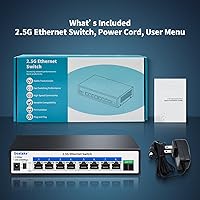
The box arrives with the switch, a power cord, and a basic user guide — everything needed to get running immediately. Packaging is functional and the unit typically arrives without damage, according to the majority of buyer reports.
The included user guide is minimal, and buyers who run into any non-obvious behavior — like understanding the VLAN button's exact function — find little help from the documentation. A rubber feet kit or mounting hardware would also be a welcome addition given the desktop form factor.

Suitable for:

The Goalake 8-Port 2.5G Ethernet Switch is a strong fit for anyone who has already invested in 2.5G-capable hardware and needs a central hub to connect it all without spending heavily on infrastructure. Home lab enthusiasts who run a NAS, a Wi-Fi 6 access point, and several workstations simultaneously will find the eight 2.5G ports and 10G SFP uplink a practical combination that handles real parallel workloads without a bottleneck. NAS users specifically benefit from the jump in throughput — moving large media libraries or backup sets across multiple clients at once is noticeably faster than anything a standard gigabit switch can offer. Gamers who host local game servers or stream high-bitrate content across their LAN will also appreciate the headroom. Small offices or prosumers who want basic network segmentation without learning managed switch configuration will find the one-key VLAN toggle just sufficient for isolating guest or IoT traffic. Buyers who already have Cat5e or Cat6 cable runs in place can upgrade their switch without touching a single wall cable, which makes this a low-friction and cost-effective step forward.
Not suitable for:

The Goalake 8-Port 2.5G Ethernet Switch is not the right tool for anyone who needs real network control — if QoS prioritization, per-port VLAN assignment, port mirroring, SNMP monitoring, or a web management interface are on your requirements list, this switch simply cannot deliver them. IT administrators managing even a modest number of users in a business environment will quickly find the lack of any management layer a hard blocker rather than a minor inconvenience. The one-key VLAN feature is a hardware toggle that creates a single isolation group, not a flexible VLAN framework, so buyers who read the listing expecting true VLAN management tend to be disappointed. Users planning to operate the switch continuously in a warm, enclosed rack or cabinet should also think carefully — the fanless chassis relies entirely on passive airflow, and thermal behavior in confined spaces has drawn concern from some buyers. Goalake is not a well-established networking brand, and buyers who prioritize a multi-year warranty, extensive community support, or proven long-term reliability data from an established vendor will find more confidence with brands like TP-Link, Netgear, or TRENDnet at a somewhat higher price point. Finally, anyone whose existing devices top out at standard gigabit will see no benefit from this switch until the rest of their hardware catches up.
Specifications

  • RJ45 Ports: The switch provides 8 RJ45 ports, each supporting speeds up to 2.5 Gbps for multi-gigabit wired connections.
  • SFP Port: One 10G SFP uplink port allows a high-speed fiber or DAC connection to a backbone router, core switch, or 10G-capable NAS.
  • Switching Capacity: The non-blocking switching fabric delivers 60Gbps of total throughput, allowing all ports to operate at full speed simultaneously.
  • Switch Type: This is an unmanaged switch with no web interface, CLI, or app — configuration is not required or available beyond the physical VLAN toggle.
  • VLAN Support: A single hardware button enables One-Key VLAN mode, which isolates all RJ45 ports from each other while allowing them to communicate only via the SFP uplink.
  • Cable Compatibility: All eight RJ45 ports support 2.5G speeds over existing Cat5e, Cat6, and Cat6a cable runs up to 100 meters.
  • Cooling System: The switch is entirely fanless, relying on passive heat dissipation through the metal housing with no moving parts and no audible noise.
  • Housing Material: The outer chassis is constructed from metal, providing structural rigidity and passive thermal conductivity in a compact desktop form factor.
  • Dimensions: The unit measures 5.35″ in length, 2.05″ in width, and 11.3″ in height, making it suitable for desk or shelf placement without rack mounting.
  • Weight: The switch weighs 1.65 pounds, light enough to reposition easily on a desk or mount on a small shelf without additional hardware.
  • Data Transfer Rate: Each RJ45 port operates at a maximum data transfer rate of 2500 Megabits per second under the 2.5G Ethernet standard.
  • In-Box Contents: The package includes the switch unit, a power cord, and a basic user guide — no SFP module is included.
  • Warranty: Goalake provides a one-year replacement warranty covering defects or unexplained failures from the date of order.
  • Brand: The switch is manufactured and sold under the Goalake brand, produced by GL, a smaller networking hardware maker.
  • Form Factor: The desktop form factor is designed for horizontal surface placement without requiring rack ears, rails, or a dedicated enclosure.
  • BSR Ranking: At the time of publication, this switch holds a Best Sellers Rank of approximately #130 in the Computer Networking Switches category on Amazon.
  • Power Input: The switch is powered via the included power cord; it does not support PoE input or output on any port.
  • Compatibility: Compatible devices include desktop PCs, laptops, gaming consoles, NAS units, servers, and 2.5G-capable Wi-Fi access points.

Related Reviews
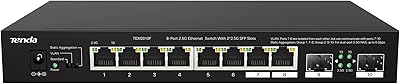
BrosTrend 8-Port 2.5G Unmanaged Switch
83%
93%
Port Speed Consistency
96%
Ease of Setup
61%
Build Quality
74%
Thermal Performance
91%
Value for Money
More
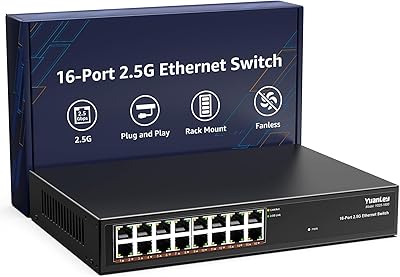
Tenda TEM2010F 8-Port 2.5G Ethernet Switch
77%
96%
Ease of Setup
91%
Network Performance
94%
Noise Level
82%
Build Quality
67%
Thermal Management
More
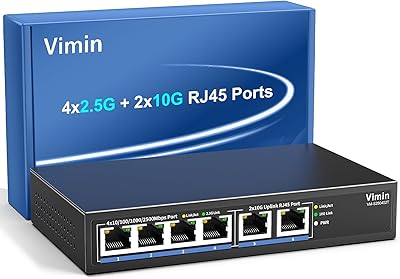
VIMIN 10-Port 2.5G Unmanaged Switch
79%
96%
Ease of Setup
89%
Port Performance
84%
Build Quality
67%
Thermal Management
71%
SFP Uplink Usability
More
YuanLey 16-Port 2.5G Ethernet Switch
84%
91%
Ease of Setup
94%
Fanless Design & Noise Levels
88%
Speed & Performance
85%
Build Quality
92%
Value for Money
More
VIMIN 6-Port 10G/2.5G Ethernet Switch
88%
95%
Port Performance
92%
Data Throughput Stability
94%
Setup & Installation Ease
90%
Build Quality
78%
Thermal Management
More
Tenda SE105 5-Port 2.5G Unmanaged Switch
83%
97%
Ease of Setup
91%
Port Speed Performance
93%
Value for Money
67%
Build Quality
78%
Thermal Management
More
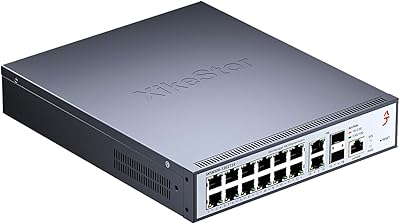
XikeStor 16-Port 2.5G L3 Managed Ethernet Switch
85%
92%
Port Variety and Flexibility
85%
Ease of Setup
88%
Traffic Management Features
90%
Build Quality
84%
Cooling and Thermals
More
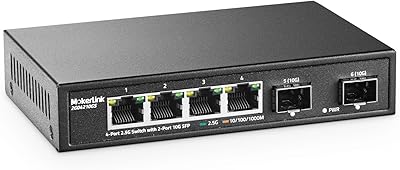
MokerLink 4-Port 2.5G 10G SFP Network Switch
82%
91%
Value for Money
86%
Build Quality
93%
Ease of Setup
97%
Noise Level
67%
Thermal Performance
More
Zyxel XMG1915-10EP 8-Port 2.5G PoE Switch
81%
78%
PoE Performance
84%
Cloud Management
86%
Setup & Onboarding
81%
Build Quality
89%
2.5G Port Speed
More
NICGIGA S25-0801P 8-Port 2.5G PoE Switch
79%
88%
Network Performance
79%
PoE Reliability
84%
Build Quality
76%
Thermal Management
93%
Ease of Setup
More

FAQ

No, none at all. This is an unmanaged switch, which means you plug in your cables and it works immediately. There is no app, no web portal, and no configuration file to deal with — link negotiation happens automatically between the switch and your connected devices.

In most home and small office scenarios, yes. Cat5e and Cat6 cables are both rated to handle 2.5G Ethernet over runs up to 100 meters, so if your existing infrastructure is in reasonable condition and properly terminated, you should not need to pull new cable. Cat6a gives you a bit more headroom but is not strictly required for 2.5G.

Not in the managed-switch sense. When you press the VLAN button, all eight RJ45 ports become isolated from each other and can only communicate through the SFP uplink port. It is a single binary toggle — useful for simple guest or IoT isolation, but it does not let you assign individual ports to specific VLANs or configure tagging. Think of it as a basic broadcast containment feature, not a flexible VLAN framework.

You will need to buy an SFP module separately — the package only includes the switch, power cord, and a user guide. Make sure to pick up a compatible 10G SFP module (DAC cable or fiber transceiver) if you plan to use the uplink port. Goalake does not publish an official compatibility list, so most buyers choose widely supported modules from brands like FS or 10Gtek.

It does run warmer than a switch with active cooling, which is expected for a fanless design. In an open desk environment with decent airflow, most users report no issues. Where buyers raise concerns is in enclosed spaces — rack cabinets with poor ventilation or tightly stacked hardware setups. If you plan to run it continuously in a confined area, make sure there is room for passive airflow around the metal chassis.

Probably not. The most common cause is the client device itself: older network adapters, certain Wi-Fi cards used as wired bridges, or NICs with outdated drivers sometimes cap out at 1G even when connected to a 2.5G switch. Check your adapter drivers first and confirm the NIC actually supports 2.5G. If a modern, known-good 2.5G device also fails to negotiate the higher speed, then the port or cable run is worth investigating.

Yes, absolutely. The SFP port is independent — all eight RJ45 ports function normally whether or not anything is plugged into the SFP slot. You can use the switch purely as an 8-port 2.5G hub and add a 10G uplink later when your setup calls for it.

It depends on your needs. For a very small office that just wants faster file transfers between a few workstations and a NAS, it works fine. But if you need QoS, traffic monitoring, port-based access control, or anything beyond basic connectivity, it will fall short quickly. Businesses with more than a handful of users or any compliance or network management requirements should look at a managed switch instead.

Completely silent. There is no fan, no moving parts, and no audible noise of any kind. It is one of the most consistently praised aspects of this switch — buyers who put it on a home office desk or near a TV specifically mention that it disappears acoustically. The only thing you might notice over time is that the metal housing is warm to the touch.

Goalake offers a one-year replacement warranty from the date of order. Based on buyer reports, the process generally involves contacting their support team directly; most users describe the experience as straightforward without excessive back-and-forth. Keep your order confirmation handy as proof of purchase. Just be aware that one year is a shorter coverage window than some competing brands offer, so factor that into your decision if you plan to run this in a business-critical role.