Overview

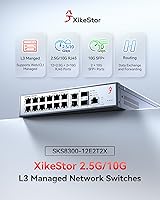
The XikeStor SKS8300 16-Port 2.5G L3 Managed Switch is a mid-range networking device that punches well above its price class, targeting home lab builders and small business IT teams who need real routing capabilities without enterprise-level spending. You get 12 x 2.5G RJ45 ports, two 10G RJ45 uplinks, and two 10G SFP+ slots packed into a compact desktop chassis — a port mix that is genuinely hard to find at this price point. XikeStor is a brand from Anhui Seeker Electronic Technology, largely unfamiliar outside the enthusiast community, so firmware quality and long-term support deserve scrutiny. With a 3.8 out of 5 rating across 113 reviews, reception is cautiously positive — solid, but not without caveats.
Features & Benefits

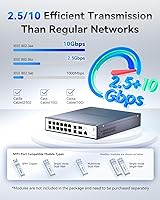
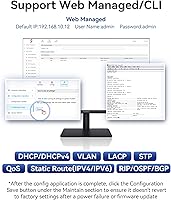
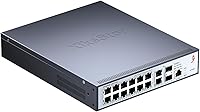
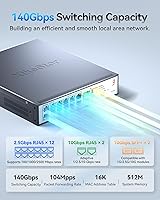
What makes this L3 desktop switch genuinely interesting is its Layer 3 routing stack — OSPF, BGP, RIP, and DHCP support at this price is unusual, and for network engineers who want a platform to practice real routing protocols, that matters. On the switching side, 140 Gbps of non-blocking capacity means you won't hit throughput ceilings in normal deployments. Port speed negotiation is flexible, auto-sensing from 100M up through 2.5G on standard ports and hitting 10G on the uplinks and SFP+ slots. Both a web GUI and CLI are available, meaning a junior admin can click through basic VLAN configs while a seasoned engineer scripts changes via command line.

Best For

This 2.5G managed switch is a natural fit for home lab enthusiasts who are tired of 1G limitations and want to experiment with routed networks, VLANs, and link aggregation without spending thousands. NAS users — especially those running Synology or QNAP systems — will appreciate the multi-gigabit port density, letting several clients simultaneously hit a storage server at full speed. Small businesses get a realistic path to 10G uplinks for servers or access points. Creative studios moving large video files between workstations and storage will find the throughput meaningful. For BGP and OSPF practice specifically, it is a cost-effective lab platform — just don't expect it to replace a production enterprise router.

User Feedback

Across the 113 ratings, a clear pattern emerges: buyers who understand they are getting an affordable, feature-rich switch from a lesser-known brand tend to be satisfied with daily stability and throughput. Complaints center on softer areas — the web interface works but won't win any design awards, and English-language documentation can be thin in spots. Firmware updates have occasionally caused headaches, and XikeStor's support responsiveness is inconsistent by multiple accounts. Fan noise is largely a non-issue under typical loads, with occasional spin-up during heavy traffic. The 3.8 rating is fair: this XikeStor unit delivers on its core promises but rewards buyers who arrive with some networking experience already.

Pros

  • Layer 3 routing with OSPF, BGP, and RIP is exceptionally rare at this price point.
  • Twelve 2.5G ports plus four 10G uplinks cover most small network topologies in a single unit.
  • Both web GUI and CLI management give technical users genuine flexibility in how they configure the switch.
  • VLAN, ACL, QoS, and LACP support rivals switches that cost considerably more.
  • The metal chassis and temperature-controlled fan hold up well under sustained, heavy workloads.
  • 140 Gbps non-blocking switching capacity means port speeds are real, not theoretical maximums that vanish under load.
  • Auto-negotiation across multiple speeds makes it easy to mix older 1G and newer 2.5G devices on the same network.
  • Wall-mount or desktop placement options give small offices flexibility in where the unit lives.
  • For home lab engineers wanting to practice real routing protocols, this XikeStor unit is a cost-effective sandbox.
  • Fan noise stays acceptably low during typical everyday traffic, making it usable in quieter office environments.

Cons

  • Firmware updates have caused stability issues for some users, with limited rollback guidance available.
  • English-language documentation is thin and can leave non-native technical readers guessing at configuration steps.
  • The web interface works but feels dated and unpolished compared to competitors like Ubiquiti or TP-Link Omada.
  • Customer support response times from XikeStor are inconsistent, with some users reporting long waits for useful answers.
  • No PoE support means you will need a separate switch or injectors if you need to power access points or cameras.
  • Brand longevity and long-term firmware commitment are uncertain for a relatively unknown manufacturer.
  • Less technical buyers will face a steep learning curve just to get basic configurations running correctly.
  • The 3.8 out of 5 rating across 113 reviews signals real-world friction, not just isolated complaints.
  • BGP and OSPF implementation quality has not been independently validated, which matters for anyone relying on those protocols seriously.
  • Resale value is likely low given limited brand recognition outside the enthusiast community.

Ratings

Our editorial team used AI-assisted analysis to evaluate verified buyer reviews for the XikeStor SKS8300 16-Port 2.5G L3 Managed Switch from across global markets, actively filtering out incentivized, bot-generated, and spam submissions to surface what real users actually experience. The scores below reflect both the genuine strengths that keep buyers satisfied and the friction points that have led others to leave critical feedback. Nothing has been softened — the ratings tell the full story.
Value for Money
88%
For home lab builders and small business IT teams, the sheer volume of Layer 3 features packed into this price tier is difficult to match. Buyers consistently note that comparable protocol support — OSPF, BGP, VLAN, ACL — from established brands would cost two or three times as much. That gap is the most cited reason for positive reviews.
A handful of buyers who expected consumer-grade reliability felt the value equation shifts if you factor in time spent troubleshooting firmware issues or navigating sparse documentation. For those users, the lower price starts to feel less like a deal and more like a trade-off.
Port Configuration
91%
The combination of twelve 2.5G RJ45 ports alongside four 10G uplinks — two copper, two SFP+ — is genuinely rare in a compact desktop form factor. Users connecting NAS appliances, editing workstations, and servers simultaneously report that this port mix handles their topology without requiring a second switch.
The absence of PoE is a recurring sticking point. Buyers who initially overlooked that limitation found themselves needing to add injectors or a secondary switch to power access points and cameras, adding cost and complexity they had not budgeted for.
Layer 3 Routing Capability
83%
Network engineers using this L3 desktop switch as a home lab platform for practicing OSPF and BGP configurations report that the routing functions work reliably for learning and testing purposes. The ability to do inter-VLAN routing without a separate router is genuinely useful for small business deployments too.
The BGP and OSPF implementations have not been independently stress-tested, and a few technically advanced users noted edge-case instability under complex routing scenarios. This is a capable learning and small-deployment tool, but it is not a production-grade router replacement for anything mission-critical.
Switching Performance
89%
Users transferring large files between NAS and workstations at 2.5G simultaneously report that throughput holds steady without unexplained drops or congestion. The 140 Gbps non-blocking architecture appears to deliver in practice, not just on paper, which is not always the case with budget-tier managed switches.
A small number of users reported occasional packet loss under very specific high-load conditions, though it was difficult to isolate whether firmware, cabling, or connected device behavior was the cause. Under typical office and home lab workloads, this does not appear to be a widespread issue.
Web Interface Usability
62%
38%
For users already familiar with managed switch interfaces, the web GUI gets the job done — VLANs, LACP bonds, and QoS rules are all configurable without touching the CLI. Some reviewers appreciated that the layout at least follows logical groupings rather than burying features in unexpected menus.
The interface feels dated and unpolished compared to competitors like TP-Link Omada or Ubiquiti, and less experienced users frequently describe it as confusing. Missing input validation in a few configuration fields means it is possible to save broken settings without a clear error message to guide you back.
CLI Management
78%
22%
Network professionals who prefer scripting configurations or managing the switch remotely via SSH will find the CLI functional and reasonably familiar if they have worked with other managed switch command sets. For home lab users practicing for enterprise environments, the CLI provides a realistic interface to work with.
The CLI documentation is limited, particularly in English, which means users occasionally need to experiment or seek answers from community forums rather than official references. Not every command behaves exactly as expected compared to industry-standard implementations, which can cause confusion during initial setup.
Firmware Stability
57%
43%
When left on a stable firmware version without forcing updates, this XikeStor unit runs reliably for extended periods according to a consistent portion of positive reviewers. Users who set it up and leave it alone tend to report far fewer issues than those who actively update firmware shortly after release.
Firmware updates are the most frequently cited pain point in critical reviews. Several users experienced unexpected reboots or degraded performance after applying updates, with limited official guidance on how to roll back. For any environment where unplanned downtime is unacceptable, this is a meaningful risk to weigh carefully.
Build Quality
81%
19%
The all-metal chassis feels solid and professional — noticeably more substantial than plastic-bodied competitors in the same price range. Users who have had the switch running continuously for months report no signs of physical degradation, warping, or port loosening under normal desktop operating conditions.
The unit does get warm to the touch during sustained heavy workloads, and a few users questioned the long-term heat tolerance of internal components near the upper 40-degree Celsius operating limit in warmer rooms or poorly ventilated enclosures.
Fan Noise
74%
26%
Under everyday loads — office traffic, NAS backups, routine file transfers — the fan operates at a level that most users describe as quiet enough to share a room with. In a typical home office or small server closet, it blends into background ambient noise without being distracting.
During heavy simultaneous traffic across multiple high-speed ports, the fan audibly spins up to a level some users found noticeable in quiet environments. It is not exceptionally loud, but buyers who need near-silent operation in a studio or bedroom lab may find the occasional spin-up disruptive.
Documentation Quality
44%
56%
The basic setup guide included with the unit is sufficient to get the switch online and reach the management interface for the first time. Users who already know what they are doing can get up and running without ever consulting documentation beyond the default IP and login credentials.
English-language documentation is genuinely thin, and this is one of the more consistent complaints across negative reviews. Configuration guides for advanced features like BGP, ACL rules, and IGMP snooping are either absent or poorly translated, pushing users toward third-party forums for answers that should be in an official manual.
Customer Support
48%
52%
A portion of buyers who reached out to XikeStor for straightforward questions did receive responses, and a few reported that issues were eventually resolved with the help of the support team after persistent follow-up.
Response times are inconsistent, and the quality of support answers varies significantly — a pattern flagged by multiple reviewers across different markets. For a managed networking device where configuration problems can bring down a small office network, unpredictable support availability is a meaningful concern that should factor into the buying decision.
Compatibility
82%
18%
Auto-negotiation across 100M, 1G, and 2.5G means existing 1G infrastructure integrates without any reconfiguration, and most users connecting NAS appliances, gaming PCs, and access points report no compatibility surprises out of the box. SFP+ ports accepted third-party DAC cables and transceivers without vendor lock-in issues.
A small number of users reported that specific older network cards did not negotiate 2.5G correctly on the first attempt, requiring manual speed configuration via the web GUI. This is not a widespread problem, but it is worth knowing that auto-negotiation is not guaranteed to be flawless with every piece of legacy hardware.
Setup Experience
66%
34%
For technically experienced buyers, initial setup is straightforward — set the host IP, navigate to the management address, log in with default credentials, and start configuring. The process is logical if you have done it before, and several reviewers had the switch operational within 20 to 30 minutes of unboxing.
Less experienced users frequently describe the first-time setup as a stumbling block, particularly the requirement to manually reconfigure the host computer's IP address before the management interface is reachable. There is no auto-discovery tool or simplified onboarding wizard to ease that initial friction.
Mounting Flexibility
76%
24%
The option to use this L3 desktop switch either flat on a desk or wall-mounted is a practical feature for small offices and home labs where rack space is limited or nonexistent. The compact footprint means it does not dominate a desk even when used in desktop mode.
Wall-mount hardware is not always confirmed to be included in the box, and a few buyers noted they had to source their own brackets. The unit's weight — just over five pounds — is manageable but worth accounting for if mounting on drywall without a stud.

Suitable for:

The XikeStor SKS8300 16-Port 2.5G L3 Managed Switch is a strong match for anyone who has outgrown basic unmanaged or consumer-grade switches and needs real network control without a five-figure budget. Home lab builders will find the OSPF and BGP support genuinely useful for practicing enterprise routing scenarios in a low-stakes environment. Small businesses running NAS appliances from Synology or QNAP will immediately feel the difference when multiple workstations can simultaneously pull data at 2.5G instead of queuing at 1G. Creative teams transferring large video or design files between storage and editing stations will benefit from the high port density and non-blocking throughput. IT professionals who want dual management paths — clicking through a web interface for quick changes or dropping into CLI for scripted configs — will appreciate having both options available. If you are comfortable reading a technical manual, possibly in imperfect English, and you know what a VLAN or LACP bond is, this L3 desktop switch will likely exceed your expectations for the money.
Not suitable for:

Buyers expecting plug-and-play simplicity should look elsewhere — the XikeStor SKS8300 16-Port 2.5G L3 Managed Switch is a managed device that assumes the person configuring it knows what they are doing. If your networking experience tops out at connecting a router to a basic unmanaged switch, the web interface will feel confusing rather than helpful, and the CLI will be outright intimidating. Organizations that rely on prompt, responsive vendor support should also pause: multiple reviewers have noted that getting timely, useful answers from XikeStor can be a frustrating experience. Environments where firmware stability is mission-critical — a production office network with no tolerance for unexpected reboots during updates — should treat this unit with caution until the firmware matures further. Buyers needing PoE to power access points or IP cameras directly from the switch will need a different device entirely, as this one provides no Power over Ethernet. Finally, anyone expecting Cisco- or Ubiquiti-level documentation, community forums, or long-term software support guarantees is likely to be disappointed by what a smaller brand can realistically offer.
Specifications

  • Switch Type: This is a Layer 3 managed switch, meaning it supports IP routing between VLANs in addition to standard Layer 2 switching functions.
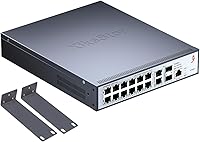
  • Total Ports: The switch provides 16 total ports: 12 x 2.5G RJ45, 2 x 10G RJ45, and 2 x 10G SFP+.
  • Port Speeds: The 12 RJ45 ports auto-negotiate at 100M, 1G, or 2.5G; the two 10G RJ45 and two SFP+ uplink ports support 1G, 2.5G, and 10G.
  • Switching Capacity: Total non-blocking switching capacity is 140 Gbps, ensuring no single port becomes a bottleneck under simultaneous full-load traffic.
  • Routing Protocols: Supported Layer 3 routing protocols include OSPF, BGP, RIP, and DHCP, enabling inter-VLAN routing and dynamic route exchange.
  • Network Features: The switch supports VLAN, ACL, QoS, LACP (link aggregation), and IGMP snooping for granular traffic control and multicast management.
  • Management Options: Configuration is available through a browser-based web GUI or a command-line interface (CLI), accessible after setting the host PC to the 192.168.10.X subnet.
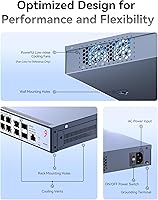
  • Chassis Material: The enclosure is constructed from metal, providing structural rigidity and passive heat dissipation during extended operation.
  • Cooling System: An intelligent temperature-controlled fan adjusts speed based on internal thermal readings, balancing noise output with cooling demand.
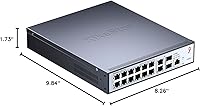
  • Dimensions: The unit measures 9.84″ in length, 8.26″ in width, and 1.73″ in height, fitting comfortably on a desktop or mounted flat to a wall.
  • Weight: The switch weighs 5.37 pounds, making it manageable for a single person to mount or reposition without assistance.
  • Mounting Options: The switch supports both desktop placement and wall-mount installation, with appropriate hardware expected for wall-mount use.
  • Input Voltage: The unit operates on 110V AC power, compatible with standard North American electrical outlets.
  • Max Temperature: The upper operating temperature rating is 40 degrees Celsius, suitable for climate-controlled office or home lab environments.
  • Manufacturer: The switch is designed and manufactured by Anhui Seeker Electronic Technology Co., Ltd., marketed internationally under the XikeStor brand.
  • Model Number: The official model identifier is SKS8300-12E2T2X, which corresponds to the 12x2.5G, 2x10G RJ45, and 2x10G SFP+ port configuration.
  • Default Login IP: The factory default management IP address is 192.168.10.12, accessed via a web browser after configuring the host to the same subnet.
  • Customer Rating: The switch holds a 3.8 out of 5 star rating based on 113 verified Amazon ratings at the time of this review.

Related Reviews
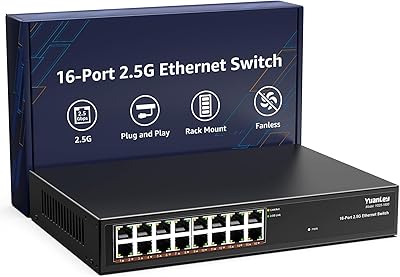
YuanLey YS25-1600 16-Port 2.5G Ethernet Switch
81%
91%
Network Performance
93%
Plug-and-Play Setup
86%
Build Quality
97%
Noise Level
83%
Value for Money
More
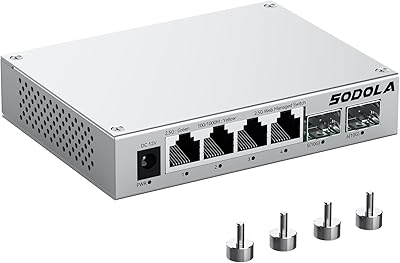
Sodola SL902-SWTG124AS 6-Port 2.5G Managed Switch
80%
91%
Value for Money
88%
Build Quality
83%
Web Management Interface
87%
Port Performance
58%
Advanced Feature Depth
More
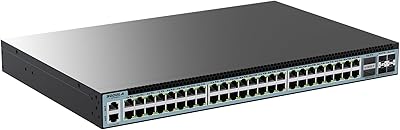
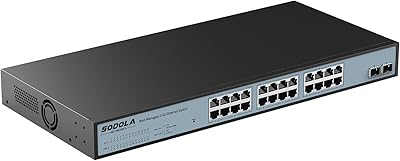
Sodola 48-Port 2.5GbE L3 Managed Switch
71%
94%
Port Density & Speed
91%
Value for Money
88%
Uplink Flexibility
86%
Layer 3 Feature Set
52%
Ease of Setup
More
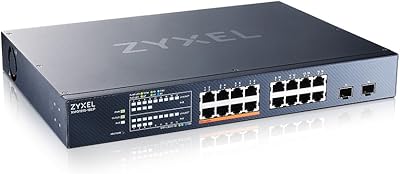
Sodola 24-Port 2.5G Managed Network Switch
80%
91%
Network Performance
88%
Build Quality
63%
Setup Experience
76%
Web Management Interface
89%
Value for Money
More
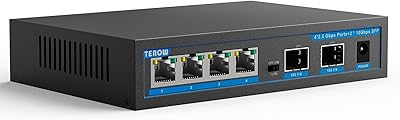
Zyxel XMG1915-18EP 16-Port 2.5G Multi-Gig Switch
87%
92%
Performance
94%
Ease of Setup
88%
Build Quality
90%
PoE Functionality
95%
Fanless Design (Noise)
More
TEROW 4-Port 2.5G 2-Port SFP+ Network Switch

81%
93%
Value for Money
96%
Ease of Setup
88%
Port Performance & Link Stability
71%
SFP+ Port Compatibility
84%
Build Quality & Materials
More
ienRon 6-Port 2.5Gb PoE Switch with 2-Port 10Gb SFP+
85%
86%
Performance
91%
Ease of Setup
88%
PoE Power Delivery
84%
Build Quality
93%
Fanless Operation
More
Goalake 8-Port 2.5G Ethernet Switch
80%
91%
Port Count & Configuration
88%
Throughput & Switching Performance
93%
Ease of Setup
79%
Build Quality & Materials
96%
Fanless & Noise Level
More
VIMIN 10-Port 2.5G Unmanaged Switch
79%
96%
Ease of Setup
89%
Port Performance
84%
Build Quality
67%
Thermal Management
71%
SFP Uplink Usability
More
VIMIN 18-Port 2.5G Unmanaged Network Switch
81%
88%
Port Performance
91%
Thermal Management
97%
Noise Level
93%
Setup Experience
79%
Build Quality
More

FAQ

It depends on your willingness to learn. The web interface is functional and straightforward enough for basic tasks like setting up VLANs or enabling LACP, but it is not a hand-holding experience. If you are comfortable reading technical documentation and doing a bit of trial and error, you will get there. If you expect it to work like a home router with a simple wizard, you will likely find it frustrating.

No, it does not. This switch has no Power over Ethernet capability whatsoever. If you need to power wireless access points, IP cameras, or VoIP phones directly from the switch, you will need to either buy a separate PoE switch or use inline PoE injectors.

Yes, the SFP+ ports are standard form factor and accept 10G direct-attach copper (DAC) cables as well as compatible SFP+ optical transceivers. Just make sure whatever transceiver you buy is rated for 10G SFP+; the switch does not do transceiver vendor locking in the way some enterprise brands do, but compatibility is always worth confirming before purchasing.

Under normal loads, most users describe the fan as quiet or barely noticeable. It does spin up audibly when traffic is heavy or the unit gets warm, but it is not the kind of constant roar you get from rack-mount enterprise gear. For a desk or a small closet setup in a home office, it should be perfectly livable.

You need to temporarily set your computer's IP address to something in the 192.168.10.X range — any number between 2 and 254 except 12. Then open a browser and navigate to 192.168.10.12. The default username and password are both admin. Once you are in, make sure you click the Save button after any changes, or the switch will revert to factory defaults on the next reboot.

For home lab practice and learning, it works well enough — you can build multi-router topologies and experiment with route redistribution without issues. That said, this is not Juniper or Cisco gear, and the BGP and OSPF implementations have not been independently audited for edge-case stability. Using it in a real production environment where dynamic routing failures would have serious consequences is a risk most IT professionals would not take.

Your existing 1G devices will work fine. The RJ45 ports auto-negotiate down to 1G or even 100M, so you can mix old and new equipment on the same switch without any compatibility issues. You will only get 2.5G speeds when both the switch port and the connected device support 2.5G.

This is probably the most honest concern to flag. Some users have reported that firmware updates occasionally cause unexpected behavior, and the rollback process is not well-documented in English. If your setup is critical, it is worth waiting for community feedback on any new firmware version before applying it, rather than updating immediately on release.

Yes, and this is genuinely one of the best use cases for this L3 desktop switch. As long as your NAS and the connecting computers all have 2.5G network cards, each client gets a dedicated 2.5G connection to the switch. There is no shared bandwidth bottleneck the way you see with older switches, so simultaneous large file transfers from multiple machines to the NAS work exactly as you would hope.

XikeStor offers a limited manufacturer warranty, but the quality of after-sales support has been inconsistent based on user reports. Response times from the support team can vary significantly, and resources like detailed English-language manuals or an active user community are limited compared to established brands. Before buying, it is worth factoring in that you may need to rely on third-party forums or your own troubleshooting skills if something goes wrong.