Overview

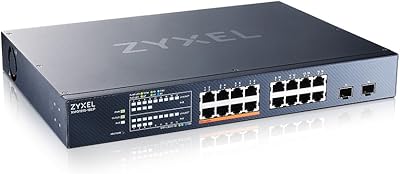
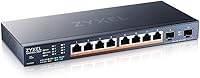
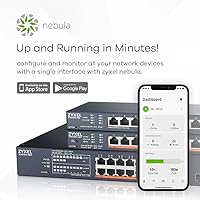
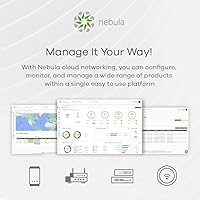
The Zyxel XMG1915-10EP 8-Port 2.5G PoE Switch arrived in early 2024 as a genuinely current-generation option for anyone caught between a basic unmanaged gigabit switch and a full rack-mounted enterprise solution. That middle ground is exactly where it thrives. The fanless compact chassis sits quietly on a desk or mounts flat against a wall — no fan noise, no dedicated rack space required. Getting it online is straightforward thanks to Nebula cloud management, which lets you configure and monitor the switch from a mobile app rather than hunting through a local web GUI. For home labs and small offices ready to leave gigabit behind, this 2.5G PoE switch makes a compelling case.
Features & Benefits

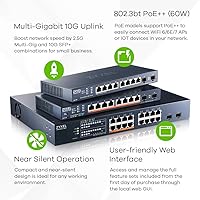
The XMG1915-10EP packs eight 2.5G PoE++ ports, each capable of delivering up to 60W — enough to power a high-end PTZ camera or a Wi-Fi 6E access point without an external injector. The catch worth knowing: the total PoE budget is 130W, so if you load all eight ports with power-hungry devices simultaneously, you will hit that ceiling fast. Plan your deployments accordingly. Two 10G SFP+ uplinks handle aggregation to a NAS or upstream router cleanly. The Nebula App earns its keep here — you can push VLAN changes, check port utilization, or remotely reboot a port without touching the switch physically. Silent fanless cooling rounds out a feature set that punches well for its price tier.

Best For

This 2.5G PoE switch makes the most sense for small offices and home labs that have outgrown gigabit but have no interest in installing a rack. If you are running multiple Wi-Fi 6 or 6E access points, IP cameras, or VoIP phones that draw real power, the PoE++ headroom is genuinely useful. Content creators and prosumers with a multi-gig NAS will appreciate the 2.5G port speeds for local transfers that actually saturate the connection. It also fits naturally into Zyxel Nebula deployments where unified management across switches and access points matters. Network installers looking for a tidy wall-mount solution in a conference room or reception area will find the slim form factor easy to work with.

User Feedback

Buyers who set up this Zyxel multi-gig switch through Nebula consistently praise the mobile app experience — onboarding is reportedly quick, and remote port management works reliably day to day. Build quality draws positive comments too; the metal chassis feels solid despite the slim profile. Where frustration surfaces is predictable: the 130W PoE budget leaves little margin when several high-draw devices run simultaneously, and some users feel the constraint should be spelled out more clearly upfront. A handful of buyers have flagged inconsistent SFP+ module compatibility with third-party transceivers, so verify support before purchasing. Compared to TP-Link and UniFi alternatives at similar price points, the Nebula ecosystem is seen as a genuine advantage — though its value depends heavily on whether you are already invested in Zyxel hardware.

Pros

  • All eight ports run at 2.5G, a meaningful real-world speed improvement over standard gigabit switches.
  • Up to 60W per PoE++ port handles demanding devices like PTZ cameras and Wi-Fi 6E APs without separate injectors.
  • Dual 10G SFP+ uplinks provide fast, uncongested aggregation to a NAS or upstream router.
  • Nebula mobile app makes remote port management and VLAN configuration genuinely practical from anywhere.
  • Fanless design keeps the unit completely silent — ideal for offices, living rooms, or client-facing spaces.
  • Wall-mount and desktop options give installers flexibility without needing rack hardware.
  • 802.3bt PoE++ compliance ensures compatibility with current and upcoming high-power network devices.
  • Slim metal chassis feels solid and durable despite its compact footprint.
  • Zero-touch cloud provisioning through Nebula significantly reduces initial setup time for repeat deployments.
  • Competitive positioning in the mid-range 2.5G PoE space makes it a credible value for what it delivers.

Cons

  • The 130W total PoE budget runs tight fast — filling all eight ports with power-hungry devices is not realistic.
  • Third-party SFP+ transceiver compatibility is inconsistent and requires verification before purchasing.
  • Advanced features and the best management experience depend on cloud connectivity, which may not suit everyone.
  • No Layer 3 routing support limits usefulness in networks that need inter-VLAN routing at the switch level.
  • Eight access ports may feel restrictive quickly as a network grows, with no easy expansion path in the same chassis.
  • Buyers outside the Zyxel Nebula ecosystem lose much of the platform advantage and may find setup less intuitive.
  • The Nebula subscription model for certain advanced features can add ongoing cost that is not obvious at purchase.
  • Some users report the Nebula app occasionally lags or requires a refresh to reflect real-time port status accurately.

Ratings

The scores below for the Zyxel XMG1915-10EP 8-Port 2.5G PoE Switch were generated by AI after analyzing verified buyer reviews from global markets, with spam, bot submissions, and incentivized feedback actively filtered out. Every category reflects the honest distribution of real user experiences — strengths are credited where earned, and recurring frustrations are weighted fairly rather than buried. Whether this switch fits your setup or falls short depends on specifics, and that is exactly what these ratings are designed to help you judge.
PoE Performance
78%
22%
Users running two to four high-draw devices — such as a couple of Wi-Fi 6E access points alongside a PTZ camera — report solid, stable power delivery with no drops or renegotiation events. The 60W per-port ceiling is genuinely useful for newer 802.3bt devices that older PoE+ switches simply cannot power adequately.
The 130W shared budget becomes a real constraint in denser deployments. Buyers who expected to max out all eight ports quickly discovered the math does not work — loading six or more power-hungry devices simultaneously forces throttling or leaves some ports underpowered.
Cloud Management
84%
The Nebula app consistently earns praise for making remote management genuinely practical. Users managing installs at client offices or secondary locations appreciate being able to toggle ports, check live traffic, and push firmware without dispatching anyone on-site — tasks that typically required a full controller in competing ecosystems.
A recurring complaint is that the Nebula free tier has feature ceilings that push users toward a paid license sooner than expected. A small number of users also report occasional app latency where port status takes a few seconds to refresh, which is frustrating during active troubleshooting.
Setup & Onboarding
86%
First-time Zyxel users are regularly surprised by how quickly the XMG1915-10EP gets online. The QR code registration into Nebula is fast, and basic VLAN and PoE configurations can be completed from a phone in under 15 minutes — a meaningful advantage for installers doing multiple deployments in a day.
The standalone web interface, used without Nebula, is noticeably less polished and can feel dated. Users who prefer fully offline management report the local GUI lacks the clarity and responsiveness of the cloud platform, which creates an inconsistent experience depending on how you prefer to work.
Build Quality
81%
19%
The all-metal chassis feels reassuringly solid for a desktop-class switch, and buyers who have wall-mounted it report no flex or rattling over extended use. For its size and price tier, the physical build compares favorably to plastic-chassis competitors from TP-Link in the same category.
A handful of users note that the port labeling can fade with time in warm environments, and the wall-mount bracket, while functional, feels like a secondary design consideration rather than a premium fit. Nothing feels flimsy, but it does not feel overbuilt either.
2.5G Port Speed
89%
Buyers who upgraded from gigabit switches and have 2.5G-capable NAS units or workstations report a very tangible difference in local transfer speeds. Large file moves that previously saturated a 1G link complete noticeably faster, and the benefit is consistent rather than theoretical.
The speed improvement is only realized when both endpoints support 2.5G, which limits the upgrade payoff for users with mixed older hardware. A few buyers felt the benefit was narrower than anticipated because only one or two of their devices could actually negotiate 2.5G.
10G SFP+ Uplinks
73%
27%
For users connecting this switch to a 10G-capable NAS or upstream router, the SFP+ uplinks perform reliably and provide genuine headroom to prevent the uplink from becoming the bottleneck when multiple 2.5G ports are active simultaneously.
Third-party SFP+ module compatibility is the most consistent complaint in this category. Several users found that non-Zyxel transceivers were not recognized or caused instability, adding unexpected cost if buyers assumed generic modules would work. Zyxel's own compatibility list is not exhaustive.
Noise Level
97%
Fanless operation is one of the most universally praised attributes of this switch. Users running it in home offices, living rooms, and bedrooms consistently confirm it produces zero audible noise under normal and heavy load — a stark contrast to fan-cooled switches in the same performance class.
In enclosed or poorly ventilated spaces, the passive-cooled chassis can get noticeably warm to the touch under sustained PoE load. This is not a failure condition, but buyers who assumed silent meant cool should account for some airflow around the unit.
Value for Money
76%
24%
Buyers who needed both multi-gig speeds and PoE++ in a fanless, cloud-managed form factor found the price justifiable — the combination of features at this size is genuinely limited in the market. For Nebula ecosystem users in particular, the integration value adds to the proposition.
Users who compared it purely on hardware specs against unmanaged or locally-managed 2.5G PoE switches from TP-Link found the premium harder to justify, especially factoring in potential Nebula subscription costs. If you do not need cloud management, the value calculus shifts noticeably.
Mounting Flexibility
83%
The dual-mode mounting design is a practical win for installers who need to adapt to different client environments. The slim profile mounts flat against a wall cleanly, and several users specifically noted it looks professional in conference rooms and reception areas without requiring a rack.
The included wall-mount hardware is basic, and installation on drywalled surfaces without a stud requires the buyer to source appropriate anchors separately. A few users also noted the mounting bracket positions the indicator LEDs facing downward when wall-mounted, making status checking awkward.
App & Remote Access
82%
18%
Day-to-day remote management through the Nebula mobile app is described as reliable and genuinely time-saving by most users. Checking which devices are connected, reviewing bandwidth usage per port, and rebooting a specific PoE port remotely are all tasks that work without friction in normal conditions.
Some users report that the app occasionally requires a full logout and re-login to reflect configuration changes accurately, which is a minor but recurring annoyance. Notification and alerting features are also considered thin compared to what UniFi offers at a similar management tier.
Compatibility
79%
21%
Standard IEEE 802.3bt compliance means the switch works correctly with any certified PoE++ device out of the box, and backward compatibility with older PoE and PoE+ devices is handled reliably. Multi-gig auto-negotiation with 1G and 2.5G devices functions without manual intervention.
Compatibility issues surface specifically with third-party SFP+ modules and, for some users, with older network management tools expecting SNMP configurations that Nebula-first setups handle differently. Buyers integrating this into complex mixed-vendor environments should test thoroughly before full deployment.
Thermal Management
74%
26%
Under typical mixed loads — a few access points and cameras drawing moderate PoE — the chassis stays at a manageable temperature and shows no signs of throttling or instability. Passive cooling performs well within its intended operating range for most home and small office use cases.
When the switch runs near its PoE budget ceiling for extended periods, the chassis becomes hot enough that some users expressed concern about longevity. There is no thermal monitoring exposed through the Nebula app, so buyers cannot proactively track whether operating temperatures are within safe bounds.
Documentation & Support
67%
33%
Zyxel provides online knowledge base articles and community forums that cover common Nebula configurations reasonably well, and setup guides for the XMG1915-10EP are available in multiple languages. Users familiar with managed switches generally found enough documentation to self-serve.
Direct support experiences are rated inconsistently — response times and technical depth vary significantly by region. Users new to managed networking found the documentation assumes a baseline of familiarity that not all buyers have, and troubleshooting edge cases often required searching community forums rather than official resources.

Suitable for:

The Zyxel XMG1915-10EP 8-Port 2.5G PoE Switch is a strong fit for small business owners and serious home lab enthusiasts who have outgrown gigabit but do not want to commit to a full rack-mounted infrastructure. If you are running two or more Wi-Fi 6E access points, a handful of IP cameras, or a mix of both, the PoE++ headroom per port gives you real breathing room that cheaper PoE+ switches simply cannot match. Content creators and prosumers who have upgraded to a 2.5G-capable NAS will immediately feel the difference in local transfer speeds compared to a standard gigabit switch. The Nebula cloud management platform is a genuine time-saver for anyone managing a small network remotely — pushing VLAN changes or rebooting a misbehaving port from a phone is practical, not just a checkbox feature. Network installers working in client-facing spaces like reception areas or conference rooms will also appreciate how cleanly this switch wall-mounts and how quietly it runs without a fan.
Not suitable for:

The Zyxel XMG1915-10EP 8-Port 2.5G PoE Switch is not the right choice if you plan to run eight high-draw PoE devices simultaneously — the 130W total budget will cap out before every port reaches its 60W maximum, forcing you to either throttle devices or leave ports unpowered. Buyers who prefer or require completely offline, self-hosted management may find the Nebula-centric approach frustrating, since the platform works best when cloud-connected and some advanced features depend on it. If you need more than eight access ports, or require SFP+ uplinks with broad third-party transceiver support, the XMG1915-10EP has real limitations that competitors with more flexible firmware may handle better. Large enterprise environments or anyone needing Layer 3 routing functions should look elsewhere entirely — this is a Layer 2 smart managed switch and is not designed for complex routing topologies. Finally, buyers deeply invested in the UniFi or Netgear ecosystem will likely find a same-brand switch a more integrated and less friction-prone experience.
Specifications

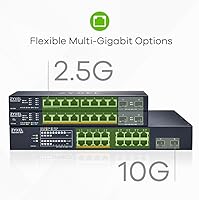
  • Access Ports: The switch includes 8 RJ45 ports, each running at 2.5 Gbps (2500 Mbps) with full PoE++ support.
  • Uplink Ports: Two 10G SFP+ slots provide high-speed fiber or DAC uplinks for aggregation to a core switch, NAS, or router.
  • PoE Standard: All eight access ports comply with IEEE 802.3bt (PoE++), supporting up to 60W of power delivery per individual port.
  • PoE Budget: The total PoE power budget across all ports is 130W, shared simultaneously among all connected powered devices.
  • Management: The switch supports both Zyxel Nebula cloud management and standalone smart managed configuration via a local web interface.
  • Cooling: The unit is entirely fanless, relying on passive heat dissipation through the metal chassis for silent operation.
  • Mounting: The switch supports both desktop placement and wall mounting, with hardware included for either installation method.
  • Dimensions: Package dimensions measure 11.93 x 10.08 x 2.6 inches, reflecting the slim, low-profile chassis design.
  • Weight: The unit weighs 1.83 kg (4.02 lbs), making it light enough for wall mounting without heavy-duty anchoring hardware.
  • Color & Finish: The chassis is finished in matte black with a metal construction that contributes to both durability and passive cooling.
  • Availability: The XMG1915-10EP was first made available in March 2024, positioning it as a current-generation multi-gig switch.
  • Manufacturer: Zyxel Networks, a networking hardware company with decades of experience in switches, routers, and access points, manufactures this unit.
  • Transfer Rate: Each of the eight access ports supports a data transfer rate of 2500 Mbps (2.5 Gbps), offering 2.5x the throughput of standard gigabit ports.
  • Cloud Platform: Nebula cloud management allows remote configuration, port-level monitoring, VLAN management, and firmware updates through the Nebula mobile app or web portal.
  • UPC: The product UPC is 760559130312, which can be used to verify authenticity and cross-reference listings across retailers.

Related Reviews

NICGIGA S25-0801P 8-Port 2.5G PoE Switch
79%
88%
Network Performance
79%
PoE Reliability
84%
Build Quality
76%
Thermal Management
93%
Ease of Setup
More
Zyxel XMG1915-18EP 16-Port 2.5G Multi-Gig Switch
87%
92%
Performance
94%
Ease of Setup
88%
Build Quality
90%
PoE Functionality
95%
Fanless Design (Noise)
More
ienRon 6-Port 2.5Gb PoE Switch with 2-Port 10Gb SFP+
85%
86%
Performance
91%
Ease of Setup
88%
PoE Power Delivery
84%
Build Quality
93%
Fanless Operation
More
Goalake 8-Port 2.5G Ethernet Switch
80%
91%
Port Count & Configuration
88%
Throughput & Switching Performance
93%
Ease of Setup
79%
Build Quality & Materials
96%
Fanless & Noise Level
More
BrosTrend 8-Port 2.5G Unmanaged Switch
83%
93%
Port Speed Consistency
96%
Ease of Setup
61%
Build Quality
74%
Thermal Performance
91%
Value for Money
More
Tenda TEM2010F 8-Port 2.5G Ethernet Switch
77%
96%
Ease of Setup
91%
Network Performance
94%
Noise Level
82%
Build Quality
67%
Thermal Management
More
Zyxel XMG-108HP 8-Port Unmanaged PoE++ Switch
84%
96%
Ease of Setup
91%
Multigigabit Performance
87%
PoE Reliability
98%
Noise Level
88%
Value for Money
More
Zyxel MG-105 5-Port 2.5G Unmanaged Switch
80%
93%
Network Performance
97%
Ease of Setup
89%
Value for Money
62%
Build Quality
98%
Noise Level
More
TP-Link TL-SG108-M2 8-Port 2.5G Unmanaged Switch
81%
93%
Network Performance
97%
Ease of Setup
89%
Build Quality
74%
Thermal Management
81%
Value for Money
More
MokerLink POE-F062F 8-Port PoE Switch
86%
91%
Value for Money
88%
Performance Stability
95%
Ease of Installation
85%
PoE Power Output
82%
Build Quality
More

FAQ

You do not strictly need a Nebula subscription to use the Zyxel XMG1915-10EP 8-Port 2.5G PoE Switch — it can be configured through a local web interface in standalone smart managed mode. That said, the Nebula cloud platform unlocks the most convenient experience, including the mobile app, remote management, and zero-touch provisioning. Zyxel offers a free Nebula tier, though some advanced features require a paid license.
Not quite. The switch supports up to 60W per port, but the total shared PoE budget is 130W across all eight ports. If every port was drawing maximum power, you would need over 480W — far beyond what the budget allows. In practice, most real deployments mix lower-draw devices like access points and cameras, which typically consume 15W to 30W each, making the 130W budget workable for the majority of setups.

Yes, the ports are backward compatible with standard 1G and even 100Mbps devices. You only get 2.5G speeds when both the switch port and the connected device support the 2.5G standard — older hardware will simply negotiate down to its highest supported speed.

Zyxel-branded SFP+ modules are fully supported and recommended. Third-party modules can work, but compatibility is not guaranteed and some users have reported issues with certain off-brand transceivers. If you plan to use the uplinks for a critical connection, it is worth verifying compatibility with Zyxel's published compatibility list before purchasing third-party modules.

It runs completely silently. There is no fan in this unit — it uses passive cooling through the metal chassis. You can place it in a living room, bedroom, or quiet office without any audible noise from the switch itself.

Once the switch is registered to your Nebula organization, you can log into the app from anywhere and see real-time port status, traffic stats, and connected device info. You can enable or disable individual ports, adjust PoE power settings, configure VLANs, and push firmware updates — all without being on-site. It is genuinely useful for managing a remote office or a client installation you cannot visit easily.

Setup is fairly approachable, especially through Nebula. Scanning a QR code on the unit registers it to your cloud account, and basic configurations can be done through the mobile app without ever touching a command line. For more advanced VLAN or QoS configurations, some prior networking knowledge helps, but the interface is cleaner than many competitors at this price point.

TP-Link's TL-SX1008P is a close hardware comparison on specs, often priced similarly, but lacks cloud management and the Nebula ecosystem integration. UniFi switches offer excellent management software but work best when you are already using UniFi access points and gateways. The XMG1915-10EP makes the most sense if you want cloud management without a dedicated on-site controller, or if you are already in the Zyxel ecosystem.

Yes, the switch supports wall mounting and the necessary hardware is included in the box. The slim chassis keeps it unobtrusive when mounted, which makes it a reasonable option for conference rooms, hallways, or any space where a clean install matters.

Zyxel typically provides a limited lifetime warranty on its XMG-series switches for the original owner, covering hardware defects under normal use conditions. It is worth confirming the warranty terms directly with Zyxel or your retailer at the time of purchase, as regional terms can vary slightly.