Overview

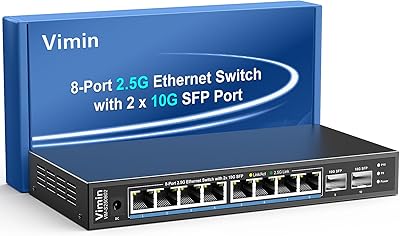
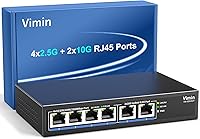
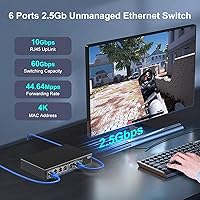
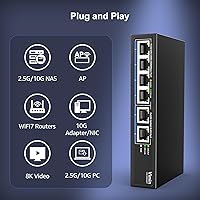
The Vimin 6-Port 2.5G/10G Unmanaged Network Switch arrived in early 2025 as one of the more accessible options for home lab users and small offices ready to move past standard gigabit networking. With four 2.5G ports and two 10G ports, you get real flexibility — use the 10G ports to link your NAS or router at full speed while the 2.5G ports handle everything else. There is no setup required — no web interface, no CLI, just plug things in and it works. The metal chassis feels solid for the price, and the option to wall-mount it is a nice touch when desk space is at a premium.
Features & Benefits

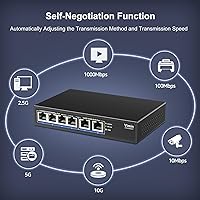
The Vimin switch runs a 60Gbps non-blocking switching fabric, which in plain terms means every port can push data at full speed simultaneously without traffic from one device slowing down another. Think of it like a highway with no merge lanes — no one waits. The dual 10GBASE-T uplink ports connect directly via standard RJ45, so there is no need for SFP modules or fiber transceivers. Auto-negotiation handles mixed-speed environments gracefully, and if you only have CAT5e or CAT6 cables around, they will work fine at 2.5G — though CAT6A is recommended for stable 10G links. Flow control keeps packet loss in check during heavy transfers, and the completely fanless design runs in total silence.

Best For

This 10G desktop switch fits a pretty specific type of buyer, and that is a good thing — it does not try to be everything to everyone. If you run a home NAS with a multi-gig capable drive array and want to actually feed it at speed, this is a practical solution. Content creators moving large video files across a local network will notice the difference immediately compared to a standard gigabit connection. It also works well as a backbone switch for a WiFi 6 access point setup, or for a gamer who wants a reliable wired connection without the overhead of managed switch features they will never use. The compact footprint helps in tight spaces.

User Feedback

Early buyers of the Vimin switch have been largely positive, with most praising instant plug-and-play setup and a noticeable jump in file transfer speeds compared to their previous gigabit hardware. The LED indicators get reasonable marks for readability — port link status is visible at a glance. On the critical side, a few users have flagged that reaching stable 10G speeds requires CAT6A cabling, which is not always obvious from the listing. There are also questions about long-term durability, fair given that this product only reached the market in February 2025 and the review pool is still thin. Passive cooling keeps things silent, but buyers in warmer or enclosed environments should keep tabs on operating temperatures over time.

Pros

  • Plug-and-play setup means you are up and running in minutes with absolutely no configuration required.
  • Dual 10G RJ45 ports let you connect a NAS or router at full speed without purchasing separate SFP transceivers.
  • The non-blocking 60Gbps switching fabric ensures no single port starves for bandwidth even under heavy simultaneous traffic.
  • Completely silent fanless operation makes this multi-gig switch a natural fit for bedrooms, home offices, or media rooms.
  • Auto-negotiation across multiple speeds protects your existing investment in CAT5e and CAT6 cabling for lower-speed devices.
  • The metal enclosure feels noticeably more durable than plastic-bodied alternatives commonly found at this price point.
  • Wall-mount compatibility is a practical bonus that frees up desk space and keeps cable runs cleaner in tight spaces.
  • IEEE 802.3x flow control reduces packet loss during heavy file transfer bursts without requiring any manual tuning.
  • Dynamic per-port LED indicators make it easy to confirm link status and active speed with a quick glance.
  • Compact physical footprint slots easily into crowded home network setups without overwhelming a desk or shelf.

Cons

  • Six ports total is a hard ceiling — four at 2.5G and two at 10G — with no expansion path as your device count grows.
  • Reaching stable 10G speeds requires CAT6A cabling, which many buyers do not already own and must purchase separately.
  • Fully unmanaged means no VLANs, no QoS, and no traffic monitoring — a dealbreaker for anyone with even moderate network management needs.
  • Launched in early 2025, this switch has a limited real-world track record, making long-term reliability genuinely difficult to assess.
  • Passive cooling handles typical open-air use well, but heat accumulation in enclosed cabinets or warmer rooms warrants ongoing attention.
  • No PoE support means you cannot power access points or IP cameras directly through the switch — a separate injector or PoE switch is needed.
  • An external power supply adds another cable to manage, which can contribute to clutter in an already-busy desk or rack setup.
  • Competing brands with longer market histories offer comparable port configurations, giving cautious buyers legitimate reason to comparison shop before committing.

Ratings

The scores below for the Vimin 6-Port 2.5G/10G Unmanaged Network Switch were generated by AI after processing verified purchase reviews from global markets, with spam submissions, bot-generated feedback, and incentivized reviews systematically filtered out before any category was scored. Each rating reflects the genuine distribution of buyer experiences — from enthusiastic praise to recurring frustrations — so the numbers tell the full picture, not just the highlights. Where scores are lower, the reasoning is grounded in patterns reported consistently across real user feedback, not editorial opinion.
Ease of Setup
94%
Buyers consistently report being fully operational within minutes of unboxing, with no drivers, no web portal, and no configuration steps involved. For home users moving a NAS or gaming rig to multi-gig speeds, the complete absence of setup friction is one of the most appreciated qualities this switch offers.
The simplicity is a deliberate trade-off — there is nothing to configure because there is nothing to configure with, which frustrates technically inclined buyers who want even basic diagnostic visibility. When something does not behave as expected, the lack of any management interface makes isolating the cause considerably harder.
Network Performance
86%
Users transferring large video archives or raw photo libraries between a NAS and a workstation consistently report completion times two to three times faster than their previous gigabit switches under real-world conditions. The non-blocking switching fabric means multiple devices can push data simultaneously without one starving bandwidth from another.
Reaching the full 10G ceiling is conditional on having CAT6A cabling already in place — a requirement many buyers discover only after installation, effectively capping their uplink ports at 2.5G until they rewire. A handful of reviewers also note slightly longer link-negotiation times at startup compared to competing units.
Value for Money
83%
For a switch with genuine dual 10GBASE-T uplink capability and a metal chassis, the price sits well below most established-brand equivalents at the same port configuration. Home lab users and prosumers who have watched the multi-gig switch market closely note that options at this specification level remain relatively rare at this price bracket heading into 2025.
The value calculation becomes murkier when buyers factor in the potential cost of replacing existing CAT5e or CAT6 cabling to actually unlock the 10G ports — an expense that does not appear in the sticker price. Some users reflect that paying modestly more for a managed switch from a proven brand would have been the smarter long-term call.
Port Configuration
88%
The four 2.5G plus two 10G layout strikes a genuinely practical balance for typical home lab and small office setups, covering the most common scenario of a fast NAS or router uplink alongside several mid-speed client ports. Unlike all-10G switches requiring full device upgrades, this hybrid design works sensibly with real mixed-speed environments.
Six total ports is a hard ceiling that buyers sometimes underestimate at purchase — a growing home network with a NAS, router, desktop PC, access point, and a couple of wired clients can exhaust available ports quickly. There is no way to expand capacity without adding a second switch to the setup.
Thermal Management
67%
33%
In open-air desktop or wall-mounted deployments with adequate ventilation, the passive cooling approach works reliably — buyers running the Vimin switch continuously in well-ventilated spaces report no unusual warmth or performance issues even after extended periods of sustained heavy file transfers. The metal enclosure conducts heat away from internals better than plastic alternatives.
The fanless design raises legitimate concerns for users planning to mount this inside an enclosed AV cabinet or tight equipment closet with minimal airflow. Since the product launched only in early 2025, there is not yet a meaningful body of long-term data confirming how passive cooling holds up over sustained operation in warmer or restricted environments.
Build Quality
78%
22%
The metal enclosure is a tangible step above the plastic shells common at lower price points in this category, and most buyers note the unit feels solid and well-assembled out of the box. Port seating is consistent across units, and the overall fit and finish does not feel rushed for the price tier.
The chassis surface can become noticeably warm to the touch during sustained heavy traffic, which raises modest concerns about long-term component stress in less ventilated setups. A few buyers also note that the wall-mount hardware included in the box feels minimal and may not inspire confidence for permanent installations.
Noise Level
96%
Because there is no fan anywhere in the design, this switch is genuinely inaudible — it produces zero operational noise regardless of network load. For home office users, bedroom deployments, or anyone running network hardware in a shared living space, that complete silence is a meaningful quality-of-life benefit over fan-cooled alternatives.
The zero-noise operation rarely draws complaints on its own terms. The only marginal concern is that the absence of active cooling means the chassis surface can feel notably warm after prolonged heavy use — a reminder to ensure adequate passive ventilation, even if the silence itself is never the problem.
Backward Compatibility
89%
Auto-negotiation across the full standard Ethernet speed range means legacy gigabit devices, older laptops, and even slower 100Mbps hardware connect without any friction. Buyers appreciate being able to migrate their network to multi-gig speeds incrementally, device by device, without needing to replace everything at once.
While compatibility with slower speeds is strong, users frequently discover that connecting a 10G-capable device via CAT5e or CAT6 cable caps that port at 2.5G — leading some to incorrectly assume the switch is underperforming when the bottleneck is actually the cable. This confusion appears regularly in early buyer feedback.
LED Indicators
71%
29%
Most buyers find the per-port LEDs adequate for confirming that a link is active and data is flowing at a glance — enough to know which ports are live, which are idle, and whether traffic is moving, which covers the needs of most home and small office users without any additional tools.
Distinguishing between 2.5G and 10G link speeds from the LED behavior alone is not immediately intuitive for all users, and the included manual does not elaborate clearly on indicator patterns. More distinct visual differentiation between speed tiers — such as separate indicator colors per speed level — would make the switch easier to self-diagnose.
Mounting & Form Factor
82%
18%
The compact physical dimensions allow this 10G desktop switch to slot onto a shelf, beside a router, or behind a monitor without dominating the surrounding space. Wall-mount capability adds genuine versatility for users who want to keep desks clear or position the switch closer to a wall outlet or patch panel.
The included wall-mount hardware is fairly basic, and buyers planning a clean, permanent installation may need to source more robust mounting accessories separately. The power cable length can also be a constraint depending on where the switch needs to sit relative to the nearest available outlet.
Long-term Reliability
58%
42%
Early adopters report stable, consistent performance across the first weeks and months of use, with no widespread reports of unexpected reboots, port failures, or thermal shutdowns appearing in the initial review pool. Within its intended design parameters and ventilation requirements, the switch appears to perform dependably for home and small office workloads.
With the product only available since February 2025, there is simply not enough accumulated real-world data to make confident long-term durability claims. Buyers who place high value on proven longevity — particularly those replacing a critical home lab or small business network component — may feel uneasy purchasing from a brand without years of field-proven track record.
Flow Control
77%
23%
IEEE 802.3x flow control provides practical protection against packet loss during bursty traffic scenarios, which benefits users running IP camera feeds or initiating large NAS backups while other devices are simultaneously active on the network. Most buyers running these mixed-load conditions report stable, consistent throughput without notable data loss.
Because the switch is fully unmanaged, flow control operates automatically with no ability to adjust or disable it on a per-port basis — an inflexibility that more experienced users may notice in latency-sensitive edge cases where flow control signals can occasionally introduce brief, unwanted pauses in traffic delivery.
Documentation
63%
37%
For the majority of buyers, setup is intuitive enough that the manual is rarely consulted at all — the plug-and-play nature of the switch means most users are connected and working before they finish reading the first page. The simplicity of unmanaged operation keeps the ceiling of required user knowledge very low.
The included manual is thin, offering little guidance on LED speed interpretation, optimal cable selection for each speed tier, or recommended practices for enclosed or warm installations. Buyers who encounter unexpected behavior — such as not reaching expected 10G speeds — are largely left to search online forums rather than consult official documentation.

Suitable for:

The Vimin 6-Port 2.5G/10G Unmanaged Network Switch is a strong fit for anyone who has genuinely outgrown standard gigabit networking but has no interest in the complexity or cost of a managed switch. Home lab enthusiasts running a multi-bay NAS will find the dual 10G ports particularly valuable, especially when paired with a 10G-capable router or PC that can actually take advantage of the headroom. Content creators and video editors who routinely move large raw footage files between a workstation and network-attached storage will feel the throughput difference in daily work, not just on a benchmark chart. Small offices or prosumers building out a WiFi 6 infrastructure also have a real use case here — a compact, silent 10G backbone switch that requires zero configuration is genuinely useful in that context. Anyone who needs networking hardware in a shared living or working space where fan noise is a real annoyance will also appreciate the completely passive cooling design.
Not suitable for:

The Vimin 6-Port 2.5G/10G Unmanaged Network Switch is simply the wrong tool for network administrators or IT professionals who need visibility and control over their traffic. Because it is entirely unmanaged, there are no VLANs, no QoS prioritization, no port mirroring, and no management interface whatsoever — if any of those features matter to your setup, a managed switch is a prerequisite regardless of price. Buyers with more than four 2.5G or two 10G devices to connect will also hit the port ceiling quickly and have no expansion path within this unit. Anyone relying on older CAT5e or CAT6 cabling throughout their space should also temper expectations, since stable 10G operation requires CAT6A and retrofitting cables adds both cost and effort that may not be worth it. Finally, buyers who prioritize proven long-term reliability backed by years of real-world data should note that this product only launched in early 2025 — the review history is still thin, and patience may be warranted.
Specifications

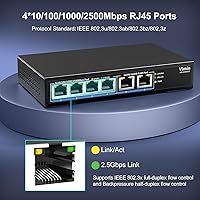
  • Port Layout: The switch provides four 2.5GBASE-T and two 10GBASE-T RJ45 ports, delivering six total copper Ethernet connections in a single compact unit.
  • Switching Capacity: A non-blocking wire-speed switching fabric delivers 60Gbps of total throughput, ensuring no port is ever starved for bandwidth under simultaneous full load.
  • Speed Support: All ports auto-negotiate across 10, 100, 1000, 2500, and 10000Mbps to maintain backward compatibility with legacy and mixed-speed network equipment.
  • Flow Control: IEEE 802.3x full-duplex flow control and half-duplex backpressure are both supported to reduce packet loss during high-volume traffic bursts.
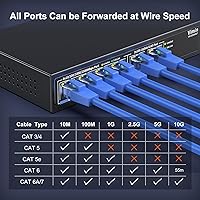
  • Cable Requirements: CAT5e and CAT6 cables support speeds up to 2.5G, while CAT6A cabling is required for stable and reliable 10G link operation.
  • Standards: The switch complies with IEEE 802.3bz for 2.5G and 5G Ethernet and IEEE 802.3an for 10GBASE-T, ensuring broad interoperability with modern network hardware.
  • MDI/MDIX: Auto-MDI/MDIX support is included on all ports, eliminating the need for crossover cables and simplifying patch cable use across all connections.
  • Cooling Method: Passive fanless cooling keeps the unit completely silent during operation, with heat dissipated through the metal enclosure rather than an active fan.
  • Chassis Material: The outer housing is a metal enclosure, offering improved structural durability and better ambient heat dissipation compared to plastic-bodied alternatives at this price tier.
  • Mounting Options: The unit supports both flat desktop placement and wall mounting, providing installation flexibility for space-constrained home or office environments.
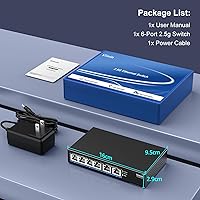
  • Weight: The switch weighs approximately 0.58 kg (roughly 1.28 lbs), keeping it light enough for wall mounting without structural concerns.
  • Dimensions: Package dimensions measure 7.05 x 6.3 x 2.83 inches, reflecting a compact footprint well suited to desktop or wall-mounted deployment.
  • Management: This is a fully unmanaged switch with no web interface, command-line access, or configuration software — it operates entirely on a plug-and-play basis.
  • LED Indicators: Dynamic per-port LEDs display live link and activity status, providing quick visual confirmation of connection presence and data flow at a glance.
  • In the Box: Each unit ships with the switch itself, one power cable, and a basic user manual covering connection and installation guidance.
  • Availability: The switch entered the market in February 2025, making it a recent addition to the budget-friendly multi-gig desktop switch category.

Related Reviews

VIMIN 6-Port 2.5G Unmanaged Network Switch
83%
88%
Throughput Performance
84%
Build Quality
93%
Setup & Ease of Use
67%
SFP+ Port Usability
96%
Fanless Noise Level
More
VIMIN 18-Port 2.5G Unmanaged Network Switch
81%
88%
Port Performance
91%
Thermal Management
97%
Noise Level
93%
Setup Experience
79%
Build Quality
More
TEROW 4-Port 2.5G 2-Port SFP+ Network Switch
81%
93%
Value for Money
96%
Ease of Setup
88%
Port Performance & Link Stability
71%
SFP+ Port Compatibility
84%
Build Quality & Materials
More
ienRon 6-Port 2.5Gb PoE Switch with 2-Port 10Gb SFP+
85%
86%
Performance
91%
Ease of Setup
88%
PoE Power Delivery
84%
Build Quality
93%
Fanless Operation
More
VIMIN 10-Port 2.5G Unmanaged Switch
79%
96%
Ease of Setup
89%
Port Performance
84%
Build Quality
67%
Thermal Management
71%
SFP Uplink Usability
More
Sodola SL902-SWTG124AS 6-Port 2.5G Managed Switch
80%
91%
Value for Money
88%
Build Quality
83%
Web Management Interface
87%
Port Performance
58%
Advanced Feature Depth
More
TRENDnet TEG-S350 5-Port 2.5G Network Switch
78%
88%
Value for Money
91%
Network Performance
94%
Ease of Setup
86%
Build Quality
97%
Noise Level
More
NICGIGA S25-0801P 8-Port 2.5G PoE Switch
79%
88%
Network Performance
79%
PoE Reliability
84%
Build Quality
76%
Thermal Management
93%
Ease of Setup
More
Zyxel MG-105 5-Port 2.5G Unmanaged Switch
80%
93%
Network Performance
97%
Ease of Setup
89%
Value for Money
62%
Build Quality
98%
Noise Level
More
HPE Networking Instant On 1430 16-Port Gb Unmanaged Layer 2 Ethernet Switch
85%
92%
Setup and Installation
88%
Performance and Reliability
94%
Silent Operation
89%
Energy Efficiency
85%
Build Quality and Durability
More

FAQ

Yes, and this catches a lot of buyers off guard. CAT5e or CAT6 cables will get you to 2.5G without any trouble, but for a stable 10Gbps link on the two uplink ports you need CAT6A. It is worth auditing your existing cable runs before you order, because retrofitting cables adds cost and effort that is easy to underestimate.

It really does just work. The Vimin 6-Port 2.5G/10G Unmanaged Network Switch has no app to install, no web portal to configure, and no login credentials to set up. Connect your devices, and it automatically detects each one and negotiates the fastest supported speed — nothing else is required on your end.
Absolutely. The switch auto-negotiates down to match slower devices, so a standard 1G router, laptop, or access point will connect just fine. You simply will not see multi-gig speeds on those particular ports until you upgrade the hardware on the other end of the cable.

With some care, yes — but it is worth being thoughtful about it. The fanless design handles heat well in open or semi-open spaces, but a tightly sealed enclosure with no airflow can cause heat to build up over extended use, especially in warmer environments. If you plan to enclose it, try to ensure at least some passive ventilation and keep an eye on temperatures during the first few weeks of heavy use.

No — and that is by design. This is a fully unmanaged switch, which means there are no VLANs, no QoS rules, no port isolation, and no traffic monitoring tools of any kind. If those features are on your list, you will need to look at managed switches, which come at a higher price and with more complexity.

Completely silent. There is no fan anywhere in the unit, so there is nothing to generate noise regardless of how hard the switch is working. The metal chassis handles heat passively, which also means no sudden fan spin-up during large file transfers — a genuine benefit in any quiet environment.

Yes, and that is really the sweet spot this switch is designed for. Use one 10G port for your NAS and the other for your router or workstation, then connect remaining devices across the four 2.5G ports. It is a clean, practical setup for a home lab or small office without jumping to a larger and more expensive switch.

No, none of the ports provide Power over Ethernet. If you need to run a WiFi access point or IP camera over the same cable that carries data, you will need a separate PoE injector or a PoE-capable switch for those specific devices. This multi-gig switch handles data only.

The per-port LED indicators show live link and activity status for each connection. The specific indicator behavior — such as which pattern corresponds to 2.5G versus 10G — is covered in the included user manual. Most buyers report that reading port status is intuitive once you know what to look for, though the manual is worth a quick scan before assuming everything is running at maximum speed.

The budget multi-gig switch segment has become genuinely competitive in 2025, with several brands offering comparable 4x2.5G plus 2x10G configurations at similar price points. The Vimin switch holds up well on paper, but it is a newer brand with a thinner real-world review history than longer-established competitors. If community troubleshooting resources and years of reliability data matter to you, it may be worth spending a little more on a brand with a deeper track record — otherwise, the specs-per-dollar on this 10G desktop switch are hard to argue with.