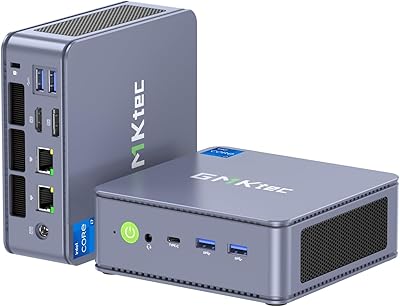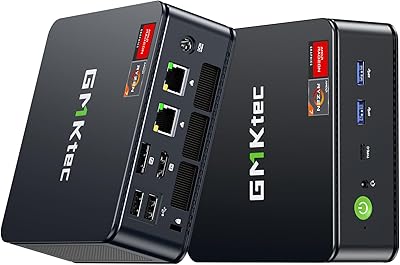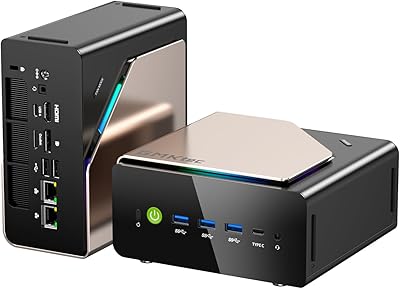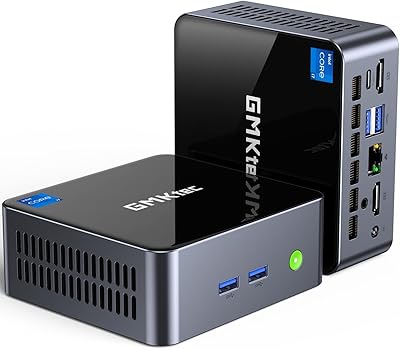
Overview

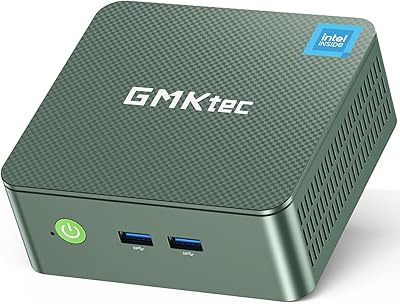
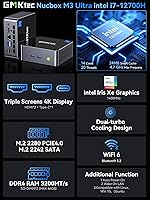
The GMKtec M3 Ultra i7-12700H Mini PC stands out in the mini PC market by doing something most compact desktops avoid: fitting a genuine laptop-grade H-series processor into a palm-sized chassis. The Intel Core i7-12700H is a 45W TDP chip with 14 cores and 20 threads — the kind of CPU you would normally find inside a gaming laptop, not a device smaller than a hardcover book. It ships ready to work, with 32GB of DDR4 RAM and a 1TB NVMe SSD pre-installed, running Windows 11 Pro. Competing against established names like Beelink and Minisforum, this compact desktop stakes a clear claim as a serious productivity machine.

Features & Benefits

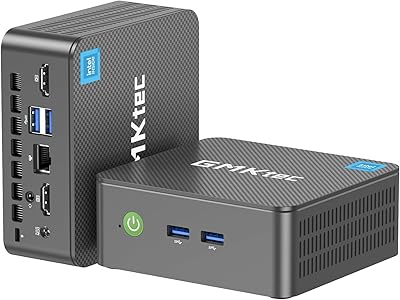
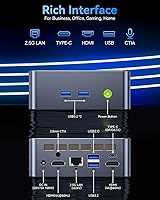
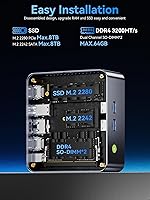
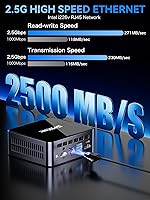
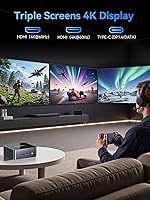
What separates the M3 Ultra from the crowd of budget mini PCs is the combination of connectivity options that actually change how you work day to day. Triple 4K display output via dual HDMI 2.0 and a USB-C port with DisplayPort 1.4 means running three monitors without adapters or compromises. The 2.5GbE wired Ethernet is a genuine quality-of-life upgrade for anyone transferring large files to a NAS or relying on a stable wired connection for video calls. WiFi 6 and Bluetooth 5.2 handle wireless duties without issue. Both RAM slots and both M.2 slots are user-accessible, so future upgrades to 64GB of RAM or expanded storage are straightforward. Thermal behavior under sustained load remains the one variable worth watching closely.

Best For

This compact desktop is built for a specific kind of user, and it is worth being honest about who that is. It shines for home office professionals who want two or three monitors on a tidy desk without the bulk of a tower. Developers compiling code or running local environments will appreciate the headroom that 14 cores provide. Finance and data analysts juggling multiple dashboards benefit directly from the multi-display capability. Light video editors working on 1080p or moderate 4K timelines can get real work done here. What it is not: a gaming rig or a 3D rendering station. Anyone expecting discrete GPU performance will run into the hard limits of integrated Iris Xe graphics fairly quickly.

User Feedback

Sitting at 4.4 stars, the M3 Ultra earns mostly positive sentiment, but the reviews are candid enough to be genuinely useful. Buyers consistently praise the out-of-box experience — it boots quickly, recognizes peripherals without fuss, and the included VESA mount and HDMI cable are appreciated rather than dismissed as filler. Performance on everyday tasks draws strong approval across the board. The friction surfaces under sustained workloads: several buyers note that fans spin up noticeably during prolonged CPU-intensive sessions, and a handful report thermal throttling under stress. Build quality earns solid but unremarkable marks. GMKtec's customer support draws mixed reactions — some buyers found responses prompt and helpful, while others experienced slower-than-expected resolution times.

Pros

  • Ships with Windows 11 Pro, 32GB RAM, and a 1TB NVMe SSD — genuinely ready to work out of the box.
  • Triple 4K display output across dual HDMI and USB-C ports is rare at this price point and works without adapters.
  • The i7-12700H brings laptop-grade H-series performance that budget mini PCs simply cannot match.
  • 2.5GbE wired Ethernet is a practical, future-proof upgrade for NAS users and heavy local network workflows.
  • Both RAM slots and both M.2 slots are user-accessible, making upgrades to 64GB RAM straightforward.
  • WiFi 6 and Bluetooth 5.2 are current-generation wireless standards — no dongles, no workarounds.
  • The included VESA mount and HDMI cable are useful additions, not just box filler.
  • Wake on LAN, Auto Power On, and PXE boot support make it viable for small business and IT deployments.
  • Linux compatibility broadens its appeal well beyond Windows-only buyers.
  • The compact chassis recovers significant desk real estate compared to a mid-tower without sacrificing productivity.

Cons

  • Fan noise under sustained CPU load is noticeable and can be disruptive in quiet workspaces.
  • Thermal throttling has been reported during prolonged heavy workloads, which can dent real-world performance consistency.
  • Intel Iris Xe integrated graphics impose a hard ceiling on GPU-dependent tasks like gaming or 3D rendering.
  • Customer support response times from GMKtec have been inconsistent according to several buyers.
  • The second storage slot is M.2 2242 SATA, not NVMe, which limits expansion speed compared to the primary slot.
  • Only one USB 2.0 port rounds out the rear — USB port count may feel tight in peripheral-heavy setups.
  • The 1-year warranty is shorter than what some competing brands in this segment now offer.
  • Build quality feels solid but not premium — the chassis materials reflect the price tier honestly.

Ratings

The GMKtec M3 Ultra i7-12700H Mini PC scores here reflect AI-synthesized analysis of verified global buyer reviews, with spam, incentivized, and bot-generated feedback actively filtered out. Ratings span everything from raw processing performance to long-term thermal behavior, giving prospective buyers an honest picture of where this compact desktop genuinely delivers and where it falls short.

Processing Performance
88%
For a machine this size, the i7-12700H punches well above expectations. Buyers running multiple browser tabs, video calls, code compilation, and office applications simultaneously report genuinely smooth responsiveness — the kind of headroom that makes daily work feel effortless rather than managed.
Under prolonged, CPU-saturating workloads like extended video renders or large build jobs, some users observe performance dipping as the system throttles to control heat. It is not a dealbreaker for most, but sustained heavy use reveals the thermal ceiling more quickly than a larger chassis would.
Thermal Management
67%
33%
For typical office and productivity use, the copper-base dual-turbine cooling system keeps things in check. Temperatures stay reasonable during moderate workloads, and most buyers report no issues during standard day-to-day tasks like video conferencing, document editing, or light development work.
This is the most consistently flagged concern in user reviews. The compact chassis struggles to dissipate the heat generated by a 45W H-series chip during extended stress, and thermal throttling under sustained load is a real and documented occurrence rather than a theoretical edge case.
Multi-Monitor Support
93%
Triple 4K display output through two HDMI 2.0 ports and a USB-C DisplayPort 1.4 connection is genuinely rare at this price tier and works exactly as advertised. Finance professionals and developers running three-screen setups consistently praise this as the feature that justified the purchase over competing mini PCs.
The USB-C port handles both display output and data simultaneously, so splitting those duties between a 4K monitor and high-speed peripherals at the same time may require a hub. A small number of users also note minor compatibility quirks with certain third-party monitors on the USB-C output.
Value for Money
84%
Buyers generally feel the price-to-performance ratio is strong when they compare it against similarly specced mini PCs from Beelink or Minisforum, especially given the H-series chip, 32GB RAM, 1TB NVMe SSD, and Windows 11 Pro all included from day one without extra configuration.
A small segment of buyers feel the thermal limitations and the one-year warranty period undercut the premium positioning slightly. For a machine at this price point, a two-year warranty is increasingly the norm among competitors, and a few users feel the cooling solution should match the chip's ambitions more closely.
Build Quality
74%
26%
The chassis feels solid in hand and the overall fit and finish is consistent with what buyers expect at this tier. Nothing flexes or rattles, port placements are practical, and the size-to-weight ratio gives it a reassuring density that distinguishes it from cheaper plastic-heavy alternatives.
It is not a premium-feeling device by any stretch — the materials and finish are functional rather than impressive. Buyers upgrading from a well-built business laptop or a quality desktop may find the tactile experience underwhelming, even if the internals justify the price.
Out-of-Box Setup
91%
Nearly every buyer comments on how quickly they were productive after unboxing. Windows 11 Pro boots activated and ready, drivers are pre-loaded, and the included HDMI cable and VESA mount mean most users have their setup running within 15 to 20 minutes of opening the box.
A small number of users encountered driver conflicts with specific peripheral combinations or found that the pre-installed software bundle included some unwanted applications. These are minor friction points, but worth noting for buyers who prefer a completely clean Windows installation.
Fan Noise
63%
37%
During idle and light workloads, the fans are barely perceptible. Users in typical office environments report that background noise easily masks whatever the cooling system produces during browsing, calls, or document work — making it a non-issue for the majority of the working day.
Under load the fan noise becomes genuinely noticeable, and in a quiet home office or recording-adjacent workspace this matters. Several buyers specifically flagged that the fan ramp-up during CPU-intensive tasks was louder than they anticipated given the machine's compact size and office-oriented positioning.
Connectivity & Ports
86%
The 2.5GbE Ethernet, WiFi 6, and Bluetooth 5.2 combination covers every realistic connectivity scenario without needing external adapters. NAS users and those on high-throughput local networks especially appreciate the 2.5G wired port, which is a meaningful step up from the gigabit standard.
The total USB port count — three USB 3.2 Type-A, one USB 2.0, and one shared USB-C — can feel limiting for users with four or more peripherals. Power users with a keyboard, mouse, webcam, external drive, and audio interface will likely need a USB hub from day one.
Upgradeability
89%
Both RAM slots and both M.2 slots are physically accessible without specialized tools, and standard DDR4 SO-DIMMs and NVMe drives drop straight in. For buyers planning ahead, the path to 64GB RAM or a larger SSD is clear, affordable, and well-documented by the user community.
The second storage slot is M.2 2242 SATA rather than NVMe, which limits its practical speed advantage for storage-intensive workloads. Buyers who want dual high-speed NVMe drives will need to prioritize the primary slot with the largest drive they can afford upfront.
Software & OS
82%
18%
Windows 11 Pro pre-installed and fully activated is a genuine value addition, and the confirmed Linux compatibility broadens the appeal significantly for developers and IT users who prefer Ubuntu or other distributions. Wake on LAN and PXE boot support add real utility for small business deployments.
A handful of users report that some bundled software and minor pre-installed utilities needed to be removed for a clean working environment. Nothing egregious, but buyers expecting a completely bare Windows installation may want to budget 20 to 30 minutes for a software cleanup after setup.
Gaming Capability
41%
59%
Older titles, indie games, and lighter esports releases are playable at reduced settings, and for occasional casual gaming between work sessions this compact desktop is adequate. The i7-12700H handles game logic well — the constraint is entirely on the graphics side.
Intel Iris Xe integrated graphics simply cannot deliver a satisfying experience in modern AAA titles or anything with demanding GPU requirements. Buyers drawn to this machine for gaming alongside productivity work will hit frustrating framerates quickly and should factor in the lack of discrete GPU support as a hard limitation.
Included Accessories
79%
21%
The VESA mount is genuinely useful and not an afterthought — it fits standard monitor mounts cleanly and immediately eliminates desk clutter for most users. The included HDMI cable is functional and saves buyers a small but appreciated immediate expense.
Only one HDMI cable is included despite the machine supporting two HDMI displays natively, so buyers planning a dual-HDMI setup need to source a second cable immediately. The power adapter is adequate but the barrel connector feels dated compared to USB-C power delivery adoption across the broader market.
Warranty & Support
58%
42%
GMKtec does have a dedicated after-sales support team, and buyers with straightforward issues — particularly hardware defects within the first few months — generally report adequate resolution. The warranty process itself is documented and accessible through standard channels.
The one-year warranty is shorter than the two-year coverage increasingly offered by competitors at a similar price point, and user feedback on support responsiveness is genuinely mixed. Some buyers experienced slow response times or needed to follow up multiple times to reach a resolution, which erodes confidence in the post-purchase experience.

Suitable for:

The GMKtec M3 Ultra i7-12700H Mini PC is a strong fit for home office professionals who want real computing muscle without a tower dominating their desk. If your daily workload spans video calls, browser-heavy research, complex spreadsheets, or light content editing across two or three monitors, this machine handles all of it with headroom to spare. Developers running local servers, Docker containers, or compiling mid-size projects will find the 14-core processor genuinely responsive rather than merely adequate. The 2.5GbE Ethernet and WiFi 6 make it equally practical for wired power users and those in modern wireless setups. Finance analysts, data professionals, and anyone who depends on a multi-monitor workflow will especially appreciate the triple 4K display capability, which removes the usual adapter headaches. It also suits users migrating away from an aging desktop tower who want to reclaim physical space without accepting a meaningful performance downgrade.

Not suitable for:

The GMKtec M3 Ultra i7-12700H Mini PC is the wrong choice if your workload demands a discrete GPU. Integrated Intel Iris Xe graphics simply cannot handle AAA gaming, GPU-accelerated 3D rendering, machine learning model training, or serious video effects work at any satisfying level. Gamers looking for smooth framerates in modern titles will hit a hard wall quickly and should look at systems with dedicated graphics instead. Heavy video editors working in 4K with complex timelines, color grading, or heavy effects will find the integrated graphics a genuine bottleneck, not just a minor inconvenience. Users in thermally challenging environments should also be cautious — sustained CPU-intensive workloads can push the compact cooling system hard, and the fan noise becomes noticeable under pressure. Finally, buyers who prioritize near-silent operation at all times may find the fan behavior during peak loads frustrating over the long term.

Specifications

  • Processor: Intel Core i7-12700H with 14 cores (6 Performance + 8 Efficient) and 20 threads, boosting up to 4.7GHz turbo with a 45W base TDP.
  • RAM: 32GB DDR4 3200MHz dual-channel memory installed as two 16GB SO-DIMM modules across two user-accessible slots.
  • Storage: 1TB PCIe 3.0 M.2 2280 NVMe SSD installed, with a second M.2 2242 SATA slot available for additional storage expansion.
  • Graphics: Intel Iris Xe integrated graphics running up to 1.4GHz, supporting hardware video encoding but no discrete GPU capability.
  • Display Output: Three simultaneous display outputs: dual HDMI 2.0 ports at 4K 60Hz each, plus one USB-C port with DisplayPort 1.4 support.
  • Ethernet: Intel I226-V controller providing 2.5 Gigabit (2500Mbps) wired Ethernet via a standard RJ45 port.
  • Wireless: WiFi 6 (802.11ax) and Bluetooth 5.2 are built in, requiring no external adapters or dongles.
  • USB Ports: Four USB ports total: three USB 3.2 Type-A ports and one USB 2.0 Type-A port, plus one USB-C port that doubles for data and DisplayPort output.
  • RAM Capacity: RAM is user-upgradeable up to 64GB maximum via the dual SO-DIMM slots using standard DDR4 3200MHz modules.
  • Storage Capacity: Primary M.2 2280 slot supports up to 8TB NVMe drives; secondary M.2 2242 SATA slot also supports up to 8TB.
  • Cooling System: Active air cooling with a copper-base heat spreader and dual turbine bidirectional intake fans to manage the 45W processor thermals.
  • Power Supply: Included 100W power adapter outputs 20V at 5A via a DC barrel connector (5.5mm outer, 2.5mm inner).
  • Operating System: Windows 11 Pro comes pre-installed; the system also supports Ubuntu, other Linux distributions, and Windows 10.
  • Extra Features: Wake on LAN, Auto Power On, and PXE boot are all supported, making it viable for small business and remote IT environments.
  • Audio: One 3.5mm CTIA combo audio jack is included for headphones or headsets with an integrated microphone.
  • Operating Environment: Rated for operation between -10°C and 45°C at 30% to 85% relative humidity (non-condensing).
  • Warranty: GMKtec provides a 1-year limited warranty covering manufacturing defects in materials and workmanship from the date of purchase.
  • In-Box Contents: Package includes the mini PC unit, a 100W power adapter, a VESA mount with screws, one HDMI cable, and a printed user manual.

Related Reviews
GMKtec NucBox K7 Plus 32GB/2TB
80%
88%
Processing Performance
63%
Thermal Management & Cooling
91%
Memory & Storage Configuration
94%
Networking — Dual 2.5G LAN
84%
Display Output & Multi-Monitor Support
More
GMKtec NucBox M5 Ultra Mini PC
77%
84%
Performance & Speed
88%
Value for Money
93%
Networking Capability
87%
Multi-Monitor Support
61%
Graphics & Display Quality
More
GMKtec M6 Ultra Ryzen 7640HS Mini PC
75%
88%
CPU Performance
61%
Gaming Performance
91%
Multi-Display Support
86%
Networking & Connectivity
67%
Thermal Management
More
GMKtec Nucbox M2 Pro S (i7-1185G7, 32GB/1TB)
77%
78%
Processing Performance
61%
Thermal Management
88%
Memory & Storage
84%
Multi-Monitor Support
86%
Connectivity & Networking
More
GMKtec EVO-T1 Ultra 9 285H Mini PC
82%
91%
CPU Performance
67%
GPU & Graphics
93%
RAM & Memory
94%
Storage & Expandability
89%
Multi-Display Support
More
GMKtec Nucbox K9 Mini PC
80%
88%
CPU Performance
67%
GPU & Graphics
91%
Memory & RAM
86%
Storage Speed
93%
Networking
More
GMKtec G9 Plus Mini PC NAS
82%
86%
Performance
92%
Ease of Setup
88%
Storage Expansion Flexibility
91%
Network Speed
84%
Cooling & Thermal Management
More
GMKtec Nucbox G3 Plus N150 Mini PC
76%
78%
Value for Money
74%
Performance for Intended Use
58%
Thermal Management
54%
Fan Noise
91%
Connectivity & Ports
More
GMKtec Nucbox M6 32GB/1TB Mini PC
76%
88%
Everyday Performance
61%
Gaming Capability
83%
Build Quality
59%
Thermal Management
64%
Fan Noise
More
GMKtec NucBox K10 Mini PC (Intel Core i9-13900HK, 32GB DDR5, 1TB SSD)
79%
88%
CPU Performance
67%
Thermal Management & Cooling
82%
RAM Speed & Capacity
91%
Storage Performance
89%
Multi-Monitor Support
More

FAQ

Yes, and it does so natively without adapters. You connect two displays via the HDMI 2.0 ports and a third via the USB-C port, which supports DisplayPort 1.4. All three can run at 4K 60Hz simultaneously, which is one of the more practical features of this machine for multi-monitor office setups.

Both are user-upgradeable. The two SO-DIMM slots accept standard DDR4 3200MHz modules up to 64GB total, and the primary M.2 2280 NVMe slot can take drives up to 8TB. There is also a second M.2 2242 SATA slot for additional storage, though that slot is slower than the primary NVMe connection.

Under light to moderate workloads — web browsing, documents, video calls — the fan stays quiet enough that most people won't notice it. Push the CPU hard with sustained tasks like long video exports or heavy compilation jobs, and the fans do spin up audibly. It is not distracting in a busy office, but in a quiet room it becomes noticeable.

Only for older or less demanding titles. The Intel Iris Xe integrated graphics can handle casual games, older releases, and some lighter esports titles at reduced settings, but it has hard limits. Modern AAA games, anything requiring a dedicated GPU, and VR are not realistic use cases for this machine.

Yes. GMKtec officially lists Ubuntu and Linux compatibility alongside Windows 10 and 11. Most users report a smooth experience with popular distributions, though as with any mini PC, it is worth checking driver support for your specific Linux version before purchasing if that is your primary OS.

The built-in 2.5 Gigabit Ethernet is genuinely faster than the standard 1Gbps ports found on most mini PCs. If you have a compatible router or switch, large file transfers to a NAS or local server complete noticeably faster. For standard home internet use it makes no practical difference, but for network-heavy work environments it is a real advantage.

It can. The i7-12700H is a 45W chip, which generates meaningful heat in a compact chassis. For short bursts the performance is strong, but during extended heavy workloads — prolonged video rendering, large compilation jobs — some users report the system throttles to manage thermals. For typical office and development work this is rarely an issue.

Yes, Windows 11 Pro comes pre-installed and activated. You can log in and start working without needing to purchase or enter a separate license key.

Yes, and the VESA mount is included in the box with the necessary screws. It attaches to the back of any VESA-compatible monitor, keeping the desktop completely clear. Most buyers find this a genuinely useful inclusion rather than a gimmick.

The i7-12700H is in a different performance tier. Budget mini PCs using Intel N-series chips or lower-wattage U-series processors are adequate for basic tasks but noticeably slower under any kind of sustained workload. The 14-core, 45W H-series chip in this compact desktop handles multitasking, compiling, and light creative work at a level those entry-level chips simply cannot match.