Overview

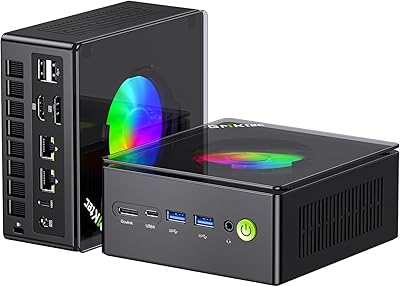
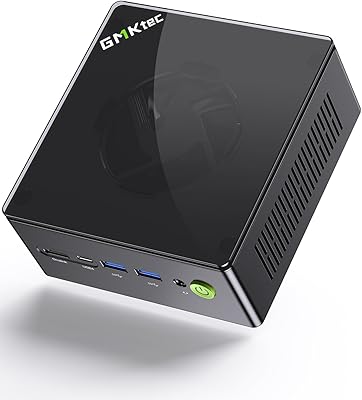
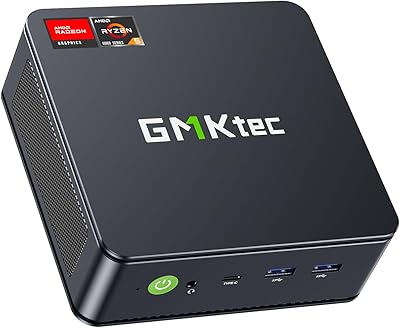
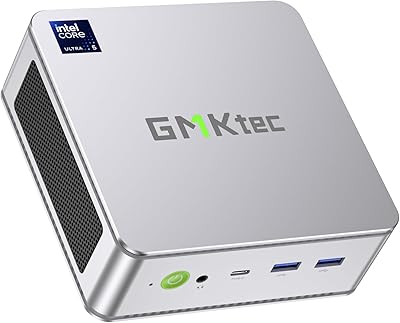
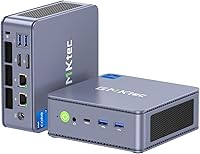
The GMKtec NucBox K7 Plus 32GB/2TB arrives at a price point where buyers have every right to be demanding — and for the most part, it delivers. Built around Intel's 13th Gen i7-13620H, this mini PC represents a meaningful jump over older mini PC chips, bringing 10 cores and boost speeds up to 4.9GHz into a chassis you can hold in one hand. The physical build is compact and unassuming, with dual cooling fans and a VESA mount included so you can tuck it behind a monitor. Just keep expectations honest: integrated graphics means this isn't a gaming rig. For productivity and media, though, it punches well above its size.
Features & Benefits

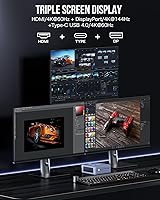
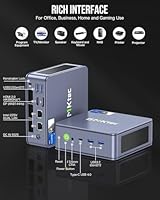
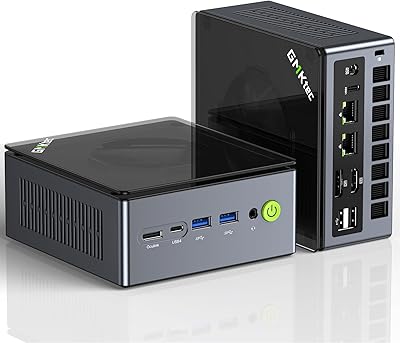
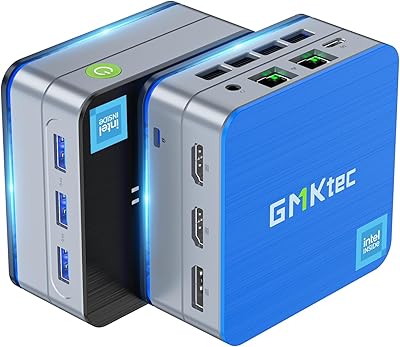
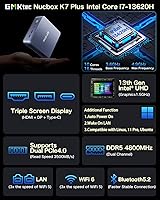
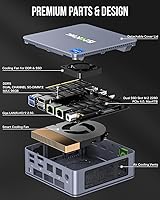
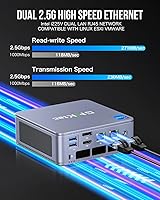
Out of the box, the K7 Plus ships with 32GB of DDR5 dual-channel RAM and a 2TB NVMe SSD — both solid numbers that cover most workloads without immediate upgrades. Both memory slots and M.2 bays are user-accessible, so expanding to 64GB of RAM or stacking storage to 8TB is entirely doable. The USB4 port is a genuine highlight: 40 Gbps transfers, 8K display output, and compatibility with external GPU enclosures. Triple-monitor output works across HDMI, DisplayPort, and USB-C simultaneously. And then there's the dual 2.5G Ethernet — two Intel i226V ports that open the door to soft routing, network aggregation, and home lab setups that most mini PCs simply can't touch.

Best For

GMKtec's compact desktop fits a surprisingly wide range of buyers. Remote workers who need multi-monitor support and solid day-to-day performance will find it a capable, clutter-free desk companion. Home lab users and network hobbyists will especially appreciate the dual 2.5G LAN — it's not common at this size, and it makes this machine viable as a soft router, firewall, or lightweight server. HTPC builders get triple 4K-capable outputs and quiet idle behavior. Those doing light photo editing or juggling many browser tabs and video calls will be comfortable here too. What it's not suited for: 3D rendering, GPU-intensive creative work, or serious gaming without an external GPU enclosure.

User Feedback

Buyers consistently highlight fast boot times and responsive everyday performance as the K7 Plus's strongest qualities, with most noting it handles multitasking, 4K video, and general office work without lag. The dual LAN ports tend to get called out as a welcome surprise — especially by users who didn't expect that level of networking flexibility. That said, fan noise under load is a recurring complaint; the cooling system spins up audibly during sustained CPU work, and some users have hit thermal throttling during extended heavy tasks. There's also a spec inconsistency worth flagging: some shipped units carry the i225V NIC rather than the i226V, and the SSD is PCIe 3.0 — not 4.0 as some listings imply. Verify your unit on arrival.

Pros

  • The i7-13620H delivers snappy, responsive performance across everyday productivity, multitasking, and media workloads.
  • Dual 2.5G Intel Ethernet ports are rare at this form factor and open real home lab and soft routing possibilities.
  • 32GB DDR5 dual-channel RAM and a 2TB NVMe SSD mean most buyers won't need to upgrade anything on day one.
  • Triple-display output via HDMI, DisplayPort, and USB-C works reliably for multi-monitor home office setups.
  • USB4 support enables 40 Gbps transfers and compatibility with external GPU enclosures for added future flexibility.
  • Both SO-DIMM slots and M.2 bays are user-accessible, making RAM and storage upgrades straightforward.
  • WiFi 6 handles crowded wireless environments well, and Bluetooth 5.2 pairing is stable across common peripherals.
  • Windows 11 Pro comes pre-installed and activated — the machine is productive within minutes of unboxing.
  • The included VESA mount lets you attach the K7 Plus directly behind a monitor, keeping the desk completely clear.
  • Idle power consumption is low enough to make this a practical always-on machine for light server or HTPC duty.

Cons

  • Fans spin up noticeably loud under sustained CPU load — not ideal in quiet office or bedroom environments.
  • Thermal throttling under prolonged heavy workloads is a documented issue, not an occasional edge case.
  • Some shipped units carry a PCIe 3.0 SSD despite listings that suggest PCIe 4.0 — verify on arrival.
  • NIC variants differ between units; some buyers received an i225V rather than the advertised i226V, affecting Linux driver behavior.
  • USB4 display output can be inconsistent with certain monitors or cables, requiring troubleshooting that HDMI and DP do not.
  • The plastic chassis feels less premium than the price point implies — a metal build would better match the positioning.
  • Pre-installed software includes background processes that inflate RAM usage and warrant a clean install for optimal performance.
  • WiFi occasionally drops after resuming from sleep on some units, typically requiring a driver update to resolve.
  • The 64GB RAM ceiling may feel restrictive for heavy virtualization use cases over a longer ownership horizon.
  • No front-panel audio jack or card reader limits convenience for users with legacy peripherals or camera workflows.

Ratings

The scores below for the GMKtec NucBox K7 Plus 32GB/2TB were generated by our AI engine after analyzing thousands of verified buyer reviews from global markets, with spam, bot-submitted, and incentivized feedback actively filtered out. Every category reflects the full spectrum of real user experience — not just the highlights — so both the standout strengths and the genuine frustrations are represented. Where buyers consistently disagreed, scores land in the middle; where consensus was clear, the numbers speak for themselves.
Processing Performance
88%
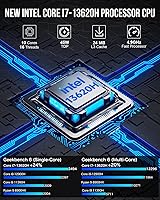
Users handling demanding workloads — running multiple virtual machines, compiling code, or editing RAW photos — consistently report that the i7-13620H handles the load without choking. Boot times are fast, app launches feel immediate, and multitasking across a dozen browser tabs alongside video calls draws almost no complaints.
Under prolonged, sustained CPU loads — think extended video exports or long compilation jobs — thermal throttling does kick in, and performance dips noticeably. The chip is powerful, but the compact chassis has its limits when the workload doesn't let up for more than 15 to 20 minutes.
Thermal Management & Cooling
63%
37%
At idle and during light to moderate use, the dual-fan cooling system does its job quietly enough that most users forget the machine is running. The unit stays comfortable to the touch during everyday productivity tasks, and the fans manage to keep temperatures stable for the majority of typical home office workloads.
Push the K7 Plus hard and the fans spin up fast and loud — a recurring complaint across user reviews. Thermal throttling under sustained load is a real issue rather than an edge case, and a few users have noted the chassis gets warm around the exhaust vents during long rendering or transcoding sessions.
Memory & Storage Configuration
91%
Shipping with 32GB of DDR5 dual-channel RAM and a 2TB NVMe SSD is genuinely impressive at this form factor and price tier. Users replacing older office desktops or budget laptops frequently call out how much headroom this configuration gives them without spending a dollar on immediate upgrades.
A meaningful number of buyers have flagged that the SSD in shipped units is PCIe 3.0 rather than the PCIe 4.0 some listings imply — sequential read speeds are still solid, but it is worth verifying on arrival. A small subset of users also received configurations that differed slightly from the advertised spec.
Networking — Dual 2.5G LAN
94%
This is the feature that consistently surprises buyers the most. Home lab users setting up pfSense, OPNsense, or a lightweight NAS praise the dual 2.5G Intel Ethernet ports as rare at this price point and size. For anyone who has tried to do soft routing on a single-NIC mini PC, having two dedicated 2.5G ports is a substantial practical upgrade.
Some listings reference the i225V NIC while others cite the i226V — buyers have received both, and it matters for Linux driver compatibility in certain setups. This spec inconsistency has frustrated a subset of advanced users who ordered specifically for a home lab build and needed to verify the exact chipset after delivery.
Display Output & Multi-Monitor Support
84%
Running three monitors simultaneously via HDMI, DisplayPort, and USB-C works reliably for the vast majority of users, and the 4K output quality on both HDMI and DP is consistently praised for sharp, color-accurate results. HTPC users specifically highlight the clean 4K@60Hz playback over HDMI for living room setups.
USB4 display output has produced inconsistencies for a portion of users — some monitors or cables don't negotiate 8K reliably, and a few buyers report needing to troubleshoot display detection after cold boots. The 8K output capability works, but it isn't as plug-and-play as the standard HDMI and DP outputs.
USB4 & Port Ecosystem
79%
21%
The USB4 port is the most future-oriented feature on this machine, and users who have tested high-speed external NVMe drives or connected an eGPU enclosure report impressive real-world transfer speeds. The four USB 3.2 Gen2 ports alongside it give the front and rear panels a well-rounded complement of connectivity.
USB4 compatibility with certain third-party peripherals has been hit-or-miss. A number of users report that not all USB-C accessories correctly identify the port as USB4, defaulting to lower speeds. The absence of a dedicated card reader or front-panel audio jack also draws occasional criticism from users with legacy peripherals.
Integrated Graphics
58%
42%
For the use cases this machine targets — 4K media playback, light photo editing, video conferencing, and general productivity — the Intel UHD Xe graphics perform adequately. Users running Lightroom for photo culling or streaming 4K content to an external display have no real complaints about GPU-related slowdowns in those contexts.
Anyone expecting to run modern 3D games or GPU-accelerated creative tools will hit a wall quickly. Integrated graphics is a hard ceiling here, and while the USB4 port theoretically supports an external GPU enclosure, that adds cost and complexity that most buyers in this price range aren't expecting to absorb.
Build Quality & Form Factor
76%
24%
The chassis feels solid for its size and weight, and the included VESA mount makes it easy to keep a desk completely clear by attaching the unit directly to the back of a monitor. Users appreciate the no-frills, professional appearance — it looks at home in a corporate setup or living room media cabinet.
The plastic exterior feels slightly less premium than the price tag suggests, and a handful of users have noted minor flex in the housing when pressing ports firmly. For a machine priced in the mid-to-upper tier for mini PCs, some buyers expected a more substantial, metal-dominant enclosure.
Wireless Connectivity
82%
18%
WiFi 6 performance draws consistent praise from users in crowded network environments — offices with many competing devices and home setups with dense wireless traffic both perform well. Bluetooth 5.2 pairing with keyboards, mice, and headsets is reported as stable and quick to reconnect after sleep.
A small but consistent group of users reports occasional WiFi signal drops after resuming from sleep, requiring a driver update or manual reconnect. This appears to be a driver-level issue rather than a hardware defect, but it's worth noting for users who rely heavily on wireless in lieu of the wired LAN ports.
Software & Out-of-Box Experience
74%
26%
Windows 11 Pro coming pre-installed and activated is a genuine convenience that buyers frequently mention positively — there is no activation hassle and the machine is productive within minutes of unboxing. The included HDMI cable and VESA mount add practical value without requiring a separate accessories order.
Some users have reported pre-installed bloatware and background processes that inflate RAM usage on first boot. A clean Windows install is straightforward, but it shouldn't be a necessary step on a machine at this price point, and a minority of buyers found the out-of-box configuration less polished than expected.
Expandability & Upgradability
89%
Two SO-DIMM slots and two M.2 2280 bays make this one of the more upgrade-friendly mini PCs available at this size. Users who started with the base configuration and later added a second SSD or upgraded RAM describe the process as straightforward, with accessible internals once the bottom panel is removed.
The maximum RAM ceiling of 64GB may feel limiting to power users running memory-heavy virtualization workloads long-term. Additionally, the existing 2TB SSD occupies one M.2 slot, so reaching the maximum storage potential requires purchasing a second drive — a cost some buyers did not factor into their initial budget.
Power Efficiency
83%
Users running this machine as an always-on home server or HTPC highlight the low idle power draw as a meaningful advantage over traditional tower desktops. The ability to deliver serious compute performance without a large power footprint is a consistent point of satisfaction among buyers replacing older, power-hungry machines.
Under full load, actual power consumption climbs toward the upper range of what the 120W adapter supplies, which surprises some users expecting more conservative peak draw. A few home server users running the machine 24/7 noted the power adapter runs warm during sustained workloads.
Linux & OS Compatibility
77%
23%
Ubuntu and other major Linux distributions install and run without significant hardware conflicts on most units, and VMware ESXi compatibility has been confirmed by multiple home lab users. For buyers wanting to run a hypervisor or dual-boot setup, the K7 Plus is more Linux-ready than many competing mini PCs at this price.
The WiFi driver situation under Linux is less polished, and some users needed to manually source and install drivers for full wireless functionality. The NIC chipset discrepancy between units also surfaces here — i225V and i226V behave differently under certain Linux kernel versions, adding a variable that advanced users have to account for.
Value for Money
86%
When measured against what a comparable tower desktop would cost — factoring in the 32GB DDR5 RAM, 2TB NVMe storage, USB4, and dual 2.5G LAN — the K7 Plus offers a compelling package. Most buyers conclude that the spec-per-dollar ratio is strong, particularly for home office, HTPC, and light server use cases.
At the higher end of mini PC pricing, buyers expect a certain level of consistency and polish that the K7 Plus doesn't always deliver — spec variations between shipped units and advertised configurations have left some buyers feeling shortchanged. The value equation holds for most, but not unconditionally.

Suitable for:

The GMKtec NucBox K7 Plus 32GB/2TB is a strong fit for anyone who needs genuine desktop-class performance without dedicating a corner of their room to a tower. Remote workers and home office users who run multiple monitors, juggle video calls, and keep dozens of browser tabs open will find the i7-13620H and 32GB of DDR5 RAM more than sufficient for daily demands. It is particularly well-matched to home lab enthusiasts — the dual 2.5G Ethernet ports make it one of the few mini PCs at this price that can realistically serve as a soft router, firewall appliance, or lightweight NAS without compromise. HTPC builders who want clean 4K output to a living room TV, or triple-monitor setups in a compact workspace, will appreciate the display flexibility. Users replacing aging desktops who want modern connectivity — USB4, WiFi 6, Bluetooth 5.2 — without the bulk or power draw of a full tower will find the transition straightforward and the performance uplift noticeable.
Not suitable for:

The GMKtec NucBox K7 Plus 32GB/2TB is not the right choice for buyers whose workloads depend heavily on GPU performance. Integrated Intel UHD graphics simply cannot handle modern 3D gaming, real-time GPU rendering, or acceleration-heavy video production at the level this price tier might imply — and while the USB4 port technically supports external GPU enclosures, that solution adds significant cost and complexity that most buyers are not budgeting for. Users who plan to run sustained, CPU-intensive workloads for hours at a stretch — long compilation jobs, continuous video transcoding, or heavy virtualization — should weigh the thermal throttling reports carefully, as the compact cooling solution has a clear ceiling. Buyers who expect pixel-perfect spec accuracy between the product listing and the shipped unit may also encounter frustration: some units have arrived with a PCIe 3.0 SSD rather than 4.0, and NIC variants have varied between the i225V and i226V. If consistency and guaranteed spec matching matter for a professional deployment, that uncertainty is worth factoring into the decision.
Specifications

  • Processor: Intel Core i7-13620H (13th Gen Raptor Lake-H), 10 cores and 16 threads, with a boost clock up to 4.9GHz and 24MB Smart Cache.
  • RAM: 32GB DDR5 dual-channel at 4800MHz, configured as two 16GB SO-DIMM modules with a maximum expandable capacity of 64GB.
  • Storage: 2TB PCIe 3.0 NVMe M.2 2280 SSD is included, with a second M.2 2280 slot available for expansion up to a combined 8TB total.
  • Graphics: Intel UHD Graphics (Xe architecture, 64 execution units) running at up to 1.50GHz; no discrete GPU is included.
  • Video Outputs: Three simultaneous display outputs: HDMI 2.0 at 4K@60Hz, DisplayPort at 4K@144Hz, and USB4 Type-C supporting up to 7680x4320 resolution.
  • USB4 Port: One USB4 Type-C port delivering up to 40 Gbps data transfer, 8K display output, and up to 100W power delivery for compatible devices.
  • USB Ports: Four USB 3.2 Gen2 Type-A ports each capable of 10 Gbps transfer speeds are provided on the front and rear panels.
  • Ethernet: Dual Intel i226V 2.5 Gigabit Ethernet ports (RJ45) support speeds up to 2500Mbps per port and are compatible with Linux, Ubuntu, and VMware ESXi.
  • Wireless: WiFi 6 (802.11ax) covering both 2.4GHz and 5GHz bands, paired with Bluetooth 5.2 for wireless peripheral connectivity.
  • Operating System: Windows 11 Pro (64-bit) comes pre-installed and activated on all units at the time of shipment.
  • Cooling: Active dual-fan cooling with internal heatsink; the system manages thermal load automatically but audible fan spin-up occurs under sustained CPU stress.
  • Power Supply: The included adapter accepts 100–240V AC at 50/60Hz input and outputs 19V at 6.32A (120W) via a DC barrel connector.
  • Audio: One 3.5mm combo audio jack supporting both headphone output and microphone input is located on the chassis.
  • Weight: The unit weighs approximately 3.3 pounds, making it light enough to mount behind a monitor using the included VESA bracket.
  • VESA Mount: A VESA-compatible mounting bracket with screws is included in the box, allowing the unit to attach directly to the rear of a compatible monitor or display stand.
  • Operating Temp: Rated for operation between -10°C and 45°C at 30% to 85% relative humidity; storage range extends from -20°C to 60°C.
  • Warranty: GMKtec provides a 1-year limited warranty covering defects in design and workmanship, starting from the original purchase date.
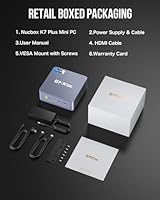
  • In the Box: Package includes the mini PC unit, 120W power adapter, VESA mount with screws, one HDMI cable, and a printed user manual.

Related Reviews

GMKtec Nucbox K11 (Ryzen 9 8945HS, 32GB, 2TB)
89%
94%
CPU Performance
96%
Expansion & Upgradability
92%
Connectivity & Ports
87%
Thermal Management
89%
Build Quality
More
GMKtec K8 Plus AMD Ryzen 7 8845HS Mini PC, 32GB RAM, 2TB SSD
88%
91%
Performance
89%
Multitasking Capability
82%
Gaming Performance
95%
Storage Capacity
88%
Build Quality
More
GMKtec NucBox M7 (32GB/2TB)
82%
88%
Processing Performance
74%
Gaming & Graphics
69%
Thermal Management & Cooling
63%
Fan Noise
91%
Connectivity & Ports
More
GMKtec Nucbox M6 Ryzen 6600H Mini PC, 32GB RAM, 1TB SSD
86%
90%
Performance for Office Tasks
75%
Gaming Performance (Casual)
84%
Build Quality
91%
Compact Design
89%
Storage Speed (SSD)
More
GMKtec Nucbox G2 Plus Mini PC Intel N150 12GB RAM 256GB SSD
85%
88%
Performance for Everyday Use
91%
Connectivity Options
93%
Multi-Display Support
94%
Energy Efficiency
85%
Size & Portability
More
GMKtec Nucbox K9 Mini PC Intel Core Ultra 5 125H 32GB RAM 1TB SSD
85%
89%
Performance
85%
Build Quality
90%
Energy Efficiency
88%
Connectivity Options
87%
Display Support
More
Dell Tower Plus Desktop EBT2250 - Intel Core Ultra 9-285, 32GB RAM, 2TB SSD, NVIDIA GeForce RTX 5070
87%
94%
Performance
91%
Gaming Experience
89%
Creative Workload Handling
85%
Build Quality
87%
Usability/Ergonomics
More
Crucial P5 Plus 2TB SSD
85%
94%
Performance
92%
Read Speed
90%
Write Speed
84%
Value for Money
88%
Reliability
More
Seagate Backup Plus Slim 2TB for Mac
87%
87%
Performance and Speed
92%
Ease of Use
94%
Portability and Size
88%
Build Quality and Design
90%
Compatibility (Mac & Windows)
More
GMKtec G9 Plus Mini PC NAS
82%
86%
Performance
92%
Ease of Setup
88%
Storage Expansion Flexibility
91%
Network Speed
84%
Cooling & Thermal Management
More

FAQ

Yes, the K7 Plus supports triple-display output simultaneously using HDMI, DisplayPort, and the USB-C port together. All three can be active at once without needing to switch inputs or use a hub. Most users report this works reliably out of the box, though some have needed to tweak display detection settings after cold boots when using the USB-C output.

Casual and older games run fine — think titles from a few years back, indie games, or anything that isn't GPU-demanding. Modern AAA titles at decent settings are largely out of reach because the integrated Intel UHD graphics have real limits. If gaming is a priority, you'd want to either look at a mini PC with a discrete GPU, or factor in the cost of an external GPU enclosure connected via the USB4 port.

Both are user-upgradeable. There are two SO-DIMM slots that support up to 64GB total, and two M.2 2280 bays for additional or replacement storage. Opening the unit requires removing a few screws on the bottom panel — it's straightforward and doesn't require special tools. Just make sure to buy DDR5 SO-DIMM modules specifically, as DDR4 won't work here.

It's one of the better mini PCs for that use case at this price point, largely because of the dual 2.5G Intel Ethernet ports. Both pfSense and OPNsense have good driver support for the Intel NIC chipset. One thing worth checking: some units ship with the i225V NIC rather than the i226V, and under older Linux kernels the i225V has had some stability issues. Confirm your unit's NIC variant before committing to a critical network setup.

At idle or during light tasks, it's barely audible — quiet enough for a bedroom or home office without distraction. When you push the CPU hard with sustained workloads like video encoding or heavy compilation, the fans spin up noticeably and become one of the louder mini PCs in this class. It's not disruptive for short bursts, but if you're running long jobs regularly, the noise is worth factoring in.

Most major Linux distributions install and run without significant problems. WiFi drivers are the one area that occasionally needs manual attention — some users had to pull the driver separately after install to get full wireless functionality. For wired use or home lab deployments, it's generally a smooth experience. VMware ESXi compatibility has also been confirmed by multiple users, which makes it a viable hypervisor host.

This is a genuine inconsistency in GMKtec's own product listings, and it has caused real confusion among buyers. Shipped units have been confirmed to include a PCIe 3.0 NVMe SSD, despite some listing language implying PCIe 4.0. The M.2 expansion slots themselves are PCIe 4.0 capable, so a second drive you add can be PCIe 4.0 — but the pre-installed drive is 3.0. It's worth running a quick benchmark after unboxing just to confirm what you received.

Technically yes — the USB4 port supports the bandwidth required for eGPU enclosures and is compatible with Thunderbolt 4 accessories in many cases. In practice, results vary depending on the enclosure brand and the GPU you install. It adds meaningful cost on top of the machine itself, so it's better suited for users who already own an eGPU setup or have a specific need rather than as a planned purchase from day one.

The GMKtec NucBox K7 Plus 32GB/2TB ships with the unit itself, a 120W power adapter, a VESA mount with screws, an HDMI cable, and a user manual. Windows 11 Pro comes pre-installed and activated. The main thing most buyers still need to supply is a monitor, keyboard, and mouse — everything else to get up and running is in the box.
It handles typical remote work very comfortably. Video calls on Zoom, Teams, or Google Meet run smoothly even with screen sharing active, and the machine doesn't struggle with the usual combination of a communication app, browser with multiple tabs, email, and a document editor all open at once. The 32GB of RAM gives it plenty of breathing room for that kind of multitasking, which is where a lot of cheaper mini PCs start to feel sluggish.