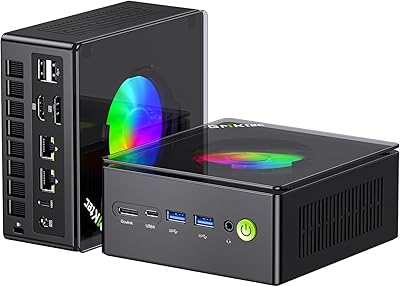
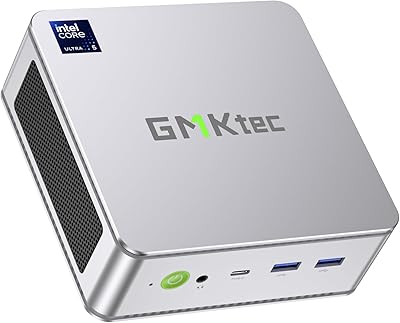
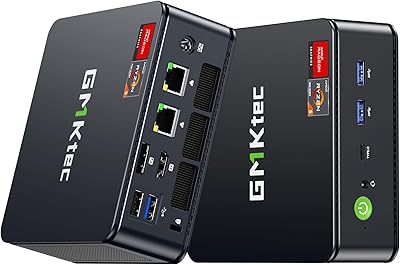
Overview

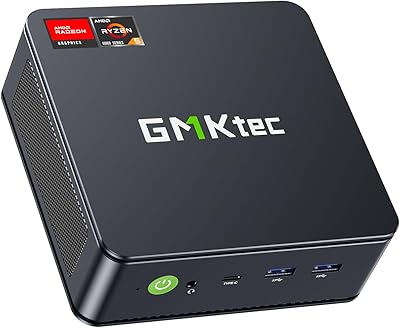
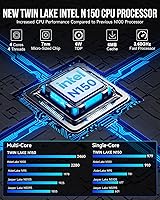
The GMKtec Nucbox G3 Plus N150 Mini PC is a palm-sized desktop that runs Intel's latest Twin Lake N150 chip, aimed squarely at home office users and everyday computing tasks. At roughly 4.17 x 4.49 inches and under two pounds, this mini PC tucks neatly behind a monitor using the included VESA mount — a smart, practical touch. It ships with Windows 11 Pro already activated, so there's no OS installation to wrestle with on day one. The N150 is a real step up from the widely used N100, offering single-threaded improvements that make routine multitasking feel slightly more responsive. Budget-conscious and space-efficient, it sets realistic expectations from the start.
Features & Benefits

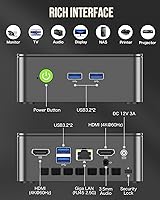
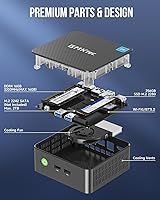
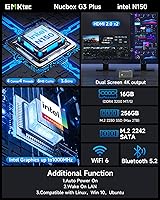
The N150 processor won't win benchmarks, but for the tasks this mini PC is actually designed for — web browsing, spreadsheets, video calls, light document work — it holds up well. The 16GB DDR4 means you can keep a dozen browser tabs open alongside a video call without things grinding to a halt. Storage is 256GB NVMe, fast enough for quick boots and file access, and crucially there are two expansion slots (M.2 2280 PCIe and M.2 2242 SATA) for adding more down the road. The Intel i226-V 2.5GbE port is the headline spec here — unusually rare at this price tier, and useful for anyone running a NAS or home server. WiFi 6 and four USB 3.2 ports round things out without cutting corners.

Best For

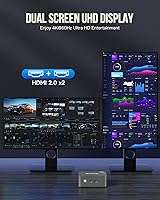
This compact desktop is a natural fit for remote workers who want a clean desk without sacrificing a full Windows experience. It handles dual 4K displays at 60Hz, which makes it surprisingly capable as a productivity workstation for office software or light creative work. Home theater setups benefit from AV1 decode support and 4K playback over HDMI. For homelab enthusiasts, the 2.5GbE NIC and Linux compatibility open the door to Proxmox, pfSense, or Docker deployments on minimal power draw. Students and casual users get a proper full-featured PC in a tiny package. It also works well as a secondary workstation mounted behind a monitor where a full tower would simply be overkill.

User Feedback

Buyer opinions on the Nucbox G3 Plus are clearly mixed — a 3.6-star average tells that story. Those who are happy tend to point to 2.5GbE networking and dual 4K output as features that overdeliver for the price. Critics, however, raise consistent concerns: fan noise under load is a recurring complaint, and a few buyers encountered Windows activation hiccups or driver issues straight out of the box. GMKtec did make improvements to the thermal paste and fan design over earlier models, and that shows for light workloads — but sustained CPU-heavy tasks can still push temperatures uncomfortably high. It's not a device for video encoding or compiling large codebases. Go in with the right expectations and it delivers; ask too much of it and frustration follows.

Pros

  • Dual 4K HDMI output at 60Hz is rare and genuinely useful for a compact desktop at this price.
  • The Intel i226-V 2.5GbE NIC is a standout networking spec that most competitors in this tier skip entirely.
  • Windows 11 Pro comes pre-installed and ready, no OS setup required on day one.
  • WiFi 6 and Bluetooth 5.2 mean you get modern wireless without hunting for adapters.
  • Four USB 3.2 ports handle most peripheral setups without needing an external hub.
  • Two storage expansion slots let you grow the device over time rather than replace it.
  • The VESA mount in the box is a thoughtful inclusion that enables clean, monitor-back installations.
  • At roughly 36 watts peak draw, running costs are minimal compared to a traditional desktop.
  • Compatible with Linux, Proxmox, and VMware, making it genuinely useful as a lightweight homelab node.
  • Improved thermal paste and revised fan design show GMKtec is iterating on real user complaints.

Cons

  • Fan noise under sustained CPU load is a consistent complaint and not suitable for quiet environments.
  • Single-channel RAM limits integrated graphics bandwidth and holds back multi-threaded performance.
  • Some buyers report Windows activation failures or missing drivers straight out of the box.
  • 256GB base storage fills up quickly once Windows overhead and applications are accounted for.
  • Thermal throttling under prolonged heavy workloads is a real concern, not just a theoretical one.
  • The N150 offers only modest gains over the N100 — not a meaningful upgrade if you already own an N100 machine.
  • A 3.6-star average rating signals quality consistency issues that prospective buyers should factor in.
  • No Thunderbolt or USB4 port limits high-speed peripheral and external GPU options entirely.
  • The 12V barrel plug power connector is proprietary, meaning a lost adapter is an inconvenient replacement hunt.

Ratings

The scores below for the GMKtec Nucbox G3 Plus N150 Mini PC were generated by our AI rating engine after analyzing verified global buyer reviews, with spam, bot activity, and incentivized feedback actively filtered out. Each category score reflects the honest consensus from real-world usage — not manufacturer claims — so both the genuine strengths and the recurring frustrations are represented transparently.
Value for Money
78%
22%
Buyers consistently point out that the combination of 2.5GbE networking, dual 4K HDMI output, and Windows 11 Pro at this price tier is hard to match from rival brands. For light office use or a homelab node, the hardware-to-dollar ratio lands well above expectations.
A handful of users feel the value equation is undercut by quality inconsistency — units with driver issues or OS activation failures out of the box make the savings feel less certain. For buyers who factor in potential troubleshooting time, the perceived value drops noticeably.
Performance for Intended Use
74%
26%
For the tasks this compact desktop was actually built for — web browsing, productivity software, video calls, and 4K media playback — the N150 handles the load comfortably. Boot times are quick, tab switching feels responsive, and everyday office workflows rarely hit a wall.
Step outside those boundaries and the cracks show fast. Sustained multitasking with heavier applications triggers throttling, and anything touching video encoding or virtualization at scale exposes the chip's efficiency-first design. Buyers expecting a general-purpose workhorse often come away disappointed.
Thermal Management
58%
42%
GMKtec did make genuine improvements to the cooling system on this revision — updated thermal paste and a revised fan design help keep temperatures in check during light to moderate use, and casual users rarely encounter thermal issues during a standard workday.
Under sustained CPU load, thermal throttling is a real and documented problem. Multiple buyers report the unit gets noticeably warm and performance dips after extended periods of demanding work. The upgraded cooling helps but does not fully solve the underlying heat challenge in such a compact chassis.
Fan Noise
54%
46%
At idle and during light tasks like document editing or streaming video, the fan stays quiet enough that most users in a normal office environment will not notice it. For background use or media playback, noise is rarely a complaint.
Sustained workloads push the fan into clearly audible territory, and this is one of the most repeated complaints across buyer reviews. Users who placed this mini PC in a quiet bedroom or library-style workspace specifically flagged fan ramp-up under load as a frustrating surprise.
Connectivity & Ports
91%
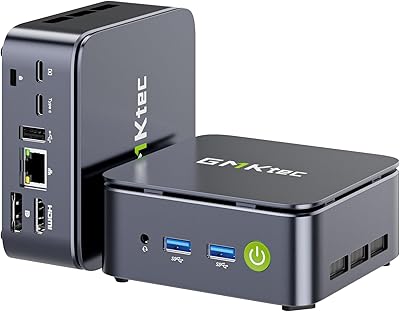
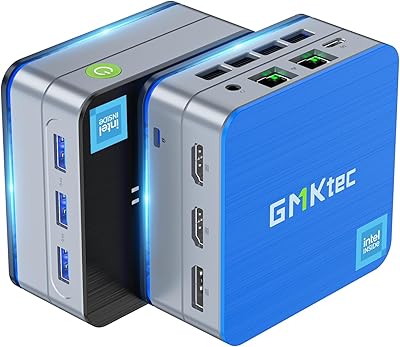
Four USB 3.2 ports, dual HDMI 2.0, a 3.5mm audio combo jack, and the standout Intel i226-V 2.5GbE NIC give this compact desktop a port layout that punches well above its class. Most users report covering their full peripheral setup without reaching for a hub.
The absence of any USB-C or Thunderbolt port is a real gap for users who rely on modern monitors or high-speed external drives that depend on that interface. There is also only one audio jack, which can be limiting for users who need simultaneous mic and speaker setups on separate devices.
Out-of-Box Setup
61%
39%
For the majority of buyers, the first-boot experience is straightforward — plug in, connect a display, and Windows 11 Pro walks you through initial setup in minutes. The included HDMI cable and VESA mount mean most users have everything they need to get started without an accessory run.
A meaningful minority of buyers hit Windows activation failures or missing drivers on first boot, which turns a simple setup into a support ticket. This inconsistency feels avoidable at the product validation stage and is a recurring theme in lower-star reviews from otherwise satisfied hardware users.
Build Quality & Design
69%
31%
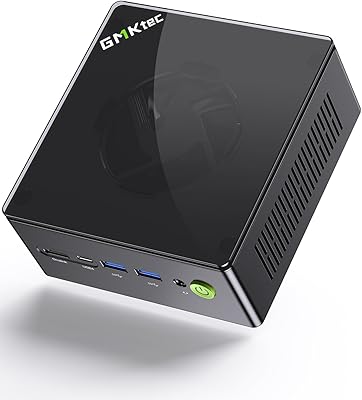
The all-black plastic chassis feels solid enough for a desk or monitor-back mount, and the compact footprint is genuinely appealing to anyone trying to reduce workspace clutter. It does not feel cheap or hollow when handled.
The plastic construction does not inspire confidence over the long term, and a few buyers noted flex in the casing or slightly misaligned port cutouts. It is acceptable for the price tier but a step below what competing brands offer at a similar cost.
Wireless Performance
82%
18%
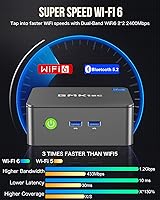
Wi-Fi 6 delivers noticeably stable and fast wireless performance for a device in this category — video calls, cloud sync, and streaming all run smoothly without the dropout issues seen on older Wi-Fi 5 mini PCs. Bluetooth 5.2 pairs reliably with keyboards, mice, and speakers.
Some users in dense apartment buildings or busy Wi-Fi environments report occasional 5GHz band instability, though this is likely as much an environmental factor as a hardware one. A small number of Linux users also noted needing to manually load the wireless driver on certain distributions.
Networking (2.5GbE)
93%
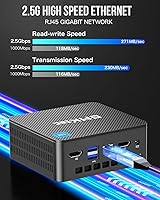
The Intel i226-V NIC is the most praised single component in buyer feedback. Homelab users running Proxmox or pfSense, and NAS users moving large files over a local network, all single out this port as a genuine differentiator that justifies the purchase on its own. Driver support on Linux is mature and reliable.
The 2.5GbE port only delivers its full benefit if your router or switch also supports 2.5G speeds, which not every home network does yet. Buyers without matching network hardware are effectively using a standard gigabit connection and may not notice any real-world difference.
Storage & Expandability
84%
The NVMe SSD delivers fast sequential speeds that make boot times and application launches feel snappy. More importantly, the two expansion slots — one M.2 2280 PCIe and one M.2 2242 SATA — give users a clear upgrade path without replacing the unit, which adds real long-term value.
The base 256GB feels tight in practice once Windows overhead and a few applications are installed, and users who do not realize expansion is straightforward may feel constrained early on. The secondary SATA slot also tops out at lower speeds than PCIe, which matters for users adding large media libraries.
Display Output Quality
88%
Dual 4K at 60Hz over both HDMI ports simultaneously works exactly as advertised, and buyers running two external monitors for productivity work are among the most consistently satisfied users in the review pool. AV1 decode support makes 4K streaming smooth and efficient.
There is no DisplayPort output, which limits compatibility with some professional monitors and KVM switches that expect DP. Users with older 1080p displays will not notice any display-related limitations, but those building a modern dual-monitor workstation should verify their monitor inputs beforehand.
Software & OS Experience
63%
37%
Windows 11 Pro is a meaningful inclusion — the Pro license enables features like Remote Desktop, BitLocker, and domain joining that matter for small business and IT users. When activation works correctly, buyers appreciate getting a full Pro license without an extra purchase.
The inconsistency in activation reliability drags this score down considerably. Bloatware presence has also been noted by some users, and the driver package bundled with some units appears to lag behind current Intel releases, requiring manual updates shortly after purchase.
Noise at Idle
79%
21%
During idle and light workloads the fan operates quietly enough that users working in shared office spaces or running this as a media server rarely notice it. Several buyers specifically praised how unobtrusive the device is during typical eight-hour workdays of browser and document work.
Idle noise is not truly silent, and audiophiles or users in dead-quiet environments will still detect a faint hum. It is a fair trade-off for active cooling in a chassis this size, but buyers expecting passively cooled silence should look at fanless alternatives.
Power Efficiency
86%
Drawing under 36 watts at peak load, this compact desktop sips power compared to even the most modest tower desktops. As an always-on home server or workday productivity machine, monthly energy costs are negligible, which buyers running 24/7 workloads consistently highlight as a genuine advantage.
The proprietary 12V barrel-plug power connector is a minor but real inconvenience — replacement adapters are not universally available at retail, and losing the included adapter creates a harder-than-expected sourcing problem. Universal USB-C PD charging would have been a more future-proof choice.

Suitable for:

The GMKtec Nucbox G3 Plus N150 Mini PC is a genuinely good fit for anyone who needs a full Windows 11 Pro desktop without dedicating a corner of their desk — or room — to a tower. Remote workers handling email, video calls, and cloud-based apps will find it more than capable, especially when paired with dual monitors for a proper two-screen setup. The included VESA mount means it can disappear behind a display entirely, keeping workspaces tidy. Home theater enthusiasts who want 4K playback and AV1 decode support on a low-power, quiet-ish device will also find it a practical choice. Perhaps most notably, homelab users and networking hobbyists get rare value here: the Intel i226-V 2.5GbE port and Linux compatibility make it a legitimate candidate for running Proxmox, pfSense, or lightweight Docker containers at a fraction of the power draw of a traditional server. Students needing a reliable everyday PC on a tight budget round out the ideal audience.
Not suitable for:

The GMKtec Nucbox G3 Plus N150 Mini PC is not the right tool if your workload goes beyond the basics. The N150 is an efficiency-first chip — it was never designed for video editing, 3D rendering, gaming beyond casual browser titles, or compiling large codebases, and pushing it into those scenarios will result in thermal throttling and real frustration. The single-channel DDR4 memory configuration also acts as a bottleneck for anything graphics-intensive, since integrated graphics performance depends heavily on memory bandwidth. Buyers who need a fanless or near-silent machine should look elsewhere, as sustained CPU loads can make the fan noticeably audible. The 256GB base storage sounds adequate until you factor in Windows overhead and a few applications, so users who work with large files or media libraries should be prepared to add storage — or budget for a version with more from the start. Finally, anyone who needs rock-solid out-of-box reliability and zero setup friction may be put off by the reported inconsistency in Windows activation and driver readiness that some buyers have encountered.
Specifications

  • Processor: Intel Twin Lake N150 with 4 cores, 4 threads, 6MB cache, and a burst clock speed up to 3.6GHz.
  • RAM: 16GB DDR4 running at 3200MHz in a single-channel configuration on one SO-DIMM slot.
  • Storage: 256GB PCIe 3.0 NVMe SSD in M.2 2280 form factor, with fast sequential read speeds suitable for everyday workloads.
  • Storage Expansion: Two additional slots are available: one M.2 2280 PCIe supporting up to 2TB and one M.2 2242 SATA also supporting up to 2TB.
  • Graphics: Intel UHD integrated graphics running at up to 1000MHz, capable of AV1 decode and 4K video playback.
  • Display Output: Two HDMI 2.0 ports support simultaneous dual-display output at up to 4K resolution and 60Hz refresh rate.
  • Wired Network: Intel i226-V 2.5 Gigabit Ethernet via RJ45, delivering up to 2.5x the throughput of standard 1GbE connections.
  • Wireless: Wi-Fi 6 (802.11ax) supporting both 2.4GHz and 5GHz bands, with Bluetooth 5.2 built in.
  • USB Ports: Four USB 3.2 Gen 1 ports delivering transfer speeds up to 5Gbps each, with no USB-A hubs required for typical setups.
  • Audio: One 3.5mm combo jack supports both headphone output and microphone input simultaneously.
  • Operating System: Windows 11 Pro comes pre-installed from the factory, including a product key intended to be activated at first boot.
  • Power Supply: Includes a 12V/3A (36W) barrel-plug AC adapter rated for 100–240V input, suitable for international use.
  • Dimensions: The unit measures 4.17 x 4.49 x 1.67 inches (L x W x H), making it small enough to mount behind most monitors.
  • Weight: The device weighs 1.8 pounds without the power adapter, light enough to be VESA-mounted without straining monitor arms.
  • VESA Mount: A VESA-compatible mounting bracket and screws are included in the box for attaching the unit directly to a monitor or desk.
  • Operating Temp: Rated for operation between -10°C and 45°C at 30% to 85% relative humidity (non-condensing).
  • Warranty: GMKtec provides a 1-year limited warranty covering defects in design and workmanship from the date of purchase.
  • Wake Features: Supports Wake on LAN, PXE Boot, RTC Wake, and Auto Power On for remote management and server-style deployments.
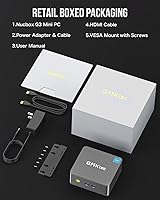
  • Box Contents: Package includes the mini PC unit, power adapter, VESA mount with screws, one HDMI cable, and a printed user manual.
  • Compatibility: Compatible with Linux distributions including Ubuntu, Proxmox, and ESXI VMware, in addition to the pre-installed Windows 11 Pro.

Related Reviews
GMKtec Nucbox G2 Plus Mini PC Intel N150 12GB RAM 256GB SSD
85%
88%
Performance for Everyday Use
91%
Connectivity Options
93%
Multi-Display Support
94%
Energy Efficiency
85%
Size & Portability
More
GMKtec G9 Plus Mini PC NAS
82%
86%
Performance
92%
Ease of Setup
88%
Storage Expansion Flexibility
91%
Network Speed
84%
Cooling & Thermal Management
More
GMKtec Nucbox M6 32GB/1TB Mini PC
76%
88%
Everyday Performance
61%
Gaming Capability
83%
Build Quality
59%
Thermal Management
64%
Fan Noise
More
GMKtec Nucbox G10 Ryzen 5 Mini PC
75%
83%
Value for Money
74%
Performance
88%
Connectivity & Ports
86%
Display Output
67%
Thermal Management
More
GMKtec Nucbox K8 Plus Mini PC
78%
84%
Value for Money
91%
CPU Performance
67%
Gaming Performance
93%
Connectivity & Ports
69%
Thermal Management
More
GMKtec Nucbox K11 (Ryzen 9 8945HS, 32GB, 2TB)
89%
94%
CPU Performance
96%
Expansion & Upgradability
92%
Connectivity & Ports
87%
Thermal Management
89%
Build Quality
More
GMKtec NucBox M5 Ultra Mini PC
77%
84%
Performance & Speed
88%
Value for Money
93%
Networking Capability
87%
Multi-Monitor Support
61%
Graphics & Display Quality
More
GMKtec NucBox K7 Plus 32GB/2TB
80%
88%
Processing Performance
63%
Thermal Management & Cooling
91%
Memory & Storage Configuration
94%
Networking — Dual 2.5G LAN
84%
Display Output & Multi-Monitor Support
More
GMKtec NucBox M7 (32GB/2TB)
82%
88%
Processing Performance
74%
Gaming & Graphics
69%
Thermal Management & Cooling
63%
Fan Noise
91%
Connectivity & Ports
More
GMKtec Nucbox K9 Mini PC
80%
88%
CPU Performance
67%
GPU & Graphics
91%
Memory & RAM
86%
Storage Speed
93%
Networking
More

FAQ

It ships with Windows 11 Pro pre-installed, but a small number of buyers have reported hitting activation issues on first boot. Most units activate fine during initial setup, but it is worth keeping your purchase receipt handy just in case you need to contact GMKtec support to resolve a licensing hiccup.

The RAM is not soldered — it uses a standard SO-DIMM slot, so technically it can be swapped out. That said, the unit ships with a single 16GB stick in one slot, and the single-channel configuration is a real performance limitation for graphics-intensive tasks. If a second slot is available on your unit, adding a matched stick to run in dual channel would be a meaningful upgrade.

Yes, this is one of the more practical use cases for the Nucbox G3 Plus. The Intel i226-V 2.5GbE NIC has solid Linux driver support, and the device is explicitly listed as compatible with Proxmox, Ubuntu, and ESXi VMware. Wake on LAN and PXE Boot support make remote management straightforward. Just keep in mind the N150 is a low-power chip, so it handles lightweight virtualization well but will struggle with anything resource-intensive.

At idle and light loads, fan noise is minimal and most people will not notice it. Under sustained CPU load — think prolonged video encoding or running multiple VMs simultaneously — the fan ramps up and becomes noticeable. If near-silent operation matters to you, this is a genuine concern worth factoring in. It is not loud by desktop standards, but it is not passively cooled either.

Yes, both HDMI 2.0 ports can output 4K at 60Hz simultaneously, and this is one of the features buyers consistently praise. For everyday productivity use — documents, spreadsheets, browser windows — dual 4K works well. If you are hoping to play games or run GPU-accelerated workloads across those two displays, the integrated graphics will be the limiting factor.

Windows 11 Pro alone consumes roughly 30 to 40GB after updates, and once you add a few applications, 256GB starts to feel tighter than it sounds. The good news is there are two expansion slots — an M.2 2280 PCIe slot and an M.2 2242 SATA slot — each supporting up to 2TB. If you work with video files, large datasets, or a lot of installed software, budgeting for an extra drive upfront makes sense.

GMKtec includes both an HDMI cable and a VESA mounting bracket with screws in the box, which is a nice touch at this price point. You also get the power adapter and a printed manual. A keyboard, mouse, and monitor are not included, as expected for a barebones desktop unit.

Honestly, not really. The N150 offers roughly 6 to 10 percent overall performance improvement over the N100, which is noticeable in benchmarks but unlikely to feel transformative in daily use. If your current N100 device is meeting your needs, this is not a compelling reason to switch. If you are coming from something older or slower, the jump will be more worthwhile.

Linux compatibility is solid on this hardware. Ubuntu, Proxmox, and ESXi are all listed as supported, and the Intel i226-V NIC in particular has mature kernel-level driver support. That said, as with most mini PCs, some users report needing to manually install or update Wi-Fi or audio drivers depending on the distribution and kernel version. For mainstream distros on recent kernels, experience is generally smooth.

For light workloads — web browsing, document editing, media playback — thermal management is fine and the device runs comfortably all day. GMKtec upgraded the thermal paste and fan design on this model compared to earlier versions, and that does help. Under prolonged heavy CPU usage, thermal throttling can kick in and reduce performance to manage heat. For always-on server or light NAS duties, it holds up well; for sustained compute tasks, plan for occasional thermal limits.

Where to Buy