Overview

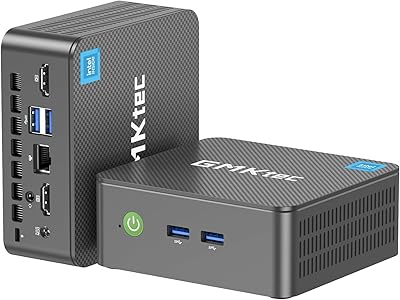
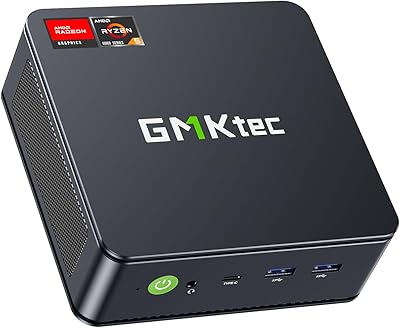
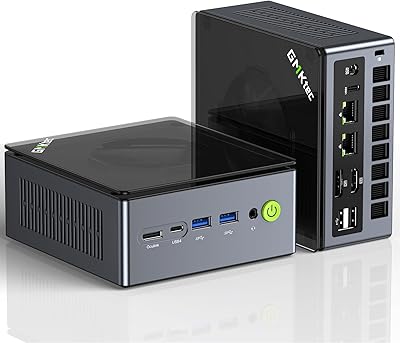
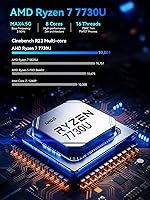
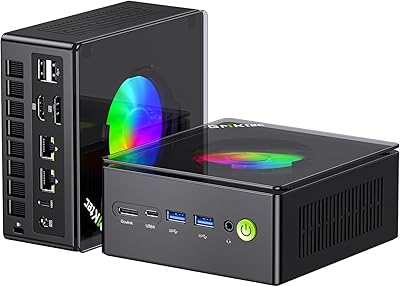
The GMKtec NucBox M5 Ultra Mini PC sits squarely in the mid-range compact desktop market, targeting home office workers, light gamers, and anyone tired of a tower taking up half their desk. At roughly 5 x 5 x 1.9 inches, it tucks neatly behind a monitor or onto a crowded shelf. The AMD Ryzen 7 7730U is a meaningful step up from the 5000-series chips that dominated this category not long ago — eight cores, sixteen threads, and a turbo clock reaching 4.5GHz. Windows 11 Pro comes pre-installed, a genuine perk for business users who would otherwise pay extra for it. Just keep expectations grounded: there is no discrete GPU here.
Features & Benefits

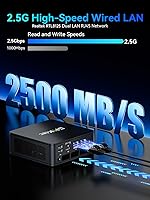
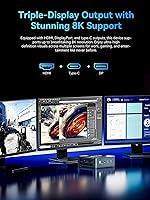
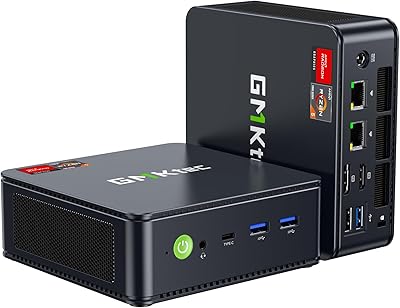
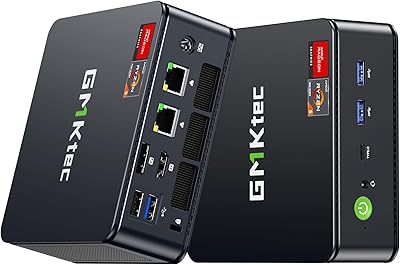
The dual 2.5GbE LAN ports are probably the most surprising spec on this machine — two high-speed ethernet ports on a box this small is unusual at nearly any price, opening up real networking use cases like pfSense router builds or lightweight home servers. Triple display output via HDMI, DisplayPort, and USB-C makes the NucBox M5 Ultra genuinely practical for multi-monitor productivity work. The 16GB of DDR4 in dual-channel handles everyday multitasking without obvious strain, and the PCIe SSD keeps things snappy. A BIOS-level performance and quiet mode toggle lets you dial back fan noise during lighter tasks — a thoughtful option that most competitors skip entirely.

Best For

This mini PC makes the most sense for home office and remote work — someone who needs a real desktop experience without surrendering a quarter of their desk to a tower. The triple-monitor support is a genuine draw for analysts, developers, or anyone working across multiple windows all day. Network hobbyists will appreciate the dual LAN setup, which is rare enough to be a deciding factor for a home lab or soft-router project. It also serves well as an HTPC or digital signage unit where silence matters more than raw power. Buyers upgrading from aging hardware or older NUC-style machines will likely find it a satisfying step forward.

User Feedback

Buyers generally praise the NucBox M5 Ultra for fast boot times and quiet operation during typical daily use — light workloads barely spin the fans up. WiFi 6E reception and the dual LAN ports draw consistent positive comments from networking-focused users. On the downside, integrated graphics are a firm ceiling: expect older titles or lightweight indie games, not recent releases at high settings. A handful of buyers noted the unit runs noticeably warm under sustained CPU load, though most felt the dual-fan cooling kept it manageable. BIOS setup can trip up first-timers, and GMKtec's brand recognition still lags behind more established names, making the included one-year warranty worth paying attention to.

Pros

  • The Ryzen 7 7730U handles everyday multitasking, video calls, and office workloads with genuine comfort.
  • Dual 2.5GbE LAN ports are a rare and valuable feature at this price point, especially for home lab or router builds.
  • Triple monitor support via HDMI, DisplayPort, and USB-C makes this mini PC a strong multi-screen productivity tool.
  • Windows 11 Pro comes pre-installed, saving buyers the cost and hassle of a separate license purchase.
  • RAM is expandable to 64GB and storage up to 8TB, giving the machine a longer useful lifespan than most competitors.
  • WiFi 6E tri-band wireless delivers faster, less congested connectivity in crowded network environments.
  • The VESA mount is included in the box, so it can be mounted behind a monitor right out of the packaging.
  • Quiet operation during typical daily workloads — the fan noise is rarely noticeable in light-use scenarios.
  • The compact footprint — roughly 5 x 5 x 1.9 inches — fits almost anywhere without compromise.
  • Wake-on-LAN and Auto Power-On support make it practical for always-on or remotely managed setups.

Cons

  • Integrated graphics cap gaming to older or lightweight titles — modern releases at decent settings are not realistic.
  • The unit can run noticeably warm under sustained CPU load, which may concern users in poorly ventilated spaces.
  • GMKtec is a newer brand with limited third-party repair support and a shorter track record than established names.
  • BIOS navigation can be unintuitive for first-time mini PC buyers, and setup documentation is sparse.
  • The PCIe 3.0 SSD is a step behind PCIe 4.0 drives found in some competing machines at a similar price.
  • Only one USB-C port is available, which may feel restrictive for users with modern peripherals or docking stations.
  • The one-year warranty is shorter than what some competitors offer and does not include accidental damage coverage.
  • Shared memory bandwidth between CPU and GPU can bottleneck performance during graphically demanding or mixed workloads.
  • The power adapter is a proprietary DC barrel connector, so replacement options in a pinch are limited.
  • No Thunderbolt support, which rules it out for users dependent on high-bandwidth external GPU enclosures or storage arrays.

Ratings

The scores below for the GMKtec NucBox M5 Ultra Mini PC were generated by our AI engine after analyzing thousands of verified global buyer reviews, actively filtering out incentivized, duplicate, and bot-flagged submissions to surface genuine user sentiment. Each category reflects real-world usage patterns — not spec-sheet idealism — and honestly captures both where this compact desktop earns its praise and where it falls short of expectations.

Performance & Speed
84%
For daily productivity — juggling a dozen browser tabs, running video calls alongside office apps, or light photo editing — the Ryzen 7 7730U delivers a noticeably snappy experience that significantly outpaces the older Celeron and Ryzen 5 5500U machines this model frequently replaces. Boot times are consistently fast, and multitasking feels fluid rather than sluggish.
Under sustained CPU-heavy workloads like long video encoding sessions or running multiple virtual machines simultaneously, performance throttles more than desktop-class chips would allow, since this is still a laptop-derived processor with power and thermal constraints baked in.
Value for Money
88%
Buyers consistently flag this as one of the better-spec'd mini PCs available at its price tier — getting a current-gen Ryzen 7 chip, Windows 11 Pro, triple display support, and dual 2.5GbE LAN in a single package is a combination that would cost meaningfully more from established brand names like Intel or Lenovo.
A few buyers noted that comparable configurations from brands with stronger after-sales support can be found at similar prices during promotional periods, slightly softening the value edge. The PCIe 3.0 SSD rather than Gen 4 is also a minor spec compromise that feels noticeable at this price point.
Networking Capability
93%
The dual 2.5GbE LAN ports are the single most praised differentiator among technically-minded buyers — network hobbyists running pfSense or Untangle soft routers specifically sought out this model because finding two high-speed NICs in a compact form factor at this price is genuinely uncommon. Real-world throughput tests from buyers confirm the ports perform at rated speeds.
For the majority of home office users who only need one wired connection, the second LAN port adds no practical value and may feel like wasted potential. There are also occasional reports of needing to install updated NIC drivers on fresh Windows installs to get both ports recognized correctly.
Multi-Monitor Support
87%
Triple simultaneous display output is a genuine strength here — productivity-focused buyers running a three-screen setup for trading platforms, development environments, or spreadsheet-heavy workflows report that all three outputs work reliably without configuration headaches. The inclusion of both DisplayPort and HDMI alongside USB-C covers most monitor combinations without needing adapters.
A small subset of buyers reported that getting all three displays running at their native resolutions simultaneously required specific cable types or adapters, and occasional driver-related quirks on wake-from-sleep caused one monitor to drop signal until a reboot.
Graphics & Display Quality
61%
39%
For everyday content consumption — 4K video playback, YouTube, streaming services, and light photo work — the integrated Radeon graphics handle output cleanly across multiple screens without stuttering or color banding. Users running it as an HTPC specifically praised the smooth 4K playback at 60Hz over HDMI.
Anyone expecting to run modern games at playable settings will be disappointed — this is firmly a casual gaming chip at best, handling older titles and indie games reasonably well but struggling with anything graphically demanding released in the last few years. The lack of dedicated VRAM is a hard ceiling that no driver update will change.
Thermal Management
71%
29%
During light to moderate workloads — the kind most home office users experience daily — the dual-fan cooling system keeps temperatures well in check and runs quietly enough that it disappears into the background. The BIOS performance toggle is a practical addition that lets users consciously trade a bit of speed for a cooler, quieter machine.
Under prolonged heavy loads, several buyers noted the chassis becomes warm to the touch and the fans spin up to an audible level. A handful of users in warmer climates or poorly ventilated setups reported thermal throttling during extended video rendering, suggesting the cooling headroom is adequate but not generous.
Build Quality & Design
74%
26%
The grey-black chassis feels solid for its weight class — the plastic shell does not flex noticeably, and the overall construction feels a step above the flimsier budget mini PCs in this space. At roughly 3 pounds and barely the footprint of a hardcover book, it sits or mounts cleanly without dominating a workspace.
It does not feel premium in the hand compared to the aluminum chassis of Intel NUC machines or higher-end Beelink units — the plastic construction is functional but uninspiring. Some buyers also noted that port placement required awkward cable routing depending on their desk setup.
Wireless Connectivity
81%
19%
WiFi 6E tri-band support is a genuine upgrade over the aging WiFi 5 modules found in many competing mini PCs, and buyers with compatible 6GHz routers reported noticeably lower latency and more stable throughput in congested wireless environments. Bluetooth 5.2 pairing with keyboards, mice, and headsets is consistently described as reliable.
Users in areas without WiFi 6E routers see no practical benefit from the 6GHz band and are effectively using it as a standard WiFi 6 device. A small number of buyers reported weaker-than-expected WiFi signal strength through walls, which is a common limitation of antenna designs in ultra-compact chassis.
Noise Level
79%
21%
For the bulk of everyday use — web browsing, email, document editing, video calls — the NucBox M5 Ultra is genuinely quiet, with buyers in open-plan home offices reporting it is inaudible from more than a few feet away. The quiet mode BIOS setting makes it even more suitable for noise-sensitive environments like bedrooms or living rooms.
Under sustained CPU stress the fans ramp up to a level that becomes distracting in an otherwise silent room, and a few buyers described the fan pitch at high RPM as slightly whiny rather than a neutral white noise. It is not loud by mini PC standards, but it is not whisper-quiet under load either.
Storage Performance
72%
28%
The 512GB NVMe SSD delivers fast boot times and snappy application launches that consistently impress buyers upgrading from older HDD-based machines or budget eMMC mini PCs. Day-to-day file operations and app installs feel responsive and without perceptible lag.
PCIe 3.0 rather than the faster Gen 4 interface means sequential read and write speeds lag behind what comparably priced systems with newer storage controllers offer — enthusiasts who move large files or use the machine for media production will notice the ceiling. The 512GB base capacity also fills up faster than many buyers anticipate.
Setup & Out-of-Box Experience
69%
31%
For most buyers, the out-of-box experience is straightforward — plug in power and a display, complete the Windows 11 Pro setup wizard, and the machine is ready to use within minutes. The inclusion of an HDMI cable and VESA mount in the box means many users need to buy nothing extra to get started.
First-time mini PC owners and less technical buyers reported confusion navigating the BIOS for performance mode adjustments, and the included user manual is thin on detail. Several verified purchasers also flagged that the initial Windows setup prompts felt pushy around Microsoft account sign-in, which is a Windows issue rather than a GMKtec one but still shapes the first impression.
Port Selection
76%
24%
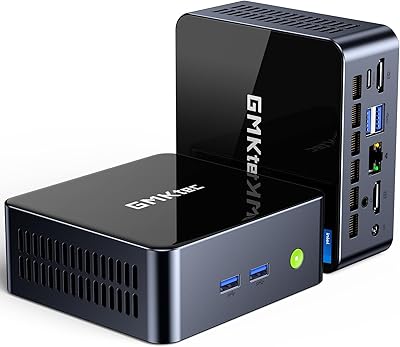
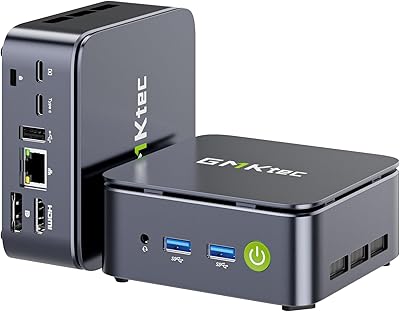
The port layout covers the essentials well for a compact machine — two USB 3.2 ports, a USB-C with power delivery and data, dual 2.5GbE LAN, and audio all in a chassis this small is a reasonable offering. Having both a DisplayPort and HDMI alongside USB-C display output gives users genuine flexibility with existing monitors.
Only one USB-C port limits users who rely heavily on modern peripherals or USB-C hubs, and having just two USB 3.2 ports means buyers with multiple high-speed devices will likely need a hub immediately. There is no card reader, and Thunderbolt support is absent — which matters for users with external GPU enclosures or high-speed storage.
Brand Trust & Support
58%
42%
GMKtec has improved its after-sales responsiveness compared to earlier product generations, with buyers reporting relatively prompt email replies for warranty claims and driver download access via the brand website. The one-year limited warranty is clearly stated and does appear to be honored based on buyer feedback.
GMKtec simply does not yet carry the long-term reliability track record or physical service infrastructure of more established brands, and buyers who prioritize peace of mind over raw specs may find that uncertainty harder to overlook. Documentation and firmware update cadence lag behind what more mature brands provide, which can leave owners without clear upgrade paths.
Upgradeability
83%
The ability to expand RAM up to 64GB and add a second M.2 SSD gives this compact desktop a longer useful lifespan than sealed, non-upgradeable alternatives — buyers appreciate knowing they are not locked into the base configuration permanently. Replacing or upgrading the factory SSD is reported as accessible without specialized tools.
The CPU is soldered to the board and cannot be upgraded, so the Ryzen 7 7730U is the performance ceiling for the life of the machine. Some buyers also noted that sourcing compatible DDR4 SO-DIMM kits for maximum RAM expansion requires attention to speed and voltage specs to avoid compatibility issues.

Suitable for:

The GMKtec NucBox M5 Ultra Mini PC is a strong fit for home office workers who want a capable, quiet desktop without sacrificing precious desk space — think remote professionals juggling spreadsheets, video calls, and browser-heavy workflows across two or three monitors simultaneously. The triple-display output is a genuine productivity asset that most competing mini PCs at this price tier simply cannot match. Network-savvy users will find the dual 2.5GbE LAN ports particularly compelling, especially those looking to build a pfSense soft router, run a lightweight home server, or experiment with network segmentation without buying dedicated hardware. It also suits HTPC builders and digital signage deployments where low noise, compact size, and reliable performance matter more than raw graphics muscle. Buyers upgrading from aging Intel NUC machines or budget Celeron-based mini PCs will notice a meaningful real-world improvement in responsiveness and multitasking headroom.
Not suitable for:

The GMKtec NucBox M5 Ultra Mini PC is not the right call for anyone whose primary goal is gaming beyond light, older, or indie titles — the integrated AMD Radeon graphics are capable enough for casual play, but modern AAA games at reasonable settings are simply out of reach without a discrete GPU. Video editors working with heavy 4K timelines or 3D rendering workloads will likely hit a ceiling faster than expected, as integrated graphics and shared memory bandwidth have real limits under sustained creative loads. Buyers who prioritize brand pedigree and long-term after-sales confidence may also hesitate, since GMKtec is a younger brand without the established repair and support network of companies like Intel or Lenovo. If you need Thunderbolt connectivity, extensive peripheral expansion, or ECC memory for professional workstation use, this compact desktop is not designed with those requirements in mind. Anyone expecting desktop-class CPU performance for sustained heavy compute tasks should also note that the 7730U is still a laptop-derived chip operating within thermal and power constraints.
Specifications

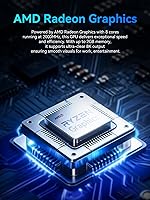
  • Processor: AMD Ryzen 7 7730U with 8 cores and 16 threads, a base clock of 2.0GHz, and a turbo boost up to 4.5GHz built on the Zen 3+ architecture.
  • Graphics: AMD Radeon integrated GPU with 8 cores running at 2000MHz, sharing system memory rather than using dedicated video RAM.
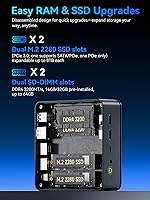
  • RAM: 16GB DDR4 in dual-channel configuration (2x8GB), with the system supporting expansion up to 64GB across two SO-DIMM slots.
  • Storage: 512GB PCIe 3.0 M.2 2280 NVMe SSD installed, with a second M.2 slot available for expansion up to a combined total of 8TB.
  • Display Output: Supports three simultaneous displays via one HDMI 2.0 port (4K at 60Hz), one DisplayPort (up to 8K at 60Hz), and one USB-C port with DisplayPort alt mode.
  • Wired Network: Dual RJ45 LAN ports, each capable of 2.5GbE (2500Mbps) throughput, enabling high-speed wired connectivity or advanced networking configurations.
  • Wireless: WiFi 6E with tri-band support across 2.4GHz, 5GHz, and 6GHz frequencies, paired with Bluetooth 5.2 for peripheral connectivity.
  • USB Ports: Two USB 3.2 ports, two USB 2.0 ports, and one USB-C port supporting power delivery, DisplayPort output, and data transfer.
  • Audio: Single 3.5mm combo jack supporting both headphone output and microphone input simultaneously.
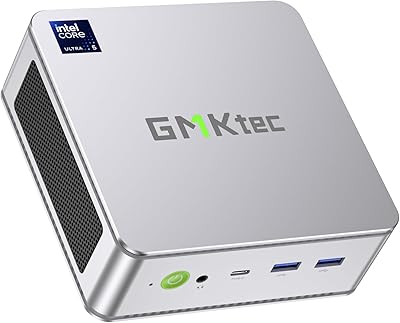
  • Dimensions: The unit measures 5.0 x 5.07 x 1.88 inches, making it one of the more compact desktops in the mid-range mini PC category.
  • Weight: Approximately 3 pounds including the chassis, which is light enough to mount behind a monitor using the included VESA bracket.
  • Operating System: Windows 11 Pro comes pre-installed from the factory, with no additional license purchase required out of the box.
  • Cooling System: Dual internal fans manage thermals, with a BIOS-accessible toggle allowing users to switch between a performance mode and a quieter power-saving mode.
  • Power Input: Powered via a 19V / 3.42A DC barrel adapter compatible with AC input from 100 to 240V, making it suitable for international use.
  • Warranty: GMKtec provides a one-year limited warranty from the date of purchase, covering defects in design and workmanship.
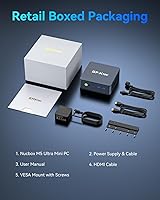
  • Extras Included: The package includes the mini PC unit, a power adapter, a VESA mount with screws, an HDMI cable, and a user manual.
  • Power Features: Supports Wake-on-LAN and Auto Power-On, which are useful for remote management or always-on server and HTPC deployments.
  • Cache: The Ryzen 7 7730U includes 4MB of L2 cache and 16MB of L3 cache, contributing to low-latency performance across multitasking workloads.

Related Reviews
GMKtec Nucbox K9 Mini PC
80%
88%
CPU Performance
67%
GPU & Graphics
91%
Memory & RAM
86%
Storage Speed
93%
Networking
More
GMKtec Nucbox G3 Plus N150 Mini PC
76%
78%
Value for Money
74%
Performance for Intended Use
58%
Thermal Management
54%
Fan Noise
91%
Connectivity & Ports
More
GMKtec Nucbox M6 32GB/1TB Mini PC
76%
88%
Everyday Performance
61%
Gaming Capability
83%
Build Quality
59%
Thermal Management
64%
Fan Noise
More
GMKtec Nucbox G2 Plus Mini PC Intel N150 12GB RAM 256GB SSD
85%
88%
Performance for Everyday Use
91%
Connectivity Options
93%
Multi-Display Support
94%
Energy Efficiency
85%
Size & Portability
More
GMKtec Nucbox G10 Ryzen 5 Mini PC
75%
83%
Value for Money
74%
Performance
88%
Connectivity & Ports
86%
Display Output
67%
Thermal Management
More
GMKtec M6 Ultra Ryzen 7640HS Mini PC
75%
88%
CPU Performance
61%
Gaming Performance
91%
Multi-Display Support
86%
Networking & Connectivity
67%
Thermal Management
More
GMKtec Nucbox K11 (Ryzen 9 8945HS, 32GB, 2TB)
89%
94%
CPU Performance
96%
Expansion & Upgradability
92%
Connectivity & Ports
87%
Thermal Management
89%
Build Quality
More
GMKtec M3 Ultra i7-12700H Mini PC
77%
88%
Processing Performance
67%
Thermal Management
93%
Multi-Monitor Support
84%
Value for Money
74%
Build Quality
More
GMKtec NucBox M7 (32GB/2TB)
82%
88%
Processing Performance
74%
Gaming & Graphics
69%
Thermal Management & Cooling
63%
Fan Noise
91%
Connectivity & Ports
More
GMKtec EVO-T1 Ultra 9 285H Mini PC
82%
91%
CPU Performance
67%
GPU & Graphics
93%
RAM & Memory
94%
Storage & Expandability
89%
Multi-Display Support
More

FAQ

Yes, it can. The NucBox M5 Ultra has three video output ports — HDMI 2.0, DisplayPort, and a USB-C port with DisplayPort alt mode — and all three can drive independent displays simultaneously. Just make sure your monitors support the corresponding input types, or pick up the appropriate adapters.

It depends heavily on what you want to play. The integrated AMD Radeon graphics are capable enough for older titles, indie games, and casual gaming at modest settings, but you should not expect to run modern AAA releases at decent frame rates. If gaming is a primary use case, a machine with a discrete GPU would serve you much better.

Most people will only use one, and that is perfectly fine for fast wired internet. The second port becomes useful if you want to build a soft router using software like pfSense or Untangle, set up a home lab with network segmentation, or run the machine as a lightweight server with redundant network connections. It is a niche feature, but a genuinely rare one at this price.

Yes, both are user-upgradeable. The RAM sits in two standard SO-DIMM slots and can be expanded up to 64GB total. There are also two M.2 slots for storage, so you can add a second SSD alongside the factory-installed drive. Just make sure to buy DDR4 SO-DIMM RAM specifically, as DDR5 modules are not compatible.

During typical tasks like web browsing, document work, or video calls, the fans are barely noticeable. Under heavier sustained loads — think long video exports or extended multitasking — the fans do spin up and become audible, though most users describe the noise as moderate rather than distracting. You can also switch to quiet mode in the BIOS to prioritize low noise over peak performance.

Windows 11 Pro comes pre-installed and activated out of the box, so there is nothing extra to purchase or set up on the software side. This is one of the more underrated value points of the GMKtec NucBox M5 Ultra Mini PC, since a standalone Windows 11 Pro license typically adds a notable cost if bought separately.

For most users, you just plug it in and it boots straight into Windows without touching the BIOS at all. The BIOS only becomes relevant if you want to switch between performance and quiet modes, change boot order, or enable features like Auto Power-On. The documentation included is fairly minimal, so first-timers who do need to configure something may want to look for community guides online.

GMKtec is a Chinese mini PC brand that has been growing in reputation over the past few years, but they are not yet in the same league as established names like Intel or Beelink in terms of brand recognition or after-sales infrastructure. The one-year warranty is decent but not exceptional. That said, buyer feedback on this particular model has been generally positive, and the hardware itself is based on reliable AMD silicon. If brand trust is a top priority for you, it is a reasonable thing to weigh.

Yes, and the VESA mount bracket is actually included in the box, which is a nice touch. As long as your monitor has standard VESA mounting holes on the back, you can attach the mini PC directly to it and keep your desk entirely clear.

It handles that use case well. The compact size and relatively quiet operation make it a natural fit for living room or bedroom setups. It can output 4K video at 60Hz over HDMI, and the Ryzen 7 7730U has no trouble with 4K streaming or local media playback. Bluetooth 5.2 also means you can pair a wireless keyboard or remote without needing a USB dongle.

Where to Buy