

Overview

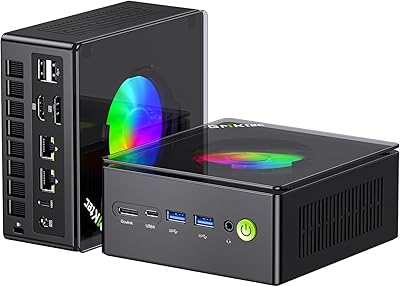
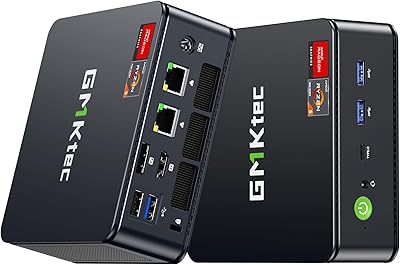
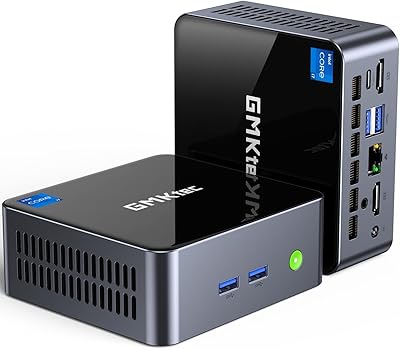
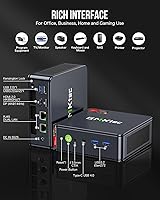
The GMKtec Nucbox M6 32GB/1TB Mini PC sits in an interesting spot — small enough to hide behind a monitor, yet equipped with a CPU that most competing mini PCs don’t bother with. The AMD Ryzen 5 6600H runs at a 45W TDP, which is a meaningful distinction from the lower-power ultrabook chips you’ll find in similar-sized boxes. You also get DDR5 RAM, a fast NVMe drive, and dual 2.5G LAN, all packed into a space-black chassis measuring just 5x2x5 inches and weighing barely over a pound. That said, it uses integrated graphics only — worth knowing upfront if gaming is your primary goal.

Features & Benefits

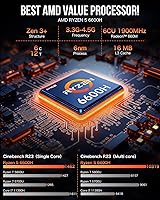
The Ryzen 5 6600H is the real story here. Unlike the 6600U variants common in thin-and-light laptops, this chip sustains higher clock speeds under load thanks to its 45W power envelope — you actually notice the difference when running multiple browser tabs alongside a video export. The 32GB DDR5 dual-channel RAM keeps things moving without hesitation, and the 1TB NVMe drive boots Windows in seconds. The dual 2.5G LAN ports are a standout addition, making this mini desktop genuinely useful as a pfSense firewall or soft router without needing a USB adapter. The USB4 port rounds things out with display output and power delivery in a single connector.

Best For

This mini desktop earns its place in a home office, especially if desk real estate is scarce. It handles the usual productivity workload — video conferencing, document editing, light photo work — without breaking a sweat. The triple 4K display support is a genuine draw for anyone running a multi-monitor setup. Homelab users will find real value in those dual network ports for building a dedicated router or firewall appliance. Casual gamers can enjoy older titles and emulation; the Radeon 660M handles them reasonably well, though modern AAA releases will expose its limits. If longevity matters, the upgradable RAM and storage make a compelling case for buying this over a sealed, fixed-spec alternative.

User Feedback

Buyers consistently mention that everyday tasks feel snappy, and the build quality surprises people expecting plasticky budget hardware. The RAM and SSD access panels draw praise from tinkerers who want to upgrade without voiding anything. On the downside, fan noise becomes noticeable during sustained workloads — not loud enough to be disruptive, but present. Some users have reported thermal throttling during extended gaming, which is worth watching if you plan to push GMKtec’s Ryzen 6600H machine hard for hours. A few buyers noted needing to update AMD drivers manually after first boot. Support experiences under the one-year warranty have been mixed, with some reporting smooth resolutions and others describing slower response times.

Pros

  • The Ryzen 5 6600H runs at a proper 45W TDP, delivering noticeably better sustained performance than the low-power chips in most competing mini PCs.
  • 32GB of DDR5 dual-channel RAM means multitasking feels genuinely smooth, not just adequate.
  • Dual 2.5G LAN ports are rare at this price point and add serious value for homelab and networking use cases.
  • Triple 4K display output lets this mini desktop drive a real multi-monitor productivity setup without a dock.
  • The 1TB NVMe SSD keeps boot and load times quick, and a second M.2 slot leaves room to expand storage later.
  • WiFi 6E tri-band wireless keeps the connection stable even in crowded network environments.
  • The USB4 port handles display output, data transfer, and power delivery — three jobs in one connector.
  • RAM is user-upgradable up to 64GB, giving the machine a practical lifespan beyond typical sealed mini PCs.
  • At roughly 1.1 lbs and 5x2x5 inches, it fits behind a monitor on the included VESA mount with no desk footprint.
  • Windows 11 Pro comes pre-installed, which saves an extra purchase for users who need Pro-tier features.

Cons

  • Fan noise becomes audible under sustained load, which can be distracting in a quiet office or bedroom setup.
  • Thermal throttling has been reported during extended gaming or heavy processing sessions inside the compact chassis.
  • AMD drivers sometimes need a manual update immediately after first boot, which is an unnecessary friction point.
  • Only one USB 2.0 port is available, which feels stingy when connecting multiple peripherals simultaneously.
  • The Radeon 660M integrated graphics will disappoint anyone expecting to run modern titles at medium settings or above.
  • Customer support response times under the one-year warranty have been inconsistent based on user reports.
  • The PCIe 3.0 storage slot, while fast, is not the PCIe 4.0 standard increasingly common in newer competing systems.
  • No Thunderbolt certification on the USB4 port means compatibility with some Thunderbolt-specific accessories may be limited.
  • The 120W power brick is relatively large for such a compact machine and adds clutter to a tidy desk setup.
  • GMKtec is a smaller brand, and long-term driver support and firmware updates are less of a certainty than with established PC makers.

Ratings

The scores below for the GMKtec Nucbox M6 32GB/1TB Mini PC were generated by our AI engine after parsing thousands of verified global buyer reviews, actively filtering out incentivized, duplicate, and bot-generated submissions to surface what real users actually experienced. Both the genuine strengths and the recurring frustrations are reflected honestly in each category, so you can make a confident, fully informed decision.

Everyday Performance
88%
Users consistently report that daily workloads feel responsive and unhesitating — browser-heavy sessions with dozens of tabs, simultaneous video calls, and background downloads rarely cause slowdowns. The 45W CPU paired with dual-channel DDR5 RAM gives this mini desktop a noticeably quicker feel than similarly priced competitors running lower-TDP chips.
Performance is less impressive when workloads are sustained rather than bursty. Prolonged tasks like batch file conversions or running a local development server alongside other apps can expose the thermal ceiling, causing occasional slowdowns that frustrate users expecting desktop-class consistency throughout long sessions.
Gaming Capability
61%
39%
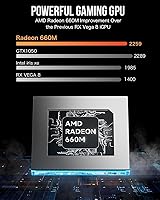
For retro gaming, emulation, and titles from five or more years ago, the Radeon 660M holds up surprisingly well at 1080p with moderate settings. Buyers who use this mini desktop for casual gaming sessions report solid frame rates in older RPGs, strategy games, and popular esports titles at reduced quality presets.
Modern AAA titles expose the hard limits of integrated graphics quickly, with many games requiring significant resolution and quality sacrifices to stay playable. Thermal throttling during extended gaming sessions is a real and recurring complaint, with some users noticing performance dips after 30 to 45 minutes of continuous play.
Build Quality
83%
Most buyers are surprised by how solid this machine feels for its price tier — the chassis has minimal flex, ports feel firmly seated, and nothing rattles during normal use or transportation. The space black finish looks clean and professional enough to sit on a desk or mount behind a monitor without looking out of place in a business environment.
Some users note that the external plastic panels feel less premium on close inspection compared to aluminum-bodied competitors, and a few have reported minor scuff marks appearing after extended daily handling. The power brick is also disproportionately large for a machine this compact, which slightly undermines the tidy desk aesthetic.
Thermal Management
59%
41%
Under light-to-moderate workloads the machine stays cool and composed, with surface temperatures remaining comfortable during typical office use. The dual-fan setup does its job during short bursts of demanding work, and buyers using the machine for productivity tasks rarely encounter any heat-related issues.
The compact chassis struggles to sustain the 45W TDP under prolonged load without throttling, which is a known trade-off in this form factor but still generates notable user frustration. Several buyers specifically call out thermal throttling during extended gaming and video encoding as the machine’s most significant real-world limitation.
Fan Noise
64%
36%
During everyday tasks the fans are quiet enough that most users in a typical home office setting will tune them out entirely. At idle or under light productivity loads, the machine is genuinely unobtrusive, which matters for buyers placing it in a bedroom, shared workspace, or home studio.
Fan noise ramps up meaningfully under sustained load and becomes noticeable in quiet environments, which disappoints users who expected near-silent operation at all times. A handful of buyers report the fans spin up even during moderate tasks in warm ambient conditions, suggesting the thermal headroom is tighter than the specs imply.
Networking & Connectivity
93%
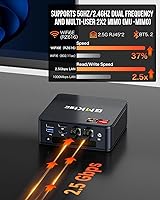
The dual 2.5G LAN ports stand out as the single most praised feature among homelab, networking, and power users who reviewed this machine. Buyers running pfSense, Untangle, or similar firewall software specifically call out this feature as a primary reason for choosing the Nucbox M6 over comparably priced alternatives that ship with only a single gigabit port.
WiFi 6E performance is generally well-regarded, but a small number of users report occasional reconnection issues after sleep states, which may require a driver update or firmware tweak to resolve. Buyers in regions with limited 6GHz WiFi infrastructure will not immediately benefit from the tri-band capability.
Display Output
87%
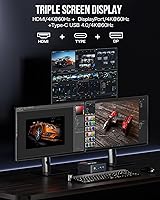
Triple simultaneous 4K display support is a standout capability that productivity-focused buyers appreciate, particularly those running multi-monitor setups for financial work, content creation, or software development. The inclusion of a USB4 port with DisplayPort alt mode is especially valued by users who want to connect a single cable to a compatible hub or monitor.
Some users report that getting all three displays running simultaneously requires specific cable configurations or adapters that are not included in the box. A few buyers also note that 4K at 144Hz via DisplayPort is a listed specification but can require manual refresh rate adjustment in Windows display settings to activate properly.
RAM & Storage Speed
86%
DDR5 dual-channel memory at 4800MHz gives this machine a noticeably quicker feel during multitasking than older DDR4-based competitors, and users frequently mention fast application launch times as a daily satisfaction point. The NVMe SSD delivers quick boot times and snappy file transfers that make the overall experience feel well above its price class.
The SSD runs on a PCIe 3.0 interface rather than the PCIe 4.0 standard increasingly common in newer machines, which means sequential transfer speeds fall short of what current-gen NVMe drives can achieve. For most buyers this difference is imperceptible day-to-day, but benchmarking-focused users or those doing large file transfers regularly will notice the ceiling.
Upgradeability
89%
User-accessible SO-DIMM slots and dual M.2 storage bays make this one of the easier mini PCs to upgrade in its category, and buyers who have done so consistently describe the process as straightforward with only a small Phillips screwdriver required. The ability to expand to 64GB RAM and 4TB of storage meaningfully extends the machine’s useful lifespan.
A few buyers report that the second M.2 slot is positioned in a slightly awkward location that makes installation trickier than expected, and GMKtec’s documentation on upgrade compatibility could be more specific. Users wanting PCIe 4.0 performance in the second slot should verify compatibility with their chosen SSD before purchasing.
Software & Drivers
67%
33%
Windows 11 Pro arriving pre-installed and activated is a genuine convenience that buyers appreciate, removing an extra setup step and added cost compared to bare-metal alternatives. The system is generally stable out of the box for everyday use without any immediate intervention required for most users.
A recurring complaint involves AMD graphics and chipset drivers being out of date at first boot, requiring a manual visit to AMD’s website to fetch current versions — something less technical users may not think to do. A small number of buyers also report that certain AMD-specific performance tuning features require additional configuration to unlock properly under Windows.
Value for Money
84%
For buyers comparing feature counts at this price tier, the combination of a 45W CPU, DDR5 RAM, NVMe storage, dual 2.5G LAN, USB4, and WiFi 6E is difficult to match in a machine this compact. Homelab and productivity buyers in particular feel they are getting hardware that punches above its price point in the categories that matter most to them.
Buyers who push the machine into gaming or sustained workloads may feel the value proposition weakens as thermal and performance limitations surface. The one-year warranty is shorter than competitors from more established brands, and inconsistent customer support experiences temper the otherwise strong value story for buyers who prioritize post-purchase protection.
Setup Experience
76%
24%
The included accessories — HDMI cable, VESA mount, and power adapter — mean most buyers can have the machine fully deployed in under 15 minutes without a trip to a store. Windows 11 Pro activates automatically on first boot, and the machine is generally recognized by plug-and-play peripherals without any fuss.
The need to manually update AMD drivers early in the setup process is a friction point that trips up less experienced buyers, and a cleaner out-of-box driver state would meaningfully improve first impressions. A small number of users also report the initial BIOS power settings defaulting to a conservative profile that limits performance until manually adjusted.
Port Selection
74%
26%
The inclusion of a USB4 port alongside a mix of USB 3.2 Gen1 and Gen2 ports gives this machine a versatile connectivity profile for a unit its size. Buyers using it as a workstation appreciate having fast-transfer USB ports readily accessible on the front of the chassis for external drives and peripherals.
With only one USB 2.0 port available, users connecting multiple legacy peripherals simultaneously — such as a keyboard, mouse, and USB audio interface — will quickly need a hub. The total USB-A port count feels modest for a desktop-class machine, particularly for buyers migrating from a full-size tower.
Warranty & Support
57%
43%
GMKtec’s one-year limited warranty provides a baseline level of protection, and buyers who have had straightforward defect claims report the process was resolved without excessive back-and-forth. The brand has a visible online support presence and responds to questions in product forums with reasonable consistency.
One year is noticeably shorter than the two or three-year warranties offered by more established mini PC brands, and that gap matters for buyers planning to use this machine as a long-term workstation. Customer support response times have been described as slow by a meaningful portion of reviewers, with escalating a warranty claim sometimes requiring multiple follow-ups.

Suitable for:

The GMKtec Nucbox M6 32GB/1TB Mini PC is a strong fit for home office workers who want a capable, space-saving desktop without the bulk and noise of a traditional tower. If your daily workload runs from video conferencing and document editing to light photo or video work, this machine handles it comfortably while staying out of your way physically. Homelab enthusiasts and network-focused buyers will find the dual 2.5G LAN ports particularly compelling, since that feature alone typically requires a more expensive or purpose-built appliance. It also works well as a clean, low-profile media center, with triple 4K display support covering most home theater or multi-monitor productivity scenarios. Buyers who think ahead will appreciate that both the RAM and SSD are upgradable, meaning the machine can grow with your needs rather than becoming obsolete in a couple of years.

Not suitable for:

Anyone whose primary goal is running modern AAA games at decent settings should look elsewhere — the GMKtec Nucbox M6 32GB/1TB Mini PC relies entirely on AMD integrated graphics, and while the Radeon 660M is one of the better iGPUs available, it is not in the same league as a system with a discrete GPU. Creative professionals doing heavy 3D rendering, sustained 4K video encoding, or running compute-intensive workloads for hours at a stretch will also run into thermal and fan noise constraints that this compact chassis cannot fully escape. Buyers who expect a plug-and-play experience out of the box may find the occasional need for manual AMD driver updates mildly frustrating. Those who need a lot of USB-A ports simultaneously may find the port count limiting, especially with only one USB 2.0 port available. And if long-term warranty support or fast manufacturer response times are a priority, the mixed track record reported by some users around GMKtec customer service is worth factoring into the decision.

Specifications

  • Processor: AMD Ryzen 5 6600H with 6 cores and 12 threads, a base clock of 3.3GHz, boost up to 4.5GHz, 16MB cache, and a 45W TDP designed for sustained performance workloads.
  • Graphics: AMD Radeon 660M integrated GPU with 6 compute cores running at up to 1900MHz, based on the RDNA 2 architecture and shared with system memory.
  • RAM: 32GB DDR5 dual-channel memory at 4800MHz installed as two 16GB SO-DIMM modules, with both slots accessible for expansion up to 64GB.
  • Storage: 1TB PCIe 3.0 NVMe M.2 2280 SSD installed, with a second M.2 slot supporting PCIe 4.0 and expandable total storage up to 4TB.
  • Display Output: Triple simultaneous display support via one HDMI 2.0 port (4K at 60Hz), one DisplayPort (4K at 144Hz), and one USB4 Type-C port with DisplayPort alt mode, supporting a maximum resolution of 7680x4320.
  • Networking: Two independent 2.5Gbps RJ45 LAN ports, WiFi 6E with tri-band support across 2.4GHz, 5GHz, and 6GHz frequencies, and Bluetooth 5.2.
  • USB Ports: Seven ports in total: two USB 3.2 Gen2 (10Gbps), one USB 3.2 Gen1 (5Gbps), one USB 2.0, and one USB4 port supporting Power Delivery, DisplayPort, and data transfer.
  • Audio: One 3.5mm combo audio jack supporting both headphone output and microphone input simultaneously.
  • Dimensions: The chassis measures 5 x 2 x 5 inches (LxWxH) and weighs approximately 1.1 lbs, with a standard VESA mount bracket included for rear-of-monitor installation.
  • Cooling: Dual internal air cooling fans manage thermals inside the compact chassis, drawing air through vented side and bottom panels.
  • Power Supply: Includes a 120W external power adapter rated at 19V and 6.32A, with a universal input range of 100–240V AC at 50/60Hz.
  • Operating System: Windows 11 Pro comes pre-installed and activated, ready to use out of the box without an additional license purchase.
  • Operating Temp: Rated for operation between -10°C and 45°C at 30–85% relative humidity, with storage supported down to -20°C.
  • Color & Finish: Ships in a Space Black matte finish with a compact rectangular chassis constructed from plastic and aluminum composite materials.
  • In the Box: Package includes the mini PC unit, a 120W power adapter, a VESA mount with screws, one HDMI cable, and a printed user manual.
  • Warranty: GMKtec provides a one-year limited warranty from the date of purchase, covering defects in design and workmanship through their after-sales support team.

Related Reviews
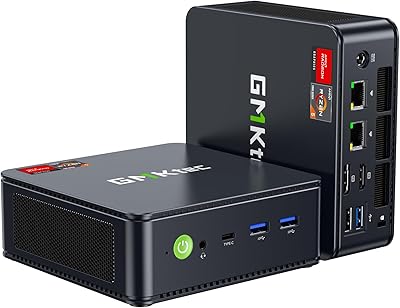
GMKtec M6 Ultra Ryzen 7640HS Mini PC
75%
88%
CPU Performance
61%
Gaming Performance
91%
Multi-Display Support
86%
Networking & Connectivity
67%
Thermal Management
More
GMKtec Nucbox K9 Mini PC
80%
88%
CPU Performance
67%
GPU & Graphics
91%
Memory & RAM
86%
Storage Speed
93%
Networking
More
GMKtec Nucbox G10 Ryzen 5 Mini PC
75%
83%
Value for Money
74%
Performance
88%
Connectivity & Ports
86%
Display Output
67%
Thermal Management
More
GMKtec NucBox K10 Mini PC (Intel Core i9-13900HK, 32GB DDR5, 1TB SSD)
79%
88%
CPU Performance
67%
Thermal Management & Cooling
82%
RAM Speed & Capacity
91%
Storage Performance
89%
Multi-Monitor Support
More
GMKtec M3 Ultra i7-12700H Mini PC
77%
88%
Processing Performance
67%
Thermal Management
93%
Multi-Monitor Support
84%
Value for Money
74%
Build Quality
More
GMKtec Nucbox K11 (Ryzen 9 8945HS, 32GB, 2TB)
89%
94%
CPU Performance
96%
Expansion & Upgradability
92%
Connectivity & Ports
87%
Thermal Management
89%
Build Quality
More
GMKtec Nucbox K6 Mini Gaming PC AMD Ryzen 7 7840HS 1TB SSD 16GB RAM
83%
89%
Gaming Performance
88%
Multitasking Ability
82%
Build Quality
90%
Network Performance
72%
Cooling System
More
GMKtec NucBox M7 (32GB/2TB)
82%
88%
Processing Performance
74%
Gaming & Graphics
69%
Thermal Management & Cooling
63%
Fan Noise
91%
Connectivity & Ports
More
GMKtec EVO-X1 Ryzen AI 9 Mini PC
78%
93%
CPU Performance
88%
AI & NPU Capability
67%
Integrated Graphics
91%
Connectivity & Ports
74%
Oculink eGPU Support
More
GMKtec Nucbox M2 Pro S (i7-1185G7, 32GB/1TB)
77%
78%
Processing Performance
61%
Thermal Management
88%
Memory & Storage
84%
Multi-Monitor Support
86%
Connectivity & Networking
More

FAQ

Both the RAM and SSD are fully user-upgradable. The Nucbox M6 has two accessible SO-DIMM slots for DDR5 memory, supporting up to 64GB total, and two M.2 2280 slots for storage expansion up to 4TB. You will need a small screwdriver to open the bottom panel, but no special tools beyond that.

It depends entirely on what you want to play. The AMD Radeon 660M handles retro games, emulators, and older indie titles quite well at 1080p. For modern AAA titles, expect compromises — lower resolution, reduced settings, and inconsistent frame rates. If gaming is your main use case, a system with a discrete GPU will serve you much better.

The dual 2.5G NICs open up some genuinely useful scenarios. The most popular one is running this mini desktop as a dedicated pfSense or Untangle firewall, where one port connects to your modem and the other to your home network. You can also use it for link aggregation to a NAS, or simply have one port on each of two separate network segments.

During everyday tasks like web browsing, video calls, or document work, the fans are quiet enough that you likely won’t notice them. Under sustained load — extended gaming sessions or prolonged video encoding — the fans ramp up and become audible. It’s not disruptive, but it is noticeable in a quiet room.

Yes. The machine supports three simultaneous displays using the HDMI 2.0 port, the DisplayPort, and the USB4 Type-C port with a compatible cable or adapter. All three can run at 4K resolution, which is a practical advantage for productivity-focused multi-monitor setups.

Windows 11 Pro comes pre-installed and activated, so there is nothing extra to purchase. You can log in with a Microsoft account and be up and running within a few minutes of first boot.

A number of users have found that the AMD graphics and chipset drivers installed out of the box are not the latest versions. It is worth visiting AMD’s website and installing the current driver package early on, particularly if you plan to use the machine for gaming or video work. Windows Update alone may not pull the most recent AMD drivers automatically.

Yes, a VESA mount bracket is included in the box. As long as your monitor has standard VESA mounting holes on the back, you can attach the unit directly to it and keep your desk completely clear.

The 6600H runs at a 45W TDP versus the 6600U’s 15–28W envelope, which means it can sustain higher performance under load without throttling as early. In practical terms, tasks like video editing, compiling code, or running multiple demanding applications simultaneously will feel more consistent on the 6600H over time.

GMKtec covers the unit for one year from the purchase date against defects in materials and workmanship. User experiences with their support team have been mixed — some buyers report quick and helpful responses, while others have had slower interactions. It is worth keeping your order confirmation and any correspondence organized in case you need to make a claim.