Overview

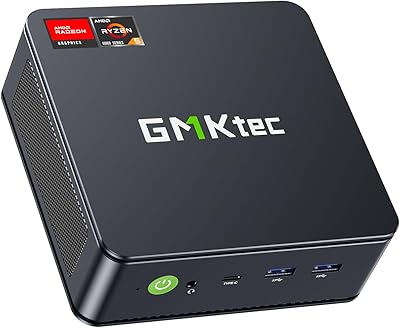
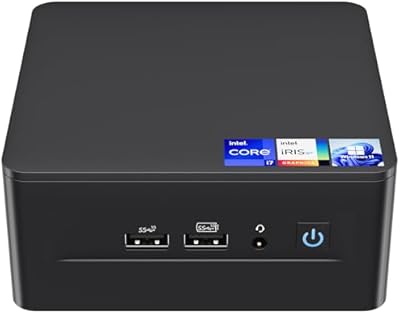
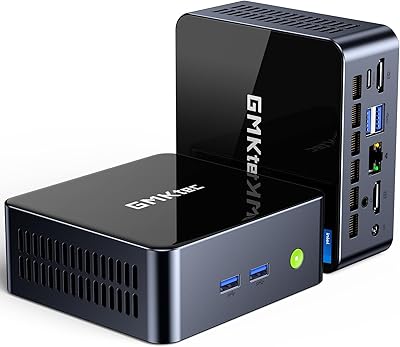
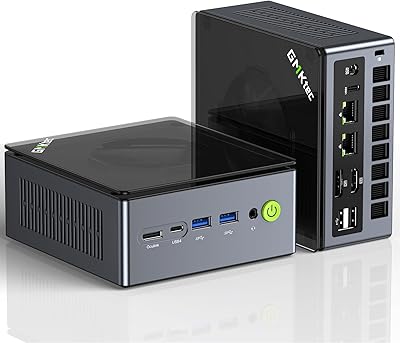
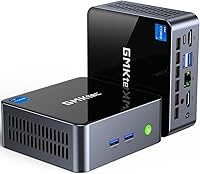
The GMKtec Nucbox M2 Pro S (i7-1185G7, 32GB/1TB) is a palm-sized desktop that punches well above its weight for everyday computing. Built around Intel's 11th-gen i7-1185G7, this mini PC ships with Windows 11 Pro pre-installed and a VESA mount tucked in the box — so you can bolt it behind a monitor and reclaim your desk on day one. It's not the newest chip on the market, but for home office users and HTPC builders who want solid performance without a tower eating up floor space, the value proposition here is genuinely hard to ignore.
Features & Benefits

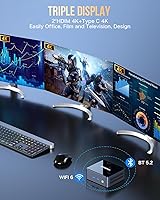
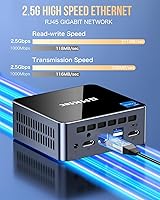
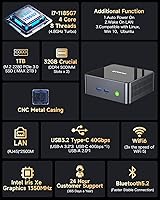
The i7-1185G7 is a 2020-era Tiger Lake chip, but don't let that put you off — at 4.8GHz boost with 4 cores and 8 threads, this mini PC handles browser-heavy workflows, video calls, and light productivity without breaking a sweat. What genuinely stands out is the triple 4K display support: two HDMI ports plus a USB-C output, all capable of 4K at 60Hz simultaneously — unusual at this size. The 32GB of dual-channel DDR4 keeps multitasking smooth, and a 2.5Gbps Ethernet port alongside WiFi 6 means transfers and streaming stay fast whether wired or wireless. Two M.2 slots give you real room to expand storage down the road.

Best For

This compact desktop earns its spot for anyone who values a clutter-free workspace. Remote workers will appreciate the multi-monitor capability — running three screens from a box smaller than a paperback book is a genuine convenience. It also works well as a home theater PC, drawing just 35 watts under load and staying relatively quiet during media playback. Students and educators get a fully capable Windows 11 machine without tower bulk or noise. For light creative work like photo editing or casual video projects, the Intel Iris Xe GPU is competent — just don't expect it to handle heavy 3D rendering or modern gaming at high settings.

User Feedback

Buyer feedback on the Nucbox M2 Pro S is moderately positive, with most praise directed at the out-of-box experience — Windows activates cleanly, setup is straightforward, and the machine boots quickly. Several users confirm successful RAM and SSD upgrades without issues, which is reassuring for anyone planning to push capacity later. On the critical side, buyers flag that the cooling fan becomes audible during sustained workloads, which may bother users in quiet environments. A few have noted concerns about long-term driver support and update compatibility. Compared to similarly priced Intel N100-based machines, most reviewers agree this mini PC delivers more raw processing power, though newer budget chips are steadily closing that gap.

Pros

  • Ships with 32GB RAM and a 1TB NVMe SSD pre-installed — no immediate upgrade cost required.
  • Triple 4K display output from a device smaller than a hardcover book is genuinely rare at this price tier.
  • Windows 11 Pro activates cleanly out of the box with no extra licensing steps.
  • 2.5Gbps Ethernet makes local network transfers noticeably faster than on most competing mini PCs.
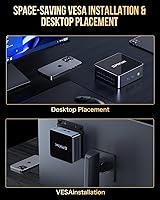
  • The included VESA mount lets you hide this compact desktop behind any monitor immediately.
  • WiFi 6 and Bluetooth 5.2 keep wireless connections fast and stable across peripherals and networks.
  • Dual M.2 slots allow meaningful storage expansion without replacing existing drives.
  • Wake-on-LAN and Auto Power On support make it viable for always-on home server or remote access setups.
  • At just 35 watts under load, long-term electricity costs are negligible even running it all day.
  • RAM is user-upgradeable to 64GB, giving the machine a longer useful lifespan than sealed alternatives.

Cons

  • Fan noise ramps up abruptly under load and the pitch is more irritating than a gentle hum.
  • The secondary M.2 slot only supports older 2242 SATA drives, limiting its usefulness for high-speed storage expansion.
  • GMKtec's driver documentation and firmware update cadence lag well behind mainstream PC brands.
  • The proprietary 19V DC power connector means a lost or damaged adapter requires a specific replacement, not a universal one.
  • Thermal throttling under sustained workloads can push real-world CPU performance below what the spec sheet implies.
  • Long-term software support and BIOS update reliability remain uncertain for a less-established brand.
  • Only one USB-A 2.0 port is included, but even the 3.2 ports fill up quickly in multi-peripheral setups.
  • The plastic chassis flex and lightweight power button feel inconsistent with the otherwise solid pricing and spec level.

Ratings

The GMKtec Nucbox M2 Pro S (i7-1185G7, 32GB/1TB) scores here reflect AI-driven analysis of verified global buyer reviews, with spam, incentivized, and bot-generated feedback actively filtered out. This mini PC earns genuine praise in several areas but also draws consistent criticism that prospective buyers should weigh carefully. Both the strengths and the friction points are represented honestly in the scores below.
Processing Performance
78%
22%
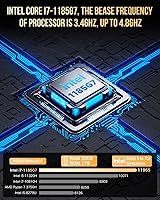
For office multitasking — juggling browser tabs, video calls, spreadsheets, and cloud apps simultaneously — the i7-1185G7 holds up well. Its 4.8GHz boost clock gives it a snappy feel during short-burst workloads that many users notice immediately after switching from older machines.
The chip dates back to 2020, and buyers comparing it against newer N-series or Ryzen 7000-based mini PCs note the gap in sustained multi-threaded throughput. Encoding or compiling tasks reveal the ceiling faster than the spec sheet implies.
Thermal Management
61%
39%
During light daily use — documents, streaming, web browsing — the Nucbox M2 Pro S stays cool and nearly inaudible. The compact chassis manages heat adequately when the workload stays within the 35W TDP envelope the system is designed around.
Push the CPU harder for more than 15 to 20 minutes and the fan ramps up noticeably. Several buyers report thermal throttling under sustained loads, which reduces the chip to well below its rated boost speeds and undermines performance during longer encoding or compilation sessions.
Memory & Storage
88%
Shipping with 32GB of dual-channel DDR4 and a 1TB NVMe SSD is genuinely generous for this product tier. Buyers frequently comment that the system feels responsive on boot and during file operations, and confirmed that the SSD delivers solid read and write speeds in real-world transfers.
The DDR4 platform is not the fastest available today, and a handful of buyers note the NVMe drive is PCIe 3.0 rather than 4.0, which limits peak throughput. Neither is a dealbreaker, but buyers expecting cutting-edge storage performance may find the specs slightly dated.
Multi-Monitor Support
84%
Triple 4K output from a device this small is a legitimate differentiator. Home office users running two external monitors plus a TV report that all three displays activated without driver conflicts, and the 4K at 60Hz cap holds across all outputs in typical productivity use.
Driving three displays simultaneously does increase the GPU and CPU load, which contributes to the thermal issues noted elsewhere. A small number of buyers also report inconsistent behavior when hot-plugging monitors, requiring a reboot to re-establish a display connection properly.
Connectivity & Networking
86%
The 2.5Gbps Ethernet port is a standout for buyers on faster home or office networks — large file transfers over LAN are noticeably quicker than on most competing mini PCs at this price. WiFi 6 performs reliably at range, and Bluetooth 5.2 pairs peripherals quickly and holds connections stably.
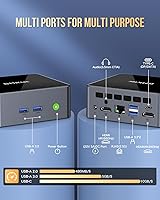
The single USB-A 2.0 port feels like a relic among otherwise modern I/O. While most peripherals can use the USB 3.2 ports, buyers with older accessories occasionally grumble about port allocation when all four USB-A slots are occupied.
Build Quality & Design
74%
26%
The all-black chassis feels reasonably solid for its weight class, and the compact footprint — barely larger than a thick paperback — makes it easy to mount behind a monitor with the included VESA bracket. Most buyers describe the fit and finish as clean and professional-looking on a desk.
The plastic chassis does flex slightly under hand pressure, and a few buyers note the power button feels cheaper than the rest of the unit. At this size, there are limited ventilation slots, which connects directly to the thermal complaints raised by users running sustained workloads.
Setup & Out-of-Box Experience
83%
Windows 11 Pro activates cleanly straight out of the box — no activation headaches, which buyers specifically call out as a positive compared to some competing brands. The included HDMI cable and VESA mount mean most users are up and running within minutes of unboxing.
The included documentation is minimal, which frustrates less technical buyers trying to configure dual-boot Linux or BIOS settings. Driver installation for some peripherals requires manual downloads, and GMKtec's support documentation online is sparse compared to larger brands.
Upgradeability
81%
19%
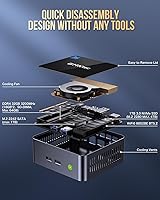
Buyers who opened the unit for RAM or SSD upgrades report the process is straightforward — dual SODIMM slots and two M.2 bays are accessible without specialized tools. Confirmed upgrades to 64GB RAM and dual-drive configurations appear regularly in owner feedback without reported complications.
The secondary M.2 slot supports only the older 2242 SATA form factor, which limits drive selection and top speeds for that slot. Buyers expecting two NVMe drives will be disappointed, as the SATA slot is better suited for light secondary storage than a performance cache.
Noise Level
63%
37%
Under typical desktop workloads — web browsing, document editing, light video streaming — the fan is nearly imperceptible. Buyers using this mini PC as an HTPC in a living room report it blends into the background during movie playback without distracting noise.
The fan behavior under load is the most consistent negative across reviews. It spins up abruptly rather than gradually, and the pitch when it does ramp is described by multiple buyers as a high-frequency whine rather than a low hum, which proves more irritating in quiet office environments.
Graphics & Media Playback
71%
29%
Intel Iris Xe handles 4K video playback, light photo editing in Lightroom, and casual productivity graphics without issue. Buyers using this compact desktop as a media server or for basic content consumption are broadly satisfied with visual output quality across all three display outputs.
Anyone expecting this GPU to handle modern games beyond casual or older titles will be let down. The Iris Xe GPU is adequate for its intended workloads but hits a hard ceiling quickly — buyers who tested titles beyond light gaming report frame rates that make the experience impractical.
Power Efficiency
87%
A 35W TDP in a machine with this spec sheet is genuinely impressive. Buyers running this mini PC as an always-on home server or workstation note that monthly electricity costs remain negligible, and the unit runs comfortably without a UPS or power conditioning concerns.
The power adapter is proprietary at 19V 3A, so losing or damaging it requires sourcing a specific replacement. A small number of buyers also note the adapter runs warm during extended use, which is worth monitoring in confined cabinet installations.
Value for Money
76%
24%
For buyers who need a Windows 11 Pro machine with substantial RAM and storage already included, the price-to-spec ratio is competitive. Getting 32GB of memory and a 1TB drive pre-configured removes the hassle and cost of sourcing and installing upgrades separately.
The i7-1185G7 is a 2020-era processor, and some buyers feel the pricing reflects the brand premium more than the underlying hardware generation. Competing mini PCs with newer Ryzen or Intel N200 chips can be found at similar or lower prices, making the value equation less clear-cut for spec-focused shoppers.
Software & Driver Support
66%
34%
Windows 11 Pro is pre-installed and activated, and the system runs standard drivers without unusual conflicts for the majority of buyers. Linux compatibility has been confirmed by several technically oriented users, which broadens the appeal for developers and homelabbers.
GMKtec does not have the driver update cadence of Lenovo or HP, and buyers who encountered issues report slow or absent responses from official support channels. Concerns about BIOS updates and long-term firmware support surface repeatedly in critical reviews, which is worth factoring in for buyers planning multi-year deployments.
Portability & Form Factor
82%
18%
Weighing around 2 pounds and fitting in a coat pocket, the Nucbox M2 Pro S travels well for buyers who move between a home office and a work location. The VESA mount adds deployment flexibility that bulkier machines simply cannot match.
Portability is somewhat undercut by the external power brick, which adds volume and another cable to manage. The proprietary DC connector also means you cannot improvise a replacement power source on the road the way you might with a USB-C powered laptop or NUC-style device.

Suitable for:

The GMKtec Nucbox M2 Pro S (i7-1185G7, 32GB/1TB) is a strong fit for remote workers and home office setups where desk space is limited but productivity demands are real — especially anyone who needs to run two or three monitors simultaneously without a full tower. Small business owners deploying workstations across a compact office will appreciate the low power draw and the VESA mount option that keeps installations tidy. Home theater enthusiasts building a living room PC will find it capable enough for 4K media playback while staying quiet during casual use. Students and educators who need a dependable Windows 11 Pro machine for research, presentations, and light creative work will get solid daily performance without overspending on hardware they won't fully use. Anyone already on a fast home network who wants to take advantage of 2.5Gbps LAN for local file transfers or NAS access will find this compact desktop a surprisingly capable network citizen.
Not suitable for:

Buyers who plan to run sustained heavy workloads — video encoding, 3D rendering, large dataset processing, or extended compilation tasks — should approach the Nucbox M2 Pro S with caution, as the thermal ceiling becomes a real constraint under prolonged CPU stress. Gamers looking for anything beyond casual or older titles will find the Intel Iris Xe GPU insufficient; this is not a machine designed for gaming, and no amount of settings-tweaking will change that. Buyers who prioritize cutting-edge hardware should note that the i7-1185G7 is a 2020-era chip, and newer Ryzen 7000 or Intel Core Ultra-based mini PCs are now available at comparable prices with meaningfully better multi-threaded and efficiency performance. Anyone who requires long-term vendor firmware support or fast driver update cycles may find GMKtec's after-sales ecosystem thin compared to established brands like Lenovo or ASUS. If you need a fully portable, battery-powered device, this is obviously the wrong category entirely — the proprietary power brick is non-negotiable.

Specifications

  • Processor: Intel Core i7-1185G7 with 4 cores, 8 threads, 12MB cache, base clock 3.0GHz, boost up to 4.8GHz.
  • RAM: 32GB dual-channel DDR4 SODIMM (two 16GB sticks), expandable to a maximum of 64GB.
  • Primary Storage: 1TB M.2 2280 NVMe SSD running on a PCIe 3.0 interface, expandable to 2TB.
  • Secondary Storage: Additional M.2 2242 SATA slot supports up to 2TB for supplemental storage expansion.
  • Graphics: Intel Iris Xe Graphics with 96 execution units running at 1400MHz, integrated into the processor.
  • Display Output: Three simultaneous 4K outputs: two HDMI ports and one USB-C port, all supporting 4K at 60Hz.
  • Networking: 2.5Gbps RJ45 Ethernet, WiFi 6 (802.11ax) dual-band 2.4GHz and 5GHz, and Bluetooth 5.2.
  • USB Ports: One USB4.0 Type-C, three USB-A 3.2 Gen 2, and one USB-A 2.0 port for a total of five USB connections.
  • Power Draw: 35W TDP with a 19V 3A (57W) proprietary DC power adapter supporting 100–240V AC input.
  • Dimensions: The unit measures 4.48 x 4.17 x 1.47 inches and weighs approximately 2 pounds.
  • Operating System: Windows 11 Pro comes pre-installed and pre-activated, with confirmed support for Ubuntu and Linux distributions.
  • Cooling: Active cooling via an internal fan; the system is not passively cooled and the fan engages under load.
  • Smart Power: Wake-on-LAN, Auto Power On, and PXE boot are all supported natively for remote and automated deployments.
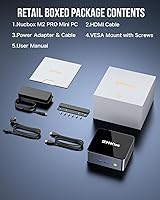
  • In the Box: Package includes the mini PC unit, DC power plug, one HDMI cable, a VESA mount with screws, and a user manual.
  • Memory Expandability: Both SODIMM slots are user-accessible, allowing RAM upgrades to a maximum of 64GB without voiding typical warranty terms.
  • Audio: Audio output is available through the HDMI and USB-C display ports; there is no dedicated analog audio jack confirmed in specs.
  • Form Factor: Classified as a Mini PC desktop; designed for horizontal or monitor-mounted deployment via the included VESA bracket.

Related Reviews

GMKtec Nucbox M6 Ryzen 6600H Mini PC, 32GB RAM, 1TB SSD
86%
90%
Performance for Office Tasks
75%
Gaming Performance (Casual)
84%
Build Quality
91%
Compact Design
89%
Storage Speed (SSD)
More
Microsoft Surface Pro 9, 13-inch, Intel i7, 32GB RAM, 1TB SSD
87%
91%
Performance
93%
Display Quality
88%
Portability
85%
Battery Life
90%
Build Quality
More
Intel NUC 13 Pro Mini PC, Core i7-1360P, 32GB RAM, 1TB SSD
86%
92%
Performance
89%
Value for Money
94%
Compact Size
88%
Multitasking Capabilities
78%
Setup/Installation
More
Microsoft Surface Pro 8 13-inch, Intel Core i7, 32GB RAM, 1TB SSD
86%
91%
Performance for Multitasking
88%
Battery Life
93%
Display Quality
89%
Build Quality
85%
Portability and Weight
More
GMKtec M3 Ultra Mini PC with Intel Core i7-12700H, 32GB RAM, 1TB SSD
86%
88%
Overall Performance
91%
Multitasking & Processing Power
78%
Graphics Performance
84%
Build Quality & Design
93%
Ease of Setup
More
Intel NUC 12 Pro NUC12WSHi7, 32GB RAM, 1TB SSD, Intel Core i7-1260P
88%
93%
Performance
89%
Build Quality
88%
Usability
92%
Connectivity
95%
Design & Size
More
GMKtec NucBox M7 (32GB/2TB)
82%
88%
Processing Performance
74%
Gaming & Graphics
69%
Thermal Management & Cooling
63%
Fan Noise
91%
Connectivity & Ports
More
GMKtec Nucbox K9 Mini PC Intel Core Ultra 5 125H 32GB RAM 1TB SSD
85%
89%
Performance
85%
Build Quality
90%
Energy Efficiency
88%
Connectivity Options
87%
Display Support
More
Samsung Galaxy Book3 Pro 16″ Laptop, 32GB RAM, 1TB SSD, Intel Core i7 (2023)
85%
94%
Performance
91%
Display Quality
88%
Battery Life
87%
Portability
85%
Build Quality
More
HP Pro Tower 290 G9 Desktop (i5-12500, 32GB RAM, 1TB SSD)
81%
96%
Multitasking Capability
91%
Value for Money
88%
Port Selection
84%
Thermal & Acoustic Performance
93%
Boot Speed & Storage
More

FAQ

It comes fully activated out of the box. You don't need to purchase or enter any license key — just power it on, complete the initial Windows setup, and you're good to go.

You can genuinely run three displays simultaneously using the two HDMI ports and the USB-C output, all at 4K and 60Hz. Buyers who have tested this confirm it works without needing extra drivers or adapters, though pushing all three displays does increase the thermal load on the system.

Fairly straightforward. The bottom panel comes off with a few screws, and both SODIMM slots and the M.2 bays are accessible without any specialized tools. Multiple buyers have confirmed successful upgrades to 64GB RAM and larger NVMe drives without any issues.

At idle or during light tasks like browsing and document work, the fan is barely perceptible. The problem shows up during heavier workloads — the fan spins up abruptly and the pitch can be noticeable in a quiet room. For media playback and office use, most people find it acceptable.

Several technically experienced buyers have confirmed successful installations of Ubuntu and other Linux distributions. That said, driver support may require some manual configuration, and GMKtec's official documentation on Linux is limited, so expect to do a bit of troubleshooting if you go that route.

The i7-1185G7 has a clear advantage in single-core burst performance and handles more demanding tasks noticeably better than the N100. The tradeoff is that the N100 runs cooler and more efficiently under sustained loads, while the i7 can throttle when pushed hard for extended periods. For most office work and media use, the i7 feels snappier day-to-day.

Yes, and it's actually well-suited for it. The GMKtec Nucbox M2 Pro S (i7-1185G7, 32GB/1TB) supports Wake-on-LAN and Auto Power On, and its 35W power draw keeps electricity costs low even running continuously. Just make sure it's in a well-ventilated spot if you plan to run persistent workloads.
The unit uses a proprietary 19V 3A DC barrel connector, so you cannot simply use any USB-C charger or universal laptop adapter. You would need to source a matching 19V 3A adapter with the correct barrel size, which is available from third-party sellers but requires checking the connector dimensions carefully.

For casual and moderate Lightroom work — importing, culling, applying standard adjustments — it handles the job without frustrating lag, especially with 32GB of RAM keeping things moving. Heavy masking, AI-powered edits, or large batch exports will feel slower than on a dedicated GPU machine, but for hobbyist or light professional use it is genuinely workable.

Yes, the included mount follows the standard 75x75mm and 100x100mm VESA pattern found on the vast majority of monitors and TV backs. It attaches cleanly and positions the unit behind the display so no desk space is consumed at all — a genuinely practical inclusion that many competing mini PCs skip.