Overview

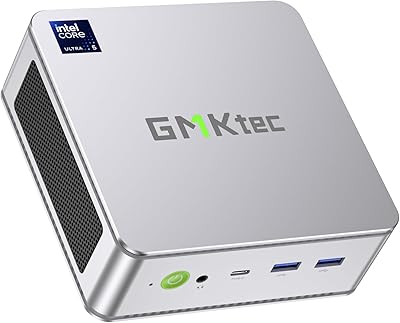
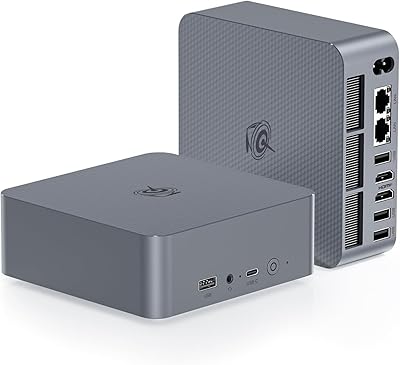
The GMKtec NucBox K10 Mini PC (Intel Core i9-13900HK, 32GB DDR5, 1TB SSD) takes a genuinely different approach to the small-form-factor space by dropping a 13th-gen flagship mobile chip into a box you could fit behind a monitor. It ships with Windows 11 Pro ready to go, which matters for business buyers who don't want to deal with licensing headaches on day one. What really separates it from the crowd is the RS-232 COM port — a practical nod to industrial users dealing with PLCs, POS terminals, or serial automation hardware. In a segment full of near-identical Celeron and i5 boxes, that inclusion signals a more serious intent.
Features & Benefits

The K10's processor deserves a bit of context before you get excited: the i9-13900HK is a mobile H-series chip, not a desktop part, so its performance is impressive but thermally constrained inside this small chassis. That said, 14 cores and 20 threads with a 5.4GHz boost handles heavy multitasking, data processing, and even light video editing without much complaint. The 32GB of DDR5 RAM is genuinely fast, though the CPU officially tops out at 5200MHz — the 5600MHz sticks may run at a lower effective speed. Add a PCIe 4.0 NVMe SSD, quad-display output including an 8K-capable DisplayPort, 2.5G Ethernet, and Wi-Fi 6, and this compact workstation covers most professional bases comfortably.

Best For

This mini PC makes most sense for people who need real CPU headroom in a genuinely small footprint. Home-office professionals juggling multiple applications, video calls, and browser-heavy workflows will find it capable without the noise and bulk of a tower. The four-monitor output is particularly useful for financial traders, analysts, or designers who live across multiple screens. Industrial developers get something rare — a modern, capable machine that still speaks RS-232. Small businesses can lean on the Windows 11 Pro license and 2.5G LAN for reliable deployments, and developers looking to run Linux alongside Windows will generally find the hardware cooperative, though driver testing is always advisable.

User Feedback

Buyers generally report that the K10 handles everyday productivity without issue, and setup is straightforward — Windows 11 Pro arrives activated and the machine is usable within minutes of unboxing. Build quality earns decent marks for this price tier, though a few users note the chassis runs warm during sustained workloads and the fan does spin up audibly when the CPU is pushed hard. Some buyers flag that the bundled accessories are basic — the HDMI cable and power adapter work fine, but feel budget-grade. On the whole, verified purchasers rate it highly for multi-monitor productivity, with thermals under extended heavy use being the most consistent caveat worth keeping in mind.

Pros

  • Pre-activated Windows 11 Pro means the K10 is ready for business use within minutes of unboxing.
  • Four simultaneous display outputs, including an 8K-capable DisplayPort, is rare at this form factor and price.
  • 32GB of DDR5 RAM is genuinely generous for a mini PC and removes memory as a multitasking bottleneck.
  • The RS-232 COM port enables direct serial communication with industrial hardware that most mini PCs simply cannot support.
  • 2.5G Ethernet delivers noticeably faster local network performance than standard gigabit setups for large file transfers and NAS access.
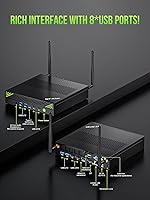
  • Eight USB ports total means most users will never need an external hub on their desk.
  • Triple M.2 expansion slots let you scale storage up to 12TB without replacing the base unit.
  • PCIe 4.0 NVMe storage produces fast boot and application load times that feel sharp in daily use.
  • Wi-Fi 6 and Bluetooth 5.2 keep wireless connectivity current and reliable for modern peripherals and networks.
  • The compact footprint reclaims significant desk space compared to a tower without sacrificing professional-grade specs.

Cons

  • Sustained CPU-heavy workloads trigger thermal throttling, pulling real-world peak performance below what the spec sheet implies.
  • The fan becomes clearly audible under load, which will bother users in quiet or noise-sensitive environments.
  • Integrated Iris Xe graphics cannot handle GPU-accelerated workloads, 3D rendering, or any serious gaming.
  • The DDR5 RAM is rated at 5600MHz but the CPU officially supports up to 5200MHz, meaning effective memory bandwidth may be lower than advertised.
  • The one-year warranty is shorter than what several competing mini PC brands offer at a comparable price.
  • Bundled accessories — particularly the HDMI cable and power adapter — feel noticeably budget-grade relative to the machine's price point.
  • The USB-C port lacks Power Delivery, limiting its usefulness for users who want to charge or power peripherals through a single cable.
  • Linux users get a functional but less polished experience compared to the plug-and-play Windows setup, requiring manual driver work.
  • Some buyers report pre-installed promotional software that needs to be cleaned out before the system feels properly ready to use.

Ratings

The GMKtec NucBox K10 Mini PC (Intel Core i9-13900HX, 32GB DDR5, 1TB SSD) earned its scores through AI-driven analysis of verified global buyer reviews, with spam, bot-submitted, and incentivized feedback actively filtered out before scoring. The result is a rating profile that reflects what real users actually experience day-to-day — not what the spec sheet promises. Strengths and frustrations are weighted equally, so the numbers you see here tell the full story.

CPU Performance
88%
Users running multi-tab research setups, simultaneous video calls, and background file processing consistently report that the K10 handles the load without hesitation. The 14-core mobile chip punches well above what most mini PCs in this category offer, and buyers coming from older Core i5 systems notice the difference immediately in application responsiveness.
A few technically minded users point out that sustained CPU-intensive tasks — like prolonged code compilation or long video exports — eventually trigger thermal throttling, pulling performance back from its peak. It is a mobile H-series chip in a small enclosure, and that physical reality does catch up under extended heavy workloads.
Thermal Management & Cooling
67%
33%
Under typical office workloads — spreadsheets, browser sessions, video conferencing — the twin copper heatpipe system keeps the machine running quietly and at manageable temperatures. Most users in light-to-moderate use scenarios report that the fan rarely becomes intrusive during their normal working hours.
Extended high-load tasks tell a different story. Multiple buyers report that the fan ramps up noticeably and the chassis gets warm to the touch during sustained CPU stress, which is a genuine concern for users planning to run this compact workstation as a always-on server or in a data-heavy automation context. Thermal headroom is the K10's most discussed limitation.
RAM Speed & Capacity
82%
18%
Having 32GB of DDR5 on board at this form factor and price point is genuinely uncommon, and users who multitask heavily — keeping dozens of browser tabs, running virtual machines, or working across multiple large documents — appreciate not having to think about memory pressure at all.
There is a known mismatch worth flagging: the RAM sticks are rated at 5600MHz but the i9-13900HK officially supports up to 5200MHz, meaning the memory likely runs at the lower validated speed. Most users will never notice in daily use, but buyers who care about extracting maximum memory bandwidth should be aware.
Storage Performance
91%
The PCIe 4.0 NVMe SSD delivers fast boot times and application load speeds that buyers consistently praise. Users migrating from systems with older SATA SSDs or spinning hard drives describe the difference as dramatic, with Windows 11 Pro fully operational within seconds of powering on.
A small number of buyers wished the included drive were larger given the workstation positioning, particularly those using the K10 for local data archiving or media work. The triple M.2 expansion is a real advantage here, but it does require additional investment in drives to fully utilize.
Multi-Monitor Support
89%
The quad-display capability is one of the K10's most praised features among traders, analysts, and designers. Running four screens simultaneously via dual HDMI, DisplayPort, and USB-C works reliably in practice, and users setting up dense multi-monitor workstations specifically call this out as a key purchase reason.
The USB-C display output does not support Power Delivery, so users hoping to simplify cable runs by powering a monitor through the same port will be disappointed. A handful of buyers also note that achieving the full 8K resolution on the DisplayPort 1.4 output requires a compatible cable and display, which are not always immediately obvious to first-time buyers.
Connectivity & Networking
93%
The 2.5G Ethernet port consistently earns praise from buyers in network-intensive environments — remote desktop sessions, large file transfers, and NAS access all benefit noticeably compared to standard gigabit setups. Wi-Fi 6 and Bluetooth 5.2 perform as expected, covering modern wireless demands without issue.
A few users in older office environments note that the 2.5G Ethernet requires a compatible switch or router to fully leverage, which can mean additional infrastructure cost. The Bluetooth connection has drawn isolated complaints about occasional pairing delays with certain peripherals, though this appears to be a minor and infrequent issue.
Port Selection & Accessibility
86%
Eight USB ports total — four USB 3.2 Gen2 at 10Gbps and four USB 2.0 — means most buyers never find themselves hunting for a hub. The COM port is a legitimate differentiator that industrial users specifically sought out, and its presence alone was the deciding purchase factor for several verified buyers in automation and POS contexts.
Port placement on such a compact chassis means some ports are on the rear panel, which can be awkward for users who frequently hot-swap USB devices. A few buyers also flag that the USB-C port lacks Power Delivery, which limits its utility compared to what modern USB-C users typically expect.
Build Quality & Design
74%
26%
The chassis feels solid enough for an office desk or industrial rack shelf, and buyers generally consider the construction acceptable for the price tier. The compact dimensions are consistently appreciated by users reclaiming desk space from aging tower setups.
The premium spec sheet is not entirely matched by the tactile feel of the enclosure — a few reviewers describe the plastic casing as feeling slightly budget-grade under hand. At just under five pounds it is heavier than some competing mini PCs, which surprises some buyers expecting an ultralight device.
Out-of-Box Setup Experience
88%
Windows 11 Pro arriving pre-activated is a practical convenience that buyers consistently appreciate, particularly small business deployers who want to skip licensing setup entirely. Most users describe being productive within 10 to 15 minutes of first power-on, with drivers installing automatically and the OS behaving as expected.
A small number of users encountered pre-installed bloatware or promotional software that required manual removal before the system felt clean. Driver support for Linux is generally functional but requires more hands-on effort than the plug-and-play Windows experience, as a few Linux-focused buyers noted.
Included Accessories
61%
39%
The inclusion of an HDMI cable and dual Wi-Fi antennas means the machine is functional immediately without an additional accessories run. The power adapter covers a wide input range of 100 to 240V, making it usable internationally without a converter.
Buyers expecting premium bundled accessories given the price point may be underwhelmed. The HDMI cable is described as basic and short by multiple reviewers, and the power adapter, while functional, has a noticeably cheap feel that several buyers contrast unfavorably with the machine's headline specs.
Integrated Graphics
63%
37%
Intel Iris Xe handles everyday display tasks, light photo editing, and casual media consumption without trouble. For buyers using the K10 as a productivity workstation with no gaming or GPU compute needs, the integrated graphics are entirely adequate and the quad-display support works reliably through it.
This is not a machine for GPU-intensive work. Users who expected more from the i9 branding and attempted 3D rendering, serious video encoding acceleration, or any gaming beyond very light titles came away disappointed. There is no discrete GPU and no eGPU support, which is a hard ceiling for a specific subset of buyers.
Fan Noise
69%
31%
During idle and light workloads, the cooling system is quiet enough that most users in office environments report it is effectively inaudible from a normal working distance. The fan behavior under light use is one aspect buyers in quiet home-office settings specifically commend.
Under sustained load the fan becomes clearly audible, and in a silent room it can become distracting. This is a recurring theme in buyer feedback — not a dealbreaker for most, but worth knowing if you plan to use the K10 in a noise-sensitive environment like a recording space or a shared quiet office.
Value for Money
83%
Buyers who understand what they are purchasing — a capable mobile-class i9 workstation in a compact body, with Windows 11 Pro, 32GB DDR5, generous I/O, and expandability — generally feel the price reflects fair value. The COM port, 2.5G Ethernet, and quad-display support together justify the cost for professional buyers.
Buyers who approach this expecting desktop i9 performance at this price will feel misled by the spec sheet framing. The mobile H-series chip, integrated-only graphics, and thermal constraints mean the real-world performance ceiling is lower than the headline numbers suggest, and a few reviewers feel the marketing leans too hard on the i9 branding.
Warranty & After-Sales Support
71%
29%
GMKtec offers a one-year limited warranty covering manufacturing defects, and buyers who have needed to contact support generally describe response times as acceptable. The warranty terms are straightforward with no complex claim procedures reported by verified buyers.
A one-year warranty is below the two-year or three-year coverage that some competing brands offer at similar price points, and this is a friction point for buyers making long-term deployment decisions. A handful of reviewers also note that international warranty support can be slower than domestic service.

Suitable for:

The GMKtec NucBox K10 Mini PC (Intel Core i9-13900HK, 32GB DDR5, 1TB SSD) is a strong fit for home-office professionals and remote workers who need genuine CPU muscle without dedicating half a desk to a tower. If your daily workload involves heavy multitasking — think virtual machines, large spreadsheets, simultaneous video conferencing, and browser-heavy research sessions — the 14-core mobile chip and 32GB of DDR5 handle it without the system breaking a sweat under normal conditions. Financial traders, data analysts, and designers who rely on four monitors simultaneously will find the quad-display output practical and reliable straight out of the box. Small businesses can deploy it confidently thanks to the pre-activated Windows 11 Pro license and the 2.5G LAN port, which makes it a capable thin-client or workstation replacement in network-intensive office environments. Industrial developers and embedded systems engineers get something genuinely rare at this price point: a modern, fast machine that still speaks RS-232 via a physical COM port, enabling direct integration with PLCs, POS hardware, and serial automation equipment without USB adapters or compatibility headaches.
Not suitable for:

Buyers expecting desktop-class i9 performance should pause before purchasing the K10, because the i9-13900HK is a mobile H-series processor — capable and fast, but operating under thermal constraints that a small aluminum chassis simply cannot escape during sustained heavy workloads. If your work involves GPU-accelerated tasks like 3D rendering, machine learning inference, serious video encoding, or any gaming beyond the very lightest titles, the Intel Iris Xe integrated graphics will be a hard ceiling that no amount of CPU headroom can compensate for. Content creators who regularly push long exports or compile large codebases for hours at a stretch may find the fan noise and thermal throttling genuinely disruptive rather than just occasionally noticeable. Buyers who need long-term deployment confidence may also find the one-year warranty limiting compared to competing brands offering two or three years at similar price points. If you are specifically shopping for the lowest possible noise floor — for a recording studio, a quiet medical environment, or a shared silent workspace — this compact workstation is not the right tool, as sustained loads will make the cooling system audible.

Specifications

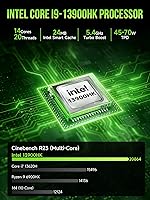
  • Processor: Intel Core i9-13900HK, a 13th-gen mobile H-series chip with 14 cores, 20 threads, 24MB L3 cache, and a maximum boost frequency of 5.4GHz.
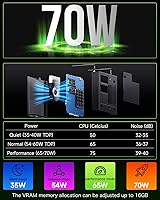
  • TDP: Base TDP is 45W, configurable up to 70W through BIOS power settings for users who want to push sustained performance further.
  • RAM: 32GB of DDR5 dual-channel memory configured as two 16GB modules running at 5600MHz, though effective speed is governed by the CPU's 5200MHz memory controller limit.
  • Storage: 1TB PCIe 4.0 NVMe M.2 2280 SSD provides the primary storage, with two additional M.2 2280 PCIe 4.0 x4 slots available for expansion up to 12TB total.
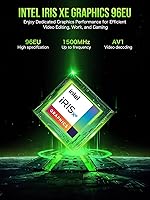
  • Graphics: Intel Iris Xe integrated graphics with a clock speed up to 1.5GHz handle everyday display tasks and multi-monitor output but offer no discrete GPU capability.
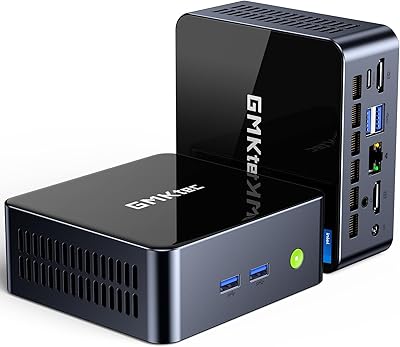
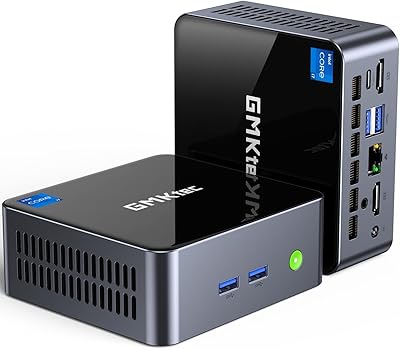
  • Display Output: Quad-display output is supported via two HDMI 2.0 ports at 4K 60Hz, one DisplayPort 1.4 at 8K 60Hz, and one USB-C port with DisplayPort Alt Mode.
  • USB Ports: Eight USB ports are included: four USB 3.2 Gen2 at 10Gbps and four USB 2.0 at 480Mbps, covering both high-speed peripherals and legacy devices.
  • Networking: Wired connectivity is handled by a Realtek RTL8125BG 2.5G Ethernet port, complemented by Wi-Fi 6 supporting 2.4GHz and 5GHz bands, plus Bluetooth 5.2.
  • COM Port: One RS-232 serial COM port is included for industrial and embedded system applications such as PLC communication, POS terminals, and serial data acquisition hardware.
  • USB-C Port: The single USB-C port supports DisplayPort Alt Mode and USB 3.2 Gen2 data transfer at 10Gbps, but does not support Power Delivery for charging or powering peripherals.
  • Audio: One 3.5mm CTIA combo jack supports both headphone output and microphone input from a single port.
  • Power Supply: The included adapter accepts 100–240V AC input at 50/60Hz and outputs 19V at 6.32A for a total of 120W via a 2.5×5.5mm DC barrel connector.
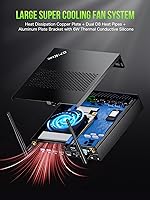
  • Cooling System: An active cooling system combines a large variable-speed fan with twin copper heatpipe heatsink tubes to manage thermals across the full TDP range.
  • Operating System: Windows 11 Pro comes pre-installed and pre-activated, ready for business or professional use without additional licensing steps.
  • Weight: The unit weighs approximately 4.95 pounds, which is heavier than many competing mini PCs in this category.
  • Operating Environment: Designed to operate in temperatures between -10°C and 45°C with relative humidity between 30% and 85% non-condensing.
  • Warranty: GMKtec provides a one-year limited warranty covering manufacturing defects in design and workmanship, starting from the date of purchase.
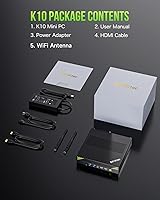
  • Package Contents: The box includes the mini PC unit, two Wi-Fi antennas, a 120W power adapter, one HDMI cable, and a printed user manual.

Related Reviews

GEEKOM MEGAMINI G1 Mini PC (i9-13900HK, RTX 4060, 32GB DDR5, 2TB SSD)
80%
88%
Thermal Management
83%
Gaming Performance
91%
CPU Responsiveness
86%
Build Quality & Design
89%
Connectivity & Port Selection
More
GMKtec Nucbox K9 Mini PC Intel Core Ultra 5 125H 32GB RAM 1TB SSD
85%
89%
Performance
85%
Build Quality
90%
Energy Efficiency
88%
Connectivity Options
87%
Display Support
More
GMKtec M3 Ultra Mini PC with Intel Core i7-12700H, 32GB RAM, 1TB SSD
86%
88%
Overall Performance
91%
Multitasking & Processing Power
78%
Graphics Performance
84%
Build Quality & Design
93%
Ease of Setup
More
GMKtec Nucbox M2 Pro S (i7-1185G7, 32GB/1TB)
77%
78%
Processing Performance
61%
Thermal Management
88%
Memory & Storage
84%
Multi-Monitor Support
86%
Connectivity & Networking
More
CLX Gaming PC - Intel Core i9 14900KF, GeForce RTX 4070 SUPER, 32GB DDR5, 1TB SSD, 4TB HDD
87%
96%
Gaming Performance
94%
Graphics Quality
91%
Cooling Efficiency
88%
Build Quality
89%
Storage Capacity
More
KOOSMILE Mini PC Core i9-12900HK 32GB RAM 1TB SSD
86%
94%
Performance
90%
Cooling System
91%
Multitasking Capability
88%
Display Support
86%
Connectivity (WiFi/Bluetooth)
More
GMKtec Nucbox M6 Ryzen 6600H Mini PC, 32GB RAM, 1TB SSD
86%
90%
Performance for Office Tasks
75%
Gaming Performance (Casual)
84%
Build Quality
91%
Compact Design
89%
Storage Speed (SSD)
More
MINISFORUM UN1290 Mini PC Core i9-12900HK 32GB RAM 1TB SSD
88%
93%
Performance
88%
Build Quality
89%
Ease of Setup
91%
Multitasking Efficiency
67%
Cooling & Thermals
More
Beelink SEI14 Mini PC with Intel Core Ultra 9 185H, 32GB RAM, 1TB SSD
86%
92%
Performance
87%
Build Quality
94%
Usability & Setup
88%
Display Support
85%
Connectivity
More
GMKtec Nucbox K11 (Ryzen 9 8945HS, 32GB, 2TB)
89%
94%
CPU Performance
96%
Expansion & Upgradability
92%
Connectivity & Ports
87%
Thermal Management
89%
Build Quality
More

FAQ

The GMKtec NucBox K10 Mini PC (Intel Core i9-13900HK, 32GB DDR5, 1TB SSD) sits solidly in the capable workstation category rather than the light-use tier. It handles heavy multitasking, business applications, development environments, and multi-monitor setups without trouble. Just keep in mind that it uses a mobile processor, so sustained CPU-intensive tasks like hour-long video exports or large compilation jobs may eventually hit thermal limits that a full desktop tower would not.
Yes, quad-display output works as advertised. You get two HDMI 2.0 outputs, one DisplayPort 1.4, and one USB-C with DisplayPort support — all four can drive independent screens simultaneously. For the 8K resolution on the DisplayPort output you will need a compatible 8K display and a certified DisplayPort 1.4 cable, which is not included in the box.

Under light to moderate workloads — web browsing, video calls, document work — the fan is very quiet and essentially unnoticeable from a normal desk distance. Push the CPU hard with sustained workloads and the fan ramps up clearly enough to hear in a quiet room. It is not uncomfortably loud, but if you need near-silent operation at all times, this chassis design is a genuine trade-off to consider.

The installed DDR5 sticks are rated at 5600MHz, but the i9-13900HK CPU officially validates memory up to 5200MHz. In practice, the RAM is very likely running at 5200MHz or the nearest JEDEC profile the CPU accepts. For the vast majority of users this difference is invisible in real-world performance, but it is worth knowing if you are evaluating memory bandwidth figures on paper.

General compatibility with popular Linux distributions is functional, and some users run Ubuntu and similar environments on the K10 without major issues. That said, driver support is not as turnkey as the Windows 11 Pro experience — you may need to source Wi-Fi, Bluetooth, or Ethernet drivers manually depending on the distribution and kernel version. If Linux is your primary OS, budget some extra setup time and verify compatibility with your specific distribution before committing.

The RS-232 serial COM port allows direct communication with older industrial and embedded hardware — things like programmable logic controllers, serial barcode scanners, POS terminals, and CNC equipment. If you have no need for serial communication with external hardware, it simply sits unused and does not affect anything else. But if you are in automation, manufacturing, or embedded development, this port is the reason the K10 exists in your shortlist.

Expansion is genuinely one of this machine's stronger points. There are three M.2 2280 PCIe 4.0 x4 slots in total — the 1TB drive occupies one, leaving two open for additional drives. You can scale up to 12TB of total storage in theory, which is an unusual amount of headroom for a mini PC at this size.

No — the USB-C port on the K10 does not support Power Delivery in either direction. It handles DisplayPort output and high-speed data transfer at 10Gbps, but it cannot charge connected devices or accept power input. The machine runs exclusively off the included DC barrel connector adapter.

It comes pre-activated and ready to use out of the box. Most buyers report being fully set up and productive within 15 minutes of first boot. A small number of users have noted some pre-installed promotional software that is worth clearing out before your first productive session, but the OS activation itself requires no extra steps.

It handles video conferencing workloads comfortably — running Zoom, Teams, or Google Meet alongside a full browser session and productivity apps is well within the K10's capabilities. The 32GB of RAM means you are not fighting memory pressure even with many applications open simultaneously. Fan noise during typical conference call use remains low, so it will not be audible to the people you are speaking with.