Overview

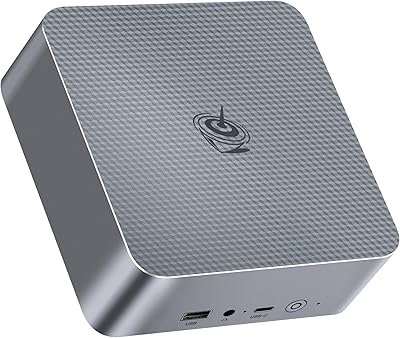
The Beelink EQI i3-1220P 16GB Mini PC sits in an interesting spot — compact enough to hide behind a monitor, yet powered by Intel's i3-1220P, a 10-core hybrid processor that handles everyday computing with more headroom than you might expect from a machine this size. This isn't a budget throwaway; it occupies the mid-to-premium tier of the mini PC market, which means buyers should expect real build quality and genuine performance, not just a spec sheet that sounds better than it delivers. One thing worth noting immediately: it ships with Windows 11 Pro pre-installed, completely clean — no trial software, no unwanted apps cluttering the start menu from day one.
Features & Benefits

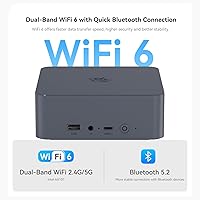
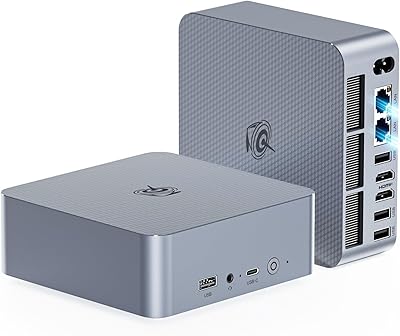
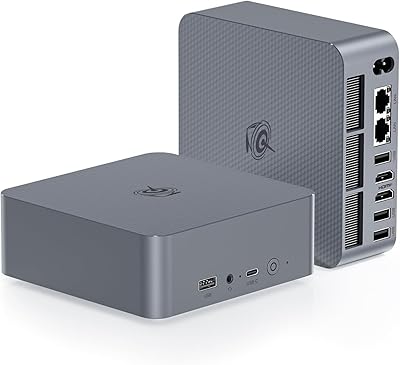
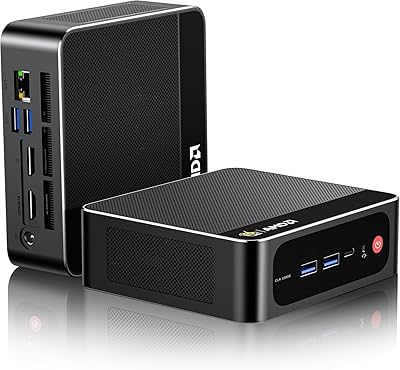
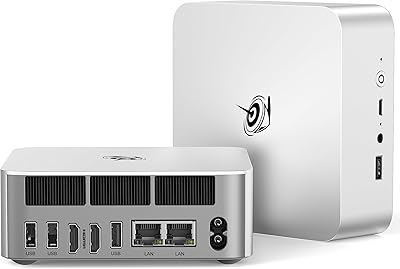
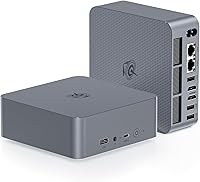
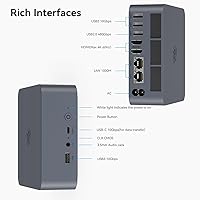
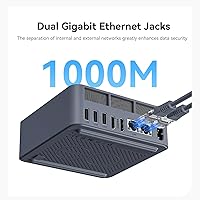
The port selection on this mini PC is genuinely impressive for its footprint. Dual HDMI outputs push 4K at 60Hz to two monitors simultaneously, which is not something every compact desktop in this range can do reliably. Three USB 3.2 Gen 2 ports handle fast external drives and peripherals without bottlenecking, and the USB-C adds flexibility for modern accessories. What really stands out is the inclusion of two Gigabit Ethernet ports — unusual at this size and a real advantage for home lab users or anyone connecting to a NAS. Add Wi-Fi 6, Bluetooth 5.2, and a built-in power supply, and cable management becomes far less of a headache than with external-brick competitors.

Best For

This compact desktop is a strong fit for home office professionals who want two monitors running without sacrificing desk real estate. Students and educators will appreciate the clean Windows 11 Pro environment — no license headaches, just a working machine straight out of the box. The i3-1220P's 10-core layout and expandable RAM also make it capable for light virtualization or running development environments, though anyone expecting to push heavy video rendering or 3D workloads should look at something like the Minisforum UM790 instead. If you are replacing an aging all-in-one or a tired laptop and want something more repairable and expandable, this mini PC checks the right boxes for that transition.

User Feedback

Buyers tend to praise the Beelink EQI for its fast boot times and quiet operation under typical office loads — two things that matter daily but rarely show up in spec comparisons. The dual-display setup is frequently described as reliable and straightforward to configure. On the downside, a few users report that fan noise picks up noticeably under sustained CPU load, and some have flagged inconsistencies in the product listing around memory type, since the specs alternately cite DDR4 and DDR5, creating confusion before purchasing. Wi-Fi stability and driver compatibility have also come up occasionally, particularly with certain monitor configurations. Overall, the out-of-box experience earns consistently positive marks, with Windows activation described as smooth and immediate.

Pros

  • Dual HDMI ports deliver reliable 4K output to two monitors simultaneously — genuinely useful for productivity work.
  • The i3-1220P offers 10 cores and 12 threads, outperforming typical entry-level mini PC chips in multi-threaded tasks.
  • Windows 11 Pro comes pre-installed with zero bloatware, so setup is straightforward from the moment you plug it in.
  • Two Gigabit Ethernet ports are a rare and practical feature at this form factor, especially for home lab or NAS users.
  • Wi-Fi 6 and Bluetooth 5.2 keep wireless connectivity current and dependable for modern peripherals and networks.
  • The built-in PSU eliminates the external power brick, keeping cable runs tidy and the desk cleaner overall.
  • A second M.2 slot means storage can be expanded significantly without replacing the existing drive.
  • Boot times are consistently fast according to verified buyers, making daily startup a non-issue.
  • At roughly 2 pounds and a small footprint, this mini PC travels easily and fits almost any desk or mounting setup.
  • The 1-year warranty and lifetime technical support offer a reasonable safety net for a mid-tier purchase.

Cons

  • Fan noise increases noticeably under sustained CPU load, which can be distracting in quiet work environments.
  • Product listing inconsistencies between DDR4 and DDR5 RAM specs create unnecessary confusion before buying.
  • Integrated graphics cap the machine's usefulness — no viable path for GPU-accelerated work without an external solution.
  • Thermal throttling under prolonged all-core workloads limits sustained performance in demanding tasks.
  • Some users have reported occasional Wi-Fi stability issues, particularly in environments with crowded wireless bands.
  • Monitor compatibility hiccups with specific display configurations have come up in user feedback more than once.
  • Only one USB 2.0 port is included, which feels limiting if you use older peripherals alongside modern ones.
  • Driver support documentation is sparse, which can add friction when troubleshooting edge-case hardware setups.
  • No Thunderbolt support means expansion options for high-bandwidth accessories or external GPUs are off the table.
  • At its price point, competing mini PCs with AMD Ryzen processors offer more graphics and sustained CPU performance per dollar.

Ratings

The scores below reflect an AI-driven analysis of verified global buyer reviews for the Beelink EQI i3-1220P 16GB Mini PC, with spam, incentivized, and bot-generated feedback actively filtered out before scoring. Every category captures what real users experienced day-to-day — not what the spec sheet promises — so both the genuine strengths and the recurring frustrations are represented honestly.

Everyday Performance
83%
For the tasks this compact desktop is designed around — web browsing, Office applications, video calls, and light multitasking — the i3-1220P delivers a noticeably snappy experience. Users consistently praise how responsive it feels during typical workday use, with no lag even when juggling multiple browser tabs and productivity apps simultaneously.
Push it harder with sustained workloads like large file exports or extended compilation tasks and the processor starts to throttle, making the performance drop noticeable. Users doing anything beyond moderate multitasking report that the machine struggles to maintain its peak responsiveness over time.
Dual Display Reliability
88%
Running two monitors at 4K and 60Hz simultaneously is one of this mini PC's most praised capabilities, and verified buyers confirm it works as advertised with compatible displays. For home office users who rely on a dual-screen setup for productivity, the consistency of the output is a genuine selling point that holds up in daily use.
A subset of users encountered compatibility hiccups with specific monitor models, particularly older displays that required manual resolution adjustments before the output stabilized. The USB-C port being data-only — with no video output — also limits any expansion beyond two screens.
Setup & Out-of-Box Experience
91%
Buyers repeatedly describe the initial setup as refreshingly straightforward — plug in monitors, keyboard, and mouse, and Windows 11 Pro is ready to go within minutes. The absence of bloatware is something users specifically call out as a pleasant surprise compared to similarly priced competitors.
A small number of buyers flagged confusion around Windows activation, though the majority report no issues at all. The inconsistency in the product listing — citing both DDR4 and DDR5 RAM — creates unnecessary pre-purchase anxiety that Beelink has not addressed clearly.
Port Selection & Layout
86%
Three USB 3.2 Gen 2 ports, dual Gigabit Ethernet, and a USB-C data port cover the needs of most office and home lab users without requiring a separate hub. The physical port layout is generally well-received, with connectors distributed sensibly across the chassis for easy cable management.
Only one USB 2.0 port is included, which feels limiting if you regularly use older peripherals like certain printers or input devices. The USB-C port being restricted to data-only is a recurring disappointment for users expecting display or charging capability from it.
Thermal Management & Fan Noise
67%
33%
Under light to moderate loads — which covers the majority of everyday use cases — the fan stays quiet enough that most users in standard office environments will not notice it running. Idle thermals are well controlled, and the built-in PSU does not add extra heat the way some external brick designs can.
Fan noise becomes a genuine complaint when the CPU is pushed under sustained load, with several buyers describing it as distracting in quiet rooms or during video calls. Some users also note that the chassis gets warm to the touch during extended heavy sessions, raising questions about long-term thermal reliability.
Build Quality & Design
78%
22%
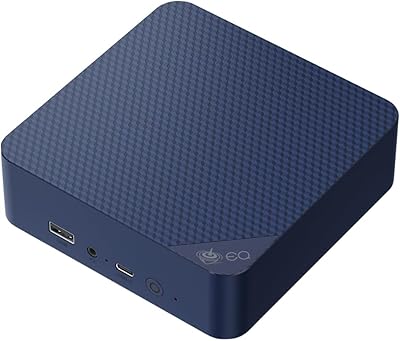
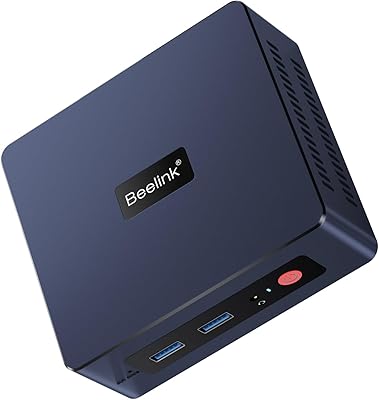
The ABS chassis feels solid for its size and weight class, and the compact form factor at roughly 2 pounds is something buyers consistently appreciate — it sits neatly on a desk or mounts behind a monitor without drawing attention. The all-black finish looks clean and professional in office environments.
Compared to premium mini PCs like those from Intel NUC or higher-end Minisforum models, the plastic construction feels a tier below in tactile quality. A few users noted the chassis flexes slightly under pressure, which does not affect function but does affect the perception of durability.
Wireless Connectivity
74%
26%
Wi-Fi 6 support means this compact desktop handles modern wireless networks well, with noticeably lower latency and more stable throughput than older 802.11ac devices — useful for users in dense apartment buildings or busy office environments with congested networks.
A recurring thread in user feedback involves intermittent Wi-Fi drops, particularly in dual-band environments or when the unit is placed inside a desk enclosure with limited airflow. The issue does not affect every unit, but it appears often enough to warrant caution for users relying primarily on wireless connectivity.
Storage Speed & Expandability
84%
The 500GB NVMe SSD delivers fast read and write speeds that make boot times and application launches feel immediate — users coming from HDD-based systems or older SATA SSDs will feel a clear difference. The second M.2 slot is a practical bonus that lets buyers grow storage without replacing what is already installed.
500GB fills up faster than expected for users storing media libraries or large project files, making the second drive slot almost a necessity rather than a luxury. The listing does not specify the exact SSD brand or model, so replacement or upgrade research requires opening the unit first.
Value for Money
71%
29%
For buyers whose needs align squarely with what this mini PC delivers — dual 4K displays, clean Windows 11 Pro, and reliable everyday performance — the overall package represents reasonable value for the price tier it occupies. The dual Ethernet ports and built-in PSU add practical value that competing units at similar prices often omit.
At its price point, AMD Ryzen-based mini PCs from brands like Minisforum offer more sustained CPU performance and significantly better integrated graphics, making the value proposition feel less compelling for anyone with workloads beyond basic productivity. Buyers paying a premium expect more headroom than the i3-1220P consistently delivers.
Networking Capabilities
89%
Dual Gigabit Ethernet ports are an unusual and genuinely useful feature at this size, and home lab users and NAS enthusiasts in particular highlight this as a key reason they chose this compact desktop over alternatives. Combined with Wi-Fi 6, the networking options cover virtually every wired and wireless scenario a home or small office user might encounter.
The Ethernet ports are rated at 1000M rather than 2.5GbE, which is adequate for most users but a limitation for those with multi-gigabit home networks who were hoping for faster wired throughput. This is a spec worth clarifying before purchase if network speed is a priority.
Software & Driver Support
63%
37%
Windows 11 Pro comes fully activated and configured out of the box, and for standard use cases the system runs without any driver intervention required. Most peripherals connect and work immediately, which new and non-technical users especially appreciate.
Users who venture beyond standard configurations — custom display setups, specific USB peripherals, or virtualization environments — occasionally encounter driver gaps that Beelink's documentation does not address clearly. Support response times are acceptable but the self-service resources are thin compared to more established PC brands.
Memory Adequacy
79%
21%
16GB of DDR4 RAM handles everyday multitasking, light virtualization, and media work without users feeling constrained during typical sessions. The upgrade path is open, giving technically inclined buyers the option to expand if their workloads grow over time.
The product listing's inconsistent references to DDR4 versus DDR5 created real confusion among buyers researching upgrade compatibility. For users running multiple virtual machines or memory-intensive development environments, 16GB starts to feel snug faster than expected.
Warranty & Support
72%
28%
A 1-year warranty backed by a lifetime technical support promise is a meaningful commitment for a brand in this segment, and buyers who have needed assistance generally report that Beelink's support team is responsive and helpful for common issues.
The warranty terms are not exceptional compared to brands offering 2- or 3-year coverage at similar price points, and the lifetime technical support claim is qualified enough that users should not interpret it as a guarantee of hardware repair beyond the warranty window. Documentation for advanced troubleshooting remains limited.
Portability & Form Factor
87%
At just over 2 pounds and smaller than a hardcover book, this mini PC fits into carry bags, travel cases, and compact desk setups without any real compromise. Users who move between locations — between a home office and a secondary workspace, for example — find it genuinely practical to transport.
The integrated PSU, while tidier than an external brick, means the power cable is fixed to the unit rather than swappable, which adds a minor inconvenience during travel packing. The lack of a VESA mount kit included in the box is an omission that buyers of this form factor often expect as standard.

Suitable for:

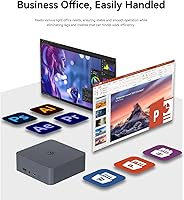
The Beelink EQI i3-1220P 16GB Mini PC is a well-matched choice for home office workers who want a genuine dual-monitor setup without the footprint of a traditional tower. If your day revolves around spreadsheets, browser tabs, video calls, and document editing across two screens, this compact desktop has the horsepower and port layout to handle that without compromise. It also appeals strongly to students, educators, and small business users who value a clean Windows 11 Pro environment they can put to work immediately — no license hunting, no bloatware removal rituals. The dual Ethernet ports make it an unexpectedly capable option for home lab enthusiasts or anyone who needs a reliable wired connection to a NAS or local server. Anyone transitioning away from an aging all-in-one or underpowered laptop will likely find this mini PC a meaningful upgrade in both speed and expandability.
Not suitable for:

The Beelink EQI i3-1220P 16GB Mini PC is not the right call for users whose workflows involve sustained heavy lifting — think 4K video editing timelines, complex 3D rendering, or running GPU-intensive applications. The integrated Intel UHD graphics simply cannot compete with even a modest discrete GPU, so creative professionals and gamers should look elsewhere, perhaps toward mini PCs with AMD Ryzen 7 or 9 silicon and dedicated graphics options. The i3-1220P is a capable chip for everyday tasks, but it will throttle under prolonged all-core loads, which matters if you plan to compile large codebases or run demanding virtual machines continuously. Buyers expecting a near-silent machine regardless of workload may also be disappointed, since fan noise under load has been a recurring note in user feedback. If raw processing power or graphics performance is the priority, this compact desktop will feel like a ceiling rather than a foundation.
Specifications

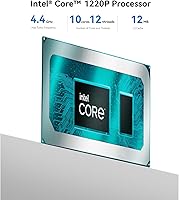
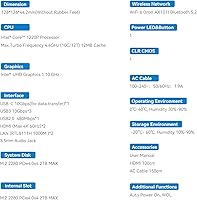
  • Processor: Intel Core i3-1220P with 10 cores (2 performance, 8 efficiency) and 12 threads, boosting up to 4.4GHz.
  • RAM: 16GB DDR4 SDRAM installed, with slots available for upgrading to higher capacity modules.
  • Primary Storage: 500GB NVMe PCIe M.2 2280 SSD pre-installed for fast boot and application load times.
  • Storage Expansion: A second M.2 slot supports additional NVMe drives, allowing total storage capacity up to 4TB.
  • Graphics: Intel UHD integrated graphics handles everyday display tasks and 4K video playback across dual outputs.
  • Display Output: Two HDMI ports support simultaneous dual-monitor output at 4K resolution and 60Hz refresh rate.
  • USB Ports: Three USB 3.2 Gen 2 ports, one USB 2.0 port, and one USB-C data port are provided on the chassis.
  • Networking: Two Gigabit Ethernet ports (1000M RJ45) provide wired network redundancy or multi-network connectivity.
  • Wireless: Wi-Fi 6 (802.11ax) and Bluetooth 5.2 are built in for modern wireless device and network support.
  • Operating System: Windows 11 Pro comes pre-installed with no third-party bloatware included out of the box.
  • Power Supply: A power supply unit is integrated directly into the chassis, eliminating the need for an external power brick.
  • Audio: A 3.5mm audio jack on the chassis supports headphones or external speakers.
  • Dimensions: The unit measures 6.1 x 5.98 x 4.21 inches, fitting easily behind a monitor or on a compact desk shelf.
  • Weight: The unit weighs approximately 2.03 pounds, making it easy to reposition or transport between locations.
  • Certifications: The device carries FCC, CE, and RoHS certifications, confirming compliance with safety and environmental standards.
  • Warranty: Beelink provides a 1-year worry-free warranty alongside lifetime technical support for registered buyers.
  • Bluetooth: Bluetooth 5.2 supports lower latency and more stable connections compared to older Bluetooth standards.
  • Chassis Material: The outer casing uses an ABS frame construction with a ventilation design rated MSC2.0 for heat dissipation.

Related Reviews

Beelink EQI12 Mini PC (i3-1220P, 16GB/500GB)
81%
84%
Everyday Performance
89%
Boot & Load Speed
71%
Thermal Management & Cooling
86%
Display & Dual Monitor Support
82%
Build Quality & Design
More
Beelink Mini S12 Pro (N100, 16GB, 500GB)
83%
83%
Everyday Performance
91%
Value for Money
76%
Build Quality & Design
84%
Thermal Management & Noise
88%
Connectivity & Ports
More
Beelink EQ14 Mini PC (N150, 16GB, 1TB)
74%
74%
Everyday Performance
61%
RAM & Memory Configuration
83%
Storage & Expandability
91%
Connectivity & Networking
79%
Display Output
More
Beelink EQI Mini PC i5-1235U 32GB RAM 1TB SSD
87%
88%
Performance
85%
Build Quality
92%
Value for Money
90%
Design/Size
81%
Thermals
More
Beelink SER3 Mini PC, AMD Ryzen 3 3200U, 16GB RAM, 500GB SSD
84%
85%
Performance
92%
Value for Money
88%
Build Quality
94%
Compact Design
90%
Ease of Setup
More
Beelink EQi12 Mini PC (i5-1235U, 16GB, 500GB)
80%
83%
Processing Performance
67%
Thermal Management
79%
RAM & Expandability
86%
Storage Speed & Flexibility
88%
Display Output
More
Beelink SEI Mini PC (Ryzen 5500U, 16GB/500GB)
81%
84%
Everyday Performance
61%
RAM Configuration
91%
Display & Multi-Monitor Support
73%
Cooling & Thermal Management
88%
Networking
More
Beelink ME Mini PC
Beelink ME Mini PC
87%
88%
Performance
91%
Connectivity
85%
Storage Expansion
95%
Power Efficiency
90%
Noise Levels
More
Beelink Mini S12 Mini PC
78%
88%
Value for Money
82%
Performance for Daily Tasks
79%
Build Quality & Design
91%
Dual Monitor Support
84%
Thermal Management & Noise
More
ACEMAGICIAN Kron Mini K1 Mini PC, Ryzen 7 7730U, 16GB RAM, 512GB SSD
85%
88%
Value for Money
91%
Performance for Everyday Tasks
94%
Compact Design & Portability
90%
Setup & Ease of Use
78%
Gaming Performance (Light)
More
Beelink EQi13 Pro (32GB/500GB)
83%
88%
Processing Performance
91%
Memory & Multitasking
86%
Storage Speed & Expandability
74%
Thermal Management & Noise
93%
Networking Capabilities
More

FAQ

It genuinely supports dual 4K output at 60Hz through its two HDMI ports simultaneously. That said, you will want to confirm your monitors accept standard HDMI 2.0 input, as older displays may cap out at lower resolutions or refresh rates.

The Beelink EQI i3-1220P 16GB Mini PC uses DDR4 SDRAM, not DDR5. The DDR5 reference appearing in some listing fields appears to be a data entry error on the product page. If you plan to upgrade the RAM, make sure you source DDR4 modules compatible with the i3-1220P platform.
There is a second M.2 slot available inside the chassis, so you can add another NVMe drive without removing the original. Total supported storage across both slots can reach up to 4TB, which gives you real room to grow.

Under light to moderate workloads like office tasks, web browsing, or video playback, the fan is quiet enough that most users won't notice it. If you push the CPU hard for extended periods — compiling code, running multiple VMs, or similar — the fan does spin up and becomes audible. It is not unusually loud, but it is not silent either.

Windows 11 Pro comes pre-installed and activated on the unit. Most buyers report that it was ready to use straight out of the box with no additional license purchase needed.

The USB-C port on this compact desktop is data-only, not a display output. It works well for connecting external drives, docks, or accessories, but it cannot drive an additional monitor. Your display options are limited to the two HDMI ports.

For most home office users, one Ethernet port is plenty. The second port becomes genuinely useful if you are running a home lab, connecting directly to a NAS, or want to separate your network traffic — for example, keeping a secure work connection isolated from your home network. It is a niche feature, but for the users who need it, having it built in at this size is a real convenience.

Light virtualization is feasible — running one or two VMs for development testing or network lab work is within reach, especially with 16GB of RAM available. You should not expect smooth performance running multiple resource-heavy VMs simultaneously, as the i3-1220P will start showing its limits under that kind of sustained load.

Not really. The integrated Intel UHD graphics are capable enough for casual or older titles at reduced settings, but this mini PC is not designed for gaming or GPU-accelerated creative work like video rendering or 3D modeling. If those are priorities, you would be better served by a mini PC featuring discrete or more powerful AMD integrated graphics.

Setup is about as simple as it gets for a desktop PC. You connect your monitors via HDMI, plug in a keyboard and mouse, connect power, and boot up into Windows 11 Pro. The lack of bloatware means there is no cleanup required before you start using it. Most buyers describe the initial experience as genuinely plug-and-play.