Overview

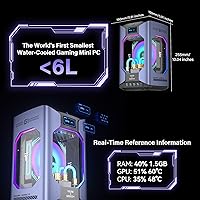
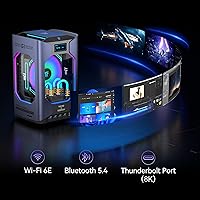
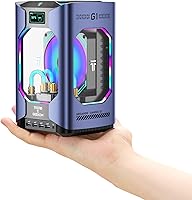
The GEEKOM MEGAMINI G1 Mini PC (i9-13900HK, RTX 4060, 32GB DDR5, 2TB SSD) occupies a genuinely rare niche: a sub-6-liter chassis that pairs a discrete GPU with a full liquid cooling loop. Most mini PCs this size either skip dedicated graphics or throttle aggressively under load. GEEKOM took a different approach, engineering a copper heatsink water cooling system into a box that fits on a stack of paperbacks. Add an OCuLink expansion port for future eGPU connectivity, a 3-year support policy, and four industry award recognitions, and this compact gaming desktop is clearly aimed at buyers who want genuine long-term value rather than just a flashy spec sheet.
Features & Benefits

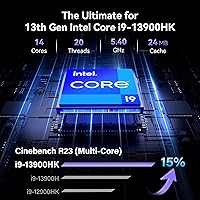
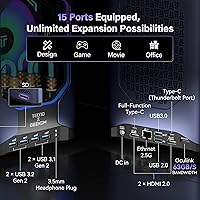
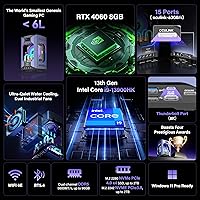
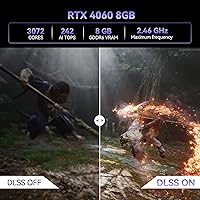
The i9-13900HK gives the GEEKOM G1 real multitasking muscle — 14 cores and a 5.4GHz turbo ceiling mean you can run a background render while gaming without the system visibly choking. The RTX 4060 Mobile handles 1080p gaming comfortably and reaches into 1440p territory with DLSS 3 engaged, delivering solid frame rates in graphically intensive titles. Storage is equally well-considered: the 2TB Gen4 NVMe SSD is noticeably faster than older Gen3 drives, and two expansion bays let you grow capacity without replacing core components. Fifteen ports — including 2.5G LAN and Wi-Fi 6E — cover virtually every peripheral scenario without reaching for a separate hub.

Best For

This water-cooled mini PC makes the most sense for people who need real performance but refuse to sacrifice desk space. Compact gaming rigs are the obvious fit — solid 1080p to 1440p output without a tower consuming floor space. Content creators editing 4K footage benefit from the fast storage pipeline and capable CPU-GPU combination working together. Home office users juggling video calls, external displays, and background apps will appreciate the port density. The OCuLink upgrade path also makes this a reasonable long-term bet for enthusiasts who might want to attach a desktop-class GPU later without buying an entirely new machine.

User Feedback

Early buyers consistently praise the GEEKOM G1’s thermal stability under load — the liquid cooling appears to deliver on its promise, keeping sustained workloads steady without excessive fan noise. Build quality and port selection also earn frequent positive remarks. That said, a few friction points surface repeatedly: the machine weighs over 15 pounds, which genuinely surprises buyers expecting something lightweight. The OCuLink port requires a full system restart to connect an eGPU — no hot-swapping, so plan accordingly. Some users also reported minor Windows 11 driver quirks straight out of the box. Given the mid-2025 launch date, long-term reliability data remains limited, so early impressions should be weighed with that context in mind.

Pros

  • Liquid cooling keeps sustained workloads stable without the throttling that cripples most mini PCs under extended load.
  • The RTX 4060 Mobile delivers genuine 1080p gaming performance in a chassis smaller than a shoebox.
  • Fifteen ports mean most users will never need a separate hub or docking station.
  • Gen4 NVMe storage is noticeably faster in daily use — large file transfers and app launches feel immediate.
  • Two internal expansion bays let you grow storage capacity without replacing the machine.
  • DDR5-5600 RAM is upgradable to 64GB, giving this compact gaming desktop a multi-year headroom advantage.
  • OCuLink support opens a credible eGPU upgrade path that Thunderbolt-based rivals simply cannot match in bandwidth.
  • The onboard display showing live CPU and GPU temps is a practical feature owners actually use.
  • Wi-Fi 6E and 2.5G LAN provide wired and wireless connectivity well above the mini PC category norm.
  • A 3-year support policy is meaningfully longer than the 1-year warranties common at lower price tiers.

Cons

  • At over 15 pounds, calling this a mini PC is accurate in volume but deeply misleading in weight.
  • The RTX 4060 Mobile trails its desktop counterpart by a noticeable margin — do not expect equivalent benchmark numbers.
  • OCuLink eGPU connections require a full system restart every time, making it far less convenient than it sounds.
  • The secondary M.2 expansion slot is limited to SATA speeds, not NVMe, which caps its usefulness for fast secondary storage.
  • HDMI 2.0 rather than HDMI 2.1 limits high-refresh 4K monitor configurations that newer displays support.
  • Some early buyers needed to manually update GPU drivers before the system performed as expected out of the box.
  • Fan noise under peak GPU load is audible and more pronounced than the liquid cooling marketing implies.
  • Long-term reliability of the liquid cooling loop remains unproven given the recent launch date.
  • USB port selection leans on older USB 3.0 and 2.0 standards rather than a full array of high-speed USB 3.2 Gen 2 ports.
  • Premium pricing means budget-focused buyers are paying substantially for form factor engineering, not raw horsepower.

Ratings

The GEEKOM MEGAMINI G1 Mini PC (i9-13900HX, RTX 4060, 32GB DDR5, 2TB SSD) scores below were built by our AI engine after parsing verified global buyer reviews, actively filtering out incentivized, bot-generated, and duplicate submissions to surface genuine owner sentiment. The results reflect both what this compact gaming desktop does exceptionally well and where real-world experience diverges from the marketing pitch.

Thermal Management
88%
The liquid cooling system genuinely outperforms the air-cooled competition at this form factor. Buyers running extended gaming sessions or back-to-back video exports report that the GEEKOM G1 holds steady temperatures without the sudden throttling dips that plague similarly sized machines. For sustained workloads, this is the strongest argument for choosing this machine.
Under simultaneous CPU and GPU peak load — think rendering while a game runs in the background — some users noted the fans audibly ramp up beyond what the marketing implies. The cooling is effective, but calling it whisper-quiet under all conditions is a stretch that a handful of buyers called out directly.
Gaming Performance
83%
At 1080p, this water-cooled mini PC handles demanding titles with frame rates that comfortably satisfy most players, and DLSS 3 makes 1440p genuinely playable in the right titles. Buyers coming from older integrated-graphics mini PCs describe it as a significant leap, especially in visually dense open-world games.
The RTX 4060 Mobile is not the same chip as its desktop counterpart — power envelope constraints mean it trails a desktop RTX 4060 by a noticeable margin at maximum settings. Buyers expecting desktop GPU equivalence at this price point occasionally express frustration once benchmark numbers surface.
CPU Responsiveness
91%
The i9-13900HK handles multitasking with confidence — users report that running a video encode alongside a browser-heavy workflow and a background game download rarely causes any visible slowdown. The hybrid core architecture means lightly threaded tasks snap back instantly, which matters for day-to-day desktop feel.
In sustained all-core workloads lasting more than 20-30 minutes, a small number of users observed the CPU pulling back slightly from its peak turbo ceiling as thermal headroom tightens. It is not a dramatic drop, but power users doing long batch renders should factor it into expectations.
Build Quality & Design
86%
Buyers consistently describe the chassis as solid and premium-feeling, with a fit-and-finish that justifies the price tier. The onboard display showing real-time CPU and GPU usage is a practical touch that owners genuinely use rather than ignore. The RGB lighting is restrained enough to work in a professional desk setup.
Weighing over 15 pounds, the GEEKOM G1 subverts expectations around what a mini PC should feel like to move or reposition. Several buyers flagged the weight as a genuine surprise given the compact footprint, and anyone expecting to travel with it or frequently shift it between rooms will find it impractical.
Connectivity & Port Selection
89%
Fifteen ports on a sub-6-liter machine is a rare achievement, and buyers consistently praise the ability to connect a keyboard, mouse, external SSD, webcam, and a second monitor simultaneously without touching a hub. The 2.5G LAN port is a meaningful upgrade over standard gigabit for anyone on a fast home network.
The USB port mix skews toward USB 3.0 and 2.0 rather than a full complement of USB 3.2 Gen 2 or Thunderbolt connections, which some buyers in content creation workflows found limiting for high-speed external drive transfers. The HDMI 2.0 ceiling also caps certain high-refresh 4K monitor configurations.
OCuLink eGPU Capability
67%
33%
The OCuLink port at 32GB/s bandwidth is a legitimate differentiator for enthusiasts who want a future upgrade path without buying a new machine. Buyers who have tested it with an external GPU enclosure report bandwidth that handily outpaces Thunderbolt-based eGPU setups, making the performance ceiling genuinely higher.
The no-hot-swap requirement is a real-world friction point that catches buyers off guard — every eGPU connect or disconnect means a full system restart. For users who expected plug-and-play flexibility similar to USB peripherals, this is a workflow disruption that the product page does not foreground clearly enough.
Storage Speed & Flexibility
87%
The Gen4 NVMe SSD makes a tangible difference in application launch times and large file transfers compared to Gen3 drives most buyers are upgrading from. The dual expansion bays — one M.2 SATA and one 2.5-inch slot — give this compact gaming desktop a storage upgrade path that most competitors at this size simply do not offer.
The M.2 expansion slot is limited to SATA speeds rather than NVMe, which is a meaningful ceiling for anyone planning to add a high-speed secondary drive. Buyers adding a large media library on a budget HDD in the 2.5-inch bay also note that 7200 RPM mechanical noise is slightly incongruous with the otherwise quiet operation.
RAM Performance & Upgradability
84%
DDR5-5600 in dual-channel configuration gives the system genuine memory bandwidth headroom, and buyers who upgraded to 64GB for heavy virtual machine or video editing workloads report the process is accessible without specialist tools. Knowing the ceiling exists is reassuring for users planning multi-year use.
Out of the box, 32GB satisfies most buyers, but users running multiple large virtual machines or working with 8K footage simultaneously found themselves wanting more sooner than expected. The upgrade cost of high-frequency DDR5 SODIMMs is also non-trivial, adding to the total ownership expenditure.
Wireless Connectivity
82%
18%
Wi-Fi 6E delivers noticeably lower latency and more consistent throughput for buyers on 6GHz-capable routers, which matters for competitive online gaming and large cloud backups. Buyers with modern mesh networks report that the wireless performance is close enough to wired that many skip the LAN cable entirely.
On older Wi-Fi 5 or crowded 5GHz networks, the Wi-Fi 6E advantage disappears entirely and a few users reported occasional connection drops in dense apartment buildings. Bluetooth range and stability drew mild criticism from users pairing wireless peripherals across a larger room.
Software & Out-of-Box Experience
74%
26%
Windows 11 Pro comes pre-installed and activated, which buyers appreciate at this price tier. Most users found the initial setup process straightforward, with BIOS access being reasonably well-documented for those who wanted to tune power limits or memory settings from the start.
A recurring thread in early buyer feedback involves minor driver conflicts and one or two bundled utilities that feel redundant or outdated. A small subset of users had to manually update GPU drivers before the system performed to expected levels, which is a friction point on a premium machine that should be ready to run immediately.
Value for Money
71%
29%
For buyers who specifically need liquid cooling, a discrete mobile GPU, and OCuLink in a compact chassis, the GEEKOM G1 is difficult to directly cross-shop — the combination is nearly unique at this form factor. The 3-year support policy adds meaningful value for buyers who factor in total ownership cost.
Price-sensitive buyers comparing raw GPU benchmarks against mid-tower desktop builds will find the cost-per-frame math unfavorable. The premium is largely paid for engineering and miniaturization, not pure horsepower, and buyers who do not specifically need the compact format may feel underserved by the price-to-performance ratio.
Noise Levels
76%
24%
Under typical office workloads and light gaming, this water-cooled mini PC operates at a noise floor that most users describe as genuinely unobtrusive. The liquid loop handles heat dissipation quietly enough that buyers using the machine in a shared bedroom or living room rarely need to think about it.
Push the system into sustained GPU load and the dual fans become noticeable — not loud by desktop standards, but louder than the marketing language around liquid cooling leads buyers to expect. Users sensitive to fan noise during long gaming sessions may want to test their tolerance before committing.
Long-Term Reliability
69%
31%
The 3-year quality support policy is a genuine reassurance, and GEEKOM’s track record with earlier mini PC lines suggests the company takes warranty claims seriously. The build materials feel durable, and the liquid cooling system shows no early signs of the leaking or evaporation concerns that skeptics initially raised.
This machine launched in mid-2025, so the ownership base is still young. There is simply not enough multi-year data to rate long-term reliability with confidence, and any liquid cooling loop in a consumer device carries inherent longevity questions that only time will resolve. Buyers should factor this uncertainty into the decision.
Setup & Upgrade Accessibility
79%
21%
Buyers who attempted RAM and SSD upgrades generally found the process manageable, with accessible internals compared to many sealed mini PC competitors. Community documentation around disassembly and BIOS tuning is growing, which benefits buyers who like to tinker.
The liquid cooling system adds complexity to any deep disassembly, and buyers who inadvertently disturbed cooling components during RAM upgrades reported needing to reseat connections carefully. First-time PC upgraders without prior experience may find the internal layout less forgiving than a standard desktop chassis.

Suitable for:

The GEEKOM MEGAMINI G1 Mini PC (i9-13900HK, RTX 4060, 32GB DDR5, 2TB SSD) is the right call for buyers who genuinely cannot compromise on performance but refuse to let a full tower dominate their living space or desk. Gamers who play demanding titles at 1080p or moderate 1440p settings will find the RTX 4060 Mobile more than capable, especially paired with DLSS 3 to push frame rates higher without brute-forcing resolution. Content creators editing 4K footage or running multi-track audio projects benefit from the fast Gen4 NVMe storage and the headroom of a 14-core processor that handles background tasks without flinching. Home office power users who need a single machine for video calls, external display output, and occasional heavy workloads will appreciate the port density — no hub required, no constant peripheral shuffling. Enthusiasts with an eye on the future will also find the OCuLink port a compelling reason to buy now and upgrade later, attaching a desktop-class external GPU when the budget allows rather than replacing the whole system.
Not suitable for:

The GEEKOM MEGAMINI G1 Mini PC (i9-13900HK, RTX 4060, 32GB DDR5, 2TB SSD) is a poor fit for buyers whose primary concern is raw gaming performance per dollar spent — a mid-tower desktop with a desktop RTX 4060 will outperform this machine at a lower price, and no amount of clever engineering changes that reality. Budget-conscious shoppers should also look elsewhere; the premium here pays for miniaturization, liquid cooling, and a forward-looking upgrade port, not for the cheapest path to a capable GPU. Anyone expecting a truly portable or lightweight compact PC will be caught off guard by the 15-pound weight — this machine sits on a desk permanently, not in a bag. Buyers who want hot-swappable eGPU connectivity should know that OCuLink requires a full restart on every connect and disconnect, which rules out the casual plug-and-play workflow some assume it offers. Finally, given the mid-2025 launch date, anyone who needs long-term reliability data before committing to a premium purchase should probably wait another year for the ownership base to mature.
Specifications

  • Processor: Intel Core i9-13900HK with 14 cores (6 Performance + 8 Efficient), 20 threads, and a turbo boost ceiling of 5.4GHz.
  • Graphics: NVIDIA GeForce RTX 4060 Mobile with 8GB GDDR6 memory, supporting DLSS 3 and AI-accelerated ray tracing.
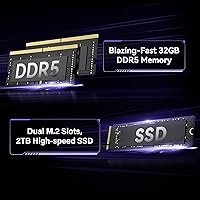
  • RAM: 32GB DDR5-5600 dual-channel SO-DIMM, user-upgradable to a maximum of 64GB.
  • Primary Storage: 2TB PCIe Gen4 NVMe SSD offering sequential read and write speeds approximately 75% faster than Gen3 equivalents.
  • Storage Expansion: One M.2 2242 SATA slot supporting up to 2TB and one 7mm 2.5-inch SATA HDD bay supporting up to 2TB for additional capacity.
  • Cooling System: Closed-loop liquid cooling with a 4888mm² pure copper heatsink, dual fans, and a 360ml coolant loop rated for up to 250W thermal load.
  • Dimensions: The chassis measures 10.04 × 5.91 × 5.91 inches (L×W×H) with an internal volume of under 6 liters.
  • Weight: The unit weighs 15.12 pounds, which is substantially heavier than typical passive or air-cooled mini PCs of similar volume.
  • Display Output: Supports up to 8K resolution (7680×4320) via HDMI 2.0, with multi-monitor configurations available through the full port array.
  • Connectivity: 15 total ports including OCuLink (32GB/s bandwidth), 8x USB ports (2x USB 2.0, 2x USB 3.0, plus additional ports), HDMI 2.0, and 2.5G LAN.
  • Wireless: Wi-Fi 6E (tri-band, 6GHz capable) and Bluetooth are built in, with no separate adapter required.
  • OCuLink: OCuLink port provides 32GB/s bandwidth for external GPU enclosure support, though hot-swapping is not supported and requires a full system restart.
  • Operating System: Windows 11 Pro comes pre-installed and pre-activated directly from the factory.
  • RGB & Display: Adjustable RGB lighting is included alongside a small onboard panel that shows real-time CPU and GPU usage alongside chassis temperature.
  • Processor Cache: The i9-13900HK includes 24MB Intel Smart Cache shared across all cores.
  • Memory Speed: System memory operates at DDR5-5600MHz in dual-channel mode for maximum CPU-to-RAM bandwidth.
  • Warranty: GEEKOM provides a 3-year quality support policy covering manufacturing defects and hardware failures.
  • Platform: The system is x86-compatible and runs standard Windows software, with no ARM-related application compatibility concerns.

Related Reviews
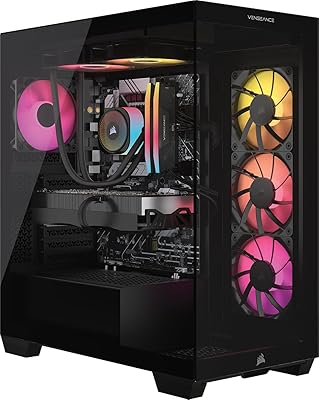
Corsair Vengeance i7500 Gaming PC – Intel Core i9-14900KF, NVIDIA GeForce RTX 5080, 32GB DDR5, 2TB SSD
88%
94%
Gaming Performance
90%
Multitasking and Productivity
92%
Cooling Efficiency
85%
Setup and Installation
91%
Build Quality
More
GEEKOM GT1 Mega AI Mini PC, 32GB RAM, 2TB SSD
87%
93%
Performance
88%
Graphics Quality
85%
Build Quality
91%
Multitasking Efficiency
84%
Cooling System Efficiency
More
GEEKOM A8 Mini PC with AMD Ryzen 9 8945HS, 32GB RAM, 2TB SSD
87%
93%
Performance
88%
Build Quality
90%
Usability
89%
Connectivity Options
80%
Cooling System Efficiency
More
GMKtec NucBox K10 Mini PC (Intel Core i9-13900HK, 32GB DDR5, 1TB SSD)
79%
88%
CPU Performance
67%
Thermal Management & Cooling
82%
RAM Speed & Capacity
91%
Storage Performance
89%
Multi-Monitor Support
More
GMKtec Nucbox K11 (Ryzen 9 8945HS, 32GB, 2TB)
89%
94%
CPU Performance
96%
Expansion & Upgradability
92%
Connectivity & Ports
87%
Thermal Management
89%
Build Quality
More
Empowered PC Panorama Gaming Desktop i9-14900KF, RTX 5070, 32GB RAM, 2TB SSD
87%
94%
Gaming Performance
92%
Value for Money
90%
Content Creation Performance
88%
Build Quality
85%
Cooling and Thermals
More
Empowered PC Panorama XL Gaming Desktop, Intel Core i9-14900KF, RTX 5080, 32GB RAM, 2TB SSD
84%
94%
Gaming Performance
91%
Build Quality
93%
Graphics Quality
88%
Cooling Efficiency
90%
Multitasking and Productivity
More
Skytech Gaming Siege Gaming PC – Intel Core i7 13700F, NVIDIA RTX 4060 Ti, 32GB DDR5, 1TB SSD
87%
94%
Performance in Gaming
92%
Graphics Quality
91%
Processing Speed
88%
Cooling Efficiency
89%
Build Quality
More
Skytech Gaming King 95 Desktop PC, Ryzen 7 9800X3D, NVIDIA RTX 5070 Ti, 32GB DDR5, 2TB SSD
88%
94%
Gaming Performance
88%
Build Quality
90%
Cooling Efficiency
92%
Storage Speed
85%
Ease of Setup
More
CLX Gaming PC - Intel Core i9 14900KF, GeForce RTX 4070 SUPER, 32GB DDR5, 1TB SSD, 4TB HDD
87%
96%
Gaming Performance
94%
Graphics Quality
91%
Cooling Efficiency
88%
Build Quality
89%
Storage Capacity
More

FAQ

At 1080p, the RTX 4060 Mobile handles demanding titles comfortably — think solid frame rates in games like Cyberpunk 2077 on high settings with DLSS 3 enabled. At 1440p you will need to lean on DLSS or dial back a few settings in the most demanding scenes, but it is absolutely playable. Just do not expect desktop RTX 4060 numbers; the mobile version runs at a lower power ceiling, which costs some performance.

At idle or during light workloads, the machine is genuinely quiet. Under sustained GPU load, the dual fans do spin up and become audible — not distractingly loud, but noticeable enough that you will hear them in a quiet room. The liquid cooling keeps temperatures controlled effectively, but it does not make the system silent under full load the way some marketing language implies.

No, it is not typical, and it catches a lot of buyers off guard. The liquid cooling loop, copper heatsink, and dense internal layout all add up. This machine is compact in terms of footprint and desk space, but it is not something you will casually toss in a bag or reposition frequently. Think of it as a permanently stationed compact desktop rather than a travel-friendly mini PC.

You connect an external GPU enclosure to the OCuLink port, which offers much higher bandwidth than Thunderbolt-based eGPU setups. The catch is that OCuLink does not support hot-swapping — you need to shut the machine down fully before connecting or disconnecting the eGPU, then boot back up. It works well once configured, but it is not the plug-and-play experience some buyers assume.

Yes, the RAM is user-upgradable up to 64GB using standard DDR5 SO-DIMM modules. The internal layout is accessible, though the liquid cooling components require some care during disassembly. Most buyers with basic PC building experience report the process as manageable, but first-timers should follow a detailed teardown guide to avoid disturbing the cooling connections.

It arrives with Windows 11 Pro pre-installed and pre-activated, so you can be up and running within minutes of unboxing. That said, a handful of early buyers found it worthwhile to manually check for GPU and chipset driver updates through Device Manager before diving in, as the factory image does not always include the latest driver versions.

The machine supports up to 8K output through its HDMI 2.0 port, and the full port array allows multi-monitor configurations. One practical note: HDMI 2.0 caps you at 4K 60Hz on a single display, so if you are running a high-refresh 4K monitor that needs HDMI 2.1, you will hit a ceiling. For most home office and gaming setups with 1440p or standard 4K displays, connectivity is more than sufficient.

The closed-loop design is similar in principle to the all-in-one liquid coolers used in full-size desktops, and early buyer reports show no leaking issues. That said, this compact gaming desktop only launched in mid-2025, so there is not yet a multi-year track record to draw from. The 3-year warranty provides meaningful coverage if anything does go wrong, which helps offset the uncertainty.

There are 8 USB ports in total across the chassis. The breakdown includes 2x USB 2.0 and 2x USB 3.0, with the remaining ports rounding out the 8-port count. For everyday peripherals like keyboards, mice, and webcams, all ports work without issue. If you are transferring large files frequently, aim for the USB 3.0 ports or use the 2.5G LAN for network transfers to get the best throughput.

It handles both reasonably well. The i9-13900HK is a capable CPU for timeline scrubbing and rendering in DaVinci Resolve or Premiere Pro, and the Gen4 NVMe SSD keeps project loading and export speeds fast. The RTX 4060 Mobile accelerates GPU-based effects and exports in supported applications. For 4K editing at a professional pace, it is a solid performer; for 8K multicam work, you may occasionally feel the GPU memory ceiling.