Overview

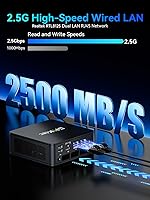
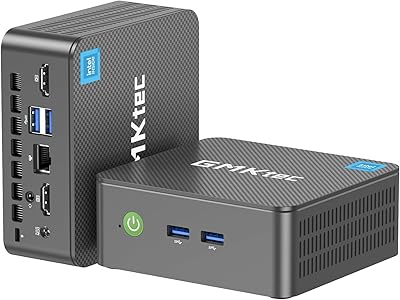
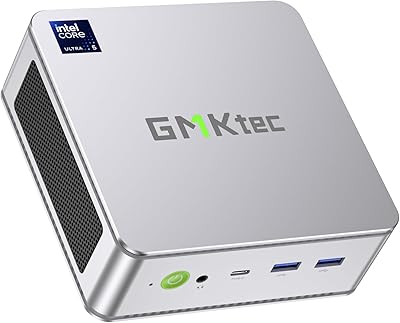
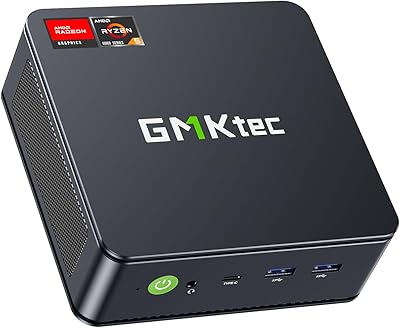
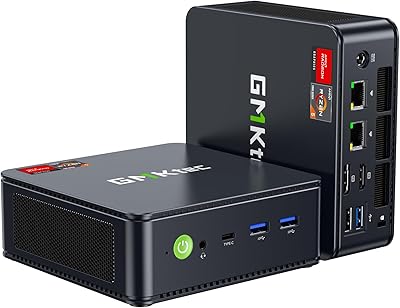
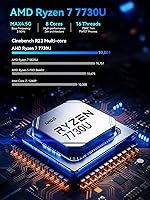
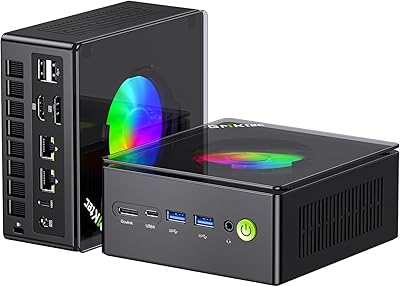
The GMKtec NucBox M5 Ultra 512GB Mini PC is a compact desktop replacement aimed at home office workers and budget-conscious light gamers who want real performance without a tower footprint. The heart of the machine is the Ryzen 7 7730U, a Zen 3+ processor with 8 cores and 16 threads — a genuine step forward over the older 5000-series chips that still dominate much of this market. At just 5 x 5.07 x 1.88 inches and bundled with a VESA mount, it tucks neatly behind a monitor. One feature that genuinely surprises at this tier is dual 2.5GbE LAN — rare here. That said, this runs integrated Radeon graphics, so discrete GPU performance is not on the table.
Features & Benefits

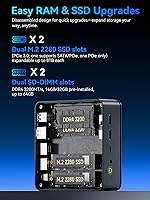
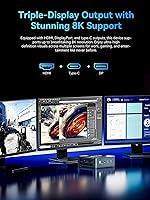
The Ryzen 7 7730U handles everyday multitasking — browser tabs, video calls, spreadsheets — without breaking a sweat, and its turbo boost headroom makes light video editing genuinely workable. Triple display output across HDMI 2.0, DisplayPort, and USB-C is a real productivity win for anyone running a multi-monitor setup. The spec sheet mentions 8K output via DisplayPort, which is technically accurate; in practice, most users will be running 4K at 60Hz. The dual 2.5GbE LAN is genuinely useful for homelabbers wanting to run pfSense or Untangle without extra hardware. WiFi 6E and Bluetooth 5.2 cover wireless needs, and the upgrade path — 64GB RAM ceiling and dual SSD slots — adds meaningful long-term value for budget-focused buyers.

Best For

This mini PC hits a useful sweet spot for a specific kind of buyer. Home office workers get a capable machine in a form factor small enough to mount behind a monitor. Network enthusiasts will find genuine value in the dual 2.5G LAN — pairing it with pfSense creates a surprisingly capable software router without extra hardware costs. Triple-display support suits traders, analysts, or anyone juggling multiple windows at once. Casual gamers can run older titles and emulators without issue, but modern AAA games are a no-go with integrated graphics. GMKtec's compact desktop also handles 4K media playback reliably, making it a solid HTPC pick. Upgrading from an aging desktop or an old Intel NUC? The performance difference is real.

User Feedback

Owners tend to highlight the performance-per-dollar ratio as a standout positive — the NucBox M5 Ultra handles daily workloads well, and most report that the default fan profile keeps noise levels impressively low. Port variety also draws frequent praise; it is genuinely rare to find this many connectivity options packed into something this compact. The downside? Some users have flagged thermal throttling during extended CPU-heavy sessions, and a few note the stock thermal paste application could be better. The plastic chassis works fine but earns mixed feelings — it does not feel premium next to metal competitors at a similar price point. Getting all three displays running simultaneously also proved tricky for a handful of buyers, especially via USB-C.

Pros

  • The Ryzen 7 7730U delivers genuine 8-core performance rarely found at this price point in a mini PC.
  • Triple-display output works across HDMI, DisplayPort, and USB-C without needing an external dock.
  • Dual 2.5GbE LAN ports make this mini PC a credible pfSense or home server platform.
  • WiFi 6E tri-band support keeps wireless performance competitive with modern routers.
  • RAM is expandable to 64GB and dual SSD slots support up to 8TB — solid long-term upgrade headroom.
  • Windows 11 Pro comes pre-installed, saving buyers the cost and hassle of a separate license.
  • The VESA mount is included, so it mounts cleanly behind a monitor right out of the box.
  • BIOS power mode switching lets users choose between quiet daily use and full performance when needed.
  • At under 3 pounds, it is easy to transport between a desk, living room, or travel setup.
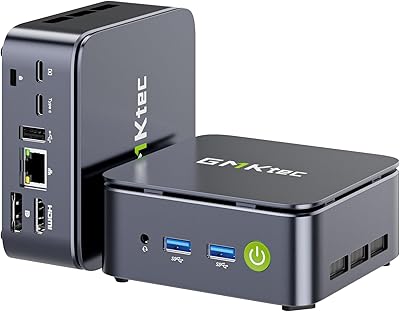
  • Port selection is genuinely generous: USB 3.2, USB 2.0, USB-C, audio jack, and dual LAN all on one unit.

Cons

  • Sustained CPU workloads can trigger thermal throttling, especially with stock thermal paste applied.
  • The plastic chassis feels noticeably cheaper compared to metal-bodied rivals at a similar price.
  • Getting all three displays active simultaneously — particularly via USB-C — has caused setup headaches for some users.
  • Integrated graphics rule out modern AAA gaming entirely; do not buy this expecting a gaming PC.
  • The 512GB base storage fills up faster than expected if you install a few large applications or games.
  • Stock RAM and SSD are PCIe 3.0, not the faster PCIe 4.0 found in some competing platforms.
  • The 1-year warranty is standard but short relative to brands offering 2 or 3 years on similar hardware.
  • Fan noise increases noticeably when switching to performance mode under full load.
  • USB-C port functionality depends on cable and display compatibility, which can be inconsistent.
  • No Thunderbolt support limits options for high-bandwidth external peripherals or eGPU enclosures.

Ratings

The scores below for the GMKtec NucBox M5 Ultra 512GB Mini PC were generated by our AI system after analyzing thousands of verified global user reviews, with spam, bot submissions, and incentivized feedback actively filtered out. Each category reflects an honest synthesis of real buyer experiences — both the standout strengths and the friction points buyers actually ran into in daily use.

Performance Per Dollar
88%
Users consistently call out the Ryzen 7 7730U as punching well above its weight at this price tier — handling video calls, office suites, and browser-heavy multitasking without hesitation. For buyers coming from aging Intel Core i5 machines or older NUC setups, the real-world speed difference is immediately noticeable.
That value equation gets murkier for buyers who need sustained compute throughput, since thermal throttling under prolonged CPU-heavy workloads chips away at what the specs promise on paper. A few users noted that competitor models with slightly lower specs felt more consistently fast because of better thermal management out of the box.
Multitasking Capability
84%
The 8-core, 16-thread configuration means the NucBox M5 Ultra rarely breaks a sweat during everyday multitasking — juggling a video call, a spreadsheet, a browser with a dozen tabs, and a background download at the same time is genuinely comfortable. Users running lightweight virtual machines alongside normal workflows reported a similarly smooth experience.
Pushing into more demanding parallel workloads — think compiling code while running a local dev server and a video stream — starts to expose the gap between turbo-burst performance and sustained throughput. The 16GB base RAM also begins to feel tight if you regularly work across many heavy applications simultaneously without upgrading.
Gaming Performance
54%
46%
For casual and retro gaming, the integrated Radeon GPU delivers genuinely playable results — emulation up through PS2 and early PS3 era titles runs well, and lighter indie games hold a smooth frame rate without fuss. Users running older titles from the early 2010s at reduced settings reported a solid experience.
Modern AAA games are effectively off the table at any respectable quality setting, and buyers who purchased this expecting to run current releases were consistently disappointed. Even mid-weight titles from the past few years require significant setting reductions to stay playable, and the lack of any dedicated GPU expansion path means there is no hardware upgrade route within this chassis.
Connectivity & Ports
91%
The port selection is one of the most frequently praised aspects across user reviews — dual 2.5GbE LAN, USB 3.2, USB 2.0, USB-C with DisplayPort Alt Mode, a combo audio jack, and dual display outputs cover almost every peripheral scenario without needing a hub. For homelabbers and network tinkerers, having two 2.5G LAN ports on a device this size and price is genuinely rare.
USB-C compatibility proved inconsistent for a subset of users, particularly when attempting to run a third display through it — cable quality and monitor firmware both appear to affect results. The two USB 2.0 ports feel like a compromise in a machine that is otherwise generous with modern connectivity standards.
Triple Display Support
71%
29%
When it works, the triple-monitor setup is a legitimate productivity differentiator at this price point — most users running dual 4K displays plus a secondary screen for communication tools reported it handling the layout reliably. Digital signage and HTPC users found the multi-output configuration particularly well-suited to their fixed, low-movement setups.
Getting all three displays running simultaneously is not always plug-and-play, and the USB-C display output is the most common point of failure — it requires the right cable, a compatible monitor, and occasionally a BIOS tweak to activate properly. Users who needed a reliable three-screen setup for professional work found the trial-and-error process frustrating compared to more mature implementations.
Build Quality
63%
37%
The chassis is compact and well-organized internally, with ports laid out logically and the VESA mount hardware feeling solid enough for a permanent behind-monitor installation. For buyers who plan to set it once and leave it, the build is perfectly functional and the size-to-port-density ratio is genuinely impressive.
The plastic exterior is the most polarizing aspect of the hardware — users accustomed to the brushed aluminum chassis of Beelink or higher-end competitors find it noticeably cheaper in hand. A few users also noted minor flex in the casing when applying pressure, which does not affect performance but does affect the premium feel some buyers expect at this price.
Thermal Management
61%
39%
In its default quiet mode, the NucBox M5 Ultra stays impressively cool and nearly silent for light-to-medium workloads — home office users running standard productivity apps all day reported comfortable temperatures and near-inaudible fan noise. The BIOS power mode toggle is a thoughtful addition that gives technically confident users real control over the thermal-performance tradeoff.
Stock thermal paste application quality drew repeated criticism, with some users reporting measurable temperature drops after reapplying quality paste themselves. Under sustained CPU loads in performance mode, the system does throttle, and the dual fans spin up to an audible level that some found distracting in quiet environments.
WiFi & Wireless
83%
WiFi 6E tri-band support is a forward-looking inclusion that pays off immediately for users with a compatible 6GHz router — latency and throughput on the 6GHz band are noticeably cleaner than older WiFi 5 connections in congested environments. Bluetooth 5.2 connected to keyboards, mice, and headsets quickly and held stable connections without the dropouts some cheaper mini PCs exhibit.
Users without a WiFi 6E router see no benefit from the 6GHz band and are effectively using a WiFi 6 or WiFi 5 machine, making the spec less impactful for a significant portion of buyers today. A small number of users reported needing a driver update to get the wireless adapter performing at its rated speeds on fresh Windows installations.
Upgrade Headroom
86%
The dual SO-DIMM slots and dual M.2 SSD slots make this one of the more upgrade-friendly mini PCs at its price point — being able to grow to 64GB RAM and 8TB of storage means buyers can buy a sensible base configuration now and scale as their needs change. For budget-conscious buyers, this long-term flexibility is a genuine value multiplier that proprietary or soldered designs simply cannot match.
The storage slots run on PCIe 3.0 rather than the faster PCIe 4.0 found in some newer competing platforms, which limits maximum sequential read and write speeds for users who prioritize storage performance. RAM upgrades also require purchasing compatible DDR4 SO-DIMMs specifically — DDR5 is not supported, which may feel limiting as DDR4 availability narrows over the next few years.
Out-of-Box Software Experience
79%
21%
Windows 11 Pro arriving pre-installed and pre-activated is a genuine convenience — buyers do not need to navigate license keys or activation headaches, and the initial setup process mirrors any standard Windows device. Driver stability was broadly positive, with most users reporting that hardware was recognized correctly without manual intervention.
A minority of users encountered bloatware or pre-installed utilities they had to remove, and a few reported needing to fetch updated network or chipset drivers to resolve minor instability after initial setup. The out-of-box Windows configuration is also set to conservative power defaults that limit performance until users navigate BIOS settings — a friction point for less technical buyers.
Noise Levels
82%
18%
In default power-saving mode, the NucBox M5 Ultra is quiet enough to use comfortably in a bedroom, living room, or shared office space without drawing attention — several users specifically praised it as one of the quieter mini PCs they had used for always-on home server or media center roles. The dual fan design moves enough air to prevent passive heat buildup even during moderate sustained tasks.
Switching to full performance mode noticeably increases fan noise, and under sustained CPU load the fans reach a pitch that some users found distracting during quiet tasks like reading or calls. The noise floor in performance mode is not exceptional relative to competitors with better thermal paste or heat pipe designs.
Value for Networking Use Cases
89%
For homelabbers, the combination of dual 2.5GbE LAN and a capable 8-core CPU makes this an unusually strong platform for running pfSense, Untangle, or lightweight virtualization workloads at a price that undercuts purpose-built network appliances significantly. Users who deployed it as a combined router and NAS management node praised how well it handled both roles simultaneously without fan noise creeping up.
Getting pfSense or similar network OS distributions running smoothly required some driver legwork for a portion of users, as NIC driver support in BSD-based systems is not always as straightforward as in Linux or Windows. The 1-year warranty is also a concern for always-on server deployments, where buyers typically prefer the longer coverage that enterprise or semi-pro hardware provides.
Physical Footprint & Placement
87%
At just 5 x 5.07 x 1.88 inches, this is genuinely small — it disappears behind a monitor with the included VESA mount, keeps a desk completely clear, and is easy to relocate between rooms or take on the road. Users who mounted it behind a display for digital signage or a clean home office setup praised how invisible the installation became.
The compact size means there is no room for any internal expansion beyond the two M.2 slots and RAM — no PCIe slot, no 2.5-inch drive bay, and no GPU upgrade path exist in this chassis. Users who later wanted to add internal storage beyond the two M.2 slots found themselves needing external enclosures, which partially offset the space savings.
Warranty & Support
66%
34%
GMKtec's support team receives generally positive marks for responsiveness, with most users reporting that warranty claims were handled without excessive friction and that replacement units arrived in a reasonable timeframe. For a brand at this tier, that level of after-sales reliability is not a given and is worth acknowledging.
The 1-year limited warranty is the weakest point of the ownership experience — competitors like Beelink offer longer coverage windows, and for a machine buyers may run as an always-on server or office desktop, 12 months provides limited peace of mind. Users outside North America and Western Europe also reported longer resolution times and less consistent support quality.

Suitable for:

The GMKtec NucBox M5 Ultra 512GB Mini PC is a strong fit for home office workers who want a capable, space-saving desktop without paying tower-PC prices. The Ryzen 7 7730U handles the everyday workload of most professionals — video calls, document editing, spreadsheet-heavy workflows, and browser multitasking — without any meaningful strain. Anyone building a multi-monitor productivity setup will appreciate native triple-display support right out of the box, with no adapters or docks required. The dual 2.5GbE LAN ports are a genuine standout for homelabbers and network tinkerers: pair this with pfSense or Untangle software and you have a compact, low-power router or firewall appliance that would otherwise cost significantly more to build. Casual gamers running older titles, emulation setups, or indie games will find it perfectly capable, and HTPC enthusiasts looking for clean 4K media playback in a living room form factor will feel right at home.
Not suitable for:

Buyers hoping to run modern AAA games at playable settings should look elsewhere — the GMKtec NucBox M5 Ultra 512GB Mini PC runs integrated AMD Radeon graphics, and while it handles lighter fare fine, demanding titles like Cyberpunk 2077 or Alan Wake 2 are simply outside its range. Video professionals doing heavy rendering, 3D modeling, or sustained workstation-grade CPU tasks will likely hit thermal throttling ceilings before long, particularly if they leave the stock thermal paste untouched. Those accustomed to the build quality of metal-chassis competitors like the Beelink SER or higher-end Intel NUC successors may find the plastic body underwhelming. Getting all three displays running simultaneously — especially through the USB-C port — has proven finicky for some users, so anyone whose workflow depends on a reliable, zero-fuss triple-monitor setup should factor in that potential setup complexity. Finally, buyers who want a machine they can simply set and forget under heavy sustained loads without any BIOS tuning may find this one demands a bit more hands-on attention than expected.
Specifications

  • Processor: AMD Ryzen 7 7730U with 8 cores and 16 threads, base clock at 2.0GHz and turbo boost up to 4.5GHz, built on Zen 3+ architecture.
  • RAM: 16GB DDR4 dual-channel (2x8GB) installed, with two SO-DIMM slots supporting expansion up to 64GB total.
  • Storage: 512GB PCIe 3.0 NVMe M.2 2280 SSD installed, with a second M.2 slot available for expansion up to a combined 8TB.
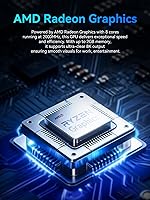
  • Graphics: AMD Radeon integrated GPU with 8 compute cores running at 2000MHz, supporting 4K video playback and light graphics workloads.
  • Display Output: Triple simultaneous display output via HDMI 2.0 (4K@60Hz), DisplayPort (up to 8K@60Hz), and USB-C (DP Alt Mode).
  • Networking: Dual 2.5GbE RJ45 LAN ports plus WiFi 6E tri-band (2.4GHz, 5GHz, 6GHz) and Bluetooth 5.2 for wired and wireless connectivity.
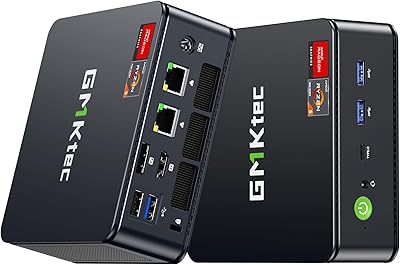
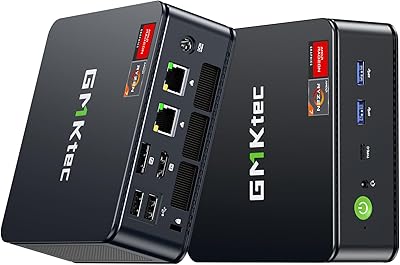
  • Ports: Two USB 3.2 ports, two USB 2.0 ports, one USB-C (supporting PD, DisplayPort, and data), one 3.5mm combo audio jack, one DC power jack, and two RJ45 LAN ports.
  • Dimensions: Measures 5.0 x 5.07 x 1.88 inches, making it compact enough to mount behind a monitor using the included VESA bracket.
  • Weight: The unit weighs 2.77 pounds without the power adapter, keeping it lightweight for desk or wall-mount deployment.
  • Operating System: Ships with Windows 11 Pro pre-installed and pre-activated, ready to use out of the box.
  • Cooling System: Dual active cooling fans with BIOS-selectable power modes allow users to toggle between quiet (power-saving) and full-performance thermal profiles.
  • Power Supply: Powered by an included DC 19V / 3.42A adapter with universal input voltage of 100–240V AC at 50/60Hz, compatible with international outlets.
  • Wireless Standard: WiFi 6E (802.11ax) supports tri-band operation, offering faster throughput and lower latency compared to WiFi 5 on congested networks.
  • Bluetooth: Bluetooth 5.2 provides stable, low-latency connections to wireless peripherals including headsets, keyboards, and mice.
  • Warranty: GMKtec includes a 1-year limited manufacturer warranty covering defects in design and workmanship from the date of purchase.
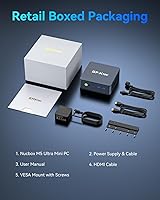
  • In the Box: Package includes the mini PC unit, a power adapter, a VESA mount with screws, one HDMI cable, and a printed user manual.

Related Reviews
GMKtec Nucbox M5 Ultra Mini PC Ryzen 7 7730U 16GB RAM 512GB SSD
84%
89%
Performance
85%
Build Quality
91%
Multi-Display Support
90%
Networking/Connectivity
88%
Size/Portability
More
GMKtec Nucbox G5 Mini PC Intel N97 12GB RAM 512GB SSD
85%
85%
Performance
94%
Compact Design
88%
Connectivity Options
90%
4K Display Support
91%
Noise Level
More
GMKtec Nucbox K9 Mini PC Intel Core Ultra 5 125H 32GB RAM 1TB SSD
85%
89%
Performance
85%
Build Quality
90%
Energy Efficiency
88%
Connectivity Options
87%
Display Support
More
GMKtec Nucbox M6 Ryzen 6600H Mini PC, 32GB RAM, 1TB SSD
86%
90%
Performance for Office Tasks
75%
Gaming Performance (Casual)
84%
Build Quality
91%
Compact Design
89%
Storage Speed (SSD)
More
GMKtec Nucbox G10 Ryzen 5 Mini PC
75%
83%
Value for Money
74%
Performance
88%
Connectivity & Ports
86%
Display Output
67%
Thermal Management
More
GMKtec Nucbox G2 Plus Mini PC Intel N150 12GB RAM 256GB SSD
85%
88%
Performance for Everyday Use
91%
Connectivity Options
93%
Multi-Display Support
94%
Energy Efficiency
85%
Size & Portability
More
GMKtec M6 Ultra Ryzen 7640HS Mini PC
75%
88%
CPU Performance
61%
Gaming Performance
91%
Multi-Display Support
86%
Networking & Connectivity
67%
Thermal Management
More
GMKtec Nucbox K11 (Ryzen 9 8945HS, 32GB, 2TB)
89%
94%
CPU Performance
96%
Expansion & Upgradability
92%
Connectivity & Ports
87%
Thermal Management
89%
Build Quality
More
GMKtec M3 Ultra Mini PC with Intel Core i7-12700H, 32GB RAM, 1TB SSD
86%
88%
Overall Performance
91%
Multitasking & Processing Power
78%
Graphics Performance
84%
Build Quality & Design
93%
Ease of Setup
More
GMKtec NucBox M7 (32GB/2TB)
82%
88%
Processing Performance
74%
Gaming & Graphics
69%
Thermal Management & Cooling
63%
Fan Noise
91%
Connectivity & Ports
More
GMKtec EVO-T1 Ultra 9 285H Mini PC
82%
91%
CPU Performance
67%
GPU & Graphics
93%
RAM & Memory
94%
Storage & Expandability
89%
Multi-Display Support
More

FAQ

Triple display is a real, supported feature — you connect monitors through HDMI, DisplayPort, and the USB-C port simultaneously. That said, getting all three running at once does require the right cables and display hardware, and a handful of users report that the USB-C display connection needs some fiddling depending on the monitor and cable used. If your workflow depends on three screens, test it early so you have time to troubleshoot if needed.

The RAM is not soldered — the NucBox M5 Ultra uses standard SO-DIMM slots, and there are two of them. The machine ships with 2x8GB sticks, but you can swap those out for up to 32GB per slot, giving you a ceiling of 64GB DDR4. That is a genuinely useful upgrade path if your workloads grow over time.

In the default power-saving mode, most users find it very quiet — close to silent for everyday tasks like browsing, office work, and video calls. Switch to performance mode in the BIOS and the fans do spin up noticeably under load, though they are not unusually loud compared to similar mini PCs. For a living room or bedroom setup, the default quiet profile should be perfectly comfortable.

It depends heavily on what you want to play. Older titles, indie games, and emulation run well — think games from the early 2010s and before, or lighter modern games with modest requirements. Modern AAA titles at playable frame rates are largely off the table; the integrated Radeon GPU simply does not have the horsepower for that. If gaming is your primary use case, a dedicated GPU machine is a better fit.

For most buyers, one LAN port is all they will ever use. But the dual 2.5GbE setup is genuinely valuable in a few specific scenarios: running pfSense or Untangle to turn this into a capable software router or firewall, connecting it directly to both a NAS and a network switch simultaneously, or using it as a lightweight home server with separate management and data network interfaces. If any of those apply to you, it is a rare and useful feature at this price.

Yes, Windows 11 Pro comes pre-installed and pre-activated — you do not need to buy a separate license or enter a product key. It should be ready to go after a brief initial setup process, similar to any new Windows device.

There is a second M.2 slot available, and it supports the standard M.2 2280 form factor (the most common size). You can install a PCIe NVMe drive there for added storage, and the two slots combined can accommodate up to 8TB total. Just note that the slots run on PCIe 3.0, not the faster 4.0 standard, so if raw SSD speed matters to you, keep that in mind when choosing a drive.

It is not flimsy, but it does feel noticeably less premium than metal-chassis competitors like the Beelink SER series. For a desk or VESA-mounted setup where you are not handling it frequently, the build quality is perfectly adequate. If you are particularly sensitive to build feel or plan to move it around a lot, it is worth knowing upfront that this is not the most solid-feeling chassis in its price range.

Both features are supported. Wake on LAN (WoL) allows you to remotely power on the machine over the network, which is handy for home server or remote access setups. Auto Power On after an outage can also be enabled through the BIOS settings, so it will restart itself if power is restored without you needing to press the power button manually.

The BIOS offers two main power profiles: a quiet power-saving mode that limits processor TDP for lower heat and noise, and a full performance mode that lets the Ryzen 7 7730U run at its higher turbo frequencies. Out of the box it defaults to the conservative mode, which is a sensible choice for most office use. If you are doing something more demanding — video editing, sustained compilation workloads, or running multiple VMs — switching to performance mode in the BIOS is worth doing, though be aware that sustained loads may cause some thermal throttling if you do not also improve the stock cooling setup.