Overview

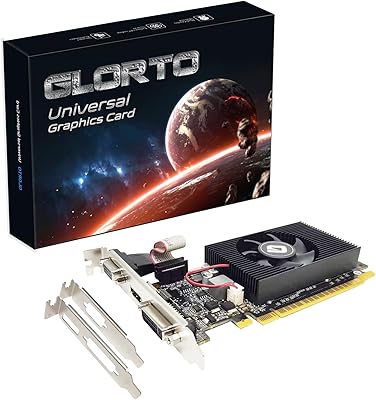
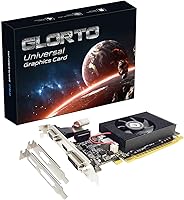
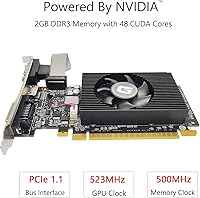
The Glorto GeForce GT 610 2GB Graphics Card is a straightforward, no-frills discrete GPU built for one specific job: giving older or compact desktops a dedicated display output when integrated graphics simply won't cut it. Glorto is not a household name — it's a third-party manufacturer repackaging an older NVIDIA GF119 chipset — so temper expectations accordingly. What makes this entry-level graphics card worth a look is its low-profile form factor, which lets it slide into small form factor towers, HTPCs, and slim cases that can't fit full-sized cards. It handles office work, basic media playback, and multi-monitor setups without complaint, and Windows 11 recognizes it without manual drivers.
Features & Benefits

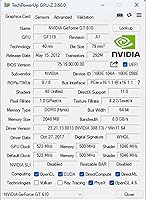
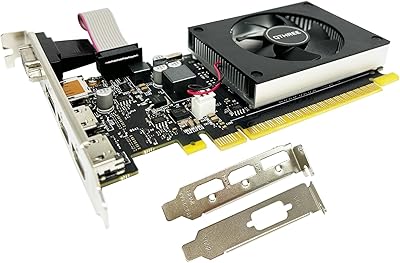
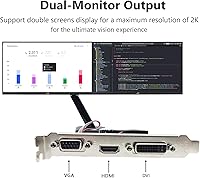
At its core, the GT 610 card runs on NVIDIA's GF119 chip with 48 CUDA cores clocked at 523 MHz — nothing spectacular, but stable for 2D desktop tasks. The 2GB of DDR3 memory on a 64-bit bus is adequate for driving displays, though anyone expecting texture rendering or encoding muscle will be disappointed fast. Where this low-profile GPU genuinely earns its place is in its triple output configuration: HDMI, VGA, and DVI ports are all present, a real convenience for users with legacy monitors. HDMI tops out at 2560x1600, covering most modern screens comfortably. PCIe x16 1.1 compatibility also means older motherboards are covered, and the bundled dual bracket supports both standard and slim cases.

Best For

This entry-level graphics card fills a genuinely specific need, and understanding that upfront saves real frustration. It's the right pick for anyone adding a dedicated GPU to an older desktop that shipped with integrated-only graphics — think business PCs or basic workstations that need a second monitor. HTPC and SFF builders will find the compact footprint particularly practical when full-height cards are physically off the table. Office setups needing an extra display port without a full system overhaul are another solid fit. It also covers legacy systems requiring DirectX 11 support for certain software — not for games, but for applications that simply won't launch without a compatible discrete card present.

User Feedback

Buyer feedback on this low-profile GPU tends to split along predictable lines. On the positive side, most users confirm that plug-and-play installation on Windows 11 works as advertised — a genuine relief for non-technical buyers dreading driver headaches. HTPC users generally report clean HDMI output and a reassuringly quiet card. The criticism is worth noting, though: some buyers flag inconsistencies in bracket fit, a recurring complaint with low-profile cards from smaller brands. A handful mention the card runs warm in tight cases with poor airflow. Since Glorto is a newer brand with a still-thin review history, treat any early review patterns with reasonable caution before drawing firm conclusions.

Pros

  • Installs on Windows 11 without manual driver downloads — genuinely plug-and-play for most users.
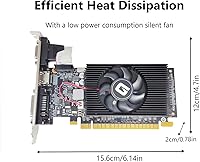
  • The low-profile form factor fits slim towers, SFF cases, and HTPC enclosures that exclude full-height cards.
  • Ships with both standard and low-profile brackets, saving you from hunting down a separate adapter.
  • HDMI, VGA, and DVI outputs cover a wide range of monitor generations without needing adapters.
  • PCIe x16 1.1 compatibility makes it viable for older motherboards that reject newer GPU standards.
  • Quiet operation under typical desktop workloads makes it unobtrusive in living room or office environments.
  • Drives HDMI output up to 2560x1600, covering most modern monitors without resolution compromises.
  • Dual-monitor office setups work reliably with one HDMI and one VGA or DVI display running simultaneously.
  • Provides the DirectX 11 support some legacy software requires, without forcing a full system replacement.

Cons

  • Gaming performance is poor — even older titles from the mid-2010s will struggle at playable frame rates.
  • No DisplayPort output, which is increasingly the default connection on modern monitors.
  • 4K output is not supported, making it a dead end for anyone with or planning a 4K display.
  • Glorto is a new brand with minimal public warranty or after-sales support history.
  • Thermal management in tight, low-airflow cases has caused instability complaints from a segment of buyers.
  • Bracket alignment on the low-profile configuration can require fiddling before ports line up cleanly.
  • HEVC, AV1, and modern codec hardware acceleration are absent — 4K or high-bitrate media may stutter.
  • Simultaneous three-monitor output is inconsistently supported depending on the host system configuration.
  • The GT 610 architecture is past its driver update lifecycle, limiting long-term software compatibility.

Ratings

The Glorto GeForce GT 610 2GB Graphics Card has been evaluated by our AI rating system after combing through verified global buyer reviews, with spam, bot activity, and incentivized feedback actively filtered out. Scores reflect honest patterns from real users — covering everything this low-profile GPU does well and the areas where it falls short. Both strengths and frustrations are represented transparently, so you can make a genuinely informed call.
Form Factor & Fit
88%
For buyers cramming a GPU into a slim desktop or HTPC chassis, the compact dimensions are the single biggest selling point. Most users report it sliding into tight cases without clearance issues, and the included dual bracket means you are not hunting down a separate low-profile adapter after the fact.
A recurring minority complaint involves inconsistent bracket alignment — some buyers found the low-profile bracket required minor adjustment before the port cutouts lined up properly with the case panel. Not a dealbreaker, but worth knowing if precision fit matters for your build.
Installation Experience
91%
The plug-and-play behavior on Windows 11 is one of the most consistently praised aspects across buyer feedback. Users with zero technical background report booting up and having a functional display within minutes, no driver disc needed, no manual downloads, no fuss.
A small number of users on older Windows 10 installs or niche motherboard configurations reported needing to manually locate drivers, which contradicts the advertised simplicity. These cases appear uncommon but are worth factoring in if your system is outside the mainstream Windows 11 setup.
Display Output Versatility
86%
Having HDMI, VGA, and DVI on a card this compact is genuinely useful for users managing a mix of monitor generations. Office setups with an older VGA display alongside a newer HDMI monitor are a common use case, and the GT 610 card handles that combination without needing an adapter.
There is no DisplayPort output, which is an increasingly standard connection on modern monitors. Users who have already moved to DisplayPort-only displays will need an active adapter, adding cost and a potential point of failure that buyers should account for upfront.
Display Resolution Support
83%
A maximum resolution of 2560x1600 over HDMI means this entry-level graphics card can drive most monitors on the market today without compromise. For users doing document work, spreadsheets, or watching video content, the image output is clean and sharp at standard desktop resolutions.
4K output is not supported, which matters more each year as monitors push toward higher pixel densities. If you are running a 4K display or planning to upgrade to one, this card will be a bottleneck — it simply was not built for resolutions beyond 1600p.
Thermal Performance
67%
33%
Under typical desktop workloads — web browsing, office applications, and standard video playback — the card stays reasonably cool and most users report no heat-related issues during normal daily use. HTPC users running media center software found thermals acceptable in well-ventilated enclosures.
In tighter cases with restricted airflow, some buyers noted the card running noticeably warm during extended use, and passive or semi-passive cooling designs on budget low-profile cards like this one leave little thermal headroom. Users building into very compact, sealed enclosures should check airflow carefully before assuming it will stay stable.
Raw Graphics Performance
43%
57%
For the narrow tasks this card is designed for — pushing pixels to a display, enabling multi-monitor desktop use, and running lightweight 2D applications — it performs reliably. Users who only needed a dedicated output to replace missing integrated graphics found it did exactly what they needed.
This is an aging architecture with 48 CUDA cores and a 523 MHz clock, and it shows the moment you push it toward anything GPU-intensive. Light gaming from the early 2010s might technically run, but expect poor frame rates, and any modern game or hardware-accelerated workload will expose the card's significant limitations quickly.
Multi-Monitor Support
78%
22%
Buyers using this card in dual-monitor office configurations — one HDMI, one VGA — report the setup working reliably without software conflicts. For the non-technical user who just needs extended desktop space for productivity, the experience is straightforward once Windows detects both displays.
Running all three outputs simultaneously is where feedback gets murkier. Some users report only two displays being recognized at a time depending on the system, and documentation on simultaneous triple-output support is thin. Buyers planning a three-monitor setup should verify compatibility with their specific motherboard before committing.
Build Quality
71%
29%
For an entry-level card from a small brand, the physical construction is adequate. The PCB feels solid enough and the port connectors are firm, with nothing obviously flimsy on first inspection. Most buyers received units without cosmetic defects or visibly poor assembly.
Glorto is not a brand with a long track record, and the materials reflect the price tier. The cooling solution feels lightweight, and a few buyers noticed minor flex in the card when installing the bracket screw — nothing catastrophic, but it does not inspire the same confidence as cards from established GPU vendors.
Compatibility with Older Systems
89%
PCIe x16 1.1 support is a genuine advantage here. Users reviving decade-old workstations with motherboards that predate PCIe 2.0 found this card slotted in without compatibility issues, giving older systems a usable discrete GPU without an expensive platform upgrade.
The card draws power solely from the PCIe slot, which is normally a convenience, but on very old systems with aging PSUs running at or near capacity, a few users reported instability. It is a rare scenario, but worth checking your power budget on hardware that has not been maintained recently.
Noise Level
82%
18%
HTPC users in particular highlight quiet operation as a meaningful plus. At typical desktop workloads the card is effectively silent in most builds, which matters a lot when the PC is sitting in a living room environment where fan noise is intrusive.
Under sustained load in a warm case, the fan — where present — can become audible. Some card variants appear to ship with minimal active cooling, and in poorly ventilated cases that means the card throttles rather than spins up aggressively, which is quiet but also limits sustained stability.
Software & Driver Support
74%
26%
NVIDIA's driver ecosystem, even for legacy chips like the GF119, is more mature than what most no-name GPU brands can offer independently. Windows 11 handles detection automatically, and users who needed manual drivers found NVIDIA's archive straightforward to navigate.
The GT 610 is a legacy product in NVIDIA's support cycle, meaning driver updates are not ongoing. Users who need cutting-edge API support or optimizations for newer software environments will find the driver situation increasingly stagnant over time, which is worth factoring into a longer-term purchase decision.
HTPC Suitability
84%
The combination of a low-profile form factor, HDMI output with up to 2560x1600 resolution, and quiet operation under media playback loads makes this entry-level graphics card a reasonable pick for a basic home theater build. Users running Kodi or similar media center software reported smooth 1080p playback without issues.
4K video decoding is off the table, and hardware acceleration for modern codecs like AV1 or HEVC 10-bit is not supported on this architecture. For a future-leaning HTPC setup, the card will feel limiting sooner than buyers might expect.
Brand Reliability & Warranty Confidence
58%
42%
Several buyers report receiving functional units that have worked without incident over weeks of regular use, which at minimum suggests the manufacturing quality control is not catastrophically inconsistent. For low-stakes, non-mission-critical installs, most users came away satisfied.
Glorto has a thin public reputation and limited buyer history compared to brands like ASUS, MSI, or Gigabyte. Warranty support processes are not well-documented by buyers who needed them, which introduces real uncertainty if the card fails outside the return window — a legitimate concern for any lesser-known GPU brand.
Value Relative to Use Case
76%
24%
For the specific buyer — someone adding display output to an old desktop or fitting a card into a slim chassis with no other options — this low-profile GPU fills a gap at a price point that makes the math work. It does not need to be fast to justify itself; it just needs to work, and for most buyers it does.
If your system can physically fit a modern low-profile card from a mainstream brand, spending a bit more opens significantly better options in terms of performance, longevity, and brand support. The value case for this card depends almost entirely on the low-profile or legacy PCIe constraint being a hard requirement, not just a preference.

Suitable for:

The Glorto GeForce GT 610 2GB Graphics Card is a practical solution for a narrow but real group of buyers who need a dedicated display output without the complexity or cost of a modern GPU upgrade. It works best for people reviving an older desktop that shipped with no discrete graphics — think office workstations from the early 2010s, or inherited business PCs that need a second monitor added for productivity. Small form factor and HTPC builders will find particular value here, since the compact low-profile design fits cases where full-height cards simply cannot go. Home theater setups running 1080p media through HDMI, and office desks needing dual monitors for spreadsheet or document work, are squarely in this card's comfort zone. If your motherboard runs PCIe 1.1 and newer cards refuse to cooperate, this entry-level graphics card is one of the few options that will slot in without a fight. Non-technical users who want a plug-and-play experience on Windows 11 without digging through driver archives will also find the install process refreshingly straightforward.
Not suitable for:

The Glorto GeForce GT 610 2GB Graphics Card is the wrong tool for anyone hoping to run modern games, handle GPU-accelerated workloads, or future-proof their system against increasingly demanding software. Gamers — even casual ones playing titles from the last several years — will hit a wall almost immediately; the GF119 architecture is genuinely old, and frame rates on anything beyond very light indie games will be frustrating rather than functional. Video editors, 3D artists, and anyone relying on hardware-accelerated encoding or decoding for formats like HEVC or AV1 should look elsewhere entirely, as this card lacks the horsepower and codec support those workflows demand. Users running 4K displays are also out of luck, since the card tops out well below that resolution threshold. Buyers who prioritize long-term reliability from a well-supported brand may also want to reconsider — Glorto has a thin track record, and warranty support processes are not well-documented. If your case can physically fit a modern low-profile GPU from an established manufacturer, the extra investment will serve you significantly better over time.
Specifications

  • GPU Chip: Built on the NVIDIA GF119 architecture, the GeForce GT 610 runs a 40nm chipset process designed for stable, low-power desktop display tasks.
  • CUDA Cores: The card features 48 CUDA cores, sufficient for basic compute compatibility but not intended for GPU-accelerated workloads.
  • Core Clock: The GPU core operates at 523 MHz, with a shader clock of 1046 MHz for standard 2D desktop rendering.
  • Memory: Equipped with 2GB of DDR3 memory running at 500 MHz across a 64-bit memory bus.
  • Display Outputs: Offers three physical outputs — HDMI, VGA, and DVI — allowing connection to a wide range of monitor types simultaneously.
  • Max Resolution: HDMI and DVI support a maximum resolution of 2560x1600, while VGA tops out at 2048x1536.
  • PCIe Interface: Uses a PCI Express x16 1.1 slot interface, making it compatible with both legacy and modern motherboards that support this standard.
  • DirectX Support: Supports DirectX 11.0, enabling compatibility with software and applications that require a DirectX 11-capable discrete GPU.
  • Compute APIs: Compatible with OpenCL, CUDA, and DirectCompute 5.0 for applications that call on GPU compute functions.
  • Graphics API: Supports OpenGL for rendering in applications and environments that rely on this graphics standard.
  • Form Factor: Low-profile card design ships with both a full-height and a low-profile bracket included in the box.
  • Card Dimensions: Measures 8.35 x 5.98 x 1.5 inches, making it one of the more compact discrete GPU options available for slim cases.
  • Card Weight: Weighs 9.9 ounces, light enough to avoid strain on the PCIe slot in most standard and slim desktop cases.
  • Power Source: Draws power exclusively from the PCIe slot with no external power connector required, simplifying installation in systems with basic PSUs.
  • OS Compatibility: Recognized natively by Windows 11 without requiring manual driver installation for basic display functionality.
  • Manufacturer: Produced by Glorto, a third-party GPU manufacturer building on licensed NVIDIA chipset technology.
  • Target Use: Designed for entry-level desktop display tasks including dual-monitor office setups, HTPC builds, and legacy system upgrades.

Related Reviews

GIGABYTE GeForce GT 710 2GB Graphics Card
78%
88%
Value for Money
93%
Installation Ease
91%
Form Factor & Physical Fit
82%
Display Output Quality
89%
Thermal Performance
More
ASUS GeForce GT 730 2GB GDDR5 Graphics Card
85%
88%
Performance for Multimedia
94%
Silent Operation
90%
Value for Money
92%
Ease of Installation
89%
Power Consumption
More
GIGABYTE GV-N1030D4-2GL GeForce GT 1030 2GB Graphics Card
88%
92%
Value for Money
85%
Gaming Performance (1080p)
90%
Ease of Installation
88%
Compatibility with Small PC Builds
83%
Media Playback Performance (4K)
More
Glorto GeForce GT 210 1GB DDR3 Low Profile Graphics Card
82%
92%
Value for Money
89%
Ease of Installation
88%
Energy Efficiency
85%
Performance for Non-Gaming Tasks
78%
Build Quality
More
Maxsun GeForce GT 730 4GB Graphics Card
75%
83%
Value for Money
91%
Multi-Monitor Support
88%
Installation & Compatibility
89%
Form Factor & Physical Fit
31%
Gaming Performance
More
SAPLOS GT 730 2GB DDR3 Graphics Card
83%
91%
Value for Money
88%
Performance for Basic Tasks
94%
Quiet Operation
85%
Installation & Setup
62%
Driver Compatibility
More
QTHREE GeForce GT 730 4GB Graphics Card
74%
91%
Ease of Installation
88%
Multi-Monitor Support
86%
Form Factor Compatibility
89%
Power Efficiency
52%
Memory Bandwidth (DDR3 vs GDDR5)
More
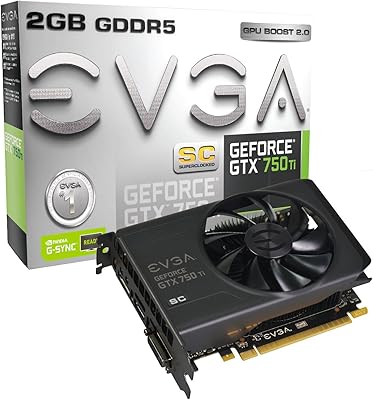
EVGA GeForce GTX 750Ti Superclocked 2GB GDDR5 Graphics Card
84%
92%
Value for Money
88%
Gaming Performance (1080p)
91%
Power Efficiency
82%
Build Quality
85%
Compatibility
More
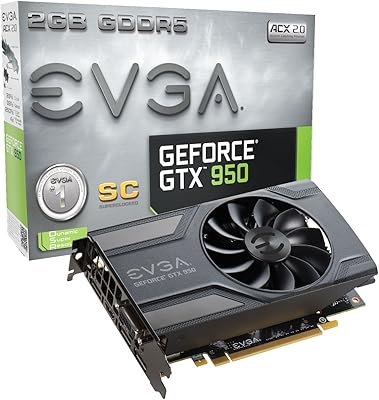
EVGA GeForce GTX 950 2GB SC Gaming Graphics Card
83%
90%
Value for Money
88%
Performance at 1080p
91%
Cooling System Noise
87%
Power Consumption
85%
Ease of Installation
More
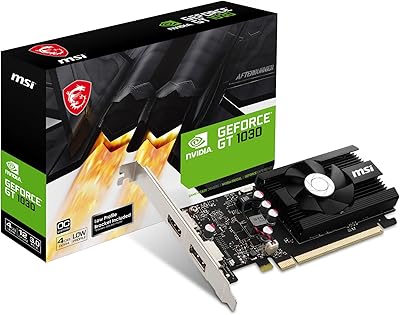
MSI GeForce GT 1030 4GB DDR4 Low Profile OC Graphics Card
84%
75%
Performance for 1080p Gaming
92%
Value for Money
88%
Power Efficiency
90%
Noise Level
89%
Compatibility with Small Builds
More

FAQ

In most cases, no. The Glorto GeForce GT 610 2GB Graphics Card is recognized automatically by Windows 11, which installs a basic display driver without any manual steps. That said, if you want to access NVIDIA-specific settings or run certain software, you can always grab the legacy driver package from NVIDIA's website — but for everyday display use, most buyers never need to bother.
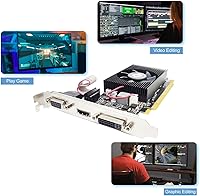
Yes, dual-monitor setups work reliably with this card. The most common configuration buyers use is HDMI for a newer monitor and VGA or DVI for an older one. Running all three outputs simultaneously is less consistent and depends on your specific motherboard and system configuration, so if three screens is the goal, test it before committing.

It is specifically designed for that. The card ships with both a standard full-height bracket and a low-profile bracket, so it physically fits in SFF towers and slim cases that cannot accommodate standard-height GPUs. The only exception called out is micro form factor cases, which are even smaller than typical SFF builds — those may still be too tight.

Honestly, no — not by modern standards. The GT 610 is a display-output card, not a gaming GPU. It might technically run very old, undemanding games from the early 2010s, but expect poor performance in anything released in the last several years. If gaming is the goal, even a modest modern card will serve you dramatically better.

Yes, PCIe x16 1.1 is the native interface for this card, so older motherboards are a natural fit. PCIe is also backward and forward compatible across generations, so it will work in PCIe 2.0 or 3.0 slots as well, just running at the 1.1 speed — which is fine given the card's modest performance level.

No external power connector is needed. The GT 610 card draws everything it needs directly from the PCIe slot, which makes installation much simpler — particularly in older office desktops that often have basic PSUs with no spare PCIe power cables.

For 1080p media playback it works fine, and the compact low-profile design suits HTPC cases well. The card is also quiet under light media loads, which matters in a living room setting. Where it falls short is 4K content and modern high-efficiency codecs like HEVC or AV1 — hardware decode for those formats is not supported, so very high-bitrate files may stutter.

Under normal desktop workloads it stays reasonably cool, but in very compact cases with poor ventilation some buyers have reported the card running warm during extended use. If your build has restricted airflow, it is worth making sure there is at least some passive circulation around the card to avoid thermal throttling over long sessions.

Over HDMI, the card supports up to 2560x1600, which covers the vast majority of monitors on the market today including 1440p displays. It does not support 4K (3840x2160), so if you have or plan to get a 4K monitor, this card will not be able to drive it at full resolution.

It is one of the more straightforward installs you can do on a desktop. You open the case, remove the appropriate slot cover, slide the card into the PCIe x16 slot until it clicks, screw in the bracket, close the case, and boot up. Windows 11 handles driver detection automatically. The trickiest part for first-timers is usually just choosing the right bracket — make sure you swap to the low-profile one if your case requires it before installation.