Overview

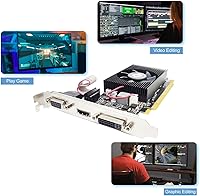
The Glorto GeForce GT 210 1GB Graphics Card is not trying to be something it isn't — and that's exactly why it still sells. Built around NVIDIA's GT 210 (GT218) chip, Glorto's take on this aging GPU serves one clear purpose: giving a PC a working display output when there isn't one. Whether you're breathing life into an old office machine, tucking a media PC behind your TV, or fitting hardware into a small form factor case, this card has a specific role it fills well. The included low-profile bracket means it slots into tight chassis without fuss. Treat it as a display adapter, not a graphics powerhouse.

Features & Benefits

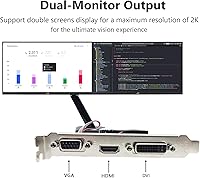
The GT218 chip at the heart of this GT 210 card runs at 589 MHz with just 16 CUDA cores — numbers that tell you this is a display chip, not a renderer. The 1GB of DDR3 memory on a 64-bit bus handles standard desktop tasks and basic HD video without complaint. What actually earns its keep is the triple output configuration: HDMI, DVI, and VGA all in one bracket, which is genuinely useful when working with monitors from different generations. HDMI pushes up to 2560x1600 resolution, and the card fits into any PCIe x16 slot, making compatibility a non-issue on virtually any desktop board.

Best For

The Glorto low-profile GPU makes the most sense in very specific situations. If you have a desktop with no onboard graphics and need to get a display connected fast, this does the job without overthinking it. HTPC builders appreciate it because it runs quietly — no fan noise to ruin a movie. Office environments and kiosk deployments are another natural fit; the card asks for almost nothing in terms of power or system resources. Critically, small form factor cases that physically cannot accommodate a full-height card finally have a compatible option here, thanks to the included bracket. Just don't expect it to handle anything graphics-intensive.

User Feedback

With 87 ratings averaging 4.2 stars, buyer sentiment around this entry-level graphics adapter is solidly positive — within its intended scope. Reviewers consistently praise plug-and-play installation, noting that drivers install without drama and the card is recognized immediately on both older and modern systems. HTPC and legacy PC users in particular seem satisfied, with several calling it exactly what they needed for a low-demand setup. The recurring criticism is predictable: buyers who expected any level of gaming performance were disappointed. A few noted concerns about packaging quality during shipping, though functional issues appear rare. Go in with the right expectations and the feedback picture is quite favorable.

Pros

  • Straightforward installation — most systems recognize it immediately without manual driver hunting.
  • The low-profile bracket is included, making it genuinely compatible with SFF and HTPC cases out of the box.
  • Offers HDMI, DVI, and VGA outputs in a single slot, covering virtually every monitor type you might encounter.
  • HDMI output supports resolutions up to 2560x1600, which is respectable for a basic display card.
  • Draws very little power, so no additional PCIe power connector is needed — just slot it in and go.
  • Runs passively in most configurations, meaning zero fan noise in a quiet home theater setup.
  • Works with a broad range of motherboards thanks to standard PCIe x16 slot compatibility.
  • A practical fix for desktops with dead or missing onboard graphics that just need a working display output.

Cons

  • Completely unsuitable for gaming — even titles from the early 2010s will struggle on this hardware.
  • The 64-bit memory bus is a significant bottleneck for any task that pushes beyond basic desktop use.
  • Glorto is a lesser-known third-party brand, so long-term driver support and warranty service are uncertain.
  • Only 1GB of VRAM limits usefulness on higher-resolution displays for anything beyond a plain desktop environment.
  • Some buyers reported concerns about packaging quality during shipping, raising the risk of transit damage.
  • No modern API support — DirectX 10.1 and OpenGL 3.3 are well behind current software requirements.
  • The GT 210 architecture is over 15 years old, meaning this is a stopgap solution, not a lasting upgrade.
  • Not viable for GPU-accelerated tasks like video encoding, 3D rendering, or machine learning workloads.

Ratings

The scores below for the Glorto GeForce GT 210 1GB Graphics Card were produced by our AI review engine after parsing verified buyer feedback from global markets, with spam, bot activity, and incentivized reviews actively filtered out. The result is an honest, data-grounded snapshot of how real users experience this card across a range of low-demand use cases. Both the genuine strengths and the recurring frustrations are reflected without sugar-coating.

Ease of Installation
91%
Buyers consistently report that the card is recognized by Windows almost immediately after being seated in the PCIe slot, with drivers pulling in automatically via Windows Update. For non-technical users reviving an old desktop, that plug-and-play experience is a genuine relief and a major reason the overall rating stays high.
A small number of users on older motherboards or niche Linux distributions reported needing to manually source drivers from NVIDIA's archive, which can be confusing if you've never done it before. This is an edge case, but worth being aware of if your system is particularly dated.
Low-Profile Compatibility
88%
The inclusion of both a standard and a low-profile bracket in the box is something buyers genuinely appreciate — it removes guesswork and means the card is ready to drop into a slim HTPC or SFF case without a trip to an accessories store. HTPC builders in particular call this out as a deciding factor.
The card is explicitly not compatible with micro form factor cases that lack any PCIe expansion slot at all, and a handful of buyers discovered this only after purchase. The product listing could do more to clarify this limitation upfront for less experienced shoppers.
Display Output Versatility
86%
Having HDMI, DVI, and VGA on a single low-profile bracket is genuinely useful when you're working with monitors from different eras — a common situation in office recycling scenarios or home lab setups. The HDMI port's support for up to 2560x1600 means it can drive a sharp modern display without issue.
Running two outputs simultaneously can be hit or miss depending on the system configuration, and some users found that driver support for multi-monitor use felt unreliable on this aging chip. For a single-display setup it's rock solid, but don't count on dual-screen productivity without testing it first.
Value for Money
83%
For a buyer whose only goal is getting a working display output on a machine that has none, the price-to-purpose ratio is hard to argue with. Legacy PC revival projects and kiosk deployments in particular benefit from a solution that doesn't require spending serious money on hardware that would be overkill.
If your needs drift even slightly beyond basic desktop display — light gaming, video encoding, or running newer software — the value equation collapses quickly. There are slightly pricier alternatives that offer meaningfully more capability, making the GT 210 a narrow buy for a narrow audience.
Raw GPU Performance
31%
69%
Within its intended scope — rendering a standard Windows or Linux desktop, playing back HD video, and driving a browser — the GT 210 does exactly what it promises. For that narrow workload, the performance is entirely adequate and users in those scenarios report no complaints.
Step outside that comfort zone and the limitations are immediate and severe. With only 16 CUDA cores and a 64-bit memory bus, this card buckles under any graphically demanding task, including games from the early 2010s. Buyers who misjudged its capabilities were consistently the most disappointed reviewers.
Build & Board Quality
67%
33%
The physical card feels solid enough for the price point, and most buyers report no issues with the PCIe connector or port construction after extended use. For a static, low-heat workload like desktop display output, the build holds up without any signs of degradation.
Glorto is a lesser-known manufacturer and the board lacks the fit-and-finish polish of cards from established brands. A few users noted that packaging during shipping was minimal, leading to cosmetic damage on arrival in some cases — functional, but not confidence-inspiring out of the box.
Thermal Performance
84%
The card runs cool and quiet under its typical workload, which is a meaningful advantage in a living room HTPC or a noise-sensitive office environment. Several buyers specifically noted the absence of fan noise as a reason they chose this card over alternatives with active cooling.
Because the card relies on passive or near-passive cooling, it depends on adequate airflow within the host chassis. In a poorly ventilated case it can run warmer than ideal, though given the low power draw, thermal issues are genuinely rare in practice.
Driver Stability
74%
26%
On mainstream Windows 10 and Windows 11 systems, the GT 210 drivers pulled from NVIDIA's archive or Windows Update tend to be stable over time. Users in long-running office and HTPC deployments report months of trouble-free operation once the drivers are correctly installed.
NVIDIA no longer actively develops drivers for the GT218 chip, which means compatibility with future OS updates is uncertain. A subset of users on Windows 11 or certain Linux kernels reported needing to troubleshoot driver conflicts, and that situation is unlikely to improve as the OS ecosystem moves forward.
Power Efficiency
89%
Drawing power entirely from the PCIe slot with no external connector required makes this card extremely easy to deploy in systems with modest or aging power supplies. For a machine running on a small-wattage PSU, that constraint-free installation is a practical advantage.
There is little room to criticize power draw on a card this modest, but it also means there is no headroom for performance. The low power ceiling is both the card's efficiency advantage and the hard ceiling on what it can ever accomplish.
Video Playback Quality
81%
19%
Hardware-accelerated H.264 decode means HD video playback — whether from a local file or a streaming service — is smooth and puts minimal load on the CPU. HTPC users consistently single out video playback as the task where this card earns its keep most convincingly.
More demanding video formats like 4K H.265 or AV1 are beyond what this chip can accelerate in hardware, pushing the decode workload onto the CPU instead. On an older host system, that can result in choppy playback or dropped frames on high-bitrate content.
Packaging & Unboxing
58%
42%
The box includes both bracket options and basic documentation, covering the essentials for a buyer who just needs to get the card installed. For most buyers, everything needed to complete the installation is present without requiring additional purchases.
Multiple reviewers flagged that the protective packaging was minimal for a product shipped internationally, resulting in cosmetic nicks or dents on the card or bracket on arrival. Nothing that typically affects function, but it does not leave a great first impression for a product at this price point.
Compatibility Range
79%
21%
The standard PCIe x16 interface ensures this card works across a very wide range of desktop motherboards, from boards over a decade old to current-generation systems that still carry a legacy slot. That breadth of compatibility makes it a genuinely flexible stopgap solution.
The explicit exclusion of micro form factor cases is a real limitation that catches some buyers off guard, and compatibility with the latest UEFI-only motherboards may require a BIOS tweak to get output working during POST. These are solvable issues, but they add friction for less experienced builders.

Suitable for:

The Glorto GeForce GT 210 1GB Graphics Card is purpose-built for buyers who need a basic, reliable display output solution — nothing more, nothing less. It's an ideal pick for anyone reviving an older desktop that shipped without a discrete GPU or whose onboard graphics have failed. HTPC builders will find it particularly useful: it runs quietly, draws minimal power, and handles standard HD video playback without breaking a sweat. Office administrators deploying kiosk terminals or basic workstations will appreciate how little maintenance it demands once installed. The included low-profile bracket also makes it one of the few viable options for small form factor and slim tower cases where full-height cards physically cannot fit. If your goal is simply getting a stable picture on screen — whether via HDMI, DVI, or an older VGA monitor — this card does that job reliably.

Not suitable for:

The Glorto GeForce GT 210 1GB Graphics Card is the wrong choice for anyone expecting even entry-level gaming performance — the GT218 chip and 16 CUDA cores were considered modest more than a decade ago, and that hasn't improved with age. Casual gamers hoping to run older or low-demand titles will likely find themselves frustrated by the hard performance ceiling this card hits almost immediately. Content creators, video editors, and anyone running GPU-accelerated software should also look elsewhere, as the 64-bit memory bus and limited compute capability will bottleneck those workflows significantly. Users who need multi-monitor productivity setups with smooth window management across large displays may find the card struggles under that load. In short, if your use case involves anything beyond displaying a standard desktop or playing back video, this adapter will leave you wanting more.

Specifications

  • GPU Chip: Powered by the NVIDIA GeForce GT 210 (GT218) silicon, manufactured on a 40nm chipset process.
  • Core Clock: The GPU core runs at 589 MHz, suited for low-demand display and desktop workloads.
  • Shader Clock: Shader processors operate at 1402 MHz, handling basic visual rendering tasks at the desktop level.
  • CUDA Cores: Features 16 CUDA cores, sufficient for display output but not designed for compute-intensive tasks.
  • Memory: Equipped with 1GB of DDR3 video memory running at 500 MHz for standard desktop and media use.
  • Memory Bus: Uses a 64-bit memory bus width, which limits memory bandwidth to basic display and video playback scenarios.
  • Video Outputs: Provides three physical output ports: HDMI, DVI, and VGA, accommodating a wide range of monitor types.
  • Max Resolution: HDMI and DVI outputs support a maximum resolution of 2560x1600, while VGA tops out at 2048x1536.
  • PCIe Slot: Installs into a standard PCI Express x16 slot, compatible with virtually all modern and legacy desktop motherboards.
  • DirectX Support: Supports DirectX 10.1, which covers basic Windows desktop composition and older software requirements.
  • OpenGL Version: Fully compatible with OpenGL 3.3, enabling standard display rendering across most operating systems.
  • API Support: Supports OpenCL and DirectCompute for lightweight general-purpose GPU computing tasks.
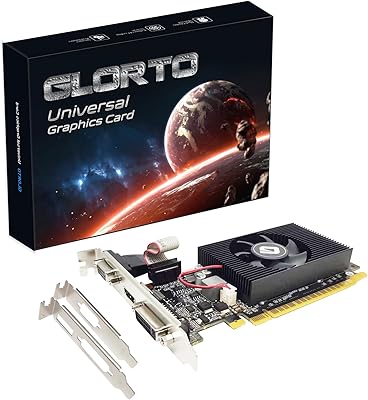
  • Form Factor: Designed as a low-profile (half-height) card with both a standard bracket and a low-profile bracket included in the box.
  • Dimensions: The card measures 6.15 x 4.73 x 0.1 inches, making it compact enough for slim and small form factor cases.
  • Weight: The card weighs 9.9 ounces, light enough to avoid stressing the PCIe slot in most chassis configurations.
  • Brand: Manufactured and sold by Glorto, a third-party board partner using NVIDIA's GT 210 reference design.
  • Cooling: Operates passively or with a minimal cooling solution, producing very little heat and no significant fan noise during typical use.
  • Power: Draws minimal power from the PCIe slot alone, requiring no additional external power connectors from the PSU.

Related Reviews
Glorto GeForce GT 610 2GB Graphics Card
76%
88%
Form Factor & Fit
91%
Installation Experience
86%
Display Output Versatility
83%
Display Resolution Support
67%
Thermal Performance
More
Maxsun GeForce GT 730 4GB Graphics Card
75%
83%
Value for Money
91%
Multi-Monitor Support
88%
Installation & Compatibility
89%
Form Factor & Physical Fit
31%
Gaming Performance
More
GIGABYTE GeForce GT 710 2GB Graphics Card
78%
88%
Value for Money
93%
Installation Ease
91%
Form Factor & Physical Fit
82%
Display Output Quality
89%
Thermal Performance
More
ASUS GeForce GT 730 2GB GDDR5 Graphics Card
85%
88%
Performance for Multimedia
94%
Silent Operation
90%
Value for Money
92%
Ease of Installation
89%
Power Consumption
More
QTHREE GeForce GT 730 4GB Graphics Card
74%
91%
Ease of Installation
88%
Multi-Monitor Support
86%
Form Factor Compatibility
89%
Power Efficiency
52%
Memory Bandwidth (DDR3 vs GDDR5)
More
GIGABYTE GeForce GT 1030 2GB Graphics Card
71%
93%
Ease of Installation
91%
Form Factor & Fit
41%
Memory Performance
34%
Gaming Capability
84%
Multimedia & Video Playback
More
MSI GeForce GT 1030 4GB Graphics Card
79%
94%
Form Factor & Compatibility
91%
Installation & Setup
88%
4K Display Output
51%
Memory Performance
38%
Gaming Capability
More
Maxsun GeForce GT 710 1GB GPU
83%
91%
Value for Money
95%
Ease of Installation
88%
Cooling & Noise
93%
Power Consumption
72%
Performance for Light Gaming
More
SAPLOS GT 730 2GB DDR3 Graphics Card
83%
91%
Value for Money
88%
Performance for Basic Tasks
94%
Quiet Operation
85%
Installation & Setup
62%
Driver Compatibility
More
KAER RX590 8GB Graphics Card
70%
71%
1080p Gaming Performance
63%
Value for Money
74%
Thermal Performance
69%
Fan Noise
83%
Driver & Software Support
More

FAQ

Yes, that is exactly the scenario this card is built for. As long as your desktop has an available PCIe x16 slot, you can slot it in, connect your monitor via HDMI, DVI, or VGA, and you should have a working display within minutes. Driver installation is typically handled automatically by Windows.

Not in any meaningful way. The GT 210 chip was entry-level hardware over a decade ago, and it hasn't gained any performance since then. It will struggle with even older or low-demand titles. This card is strictly a display adapter — if gaming is on your list, you'll need something considerably more capable.

The low-profile bracket comes included in the box alongside the standard full-height bracket. You get both, so no additional purchase is needed regardless of your case type.

Generally, yes. NVIDIA's GT 210 drivers are available through Windows Update and NVIDIA's driver archive, and most users report the card being recognized without any manual driver installation. That said, NVIDIA officially dropped active driver development for this chip some years ago, so you may be limited to older driver versions on newer OS builds.

The card has three physical outputs — HDMI, DVI, and VGA — but whether you can run two simultaneously depends on your system and driver configuration. Some users do run dual displays without issue, though this is a basic display chip and performance across two screens will be limited to standard desktop use.

No. The GT 210 draws its power entirely from the PCIe slot, so there is no 6-pin or 8-pin power connector required. This makes installation cleaner and means it will work in systems with very modest power supplies.

It should, as long as your case has a PCIe x16 slot and a low-profile expansion bay — which most slim and mini-ITX cases do. The included low-profile bracket lets the card fit half-height openings. Just double-check your case's expansion slot specification before ordering, as micro form factor cases with no expansion slots at all will not accommodate it.

It handles standard HD video playback quite well. The GT 210 supports HDCP and hardware video decode acceleration for H.264 content, which covers most streaming and Blu-ray playback scenarios. The HDMI output also carries audio, so you can run a single cable to your TV or AV receiver.

Glorto is a lesser-known third-party board manufacturer, which is common in this segment of the GPU market. The underlying chip is a genuine NVIDIA GT 210, and most buyers report the card functioning as described. The main concern with smaller brands like this is post-purchase support — warranty service and long-term driver updates are less certain than with major brands. For a low-stakes display adapter, many buyers find that acceptable.

Expect a stable, no-frills display output for a standard Windows or Linux desktop. Web browsing, video playback, office applications, and basic desktop tasks will all run fine. What you should not expect is smooth performance in any graphically demanding task, including gaming, video editing, or 3D applications. Think of it as a functional display solution rather than a performance upgrade.