Overview

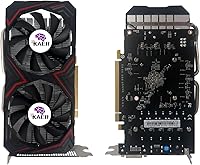
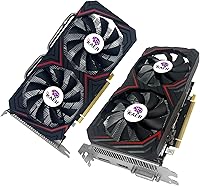
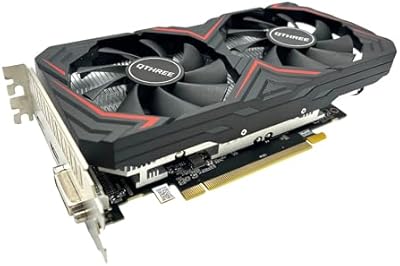
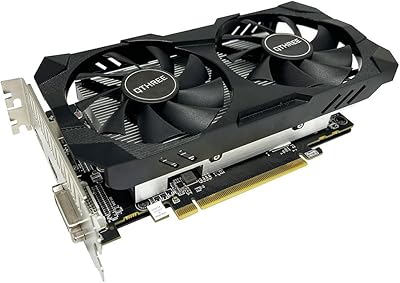
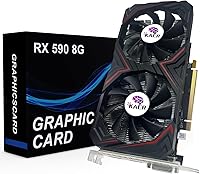
The KAER RX590 8GB Graphics Card enters the market as a budget option for first-time discrete GPU buyers who want playable 1080p gaming without breaking the bank. KAER is a third-party board partner — not AMD itself — so expectations around build quality and long-term support should be calibrated accordingly. The card runs on AMD's Polaris 30 architecture, which is admittedly aging but still capable enough for casual gaming use. A dual-fan cooler sets it apart visually from cheaper single-fan alternatives at this price tier, and that does matter for sustained thermal performance during longer play sessions.
Features & Benefits

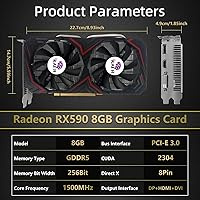
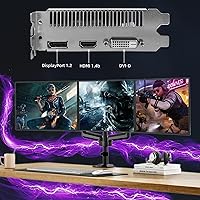
At its core, the RX 590 8GB packs 2304 stream processors with a 1380MHz boost clock and 8GB of GDDR5 memory running across a 256-bit bus — enough headroom to handle modern game textures at 1080p without the VRAM crunching you get from 4GB alternatives. The effective memory speed sits at 8000MHz, which is competitive for the architecture. The semi-passive fan behavior is a genuinely useful touch: when you are browsing or doing light work, the fans stop entirely and things stay quiet. Output options — one DisplayPort, one HDMI, one DVI — cover the vast majority of monitor setups, and the PCIe 3.0 x16 interface slots into nearly any desktop board without compatibility headaches.

Best For

This AMD Radeon card makes the most sense for budget-conscious PC builders jumping from integrated graphics or a very old GPU who want a real, tangible performance gain without a large investment. If you mostly run older titles or less demanding competitive shooters, this card handles that workload comfortably at 1080p. It also serves light creative use — basic video editing or graphic design — where having a dedicated 8GB VRAM pool matters more than raw compute throughput. Owners of older systems with PCIe 3.0 motherboards will find it a natural fit. Just don't expect it to push modern AAA titles at high settings without some compromises on quality or frame rate.

User Feedback

Buyer sentiment around this KAER GPU is mixed in ways predictable for a lesser-known brand at this price point. Most owners find installation straightforward — AMD's drivers are readily available on their official site, removing a common frustration. Thermal performance under gaming loads gets decent marks, though some users note the fans become audible during extended sessions. The recurring concern is brand reliability: KAER lacks the after-sales track record of established board partners, and a few buyers have flagged inconsistent packaging and uncertainty around warranty claims. Some also raise the valid point that comparable used cards from more reputable manufacturers can be found at similar price points, which is worth factoring in before committing.

Pros

  • 8GB of GDDR5 VRAM prevents texture-related bottlenecks in most 1080p gaming scenarios.
  • The semi-passive dual-fan cooler runs completely silent during light workloads and everyday desktop use.
  • AMD drivers are publicly available and straightforward to install from the official AMD website.
  • Triple display outputs — DisplayPort, HDMI, and DVI — cover nearly every common monitor setup.
  • PCIe 3.0 x16 compatibility makes this a low-friction drop-in upgrade for older desktop systems.
  • Delivers a substantial, tangible performance jump over integrated graphics for everyday gaming tasks.
  • The 256-bit memory bus offers decent bandwidth headroom for the price point.
  • Handles older and less demanding titles at 1080p with comfortable, playable frame rates.

Cons

  • KAER is a lesser-known brand with limited after-sales track record, making warranty claims uncertain.
  • The Polaris 30 architecture is several years old and shows its age in newer, more demanding titles.
  • Fan noise becomes noticeable during extended gaming sessions under sustained GPU load.
  • Comparable used cards from more reputable board partners can sometimes be found at similar prices.
  • No raytracing or hardware-accelerated upscaling support limits future-proofing significantly.
  • Performance in modern AAA games at high settings falls short of what many buyers might expect.
  • Packaging quality has been flagged inconsistently by some buyers, raising handling and shipping concerns.
  • Power efficiency lags well behind newer GPU architectures, adding to long-term operating costs.

Ratings

Our editorial AI analyzed verified purchase reviews for the KAER RX590 8GB Graphics Card from buyers worldwide, actively filtering out incentivized, bot-generated, and duplicate feedback to surface genuine ownership experiences. The scores below reflect an honest, unfiltered picture — crediting where this AMD Radeon card genuinely delivers and flagging where real users ran into frustration. Both the strengths and the trade-offs are represented transparently so you can make an informed decision.
1080p Gaming Performance
71%
29%
Buyers upgrading from integrated graphics or decade-old GPUs consistently report a dramatic improvement in playability at 1080p. Older titles, esports games, and mid-weight indie releases run smoothly at medium-to-high settings, which is exactly what this tier of buyer typically needs.
In newer AAA releases, users frequently find themselves dropping to medium or low settings just to maintain acceptable frame rates, which can feel disappointing if expectations were set by the advertised specs. The aging Polaris 30 architecture is the underlying reason, and no driver update will change that reality.
Value for Money
63%
37%
For buyers who truly have no flexibility in their GPU budget, the RX 590 8GB does provide a functional discrete graphics solution with 8GB VRAM — a specification advantage over cheaper 4GB alternatives in the same price neighborhood. Many users feel the raw spec sheet justifies the spend at face value.
A recurring concern in user feedback is that comparable used cards from established board partners — Sapphire, PowerColor, MSI — sometimes surface at similar prices, making the value proposition feel shakier than it first appears. Several buyers expressed mild regret after discovering secondhand alternatives they had overlooked.
Thermal Performance
74%
26%
The dual-fan cooler genuinely keeps temperatures in check during typical gaming sessions, and users running the card in well-ventilated mid-tower cases report GPU temps staying at reasonable levels without manual fan curve adjustments. The semi-passive behavior is a real comfort during everyday desktop use.
Under sustained gaming loads — particularly longer sessions in more demanding titles — some users report temperatures creeping higher than expected, with the fans audibly ramping up. In compact or poorly ventilated cases, thermal headroom tightens noticeably and sustained performance can suffer.
Fan Noise
69%
31%
The zero-RPM idle mode is a genuine highlight for users who spend significant time at the desktop, browsing, or doing light office work — the card contributes zero fan noise in those scenarios, which buyers working in quiet home setups specifically appreciate.
Once GPU load climbs during gaming, the fans become clearly audible, and a subset of users describe the noise profile as slightly coarse or whirring rather than smooth. It is not exceptionally loud, but it is noticeable enough that sensitive users in quiet rooms mentioned it as a drawback.
Driver & Software Support
83%
Because the card runs on AMD's Radeon platform, drivers are maintained and updated by AMD directly — not by KAER — which gives users access to a well-established, publicly available software ecosystem. Buyers consistently praise how straightforward the initial driver installation process is.
A small number of users encountered minor initial driver conflicts on older operating system configurations, requiring a clean install to resolve. This is not unique to KAER but is worth noting for buyers running non-standard or heavily customized Windows environments.
Installation Ease
86%
The physical installation experience draws consistently positive feedback — the card slots into PCIe 3.0 x16 motherboards without any compatibility surprises, and the standard form factor means it fits comfortably in most mid-tower cases without clearance issues. First-time builders found it approachable.
A few users noted the card's dimensions require double-checking in smaller or older cases before purchasing, as physical slot clearance can be tighter than expected. The included documentation is minimal, which may leave true first-timers needing to rely on external guides.
Build & Component Quality
58%
42%
The dual-fan shroud looks reasonably solid on first inspection, and most buyers who received the card in good condition report no cosmetic defects or immediate quality concerns during use. For a budget card, the physical construction meets basic expectations.
KAER's limited brand history means there is little long-term reliability data available, and a subset of buyers flagged concerns about packaging quality on arrival — some units showed signs of inadequate transit protection. Component longevity beyond the first year is a genuine unknown that repeated itself in user commentary.
Display Output Versatility
81%
19%
Having DisplayPort, HDMI, and DVI outputs on a single budget card is a practical advantage that buyers with mixed or older monitor setups genuinely appreciate. Users running a two or three-monitor desktop setup found the configuration covered their needs without needing adapters.
The DVI port, while useful for owners of older monitors, limits maximum resolution compared to DisplayPort connections, and users hoping to run a high-refresh-rate setup across all three outputs simultaneously may hit configuration constraints.
VRAM Adequacy
79%
21%
The 8GB GDDR5 frame buffer is a meaningful differentiator at this budget tier, and buyers doing light video editing or gaming in texture-heavy titles at 1080p report no VRAM-related stuttering or asset pop-in under normal conditions. It is a genuine spec strength.
While 8GB is sufficient for 1080p today, the GDDR5 memory type and 256-bit bus mean raw bandwidth lags behind newer memory standards, which becomes a factor in more bandwidth-intensive workloads or when attempting to push beyond 1080p resolution.
Brand Reliability & Trust
44%
56%
A portion of buyers who researched the product carefully and set appropriate expectations report satisfactory experiences with the card functioning as described, with no issues arising during the initial ownership period. For buyers comfortable with the trade-off, it works as a functional unit.
KAER carries real trust risk as an unfamiliar brand with limited community presence and an unclear warranty resolution process. Multiple users flagged difficulty getting timely responses when attempting to raise post-purchase issues, and the absence of a proven track record is a legitimate concern that weighs heavily on this score.
Warranty & After-Sales Support
41%
59%
Some buyers reported no issues requiring warranty contact at all during their ownership window, and those users naturally had no complaints about after-sales experience — which means the product, when it works correctly, does not demand post-purchase support.
When problems did arise, the feedback around KAER's support responsiveness was notably weak. Users described slow or unclear communication, and the lack of a transparent, documented warranty policy leaves buyers with little recourse confidence compared to cards from established partners with published support channels.
Compatibility with Older Systems
87%
The PCIe 3.0 x16 interface makes this one of the more broadly compatible budget GPU options available, fitting smoothly into systems built as far back as the early 2010s. Buyers reviving or upgrading older platforms specifically called out this compatibility as a key reason for their purchase.
On very old platforms with limited PCIe lane configurations or outdated BIOSes, a small number of users reported needing a firmware update before the card was fully recognized. It is an edge case, but worth noting for buyers working with particularly aged hardware.
Multi-Monitor Productivity
76%
24%
Users running dual or triple monitor setups for productivity — spreadsheets, design applications, extended desktop browsing — found the card handled the workload without any display instability or output switching issues. The three-port configuration adds genuine day-to-day utility.
Running three monitors simultaneously does add to overall GPU power draw and temperature, and users in this configuration noticed fan activity increasing even during non-gaming tasks. Multi-monitor gaming across all three screens is not a realistic use case for this card.

Suitable for:

The KAER RX590 8GB Graphics Card is a practical pick for budget-conscious PC builders who are stepping up from integrated graphics or a very old discrete GPU and simply want a meaningful, noticeable improvement without a large financial commitment. If your gaming library leans toward older titles, indie games, or less demanding competitive shooters, the RX 590 8GB handles those workloads at 1080p without breaking a sweat. It also fits neatly into older desktop systems thanks to its PCIe 3.0 x16 interface, making it one of the more compatible drop-in upgrades available at this price tier. Light creative users — think basic video editing or entry-level graphic design — will appreciate having a dedicated 8GB VRAM pool that integrated graphics simply cannot offer. For anyone whose goal is a functional, plug-and-play GPU upgrade on a tight budget, this AMD Radeon card clears that bar comfortably.
Not suitable for:

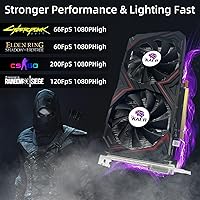
The KAER RX590 8GB Graphics Card is not the right choice for anyone expecting to run modern AAA titles at high or ultra settings with smooth frame rates — the aging Polaris 30 architecture simply was not built for that demand, and the performance gap versus current mid-range cards is substantial. Buyers who prioritize long-term reliability and robust after-sales support should also think carefully here; KAER lacks the established reputation of major board partners, and warranty resolution can be uncertain. This card is a poor fit for anyone planning to game at 1440p or higher, where its memory bandwidth and raw compute start to become real bottlenecks. If you have any flexibility in your budget, spending more to get a newer-generation GPU — even a modestly priced one — will deliver meaningfully better performance, efficiency, and driver longevity than this KAER GPU can offer.

Specifications

  • GPU Model: Built on the AMD Radeon RX 590 graphics processor using the Polaris 30 die.
  • Stream Processors: Features 2304 stream processors for parallel graphics computation across 1080p workloads.
  • VRAM: Equipped with 8GB of GDDR5 video memory for handling modern game textures without capacity shortfalls.
  • Memory Bus: Runs a 256-bit memory interface, providing adequate bandwidth for 1080p gaming and light creative tasks.
  • Boost Clock: GPU boost clock reaches up to 1380MHz under load, consistent with the Polaris 30 architecture's capabilities.
  • Memory Speed: Effective memory speed is rated at 8000MHz, delivering reasonable throughput for the GDDR5 specification.
  • PCIe Interface: Uses a PCI-Express 3.0 x16 slot, ensuring compatibility with a broad range of desktop motherboards including older platforms.
  • Display Outputs: Provides one DisplayPort, one HDMI, and one DVI output, supporting up to three simultaneous monitors.
  • Cooling System: Fitted with a semi-passive dual-fan cooler that stops fan rotation entirely when GPU temperature and load are low.
  • Card Weight: The card weighs approximately 1.54 pounds, typical for a dual-fan GPU in this performance tier.
  • Architecture: Based on AMD's Polaris 30 architecture, a 12nm refined iteration of the original Polaris 10 design.
  • Manufacturer: Produced by KAER, a third-party AIB board partner that sources and customizes AMD GPU dies independently.
  • Driver Support: Fully supported by AMD's publicly available Radeon Software drivers, downloadable directly from AMD's official website.
  • Power Connector: Requires external PCIe power connectors typical of the RX 590 platform; a capable PSU of at least 500W is recommended.
  • Multi-Monitor: Supports up to three displays simultaneously across its mixed output configuration for productivity or expanded desktop use.

Related Reviews

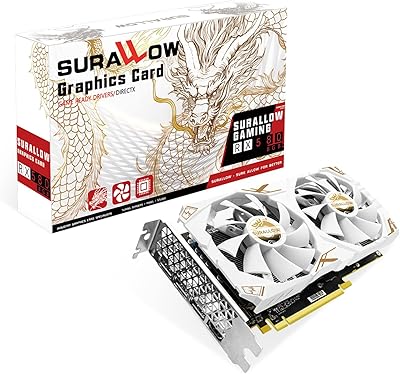
SURALLOW RX 580 8GB Graphics Card
73%
83%
1080p Gaming Performance
78%
Value for Money
76%
Thermal Management & Cooling
61%
Build & Component Quality
89%
Driver Support & Software Compatibility
More
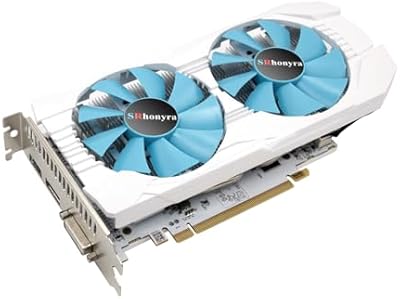
SRhonyra RX 580 8GB GDDR5 Graphics Card
81%
91%
Value for Money
88%
Performance at 1080p
85%
Cooling Efficiency
87%
Ease of Installation
83%
Multi-Display Support
More
QTHREE Radeon RX 590 GME 8GB Graphics Card
69%
72%
Value for Money
67%
1080p Gaming Performance
63%
Cooling Efficiency
84%
Ease of Installation
68%
Driver Stability
More
PowerColor Hellhound AMD Radeon RX 6600 8GB Graphics Card
85%
91%
Value for Money
88%
Gaming Performance (1080p)
85%
Cooling Efficiency
75%
Noise Level Under Load
90%
Ease of Installation
More
PNY GeForce RTX 3070 8GB Graphics Card
79%
91%
1440p Gaming Performance
88%
Thermal Management
86%
Noise Levels
63%
VRAM Adequacy
78%
Ray Tracing Performance
More
AMD Radeon Pro WX 7100 8GB GDDR5 Graphics Card
85%
93%
Performance in CAD Software
90%
Performance in 3D Rendering
88%
Value for Money
92%
Graphics Stability
89%
Multi-Monitor Support
More
QTHREE Radeon RX 560 XT 8GB Graphics Card
68%
61%
Value for Money
53%
Gaming Performance
88%
Installation & Setup
67%
Thermal Performance
58%
Fan Noise
More
Sapphire NITRO+ RX 580 8GB Graphics Card
80%
84%
1080p Gaming Performance
88%
Thermal Management
91%
Build Quality
83%
Value for Money
57%
Power Efficiency
More
GIGABYTE GeForce RTX 3050 Gaming OC 8GB Graphics Card
84%
91%
Value for Money
88%
Gaming Performance (1080p)
89%
Cooling Efficiency
84%
Build Quality
86%
Noise Level
More
MSI GeForce RTX 2080 Super 8GB GDDR6 Graphics Card
87%
94%
Performance
89%
Cooling Efficiency
91%
4K Gaming Experience
92%
Ray Tracing Capability
87%
VR Compatibility
More

FAQ

Honestly, it depends on what you are playing. The RX 590 8GB handles older titles, indie games, and less demanding competitive shooters at 1080p without much trouble. For newer AAA releases, you will likely need to dial settings down to medium to keep frame rates comfortable. It is not a powerhouse by today's standards, but for casual 1080p gaming it still does the job.

Once physically installed, you just need to grab the latest Radeon Software drivers from AMD's official website — it is a straightforward download and install. Windows will detect the card on boot, and after the driver install you are ready to go. No third-party tools or complicated setup required.

Very likely yes. The KAER RX590 8GB Graphics Card uses a standard PCIe 3.0 x16 slot, which has been the norm in desktop motherboards for well over a decade. As long as your case has enough clearance for a dual-slot card and your power supply can deliver at least 500W with the appropriate connectors, you should have no compatibility issues.
At idle or during light desktop use, the fans stop completely, so it is genuinely silent in those conditions. Under sustained gaming load the fans do spin up and become audible — not obnoxiously loud, but noticeable in a quiet room. It is typical behavior for a dual-fan card at this price tier.

Yes. The card has one DisplayPort, one HDMI, and one DVI output, and it supports all three simultaneously. Just make sure your monitors have the matching inputs, or pick up the appropriate adapters if needed.

Those are all well-established board partners with longer track records, more consistent quality control, and typically stronger warranty support. KAER is a lesser-known brand, and while many buyers receive a perfectly functional card, the after-sales support experience is less predictable. If brand reliability matters to you, it is worth weighing that before purchasing.

A reliable 500W PSU with the required PCIe power connectors is the standard recommendation for an RX 590. If your current power supply is on the older or lower-wattage side, it is worth checking its actual output before assuming it will handle the card without issue.

For light creative tasks — basic video editing in software like DaVinci Resolve or Adobe Premiere, or design work in Illustrator and Photoshop — the 8GB VRAM pool is genuinely helpful and a step above what integrated graphics can offer. It is not a workstation card by any stretch, but for hobbyist or entry-level creative use it holds its own.

KAER's warranty terms are worth reviewing carefully before buying, as the support experience for lesser-known brands can vary significantly compared to established manufacturers. Some buyers have reported uncertainty around return and replacement processes. It is a good idea to purchase from a seller with a clear return policy as an added safety net.

It is a fair question to ask. At this price range, the secondhand GPU market does offer some compelling alternatives — used cards from Sapphire, MSI, or PowerColor with the same or similar chips sometimes appear at comparable prices. The trade-off is that used cards carry their own risks around wear and no manufacturer warranty. If you can find a clean used card from a reputable seller, it might offer better long-term confidence than a new card from an unfamiliar brand.