Overview

The GL.iNet GL-B3000 Marble Wi-Fi 6 Router is one of the more unusual networking products you'll come across — it doubles as a wall-mountable photo frame, which either sounds brilliant or slightly absurd depending on your tolerance for novelty. GL.iNet has built a loyal following among privacy enthusiasts and OpenWrt tinkerers, and the Marble router sits squarely in that tradition while pushing into more design-conscious territory. The AX3000 dual-band spec delivers enough real-world throughput for streaming, video calls, and light smart home use in a typical household, all running on open-source OpenWrt firmware — something you simply won't find on most off-the-shelf routers.
Features & Benefits

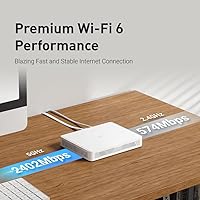
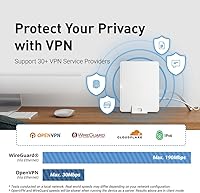
On the performance side, the Wi-Fi 6 5GHz band pushes up to 2,402Mbps — more than enough for 4K streaming on multiple devices at once — while the 2.4GHz band keeps older gadgets reliably connected. The photo frame form factor is genuinely clever: the router snaps onto a back panel and can hang on a wall, sit on a table, or stand upright, with an 8-inch photo slot in front. For VPN users, built-in WireGuard sustains close to 190Mbps, though OpenVPN tops out around 30Mbps — worth factoring in before buying. AdGuard Home handles network-wide ad blocking, Bark adds parental content controls (a paid subscription is required for the full feature set), and multi-WAN failover keeps you online if your primary connection drops.

Best For

GL.iNet's Marble is a strong fit for anyone who wants capable networking hardware without the typical black-plastic-box look cluttering a living room or home office. It particularly suits privacy-conscious users and remote workers who need fast, dependable VPN tunneling built right in. Parents who want content filtering at the network level — rather than managing it device by device — will find the Bark and AdGuard Home combination useful, though the ongoing Bark subscription cost should factor into the total price of ownership. And if you enjoy customizing firmware, the OpenWrt foundation gives you real flexibility without the usual hoops most consumer routers make you jump through.

User Feedback

Across roughly 230 ratings, this photo-frame router holds a 4.3-star average, with most buyers pleased about two things: how straightforward the mobile app setup is, and the fact that it genuinely looks good mounted on a wall. Tech-savvy reviewers consistently highlight OpenWrt access as a meaningful advantage over comparably priced alternatives. On the downside, the three Gigabit ports feel restrictive for anyone running a more complex home network, and OpenVPN throughput draws complaints from buyers who expected faster speeds. A recurring gripe is that Bark's subscription fee came as an unwelcome surprise — something worth factoring in well before you finalize a purchase decision.

Pros

  • WireGuard VPN runs natively at close to 190Mbps, making it genuinely useful for daily remote work.
  • The photo frame design is one of a kind — it actually looks intentional on a wall or shelf.
  • AdGuard Home blocks ads and trackers across every device on the network, with no extra hardware needed.
  • OpenWrt firmware gives technically inclined users real control over their network configuration.
  • Multi-WAN failover keeps the connection alive if a primary ISP link drops — handy for home offices.
  • Mobile app setup is consistently praised for being straightforward, even for less technical users.
  • Wi-Fi 6 support handles simultaneous streaming and browsing on multiple devices without noticeable slowdown.
  • Compatible with over 30 VPN providers, making it flexible for users already locked into a specific service.
  • Four mounting options — wall, tabletop, stand, or behind-frame — make placement genuinely flexible.
  • At its price point, the combination of VPN, ad blocking, and parental controls in one box is hard to match.

Cons

  • OpenVPN throughput is capped near 30Mbps, which will frustrate anyone relying on it for speed-sensitive tasks.
  • Only three Gigabit Ethernet ports total limits wired connections in more complex home setups.
  • Bark parental controls require a paid subscription to unlock the features most parents actually want.
  • GL.iNet is a niche brand — community forums, not a traditional support line, are your main resource if something goes wrong.
  • No built-in mesh support means coverage is limited to the router's own range, which may not suit larger homes.
  • The photo frame concept, while clever, may feel like a gimmick to buyers who just want reliable, no-fuss hardware.
  • OpenWrt's flexibility comes with a learning curve that casual users may not want to deal with.
  • Heat management and long-term reliability under sustained load have surfaced as minor concerns in user feedback.
  • The included photo frame slot accommodates an 8-inch photo only, which may not match everyone's decor preferences.
  • Limited to two LAN ports, which fills up quickly if you're connecting a switch, smart TV, and desktop simultaneously.

Ratings

Our AI-generated scores for the GL.iNet GL-B3000 Marble Wi-Fi 6 Router were produced by analyzing verified buyer reviews from multiple global markets, with spam, bot-submitted, and incentivized feedback actively filtered out before scoring. The ratings reflect a realistic cross-section of real-world experience — covering everything users praised and everything that frustrated them. Both strengths and genuine trade-offs are weighted transparently across each category.

Wi-Fi Performance
83%
For a household running simultaneous 4K streams, video calls, and smart home devices, the Marble router handles day-to-day load reliably. Wi-Fi 6 efficiency improvements are noticeable in denser device environments, and the 5GHz band delivers strong throughput at close range.
Range falls short in larger homes or multi-story layouts, and users at the edges of coverage report inconsistent signal. It is not a replacement for a mesh system, and buyers expecting whole-home coverage from a single unit will likely be disappointed.
VPN Capability
88%
WireGuard performance near 190Mbps is a genuine differentiator for remote workers who need fast, reliable tunneling without buying separate VPN hardware. Supporting over 30 providers out of the box makes configuration straightforward for most users already subscribed to a major service.
OpenVPN throughput capped at 30Mbps is a recurring complaint, particularly from users whose VPN provider does not support WireGuard. For anyone relying specifically on OpenVPN for corporate access or legacy compatibility, this ceiling is a real functional limitation.
Design & Aesthetics
91%
The photo frame concept genuinely lands for design-conscious buyers who have long hidden routers behind furniture. Wall-mounted with a photo in the frame slot, it looks like a decorative piece — something no competing router at this price tier can claim.
A small number of buyers find the form factor more novelty than substance, particularly those who never cared about router aesthetics to begin with. The frame adds bulk compared to a standard compact router, and placement is constrained by proximity to a power outlet.
Setup & Ease of Use
81%
19%
The mobile app-guided setup is consistently praised across reviews for being quick and approachable, with most users reporting a working network within minutes of unboxing. Casual users who stick to the default GL.iNet interface find it clean and well-organized.
Venturing beyond the basics into OpenWrt territory introduces a steeper learning curve that less technical users are unprepared for. Community forums are the primary support resource, which works well for enthusiasts but can feel isolating for buyers expecting traditional customer service.
Parental Controls
67%
33%
The combination of Bark and AdGuard Home covers two distinct angles — content filtering at the DNS level and behavioral monitoring — which is more comprehensive than most routers offer natively. Parents managing multiple kids across different devices particularly value the network-wide approach.
Bark's most useful features sit behind a recurring subscription, which catches buyers off guard when they discover it post-purchase. The local parental controls available without a subscription are basic, and families expecting full functionality out of the box will need to budget for the ongoing Bark fee.
Ad Blocking
86%
AdGuard Home running at the router level means every device on the network benefits — phones, smart TVs, and tablets alike — without needing individual app installs. Users report noticeably cleaner browsing across all household devices after enabling it.
Initial AdGuard Home configuration requires some comfort with DNS settings, which can trip up less technical users. Filter lists need periodic updates, and there is no automated guidance within the interface for first-time AdGuard users.
Build Quality
78%
22%
The unit feels solid and the frame-plus-router assembly clicks together securely without feeling flimsy. At 275g it is light enough for comfortable wall mounting, and the included hardware is adequate for most standard wall types.
Some users note the plastic finish shows fingerprints and light scratches more readily than expected for a device designed to be displayed. A small number of reviewers mention the frame assembly feels less premium up close than it appears in product photos.
Firmware & Customization
89%
OpenWrt access gives technically inclined users a level of control simply unavailable on mainstream consumer routers — custom firewall rules, package installs, and routing configurations are all fair game. GL.iNet maintains active firmware updates, which reassures users that the platform is not being abandoned.
OpenWrt's depth is only an asset for users willing to invest time in learning it. For the majority of casual buyers, much of the firmware's potential sits untouched, and the interface occasionally surfaces technical jargon without adequate explanation.
Port Count & Connectivity
58%
42%
Three Gigabit Ethernet ports cover the basics for a typical household setup — modem in, two wired devices connected — and the speeds are consistent at full gigabit. Multi-WAN support adds genuine value for home office users who want failover across two connections.
Two LAN ports fill up extremely quickly in real home setups, often requiring an additional switch immediately. Users coming from routers with four or more LAN ports consistently flag this as a step backward, and the lack of a USB port limits expandability further.
Value for Money
77%
23%
Considering the photo frame design, Wi-Fi 6 performance, native WireGuard, AdGuard Home, and OpenWrt access together, the price point represents solid value for the target buyer. Enthusiasts note that replicating this feature set across separate devices would cost considerably more.
The true cost of ownership rises meaningfully once Bark's subscription is added, and buyers who factor that in during purchase research sometimes feel the initial pricing undersells the ongoing commitment. Casual users who do not use VPN or parental controls may find they are paying for features that go unused.
Heat Management
69%
31%
Under typical household loads — streaming, browsing, light VPN use — the Marble router stays warm but not hot, and most users report no thermal issues during normal operation. The compact form factor manages heat acceptably for the majority of use cases.
Extended high-throughput VPN sessions cause the unit to run noticeably warm, and several reviewers flag this under sustained load. Placing the router in an enclosed space or cabinet exacerbates heat buildup, which is a concern given the design encourages wall-adjacent placement.
Multi-WAN & Failover
82%
18%
Failover and load balancing across multiple WAN connections work reliably, which is a meaningful feature for home offices where connectivity downtime is costly. Users with a primary ISP and a mobile hotspot backup find the automatic failover genuinely dependable.
Configuring multi-WAN beyond basic failover requires familiarity with OpenWrt, and the default interface does not make advanced load balancing options obvious. Buyers expecting a one-click multi-WAN setup comparable to enterprise routers will need to invest extra configuration time.
Mobile App Experience
79%
21%
The GL.iNet app handles initial setup smoothly and provides a readable dashboard for monitoring connected devices and basic network stats. For non-technical users, the app is the most approachable entry point into the router's features.
The app's feature depth does not match the web admin panel, and users who want fine-grained control are pushed back to a browser interface relatively quickly. Occasional sync issues between the app and the router's actual state have been reported in user feedback.
Compatibility
84%
Wi-Fi 6 backward compatibility means older laptops, phones, and smart home devices connect without issue alongside newer Wi-Fi 6 devices. The broad VPN provider support and OpenWrt foundation make the Marble router adaptable to a wide range of network environments.
Some ISP-provided modems require specific configuration to work correctly in tandem with the Marble router, and GL.iNet's documentation for edge-case ISP setups is inconsistent. A small subset of users reports needing community forum help to resolve compatibility issues with specific providers.

Suitable for:

The GL.iNet GL-B3000 Marble Wi-Fi 6 Router is purpose-built for a specific kind of buyer: someone who cares about both network performance and how their home actually looks. If you've ever hidden a router behind furniture because it's an eyesore, the Marble's photo frame design solves a real problem without sacrificing capability. Remote workers and freelancers who rely on a VPN daily will appreciate WireGuard running natively on the device at close to 190Mbps — fast enough for most work-from-home tasks without needing a separate VPN appliance. Parents will find the combination of AdGuard Home and Bark genuinely useful for managing what kids can access across every device on the network, not just one at a time. And for OpenWrt enthusiasts who want a supported platform with a polished out-of-box experience, GL.iNet's Marble hits a practical middle ground between tinkerer-friendly and family-ready.

Not suitable for:

The GL.iNet GL-B3000 Marble Wi-Fi 6 Router is not the right call for buyers who simply need the strongest possible Wi-Fi coverage in a large home. With three Gigabit ports total and no mesh networking built in, it will feel limiting if you're trying to wire up multiple rooms or expand coverage beyond a single floor. OpenVPN users should be particularly aware that throughput caps near 30Mbps — if fast OpenVPN speeds are a hard requirement, this router will disappoint regardless of its other strengths. Casual users who expect a plug-and-play experience comparable to a mainstream consumer brand may find the GL.iNet ecosystem a steeper learning curve than anticipated, especially when troubleshooting edge cases where community support replaces a traditional customer service setup. Finally, anyone planning to rely on Bark for parental controls should factor in the ongoing subscription fee, which adds to the total cost of ownership over time.
Specifications

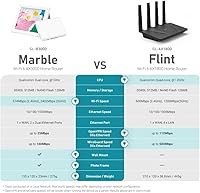
  • Wi-Fi Standard: The Marble router uses 802.11ax (Wi-Fi 6), the current mainstream standard offering improved efficiency and throughput compared to Wi-Fi 5.
  • Frequency Bands: Dual-band operation covers both 2.4GHz (up to 574Mbps) and 5GHz (up to 2,402Mbps) simultaneously.
  • CPU: A Qualcomm dual-core processor running at 1GHz handles routing, VPN encryption, and network management tasks.
  • Memory: 512MB of DDR3L RAM provides headroom for OpenWrt, AdGuard Home, and active VPN tunnels running concurrently.
  • Storage: 128MB of NAND Flash stores the firmware, configuration files, and installed packages.
  • Ethernet Ports: Three Gigabit Ethernet ports are included: one dedicated WAN port and two LAN ports, each capable of 10/100/1,000Mbps.
  • WireGuard VPN: WireGuard is pre-installed and delivers a maximum throughput of approximately 190Mbps when connected via Ethernet.
  • OpenVPN: OpenVPN is also pre-installed, though its maximum throughput is capped at around 30Mbps due to the CPU overhead of its encryption protocol.
  • VPN Compatibility: The router is compatible with more than 30 VPN service providers out of the box.
  • Ad Blocking: AdGuard Home is built into the firmware and blocks ads and trackers at the DNS level across all connected devices.
  • Parental Controls: Bark integration provides content filtering and screen time management; full Bark functionality requires an active paid subscription.
  • Firmware: The device runs OpenWrt, an open-source Linux-based firmware that allows deep customization of routing, firewall, and network settings.
  • Multi-WAN: Supports multi-WAN configurations including automatic failover and load balancing across multiple internet connections.
  • Form Factor: The router is housed inside a photo frame chassis that accommodates a standard 8-inch photograph in front of the unit.
  • Mounting Options: Four placement configurations are supported: wall-mounted, tabletop flat, upright with included stand, or with the photo frame displayed in front.
  • Dimensions: The unit measures 155 x 120 x 23mm (approximately 6.1 x 4.7 x 0.9 inches) excluding the stand.
  • Weight: The router weighs 275g (approximately 9.7 oz), making it light enough for comfortable wall mounting.
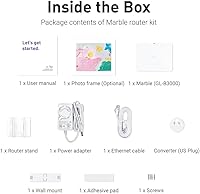
  • In the Box: The package includes the GL-B3000 router, a US-plug power adapter, an Ethernet cable, the photo frame, a stand, and wall-mount hardware.
  • Warranty: GL.iNet includes a 2-year manufacturer warranty with the router.
  • Setup Options: Initial configuration can be completed through the GL.iNet mobile app or the browser-based web Admin Panel.

Related Reviews

GL.iNet GL-AX1800 Flint WiFi 6 Router
79%
93%
VPN Performance
91%
Firmware Flexibility
74%
Wireless Speed & Range
58%
Ease of Setup
89%
Wired Connectivity
More
GL.iNet GL-MT6000 Flint 2
82%
93%
VPN Performance
81%
Wireless Speed & WiFi 6
92%
Wired Connectivity
88%
Firmware & Software
89%
AdGuard Home Integration
More
GL.iNet GL-E750V2 4G LTE Mobile Hotspot
74%
88%
VPN Performance
84%
Build Quality
51%
Setup & Ease of Use
63%
Battery Life
72%
LTE Connectivity
More
LNN 788 Wi-Fi 6 Router
74%
91%
Ease of Setup
78%
Wi-Fi Speed Performance
67%
Coverage & Range
82%
Multi-Device Handling
79%
Gaming & Streaming Quality
More
Synology WRX560 Dual-Band Wi-Fi 6 Router
77%
91%
Network Security
88%
Software & Firmware
86%
VLAN & Network Segmentation
83%
Wired Connectivity
71%
Wireless Performance
More
Cudy WR1500 AX1500 Wi-Fi 6 Router
68%
91%
Value for Money
88%
Setup & Ease of Use
76%
Wi-Fi Speed Performance
63%
Signal Range & Coverage
82%
Multi-Device Handling
More
ExpressVPN Aircove Wi-Fi 6 VPN Router
75%
91%
Ease of Setup
78%
VPN Performance
93%
Device Grouping
69%
Wi-Fi Coverage
54%
Value for Money
More
Ubiquiti Dream Router Wi-Fi 6 Router
79%
93%
Network Stability & Reliability
54%
Setup & Initial Configuration
78%
Wi-Fi 6 Performance
91%
UniFi Controller Integration
74%
Value for Money
More
Reyee RG-E4 Wi-Fi 6 Router
78%
78%
Wi-Fi Coverage
83%
Wi-Fi Speed
86%
Setup & Ease of Use
88%
Device Capacity
81%
Gaming Performance
More
Netgear Nighthawk AX4 RAX40 Wi-Fi 6 Router
84%
92%
Wi-Fi Speed & Performance
88%
Ease of Setup & Installation
85%
Coverage Range
78%
App Usability
90%
Stability for Gaming & Streaming
More

FAQ

Honestly, reaction to the design tends to split along two lines. People who were already bothered by the look of traditional routers tend to love it — it genuinely blends into a room in a way that no standard black box can. Those who are purely performance-focused often find the frame unnecessary. If aesthetics matter to you, it works well; if they don't, the frame is easy enough to ignore.

Bark's more advanced features — including content monitoring and screen time management — do require an ongoing paid subscription to Bark's service. The router does include some basic local parental controls that work without any subscription, but the more capable filtering that most parents are looking for ties directly to Bark's platform and its associated cost. It's worth factoring that into your total budget before buying.

For most remote work tasks — video calls, file transfers, accessing company resources — WireGuard's ceiling of around 190Mbps on this router is more than sufficient. It won't bottleneck you unless your home internet connection itself is significantly faster and you need every bit of that bandwidth tunneled through the VPN simultaneously.

Yes, 30Mbps is a firm ceiling for OpenVPN on this hardware, and it's a known trade-off with the GL-B3000's processor. For general browsing and standard definition streaming it's workable, but if you specifically need OpenVPN for high-speed tasks like large cloud backups or 4K video through a VPN tunnel, you'll hit that wall. WireGuard is a much better choice on this device if your VPN provider supports it.

The GL.iNet GL-B3000 Marble Wi-Fi 6 Router works well as a primary router in a small to medium-sized home or apartment. Its three Gigabit ports are sufficient for most households. If you have a larger home needing extended coverage, or you need to wire up several devices simultaneously, you may find the two LAN ports limiting — in that case, adding a small switch solves the port issue, though coverage extension would require a separate access point.
Setup is quite approachable for a router in this category. The GL.iNet mobile app walks you through the basics, and most users report having the network up and running within minutes. The more advanced features — like OpenWrt package installation or custom VPN configurations — do have a learning curve, but you can ignore those entirely if you just want a working Wi-Fi network with ad blocking turned on.

No, the Marble router does not support mesh networking natively. If your home needs coverage across multiple floors or a large square footage, this router alone won't be enough, and it can't pair with mesh nodes in the way that systems from dedicated mesh brands can. You could add a wired access point to extend coverage, but that requires running a cable.

Yes, and this is one of the main reasons GL.iNet attracts enthusiast users. Because the router runs OpenWrt, you have access to the full package repository and can install additional tools, modify firewall rules, or adjust routing behavior at a level that is simply not possible on most consumer routers. GL.iNet also maintains its own interface layer on top, so you don't have to go deep into OpenWrt just to use the basic features.

Some buyers have noted that the unit runs warm, which is common for compact routers with active VPN processing. Under normal home use it stays within acceptable ranges, but running a sustained VPN tunnel at high throughput can increase the temperature noticeably. Keeping it in an open, ventilated spot rather than enclosed in a cabinet is advisable, especially if you plan to run VPN continuously.

GL.iNet's Marble is compatible with more than 30 VPN providers, including popular services like NordVPN, ExpressVPN, Mullvad, Surfshark, and ProtonVPN, among others. Both WireGuard and OpenVPN protocols are supported, so as long as your provider offers either of those — which most do — you should be able to configure it directly through the router's admin panel without needing to install anything extra.